
NHTSA ID Number: 11006912
Manufacturer Communication Number: 2024.26.100_082024.pdf
TSB/Document Date: 2024-09-04
Summary
Tesla does not provide physical owner's manual copies. Instead, all available owner’s manual content is integrated into the vehicle software, and only the content relevant for a given vehicle, based on vehicle configuration and software version installed, is displayed on its touchscreen. This file contains all available owner’s manual content for the vehicle converted to PDF format, and given the distribution method and NHTSA’s submission format requirements, it is the best available representative copy of owner’s manual content. However, a customer who accesses the owner’s manual via their vehicle’s touchscreen would only see the parts of this PDF file that are relevant to their vehicle.
vehicle. These modules also record information about the vehicle’s features such as charging events and status, the enabling/
disabling of various systems, diagnostic trouble codes, VIN, speed, direction and location.
The data is stored by the vehicle and may be accessed, used and stored by Tesla service technicians during vehicle servicing
or periodically transmitted to Tesla wirelessly through the vehicle’s telematics system. This data may be used by Tesla for
various purposes, including, but not limited to: providing you with Tesla telematics services; troubleshooting; evaluation of
your vehicle’s quality, functionality and performance; analysis and research by Tesla and its partners for the improvement and
design of our vehicles and systems; to defend Tesla; and as otherwise may be required by law. In servicing your vehicle, Tesla
can potentially resolve issues remotely simply by reviewing your vehicle’s data log.
Tesla’s telematics system wirelessly transmits vehicle information to Tesla on a periodic basis. The data is used as previously
described and helps ensure the proper maintenance of your vehicle. Additional Cybertruck features may use your vehicle’s
telematics system and the information provided, including features such as charging reminders, software updates, and remote
access to, and control of, various systems of your vehicle.
Tesla does not disclose the data recorded in your vehicle to any third party except when:
• An agreement or consent from the vehicle’s owner (or the leasing company for a leased vehicle) is obtained.
• Officially requested by the police or other authorities.
• Used as a defense for Tesla.
• Ordered by a court of law.
• Used for research purposes without disclosing details of the vehicle owner or identification information.
• Disclosed to a Tesla affiliated company, including their successors or assigns, or our information systems and data
management providers.
For additional information regarding how Tesla processes data collected from your vehicle, please review Tesla's Privacy
Notice at http://www.tesla.com/about/legal.
557
Owner's Manual
Consumer Information
Data Sharing
For quality assurance and to support the continuous improvement of advanced features such as Autopilot, your Cybertruck
may collect analytics, road segment, diagnostic, and vehicle usage data and send to Tesla for analysis. This analysis helps
Tesla improve products and services by learning from the experience of billions of miles that Tesla vehicles have driven.
Although Tesla shares this data with partners that contribute similar data, the collected information does not identify you
personally and can be sent to Tesla only with your explicit consent. In order to protect your privacy, personal information is
either not logged at all, is subject to privacy preserving techniques, or is removed from any reports before being sent to Tesla.
You have control over what data you share by touching Controls > Software > Data Sharing.
For additional information regarding how Tesla processes data collected from your vehicle, please review Tesla's Privacy
Notice at http://www.tesla.com/about/legal.
NOTE: Although Cybertruck uses GPS in connection with driving and operation, as discussed in this document, Tesla does not
record or store vehicle-specific GPS information, except the location where a crash occurred. Consequently, Tesla is unable to
provide historical information about a vehicle's location (for example, Tesla is unable to tell you where Cybertruck was parked/
traveling at a particular date/time).
Quality Control
You might notice a few miles/km on the odometer when you take delivery of your Cybertruck. This is a result of a
comprehensive testing process that ensures the quality of your Cybertruck.
The testing process includes extensive inspections during and after production. The final inspection takes place at Tesla and
includes a road test conducted by a technician.
Sound Library
"Free Sounds Library" (if equipped).
Free Sound Effects Site.
License: Attribution 4.0 International (CC BY 4.0). You are allowed to use sound effects free of charge and royalty free in your
multimedia projects for commercial or non-commercial purposes.
http://www.freesoundslibrary.com
California Proposition 65
WARNING: Operating, servicing and maintaining a passenger vehicle or off-highway motor vehicle can expose you to
chemicals including phthalates and lead, which are known to the State of California to cause cancer and birth defects or
other reproductive harm. To minimize exposure, wear gloves or wash your hands frequently when servicing your vehicle.
For more information go to: www.P65Warnings.ca.gov/passenger-vehicle.
WARNING: Certain components of this vehicle such as airbag modules and seat belt pre-tensioners may contain
Perchlorate Material. Special handling may be required for service or vehicle end of life disposal. See www.dtsc.ca.gov/
hazardouswaste/perchlorate.
WARNING: Battery posts, terminals, and related accessories contain lead and lead compounds. Wash hands after
handling.
Owner's Manual
558
Consumer Information
Reporting Safety Defects
Contacting Tesla
For detailed information about your Cybertruck, go to http://www.tesla.com and log on to your Tesla account or sign up to get
an account.
If you have any questions or concerns about your Cybertruck, in the United States, Canada or Puerto Rico, call
1-877-79TESLA (1-877‑798-3752) and in Mexico, call 1-800-228-8145.
NOTE: You can also use voice commands to provide feedback to Tesla. Say "Report", "Feedback", or "Bug report" followed by
brief comments. Cybertruck takes a snapshot of its systems, including your current location, vehicle diagnostic data, and
screen captures of the touchscreen. Tesla periodically reviews these notes and uses them to continue improving Cybertruck.
Reporting Safety Defects - US
If you believe that Cybertruck has a defect which could cause a crash or could cause injury or death, you should immediately
inform the National Highway Traffic Safety Administration (NHTSA) in addition to notifying Tesla.
If NHTSA receives similar complaints, it may open an investigation. If it finds that a safety defect exists in a group of vehicles,
it may order a recall and remedy campaign. However, NHTSA cannot become involved in individual problems between you,
your dealer, or Tesla.
To contact NHTSA, you may call the Vehicle Safety Hotline toll-free at 1-888-327-4236 (TTY: 1-800-424-9153); go to ; or
write to: Administrator, National Highway Traffic Safety, 1200 New Jersey Avenue SE., Washington, DC 20590. You can also
obtain other information about motor vehicle safety from www.safercar.gov.
Reporting Safety Defects - Canada
If you believe that your Cybertruck has a defect which could cause a crash or could cause injury or death, you should
immediately inform Transport Canada, in addition to notifying Tesla. To contact Transport Canada, call their toll-free
number: 1-800-333-0510.
Certifications of Conformity
FCC and ISED Certification
Component
Manufacturer Model
B Pillar Endpoint
1948204
Interior Endpoint
1815669
Fascia Endpoint
Vivaldi Endpoint
Operating Frequency
(MHz)
FCC ID
IC
2AEIM-1948204
20098-1948204
2400-2483.5
6000-8500
2AEIM-1815669
20098-1815669
1613851
2400-2483.5
6000-8500
2AEIM-1613851
20098-1613851
1752108
2400-2483.5
6000-8500
2AEIM-1752108
20098-1752108
Fascia Endpoint
1733130
2AEIM-1733130
20098-1733130
1472547G
2400-2483.5
2AEIM-1472547G
20098-1472547G
1849171
2400-2483.5
2AEIM-1849171
20098-1849171
559
13.56
2400-2483.5
6000-8500
2400-2483.5
6000-8500
315 or 433.9
Owner's Manual
Consumer Information
Component
Manufacturer Model
Operating Frequency
(MHz)
FCC ID
IC
1250241-00-A
2400- 2483.5
2ANX7CPSN1
24121-CPSN1
Tire, Goodyear
Wrangler Territory
1250242-00-A 2402-2483.5
YMY-030218
1M02FXD
TCU
1727111
XMR2020AG525RGL
XMR202303AF51Y
10224A-2020AG525R
10224A-202201AF51Y
Wireless Phone
Charger
WC6
2AEIM-WC6
20098-WC6
Glovebox BT USB
Module
1776863
2400-2483.5
2AEIM-1776863
20098-1776863
In-cabin radar*
1616631
60000-64000
2AEIM-1616631
20098-1616631
--
127.72 KHz
13.56 MHz
* The in-cabin radar is restricted to factory installation.
The devices listed above comply with Part 15 of the FCC rules and Industry Canada's license-exempt RSS Standard(s) and EU
Directive 2014/53/EU.
Operation is subject to the following two conditions: (1) this device may not cause harmful interference, and (2) this device
must accept any interference received, including interference that may cause undesired operation.
Changes or modifications not expressly approved by Tesla could void your authority to operate the equipment.
Le présent appareil est conforme aux CNR d'Industrie Canada applicables aux appareils radio exempts de licence.
L'exploitation est autorisée aux deux conditions suivantes : (1) l'appareil ne doit pas produire de brouillage, et (2) l'utilisateur
de l'appareil doit accepter tout brouillage radioélectrique subi, même si le brouillage est susceptible d'en compromettre le
fonctionnement.
Radiation Exposure Statement
The products comply with the FCC/ISED RF Exposure for Low Power Consumer Wireless Power Transfer. RF exposure limits
are set forth for an uncontrolled environment and are safe for intended operation as described in this manual. The farthest RF
exposure demonstrated by compliance was at 20cm and farther from the user's body; set the device to low output power if
such function is available.
TCU device has been tested and meets applicable limits for Radio Frequency(RF) exposure. TCU can be installed and is able to
operate with a minimum distance of 1 inch (25mm) between the radiator and human body.
Cet équipement est conforme aux limites d’exposition aux rayonnements ISED établies pour unenvironnement non contrôlé.
Déclaration d'exposition aux radiations
Le produit est conforme à l'exposition RF ISED pour le transfert de puissance sans fil de consommateurs de faible puissance.
La limite d'exposition RF fixée pour un environnement non contrôlé est sans danger pour le fonctionnement prévu tel que
décrit dans ce manuel. L'exposition RF supplémentaire que la conformité a été démontrée à 20cm et plus de séparation du
corps de l'utilisateur ou de mettre l'appareil à la puissance de sortie inférieure si une telle fonction est disponible.
Mexico
IFT-008-SCFI-2015 / NOM-208-SCFI-2016
TPMS, model: 1472547G, IFT#: RCPTE1421-4384
Owner's Manual
560
Consumer Information
TPMS, model: 1849171, IFT#: TETE1823-09546
La operación de este equipo está sujeta a las siguientes dos condiciones:
1. Es posible que este equipo o dispositivo no cause interferencia perjudicial.
2. Este equipo debe aceptar cualquier interferencia, incluyendo la que pueda causar su operación no deseada.
Radio Frequency Information
This equipment has been tested and found to comply with the limits for a Class B digital device, pursuant to Part 15 of the FCC
Rules. These limits are designed to provide reasonable protection against harmful interference in a residential installation. This
equipment generates, uses and can radiate radio frequency energy and, if not installed and used in accordance with the
instructions, may cause harmful interference to radio communications. However, there is no guarantee that interference will
not occur in a particular installation. If this equipment does cause harmful interference to radio or television reception, which
can be determined by turning the equipment off and on, try to correct the interference by one or more of the following
measures:
• Reorient or relocate the receiving antenna.
• Increase the separation between the equipment and receiver.
• Connect the equipment into an outlet on a circuit different from that to which the receiver is connected.
• Consult the dealer or an experienced radio/TV technician to help.
CAUTION: This equipment and its antennas must not be co-located or operated with another antenna or transmitter.
Canada
CAN ICES-003 (B)/NMB-003(B)
Le présent appareil est conforme aux CNR d'Industrie Canada applicables aux appareils radioexempts de licence.
L'exploitation est autorisée aux deux conditions suivantes : (1) l'appareilne doit pas produire de brouillage, et (2) l'utilisateur de
l'appareil doit accepter tout brouillage radioélectrique subi, même si le brouillage est susceptible d'en compromettre
lefonctionnement.
Cet équipement est conforme aux limites d’exposition aux rayonnements ISED établies pour unenvironnement non contrôlé.
Déclaration d'exposition aux radiations
Le produit est conforme à l'exposition RF ISED pour le transfert de puissance sans fil de consommateurs de faible puissance.
La limite d'exposition RF fixée pour un environnement non contrôlé est sans danger pour le fonctionnement prévu tel que
décrit dans ce manuel. L'exposition RF supplémentaire que la conformité a été démontrée à 20cm et plus de séparation du
corps de l'utilisateur ou de mettre l'appareil à la puissance de sortie inférieure si une telle fonction est disponible.
561
Owner's Manual
Mobile Connector
Gen 1
Safety Information
Save These Important Safety Instructions
This document contains important instructions and warnings that must be followed when using your Mobile Connector.
Warnings
WARNING:
• For use with electric vehicles.
• Automatic CCID reset provided.
• Do not use this product if there is any damage to the unit.
• Do not use this product if the electric vehicle cable is damaged.
• Read this manual before using.
• Enclosure: Type 4X
WARNING: Risk of explosion. This equipment has internal arcing or sparking parts that should not be exposed to
flammable vapors. This equipment should be located at least 18 inches (46 cm) above the floor.
WARNING: This device is intended only for charging vehicles not requiring ventilation during charging.
WARNING: Risk of electric shock. Do not remove cover or attempt to open the enclosure. No user-serviceable parts
inside.
WARNING: Read this entire document before using the Mobile Connector. Failure to do so or to follow any of the
instructions or warnings in this document can result in fire, electrical shock, serious injury or death.
WARNING: Use the Mobile Connector only within the specified operating parameters.
WARNING: The Mobile Connector is designed only for charging a battery electric vehicle that uses the North American
Charging Standard (NACS), including Tesla vehicles (with the exception of the Tesla Roadster). Do not use it for any
other purpose or with any other vehicle or object.
WARNING: Do not use the Mobile Connector’s adapters in any outlet for which they are not designed.
WARNING: Do not use (or discontinue using) the Mobile Connector if it is defective, appears cracked, frayed, broken or
otherwise damaged, or fails to operate.
WARNING: Do not attempt to open, disassemble, repair, tamper with, or modify the Mobile Connector. Contact Tesla for
any repairs.
WARNING: Do not use an extension cord, a multi-outlet adapter, a multi-plug, a conversion plug, or a power strip to plug
in the Mobile Connector.
WARNING: Do not disconnect the Mobile Connector from the wall outlet when the vehicle is charging.
WARNING: Do not plug the Mobile Connector into a damaged, loose or worn power outlet. Ensure that the prongs on the
Mobile Connector fit snugly into the wall outlet.
WARNING: Do not connect the Mobile Connector into a power outlet that is not properly grounded.
WARNING: Do not use or store the Mobile Connector in a recessed area or below floor level.
WARNING: Do not use the Mobile Connector when either you, the vehicle or the Mobile Connector is exposed to severe
rain, snow, electrical storm or other inclement weather.
WARNING: When transporting the Mobile Connector, handle with care to prevent damage to any of its components. Do
not subject the Mobile Connector to strong force or impact. Do not pull, twist, tangle, drag or step on the Mobile
Connector or any of its components.
WARNING: Protect the Mobile Connector from moisture, water and foreign objects at all times. If any exist or appear to
have corroded or damaged the Mobile Connector, do not use the Mobile Connector.
Owner's Manual
562
Mobile Connector
WARNING: If rain falls during charging, do not allow rain water to run along the length of charge cable, causing the
electrical outlet or charging port to become wet.
WARNING: Do not plug the Mobile Connector into an electrical outlet that is submerged in water or covered in snow. If,
in this situation, the Mobile Connector is already plugged in and needs to be unplugged, turn off the breaker before
unplugging the Mobile Connector.
WARNING: Do not touch the Mobile Connector’s end terminals with sharp metallic objects, such as wire, tools or
needles. Do not forcefully fold any part of the Mobile Connector or damage it with sharp objects. Do not insert foreign
objects into any part of the Mobile Connector.
WARNING: Ensure that the Mobile Connector’s charging cable does not obstruct pedestrians or other vehicles or
objects.
WARNING: Use of the Mobile Connector may affect or impair the operation of medical or implantable electronic devices,
such as an implantable cardiac pacemaker or an implantable cardioverter defibrillator. Before using the Mobile
Connector, check with the electronic device manufacturer concerning the effects that charging may have on any such
electronic device.
WARNING: Do not use cleaning solvents to clean the Mobile Connector.
Cautions
CAUTION: Do not use private power generators as a power source for charging.
CAUTION: Do not operate the Mobile Connector in temperatures outside its operating range of -22°F to +122°F (-30°C
to +50°C).
CAUTION: Store the Mobile Connector in a clean dry place in temperatures between -40°F and +185°F (-40°C and
+85°C).
General Information
Specifications
Use only a 120 volt, 208 volt or 240 volt AC supply, 50/60 hertz wall outlet that has a dedicated and properly grounded
circuit, and is rated for at least 15 amps.
If possible, use a dedicated receptacle with a single socket. If the receptacle has two sockets, do not plug any other items into
the other socket.
The Mobile Connector is 20 feet (6 meters) long. Use an existing outlet or install a new outlet within approximately 13 feet
(4 meters) of the vehicle's charge port and at least 18 inches (45 cm) above the ground. The charge port is located on the left
side of the vehicle, behind a door that is part of the rear tail light assembly.
WARNING: Do not use an extension cord, a multi-outlet adapter, a multi-plug, a conversion plug, or a power strip to plug
in the Mobile Connector.
Charging Time
Charging times vary based on the voltage and current available from the power outlet, subject to various conditions. Charge
time also depends on ambient temperature and the vehicle’s Battery temperature. If the Battery is not within the optimal
temperature range for charging, the vehicle heats or cools the Battery before or during charging.
To estimate the total time it takes to recharge the Battery in hours (from near empty to near 100%), divide the battery size
(kWh) by power (kW). Note that different adapters provide different current and power outputs.
If you are charging a Tesla, you can also touch the Charging icon to review the charging status information; it displays the time
remaining until fully charged at the currently selected charge level.
For more information on how long it takes to charge your Tesla vehicle, go to www.tesla.com.
Adapters
The Mobile Connector includes two outlet adapters: one for a standard 120 volt household outlet and a second adapter for a
240 volt outlet. For faster charging, use a 240 volt outlet. Consult an electrician to install a 240 volt outlet where you plan to
park your Tesla vehicle.
563
Owner's Manual
Mobile Connector
NEMA 5-15 Adapter
NEMA 14-50 Adapter
Owner's Manual
564
Mobile Connector
Additional adapters are available for purchase. For details, go to: shop.tesla.com.
NOTE: Images in this document are for demonstration purposes only.
Removing the Adapter
To remove an adapter, push the button on the Mobile Connector’s charge cable and pull the adapter from its socket.
Attaching the Adapter
To attach an adapter, line up the adapter with the Mobile Connector’s charge cable and push until it snaps into place.
565
Owner's Manual
Mobile Connector
How to Charge
Plugging In
CAUTION: Always inspect the Mobile Connector and adapter for damage prior to each use.
NOTE: Illustrations are provided for conceptual understanding only. Your specific vehicle and mobile connector may appear
slightly different.
NOTE: If you are charging a Tesla vehicle, find more information about how to charge your vehicle (how to adjust charge
settings, view charging status, etc.) in the Charging Instructions topic in the Owner's Manual. To display the Owner's Manual
on your vehicle’s touchscreen, touch the app launcher and select the Manual app.
1. Ensure that the Mobile Connector’s adapter matches the outlet you want to use.
2. Plug the Mobile Connector’s adapter into the power outlet. The adapter should be inserted completely into the power
outlet.
3. Open the charge port door. If you are charging a Tesla vehicle, press the button on the top of the Mobile Connector handle
with your vehicle unlocked and in Park to open the charge port door.
Owner's Manual
566
Mobile Connector
NOTE: If you are charging a Tesla vehicle, your vehicle is unlocked when the key is nearby and automatic unlocking is
enabled. You can also open the charge port door using any of these methods:
◦ Display the charging screen on your vehicle's touchscreen and touch Open Charge Port.
◦ On the key fob (if equipped), hold down the rear trunk button for 1-2 seconds.
◦ Press the charge port door when the vehicle is unlocked.
◦ Use a voice command (you can also use a voice command to close the charge port door, and to start or stop charging).
4. Plug the Mobile Connector handle into your vehicle's charge port.
5. When you plug the Mobile Connector into a Tesla vehicle, the charge port indicator light pulses green during charging, and
the vehicle displays charging information. The display turns off after you close all doors, and the charge port indicator light
stops pulsing shortly after you lock the vehicle.
Unplugging
When charging is complete on a Tesla vehicle, the charge port indicator light stops pulsing and turns solid green.
1. With the vehicle unlocked, press and hold the button on the Mobile Connector handle, wait for the charge port indicator
light to turn white, and then pull the Mobile Connector out of the charge port.
NOTE: To prevent unauthorized unplugging of the charge cable, the vehicle must be unlocked or able to recognize a key
nearby before you can disconnect the charge cable.
NOTE: When the latch in the charge port retracts, the Mobile Connector stops supplying power and you can safely unplug
it from the vehicle.
2. The charge port door automatically closes after you remove the charge cable from a Tesla vehicle.
NOTE: If your vehicle is not equipped with a motorized charge port door, you may need to push the charge port door
closed.
Tesla recommends leaving the Mobile Connector plugged into the wall outlet to reduce wear and tear from day-to-day use.
If you do not plan to use the Mobile Connector for a while (such as when you leave for vacation), unplug it and store it in an
appropriate location.
Troubleshooting
Gen 1 Mobile Connector Status Lights
Under normal conditions, when charging is in progress, the Mobile Connector’s lights illuminate sequentially, and the red light
is off. Identify problems by paying attention to these lights.
NOTE: In some cases, you may need to reset the device by pressing the RESET button located on the back.
Front
567
Owner's Manual
Mobile Connector
Back
Green Lights
Red Light
What it means
What to do
All lights
streaming
Off
Charging is in progress
All on
Off
Power on. Mobile
Make sure the Mobile Connector is plugged into the vehicle.
Connector is powered, but
not charging, or scheduled
charging is enabled
Off
1 flash
Off
Nothing. The Mobile Connector is successfully charging.
Ground fault. Electrical
current is leaking through
a potentially unsafe path
This should automatically reset in 15 minutes. If not, ensure no
one is touching or inside the vehicle, then press the RESET
button.
2 flashes
Self check failed
Unplug the Mobile Connector from the vehicle and press the
RESET button. Plug the Mobile Connector back into the vehicle.


- Advanced VCI Box, Industry-leading J2534 Pass-Thru...
- High-Speed OEM-Level Diagnostics & Programming: Unlock true...
- Coverage for 17 Car Brands & Ultra Reliability: Works...
- User-Friendly RLink Platform & Expert Support: TOPDON’s...
- 6.6 ft USB-C Cable & Portable Storage Case: The RLink J...
Last update on 2026-06-23 / Affiliate links / Images from Amazon Product Advertising API
If the PDF is very large, it may not load in the preview below.
Some older TSBs had multiple PDFs — visit the NHTSA Website to view all PDFs.
If the TSB PDF does not show, download or view it on the NHTSA Website.
Click on the (+) Plus Sign
Then Click on Associated Document(s)
Search NHTSA Database for Recalls
Search NHTSA Database for Vehicle Investigations
View Latest Vehicle Investigations
Search NHTSA Database for Vehicle Complaints
View Latest Vehicle Complaints
TSB/Document ID: 2024.26.100_082024.pdf
Replacement Service Bulletin Number:
MFR Communication Date: 2024-08-31
MFR Internal Campaign ID/Software Version: 2024.26.100
Communication Type: Over The Air
NHTSA Components: UNKNOWN OR OTHER
MFR Component System:
MFR Component Subsystem:
Previous TSB | Next TSB |

- 【OE-Level Full System Diagnostics-Lifetime F*REE Software Updates】The VDIAGTOOL D200 OBD2 Scanner for cars is a all system bidirectional scan tool that enjoy lifetime f*ree software updates, delivers complete system coverage. reading/clearing codes across engine, transmission, ABS, SAS, EPB, TPMS plus full access to body, chassis, powertrain and all control modules. This D200 Bidirectional car scanner works with most 1996+ OBD2 gasoline and hybrid
 cars and light trucks. It does NOT support pure electric and heavy-duty trucks. PLEASE CHECK COMPATIBILITY BEFORE ORDERING or Contact us with VIN to confirm compatibility.
 - 【Supports OBD2 Full Functions-ZERO Subscription Fees】D200 Bidirectional OBD2 Scanner is a upgarde of universal car code reader. It supports OBD2 full functions to help you turn off the annoying instrument fault indicator, such as read/clear codes, O2 sensor test, I/M readiness, on-board monitor test, datastream, freeze frame, E-VAP system test, and retrieve vehicle information. This professional obd2 scanner diagnostic tool can full access to diagnostics, reset tools and maintenance features with a single payment. NOTE: The fault code can only be cleared after the vehicle's malfunction has been repaired; please ensure the vehicle issue is fixed before clearing the code.
- 【D200 Hidden 2 Advantages: 1. $169 Expandable 49+ Advanced Resets. 2. $199 Get J2534 P*a*s*s-Thru Programming】Your core car diagnostics and 26 reset remain lifetime f*ree for everyday maintenance. When you need deeper repair capability, upgrade with 3-year access for $169 in Store on VDIAGTOOL App, gaining 49+ advanced resets. D200 configured with J2534 hardware, upgrade only when you need without replacing the entire device. You also can Lifetime Unlock for $199 in Store one-time, perform module programming, software re~flashing and ECU data updates directly. Supports 17+ major brands, including for BMW, for Audi, for GM, for Ford and more. Note:D200 does‘t provide any OE software.
- 【Full Bidirectional Control / Active Tests】The D200 car scanner diagnostic tool is a true bidirectional scan tool that lets you send commands directly to the vehicle’s ECU for active tests. Quickly test fuel pumps, relays, solenoids, injectors, cooling fans, windows, sunroofs and more to verify operation instantly. Get dealership-level diagnostic control at a fraction of the cost (ofter $100-200$ per diagnostic visit), reduce guessworkand confirm repairs faster, avoid unnecessary parts replacement, towing fees and wait times.
- 【26 F*ree Essential Reset & Relearn Functions – Everyday Maintenance Made Easy】Handle common maintenance and repair jobs without visiting the shop. The D200 code readers & scan tools includes 26 f*ree high-demand reset functions, including Oil Reset, EPB Service, SAS Calibration, ABS Brake Bleeding, Throttle Relearn, Injector Coding, Headlight Adjustment, Tire Size Reset and more. Perfect for home car owners, mechanics and DIYers – just plug and diagnose anytime, anywhere! Note: Service functions vary by vehicle model—please confirm compatibility.

- 【A MUST-HAVE TOOL FOR DIYERS】 - VDIAGTOOL VD10 car code reader is an incredibly useful obd scanner for each car owner or hobbyist, even for those with little to no experience when it comes to vehicle mechanics! Similar to a fixd car diagnostic tool, using this car diagnostic scanner is extremely easy. All you have to do is attach it to your car OBDII port and you can diagnose car problems in seconds! Read Codes (DTCs); Clear Codes; Live Data; View Freeze Frame; I/M Readiness; Vehicle Information.
- 【KEEP ENGINE IN GOOD STATUS】 - VDIAGTOOL check engine code reader brings a fast access to scan, read the car fault code, show its definition on the screen instantly, troubleshooting to find the root causes of problems, erase the engine fault code and turn off the MIL (Malfunction Indicator Light). Similar to a fixd car diagnostic tool, this car code reader helps ensure your engine stays in top condition.
- 【READ/CLEAR CODES & DTC LOOKUP】- No search online & saving your time, this vehicle car code reader retrieves generic (P0, P2, P3, and U0), manufacturer specific (P1, P3, and U1) codes, pending codes and displays DTC definitions based on the built-in database(more than 3000 codes) on the TFT screen, find out the root causes and clear the codes after fixed.
- 【LIVE DATA & RETRIEVE FREEZE FRAME】 - This diagnostic scan tool for accurate diagnosis enables you to retrieve data from vehicle sensors, such as Engine RPM, Intake air temperature, Short/Long term fuel, Misfire data and etc. The freeze frame is stored in the PCM together with the diagnostic trouble code (DTC) related to the fault. Comparable to a fixd car diagnostic tool, the VD10 car code reader car scanner can be a valuable & practical diagnostic aid and also greatly help when diagnosing intermittent problems.
- 【I/M READINESS for THE S-nn-0-g CHECK】- OBDII vehicle may not pass the annual inspection unless the required monitors since reset are complete. So you should at least read the readiness monitors and make sure they are ready. This car obd2 scanner diagnostic tool is equipped with I/M readiness function to check the operations of the e-m-issi0n system on OBD2 compliant vehicles, run I/M monitor readiness test, checking if the pass vehicle s-m-0-g inspection.
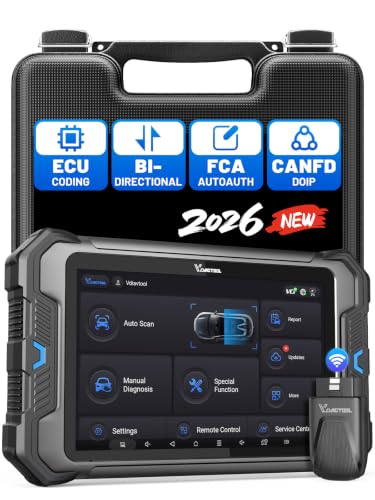
- 【Professional Diagnostics】 The VD80 BT Lite bidirectional obd2 scanner is a professional OBD2 scanner diagnostic tool, delivering vehicle diagnostics right in your own garage. It supports 4,000+ active diagnostic tests, 28+ maintenance service functions, ECU coding, PMI calibration, brake service reset, and OEM-grade full-system vehicle scanning—perfect for DIYers and pros looking for powerful automotive tools. The available function tests vary by model—please to confirm compatibility.
- 【ADVANCED ECU CODE, CUSTOMIZE OE-SETTINGS】As a complete car code reader and reset tool, the VD80 BT Lite bidirectional obd2 scanner supports ECU coding for VW, for Audi, for BMW, for Benz, for Mitsubishi and more. PMI function for Ford/for Lincoln/for Mazda, supports copy data into new module. Step-by-step Guided Diagnostics makes complex jobs easier—making this one of the most reliable code readers & scan tools on the market.
- 【100000+ Vehicles Compatibility – CAN FD/DOIP】 VD80 BT Lite Auto Scanner Compatible with 100,000+ vehicles worldwide, this bidirectiona car scanner works with all OBD2-compliant vehicles manufactured after 1996, covering more than 100 brands worldwide. It also supports CAN FD, DOIP and FCA Secure Gateway protocols, boost 2X faster data transfer, covers 99% of U.S., EU and Asian cars. With 22 languages and 2 years of f*ree updates—future-proofing your car reader diagnostic for all cars.
- 【28+ Maintenance Services & Calibration Functions】VD80 BT Lite scanner for car Supports 28 maintenance services, including resetting oil and service lights after routine maintenance, registering new batteries for proper system operation, and clear clogged filters and restore performance. Additionally, it calibrates TPMS sensors after tire rotations, resets brake systems after pad replacements, relearns steering angle sensors after alignments, and more. These functions help your vehicle quickly and accurately return to peak performance—without the costly dealer visits.
- 【True Bidirectional Control – Diagnose with Confidence】Standing out with full-system coverage and extensive active test capabilities, the VD80 BT Lite bidirectional scan tool retrieves data from electronic control units and performs a wide range of active tests. You can real-time control over modules like fuel pumps, windows, A/C clutches, and relays. Perform 100+ advanced functions including throttle adaptation, injector coding, VIN write, idle relearn, and ABS bleed—helping you fix it right the first time with this all-in-one car diagnostic scanner.
Last update on 2026-06-23 / Affiliate links / Images from Amazon Product Advertising API
This product presentation was made with AAWP plugin.