
NHTSA ID Number: 10169268
Manufacturer Communication Number: 19NA100
TSB/Document Date: 2019-12-16
Summary
This Technical bulletin provides a procedure for dealers/technicians on the release of Radio Software Version 22.8 Over-the-Air Update.
Bulletin No.:
Service Bulletin
Date:
19-NA-100
November, 2019
TECHNICAL
Subject:
Radio Software Version 22.8 Over-the-Air Update
This bulletin replaces PIC6343B. Discard all previous versions of PIC6343.
Brand:
Model:
Regal
Model Year:
VIN:
from
to
2018
2019
2018
2019
2018
2018
from
to
Engine:
ATS
Cadillac
CTS
Terrain
XTS
Involved Region or Country
North America
Additional Options (RPOs)
Equipped with Infotainment System IOS, IOT or IOU
Condition
Some customers may comment on software issues. A continuous improvement software
update is being released with updates made on the following areas: navigation,
Bluetooth, DIC display and general system improvements. This update includes over
120 improvements, most notable ones include:
• Greyed out Favorites
• DIC Speed Limit sign may be stuck on a value, have no value or is blank, or the unit of
measurement (KPH/MPH) may flash or toggle between KPH and MPH.
• DIC Speed Limit sign may flip between the posted speed and an incorrect speed
value. Example the sign may toggle between 70 mph and 35 mph.
• The navigation radio may display a message of “Navigation Service Has Expired” or
“Navigation services is going to expire in XX days” every ignition cycle.
• Device Not Connected message when device is connected via USB or Bluetooth.
• Bluetooth audio is not consistent.
• Bottom status/icon bar is gone until Home button is pressed.
• Radio is not connected back to last external device after an ignition cycle.
• When no phone is paired and customer only uses OnStar hands free calling, the
phone Contacts are deleted after every ignition cycle.
Cause
The cause of the condition may be software anomalies.
Correction
A new radio software update, 22.8, is being released for vehicles equipped with
Infotainment system RPO IOS, IOT or IOU, in addition to providing general robustness
and stability enhancements.
This update can occur remotely through in-vehicle prompts from the radio display.
However, some customers may decline the vehicle update or the update may be
unsuccessful. Along with the vehicles mentioned above, vehicles in unconnected
markets and fleet customers will need the dealer to reprogram the radio with the new
software package.
Copyright 2019 General Motors LLC. All Rights Reserved.
Page 2
November, 2019
Service Procedure
Important: If the remote vehicle update has been
downloaded or installed, DO NOT install the update via
USB. DO NOT attempt to complete the programming
event without reading Determining Where to Start –
Checking for Update Status first to avoid programming
failures or module lockup conditions.
Important: Be sure to keep the vehicle doors closed
prior to beginning, and during, the USB programming
event.
Tip: Tripping the door latch to closed status with the
door open will allow exit of the vehicle during the
programming process. Do NOT open the latch until
programming is complete.
The update procedure in this bulletin includes the
following four sections:
• Determining Where to Start – Checking for Update
Status
• Update Procedure Using Remote Vehicle Update
• Update Procedure Using TIS2WEB (USB
Download)
• Troubleshooting
Important: DO NOT attempt to complete the
programming event without reading Determining Where
to Start – Checking for Update Status first to avoid
programming failures or module lockup conditions.
Determining Where to Start – Checking for Update
Status
The process used for this update is dependent on the
status of the software on the module and if the module
already has a remote install package downloaded. To
verify if an update package is already on the vehicle,
open “Settings” and then scroll to “Updates” on the
radio screen. If an update is shown under the “Updates”
screen, proceed to the Update Procedure Using
Remote Vehicle Update section of this document.
Bulletin No.: 19-NA-100
Bulletin No.: 19-NA-100
November, 2019
Page 3
5313331
If no update is shown (see “No Updates Available”
image in next section), go to the “About” screen and
verify the build number (i.e. 20.9, 20.10, 20.11, 21.17x,
etc.). If the build number is less than 22.8, proceed with
the software update following the Update Procedure
Using TIS2WEB (USB Download) section of this
document.
Page 4
November, 2019
Bulletin No.: 19-NA-100
5313332
Caution: If Vehicle Update screen shows
“Infotainment System Update” (such as the screen
above) do not use TIS2WEB or insert a USB stick. Use
of the USB stick when the Remote Update has already
been downloaded, installed, or paused during
installation could result in program failures or module
lockup condition. The update should be completed
using the Remote Vehicle Update procedure, following
prompts on the infotainment screen. Refer to Update
Procedure Using Remote Vehicle Update after reading
the remaining information in this section if the Remote
Update has already been downloaded to the radio.
• If the remote vehicle update CANNOT be
completed, the radio must be updated through
SPS via USB. Refer to Update Procedure Using
TIS2WEB (USB Download) in this bulletin.
Update Procedure Using Remote Vehicle Update
1. If a remote package is on the system, you may see
the below pop up.
• If the remote vehicle update has not been
downloaded, select “Start Download”, wait for
the download to complete and then follow the
prompts to complete installation.
Bulletin No.: 19-NA-100
November, 2019
Page 5
5313328
2. If no “Start Download” or “Install Now” pop up is
displayed, navigate to “Settings” -> “Updates.” If
there is a remote package on the system, it will
display “Install Now” Or “Start Download.” If the
screen below is shown, then there is no remote
update package on the system. Navigate to
Settings -> About to verify the software version. If
the build number is not 22.8 or greater, update
via USB.
Page 6
November, 2019
Bulletin No.: 19-NA-100
5313324
Important: During installation, the vehicle will be
disabled and cannot be driven. Features like door
locks, windows and chimes may not work. If you leave
the vehicle, DO NOT lock occupants inside.
Note: Download may pause due to cellular connection
speed. If the download pauses, click resume to
continue. If the download takes longer than 30 minutes,
see the Troubleshooting section in this bulletin.
3. Once the remote vehicle update has completed,
verify the following operations: Select “Settings”,
scroll down and select “Updates.” If no updates are
available, verify software build is at 22.8 or greater
in “Settings” -> About screen. If confirmed, no
further action is required.
3.1. At ignition on, verify that the radio displays the
proper brand splash animation.
• If the incorrect splash animation is shown
(e.g. Cadillac logo in a GMC vehicle)
proceed to step 2.3.
• If the correct splash animation is shown
proceed to step 3.2.
3.2. Verify audio plays and that audible warning
chimes function correctly.
• If the audio is muted or chimes are not
operating as expected proceed to step 3.3.
• If the audio and chimes are operating as
expected, no further action is required.
3.3. Determine the software version now in the
radio by selecting Home> Settings> About>
Build Number. It should be 22.8 or greater.
• If 22.8 or greater, reprogram the radio using
SPS programming. Refer to the appropriate
A11 Radio: Programming and Setup (IOS/
IOU/IOT/IOR) document in SI.
• If less than 22.8 reprogram the radio using
USB and SPS programming events. Refer
to the appropriate A11 Radio: Programming
and Setup (IOS/IOU/IOT/IOR) document
in SI.
Update Procedure Using TIS2WEB (USB Download)
Caution: Before downloading the update files, be sure
the computer is connected to the internet through a
network cable (hardwired). DO NOT DOWNLOAD or
install the files wirelessly. If there is an interruption
during programming, programming failure or control
module damage may occur.
Bulletin No.: 19-NA-100
November, 2019
Page 7
Note: Carefully read and follow the instructions below.
•
•
•
•
Ensure the programming tool is equipped with the
latest software and is securely connected to the
data link connector. If there is an interruption
during programming, programming failure or
control module damage may occur.
Stable battery voltage is critical during
programming. Any fluctuation, spiking, over
voltage or loss of voltage will interrupt
programming. Install a GM Authorized
Programming Support Tool to maintain system
voltage. Refer to www.gmdesolutions.com for
further information. If not available, connect a fully
charged 12V jumper or booster pack disconnected
from the AC voltage supply. DO NOT connect a
battery charger.
Turn OFF or disable systems that may put a load
on the vehicles battery such as; interior lights,
exterior lights (including daytime running lights),
HVAC, radio, etc.
Clear DTCs after programming is complete.
Clearing powertrain DTCs will set the Inspection/
Maintenance (I/M) system status indicators to NO.
5431207
Note: If the Same Calibration/Software Warning is
noted on the SPS screen, select OK and follow screen
instructions. After a successful programming event, the
WCC is located in the Service Programming System
dialogue box of the SPS Summary screen. No further
action is required. Refer to the Warranty section of the
bulletin.
Caution: Do not use TIS2WEB or insert a USB stick if
a Remote Update has been downloaded to the radio.
Use of the USB stick when the Remote Update has
already been downloaded, installed, or paused during


- Advanced VCI Box, Industry-leading J2534 Pass-Thru...
- High-Speed OEM-Level Diagnostics & Programming: Unlock true...
- Coverage for 17 Car Brands & Ultra Reliability: Works...
- User-Friendly RLink Platform & Expert Support: TOPDON’s...
- 6.6 ft USB-C Cable & Portable Storage Case: The RLink J...
Last update on 2026-06-23 / Affiliate links / Images from Amazon Product Advertising API
If the PDF is very large, it may not load in the preview below.
Some older TSBs had multiple PDFs — visit the NHTSA Website to view all PDFs.
If the TSB PDF does not show, download or view it on the NHTSA Website.
Click on the (+) Plus Sign
Then Click on Associated Document(s)
Search NHTSA Database for Recalls
Search NHTSA Database for Vehicle Investigations
View Latest Vehicle Investigations
Search NHTSA Database for Vehicle Complaints
View Latest Vehicle Complaints
TSB/Document ID: 19NA100
Replacement Service Bulletin Number:
MFR Communication Date: 2019-11-04
MFR Internal Campaign ID/Software Version:
Communication Type: Service Bulletin/Repair Instructions
NHTSA Components: EQUIPMENT
MFR Component System:
MFR Component Subsystem:
Previous TSB | Next TSB |

- Stay Updated with Lifetime Access: This obd2 scanner includes lifetime free software updates for all app service functions. With a single payment, enjoy full access to diagnostics, reset tools, and maintenance features — zero subscription fees. A budget-friendly choice for weekend mechanics, home car owners, and DIYers, supporting vehicles from 1996 onward. Come to us with your VIN to check compatibility.
- Full Bidirectional Control/Active Tests & Stable Wireless Connectivity: This car code reader features full bidirectional control, allowing you to send commands to the vehicle's ECU for active tests on components such as fuel pumps, injectors, A/C clutches, windows, sunroofs, and more. This car scanner diagnostic tool helps DIYers quickly diagnose and test vehicle parts, cutting down troubleshooting and repair time. With BT 4.0 wireless connectivity, you can enjoy cable-free diagnostics up to 33 feet. Stand in your garage and test windows, wipers, or even engine components—all without needing to move around your car.
- Portable Car Scanner with 26 Special Functions: Scheduled vehicle maintenance with the A30M car diagnostic scanner can keep your vehicle in peak condition and save you big on dealership trips. The XTOOL A30M obd2 scanner diagnostic tool features essential reset and relearn functions, such as Oil Reset, EPB Reset (Electronic Parking Brake Release), SAS, ABS Brake Bleeding, Throttle Body Relearn, Injector Coding, Crank Sensor Relearn, Headlight Adjustment, and Tire Size Reset. Note: Service functions may vary by vehicle model – check compatibility beforehand!
- Wide Compatibility CAN FD & FCA
 Autoauth: This obd2 scanner diagnostic tool is compatible with over 85+ car brands from the U.S., Europe, and Asia, providing extensive coverage through a BT connection with your smartphone or iPad. Now upgraded to support the latest protocols, it includes FCA AutoAuth access for Chrysler, Jeep, Dodge, and Fiat (2018+), and supports CAN FD for GM (2020+) models, giving you greater access to newer vehicles and systems. Note: The FCA AutoAuth account is not included with the device. Users must register and pay separately through the official FCA AutoAuth website to access diagnostic functions for vehicles that require it.
 - Up to 8 Live Data Streams Graphing – Real-Time Graphing for Deeper Insight: This car scanner supports up to 8 live data streams simultaneously with intuitive, real-time graphing. Gain comprehensive insights into your vehicle’s performance, making it easier to spot issues, detect trends, and make informed diagnostic decisions with confidence.
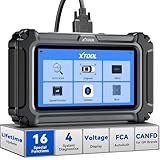
- Comprehensive OBD2 Scanner with 16 Resets: The XTOOL D5S car code reader and vehicle reset tool provides an advanced diagnostic solution with 16 commonly needed reset functions, including Electronic Parking Brake Reset (EPB Reset), SAS, BMS Reset (Battery Test), Throttle Body Relearn, TPMS Reset, ABS Bleeding, Injector Coding, Gearbox Match, Suspension Adjustment, Headlight, Window Initialization, Crank Sensor Relearn and more. Equipped with CAN FD Protocol and FAC AutoAuth, the D5S obd2 scanner diagnostic tool ensures compatibility with a broad range of modern vehicles, allowing users to address common maintenance needs quickly. NOTE: Please Check the Compatibility before ordering.
- 4 Main System Car Scanner & Full OBD2 Diagnostics: The XTOOL D5S car code reader is ideal for home mechanics, DIYers, and professionals, providing access to Transmission/Engine/ABS/SRS systems to read DTCs, Live data can be displayed in text or up to 4 PID data graphs, along with full OBD2 diagnostics to check the engine light on, other obd2 issues and routine maintenance. This car diagnostic scanner ensures you can keep your vehicles in top condition, avoiding costly repairs or unexpected breakdowns. NOTE: Some vehicles display three systems after connection because the transmission and engine of some vehicles are integrated into one.
- Check Engine Code Reader & Real-Time Engine Monitoring: Whether you're a car owner, a DIYer, or run a repair shop, the XTOOL D5S obd2 scanner diagnostic tool makes engine diagnostics fast and frustration-free, reading and explaining trouble codes in seconds—no confusion. Check live data like fuel trim, 02 sensor voltage, RPM, and coolant temp to pinpoint mis~fires, rough idle, or sensor issues. After repairs, simply use the D5S check engine code reader and reset tool to turn off the check engine light and confirm the problem’s fixed—saving time, money, and unnecessary shop visits. - Note: If the check engine light comes back on, it indicates the original problem still exists.
- Portable Car Scanner for ABS and SRS: XTOOL D5S gives you peace of mind when ABS or airbag warning lights come on. It reads and clears ABS codes to help you fix brake sensor, traction control, or wheel speed issues, and supports ABS bleeding after repairs like caliper or master cylinder replacement. For airbag systems, it scans and clears SRS codes related to airbags, seatbelt tensioners, and crash sensors. Whether you're doing repairs at home or running a small shop, the D5S is a cost-effective solution for safety diagnostics. Note: If a fault code returns after clearing, it usually means the issue hasn’t been fully resolved. Please check the compatibility before ordering.
- Transmission Warning Light ON? Here’s the Transmission Diagnostic and Reset Tool You Need: The XTOOL D5S is more than just a basic car scanner—it’s an easy-to-use transmission diagnostic tool. From rough shifts to slipping gears, the D5S lets you read and clear transmission trouble codes, monitor real-time TCM data, and perform transmission resets after fluid changes or repairs. Whether you’re a hands-on car owner or a pro running a busy shop, this OBD2 scanner with transmission functions helps you catch problems early—saving you time, money, and future headaches.. Note: Clearing fault codes is equivalent to a reset on some vehicles, but not all. For help, contact XTOOL Tech Support.
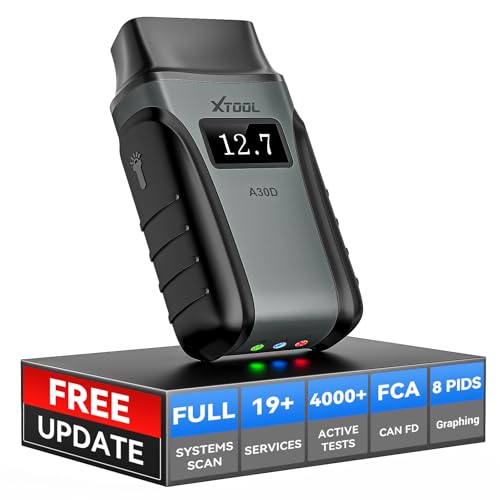
- Save $500+/Year with Pro-Level Diagnostics -No Subscriptions: The Portable XTOOL Anyscan A30D OBD2 scanner diagnostic tool includes free lifetime software updates for all app service functions, without extra cost. With a single payment, enjoy full access to diagnostics, relearn scan tools, and maintenance features. A cost-effective, smart choice for car owners and DIY enthusiasts, compatible with vehicles from 1996 onward. Please provide the car VIN and the special functions you need in advance so that we can confirm compatibility
- Bi-Directional Control for Faster Troubleshooting: Unlike a basic code reader, the A30D bi directional scan tool sends commands directly to your vehicle’s ECU to actively test components like fuel pump, valves, wipers, windows, doors, sunroof, and headlamps right from your smartphone. See component responses in real time without disassembly—perfect for brake jobs, electrical issues, and hard-to-find problems. This bidirectional obd2 scanner helps pinpoint faults faster, reduce guesswork, and avoid replacing good parts. An efficient, easy-to-use car scanner diagnostic tool built for DIYers, home garage users, and small-shop technicians who want real two-way scanner, not just codes
- 19 Reset Functions for Routine Maintenance: The A30D car diagnostic scanner provides 19 relearn functions without extra charges, including EPB Reset for parking brake replacement, TPMS Reset after tire changes, ABS Auto Bleeding, Oil Reset, SAS Reset, BMS Reset, Throttle Relearn, Injector C0ding, Gear Learning, Crank/Crankshaft/Cam/Ckp Sensor Relearn Tool, Transmission Match, Seat Calibration, Airbag Repair and more. This XTOOL A30D automotive scanner diagnostic tool supports preventive care, helping extend vehicle life and reduce costly shop visits. Functions vary by vehicle make and year—plz confirm compatibility before purchase
- Stable BT Connection & All-System & 8 Pids Live Data: The A30D wireless OBD2 scanner delivers a fast and stable wireless connection up to 33 feet, letting you move freely around the vehicle without tangled cables. Pair with with Android 9.0+ and iOS 10.0+ devices to turn your phone into a mobile auto scanner—perfect for home garages, driveways, or on-the-spot repairs. This full system scanner for cars provides real-time access to all major modules, including Engine, Gearbox, ABS, SRS, AC and more. with clear graphs, meters, and up to 8 PIDs displayed at once. This car code reader makes system monitoring visual, simple, easy to understand, and offering data logging for playback and deeper
- Wide Compatibility with CAN-FD & FCA Support: The A30D car computer diagnostic reader works with most 1996 and newer vehicles with a standard OBD2 port, including for Ford, for GM, for Toyota, for Honda, for Nissan,for Hyundai etc, with ongoing updates covering more car models and functions later. It also supports newer communication protocols like CAN-FD and FCA AutoAuth (Personal AutoAuth account and active subscription required, not included with the device!for Chrysler, for Dodge, for Jeep, for Fiat models). It is a future-ready automotive scanner diagnostic tool for households with multiple vehicles or part-time techs. Coverage vary by cars, plz check the compatibility first
Last update on 2026-06-23 / Affiliate links / Images from Amazon Product Advertising API
This product presentation was made with AAWP plugin.