
NHTSA ID Number: 10065850
Manufacturer Communication Number: DVD131
TSB/Document Date: 2016-05-19
Summary
SUMMARY TO BE PROVIDED ON A FUTURE DATE.
Land Rover Diagnostics
Software Update
REFERENCE: DVD 131 –
CALIBRATION FILE V.
CHINESE
使用此列表选择您需要的语言
DUTCH
Gebruik de lijst hiernaast om de gewenste taal te selecteren.
ENGLISH
Use the adjacent list to select the language you require
FRENCH
Sélectionnez dans la liste ci-contre la langue souhaitée
GERMAN
Wählen Sie die gewünschte Sprache aus der Liste aus.
ITALIAN
Utilizzare la lista a fianco per selezionare la lingua desiderata
JAPANESE
リストを使用し、必要な言語を選択してください。
PORTUGUESE
Use a lista ao lado para seleccionar a língua que necessita
RUSSIAN
Используйте прилагаемый список для выбора требуемого языка.
SPANISH
Seleccione en la lista de al lado el idioma que desee
Page 1 of 41
Land Rover Diagnostics
Software Update
REF: DVD 131 –
CALIBRATION FILE V.
DATE: 09 / 2012
USE GUIDANCE:
ALL IDS USERS MUST INSTALL THESE UPDATES
Updates consist of IDS Software Updates (Patches/DVDs) and Calibration File releases.
The number after the DVD reference in the header indicates the software update level - 00, 01, 02 etc.
The Calibration File version indicates the current release of the vehicle calibration file databases.
•
Current Installed Software levels can be checked via Settings – System information.
•
Updates can be triggered via Settings – System Utilities
For further information on keeping your software updated please refer to the information on Topix.
FAILURE TO FOLLOW THESE INSTRUCTIONS MAY RESULT IN COMPROMISE OF WARRANTY
CLAIMS AND CUSTOMER SATISFACTION
Introduction:
This document contains important information, as it describes the content of the DVD software update referenced
in the header; please ensure that all users of the IDS diagnostic platform are made aware of its content.
SIZE:
: 1.4 GB
Decommissioning of older Panasonic Toughbooks
With the release of DVD131 Jaguar Land Rover will decommission all Panasonic CF18 & CF19MK1
Toughbooks from operating IDS/SDD diagnostic software as previously communicated.
Please refer to Policy Letter:Revised Minimum Toughbook Specification JHSC666v2 - LRHSC151v2 - 1-245NAS and STE11-10
Please ensure you are using the latest JLR SDD Diagnostic Equipment
SDD Authentication
When this DVD release is loaded for the first time, SDD will attempt to log into the server. This log in
will require the user to enter their User Name and Password as the user would have seen since the
release of DVD 122
This authentication process only needs to be completed once for each installation of an SDD IDS
DVD release. Authentication will have to be repeated when updating your diagnostic machine to the
next DVD release, for example, updating from DVD 130 to DVD 131
Page
Page
1 of 2
11of 5
Land Rover Diagnostics
Software Update
REF: DVD 131 –
CALIBRATION FILE V.
DATE: 09 / 2012
There are two possible authentication options – "online" & "offline" the offline process allows users to
authenticate machines that are not online.
Online Authentication
1.
2.
3.
4.
5.
6.
Update to IDS DVD 131.00
Load SDD from the SDD main menu
SDD Authentication screen will appear
Enter your Username and Password (Dealer Single Login - DSL)
Select Authenticate
The machine will confirm these details and log them to the system
NOTE: Very soon you will have to authenticate on a more regular basis, please ensure you use your
own Dealer Single Login DSL
In the event you can not successfully Authenticate via the Online method then the Offline method must
be followed, please note this feature will be subject to change very shortly and an online
authentication will be required.
Offline Authentication
1.
2.
3.
4.
5.
6.
7.
Update to IDS DVD 131.00
Load SDD from the SDD main menu
SDD will inform you that no connection to the server can the established
Use the Password and Username provided on TOPIx located behind the Dealer Tab / SDD.
Select Authenticate
SDD load screen will appear
The machine will confirm these details and log them to the system
NOTE: Very soon you will have to authenticate on a more regular basis, please ensure you use your
own Dealer Single Login DSL
DVD Installation
As part of the DVD install SDD will check to confirm if your unit is compatible with the latest software.
Installation of Vehicle Data Files when re staging your IDS Laptop
Due to the size of the installation for the current SDD program Jaguar Land Rover Service Diagnostics
have decided that the module Vehicle Data Files will be delivered via a separate image. This image
will be made available on HTTP://DIAGNOSTICDELIVERY.COM/IDSCENTRAL/. Using this image will
significantly reduce the time required to execute a complete Static Restore / Rebuild process. To
ensure your diagnostic tester is up to the latest level, please select the Settings tab from the SDD
Page
Page
1 of 3
11of 5
Land Rover Diagnostics
Software Update
REF: DVD 131 –
CALIBRATION FILE V.
DATE: 09 / 2012
main menu / System Utilities / Combined as-built and calibration file update. For more information
please refer to the read me fileHTTP://DIAGNOSTICDELIVERY.COM/IDSCENTRAL/.
Freelander 13MY
Full diagnostic support has been included as part of this DVD
Defender 13MY
Full diagnostic support has been included as part of this DVD
Range Rover 13MY
Full diagnostic support has been included as part of this DVD
Data logger
Within the data logger application Jaguar Land Rover service diagnostics are please to introduce a
new feature to aid the technician when searching for signals. Located on the right hand side is of the
screen is a new search function. This will enable users to quickly search for a certain signal by name.
This is accessed using the new search button. If you discover any issues with the layout, descriptions
and/or functionality in Data logger tool, please submit an EPQR as usual.
Range Rover Sport
Enhancements to data logger transmission signal for 3.6 TDV8 6 Speed auto transmission
Evoque
Enhancements to data logger engine coolant temperature signals for Si4 variant
Discovery LR4 12MY
Enhancements to data logger injector offset signals for 2.7 variant
CAN Link Monitor enhancements.
Enhancements have been made to the CAN Link Monitor Control Buttons
Page
Page
1 of 4
11of 5
Land Rover Diagnostics
Software Update
REF: DVD 131 –
CALIBRATION FILE V.
DATE: 09 / 2012
Service Functions
The grouping of Service Functions have been modified so they are grouped by functional area
SPA
There have been scheduled updates and a general cleanup of the SPA environment. If you discover
any issues with the layout, descriptions and/ or functionality in SPA, please submit an EPQR as usual.
Page
Page
1 of 5
11of 5
路虎 (Land Rover) 诊断系统
软件更新
主题: DVD 131 –
校验文件 V.
日期: 2012 年 09 月
使用指南:
所有 IDS 用户都必须安装这些更新内容
更新内容包含 IDS 软件更新(补丁文件/DVD)和校验文件版本。
关于 DVD 之后的序号,请参考顶部指示的软件更新级别 — 00、01、02 等等。
校验文件版本指示了车辆校验文件数据库的当前版本。
•
当前安装的软件级别可通过设置 – 系统信息来确认。
•
可通过设置 – 系统实用程序来触发启用更新。
关于软件持续更新的更多信息,请参考 Topix 上的相关信息。
不遵守这些说明可能导致您的保修索赔失败和客户满意度下降
简介:
此文档包含了重要信息,其描述了首页所引用的 DVD 软件更新的内容;请确保 IDS 诊断平台的所有用户都
熟悉其内容。
SIZE:
: 1.4 GB
停用旧版 Panasonic Toughbook
正如之前已告知各位的那样,随着 DVD131 的发布,Jaguar Land Rover 将停用所有用以操作 IDS/SDD
诊断软件的 Panasonic CF18 和 CF19MK1 Toughbook。
请参阅政策函:
改进版最低 Toughbook 规格 JHSC666v2 - LRHSC151v2 - 1-245NAS 和 STE11-10
请确保您当前使用的是最新 JLR SDD 诊断设备。
SDD 身份认证
首次加载此 DVD 版本时,SDD 将尝试登录到服务器。此登录要求用户输入其“用户名”和“密码”,与
DVD 122 发布以来的一样。
对于 SDD IDS DVD 版本的每个安装,此身份验证流程仅需要执行一次。将您的诊断设备更新到下一个
DVD 版本时,必须重复身份验证,例如从 DVD 130 更新到 DVD 131 时。
第 6/5 页
路虎 (Land Rover) 诊断系统
软件更新
主题: DVD 131 –
校验文件 V.
日期: 2012 年 09 月
有两种可能的身份验证选项 —“在线”和“离线”,离线流程允许用户对未在线的设备进行身份验证。
在线身份验证
7.
8.
9.
10.
11.
12.
更新到 IDS DVD 131.00
从 SDD 主菜单加载 SDD
将显示 SDD“身份验证”屏幕
输入“用户名”和“密码”(经销商单点登录 — DSL)
选择“身份验证”
设备将确认这些详细信息,并将用户登录到系统
注:不久,您必须更频繁地进行身份验证,请确保使用您自己的经销商单点登录 DSL
如果您无法通过在线方法成功验证身份,则使用离线方法,请注意此功能可能很快就会变更,届时将需
要在线进行身份验证。
离线身份验证
8.
9.
10.
11.
12.
13.
14.
更新到 IDS DVD 131.00
从 SDD 主菜单加载 SDD
SDD 将告知您不能与服务器建立连接
使用 TOPIx 上的“经销商选项卡”/SDD 下所提供的密码和用户名。
选择“身份验证”
将显示 SDD 加载界面
设备将确认这些详细信息,并将用户登录到系统
注:不久,您必须更频繁地进行身份验证,请确保使用您自己的经销商单点登录 DSL
DVD 安装
作为 DVD 安装的一部分,SDD 将检查确认您的设备是否与最新版本软件兼容。
在恢复 IDS 便携设备原厂设置时安装车辆数据文件
由于当前 SDD 程序安装大小的原因,Jaguar Land Rover 维修诊断部门已决定将通过独立图像提供车辆
模块数据文件。 该图像将在以下网站内提供:HTTP://DIAGNOSTICDELIVERY.COM/IDSCENTRAL/。 使用该图
像将明显缩短执行完整静态还原/重建程序所需的时间。为确保您的诊断测试仪为最新版本,请于 SDD
主菜单中选择“设置”选项卡/系统实用程序/综合编译文件和校准文件更新。有关更多信息,请参阅自
述文件 HTTP://DIAGNOSTICDELIVERY.COM/IDSCENTRAL/。
第 7/5 页
路虎 (Land Rover) 诊断系统
软件更新
主题: DVD 131 –
校验文件 V.
日期: 2012 年 09 月
Freelander 2013 车型年款
本 DVD 已包含完整的诊断支持
Defender 2013 车型年款
本 DVD 已包含完整的诊断支持
Range Rover 2013 车型年款
本 DVD 已包含完整的诊断支持
数据记录器
Jaguar Land Rover 很荣幸地介绍一项新功能至数据记录器应用程序。该功能用于辅助技术人员进行信号
搜索。位于屏幕右侧的是一项新搜索功能。这将允许用户通过名称快速搜索某些特定信号。该操作可通
过使用新的搜索按钮实现。如果您发现数据记录器工具有任何布局、描述和/或功能性方面的问题,请
照常提交 EPQR。
Range Rover Sport
3.6 TDV8 6 速自动变速器的数据记录器变速器信号的增强功能
Evoque
Si4 变型的数据记录器发动机冷却液温度信号的增强功能
Discovery LR4 2012 车型年版
2.7 变型的数据记录器喷油嘴偏移信号的增强功能
CAN Link 监视器增强功能。
CAN 链路监测器控制按钮已实现增强功能
维修功能
维修功能的分组已更改,其依据功能区域划分
第 8/5 页
路虎 (Land Rover) 诊断系统
软件更新
主题: DVD 131 –
校验文件 V.
日期: 2012 年 09 月
SPA
对 SPA 环境进行了定期更新和总体清理。若您发现 SPA 中具有任何布局、描述和/或功能性方面的问
题,请照常提交 EPQR。
第 9/5 页
Land Rover Diagnose
Software-update
BETREFT: DVD 131 –
KALIBRATIEBESTAND V.
DATUM: 09 / 2012
AANWIJZINGEN VOOR GEBRUIK:
ALLE IDS-GEBRUIKERS MOETEN DEZE BIJWERKBESTANDEN INSTALLEREN
Het bijwerken omvat
kalibratiebestanden.
bijgewerkte
IDS-software
(bijwerkbestanden/dvd’s)
en
uitgaven
van
Het getal achter de DVD-referentie in de kop geeft het softwarebijwerkniveau, 00, 01, 02 enz., aan.
De versie van het kalibratiebestand geeft de huidige uitgave van de kalibratiebestand-databases voor het
voertuig aan.
•
U kunt de op dat moment geïnstalleerde software-niveau’s controleren via Instellingen –
•
U kunt de bijwerkbestanden activeren via Instellingen – Systeemhulpprogramma’s
Systeeminformatie.
Raadpleeg voor verdere informatie over hoe u uw software op het nieuwste niveau bijgewerkt kunt
houden, de informatie op Topix.
HET NIET IN ACHT NEMEN VAN DEZE AANWIJZINGEN KAN DE GARANTIECLAIMS TENIET DOEN
EN DE TEVREDENHEID VAN DE KLANT NADELIG BEÏNVLOEDEN
INLEIDING:
Dit document bevat belangrijke informatie, aangezien het de inhoud beschrijft van de bijgewerkte dvdsoftware waarnaar in de kop verwezen wordt; wij verzoeken u te zorgen dat alle gebruikers van het IDS-
SIZE:
: 1.4 GB
Buiten bedrijf stellen van oudere Panasonic Toughbooks
Met de uitgave van DVD131 zal Jaguar Land Rover alle Panasonic Toughbooks CF18 & CF19MK1
buiten gebruik stellen voor de IDS/SDD-diagnosesoftware, zoals u al eerder hebt vernomen.
Raadpleeg u de beleidsbrief:Gewijzigde minimumspecificaties voor de Toughbook JHSC666v2 - LRHSC151v2 - 1-245NAS en
STE11-10
Zorg dat u het meest recente JLR SDD-diagnosesysteem hebt
SDD-verificatie
Wanneer deze dvd voor de eerste keer wordt geladen, probeert het SDD-systeem zich bij de server
aan te melden. De gebruiker moet dan zijn Gebruikersnaam en Wachtwoord invoeren, net zoals hij
dat sinds dvd 122 heeft gedaan
Deze verificatieprocedure hoeft slechts eenmalig te worden uitgevoerd voor iedere installatie van een
IDS-dvd op het SDD-systeem. De verificatieprocedure moet worden herhaald wanneer u het
第 10/5 页
Land Rover Diagnose
Software-update
BETREFT: DVD 131 –
KALIBRATIEBESTAND V.
DATUM: 09 / 2012
diagnosesysteem bijwerkt met de volgende dvd, bijvoorbeeld wanneer u het systeem bijwerkt van dvd
130 naar dvd 131
Er zijn twee mogelijke verificatie-opties: online en offline. Met de offline-procedure kunnen gebruikers
apparaten verifiëren die niet online zijn.
Online-verificatie
13.
14.
15.
16.
17.
18.
Werk het systeem bij met IDS DVD 131.00
Laad de SDD-software vanuit het hoofdmenu van het SDD-systeem.
Het SDD-scherm Verificatie verschijnt
Voer uw Gebruikersnaam en Wachtwoord (Dealer Single Log-in [DSL]) in
Selecteer Verifiëren
Het apparaat bevestigt deze gegevens en slaat ze in het systeem op.
N.B.: Binnenkort zult u zich regelmatiger moeten aanmelden; zorg ervoor dat u hiervoor uw eigen
Dealer Single Login DSL gebruikt.
Mocht het u niet lukken om online aan te melden, dan dient u de offline-procedure te volgen; houd er
rekening mee dat deze functie spoedig zal veranderen en dat online aanmelden wordt vereist.
Offline-verificatie
15.
16.

- 💯【Conta.ct us for Support Directly】If you met any...
- 🔥🔥🔥【2026 AUTEL FLAGSHIP MK900BT MK900-BT, NEW...
- 🚗【3000+ ACTIVE TESTS (50➡3000+), SAME AS MS...
- 🚗【40+ HOT SERVICES FOR 150 MAKES (28+➡40+)】Full...
- 🚗【OE ALL SYSTEM DIAGNOSE, AUTO SCAN 2.0: SCAN LICENSE...


- 【TURN OFF CEL】 This AL319 car scanner diagnostic tool...
- 【EXTENSIVE APPLICATION】 Autel AL319 Compatible with...
- 【FOR END USER & DIYERS】 This error code reader AL319 is...
- 【USER-FRIENDLY DESIGN】 This OBD2 scanner and check...
- 【HIGH-QUALITY SERVICES】 12 months war.ranty from the...
Last update on 2026-06-21 / Affiliate links / Images from Amazon Product Advertising API
If the PDF is very large, it may not load in the preview below.
Some older TSBs had multiple PDFs — visit the NHTSA Website to view all PDFs.
If the TSB PDF does not show, download or view it on the NHTSA Website.
Click on the (+) Plus Sign
Then Click on Associated Document(s)
Search NHTSA Database for Recalls
Search NHTSA Database for Vehicle Investigations
View Latest Vehicle Investigations
Search NHTSA Database for Vehicle Complaints
View Latest Vehicle Complaints
TSB/Document ID: DVD131
Replacement Service Bulletin Number:
MFR Communication Date: 2012-09-01
MFR Internal Campaign ID/Software Version:
Communication Type: Service Bulletin/Repair Instructions
NHTSA Components: ELECTRICAL SYSTEM:SOFTWARE
MFR Component System:
MFR Component Subsystem:
Previous TSB | Next TSB |
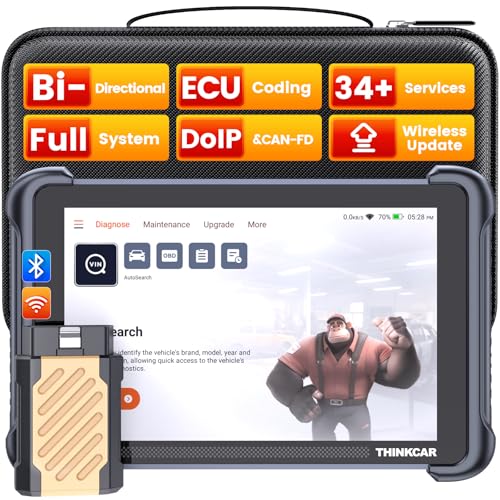
- [Notice] When you receive a used escaner automotriz device, it may be a customer return resold by Amazon without inspection. You can exchange it for a new one through Amazon. As this situation is unavoidable, we sincerely apologize. For any issues, contacting us via Amazon's "Messages" is the best way, and we’ll provide a solution within 24 hours. THINKSCAN 689BT Can Be Used Immediately After It is Turned On, Without Complicated Registration Process, Which is More Convenient & Quick.
- [Good News] THINKSCAN 689BT is the most competitive automotive scan tool to date, offering wireless updates with no subscription fees(valued 500Buc.ks) . With all the features of THINKTOOL PD8,PRO, built on Android 10 platform with 4-core CPU, 4GB RAM
 and 64GB ROM, serving up to 5X faster than older MAX/MINI/PLUS vehicle scanners escaner automotriz, no more slow and delayed feedbacks, it's time to update your garage tool.
 - [Big Money Saver] Premium THINKSCAN 689BT Wireless Diagnostic Scanner Escaner Automotriz, save up to 400USD per year, includes all useful features: Full bi-directional controls, ECU coding, 34+ services, OEM all system diagnostics, Worldwide vehicles coverage, CAN FD & DoIP, FCA AutoAuth(The 689BT only provides a login and purchase portal, and users are required to register for an FCA account and pay a membership fee in order to perform the relevant automotive diagnostics)
- [3000+ Active Tests]Active testing is one of the most useful features in automotive maintenance and greatly improves mechanic efficiency. THINKCAR 689BT bidirectional scanner can send action commends to vehicle sub-systems or components for active test without using vehicle controls. It can perform various tests such as: EVAP Test, Fuel Trim Reset, Injector Buzz Test, Window/ Mirror/ Door Lock Test, Pump and Value Tests, etc. Get functions from "Diagnose>Car Model>System>Active Test".
- [Hot Advanced Features] 689BT bidirectional tool scanner for car newly adds ECU Coding, Power Balance, Flash Hidden Functions, Reset Adaptive Data, Match Replaced Components, Customize OE-Settings. Such as: 1. changing the color of interior lights 2. switching on/off the auto hold, 3. customizing dash kits 4. activating the auto side mirror folding function 5. disables auto start-stop. Note: Coding functions vary by model&year.

- 【Cost-effective OBD2 scanner】 Thinkcar Thinkdiag2 is the most powerful wireless diagnostic tool for it's price! Equipped with multi-functions of Newly added CAN-FD protocol, BiDirectional control(Active Test), 15 Maintenance resets, All Systems diagnosis, Auto VIN, FCA AutoAuth, Unlock the protected FCA vehicle SGW module on Chrysler, Dodge, Jeep, Alfa Romeo, and Fiat vehicles manufactured after 2019.120+ Car brands coverage, No IP limited, etc. Good for workshops & DIYers. Kindly send us VIN to check compatibility before purchase
- 【OE-Level Full Systems Car Scanner with Added CAN FD Protocol】 Upgrade of Thinkdiag, Thinkdiag2 is a bluetooth diagnostic tool can diagnose Full System such as ECM, ABS, SRS, TCM, EPB, TPMS, SAS, A/C, BMS, etc. Thinkdiag2 can read/clear fault codes, read real-time data, read control module information,etc. As the only diagnostic scanner in this price range that supports the CAN-FD protocol, it suits for the latest GM(2019-) , saving $100 to buy a CAN FD adapter, reducing the risk of undetected errors to enhancing the user experience
- 【Bidirectional Test】This bidirectional scan tool Thinkdiag2 allows you to send commands from your smartphone directly to the vehicle's ECU for active testing, quickly locate problem areas, such as A/C clutch, windows, doors, sunroof, etc., reducing the diagnostic time and money. (Note: kindly send us VIN to check compatibility before order.)
- 【15+ Maintenance Functions】Thinkdiag2 OBDII code scanner is designed for individual car owners, DIYers, and small repair shops, which has a separate menu of 15 common special functions, such as Oil reset, EPB reset, SAS calibration, ABS bleeding, injector code, TPMS reset, etc. Enter from the all-system diagnostic menu to unlock more system special functions, and effectively handle the reset and relearn of most cars. Note: The Maintenance functions that each car can do may be different
- 【120+ car brands & FCA Autoauth+10 languages】Thinkcar thinkdiag2 helps you to troubleshoot the problems fast for 100 + US, European, Asian vehicle brands after 1996 that use the OBDII protocol. Only support 12V cars, including gasoline cars and diesel cars. Supporting Autoauth allows you to unlock the protected FCA vehicle SGW module on Chrysler, Dodge, Jeep, Alfa Romeo, Fiat vehicles, etc. (Note: Only provide AutoAuth login portal, and need purchase the registration number on the AutoAuth website by yourself.) Multilingual function allows workshop mechanics to avoid language barriers and use it around the world Without restriction

- 【15+ Advanced Reset & Calibration Functions】The Thinkdiag scanner provides 15+ professional maintenance functions, including:✔ Oil Reset | ✔ ABS Bleeding | ✔ Injector Coding | ✔ SAS Reset✔ TPMS Reset | ✔ BMS Reset | ✔ Transmission Adaptation | ✔ AFS Reset | ✔ Sunroof Calibration | ✔ Brake Reset | ✔ Suspension Relearn | ✔ Electronic Throttle Relearn | ✔ Seat Calibration | + More reset/relearn/calibrate/adaptive functions under automotive full systems diagnostic menu. Ideal professional OBDII scanner for mechanics and DIY enthusiasts, Thinkdiag delivers professional OE-level diagnostics with adaptive relearn capabilities for precise vehicle servicing.
- 【Full-System Diagnostics OBD2 Scanner Bluetooth】 Thinkdiag OBD2 Scanner supports all Systems diagnostic function, it can read/clear DTCs, read live data, read control module information, actuation tests and maintenance functions for ECM, BCM, SRS, TCM, BMS, TPMS, SAS, A/C system etc... It works with most car models after 1996, cover more than 120+ car brands. All car make and reset software come with 1 year update without any charge, much valuable and powerful than 1000 dollars level scanners in the market.
- 【Potential Feature Activation】 Thinkdiag diagnose obd2 scanner Bluetooth allows you to match the replaced components with ECU, activate potential functions for BMW, for GM, for Benz etc. Adjust some annoying features, adapt vehicle's settings to improve performance. No matter you are private owner or professional technician, Thinkdiag is a powerful and handy scanner in your repair tool list. Potential features are not suitable for every car models, please check with us before purchase. This superior function required newest Android OS device, it performs better on Android cell phone.
- 【Bidirectional Test/Active Test】 Thinkdiag car code reader actuates solenoids and actuators for active testing, send commands to systems/components to test their real-time working status, without using manual vehicle controls which saves much diagnostic time and effort to identify malfunction causes. You can check windows, doors, mirrors, sunroof, fans, fuel pump and other parts working status by actuation test function, thinkdiag supports 10000+ active tests. When you process Automotive full system diagnostic, you can do active test on every supported module.
- 【Intelligent Diagnostic Tool with Auto-VIN】Thinkdiag Bluetooth OBD2 scanner makes your smart phone device become a professional vehicle diagnostic tool, it compatible with Android and iOS system. Auto-VIN function supports the Thinkdiag identifies the most car models automatically, if autovin failed, you can choose car info manually. Full system Vehicle health report will be automatically created after diagnosis, report can be shared. Live Data Stream combined 4-in-1 Graphing+Data Record better for monitoring vehicle performance and analyze the abnormal parameter.
Last update on 2026-06-21 / Affiliate links / Images from Amazon Product Advertising API
This product presentation was made with AAWP plugin.