
NHTSA ID Number: 11029327
Manufacturer Communication Number: 15-335-25
TSB/Document Date: 2026-03-03
Summary
The following information announces reprogramming file availability and provides a software update installation procedure to optimize the new Gen 5 Denso CP25 Audio and Navigation head units utilized in the models listed.
If the PDF is very large, it may not load in the preview below.
Some older TSBs had multiple PDFs — visit the NHTSA Website to view all PDFs.
If the TSB PDF does not show, download or view it on the NHTSA Website.
Click on the (+) Plus Sign
Then Click on Associated Document(s)


- Advanced VCI Box, Industry-leading J2534 Pass-Thru...
- High-Speed OEM-Level Diagnostics & Programming: Unlock true...
- Coverage for 17 Car Brands & Ultra Reliability: Works...
- User-Friendly RLink Platform & Expert Support: TOPDON’s...
- 6.6 ft USB-C Cable & Portable Storage Case: The RLink J...
This product presentation was made with AAWP plugin.
Search NHTSA Database for Recalls
Search NHTSA Database for Vehicle Investigations
View Latest Vehicle Investigations
Search NHTSA Database for Vehicle Complaints
View Latest Vehicle Complaints
TSB/Document ID: 15-335-25
Replacement Service Bulletin Number:
MFR Communication Date: 2026-02-06
MFR Internal Campaign ID/Software Version:
Communication Type: Service Bulletin/Repair Instructions
NHTSA Components: ELECTRICAL SYSTEM
MFR Component System:
MFR Component Subsystem:
Previous TSB | Next TSB |
ATTENTION:
GENERAL MANAGER
q
PARTS MANAGER
q
CLAIMS PERSONNEL
q
IMPORTANT - All
Service Personnel
Should Read and
Initial in the boxes
provided, right.
SERVICE MANAGER
q
© 2025 Subaru of America, Inc. All rights reserved.
SERVICE BULLETIN
APPLICABILITY:
SUBJECT:
26MY Outback Models including
Wilderness models
NUMBER:
15-335-25
DATE:
02/06/26
Reprogramming File Availability for
Optimization of Gen 5 Denso CP25 Infotainment
Systems
INTRODUCTION:
The following information announces reprogramming file availability and provides a software
update installation procedure to optimize the new Gen 5 Denso CP25 Audio and Navigation head
units utilized in the models listed above. As in previous models, the procedure will involve either
downloading the software update files from Subarunet or using those sent directly from Nuspire to
the SDS Notebook and transferring them onto a USB flash drive for head unit installation.
ATTENTION: For Outback 26MY it is required to use the DST-010 and SSM5-R to access
Software Update setting in Dealership Mode Menu.
It is VERY IMPORTANT to read and understand this information completely before proceeding.
CAUTION: VEHICLE SERVICE PERFORMED BY UNTRAINED PERSONAL COULD
RESULT IN THE EQUIPMENT DAMAGE OR EVEN SERIOUS INJURY.
Service Bulletin is intended for use by trained technicians ONLY. It informs technicians of
conditions, which may occur in some vehicles or provides information, which could assist with
proper servicing of the vehicle. Properly trained technicians have the equipment, tools, safety
instructions, and know-how to do the job correctly and safely.
A timeline chart along with a complete list of all the conditions addressed and enhancements included
in this and previous Denso software updates are provided in Appendix 5 and Appendix 6 located at
the end of this bulletin.
IMPORTANT NOTE: The update contains 4 folders and 2 files. When performing an update, the
USB must contain the matching number of folders and files and all files must be replaced.
ALWAYS use the latest files together as a set.
NEVER reuse or combine files from a prior update with a newer version.
CAUTION: VEHICLE SERVICING PERFORMED BY UNTRAINED PERSONS COULD
RESULT IN SERIOUS INJURY TO THOSE PERSONS OR TO OTHERS.
Subaru Service Bulletins are intended for use by professional technicians ONLY. They
are written to inform those technicians of conditions that may occur in some vehicles,
or to provide information that could assist in the proper servicing of the vehicle. Properly
trained technicians have the equipment, tools, safety instructions, and know-how to
do the job correctly and safely. If a condition is described, DO NOT assume that this
Service Bulletin applies to your vehicle, or that your vehicle will have that condition.
Subaru of America, Inc. is
ISO 14001 Compliant
ISO 14001 is the international standard for
excellence in Environmental Management
Systems. Please recycle or dispose of
automotive products in a manner that is friendly
to our environment and in accordance with all
local, state and federal laws and regulations.
Continued...
Bulletin Number: 15-335-25; Date: 02/06/26
Page 1 of 24
MATERIALS REQUIRED:
•
SDS notebook
•
DST-010
•
Flash drive USB 2.0 or higher
An empty, USB 2.0 or 3.0 storage device (flash drive) will be needed to perform the update
procedure. The device should be dedicated to storing and transferring these updating files only. It
should be a minimum of 32GB or more in size and contain a NTFS file format before downloading
the update files onto it. Be sure to locate and re-format any existing USB drives used for updating
audio units. They must be fully cleared before adding these new update files to them.
NOTE: For 26MY and later vehicles use either a USB Type-C memory stick or a USB Type-A
with a conversion adapter to Type-C. The USB-A port is for power supply only and cannot be
used to install the software update.
23-25MY
USB Type-A
or
26MY and
after USB
Type-C
+ Type-C Adaptor
IMPORTANT NOTES:
• NEVER change the update file names after downloading them.
• NEVER save any other files on the same flash drive.
Please follow Appendix 1 “Flash Drive Selection” for selecting an applicable storage device
SERVICE PROCEDURE / INFORMATION:
REMINDER: Customer satisfaction and retention starts with performing quality repairs.
STEP 1- VERY IMPORTANT: Before proceeding with the software updating procedure, the
currently installed software version ID MUST be confirmed by following the steps below:
1a) After starting the engine and system boot-up completes, from the HOME screen, touch the Settings
button.
1b) Press the General button. Use the down arrow to scroll to System Information then press to
display the System Information / Version information.
NOTE: The last six digits of the software version (XXX-XXX)
would determine an eligibility for the software update. If the last six
digits of the software version are not “ 014-850” proceed to STEP
2 below. Otherwise the unit already has the latest software version
installed. No update is required at this time
Continued...
Bulletin Number: 15-335-25; Date: 02/06/26
Page 2 of 24
STEP 2- Prepare the USB flash drive
CAUTION: Do not use any USB flash drive which utilizes file organizing software or an operating
system.
VERY IMPORTANT: Before attempting to download any data files, confirm the PC and flash drive
being used is not infected with any virus. The flash drive MUST be formatted for NTFS.
Note: For 26MY and later vehicles use either a USB Type-C memory stick or a USB Type-A with a
conversion adapter to Type-C
23-25MY
USB Type-A
or
26MY and after
USB Type-C
+ Type-C Adaptor
•
Make sure the USB flash drive contains no other files.
•
Right click on the corresponding “Removable Disk”.
•
Select “Format”.
•
From the File System drop-down menu, select “NTFS”
•
Check the “Quick Format” box (if not already done).
•
Click on “Start” to format the USB flash drive.
Please follow Appendix 2 “Flash Drive Recovery” for recovering a storage device if applicable.
Continued...
Bulletin Number: 15-335-25; Date: 02/06/26
Page 3 of 24
STEP 3- Download the Update Files to the USB:
Please transfer the files to USB Flash Drive following Appendix 3 “Download the Update Files to
the USB”.
STEP 4- Perform the software update a outlined in Appendix 4.
Following the software update the confirmation message will re-appear and the customer need to
select ‘Yes’ or ‘No’.
•
CarPlay: (To enhance its services, iPhone may utilize vehicle and user information. For more
details, please see Apple Privacy Policy and iOS Terms of Use. Other Bluetooth devices will
be unavailable while Apple CarPlay is active. You may change your selection later under the
settings menu.)
•
Android Auto: (Google and its service providers may receive user information and vehicle
information while Android Auto is active. You may change your selection later under the settings
menu.)
CAUTIONS:
NEVER attempt to install the software immediately following an exchange module installation. Let
the system restart first and operate for 20 minutes.
NEVER attempt to install the software a second time for 30 minutes following a previously
unsuccessful software installation.
NEVER attempt to install the software for at least 30 minutes after completing a FOTA update.
Perform the update in a well ventilated location if updating with the engine running OR with the
ignition ON and a battery charger connected.
ATTENTION: For Outback 26MY it is required to use SSM5-R to access Software Update setting in
Dealership Mode Menu.
Please refer to Appendix 4 “Perform the software update by SSM5-R and USB” for the work
procedures for Outback 26MY.
WARRANTY / CLAIM INFORMATION:
For vehicles within the Basic New Car Limited Warranty period or covered by an active Subaru
Added Security Gold plan, this repair may be submitted using the following claim information:
Labor Description
Labor Operation#
Labor Time
Fail Code
DENSO CP25 SOFTWARE-REPROGRAMMING BY SSM5 AND USB
INCLUDES VERSION CHECK
A810-286
1.0
ZWD-48
REMINDER: The new Software Version number must be entered when prompted at claim entry.
Continued...
Bulletin Number: 15-335-25; Date: 02/06/26
Page 4 of 24
NOTE: Retailers are now permitted to claim up to $5.00 per claim in Sublet to help offset the cost
of replacement USB drives. Repeated re-formatting of the USB drives used for reprogramming
can compromise their ability to operate properly. Over time, hardware connections can loosen and
stored data files can become corrupted. Retailers are responsible for replacing any worn or otherwise
inoperable USB drives as needed. This compensation is intended to help defray those costs.
IMPORTANT REMINDERS:
•
SOA strongly discourages the printing and/or local storage of service information as previously
released information and electronic publications may be updated at any time.
•
Always check for any open recalls or campaigns anytime a vehicle is in for servicing.
•
Always refer to STIS for the latest service information before performing any repairs.
Bulletin Number: 15-335-25; Date: 02/06/26
Page 5 of 24
APPENDIX 1
FLASH DRIVE SELECTION
There are various types of USB flash drives available from many suppliers. Ensure the USB flash
drive has a capacity of 32 GB or higher. Make sure the USB flash drive is USB 2.0 or newer
and formatted to NTFS. If recognition issues persist, try using a USB flash drive from a different
manufacturer. 26MY Outback only expects USB type C port for the update. We recommend using
Anker USB C to USB A adapter.
•
Anker USB C to USB A
•
Kingston®:
Kingston DataTraveler Kyson
Kingston DataTraveler Exodia
•
SanDisk ®:
Ultra Flair SDCZ73-032G-G46
Ultra SDCZ48-032G-UAM46
•
Transcend
JetFlash 790
•
Silicon Power®:
Blaze B02
Continued...
Bulletin Number: 15-335-25; Date: 02/06/26
Page 6 of 24
APPENDIX 2
FLASH DRIVE RECOVERY
In the rare case you might encounter a scenario when USB drive is not recognized on the data is not
accessible. In those instances, you might find information below useful. Please review and apply as
applicable.
•
Reformat the drive and write MS Word file to the USB device. You may delete this file
afterwards. After that, write the software update files.
Note: The new version of the format (NTFS) will prevent some PCs from not being able to read the
USB device.
Caution: If the software cannot be updated using a Silicon Power® USB, insert the USB into the
laptop and check the device name. If the Device name shows “SILICON-POWER64G”, the
software cannot be updated and another USB must be used.
When the USB Is Not Recognized
There are various types of USB flash drive available from many suppliers. If the CP25 does NOT
recognize the USB drive during the reprogramming process, due to Controller IC type of USB drive
or Compatibility with the CP25, please clear the file and format for “FAT32” in the above process,
instead of “NTFS”. If a recognition problem remains, please use a USB flash drive from another
manufacturer.
Continued...
Bulletin Number: 15-335-25; Date: 02/06/26
Page 7 of 24
APPENDIX 3
DOWNLOAD THE UPDATE FILES TO THE USB
The files are available for download on Subarunet (see “A” below).
The applicable reprogramming files have also been sent directly to retailers by Nuspire in the same
way a Select Monitor Update would be pushed out. (see “B” below).
Follow “A” when using files downloaded from Subarunet.
Follow “B” when using the files sent directly to the SDS notebook from Nuspire.
“A” When using update files downloaded from Subarunet:
Click Here to Access the Downloads for Audio/Navigation Information on Subarunet
IMPORTANT: Files downloaded from Subarunet will be .zip files and must be unzipped before
they can be used. Using the normal audio / navigation system file update download procedure: Go to
Subarunet, select Service Operations and Technical>>Forms/Downloads>>Gen 5/Denso for Audio/
Navi then click on the applicable Hyperlink to download the file(s) to your SDS Notebook or PC:
Updates for Gen 5 Denso Audio and Navigation Head Units –26MY Outback
26MYOutback - Denso-CP25 AUDIO UPDATE- February 2026
•
Go to Downloads.
•
CAUTION: After download is complete, NEVER change the file or folder names.
•
Open / display the contents of File folder, for example: “S01NSM014-850”.
•
Click on “Extract All File
Continued...
Bulletin Number: 15-335-25; Date: 02/06/26
Page 8 of 24
•
The screen similar to the one below will appear to set a destination for the extracted file.
•
Double-click on the required folder (for this example, used folder titled “S01NSM014-850”).
Copy all files then paste (or click / drag) it to the “clean” USB flash drive as listed (Removable Disk)
in the directory.
IMPORTANT NOTE: The update contains 4 folders and 2 files. When performing an update, the
USB must contain the matching number of folders and files and all files must be replaced.
ALWAYS use the latest files together as a set.
NEVER reuse or combine files from a prior update with a newer version. NEVER change the update
file names after dwnloading them.
NEVER save any other files on the same flash drive.
Once it occurs, it cannot be fixed unless the CCM is replaced.
Continued...
Bulletin Number: 15-335-25; Date: 02/06/26
Page 9 of 24
•
To avoid confusion, use a permanent marker to label the flash drive with the file contents (e.g.
Denso CP25 2026MY ALL).
•
Go to Step 4 in service procedure.
“B” When using update files sent directly from Nuspire:
•
Go to My Documents on the GUI screen click on the folder “Denso CP25 Audio-Navi Update
Files” to display the list of available update files shown below.
IMPORTANT: Always confirm there is a correct folder. If not, the SDS notebook hasn’t been
updated with the latest release. Please contact Nuspire to request they resend the update.”
•
CAUTION: After download is complete, NEVER change the file or folder names.
•
Double-click on the required folder (for this example, select the file entitled “CP25”) and the
update file will display as shown.
Select all folders and files and either copy / paste or click / drag them to the USB flash drive.
IMPORTANT NOTE: The update contains 4 folders and 2 files. When performing an update, the
USB must contain the matching number of folders and files and all files must be replaced.
ALWAYS use the latest files together as a set.
NEVER reuse or combine files from a prior update with a newer version.
NEVER reuse or combine files from a prior update with a newer version. NEVER change the update
file names after dwnloading them.
NEVER save any other files on the same flash drive.
Once it occurs, it cannot be fixed unless the CCM is replaced.
Continued...
Bulletin Number: 15-335-25; Date: 02/06/26
Page 10 of 24
•
Once all files have been loaded onto the USB flash drive, right click on the drive and select
“Eject”.
•
CAUTION: NEVER change the file names.
•
Remove the USB flash drive after the prompt appears that says “Safe to Remove Hardware”.
•
Mark the USB to indicate the head unit it will update (Denso CP25 2026MY ALL in this
example).
Proceed to STEP 4 in service procedure.
Continued...
Bulletin Number: 15-335-25; Date: 02/06/26
Page 11 of 24
APPENDIX 4
PERFORM THE SOFTWARE UPDATE BY SSM5 AND USB
REPROGRAMMING BY SSM5 FOR OUTBACK 26MY
4-SSM5-a. Introduction
For Outback 26MY it is required to use SSM5-R to access Software Update setting in Dealership
Mode Menu.
4-SSM5-b. Preparation
It is necessary to perform the reprogramming work with the Ignition ON and Engine OFF. It is also
recommended to hook up a battery charger to the battery to maintain consistent voltage in the electric
circuits of the vehicle.
If the vehicle is Automatic (CVT) model, shift the select lever to N range and apply parking brakes
(EPB). With the gear in P range, the ignition switch is automatically turned off after about 1
hour. To prevent and unexpected shutdown in IGN-ON/Engine-OFF, open the display “Setting”
> “Vehicle” and turn “Automatic Vehicle Shut Down” to OFF. ALWAYS confirm the Parking
Brake (EPB) is ON.
Outline of the preparation steps:
•
Prepare USB flash drive to store software update files per the instructions in STEP 2 page 3.
•
Prepare an interface to connect the vehicle with the PC loaded with SSM software.
•
Install “Cloud Connector” to the PC.
•
Connect DST-010 between the vehicle and the laptop to sync-up SSM5 with the vehicle.
•
Refer to TSB 14-28-21 “New Software Reprogramming Procedures / SSM5-R” for the setup and
Continued...
Bulletin Number: 15-335-25; Date: 02/06/26
Page 12 of 24
configuration details with SSM5.
•
4-SSM5-c. Execution
i. Follow TSB 14-28-21 “New Software Reprogramming Procedures / SSM5-R” STEP 1STEP 11 to connect the vehicle and the laptop with SSM5 access. When vehicle information

- [Notice] When you receive a used device, it may be a customer return resold by Amazon without inspection. You can exchange it for a new one through Amazon. As this situation is unavoidable, we sincerely apologize. For any issues, contacting us via Amazon's "Messages" is the best way, and we’ll provide a solution within 24 hours. THINKSCAN 689BT Can Be Used Immediately After It is Turned On, Without Complicated Registration Process, Which is More Convenient & Quick.
- [Good News] THINKSCAN 689BT is the most competitive automotive scan tool to date, offering wireless updates with no subscription fees(valued 500Buc.ks) . With all the features of THINKTOOL PD8,PRO, built on Android 10 platform with 4-core CPU, 4GB RAM
 and 64GB ROM, serving up to 5X faster than older MAX/MINI/PLUS vehicle scanners, no more slow and delayed feedbacks, it's time to update your garage tool.
 - [Big Money Saver] Premium THINKSCAN 689BT Wireless Diagnostic Scanner, save up to 400USD per year, includes all useful features: Full bi-directional controls, ECU coding, 34+ services, OEM all system diagnostics, Worldwide vehicles coverage, CAN FD & DoIP, FCA AutoAuth(The 689BT only provides a login and purchase portal, and users are required to register for an FCA account and pay a membership fee in order to perform the relevant automotive diagnostics)
- [3000+ Active Tests]Active testing is one of the most useful features in automotive maintenance and greatly improves mechanic efficiency. THINKCAR 689BT bidirectional scanner can send action commends to vehicle sub-systems or components for active test without using vehicle controls. It can perform various tests such as: EVAP Test, Fuel Trim Reset, Injector Buzz Test, Window/ Mirror/ Door Lock Test, Pump and Value Tests, etc. Get functions from "Diagnose>Car Model>System>Active Test".
- [Hot Advanced Features] 689BT bidirectional tool newly adds ECU Coding, Power Balance, Flash Hidden Functions, Reset Adaptive Data, Match Replaced Components, Customize OE-Settings. Such as: 1. changing the color of interior lights 2. switching on/off the auto hold, 3. customizing dash kits 4. activating the auto side mirror folding function 5. disables auto start-stop. Note: Coding functions vary by model&year.
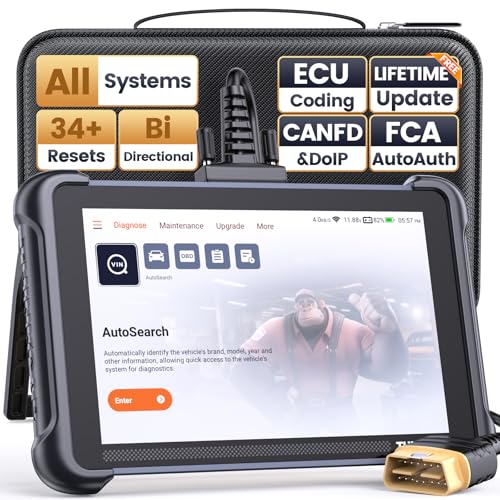
- 【Warm Tips】Wired THINKSCAN 689 is connected through a detachable OBDII cable, and we also have added OBD2 Extension Cable (about 60 cm/2 feet) as g ift, enabling customers handling vehicle repairs with ease. Just click "Bundles Item" above to get it.
- 【Professional Car Diagnostic Tool】Tired of renew fees? Thinkscan 689 scanner provides dealer-level advanced functions for lifetime f.r.e.e update for auto mechanics and repair shops. 34+ Services, 3000+ Active Test, ECU Coding, 140+ Brands Coverage, FCA AutoAuth, CANFD&DOIP Protocol, Component Matching, Power Balance, V.A.G Guided, Compatible with Google Chrome integration, etc. With strong hardware backing, 64G Memory, Android 10, 4-core processors, and 4150mAh battery. Thinkscan 689 brings you the best as your daily business helper and never lets you drop the ball!
- 【Over 34 Reset Service, Adaptation + Relearn + Calibration + Initialization + Matching】Made for workshops, Thinkscan 689 scanner provides 34+ services for worldwide vehicles: such as Gear/SAS/EPB/TPMS/D.P.F/I.M.M.O/BMS/ETS/Oil/Brake/AFS/GEARBOX/SUNROOF/SUS Reset, ABS Bleed, Injector coding, etc. Warm tips: Compatibility may vary on vehicles' model and year, please contact seller before purchase to make sure it works well on your cars.
- 【Real Active Test】Thinkscan 689 scan tool features over 3000+ full bi-directional control ability, to send commands to vehicle’s systems/components, to verify system input/output without using the vehicle's controls, e.g. turn on the radiator fan, modulate the throttle, open/close windows, operate mirrors, Injector Buz Test, turn on interior&exterior lights, sound horn, test door lock actuators, turn on/off front/rear side ACM Solenoid, Vehicle level position calibration, Wheel Speed Sensor Supply.
- 【Comprehensive Solutions with Advanced Features】Take your vehicle customization to the next level with the Thinkscan 689's advanced ECU coding capabilities. This scan tool provides power balance, PMI, unlock more new features and enhance performance by activating dormant functions, customizing OE settings, matching replaced components, and reprogramming adaptive data to elevate your driving experience. Note: Compatibility varies by car models, please check before order.

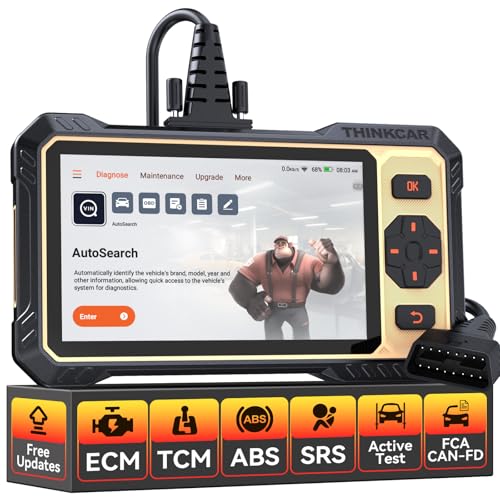
- 【Powerful Bidirectional Control -- Active Test】Good News! The THINKSCAN 662 obd2 scanner has bidirectional control function,which is the most popular feature among mechanics.This function is mainly used to test whether the executing components in the electronic control system can work normally,By requesting information from the vehicle's ECU or sending commands to the ECU module to execute commands and identify maintenance status,quickly locate the cause of the fault.Such as ABS,Fuel Injectors,Adjusting Throttle,Coolant Fans,Radiator Fans,Coolant Pumps,EV.AP Test, Fuel Trim Reset,Injector Buzz Test,Pump/ Value Test,etc. Effectively shorten diagnosis time and reduce diagnosis costs.
- 【Unlock Pro-Level Diagnostics With Half Costs】 THINKSCAN 662 obd2 scanner diagnostic tool Delivers Premium Scanning Power for Half the Price! The OBD2 scanner can handle common issues with ECM,TCM,ABS,SRS. It can easily read and clear fault codes, analyze data streams, and ensure quick identification of problems. THINKSCAN 662 bidirectional scan tool has 12 practical reset functions, including Airbag Reset,ABS Bleeding,BMS,Brake Reset, D.P.F,Throttle Adaptation,Injector Coding,OIL Reset,steering angle Reset,Gearbox,TPMS,and more. The car scanner diagnostic tool very suitable for DIY enthusiasts, car repair technicians, and small and medium-sized repair shops.
- 【Multi Functional Intelligent Car Scanner Diagnostic Tool】 Automatic VIN + Real-time Data + DTC Lookup + Historical Diagnostic Records: This OBD2 scanner features auto serch technology, allowing for car recognition without the need for manual input. The real-time data of the car ECU is read and displayed in the form of text or a 4-in-1 merged waveform chart. You can save, share, print or send the entire inspection report via email for analysis. Historical diagnostic reports help you quickly identify vehicle issues and understand the condition of the vehicle. The built-in 'feedback' module provides customized repair Operation recommendations from our certified professionals.
- 【Upgraded Hardware + Ergonomically Engineered】 THINKSCAN 662 OBD2 scanner has a friendly combination of touch screen and physical buttons with an ergonomic appearance for comfortable use.Experience 2x faster scans and 50% longer lifespan vs standard models.This scanner para autos boast a 4-core 1.8GHz CPU,6.2-inch HD touch screen,2GB RAM + 32GB ROM storage capacity,a long-lasting 4150mAh battery,Android 8 ensures lightning-fast bootup and processing.The scanner is robust with rubberized protection that you can store and use in the trunk or garage.Whether you are engaged in Home car maintenance or road rescue car repair,this car scanner can help you perfectly solve car problems.
- 【Effortless Setup & Scanning - Intuitive for All Skill Levels】No More Complicated Scanners! The User Interface is as User-Friendly as THINKCAR 689BT! Truly Plug-and-Play,The downward sliding setup shortcut portal and drawer function shortcut portal make you use this scan tool as easy as using your own cell phone.The car scanner supports setup screenshot,screen recording,volume adjustment,this scan tool includes product e-manuals,instructional videos,and fault code libraries,users can check the usage guide,perfect for DIY car owners,Maintenance technician.If your father,husband,brother,boyfriend enjoys car repairs,THINKSCAN 662 is a great gift choice, and it has amazing family value.
This product presentation was made with AAWP plugin.
Last update on 2026-05-12 / Affiliate links / Images from Amazon Product Advertising API