
NHTSA ID Number: 11022743
Manufacturer Communication Number: BW2489_US_012
TSB/Document Date: 2025-09-05
Summary
BENDIX ® ANTILOCK BRAKING SYSTEM (ABS) OPERATOR’S MANUAL
BENDIX® ANTILOCK
BRAKING SYSTEM (ABS)
OPERATOR’S MANUAL
Important Safety Information
Bendix safety technologies complement safe driving practices. No
commercial vehicle safety technology replaces a skilled, alert driver
exercising safe driving techniques and proactive, comprehensive driver
training. Never wait for the system to intervene. Responsibility for the safe
operation of the vehicle remains with the driver at all times.
Bendix®-brand Electronic Control Units (ECUs) are not designed to
store data for purposes of accident reconstruction, and Bendix® ACom®
Diagnostic Software is not intended to retrieve data for purposes of
accident reconstruction. Bendix makes no representations as to the
accuracy of data or video retrieved and interpreted from ECUs for purposes
of accident reconstruction. Bendix does not offer accident reconstruction
services or interpretation of stored data. Bendix ECUs are not protected
from fire, loss of power, impact damage, or other conditions that may be
sustained in a crash situation and may cause data to be unavailable or
irretrievable.
2
Mandate for Electronic Stability Control (ESC)
Federal Motor Vehicle Safety Standard (FMVSS) - 136 Requirements
FMVSS-136 requires the installation of an Electronic Stability Control (ESC) system
on vehicles as described below:
• August 1, 2017 - All “typical” 3 axle 6 x 4 tractors
> Front Gross Axle Weight Rating (GAWR) < 14,600 lbs
> Combined Rear GAWR < 45,000 lbs
• June 24, 2018 - Coaches/buses over 33,000 lbs GVWR
• August 1, 2019 - All other tractors, coaches/buses between 26,000 lbs. and
33,000 lbs. GVWR (includes 4 x 2; 6 x 2; and heavy haul).
Certain exclusions exist to the FMVSS-136 requirement. Contact the vehicle
manufacturer or consult FMVSS-136 for details.
FMVSS-136 requires the addition of a dash lamp to indicate the status of the
ESC system only. This lamp cannot be used to report the state of the Automatic
Traction Control (ATC) system. See your vehicle’s owner manual or contact the vehicle
manufacturer for details on the ESC dash lamp.
FMVSS-136 requires that ESC functionality must be available at speeds of 12.4 mph
(20 kph) and above. Accordingly, in FMVSS-136 compliant Electronic Control Units
(ECUs), the Antilock Braking System (ABS) off-road operation has been modified.
ECU Type
ESC Operation
Non FMVSS-136 Compliant
ESC Disabled Below 25 mph (40.2 kph)
FMVSS-136 Compliant
ESC Disabled Below 11 mph (17.7 kph)
The Bendix® EC-80™ ECUs for the Bendix® Electronic Stability Program (ESP®) system
can be programmed by the vehicle OEM to comply with FMVSS-136. Contact the
vehicle OEM or Bendix for details. The Bendix ESP is an ESC system.
3
Understanding Bendix® Antilock Braking
Systems (ABS) for Air-braked Vehicles
What Is an Antilock Braking System (ABS)?
An ABS system is an electronic control system that improves vehicle stability and
steerability by helping prevent wheel lock during braking.
How Does the Bendix® ABS System Work?
The Bendix ABS system monitors wheel rotation, and if it detects any wheel locking
up, the system may automatically reduce the brake pressure at that wheel. If
necessary, the ABS system may automatically modulate braking forces at one (1) or
more of the wheel ends. The system assists in maintaining lateral stability by helping
prevent wheel lock during braking.
What is the Optional Bendix ABS Off-road Mode?
This is an optional Bendix ABS feature operated by a dash-mounted switch for use
when operating a vehicle “off road” on soft surfaces. Below 25 mph (40.2 kph) for
non-FMVSS-136-compliant vehicles or 11 mph (17.7 kph) for FMVSS-136-compliant
vehicles, this feature improves ABS performance under off-road operating conditions.
If your vehicle is equipped with this feature, toggle the switch to the ABS Off-road
position when operating on soft surfaces. Always remember to turn off the Bendix
ABS Off-road feature when driving on a firm road surface. A new ignition cycle, or
a second depression of the off-road switch, will turn this function off and restore
normal ABS functionality and – if installed – full Bendix® Electronic Stability Program
(ESP®) system functionality. For more details on optional Bendix Automatic Traction
Control (ATC) and ESP system features, see Pages 7 and 8 of this manual.
The Bendix ABS system off-road mode should not be used on normal, paved
road surfaces because vehicle stability and steerability may be reduced. The
ABS indicator lamp will flash slowly to indicate to the driver that the ABS offroad mode is engaged.
When the Bendix ABS system off-road mode is engaged, stability functions
are disabled at speeds below 25 mph (40.2 kph) for non-FMVSS-136-compliant
vehicles or 11 mph (17.7 kph) for FMVSS-136-compliant vehicles. The Bendix
ATC/ESP system indicator lamp will illuminate to indicate that the stability
systems are disabled.
4
Important Safety Information About
Bendix® Antilock Braking Systems (ABS)
Braking with the Bendix® Antilock Braking System (ABS)
• Do not pump your brakes. Use steady, even brake applications. Apply the
brake pedal with the same pressure as you would without ABS. If you are
towing a vehicle that is not equipped with ABS, you may need to adjust
your braking applications in some instances. See below.
• D o not attempt to modulate your brake applications to prevent
wheel lock. The system controls braking pressure automatically, and
independently, at each wheel end to help prevent wheel lock-up.
Limitations of the Bendix ABS System
• The Bendix ABS system does not apply the brakes automatically. It is still
up to you to apply the brakes at the right time and with the right amount of
pedal force. A basic ABS system only starts to do its job after you apply the
brake pedal. NOTE: The Bendix® Electronic Stability Program (ESP®) system
(if equipped on your vehicle) can reduce the throttle and may apply some
or all of the brakes selectively to help maintain vehicle stability. See Page 8.
• The Bendix ABS system is not a substitute for safe driving. Even with
the Bendix ABS system, you must remain alert, react appropriately and
in a timely manner, and drive defensively. Do not take unnecessary risks.
Cautious driving practices, such as maintaining an adequate distance away
from the vehicle ahead, not speeding, anticipating obstacles and adjusting
your vehicle’s speed for traffic, weather, and road conditions, are essential
for safe operation. Never wait for the system to intervene.
If replacement tires are used that are a different diameter from the OEM-specified
tire size, the new tire size must be programmed into the ABS controller using
the Bendix® ACom® Diagnostic Software.
Towed Vehicles Without ABS
Some towed vehicles, especially older trailers built before 2001, may not be
equipped with their own ABS systems. Use extra care when towing a vehicle that
is not equipped with its own ABS system. During emergency braking or braking on
slippery surfaces, a non-ABS equipped trailer could lose its lateral stability and swing
out if its wheels lock up. Use your mirrors to watch carefully and adjust your brake
applications as necessary to keep your tractor and the non-ABS-equipped towed
vehicle in line with each other. Tractor ABS helps reduce the tendency to jackknife,
but it cannot prevent a non-ABS equipped trailer from swinging out.
5
Understanding the Bendix® Automatic Traction
Control (ATC) System (If Equipped)
What is the Bendix® Automatic Traction Control (ATC) System?
The Bendix ATC system is an optional feature for vehicles equipped with a Bendix®
Antilock Braking System (ABS) that helps control wheel spin during vehicle
acceleration to improve traction.
• The Bendix ATC system may intervene automatically and apply braking
pressure to a spinning wheel, thus transferring engine power to other drive
wheels that have better traction. This feature is active only at speeds below
25 mph (40.2 kph).
• If all of the drive wheels begin to spin, the Bendix ATC system may reduce
engine throttle to improve traction at all of the drive wheels.
How Do I Operate a Vehicle with the Bendix ATC System?
If the drive wheels begin to lose traction during acceleration, the ATC system may
engage automatically to assist the driver in accelerating the vehicle.
For non-FMVSS-136-compliant vehicles, the ATC/Bendix® Electronic Stability Program
(ESP®) indicator lamp will flash rapidly to let you know whenever ATC is actively
functioning. For FMVSS-136-compliant vehicles, the ATC indicator lamp will flash
rapidly to let you know whenever ATC is actively functioning.
NOTE: For vehicles equipped with an inter-axle differential lock switch, you should
consult the vehicle Operator’s Manual for additional information about that feature.
Typically, the driver is advised to stop the wheels from spinning and engage the interaxle differential lock switch, but you should always follow the specific instructions
given in your vehicle’s Operator’s Manual for this feature and your vehicle’s particular
configuration.
6
What is Traction Control Override?
Traction Control Override is an optional feature that is operated by a switch on the
dash. When enabled, the Bendix® Automatic Traction Control (ATC) indicator lamp
remains on to indicate that the ATC system has been turned off.
What is the Mud/Snow Mode?
The Mud/Snow mode is an optional ATC feature operated by a dash-mounted
switch. This function allows greater engine power and more wheel spin during
ATC operation. On vehicles equipped with this feature, depress the switch to the
Mud/Snow position when operating on soft road surfaces. The ATC indicator lamp
will flash slowly (approximately every 2.5 seconds) to show that you are in the Mud/
Snow mode. Whenever the ATC system intervenes, the ATC indicator lamp will flash
quickly (approximately 2.5 times per second). Always remember to turn the Mud/
Snow feature off when driving on a firm road surface. A new ignition cycle, or a
second depression of the Mud/Snow switch, will turn this function off.
What is Bendix® SMART ATC System?
The Bendix SMART ATC system monitors the accelerator pedal position to help
provide optimum traction and vehicle stability. By determining the driver’s throttle
input and adapting the drive wheel behavior to the driving situation, the Bendix
SMART ATC system allows higher wheel slip when the accelerator pedal is applied
above a preset level. In addition, the wheel slip allowed by the Bendix SMART ATC
system is decreased when driving through a curve for improved stability.
7
Understanding the Bendix®
Electronic Stability Program (ESP®) System
What is the Bendix® Electronic Stability Program (ESP®) System?
The Bendix ESP system is an optional feature for vehicles equipped with a Bendix®
Antilock Braking System (ABS) that can help to reduce the risk of rollovers, jackknifing,
and other loss-of-control situations. The Bendix ESP system features include roll
stability control and yaw control. NOTE: This feature is optional for all non-FMVSS136-compliant vehicles. See Page 4 for more details.
Roll Stability Control
What Is Roll Stability Control (RSC)?
Roll Stability Control (RSC) is a feature on the Bendix ESP full stability systemequipped vehicles that can help to reduce the risk of rollovers.
How Does RSC Improve Vehicle Roll Stability?
RSC counteracts the tendency of a vehicle, or vehicle combination, to tip over while
changing direction (typically, while turning). The lateral forces during a turn can
push a truck or tractor-trailer horizontally and, if the friction between the tires and
the road is sufficient, the vehicle may begin to tip and potentially could roll over.
To help reduce the risk of rollover, RSC detects potential rollover conditions and
slows the vehicle both by reducing engine throttle (and hence, engine torque) and by
applying the tractor and trailer service brakes as needed at the appropriate wheels.
During an RSC intervention, the vehicle automatically decelerates. The system
can slow the vehicle with or without you applying the brake pedal, and even
when you are applying the throttle.
8
During a Roll Stability Control (RSC) intervention, you can always use your service
brake pedal to increase the braking pressure that will be applied. However, if you were
to apply less braking pressure than needed – or even if you release the brake pedal
entirely during an intervention – the system may continue to apply the necessary
amount of braking pressure automatically to the appropriate wheels to help mitigate
a potential rollover.
Driving Scenario: A vehicle enters a curve too
fast, on high-friction pavement, resulting in high
lateral (side) forces acting at the vehicles center of
gravity (CG). The high friction between the wheels
and the pavement create a “hinge” effect allowing
the forces at theA
CG to push the vehicle over.
RSC Intervention: The roll stability control
automatically reduces engine torque and applies
the service brakes (based on the projected rollover
risk) to reduce the vehicle speed, thereby reducing
the tendency to roll over.
AA
A
B
B
B
C
C
C
A: Tractor/Trailer
B: Transit Bus
9
C: School Bus
C
Yaw Control
What Is Yaw Control?
Yaw control is a feature on vehicles equipped with the Bendix® Electronic Stability
Program (ESP®) system that can help reduce the risk of jackknifing and other loss-ofcontrol situations. If a vehicle’s tires start to slide during a turn, yaw control counteracts
the tendency of that vehicle to spin (or “yaw”), thereby reducing the risk of a jackknife
or other loss-of-control situations. Many factors – including road conditions, load
distribution, and driving behavior – can contribute to the development of a spin.
Spins occur where either: (a) the rear wheels begin to lose their grip on the
road – which could lead to a jackknife when towing a trailer; or, (b) the front wheels
begin to lose their grip, reducing a vehicle’s ability to respond to the driver’s steering
inputs.
Yaw control continually monitors the direction in which you are steering the vehicle
as well as the vehicle’s response to those steering inputs. If the system detects that
the vehicle is beginning to spin, yaw control may reduce the engine throttle, use
selective braking at the four (4) corners of the vehicle – and may also use trailer
braking – to help you keep the vehicle under control.
During a yaw control intervention, the vehicle automatically decelerates. Yaw
control can slow the vehicle with or without you applying the brake, and even
when you are applying the throttle.
Driving Scenario: Excessive speed exceeds the
threshold, creating a situation where a vehicle is
likely to spin and jackknife.
A
A
B
C
Yaw Control Intervention: The yaw control
feature reduces engine throttle and selectively
applies brakes to reduce the tendency to jackknife.
B
B
A
AB
C
B
A
B
C
C
C
A: Tractor/Trailer
B: Transit Bus
10
C: School Bus
Important Safety Information About the Bendix®
Electronic Stability Program (ESP®) System
The Bendix® Electronic Stability Program (ESP®) system may reduce your
speed automatically. The Bendix ESP system can make your vehicle decelerate
automatically. The Bendix ESP system may slow the vehicle with or without you
applying the brake, and even when you are applying the throttle.
To minimize unexpected deceleration and reduce the risk of a collision:
• Avoid aggressive driving maneuvers – such as sharp turns or abrupt lane
changes at high speeds – which might trigger the stability system.
• Always operate your vehicle safely, drive defensively, anticipate obstacles
and pay attention to road, weather, and traffic conditions. Bendix® Antilock
Braking System (ABS), Automatic Traction Control (ATC), and ESP systems
are no substitute for prudent, careful driving. Never wait for the system to
intervene.
Limitations of the Stability System
The Bendix ESP system’s effectiveness may be greatly reduced if:
•
The load shifts due to improper retention, accident damage, or the
inherently mobile nature of some loads (for example, hanging meat, live
animals or partially laden tankers);
•
The vehicle has an unusually high – or off-set – center of gravity (CG);
•
One side of the vehicle drops off the pavement at an angle that is too
large to be counteracted by a reduction in speed;
•
The vehicle is used to haul double or triple trailer combinations;
•
If very rapid steering changes are attempted at high speeds;
•
There are technical problems with suspension leveling of the tractor or
trailer resulting in uneven loads;
•
The vehicle is maneuvering on a high banked road creating either additional
side forces due to the weight (mass) of the vehicle, or a deviation between
expected & actual yaw rates;
•
The vehicle experiences a significant mechanical problem or failure. ESP will
not prevent serious problems (for example, tire failures) from impacting the
driver’s ability to control the vehicle;
•
Gusty winds are strong enough to cause significant side forces on the vehicle
and any towed vehicles.
To maximize the effectiveness of ESP functionality, drivers need to exercise extreme
caution at all times and should avoid sharp turns, sudden steering adjustments, or
abrupt lane changes at high speeds, and any loads should be properly secured at
all times. Never wait for the system to intervene.
11
Chassis Modifications
The Bendix® Electronic Stability Program (ESP®) system is specifically calibrated
and validated only for your vehicle’s original configuration. If the vehicle’s chassis
components are altered (for example, a wheel base extension or reduction; tag axle
addition or removal; a major body change such as conversion of a tractor into a truck;
or an axle, suspension, or steering system component modification), the ESP Electronic
Control Unit (ECU) must be updated to reflect these changes. Contact your OEM prior
to making any modifications to your vehicle.
If you modify your vehicle and do not update the ESP ECU, the ESP system may fail
to function as intended. Serious vehicle braking and performance issues could
result, including unnecessary ESP system interventions, exceeding regulated
stopping distance, and/or system faults leading to loss of system functions.
These types of failures can lead to loss-of-control of the vehicle and/or collisions
causing property damage, serious injuries, or death.
Steering Angle Sensor Recalibration
Whenever maintenance or repair work is performed – to the steering mechanism,
linkage, steering gear, adjustment of the wheel track, or if the steering angle sensor is
replaced – a recalibration of the steering angle sensor must be performed.
If the steering angle sensor is not recalibrated, the yaw control system will not
function properly, which could result in loss of control of your vehicle.
When replacing a steering wheel, use only a vehicle manufacturer approved
steering wheel and be sure that the steering angle sensor is not damaged during
installation. Recalibrate the steering angle sensor.
If replacement tires are used that are a different diameter from the OEM-specified
tire size, the new tire must be programmed into the Bendix® Antilock Braking
System (ABS) controller using Bendix® ACom® Diagnostic Software.
The location and orientation of the yaw rate sensor must not be altered. When
servicing, an identical component must be used in the same orientation (using
OEM brackets and torque requirements). During installation, follow the OEM
12
leveling guidelines.
Understanding the Bendix® Antilock
Braking System (ABS) Indicator Lamps
(Non-FMVSS-136-compliant Vehicles)
Bendix® Antilock Braking System (ABS) Indicator Lamp
An amber ABS indicator lamp is typically located on the dashboard.
• At each vehicle ignition your ABS indicator lamp should illuminate as a bulb
check for approximately three (3) seconds and then turn off. If the lamp
does not illuminate at ignition, you should have the vehicle serviced by
a qualified technician as soon as possible. NOTE: Without a functioning
indicator lamp, you may not be able to determine the ABS status without
using an external diagnostic tool.
• If the indicator lamp remains on for more than three (3) seconds after
ignition, or if it illuminates while you are driving, the ABS system may not
be fully functional or may be completely disabled. If the ABS is completely
disabled or not functioning properly, your vehicle will still have normal
service braking and it still can be driven, although without the benefits
of ABS. Have the vehicle serviced by a qualified technician as soon as
possible to restore full ABS functionality.
• The ABS indicator lamp is also used to indicate the optional off-road ABS
mode. The lamp will flash continually when the vehicle is operating in the
off-road mode. NOTE: When the ABS off-road mode is engaged, stability
functions are disabled at speeds below 25 mph (40.2 kph). The Automatic
Traction Control (ATC)/Bendix® Electronic Stability Program (ESP®) indicator
lamp will illuminate to indicate that the stability systems are disabled.) See
Page 4 of this manual for additional sources of information about the ABS offroad operating mode.
13
Understanding the Bendix® Antilock Braking System (ABS)
Indicator Lamps (Non-FMVSS-136-compliant Vehicles) (cont.)
Trailer Bendix® Antilock Braking System (ABS) Indicator Lamp
The trailer ABS indicator lamp is also dash-mounted.
• All trailers built since March 2001 are able to communicate with the towing
vehicle and operate the trailer ABS indicator lamp on the towing vehicle’s
dash. The trailer ABS indicator lamp functions just like the tractor ABS
indicator lamp. It is illuminated for three (3) seconds after each vehicle
ignition, then extinguished – unless a problem develops with the trailer
ABS during operation.
• All new trailers built since March 1, 2001, are equipped with an amber ABS
indicator lamp located near the rear of the trailer on the driver’s side. The
operation of the lamp varies depending on how the ABS system is powered:

- 💯【Conta.ct us for Support Directly】If you met any...
- 🔥🔥🔥【2026 AUTEL FLAGSHIP MK900BT MK900-BT, NEW...
- 🚗【3000+ ACTIVE TESTS (50➡3000+), SAME AS MS...
- 🚗【40+ HOT SERVICES FOR 150 MAKES (28+➡40+)】Full...
- 🚗【OE ALL SYSTEM DIAGNOSE, AUTO SCAN 2.0: SCAN LICENSE...


- 【TURN OFF CEL】 This AL319 car scanner diagnostic tool...
- 【EXTENSIVE APPLICATION】 Autel AL319 Compatible with...
- 【FOR END USER & DIYERS】 This error code reader AL319 is...
- 【USER-FRIENDLY DESIGN】 This OBD2 scanner and check...
- 【HIGH-QUALITY SERVICES】 12 months war.ranty from the...
This product presentation was made with AAWP plugin.
If the PDF is very large, it may not load in the preview below.
Some older TSBs had multiple PDFs — visit the NHTSA Website to view all PDFs.
If the TSB PDF does not show, download or view it on the NHTSA Website.
Click on the (+) Plus Sign
Then Click on Associated Document(s)
Search NHTSA Database for Recalls
Search NHTSA Database for Vehicle Investigations
View Latest Vehicle Investigations
Search NHTSA Database for Vehicle Complaints
View Latest Vehicle Complaints
TSB/Document ID: BW2489_US_012
Replacement Service Bulletin Number:
MFR Communication Date: 2025-08-20
MFR Internal Campaign ID/Software Version:
Communication Type: Other
NHTSA Components: SERVICE BRAKES
MFR Component System: Antilock Brake System
MFR Component Subsystem:
Previous TSB | Next TSB |
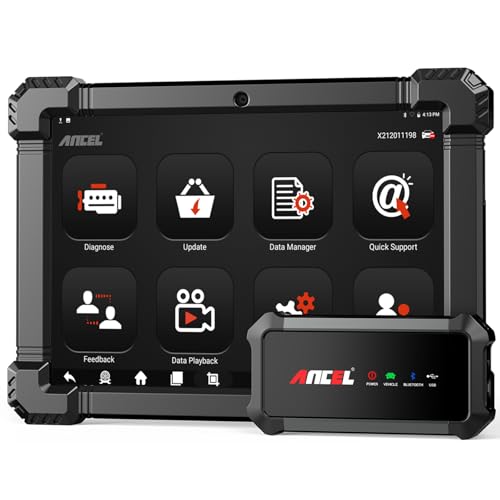
- 🔥🔥🔥2026 New Functions Making X7HD the Top Dog - Big Surprise!!! ANCEL X7HD truck scanner 10 major functional advantages .✅>Full HDOBD/OBD2 Function ✅>ALL System Diagnostic ✅>42+ Reset Function ✅>Active Test / Bi-Directional Control✅>ECU Coding✅>Graphing Live Data✅>Wide Compatibility ✅>2 Yrs Free Update✅>Remote Operation✅>Bluetooth 5.0 & Wifi In addition, 8 major hardware advantages: ✅>6000 mAh✅>10.1 inch Tablet✅>2G RAM
 ✅>32G ROM (Expandable to 128GB)✅>Data Record & Replay & Print✅>Android 10.0✅>Bluetooth 5.0 & Wifi✅>14 Languages
 - 🚛OEM DPF Forced Regen & Cylinder Cutout Test & more - ANCEL X7HD diesel scanner diagnostic tool not only supports DPF regeneration, DPF reset, DPF related information reset, DPR state reset, DPD forced regeneration etc, which helps you better solve the exhaust aftertreatment system problems, but also supports activate motor to do exhaust air in ABS Automatically. Moreover, it features TPMS activation, cylinder cut-off and learning functions
- 🚛Advanced ECU Coding & Programming - ANCEL X7HD 10.1inch truck scanner diagnostic tool is equipped with advanced ECU coding, supports Level calibration, Idle speed learning and Adjustment, Camshaft timing control learning, Control unit adaptations, Injector Codes, Read/Write VIN, Road speed limit optional vehicle speed set, etc... PLEASE NOTE that ECU codes are not compatible with all vehicles, please send us your VIN# to check vehicle compatibility
- 🚛42+ Reset Functions & Bidirectional Control - 2026 newest top heavy duty truck scan tool, comes with 42+ special services (ECU, Speed Limit and Idle Reset, Oil Reset, Injector Coding, EPB, ABS, SRS, Suspension, Throttle, etc. and always keep growing), which meet all your various needs for service and maintenance
- 🚛10 Inch All Systems Diesel Scanner & Full HDOBD/OBD2 Modes - ANCEL X7HD diesel truck scan tool supports all systems scan, such as Engine, Brake, Retarder, TECU Transmission, Tachograph, ABS, SRS, TPMS, EPB, SAS, ESP, and other vehicle systems, comes with 10 obd2 service modes: read/erase error codes, Data Stream, I/M Readiness, Vehicle Information, Actuations, DTC Lookup, EVAP, view freeze frame, etc
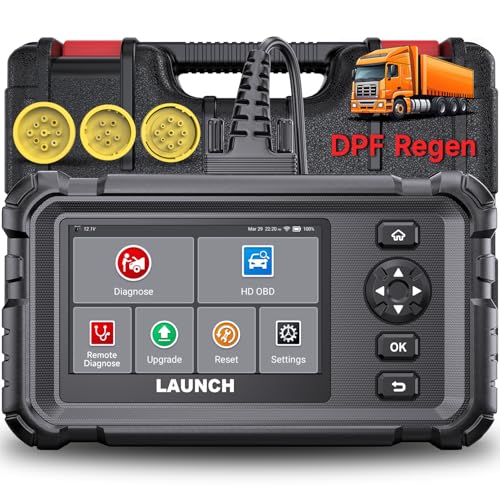
- Dealer-Level Diagnostics, Faster & Easier: The heavy duty truck scanner delivers full-system diagnostics for engine, ABS, transmission, and more, plus 7+ reset functions like DPF Regen and Speed Limit Adjust. Powered by a 1.3G CPU, 2GB RAM, 16GB storage, Android 8.1, and a 3000mAh battery, it runs smoothly for fast scanning, live data, reports, Auto VIN, Wi-Fi updates, and easy handheld use. It captures screenshots, replays live data, and generates reports to support your repair decisions.
- One Tool for 50+ Truck Brands: The diesel scanner supports J1939, J1708, J1587, and OBD2/CAN protocols, delivering broad coverage for major diesel trucks and commercial vehicles including Cummins, Cat, Detroit, Paccar, Volvo, Freightliner, Kenworth, Peterbilt, International, Mack, Isuzu, Hino, Scania, Mercedes-Benz, and more. Also supports Allison, Aisin, Eaton, WABCO, and Bendix, helping you diagnose more vehicles, reduce equipment costs, and handle more jobs with one professional scan tool.
- Diesel Truck DPF Regen & Reset Features: Experiencing loss of power, sluggish acceleration, or poor hill-climbing performance? These symptoms are often caused by a clogged or overloaded DPF. The truck diagnostic scanner offers OEM-level forced DPF regeneration, DPF reset, and DPD/DPR functions. This device extends DPF lifespan and efficiently diagnoses exhaust aftertreatment issues. It can significantly reduce diagnostic time and save you up to $3,000 or more in costly dealership fees.
- 7+ Resets - Perform Essential Procedures: The truck scanner features 7+ essential resets including DPF Regen clears carbon buildup; Oil Reset clears service light; Injector Coding matches new injectors; DEF Test checks urea injection; Speed Limit Adjust saves fuel; Cylinder Cutout pinpoints misfires; Clutch Relearn restores smooth engagement. Reset after maintenance or part replacement for proper truck operation. Vehicle compatibility varies. Email [email protected] to confirm before buying.
- Full System Diagnostic for Truck: The truck scanner diagnostic tool covers all systems like engine, ABS, transmission, SAS, SRS, TPMS and more. It reads fault codes and shows real-time data. Additionally, it includes full HD OBD and OBD2 modes: read/clear codes, live data stream, I/M readiness, freeze frame, DTC lookup, and more. When warning lights appear or performance issues arise, quickly identify which system is affected and gain the real-time data needed for accurate diagnosis.
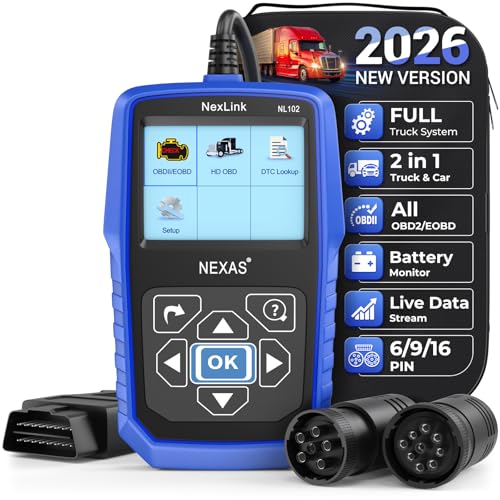
- Diagnose Heavy-Duty Truck Problems Fast — Read and clear fault codes and diagnose warning light issues on many Class 4–8 diesel trucks including Freightliner, Peterbilt, Kenworth, Volvo, Mack and Cummins-powered vehicles
- Help Reduce Downtime & Repair Costs — It offers full system diagnostics for major trucks meeting standard protocols, along with complete OBD2 functionality. Quickly check engine faults, view live truck data and identify issues before expensive repair shop visits or unnecessary repairs
- No complicated setup required — Simple menus and built-in DTC explanations make this truck code reader easy to use for owner-operators, mobile mechanics and small fleet maintenance
- Live Data & Built-in DTC Lookup — View real-time engine data and built-in truck fault code definitions directly on the scanner to help understand vehicle problems faster without searching through manuals
- Free Lifetime Updates & Technical Support — Includes free software updates plus responsive technical support for setup, compatibility and everyday truck diagnostics
This product presentation was made with AAWP plugin.
Last update on 2026-06-05 / Affiliate links / Images from Amazon Product Advertising API