
NHTSA ID Number: 10251816
Manufacturer Communication Number: ReferenceY40
TSB/Document Date: 2024-03-18
Summary
Customer Satisfaction Notification Y40 Control Module Software Updates
CUSTOMER SATISFACTION NOTIFICATION
NORTH AMERICA
Control Module Software Updates
FCA US LLC
Reference: Y40
2019 – 2021 (RU) Chrysler Pacifica Plug-in Hybrid Electric
Vehicle (PHEV) equipped with a 3.6L hybrid engine (sales
code EH3)
2019 – 2021 (JL) Jeep Wrangler equipped with a 3.6L
eTorque engine (sales code ERG)
2018 – 2022 (JL) Jeep Wrangler equipped with a 2.0L engine
(sales code EC3)
2019 – 2021 (DT) Ram 1500 Pickup equipped with a 3.6L
eTorque engine (sales code ERG)
Template Version 1.8
Revision
0
Edition
January 2024
Detail
Initial Version.
SYMPTOM DESCRIPTION
The Powertrain Control Module (PCM) software
calibration on about 287,665 of the above vehicles
may fail to properly monitor certain emission-related
diagnostic functions as required by California and
Federal regulations. In addition, the Power Inverter
Module (PIM) diagnostics allow for correct malfunction
detection but prevents natural fault healing after repair
actions. This issue prevents the clearing of permanent
fault codes (PFC)s in the PIM which is required by
regulation. This update will also address Diagnostic
Trouble Codes (DTC)s and PFCs (P0010, P0013,
P0020, P2135, P0121, P0221) that do not heal on the
2020 model year (RU) PHEV as well as a POC4A that
will not set unless communication fault U0624 is
present on the 2021 model year (RU) PHEV.
NOTE: Some vehicles above may have been
identified as not involved in this campaign and
therefore have been excluded from this campaign.
IMPORTANT: Some of the involved vehicles may
be in dealer new vehicle inventory. Dealers should
complete this campaign service on these vehicles
before retail delivery. Dealers should also perform
this repair on vehicles in used vehicle inventory and
those vehicles in for service. Involved vehicles can be
determined by using the VIP inquiry process.
REPAIR TO BE PERFORMED
Update the calibration software in the PCM and the
PIM, comprised of the Hybrid Control Processor
(HCP) and Auxiliary Hybrid Control Processor
(AHCP).
COMPLETION REPORTING / REIMBURSEMENT
Claims for vehicles that have been serviced must be
submitted on the DealerCONNECT Claim Entry
Screen located on the Service tab. Claims paid will
be used by FCA to record recall service completions
and provide dealer payments.
Use the following labor operation numbers and time
allowances:
Labor Description
Number
Hrs
Inspect PCM and HCP
18-Y4-01-81
0.2hrs
software
Inspect and Reprogram
18-Y4-01-82
0.3hrs
PCM
Inspect and reprogram
18-Y4-01-83
0.3hrs
HCP (RU Model Only)
Inspect and reprogram
18-Y4-01-84
0.2hrs
HCP (JL and DT Models
Only)
Inspect and reprogram
18-Y4-01-85
0.5hrs
PCM and HCP (RU Only)
Inspect and reprogram
18-Y4-01-86
0.4hrs
PCM and HCP (JL and DT
Models Only)
NOTE: See the Warranty Administration Manual,
Recall Claim Processing Section, for complete
claim processing instructions.
SPECIAL TOOLS
The following special tools is /are required to perform
this repair:
Number
Description
NPN
wiTECH MicroPod II / MDP
NPN
Laptop Computer
NPN
wiTECH Software
DEALER NOTIFICATION
To view this notification on DealerCONNECT, select
“Global Recall System” on the Service tab, then click
on the description of this notification.
Strictly respect STELLANTIS Group safety, cleanliness, and environmental instructions for any intervention.
Document exclusively reserved for dealer information. Internal distribution to be ensured by dealer.
Reproduction forbidden without the written agreement of STELLANTIS Group. (C) 2023 STELLANTIS Group. All Rights Reserved
1/3
CUSTOMER SATISFACTION NOTIFICATION
NORTH AMERICA
Control Module Software Updates
FCA US LLC
Reference: Y40
Service Procedure
NOTE: The wiTECH scan tool must be used to perform this campaign. The wiTECH software is required to
be at the latest release level before performing this procedure.
WARNING! The PCM, HCP and AHCP must be updated to the latest available software at the conclusion of
this repair procedure. Failure to update the HCP, AHCP modules following a PCM software update may
result in vehicle malfunctions.
NOTE: If this software update flash process is interrupted/aborted, the flash should be restarted.
NOTE: PHEV vehicles: it is normal for the high voltage charging lamp on the dash to flash like there is a
charging system failure while performing software updates.
1. Install a battery charger and verify that the charging rate provides 13.0 to 13.5 volts. Do not allow the charger
to time out during the flash process. Set the battery charger timer (if so equipped) to continuous charge.
2. Connect the wiTECH micro pod II to the vehicle data link connector.
3. Place the ignition in the “RUN” position.
4. Open the wiTECH 2.0 website.
5. Enter your “User id” your “Password” and your “Dealer Code”, then select “Finish” at the bottom of the
screen.
6. Starting at the “Vehicle Selection” screen, select the vehicle to be updated.
7. From the “Action Items” screen, select the “All Flashes” tab. Inspect if new software flashes are available for
the “PCM” and/or “HCP/AHCP”.
➢ If no module has new software available, then proceed to Step 21 and claim the inspection LOP to
complete this recall.
➢ If one or more modules have new software available, then continue with Step 8.
8. Create a Vehicle Scan Report (VSR) before proceeding with software updates.
9. Ensure there are no current DTCs that could cause concern with modules being flashed. If any questions,
please share the VSR with the STAR center.
10.
From the “Action Items” screen, select the “All Flashes” tab.
➢
➢
Select “PCM” by clicking the arrow on the right side of the screen. Read the special flash instructions, then
select “OK”. Continue with Step 11.
If “PCM” is not displayed as one of the available flashes, the PCM software is already at the current
software level and does not require updating. Proceed to Step 15.
11.
From the “Flash ECU Agreement” page, agree to terms by “Checking the Box”.
12.
Select “Flash ECU” and then follow the wiTECH screen instructions to complete the flash.
13.
Once the software is confirmed to be at the latest available calibration level, select “View DTCs”.
14.
Select the “Clear All DTCs” tab, then click “Clear All DTCs” and then select “Close”. It may be necessary to
cycle the ignition OFF to RUN to clear the codes.
Strictly respect STELLANTIS Group safety, cleanliness, and environmental instructions for any intervention.
Document exclusively reserved for dealer information. Internal distribution to be ensured by dealer.
Reproduction forbidden without the written agreement of STELLANTIS Group. (C) 2023 STELLANTIS Group. All Rights Reserved
2/3
CUSTOMER SATISFACTION NOTIFICATION
NORTH AMERICA
Control Module Software Updates
FCA US LLC
Reference: Y40
Service Procedure [Continued]
NOTE: The PIM contains two processors, Hybrid Control Processor (HCP) and Auxiliary Hybrid Control
Processor (AHCP). The HCP and AHCP are combined into one PIM software update. The software update
must begin with updating the HCP. The AHCP will update immediately following the HCP.
15.
From the “Action Items” screen, select the “All Flashes” tab.
➢
Select “HCP” by clicking the arrow on the right side of the screen. Read the special flash instructions, then
select “OK”. Continue with Step 16.
➢
If “HCP” is not displayed as one of the available flashes, the PIM software is already at the current software
level and does not require updating. Proceed to Step 20.
16.
From the “Flash ECU Agreement” page, agree to terms by “Checking the Box”.
17.
Select “Flash ECU” and then follow the wiTECH screen instructions to complete the flash.
18.
Once the software is confirmed to be at the latest available calibration level, select “View DTCs”.
19.
Select the “Clear All DTCs” tab, then click “Clear All DTCs” and then select “Close”. It may be necessary to
cycle the ignition OFF to RUN to clear the codes.
20.
Generate a VSR to ensure P0AA4/P0AA1 or any DTC is not active or pending.
21.
Turn the ignition to the “OFF” position and then remove the wiTECH micro pod II device from the vehicle.
22.
Remove the battery charger from the vehicle.
23.
For the state of California residents complete the correction form.
24.
Return the vehicle to the customer.
Complete Proof of Correction Form for California Residents
This campaign is subject to the State of California Registration Renewal/Emissions Recall Enforcement
Program. Complete a Vehicle Emission Recall Proof of Correction Form (Form No. 81-016-1053) and supply
it to vehicle owners residing in the state of California for proof that this campaign has been performed when
they renew the vehicle registration.
Process Steps to obtain the California Proof of Correction form:
a. Access the “DealerCONNECT” website.
b. Select the “Service” tab.
c. Under the “Publications” heading, select the “ePublishing” link.
d. Sign in using your Dealer Code and Password.
e. Select the “Proof of Correction form”.
Strictly respect STELLANTIS Group safety, cleanliness, and environmental instructions for any intervention.
Document exclusively reserved for dealer information. Internal distribution to be ensured by dealer.
Reproduction forbidden without the written agreement of STELLANTIS Group. (C) 2023 STELLANTIS Group. All Rights Reserved
3/3
This notice applies to your vehicle,
CUSTOMER SATISFACTION NOTIFICATION
Control Module Software Updates
[Model Year and Model]
VIN XXXXXXXXXXXXXXXXX
Y40
LOGO
VEHICLE PICTURE
YOUR SCHEDULING OPTIONS
1. RECOMMENDED OPTION
Call your authorized Chrysler /
Dodge / Jeep® / RAM dealership.
2. Call the FCA Recall Assistance
Center at 1-800-853-1403. An
agent
can
confirm
part
availability and help schedule an
appointment.
3. Visit recalls.mopar.com, scan the
QR code below, or download the
Mopar Owner’s Companion App.
QR Code
Get access to recall notifications,
locate your nearest dealer, and more
through this website or Mopar
Owner’s Companion App. You will be
asked to provide your Vehicle
Identification Number (VIN) to
protect and verify your identity.
DEALERSHIP INSTRUCTIONS
Please reference CSN Y40.
Dear [Name],
At FCA US LLC, we recognize that the success of our business depends on the satisfaction of
our customers. We are constantly monitoring the quality of our products and looking for
opportunities to improve our vehicles even after they are sold. Because your long-term
satisfaction is important to us, we are contacting you on important improvements we would
like to make to your vehicle [1]. This will be done at no charge to you.
We are recommending the following improvements be performed on certain [2017-2021 (RU)
Chrysler Pacifica Plug-in Hybrid Electric Vehicles (PHEV), [2019-2021 (DT) Ram 1500
Pickup vehicles with a 3.6L eTorque engine] [2019-2021 (JL) Jeep Wrangler vehicles with a
3.6L eTorque engine] [2018-2020 (JL) Jeep Wrangler vehicles with a 2.0L engine].
WHY DOES MY VEHICLE NEED REPAIRS?
The Powertrain Control Module (PCM) software calibration on your vehicle may fail to
properly monitor certain emission-related diagnostic functions as required by California and
Federal regulations. In addition, the Power Inverter Module (PIM) diagnostics allow for
correct malfunction detection but prevents natural fault healing after repair actions. This issue
prevents the clearing of permanent fault codes in the PIM which is required by regulation.
HOW DO I RESOLVE THIS CUSTOMER SATISFACTION NOTIFICATION?
FCA US will repair your vehicle free of charge (software update and labor). To do this, your
dealer will update the PCM and PIM software. The estimated repair time is about 30 minutes.
In addition, your dealer will require your vehicle for proper check-in, preparation, and checkout during your visit, which may require more time. Your time is important to us, so
we recommend that you schedule a service appointment to minimize your inconvenience.
Please bring this letter with you to your dealership.
TO SCHEDULE YOUR FREE REPAIR,
CALL YOUR CHRYSLER, DODGE, JEEP OR RAM DEALER TODAY
CALIFORNIA RESIDENTS
The State of California requires the completion of this emission recall repair prior to vehicle
registration renewal. Your dealer will provide you with a Vehicle Emission Recall Proof of
Correction Form after the Customer Satisfaction Notification service is performed. Be sure to
save this form since the California Department of Motor Vehicles may require that you supply
it as proof that the Customer Satisfaction Notification has been performed.
In order to ensure your full protection under the emissions warranty provisions, it is
recommended that you have your vehicle serviced as soon as possible. Failure to do so could
be determined as lack of proper maintenance of your vehicle.
WHAT IF I ALREADY PAID TO HAVE THIS REPAIR COMPLETED?
If you have already experienced this specific condition and have paid to have it repaired, you
may visit www.fcarecallreimbursement.com to submit your reimbursement request online. [2]
Once we receive and verify the required documents, reimbursement will be sent to you within
60 days. If you have had previous repairs performed and/or already received reimbursement,
you may still need to have the repair performed.
We apologize for any inconvenience, but are sincerely concerned about your satisfaction.
Thank you for your attention to this important matter.
Customer Assistance/Field Operations
FCA US LLC
Mr. Mrs. Customer
1234 Main Street
Hometown, MI 48371
[1] If you no longer own this vehicle, please help us update our records. Call the FCA Recall Assistance Center at 1-800-853-1403 to update your information.
[2] You can also mail in your original receipts and proof of payment to the following address for reimbursement consideration: FCA Customer Assistance, P.O. Box 218004, Auburn Hills, MI 48321-8007, Attention: Recall Reimbursement.


- [J2534 Pass-Thru Programmer] - TOPDON RLink J2534 is...
- [All-in-One OEM Reprogramming and Diagnostics] - When...
- [Tested, Trusted, and Proven for Accuracy] - TOPDON RLink...
- [One-Click Installation, Continuous Updates] - The exclusive...
- [Works with Windows Compatibility and OEM Software...

This product presentation was made with AAWP plugin.
If the PDF is very large, it may not load in the preview below.
Some older TSBs had multiple PDFs — visit the NHTSA Website to view all PDFs.
If the TSB PDF does not show, download or view it on the NHTSA Website.
Click on the (+) Plus Sign
Then Click on Associated Document(s)
Search NHTSA Database for Recalls
Search NHTSA Database for Vehicle Investigations
View Latest Vehicle Investigations
Search NHTSA Database for Vehicle Complaints
View Latest Vehicle Complaints
TSB/Document ID: ReferenceY40
Replacement Service Bulletin Number:
MFR Communication Date: 2024-01-12
MFR Internal Campaign ID/Software Version:
Communication Type: Service Bulletin/Repair Instructions
NHTSA Components: ELECTRICAL SYSTEM:SOFTWARE
MFR Component System:
MFR Component Subsystem:
Previous TSB | Next TSB |
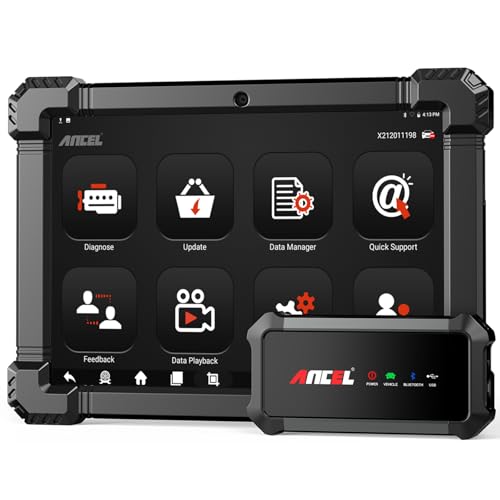
- 🔥🔥🔥2026 New Functions Making X7HD the Top Dog - Big Surprise!!! ANCEL X7HD truck scanner 10 major functional advantages .✅>Full HDOBD/OBD2 Function ✅>ALL System Diagnostic ✅>42+ Reset Function ✅>Active Test / Bi-Directional Control✅>ECU Coding✅>Graphing Live Data✅>Wide Compatibility ✅>2 Yrs Free Update✅>Remote Operation✅>Bluetooth 5.0 & Wifi In addition, 8 major hardware advantages: ✅>6000 mAh✅>10.1 inch Tablet✅>2G RAM
 ✅>32G ROM (Expandable to 128GB)✅>Data Record & Replay & Print✅>Android 10.0✅>Bluetooth 5.0 & Wifi✅>14 Languages
 - 🚛OEM DPF Forced Regen & Cylinder Cutout Test & more - ANCEL X7HD diesel scanner diagnostic tool not only supports DPF regeneration, DPF reset, DPF related information reset, DPR state reset, DPD forced regeneration etc, which helps you better solve the exhaust aftertreatment system problems, but also supports activate motor to do exhaust air in ABS Automatically. Moreover, it features TPMS activation, cylinder cut-off and learning functions
- 🚛Advanced ECU Coding & Programming - ANCEL X7HD 10.1inch truck scanner diagnostic tool is equipped with advanced ECU coding, supports Level calibration, Idle speed learning and Adjustment, Camshaft timing control learning, Control unit adaptations, Injector Codes, Read/Write VIN, Road speed limit optional vehicle speed set, etc... PLEASE NOTE that ECU codes are not compatible with all vehicles, please send us your VIN# to check vehicle compatibility
- 🚛42+ Reset Functions & Bidirectional Control - 2026 newest top heavy duty truck scan tool, comes with 42+ special services (ECU, Speed Limit and Idle Reset, Oil Reset, Injector Coding, EPB, ABS, SRS, Suspension, Throttle, etc. and always keep growing), which meet all your various needs for service and maintenance
- 🚛10 Inch All Systems Diesel Scanner & Full HDOBD/OBD2 Modes - ANCEL X7HD diesel truck scan tool supports all systems scan, such as Engine, Brake, Retarder, TECU Transmission, Tachograph, ABS, SRS, TPMS, EPB, SAS, ESP, and other vehicle systems, comes with 10 obd2 service modes: read/erase error codes, Data Stream, I/M Readiness, Vehicle Information, Actuations, DTC Lookup, EVAP, view freeze frame, etc
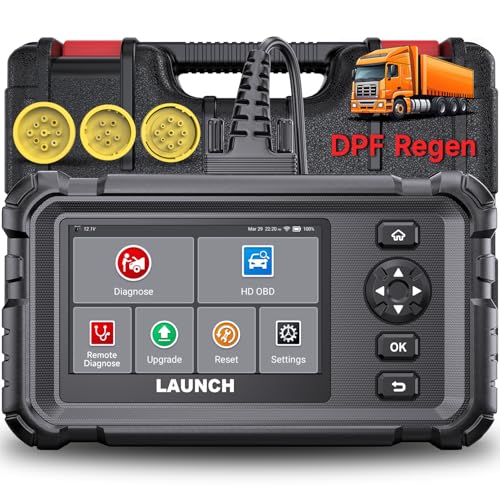
- Dealer-Level Diagnostics, Faster & Easier: The heavy duty truck scanner delivers full-system diagnostics for engine, ABS, transmission, and more, plus 7+ reset functions like DPF Regen and Speed Limit Adjust. Powered by a 1.3G CPU, 2GB RAM, 16GB storage, Android 8.1, and a 3000mAh battery, it runs smoothly for fast scanning, live data, reports, Auto VIN, Wi-Fi updates, and easy handheld use. It captures screenshots, replays live data, and generates reports to support your repair decisions.
- One Tool for 50+ Truck Brands: The diesel scanner supports J1939, J1708, J1587, and OBD2/CAN protocols, delivering broad coverage for major diesel trucks and commercial vehicles including Cummins, Cat, Detroit, Paccar, Volvo, Freightliner, Kenworth, Peterbilt, International, Mack, Isuzu, Hino, Scania, Mercedes-Benz, and more. Also supports Allison, Aisin, Eaton, WABCO, and Bendix, helping you diagnose more vehicles, reduce equipment costs, and handle more jobs with one professional scan tool.
- Diesel Truck DPF Regen & Reset Features: Experiencing loss of power, sluggish acceleration, or poor hill-climbing performance? These symptoms are often caused by a clogged or overloaded DPF. The truck diagnostic scanner offers OEM-level forced DPF regeneration, DPF reset, and DPD/DPR functions. This device extends DPF lifespan and efficiently diagnoses exhaust aftertreatment issues. It can significantly reduce diagnostic time and save you up to $3,000 or more in costly dealership fees.
- 7+ Resets - Perform Essential Procedures: The truck scanner features 7+ essential resets including DPF Regen clears carbon buildup; Oil Reset clears service light; Injector Coding matches new injectors; DEF Test checks urea injection; Speed Limit Adjust saves fuel; Cylinder Cutout pinpoints misfires; Clutch Relearn restores smooth engagement. Reset after maintenance or part replacement for proper truck operation. Vehicle compatibility varies. Email [email protected] to confirm before buying.
- Full System Diagnostic for Truck: The truck scanner diagnostic tool covers all systems like engine, ABS, transmission, SAS, SRS, TPMS and more. It reads fault codes and shows real-time data. Additionally, it includes full HD OBD and OBD2 modes: read/clear codes, live data stream, I/M readiness, freeze frame, DTC lookup, and more. When warning lights appear or performance issues arise, quickly identify which system is affected and gain the real-time data needed for accurate diagnosis.
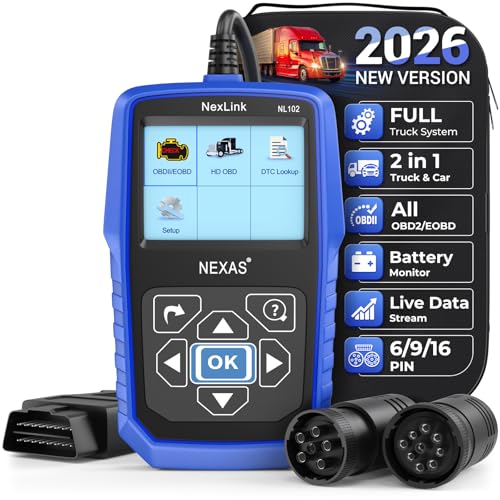
- Diagnose Heavy-Duty Truck Problems Fast — Read and clear fault codes and diagnose warning light issues on many Class 4–8 diesel trucks including Freightliner, Peterbilt, Kenworth, Volvo, Mack and Cummins-powered vehicles
- Help Reduce Downtime & Repair Costs — It offers full system diagnostics for major trucks meeting standard protocols, along with complete OBD2 functionality. Quickly check engine faults, view live truck data and identify issues before expensive repair shop visits or unnecessary repairs
- No complicated setup required — Simple menus and built-in DTC explanations make this truck code reader easy to use for owner-operators, mobile mechanics and small fleet maintenance
- Live Data & Built-in DTC Lookup — View real-time engine data and built-in truck fault code definitions directly on the scanner to help understand vehicle problems faster without searching through manuals
- Free Lifetime Updates & Technical Support — Includes free software updates plus responsive technical support for setup, compatibility and everyday truck diagnostics
This product presentation was made with AAWP plugin.
Last update on 2026-06-08 / Affiliate links / Images from Amazon Product Advertising API