
NHTSA ID Number: 10236998
Manufacturer Communication Number: 2070237.1
TSB/Document Date: 2023-06-07
Summary
Engine Control Module Update - Mulsanne (SC 23/12) Technical Background: -Software update is now available and should be applied to the engine control unit
Field campaign
Topic
Market area
Brand
Transaction
No.
Campaign
number
Note
Type
US code
Engine control module update - Mulsanne (SC 23/12)
China 796 VW Import Comp. Ltd (Vico), Beijing (6796),Korea, (South) E08 Bentley South Korea (6E08),United States E05
Bentley USA and rest America (6E05)
Bentley
2070237/1
EC77
Vehicle data
Mulsanne
Sales types
Type
3Y2*
3Y2*
3Y2*
3Y2*
3Y2*
MY
2016
2017
2018
2019
2020
Brand Designation Engine code Gearbox code Final drive code
E
*
*
*
E
*
*
*
E
*
*
*
E
*
*
*
E
*
*
*
Documents
Document name
master.xml
sc2312vinlist.pdf
INTERNAL
EC77
Engine control module update - Mulsanne (SC 23/12)
Notes
Transaction No.: 2070237/1
Repair instructions
Technical background
Software update is now available and should be applied to the Engine control unit (address 01)
NOTICE
In the event that DTC U0146 is evident within the engine control unit (address 01) the self healing procedure does not perform as required,
therefore the procedure within the Work section ensures the DTC will be automatically erased
Remedy
Carry out the software update instructions within the Work section to completion
Customer notification
Please ensure that all affected vehicles are checked and repaired at the nearest opportunity, direct customer notification is not required
When the vehicle is present at the workshop, please make a note of the required Service campaign on the workshop order before it is signed by
the customer.
You should also pass on this information to your new and used car sales departments so that vehicles affected are checked and if necessary
repaired immediately
Warranty accounting instructions
Warranty Type
710 or 790
Damage Service Number EC77
Damage Code
00 66
Criterion ID
01
Time to conduct the software update
Labour Operation Code 01 51 00 00
Time
Must not exceed 40 TU (as per the ODIS log)
Time to conduct the adaption drive
Labour Operation Code 01 21 00 00
Time
50 TU
Genuine parts
Not applicable
Parts supply
Not applicable
Parts despatch control
Not applicable
Repair instructions
Notes
Technical background
Software update is now available and should be applied to the Engine control unit (address 01)
NOTICE
In the event that DTC U0146 is evident within the engine control unit (address 01) the self healing procedure does not perform as required,
therefore the procedure within the Work section ensures the DTC will be automatically erased
INTERNAL
Check
If the vehicle is not already listed as repaired in the “Repair History” (Elsa Pro) check for the presence of the silver paint completion mark as
shown within the Identification section (Figure 4)
Genuine parts
Not applicable
Work
Software update - Engine control unit (Address 01)
•
The closed-circuit voltage of the vehicle must be at least 12.5 V during the update. Connect a suitable battery charger
to the vehicle. For further information refer to the Repair manual.
•
During the update switch off all unnecessary consumers (ventilation, seat heater, interior illumination etc)
•
Because of the highest transmission stability you MUST use the diagnosis interface VAS 6154 (WiFi diagnostic tool)
ONLY in USB operation or the cable-connected VAS 5055 for the reprogramming (updating) of control units. If these
units are not available, the diagnosis interface VAS 5054 (A) can also be used in USB mode
•
Do Not under any circumstances use a Bluetooth connection to conduct the reprogramming (updating) of control units
1) Select and run Guided fault finding
•
Within the Special functions tab select SVM - Code input then select Perform test (Figure 1)
Figure 1
2) On the next screen enter SVM code 3Y0ECMLEVC601 (Figure 2)
Figure 2
3) On the following screen, confirm the SVM code is correct
•
All control modules will now be interrogated
•
The software update will then be suggested
•
The software of 01 - Engine Control unit will be updated
INTERNAL
4) Carry out all on screen prompts until completion
After the programming is complete, gear selection may not be possible. To wake up the system a bus silence is required,
carry out the following steps in the order stated below:
•
•
Switch off the ignition
Remove the diagnostic interface from the OBD port
•
Switch off and remove the battery charger from the vehicle
•
Close the bonnet, boot and all doors
•
Lock the vehicle
•
Wait 5 minutes to allow the vehicle to go into bus silence
•
When 5 minutes has elapsed, unlock the vehicle and open the driver’s door
•
Switch on the ignition
•
Confirm that the gear selection is now possible
5) Clear the vehicle of any DTC’s generated as a result of performing steps 1 through to 4
6) Conduct the adaption drive as follows:
NOTICE
An open road is required to perform the adaption
CAUTION
All road safety rules and speed limits must be adhered to when carrying out the below procedure. The adaptions must be performed in manual
gear
•
Select manual by pressing the M button on the steering wheel
NOTICE
Confirm M drive is selected by viewing the gear selection status in the Drivers Information Panel (Figure 3)
Figure 3
•
When possible select 3rd gear (manual)
•
Accelerate to 3500-3750rpm, briefly stabilise the throttle input
•
Once the desired RPM has been achieved release the throttle completely allowing the vehicle to coast down to 2500rpm
WARNING
If the brake or throttle is pressed before reaching this point you must discount this adaption attempt and repeat
7) Repeat step 6 a further 14 times
CAUTION
When 15 adaption cycles have been performed, the adaption process is complete
INTERNAL
8) On return from the adaption drive - Clear the vehicle of any DTC’s generated as a result of performing steps 1 through to 7 before returning
the vehicle to the owner
9) Apply a silver paint completion mark as shown in the Identification section (Figure 4)
Identification
A silver campaign identification mark next to the OBD port confirms completion (Figure 4)
Figure 4
Repair instructions
INTERNAL
Notes
SCBBG7ZH2GC001555
SCBBG7ZH4GC001556
SCBBG7ZH6GC001557
SCBBG7ZH8GC001558
SCBBG7ZHXGC001559
SCBBG7ZH6GC001560
SCBBG7ZH8GC001561
SCBBG7ZHXGC001562
SCBBG7ZH3GC001564
SCBBG7ZH5GC001565
SCBBG7ZH0GC001568
SCBBG7ZH2GC001569
SCBBG7ZH9GC001570
SCBBG7ZH4GC001573
SCBBG7ZH3GC001578
SCBBG7ZH5GC001579
SCBBG7ZH1GC001580
SCBBG7ZH3GC001581
SCBBG7ZH0GC001585
SCBBG7ZH4GC001590
SCBBG7ZHXGC001593
SCBBG7ZH5GC001596
SCBBG7ZH9GC001598
SCBBG7ZH5GC001601
SCBBG7ZH9GC001603
SCBBG7ZH2GC001605
SCBBG7ZH8GC001611
SCBBG7ZH3GC001614
SCBBG7ZH2GC001619
SCBBG7ZH9GC001620
SCBBG7ZH0GC001621
SCBBG7ZH2GC001622
SCBBG7ZH6GC001624
SCBBG7ZH8GC001625
SCBBG7ZH1GC001627
SCBBG7ZH1GC001630
SCBBG7ZH0GC001635
SCBBG7ZH4GC001637
SCBBG7ZH6GC001638
SCBBG7ZH6GC001641
SCBBF7ZHXGC001645
SCBBG7ZH7GC001647
SCBBG7ZH9GC001648
SCBBG7ZH7GC001650
SCBBG7ZH9GC001651
SCBBG7ZH2GC001653
SCBBG7ZHXGC001657
SCBBF7ZH6GC001660
SCBBF7ZH8GC001661
SCBBG7ZH4GC001668
SCBBG7ZH8GC001673
SCBBF7ZH3GC001678
SCBBG7ZH9GC001679
SCBBF7ZH3GC001681
SCBBF7ZH5GC001682
SCBBF7ZH6GC001691
SCBBF7ZH3GC001695
SCBBF7ZH7GC001702
SCBBG63Y4GC001706
SCBBF7ZH8GC001708
SCBBF7ZHXGC001712
SCBBF7ZH3GC001714
SCBBF7ZH6GC001724
SCBBF7ZHXGC001726
SCBBF7ZH7GC001733
SCBBF7ZH9GC001734
SCBBG7ZHXGC001741
SCBBG7ZH3GC001743
SCBBF7ZH9GC001748
SCBBG7ZHXGC001755
SCBBF7ZH3GC001759
SCBBF63Y9GC001767
SCBBG7ZH6GC001770
SCBBF7ZH7GC001778
SCBBF7ZH0GC001783
SCBBG7ZH6GC001784
SCBBG7ZH3GC001791
SCBBF7ZH5GC001794
SCBBF7ZH6GC001805
SCBBG7ZH7GC001809
SCBBF7ZH0GC001816
SCBBF7ZH4GC001818
SCBBF7ZH2GC001820
SCBBF7ZH6GC001822
SCBBF7ZH8GC001823
SCBBG7ZH0GC001828
SCBBF7ZH0GC001833
SCBBF7ZH4GC001835
SCBBG7ZH3GC001841
SCBBF7ZH6GC001853
SCBBG7ZH3GC001855
SCBBF7ZH3GC001857
SCBBF7ZH5GC001858
SCBBF7ZH5GC001861
SCBBG7ZH0GC001862
SCBBG7ZH2GC001863
SCBBG7ZH6GC001865
SCBBF7ZHXGC001869
SCBBF7ZH6GC001870
SCBBF7ZHXGC001872
SCBBG7ZH0GC001876
SCBBF7ZH7GC001893
SCBBG7ZH2GC001894
SCBBF7ZH4GC001897
SCBBG7ZH4GC001900
SCBBF7ZH4GC001902
SCBBF7ZHXGC001905
SCBBF7ZH1GC001906
SCBBG7ZH7GC001907
SCBBF7ZH7GC001909
SCBBG7ZH6GC001915
SCBBG7ZH1GC001918
SCBBG7ZH5GC001923
SCBBG7ZH9GC001925
SCBBF7ZH2GC001932
SCBBG63Y6GC001934
SCBBF63Y6GC001936
SCBBG7ZH9GC001939
SCBBF7ZH3GC001941
SCBBG7ZH2GC001944
SCBBF7ZH4GC001947
SCBBF7ZH6GC001948
SCBBG7ZH8GC001950
SCBBG7ZHXGC001951
SCBBF7ZH1GC001954
SCBBG7ZH7GC001955
SCBBF7ZH9GC001958
SCBBF7ZH7GC001960
SCBBF7ZH3GC001969
SCBBF7ZHXGC001970
SCBBF7ZH1GC001971
SCBBG7ZH9GC001973
SCBBF7ZH9GC001975
SCBBF7ZH0GC001976
SCBBF7ZH2GC001977
SCBBF7ZH2GC001980
SCBBG7ZHXGC001982
SCBBF7ZH3GC001986
SCBBF7ZH7GC001988
SCBBF7ZH7GC001991
SCBBF7ZH9GC001992
SCBBF7ZH2GC001994
SCBBF7ZH6GC001996
SCBBG7ZH5GC001999
SCBBF7ZH4GC002001
SCBBF7ZHXGC002004
SCBBF7ZH1GC002005
SCBBF7ZH7GC002008
SCBBF63Y5GC002009
SCBBG7ZH1GC002017
SCBBG7ZH5GC002019
SCBBG7ZH4GC002030
SCBBG7ZHXGC002033
SCBBF7ZH1GC002036
SCBBG7ZH9GC002038
SCBBF7ZH7GC002042
SCBBF7ZH8GC002051
SCBBG7ZH0GC002056
SCBBF7ZH6GC002064
SCBBF7ZH1GC002070
SCBBF7ZH7GC002073
SCBBG7ZH2GC002074
SCBBF7ZH6GC002078
SCBBG7ZHXGC002081
SCBBG7ZH2GC002088
SCBBG7ZH0GC002090
SCBBG7ZH3GC002102
SCBBG7ZH9GC002105
SCBBG7ZH6GC002109
SCBBF7ZH9GC002110
SCBBG7ZH4GC002111
SCBBG7ZHXGC002114
SCBBF7ZH3GC002118
SCBBF7ZH9GC002124
SCBBG7ZH6GC002126
SCBBF7ZH3GC002135
SCBBF7ZH0GC002139
SCBBG7ZH4GC002142
SCBBG7ZH8GC002144
SCBBG63Y8GC002146
SCBBF63YXGC002149
SCBBF7ZHXGC002150
SCBBF63Y0GC002158
SCBBG7ZH6GC002160
SCBBG7ZHXGC002162
SCBBG7ZH3GC002164
SCBBF7ZH9GC002172
SCBBG7ZH8GC002175
SCBBF7ZH6GC002176
SCBBF7ZHXGC002181
SCBBG7ZH5GC002182
SCBBG7ZH0GC002185
SCBBF7ZH9GC002186
SCBBF7ZH2GC002188
SCBBG7ZH8GC002189
SCBBF7ZH6GC002193
SCBBG7ZH3GC002195
SCBBF7ZH5GC002198
SCBBG7ZH0GC002199
SCBBF7ZH3GC002202
SCBBG7ZH9GC002203
SCBBG7ZH6GC002207
SCBBF7ZH4GC002211
SCBBG7ZH0GC002218
SCBBG7ZH4GC002223
SCBBF7ZH2GC002224
SCBBG7ZHXGC002226
SCBBF7ZHXGC002228
SCBBF7ZH3GC002233
SCBBG7ZH0GC002235
SCBBF7ZH0GC002240
SCBBG7ZH8GC002242
SCBBF63Y6GC002245
SCBBG7ZH9GC002251
SCBBG7ZH2GC002253
SCBBF7ZH0GC002254
SCBBF7ZH4GC002256
SCBBG7ZH3GC002259
SCBBF7ZH6GC002260
SCBBG7ZH3GC002262
SCBBG7ZH5GC002263
SCBBG7ZH9GC002265
SCBBG7ZH0GC002266
SCBBG7ZH4GC002268
SCBBF7ZH2GC002269
SCBBF63Y7GC002271
SCBBG7ZH6GC002272
SCBBF7ZH4GC002273
SCBBG7ZH1GC002275
SCBBF7ZH1GC002277
SCBBG7ZH5GC002280
SCBBG7ZH7GC002281
SCBBF7ZH7GC002283
SCBBF7ZH0GC002285
SCBBG7ZH8GC002287
SCBBG7ZH1GC002289
SCBBG7ZH8GC002290
SCBBG7ZHXGC002291
SCBBF7ZHXGC002293
SCBBG7ZH7GC002295
SCBBG7ZH9GC002296
SCBBF7ZH0GC002299
SCBBG7ZH9GC002301
SCBBG7ZH6GC002305
SCBBF7ZH4GC002306
SCBBG7ZH1GC002308
SCBBG7ZHXGC002310
SCBBF7ZH8GC002311
SCBBF7ZHXGC002312
SCBBG7ZH7GC002314
SCBBG7ZH2GC002317
SCBBF7ZH2GC002319
SCBBF7ZH0GC002321
SCBBF7ZH1GC002327
SCBBF7ZH9GC002334
SCBBG7ZHXGC002338
SCBBG7ZH1GC002339
SCBBF7ZH4GC002340
SCBBG7ZHXGC002341
SCBBF7ZH3GC002345
SCBBG7ZH0GC002347
SCBBG7ZH2GC002348
SCBBG7ZH4GC002349
SCBBF7ZH7GC002350
SCBBG7ZH2GC002351
SCBBG7ZH4GC002352
SCBBF7ZH2GC002353
SCBBG7ZH7GC002359
SCBBG7ZH3GC002360
SCBBG7ZH5GC002361
SCBBF7ZH3GC002362
SCBBG7ZH4GC002366
SCBBG7ZHXGC002369
SCBBF7ZH4GC002371
SCBBG7ZHXGC002372
SCBBG7ZH5GC002375
SCBBG7ZH7GC002376
SCBBG7ZH9GC002377
SCBBG7ZH2GC002379
SCBBG7ZH9GC002380
SCBBF7ZH9GC002382
SCBBG7ZH6GC002384
SCBBG7ZH1GC002387
SCBBF7ZH2GC002398
SCBBG7ZH4GC002402
SCBBF7ZH3GC002474
SCBBG7ZH0GC002476
SCBBG7ZH2GC002477
SCBBG7ZH4GC002478
SCBBG7ZH2GC002480
SCBBG7ZH6GC002482
SCBBG7ZH3GC002486
SCBBG7ZH5GC002487
SCBBG7ZH0GC002493
SCBBG7ZH4GC002495
SCBBG7ZH8GC002497
SCBBG7ZH6GC002501
SCBBF7ZH6GC002503
SCBBF7ZH0GC002531
SCBBG7ZH5GC002537
SCBBF7ZH3GC002538
SCBBG7ZH9GC002539
SCBBF7ZH9GC002544
SCBBG7ZHXGC002548
SCBBF63Y4GC002552
SCBBF7ZH1GC002554
SCBBF7ZH5GC002556
SCBBG7ZH4GC002562
SCBBG7ZHXGC002565
SCBBF7ZH3GC002569


- Advanced VCI Box, Industry-leading J2534 Pass-Thru...
- High-Speed OEM-Level Diagnostics & Programming: Unlock true...
- Coverage for 17 Car Brands & Ultra Reliability: Works...
- User-Friendly RLink Platform & Expert Support: TOPDON’s...
- 6.6 ft USB-C Cable & Portable Storage Case: The RLink J...
Last update on 2026-06-23 / Affiliate links / Images from Amazon Product Advertising API
If the PDF is very large, it may not load in the preview below.
Some older TSBs had multiple PDFs — visit the NHTSA Website to view all PDFs.
If the TSB PDF does not show, download or view it on the NHTSA Website.
Click on the (+) Plus Sign
Then Click on Associated Document(s)
Search NHTSA Database for Recalls
Search NHTSA Database for Vehicle Investigations
View Latest Vehicle Investigations
Search NHTSA Database for Vehicle Complaints
View Latest Vehicle Complaints
TSB/Document ID: 2070237.1
Replacement Service Bulletin Number:
MFR Communication Date: 2023-05-23
MFR Internal Campaign ID/Software Version:
Communication Type: Service Bulletin/Repair Instructions
NHTSA Components: ENGINE AND ENGINE COOLING
MFR Component System:
MFR Component Subsystem:
Previous TSB | Next TSB |

- 🎉[OTOFIX D1 Lite, Perfect Cost-effective Diagnostic Tool]: OTOFIX D1 Lite, a newest bidirectional scan tool from OTOFIX company, is a great choice for DIYers and repair shops. 👉This obd2 scanner diagnostic tool packs all practical functions: OE level all systems diagnoses, Bi-Directional Control, 38+ reset services fixing 99% of common problems, support DoIP & CANDF protocols and FCA
 AutoAuth, high-end hardware configuration. Worldwide vehicles and 🔥2 Years Free Updating🔥 covered.
 - 🎉[Bi-Directional Scan Tool, Active Test]: OTOFIX D1 Lite bluetooth obd2 scanner can also command ECUs and monitor the operation of the actuators to track down the problems of certain parts, like windows, sunroof, wipers, fuel pumps, etc., saving repair time & trouble. This makes OTOFIX D1 Lite the most cost-effective bidirectional scan tool.
- 🎉[2026 Newest, 38+ Hot Reset Functions]: Equipped with 38+ reset functions in one, the OTOFIX D1 lite automotive scanner diagnostic tool allows you to troubleshoot 99% of common vehicle problems. You can use this car diagnostic scanner holding enough functions to easily repair common vehicle models in your repair shops. Including Oil Reset, Injector Coding, Throttle, DPF Reset, SCR Reset, Gear Learning, Clutch Learning, Suspension, etc. Note* Reset functions vary by model.
- 🎉[OE Level Full Systems Diagnostics]: Unlike the 2-system and 4-system diagnostic tools, the OTOFIX auto scan tool can complete comprehensive system diagnostics within 5 minutes. It accesses and scans all available onboard systems like for Engine /AT /ABS /EPB /BMS /TPMS /SRS /SAS /Audio System /BCM /Air Conditioning / etc., to read & clear codes, view live data, and check ECU information. Note: Active test is not involved.
- 🎉[Powerful Hardware Configuration]: Designed with a fashion appearance & a 7” touchscreen and a weight of 463g, this OTOFIX D1 Lite OBD2 diagnostic scanner scan tool is convenient for everywhere and easy to use & store. Android9.0 OS and 2+64GB memory enhance multi-task smoothness and diagnostic operation, no more wasting too much time. 5800mAh battery allows hours-lasting use. WiFi & VCI1 also bring faster communication for your diagnostics.
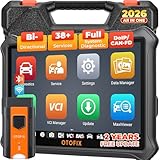
- 🏆【2026 TOP OBD2 Scanner Diagnostic Tool】OTOFIX D1 Lite wireless obd2 scanner has upgraded hardware configuration and car coverage. The newly upgraded D1 Lite with 🔥OS Android 9.0🔥1.5Ghz 4 core high efficiency processor🔥2GB RAM+64GB ROM large storage🔥5800mAh large battery, more stable and longer lasting diagnostics🔥 38+ Reset🔥action tests🔥full system diagnostic🔥Supports MV105 endoscope🔥21+ Language Supports🔥100000+ vehicle coverage to meet all your daily maintenance needs.
- 👍【Bi-Directional Control / Active Test】D1 Lite obd2 scanner has bidirectional control(worth $300+), which is the most beloved feature among mechanic. If your headlights or car windows are broken, going to a repair shop will cost a lot of money. You can use D1 Lite to send execution commands to the ECU module and identify the repair status. Such as ABS, car windows, doors, valves, wipers, headlights, etc., effectively shorten diagnostic time and reduce diagnostic costs.
- 🔥【All Systems Diagnostics, In-depth Checking】This advanced OBD2 Scanner D1 Lite can perform OE-level diagnosis of all systems including engine, transmission, airbag, ABS, ESP, TPMS, gateway, steering, radio, and air conditioning for more than 100 brands. This diagnostic scanner supports essential functions, such as reading ECU version info, reading and clearing fault codes, and reading data streams.With just a simple click, it provides you with accurate and in-depth diagnostics.
- 🏆【38+ Reset Hot Functions】For repair workshops, holding an OTOFIX D1 Lite Auto scanner is a strong advantage over others. Its 38+ maintenance functions provide various solutions for all module repairs, including Oil Reset, TPMS Reset, Injector Coding, Suspension, Throttle Matching, etc., which will usher your repair business to a new pinnacle. Continuously updating will never make the functionality & compatibility out-of-date.
- 🏆【150+ Models, 10000+ Car Coverage & 16 Languages】D1 Lite is a comprehensive car diagnostic scan tool, help you to troubleshoot car issues fast for 95% US, European, Asian auto makes. ✅ With frequent updates and optimizations allow D1 Lite to cover more vehicles to meet your needs. ✅ Multilingual menu allows auto mechanics around the world to use it without language barriers. 🚩Note: Kindly send us the S/N of the device to authorize new language updates before changing the menu language.

- 2026 Newest Wireless Bluetooth Scan Tool D1: OTOFIX D1 Diagnostic scanner is upgraded version with Enhanced Hardwares & Newest Functions, FASTER and SMARTER! ✅Alternative Bluetooth 5.0 +USB connect✅2G+64GB✅Android 9.0 OS✅5G & 2.4 GHz Dual WiFi✅5800mAh battery👍VAG Guided Function👍ECU Online Coding👍CANFD&DOIP👍40+ Services👍Bi-Directional Control👍Full Systems Diagnose👍2 Years Free Update👍150+ Vehicle Coverage🎁Contact to get gift: otofixaftersales-amz@ outlook.com
- ECU Coding to Unlock the Hidden Features: OTOFIX D1 obd2 scanner diagnostic tool newly adds ECU Coding which can Online Coding(ONLY for VW/Au.di/Sk0da), Variant Coding/Offline Programming, Flash Hidden Functions, Reset Adaptive Data, Match Replaced Components, Customize OE-Settings. Such as: halogen fog lamps retrofitted with xenon fog lamps, different capacity battery retrofit, disbale auto start-stop, sunroof initialization, injector calibration, etc. PS: Coding functions vary by model&year.
- Full Bidirectional Control for Active Car Tests: The D1 OTOFIX scanner also offers bi-directional control, allowing you to perform powerful active tests on car subsystems. This means that you can check the working status and functionality of open & close solenoids, energize injectors, turn cooling fan on & off, and more, all from the device itself.🚩The D1 bi-directional obd2 scanner can quickly help you to check if a system or component goes well,Improving 200% Efficiency.**Note that Active Tests available depend on the make/model/year of your car.
- 40+ Popular Maintenance Functions: OTOFIX D1 obd scanner for car performs 40+ hot services, including Oil Reset, EPB, TPMS, BMS, E.GR, G.PF, D.PF, SAS Calibration, ABS Bleeding, Injector Coding, Gearbox Match, Suspension, Crankshaft Relearn, Power Balance, etc., still growing. Great choice for DIYers, technician, repair shop. 🚩Get MORE special functions from "Car Brand>System>Service". Check compatibility before purchase via 📧 otofixaftersales-amz@ outlook.com.
- OE-Level All Systems Diagnostic + One-Click AutoVIN & AutoSCAN: OTOFIX D1 scanner automotriz gives you the ability to troubleshoot entire car systems including engion system,transmission system,body system,chassis,etc. 🚩One of the standout features of the D1 obd2 scanner diagnostic tool is the one-click AutoVIN & AutoScan function. This feature allows you to quickly and easily scan all diagnosable ECUs with just one click, and identify any problems hidden in your vehicle's systems.
Last update on 2026-06-23 / Affiliate links / Images from Amazon Product Advertising API
This product presentation was made with AAWP plugin.