
NHTSA ID Number: 10211578
Manufacturer Communication Number: 03286
TSB/Document Date: 2022-05-09
Summary
Tech Line Calling Guidelines - Are you just about to call Tech Line for assistance? To help ensure that both your time and that of the Tech Line agent is well spent and you get the help you are looking for, there are certain things you should know and follow.
Job Aid
March 2016
03286 Version 1
Tech Line Calling Guidelines
AFFECTED VEHICLES
General Information
INTRODUCTION
Are you just about to call Tech Line for assistance? To help ensure that both your time and that of the Tech Line agent is
well spent and you get the help you are looking for, there are certain things you should know and follow.
This job aid offers important guidance along with some valuable tips. Here is what it covers:
•
•
•
•
Before You Call
- Preparation Tips
- Check the Tech Line iN Page
- Do a Search in SIS
- Request an 11-Digit Access Code
When You Call
After You Call
To Learn More
BEFORE YOU CALL
Preparation Tips
A little preparation before calling Tech Line can save you valuable time later when you call. Here are some tips to follow:
•
•
•
•
•
•
Be the caller who is actually working on the vehicle: Tech Line wants to assist you, the service tech doing the work
– not your shop buddy, the service advisor, your service manager, or a parts counterperson.
Make your call from a mobile phone: Tech Line prefers that you use a cell phone, but any phone allowing mobility is
OK.
Be at a working iN terminal connected to a working printer: You will be using electronic publications and might
need to print out hardcopy pages.
Be ready to do off-phone research: Familiarize yourself with the iN and how to use it, especially EWDs. It is simply
not practical for the Tech Line agent to walk you through every screen or page.
Know who to contact: Not every call should be directed to Tech Line and, unfortunately, the Tech Line agent cannot
transfer you to the group(s) that you really need to talk to. See the job aid Specialty Hotlines and Departments. It lists
various specialty hotlines and departments (both inside and outside of American Honda ) with subject matter experts
ready and able to help you.
Avoid calling between 11:00 a.m. and 1:00 p.m. Pacific Time: Calling between those hours could result in longer
wait times since Tech Line agents rotate through their lunches during those hours.
CUSTOMER INFORMATION: The information in this bulletin is intended for use only by skilled technicians who have the proper tools,
equipment, and training to correctly and safely maintain your vehicle. These procedures should not be attempted by “do-it-yourselfers,” and you
should not assume this bulletin applies to your vehicle, or that your vehicle has the condition described. To determine whether this information
applies, contact an authorized Honda automobile dealer.
© 2016 American Honda Motor Co., Inc. – All Rights Reserved
Page 1 of 6
Check the Tech Line iN Page
To help save you time and effort, Tech Line has its own iN page. To access it, click on SERVICE from the HOME page,
then Tech Line from the left-hand menu bar. This takes you to the Tech Line iN page.
Now, click on Top Issues. Here you will see a list of issues that Tech Line gets the most calls on. Clicking on an issue
gives you more information about it. This can include service information, service bulletins, newsletter articles, knowledge
base material, etc.
The information in Top Issues is the latest that Tech Line has to offer and is resolving most technician issues. It is the
same resource information that you would be referred to if you call. Checking this iN page could save you a call to Tech
Line. And even if it does not correct your issue and you still need to call them, you are certainly better prepared when you
do.
Do a Search in SIS
Before calling Tech Line, always try doing a search in SIS. Using SIS helps reduce Tech Line’s call volume. And fewer
calls to them means less waiting time for you.
If you cannot find what you are looking for, try entering several other keywords or a similar model year. If you still cannot
find what you need, then it is definitely time to call Tech Line.
But before you do, you want to request an 11-digit access code. With this code, your call is directed to the Tech Line
group with the most knowledge on the system you are working on. As an access code caller, you are put at the top of the
calling queue and enjoy shorter call wait times than callers using just their dealer number.
Page 2 of 6
Request an 11-Digit Access Code
To request an 11-digit access code, click on the Tech Line tab at the top of the screen. The Tech Line Create New Case
form appears. Keep in mind this form only appears when you click on the Tech Line tab after doing an actual search in
SIS. If you click on it without doing an actual search, the Feedback to Tech Line form appears, which is the wrong form
to request an 11-digit access code.
Complete the Tech Line Create New Case form as follows:
User Information
•
•
•
DPTS ID: Enter your Dealer Personnel Tracking System (DPTS) number. If you do not have one, ask your service
manager to contact your DPSM and have your name and job code added. Do not let other service techs, service
advisors, or sales people use your DPTS number. The Tech Line system is for service techs only! For more
information, check out the October 2011 ServiceNews article “Your DPTS Number: What It Means and Why You
Need It.”
SSN: Enter the last four digits of your Social Security number.
Preferred Method of Contact: Select either Phone or Email. Depending on your selection, enter a good phone
number where you can be reached, or a valid e-mail address in case Tech Line needs to send you documents.
Vehicle Information
•
•
•
•
•
•
VIN: Enter the VIN. Enter it carefully, or you will get an error message.
Mileage: Enter the current mileage on the odometer.
Model: Select from the drop-down list.
Model Year: Select from the drop-down list.
DTC: Enter the DTC number (if applicable)
RO Number: Enter the number from your RO.
Page 3 of 6
Complaint Information
•
•
Tech Line System Group: Select from the drop-down list. Your call will be directed to that group.
What is the Customer’s contention?: Enter your customer’s complaint.
Depending on your selections, a Common Questions list may also appear to help you prepare for your call.
Having more complete information when you first call not only helps save time, but spares you from having to answer a lot
of questions over the phone or making multiple calls.
Answer the questions and complete the action items as instructed. Your input helps us gather data on specific issues,
which helps with future Tech Line calls and reduces call wait times. Also, depending on the system group you select,
some categories will have a set of dynamic questions associated with them. These questions allow for more specific data
gathering, which is needed for some repairs.
Once you complete the entire form, click on Submit. You will then see your 11-digit access code. It consists of a six-digit
dealer number and a five-digit computer-generated sequence number. Keep in mind access codes are valid only for that
day and can be used only once for the VIN you have entered.
Page 4 of 6
WHEN YOU CALL
Enter your 11-digit access code when prompted. When your call is answered, all of the data you entered on the form will
be routed to the Tech Line agent’s computer screen.
Before your call is ended, the agent will give you a reference number. Tech Line uses it to pull up your case file should
you call back for more help.
Keep in mind reference numbers are not an automatic warranty authorization or an assurance that your time will be
reimbursed by the factory warranty or the VSC extended warranty. Any requests or inquiries on that subject should
always go to your DPSM, the Zone Office, or VSC, not Tech Line.
Record the reference number on your RO or someplace where it will not get lost. If you need to call back, always enter
that same reference number.
When calling back, never use a reference number from a different vehicle or an old number. The Tech Line system
displays the case related to the reference number you have entered. If you use a wrong or old reference number, the
Tech Line agent must close that wrong case and search for the right one before getting around to helping you.
Also, do not call Tech Line for a reference number after you have finished with a repair. This is just a waste of your time
and that of the Tech Line agent and drives up the call wait time for others in the queue.
AFTER YOU CALL
Tech Line needs your resolution feedback. It improves their data base, which can improve the information given over the
phone. It also helps our engineering staff to understand any developing trends quickly and accurately.
As a reminder, Tech Line sends you a feedback FAX whenever you first call them for help with a problem. After you are
done with the repair, Tech Line would like your feedback, explaining what you actually did.
The best way to provide it is with the Feedback to Tech Line form on the iN. To access this form, click on SERVICE from
the HOME page, Tech Line from the left-hand menu bar, then Tech Line Feedback from the Tech Line iN page.
Just fill in the fields, enter your comments, and click on Submit. Your feedback goes straight to an in-box where Tech
Line can quickly process and share it.
Page 5 of 6
You can also e-mail your feedback to techline@ahm.honda.com, fax it to 310-783-2900, or call tech Line directly at
800-824-6632 and leave a message on their message center. It is available 24/7. When you call, use option 3.
TO LEARN MORE
To learn more about the material covered in this job aid, check out these resources:
•
•
•
•
•
Online University Self-Study Module GIC74, Using Tech Line as a Reference
Honda Job Aid Specialty Hotlines and Departments
October 2011 Honda ServiceNews Article “Your DPTS Number: What It Means and Why You Need It”
July 2015 Honda ServiceNews Article “Can’t Send HDS Files to Tech Line? Check Out This Work-Around”
®
Tech2Tech Video “Check Out Tech Line’s Updated iN Page!”
Page 6 of 6

- 💯【Conta.ct us for Support Directly】If you met any...
- 🔥🔥🔥【2026 AUTEL FLAGSHIP MK900BT MK900-BT, NEW...
- 🚗【3000+ ACTIVE TESTS (50➡3000+), SAME AS MS...
- 🚗【40+ HOT SERVICES FOR 150 MAKES (28+➡40+)】Full...
- 🚗【OE ALL SYSTEM DIAGNOSE, AUTO SCAN 2.0: SCAN LICENSE...


- 【TURN OFF CEL】 This AL319 car scanner diagnostic tool...
- 【EXTENSIVE APPLICATION】 Autel AL319 Compatible with...
- 【FOR END USER & DIYERS】 This error code reader AL319 is...
- 【USER-FRIENDLY DESIGN】 This OBD2 scanner and check...
- 【HIGH-QUALITY SERVICES】 12 months war.ranty from the...
Last update on 2026-06-21 / Affiliate links / Images from Amazon Product Advertising API
If the PDF is very large, it may not load in the preview below.
Some older TSBs had multiple PDFs — visit the NHTSA Website to view all PDFs.
If the TSB PDF does not show, download or view it on the NHTSA Website.
Click on the (+) Plus Sign
Then Click on Associated Document(s)
Search NHTSA Database for Recalls
Search NHTSA Database for Vehicle Investigations
View Latest Vehicle Investigations
Search NHTSA Database for Vehicle Complaints
View Latest Vehicle Complaints
TSB/Document ID: 03286
Replacement Service Bulletin Number:
MFR Communication Date: 2014-03-01
MFR Internal Campaign ID/Software Version:
Communication Type: Service Bulletin/Repair Instructions
NHTSA Components: FUEL SYSTEM, GASOLINE
MFR Component System:
MFR Component Subsystem:
Previous TSB | Next TSB |
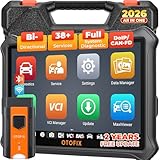
- 🏆【2026 TOP OBD2 Scanner Diagnostic Tool】OTOFIX D1 Lite wireless obd2 scanner has upgraded hardware configuration and car coverage. The newly upgraded D1 Lite with 🔥OS Android 9.0🔥1.5Ghz 4 core high efficiency processor🔥2GB RAM
 +64GB ROM large storage🔥5800mAh large battery, more stable and longer lasting diagnostics🔥 38+ Reset🔥action tests🔥full system diagnostic🔥Supports MV105 endoscope🔥21+ Language Supports🔥100000+ vehicle coverage to meet all your daily maintenance needs.
 - 👍【Bi-Directional Control / Active Test】D1 Lite obd2 scanner has bidirectional control(worth $300+), which is the most beloved feature among mechanic. If your headlights or car windows are broken, going to a repair shop will cost a lot of money. You can use D1 Lite to send execution commands to the ECU module and identify the repair status. Such as ABS, car windows, doors, valves, wipers, headlights, etc., effectively shorten diagnostic time and reduce diagnostic costs.
- 🔥【All Systems Diagnostics, In-depth Checking】This advanced OBD2 Scanner D1 Lite can perform OE-level diagnosis of all systems including engine, transmission, airbag, ABS, ESP, TPMS, gateway, steering, radio, and air conditioning for more than 100 brands. This diagnostic scanner supports essential functions, such as reading ECU version info, reading and clearing fault codes, and reading data streams.With just a simple click, it provides you with accurate and in-depth diagnostics.
- 🏆【38+ Reset Hot Functions】For repair workshops, holding an OTOFIX D1 Lite Auto scanner is a strong advantage over others. Its 38+ maintenance functions provide various solutions for all module repairs, including Oil Reset, TPMS Reset, Injector Coding, Suspension, Throttle Matching, etc., which will usher your repair business to a new pinnacle. Continuously updating will never make the functionality & compatibility out-of-date.
- 🏆【150+ Models, 10000+ Car Coverage & 16 Languages】D1 Lite is a comprehensive car diagnostic scan tool, help you to troubleshoot car issues fast for 95% US, European, Asian auto makes. ✅ With frequent updates and optimizations allow D1 Lite to cover more vehicles to meet your needs. ✅ Multilingual menu allows auto mechanics around the world to use it without language barriers. 🚩Note: Kindly send us the S/N of the device to authorize new language updates before changing the menu language.

- 🎉[OTOFIX D1 Lite, Perfect Cost-effective Diagnostic Tool]: OTOFIX D1 Lite, a newest bidirectional scan tool from OTOFIX company, is a great choice for DIYers and repair shops. 👉This obd2 scanner diagnostic tool packs all practical functions: OE level all systems diagnoses, Bi-Directional Control, 38+ reset services fixing 99% of common problems, support DoIP & CANDF protocols and FCA AutoAuth, high-end hardware configuration. Worldwide vehicles and 🔥2 Years Free Updating🔥 covered.
- 🎉[Bi-Directional Scan Tool, Active Test]: OTOFIX D1 Lite bluetooth obd2 scanner can also command ECUs and monitor the operation of the actuators to track down the problems of certain parts, like windows, sunroof, wipers, fuel pumps, etc., saving repair time & trouble. This makes OTOFIX D1 Lite the most cost-effective bidirectional scan tool.
- 🎉[2026 Newest, 38+ Hot Reset Functions]: Equipped with 38+ reset functions in one, the OTOFIX D1 lite automotive scanner diagnostic tool allows you to troubleshoot 99% of common vehicle problems. You can use this car diagnostic scanner holding enough functions to easily repair common vehicle models in your repair shops. Including Oil Reset, Injector Coding, Throttle, DPF Reset, SCR Reset, Gear Learning, Clutch Learning, Suspension, etc. Note* Reset functions vary by model.
- 🎉[OE Level Full Systems Diagnostics]: Unlike the 2-system and 4-system diagnostic tools, the OTOFIX auto scan tool can complete comprehensive system diagnostics within 5 minutes. It accesses and scans all available onboard systems like for Engine /AT /ABS /EPB /BMS /TPMS /SRS /SAS /Audio System /BCM /Air Conditioning / etc., to read & clear codes, view live data, and check ECU information. Note: Active test is not involved.
- 🎉[Powerful Hardware Configuration]: Designed with a fashion appearance & a 7” touchscreen and a weight of 463g, this OTOFIX D1 Lite OBD2 diagnostic scanner scan tool is convenient for everywhere and easy to use & store. Android9.0 OS and 2+64GB memory enhance multi-task smoothness and diagnostic operation, no more wasting too much time. 5800mAh battery allows hours-lasting use. WiFi & VCI1 also bring faster communication for your diagnostics.

- 2026 Newest Wireless Bluetooth Scan Tool D1: OTOFIX D1 Diagnostic scanner is upgraded version with Enhanced Hardwares & Newest Functions, FASTER and SMARTER! ✅Alternative Bluetooth 5.0 +USB connect✅2G+64GB✅Android 9.0 OS✅5G & 2.4 GHz Dual WiFi✅5800mAh battery👍VAG Guided Function👍ECU Online Coding👍CANFD&DOIP👍40+ Services👍Bi-Directional Control👍Full Systems Diagnose👍2 Years Free Update👍150+ Vehicle Coverage🎁Contact to get gift: otofixaftersales-amz@ outlook.com
- ECU Coding to Unlock the Hidden Features: OTOFIX D1 obd2 scanner diagnostic tool newly adds ECU Coding which can Online Coding(ONLY for VW/Au.di/Sk0da), Variant Coding/Offline Programming, Flash Hidden Functions, Reset Adaptive Data, Match Replaced Components, Customize OE-Settings. Such as: halogen fog lamps retrofitted with xenon fog lamps, different capacity battery retrofit, disbale auto start-stop, sunroof initialization, injector calibration, etc. PS: Coding functions vary by model&year.
- Full Bidirectional Control for Active Car Tests: The D1 OTOFIX scanner also offers bi-directional control, allowing you to perform powerful active tests on car subsystems. This means that you can check the working status and functionality of open & close solenoids, energize injectors, turn cooling fan on & off, and more, all from the device itself.🚩The D1 bi-directional obd2 scanner can quickly help you to check if a system or component goes well,Improving 200% Efficiency.**Note that Active Tests available depend on the make/model/year of your car.
- 40+ Popular Maintenance Functions: OTOFIX D1 obd scanner for car performs 40+ hot services, including Oil Reset, EPB, TPMS, BMS, E.GR, G.PF, D.PF, SAS Calibration, ABS Bleeding, Injector Coding, Gearbox Match, Suspension, Crankshaft Relearn, Power Balance, etc., still growing. Great choice for DIYers, technician, repair shop. 🚩Get MORE special functions from "Car Brand>System>Service". Check compatibility before purchase via 📧 otofixaftersales-amz@ outlook.com.
- OE-Level All Systems Diagnostic + One-Click AutoVIN & AutoSCAN: OTOFIX D1 scanner automotriz gives you the ability to troubleshoot entire car systems including engion system,transmission system,body system,chassis,etc. 🚩One of the standout features of the D1 obd2 scanner diagnostic tool is the one-click AutoVIN & AutoScan function. This feature allows you to quickly and easily scan all diagnosable ECUs with just one click, and identify any problems hidden in your vehicle's systems.
Last update on 2026-06-21 / Affiliate links / Images from Amazon Product Advertising API
This product presentation was made with AAWP plugin.