
NHTSA ID Number: 10176736
Manufacturer Communication Number: SF600
TSB/Document Date: 2020-06-25
Summary
Service Bulletin for Cascadia ICC5 Units. On certain 2020 Cascadia vehicles, the flat panel display does not function as fully intended. The supporting electronic control unit (ECU) for the display will be replaced with an upgraded version.
11.
Select the CGW to program and select the VIN. Then, if a "Newest" record exists, select "Newest." If only
a "Latest" record exists, then select "Latest." Click "Next." See Fig. 10.
1
2
3
12/14/2018
1. Device to Program
f120461
2. Vehicle Identification Number
3. Settings
(VIN)
Fig. 10, Selecting "Latest" or "Newest" Software
Page 9
Daimler Trucks
North America LLC
Field Service Campign
June 2020
SF600A
12.
Review and verify the VIN and hardware part number. Click "Start" to program the controller. The software
will be flashed and the new parameter set will be written to the controller on the vehicle. See Fig. 11.
12/14/2018
f120462
Fig. 11, Programming the Controller
13.
When programming is complete, the page will display "The device was successfully programmed." Press
"Finish."
IMPORTANT: After programming is complete, the following message may appear in DiagnosticLink: "The
connected vehicle contains chassis devices with incompatible software versions, you will need to update
these control devices using Program Device. Click here for more information." If this message is shown,
continue with the following substeps. Otherwise, go to the next step.
13.1 Click on the banner message. See Fig. 12.
03/06/2019
f120490
Fig. 12, Clicking on the Banner Message
Page 10
Daimler Trucks
North America LLC
Field Service Campign
June 2020
SF600A
13.2 Print or take a screen shot of the incompatible ECUs. See Fig. 13.
13.3 Program all devices listed as incompatible from the previous step.
03/06/2019
f120491
Fig. 13, Printing the List of Incompatible ECUs
IMPORTANT: After programming, some fault codes may become active and some ECUs may not auto connect.
Cycling the ignition may clear the faults and connect the ECUs.
14.
Turn the ignition to the OFF position, unplug and restart DiagnosticLink, and wait one minute.
15.
Cycle the ignition 3 times, waiting 30 seconds between key off and key on. This action will enable Intelligent Predictive Powertrain Control (IPPC) to start communicating on Roll Call, and eliminate codes for the
IPPC not communicating.
Page 11
Daimler Trucks
North America LLC
Field Service Campign
June 2020
SF600A
Remove Connect 5 ECU (ICC5)
NOTE: The Connect 5 ECU (ICC5) is located below the XMC ECU. See Fig. 14 and Fig. 15.
1
4
2
3
02/17/2020
5
f547124
Fig. 14, ICC5 Electronics Bay Location
02/05/2020
f547123
Fig. 15, Electronics Bay
1.
2.
Disconnect the vehicle batteries.
Remove the electronics bay cover and the passenger-side lower dash cover. Refer to Section 60.06 in the
New Cascadia Workshop Manual for instructions.
3.
Remove the four fasteners that secure the Vehicle Power Distribution Module (VPDM) to the front of the
electronics bay, and carefully lay it on the floor. Refer to Section 54.08, Subject 100 in the New Cascadia
Workshop Manual for instructions.
4.
Identify and disconnect the connectors from the Connect 5 ECU (ICC5). See Fig. 16.
01/22/2020
f547098
Fig. 16, Connectors of Connect 5 ECU
5.
Press the Connect 5 ECU (ICC5) firmly towards the back of the electronics bay to release the ECU from
the forward mounting slots, then lift the Connect 5 ECU (ICC5) and remove it from the electronics bay.
Page 12
Daimler Trucks
North America LLC
Field Service Campign
June 2020
SF600A
Install Connect 5 ECU (ICC5)
1.
Position the new Connect 5 ECU (ICC5) in the electronics bay, then press the ECU firmly towards the
back of the shelf. Lower the front of the ECU on to the surface of the shelf and adjust its position horizontally until the tabs on the ECU are fully seated in the mounting slots.
2.
Install the Connect 5 (ICC5) harness connectors to the ECU.
3.
Install the Connect 5 ECU (ICC5) into the electronics bay by pressing it firmly towards the back of the bay
and inserting the ECU tabs into the forward mounting slots. See Fig. 16
4.
Install the Vehicle Power Distribution Module (VPDM). Refer to Section 54.08, Subject 100 in the New
Cascadia Workshop Manual for instructions.
5.
Install the electronics bay cover and the passenger-side lower dash cover. Refer to Section 60.06 in the
New Cascadia Workshop Manual for instructions.
6.
Connect the vehicle batteries.
Program the New Connect 5 ECU (ICC5)
1.
Connect the vehicle to DiagnosticLink.
IMPORTANT: Before performing this procedure, make sure to address any pre-existing conditions or fault codes
first.
2.
Select "Program Device." See Fig. 2 on page 5. If there are any items in the section "Request Pending"
downloads, they should be removed. To remove them, select the "Request Pending" list item, then press
the "Remove All" button. See Fig. 3 on page 6.
3.
Once all controllers are connected, read the vehicle parameters. See Fig. 17.
4.
Once all controllers are connected, click the "Parameters" icon on the left hand side of the screen to read
the vehicle parameters. See Fig. 17.
12/11/2018
f120455
Fig. 17, Reading Vehicle Parameters on DiagnosticLink
Page 13
Daimler Trucks
North America LLC
Field Service Campign
June 2020
SF600A
5.
Select "Program Device." There should be data to upload. Click "Connect to Server" to upload vehicle parameters to the server. See Fig. 5 on page 7.
At this point, a warning may appear. See Fig. 18. Click "OK" and continue.
06/01/2020
f120785
Fig. 18, New Connect 5 ECU (ICC5) Warning
6.
Click "Add" to add a download request for the vehicle. See Fig. 6 on page 7.
7.
Make sure the correct VIN and hardware is populated, then click OK. See Fig. 7 on page 8.
8.
There should be a request pending status for the VIN. Click "Connect to Server" to download the updated
unit data. See Fig. 8. The server will provide any new software available on the server as well as updated
parameter sets for the new software, adjusted for the parameter set that was just uploaded from the
vehicle.
9.
Once the data has been downloaded, click "Next." See Fig. 9 on page 9.
NOTE: "Latest" is the last service record (may be older software), and "Newest" is the most up to date software
available for the installed hardware. Both will have parameter sets that have been updated relative to the upload
from the vehicle. If the last service record is the most up to date software available, then "Latest" will be the
only record visible and there will be no "Newest” record.
10.
Select the CGW to program and select the VIN. Then, if a "Newest" record exists, select "Newest." If only
a "Latest" record exists, then select "Latest." Click "Next." See Fig. 19.
11.
Review and verify the VIN and hardware part number. Click "Start" to program the controller. The software
will be flashed and the new parameter set will be written to the controller on the vehicle. See Fig. 20.
Page 14
Daimler Trucks
North America LLC
Field Service Campign
June 2020
SF600A
1
2
3
06/02/2020
1. Selecting the Device to Program
f120461a
2. Vehicle Identification Number
3. Settings
(VIN)
Fig. 19, Selecting "Latest" or "Newest" Software
06/02/2020
f120462a
Fig. 20, Programming the ICC5
Page 15
Daimler Trucks
North America LLC
Field Service Campign
June 2020
SF600A
12.
When programming is complete, the page will display "The device was successfully programmed." Press
"Finish."
IMPORTANT: After programming is complete, the following message may appear in DiagnosticLink: "The connected vehicle contains chassis devices with incompatible software versions, you will need to update these control devices using Program Device. Click here for more information." If this message is shown, continue with the
next step. Otherwise, go to step 15.
13.
Click on the banner message. See Fig. 21.
06/02/2020
f120490a
Fig. 21, Clicking on the Banner Message
14.
Print or take a screen shot of the incompatible ECUs. See Fig. 13 on page 11.
15.
Program all devices listed as incompatible from the previous step.
IMPORTANT: After a programming, some fault codes may become active and some ECUs may not auto connect. Cycling the ignition may clear the faults and connect the ECUs.
16.
Turn the ignition to the OFF position, unplug and restart DiagnosticLink, and wait one minute.
17.
Cycle the ignition 3 times, waiting 30 seconds between key off and key on.
NOTE: This action will enable Intelligent Predictive Powertrain Control (IPPC) to start communicating on Roll
Call, and eliminate codes for the IPPC not communicating.
18.
Clear inactive faults and troubleshoot any active faults.
19.
Disconnect the vehicle from DiagnosticLink.
20.
Clean a spot on the base label (Form WAR259). Write the campaign number SF600 on a blank grey
completion sticker (Form WAR261). Attach the sticker to the base label to indicate the work has been
completed.
Page 16

- 💯【Conta.ct us for Support Directly】If you met any...
- 🔥🔥🔥【2026 AUTEL FLAGSHIP MK900BT MK900-BT, NEW...
- 🚗【3000+ ACTIVE TESTS (50➡3000+), SAME AS MS...
- 🚗【40+ HOT SERVICES FOR 150 MAKES (28+➡40+)】Full...
- 🚗【OE ALL SYSTEM DIAGNOSE, AUTO SCAN 2.0: SCAN LICENSE...


- 【TURN OFF CEL】 This AL319 car scanner diagnostic tool...
- 【EXTENSIVE APPLICATION】 Autel AL319 Compatible with...
- 【FOR END USER & DIYERS】 This error code reader AL319 is...
- 【USER-FRIENDLY DESIGN】 This OBD2 scanner and check...
- 【HIGH-QUALITY SERVICES】 12 months war.ranty from the...
Last update on 2026-06-12 / Affiliate links / Images from Amazon Product Advertising API
If the PDF is very large, it may not load in the preview below.
Some older TSBs had multiple PDFs — visit the NHTSA Website to view all PDFs.
If the TSB PDF does not show, download or view it on the NHTSA Website.
Click on the (+) Plus Sign
Then Click on Associated Document(s)
Search NHTSA Database for Recalls
Search NHTSA Database for Vehicle Investigations
View Latest Vehicle Investigations
Search NHTSA Database for Vehicle Complaints
View Latest Vehicle Complaints
TSB/Document ID: SF600
Replacement Service Bulletin Number:
MFR Communication Date: 2020-06-25
MFR Internal Campaign ID/Software Version:
Communication Type: Service Bulletin/Repair Instructions
NHTSA Components: EQUIPMENT
MFR Component System:
MFR Component Subsystem:
Previous TSB | Next TSB |
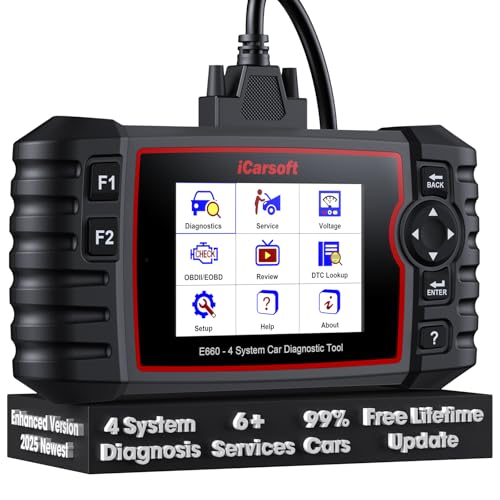
- 【Looking for More Professional Vehicle Scan Tool?】iCarsoft E660 2026 Upgrade Version OBD2 scan tool can do it all-reads and clears trouble codes on Engine system, ABS system, Transmission system and Airbag system, And with 6 reset function. It covers more than 59 vehicle makes from 1996-2023 models ( included most USA/ Asia / EU vehicle brand) with full OBDII. (As every car model has its-owned specific car system and ECUs, not all car models have full car ECUs which may prevent the scanner from performing all listed system diagnostics or reset services. Therefore, please email to us with car VIN and services required to do scanner's services for a compatibility check before purchasing.)
- 【OE-Level 4 Systems OBD2 Scanner】iCarsoft E660 2026 Upgrade Version diagnostic scanner offers comprehensive OBDII services, allowing you to quickly scan Engine system. It supports functions such as reading and erasing codes, checking I/M readiness, viewing freeze frame data, performing O2 sensor tests, conducting on-board monitoring, testing the evap system, auto VIN retrieval, and reading both generic and specific codes, as well as DTCs and battery tests.
- 【4 Systems Diagnosis for 10000+ Vehicles】 iCarsoft E660 2026 Upgrade Version adopts unique diagnostic software, works well for most Porsche
 , Benz, BMW, US Ford, Land Rover, Jaguar, Audi, VW, Volvo, Honda, Nissan, Infiniti, Toyota, Lexus, Scion, Isuzu, Hyundai, Kia, Daewoo, Mazda, Sprinter, Mini, Seat, Skoda, SAAB, EU Ford, Holden, AUS Ford, Acura, Subaru, Mitsubishi, Dacia, Renault, Fiat, GM, Chrysler, Citroen, Peugeot, Opel, Smart,Suzuki, Vauxhall, Alfa-Romeo, Lancia and etc.
 - 【6 Reset Services】iCarsoft E660 2026 Upgrade Version is a diagnostic tool that offers professional maintenance services, including Oil Reset, EPB, BMS, ETC, SAS, TPMS Reset. It can help you easily reset oil change indicators, recalibrate steering angle sensors, relearn replaced electric parking brake and so on. For optimal vehicle performance and maintenance convenience. (Tips: Please update the softwareafter receiving the product to obtain new service functions)
- 【118+ Real Time Record & Live Graph View】iCarsoft E660 2026 Upgrade Version can automatically record vehicle text history and identify vehicle information. Preserve real-time data information. View & Graph Live Data. Support Data Review and Print. 15 languages: English, German, Dutch, Spanish, French and so on. We promise to offer Lifetime updates (Lifetime free Update via PC), and confidence in products. We also provide 1 year warranty + extra lifetime hardware free repair if you need it in the future. We prioritize user experience & strive to meet your expectations. Please do feel free to reach out to us if you have any question or problem about the usage.
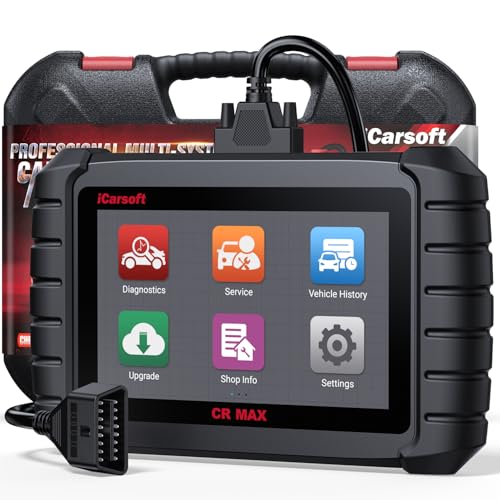
- WHY CHOOSE THE 2025 CR MAX -Upgrade the latest diagnostic capabilities for all vehicles after 1996: upgrade to 49+maintenance services; 46 extra specific functions; real all systems/all control modules diagnose; over 40K+ bidirectional actuation tests for diagnosing all control moduels of cars; Powerful full OBD2 Functions; built-in ECU Coding for BMW/ Audi/ VW/ RollsRoyce; Fr ee V.A.G Guide Function; Battery retistration for new battery adaptation and more. It covers all vehicle diagnostic services and some special professional vehicle maintenance servces, assists you to do home DIY vehicle maintenance or car repair as a pro technician.
- NEWEST IN INNOVATION FULL OBD2 SERVICES- iCarsoft auto car diagnostic scanner compatible with CAN-FD, CR MAX can do it all-reads and clears trouble codes, ALL SYSTEM DIAGNOSIS such as engine, transmission, ABS and airbag etc. CR MAX code reader for all cars can perform I/M Readiness, Live Data, Freeze Frame, Vehicle Information, Monitor Test, On-Board Monitor, E vap System Test,O2 Sensor Test,DTC Library Lookup,etc. (Warm Tips: If you car is after 2023,please contact us for compatibility; 3. It comes with 16PIN OBD2 diagnostic adapter, please check your car diagnostic socket if it is 16pin socket, if your car is 14pin diagnostic socket please contact us for the solution.)
- 49 RESET+ 46 SERVICES- Performs: Oil Reset, EPB,SAS,Throttle, D-P - F, Battery, ABS, Injector, TPMS, Suspension, AC, Head Lamp, Body Stablity, Engine, Tramsmission, Airbag, Seat, Door-Win-Roof, Fuel Pump, Door, E-G- R.+21 NEWEST SERVICES( Need update scanner)-AdBlue, Clutch, Crankshaft, High Voltage Battery, Cruise Control, NO xSensor, Rain Sensor, Stop And Start, Turbocharger, Head Up Display, Radar Camera, Vehicle Setup, Cyliner Misfire Check,Speedlimitassist, ControlUnitReset,OxygenSensor, Seatbelt. Extra 46+ extra services based on car brand.(Tips: Quantity of reset/ calibration fucitons are based on car system that your vehicle model has)
- REVOLUTIONARY 40000+BIDIRECTIONAL ACTIVE TESTS: Upgraded CR Max scanner equip with numberous of actuational test items for covering all available vehicle control modules, no longer only do simple light test or window test like other scanners, performs hardware modules test and software control modules test for checking car units or new updated control moduels work well or not after maintenance/ repair/ re-installation/ control system updated (Example for Benz- Roller Sun Blind test; Backup Camera test ;Self-test; EPB test; Transport Mode test;Boost Pressure Positioner test; Fuel Pump test; AND MORE!!).(Warm tip: The available test items are based on control modules your car has)
- ECU CODING+ BATTERY REGISTRATION- Powerful ECU Coding service for BMW/MINI/RollsRoyce / Audi/VW/Seat/Skoda/Bentley/Bugatti/Lamborghini, Improves Engine Power Performance and Optimizes Fuel Efficiency and Match New Hardware Unit to car and Customized a comfortable Driving Modes and Fixes & Updates Original Software Bug. The battery test function for checking car battery health, perform battery reset (BMS ) for replacing a damaged or aging car battery with a new one and register new battery to car ECU

- 【WHY CHOOSE CR PRO+】COST-EFFECTIVE BIDIRECTIONAL OBD2 SCANNER, COST 80 LESS THAN CR MAX, WITH THE SAME maintenance services as CR MAX, 49 Reset + 46 Brand-Specific services & ECU coding( for AU DI/BM W/ V W ONLY), OEM-level active tesing, multi-systems diagnostic(More than 4 basic systems), powerful full OBD2 functions. 2.0 GHz 4 core CPU, 16GB memory .Warm Tip: Some car models with FCA gateways, causing scanners failed diagnostic, please contact us for additional FCA adapter (please check the details in the following description)
- 【CONTACT US TO CONFIRM 】Few models need a special adapter cable, which will be available soon, please contact us for check if you are the following models: (2018&later) for Chrysler: 300, Great Jetdragon; for Dodge: Challenger, Warhorse, Durango, Cooley, Rams 1500, Rams 2500, Rams 3500, Rams 4500, Rams 5500; for JEEP: Grand Cherokee, Free Man, New Wrangler (JL), Grand Commander. (2019&later) for JEEP: Free Light, Compass. (2020&later)for JEEP: Gladiator. (2018&later) for Alfa Romeo: GIULIA; for Fiat: 500L, 500X, 500, Novo Uno fl, Toro. (2018&later) for Maserati. CONTACTING US FOR FCA GATEWAY ADAPTER.
- 【Bidirectional Test Covers 180,00+ vehicles】The CR Pro+ offers extensive actuator coverage, up to 9981 tests for AUDI A4, 4117 tests for Land Rover, 7092 tests for VW 0B-Magotan, 60776 tests for GM Chevrolet, 24611 for Benz S221, 3744 for Porsche, 114 for BMW. Beyond sending commands to basic control-units like headlights, mirrors, A/C clutches, fans, windows, doors and more, CR Pro+ CR Pro+ perform real-time bidirectional control with deeper ECU access, such as complex sensor or electronic responses or inner unit like fuel pump, injector, ignition coil, main relay, transmission coolant valve to catch potential issues. It enables you quickly locate the faults, avoid needless pa r.t swap.
- 【COST-EFFECTIVE 49 RESET SERVICE】iCarsoft Pro+features all Reset/ Adaptation/ Calibration/ Initialization service including ABS Reset/ Oil Reset/ EPB Reset/ ETC Reset/ INJ Reset/ SAS Reset/ BLD Reset/ BMS Reset/ LAP Reset/ SPS Reset/ TPMS Reset/ACS Reset/ AFS Reset/ FPP Reset/ IDL Reset/ BSC Reset/ Door Reset/ Seat Reset/ TCM Reset/ Service Interval Reset/ Brake Reset/ DWR Reset/ ECM Reset etc. IMPORTANT: CR PRO+ has been upgraded to provides numerous car maintenance functions for maintaining car systems/control units outside the systems corresponding to the above functions (in miscellaneous). NOTE:Above services vary by vehicle models, please contact us for the service list for your cars.
- 【OE MULTI-SYSTEMS DIAGNOSTICS】CR Pro+ can diagnose main vehicle systems like Engine, TCM, ABS, Airbag, Brake, BMS, Battery, windows, etc,AND ALSO diagnose vehicle specific systems like Antenna Module / Communication Control Module/ Parking Lock/Voice Control/ AC Reducing Agent Metering System,etc, helping to detect existing faults and potential faults, giving you complete vehicle health analysis. It displays module Info, real-time data graphs, such as transmission temperature, saves freeze frames to pinpoint intermittent faults. Note: Available systems vary by model. Each car model has unique systems. You can contact us for diagnoseable systems of your vehicle.
Last update on 2026-06-12 / Affiliate links / Images from Amazon Product Advertising API
This product presentation was made with AAWP plugin.