
NHTSA ID Number: 10156496
Manufacturer Communication Number: A461906 20507373
TSB/Document Date: 2019-04-02
Summary
This bulletin contains repair instructions for brake squeal solution.
46 Q7 MY18 Squeal from front brakes
46 19 06 2050737/7 March 15, 2019. Supersedes Technical Service Bulletin Group 46 number 18-01 dated
November 21, 2018 for reasons listed below.
Model(s)
Year
VIN Range
Vehicle-Specific Equipment
Q7
2018
000001 - 039706
With disc brakes in front
Condition
REVISION HISTORY
Revision
Date
Purpose
7
-
Revised Service (Updated Step 4 and Tip)
Revised Required Parts and Tools (Updated Note)
6
11/21/2018
Revised Warranty (Updated Labor Operations)
5
09/04/2018
Revised Warranty (Updated TU)
Revised Required Parts and Tools (Removed remark)
Customer reports hearing a squealing noise (1.6 KHz) from the front brakes in the following conditions:
Slow speeds, usually below 20 mph
Usually in reverse
Cold brakes
Temperature and humidity conditions may vary
Page 1 of 8
© 2019 Audi of America, Inc.
All rights reserved. Information contained in this document is based on the latest information available at the time of printing and is subject to the copyright and other intellectual property rights of Audi of
America, Inc., its affiliated companies and its licensors. All rights are reserved to make changes at any time without notice. No part of this document may be reproduced, stored in a retrieval system, or transmitted
in any form or by any means, electronic, mechanical, photocopying, recording, or otherwise, nor may these materials be modified or reposted to other sites, without the prior expressed written permission of the
publisher.
Please review the audio/video example below: https://audiexternal.kzoplatform.com:443/swf/player/359.
Figure 1. QR Code for supporting video.
Note:
Frequencies can be identified with our Audi Frequency Analysis App, review TSB 2051095: 46 Audi frequency
analysis for further information.
Technical Background
Not applicable.
Production Solution
Not applicable.
Service
Replace front brake pads according to the instruction in Elsa at Repair Manual, Chassis >> Brake System >> 46
Mechanical Components >> Front Brakes >> Brake Pads, Removing and Installing Steel Brakes.
1. Identify the caliper casting lip of the installed caliper in the vehicle. There are two possibilities for the lip; large
and small. (Figure 1).
Page 2 of 8
© 2019 Audi of America, Inc.
All rights reserved. Information contained in this document is based on the latest information available at the time of printing and is subject to the copyright and other intellectual property rights of Audi of
America, Inc., its affiliated companies and its licensors. All rights are reserved to make changes at any time without notice. No part of this document may be reproduced, stored in a retrieval system, or transmitted
in any form or by any means, electronic, mechanical, photocopying, recording, or otherwise, nor may these materials be modified or reposted to other sites, without the prior expressed written permission of the
publisher.
Figure 1. Caliper casting lip configurations.
2. Install one new lower spring in each caliper. The final configuration must have two springs per caliper (Figure
2). See available spring designs (Figure 3).
3. According to caliper casting, a specific type of spring must be assembled, as follows:
LARGE CASTING LIP >>> INSTALL SPRING 4M0 615 269 C
SMALL CASTING LIP >>> INSTALL SPRING 4M0 615 269 or 4M0 615 269 B
Page 3 of 8
© 2019 Audi of America, Inc.
All rights reserved. Information contained in this document is based on the latest information available at the time of printing and is subject to the copyright and other intellectual property rights of Audi of
America, Inc., its affiliated companies and its licensors. All rights are reserved to make changes at any time without notice. No part of this document may be reproduced, stored in a retrieval system, or transmitted
in any form or by any means, electronic, mechanical, photocopying, recording, or otherwise, nor may these materials be modified or reposted to other sites, without the prior expressed written permission of the
publisher.
Figure 2. Spring configuration, after installation.
Figure 3. Spring designs.
4. It is mandatory to clean the brake pad caliper contact surfaces for the brake pad intermediate plate (also known
as retaining plate) and thinly coat with lithium grease. (Figure 4).
Page 4 of 8
© 2019 Audi of America, Inc.
All rights reserved. Information contained in this document is based on the latest information available at the time of printing and is subject to the copyright and other intellectual property rights of Audi of
America, Inc., its affiliated companies and its licensors. All rights are reserved to make changes at any time without notice. No part of this document may be reproduced, stored in a retrieval system, or transmitted
in any form or by any means, electronic, mechanical, photocopying, recording, or otherwise, nor may these materials be modified or reposted to other sites, without the prior expressed written permission of the
publisher.
Figure 4. Clean contact surfaces and then coat with lithium grease.
5. It is mandatory to pay attention to the labeling on the brake pad (Figure 5). Once installed the arrow (1) on the
backing plate must point upward (the pads should be installed with the arrows following the forward rotation of the
wheel). Labeling (2) indicate correct assembly position (left outer/inner, right outer/inner).
Page 5 of 8
© 2019 Audi of America, Inc.
All rights reserved. Information contained in this document is based on the latest information available at the time of printing and is subject to the copyright and other intellectual property rights of Audi of
America, Inc., its affiliated companies and its licensors. All rights are reserved to make changes at any time without notice. No part of this document may be reproduced, stored in a retrieval system, or transmitted
in any form or by any means, electronic, mechanical, photocopying, recording, or otherwise, nor may these materials be modified or reposted to other sites, without the prior expressed written permission of the
publisher.
Figure 5. Correct installation positioning for the brake pad.
6. It is mandatory to replace all 4 brake pad intermediate plate per caliper – included in the brake pad box (Figure
6).
Figure 6. Replace all 4 intermediate plates.
Page 6 of 8
© 2019 Audi of America, Inc.
All rights reserved. Information contained in this document is based on the latest information available at the time of printing and is subject to the copyright and other intellectual property rights of Audi of
America, Inc., its affiliated companies and its licensors. All rights are reserved to make changes at any time without notice. No part of this document may be reproduced, stored in a retrieval system, or transmitted
in any form or by any means, electronic, mechanical, photocopying, recording, or otherwise, nor may these materials be modified or reposted to other sites, without the prior expressed written permission of the
publisher.
7. Brake Embedding:
a. Perform 10 stops from approximately 35 mph to 10 mph with medium brake application.
b. Drive for approximately 2 minutes 40 mph without braking to allow the brakes to cool down.
c. Repeat steps A and B if necessary.
Note:
A. This bulletin does not apply if there is an improper operation or misuse of the vehicle.
B. Do not perform ABS stops as a way of embedding the brakes. Brake pads and discs may be permanently
damaged if brakes are overheated prior to being properly embedded.
C. Do not replace current springs already installed in the caliper. It is mandatory to install two springs per vehicle.
Tip: Rust/Corrosion build-up, grooves, or glazing on the braking surface of the brake disc may cause noise
and must be considered when replacing brake pads. If this TSB has not been completed, complete the repairs as
outlined in this TSB. If this TSB has already been completed and the noise has returned, please review TSB
2034181.
Warranty
Claim Type:
110 up to 24 Months/24,000 Miles.
If the vehicle is outside any warranty, this Technical Service Bulletin is informational
only.
Service Number:
4636
Damage Code:
0010
Labor Operations:
Wheels remove + reinstall (front)
4405 2000
See SRT
Brake pads front remove + reinstall
4636 2050
See SRT
GFF
No allowance
0 TU
Road test prior to service procedure
0121 0002
10 TU
Road test after service procedure
0121 0004
10 TU
Diagnostic Time:
Claim Comment:
As per TSB #2050737/7
All warranty claims submitted for payment must be in accordance with the Audi Warranty Policies and Procedures
Manual. Claims are subject to review or audit by Audi Warranty.
Page 7 of 8
© 2019 Audi of America, Inc.
All rights reserved. Information contained in this document is based on the latest information available at the time of printing and is subject to the copyright and other intellectual property rights of Audi of
America, Inc., its affiliated companies and its licensors. All rights are reserved to make changes at any time without notice. No part of this document may be reproduced, stored in a retrieval system, or transmitted
in any form or by any means, electronic, mechanical, photocopying, recording, or otherwise, nor may these materials be modified or reposted to other sites, without the prior expressed written permission of the
publisher.
Required Parts and Tools
Part Number
Part Description
Quantity
4M0698151BD
Set of front brake pads
01
4M0615269 or
Spring (According to caliper casting design)
02 springs per vehicle/repair
4M0615269B or
4M0615269C
Note:
Packaging may vary with 1 or 2 parts, according to the
supplier.
G052150A2
0.1
See ETKA
Sender wire.
02
Note:
Pad wear indicator, replace only if defective. Vehicles
with very low mileage probably will not require
replacement.
See ETKA
Fasteners, Bolts, Nuts, and Screws as needed per the
Repair Manual
See ETKA/ELSA
Additional Information
The following Technical Service Bulletin(s) will be necessary to complete this procedure:
TSB 2051095, 46 Audi frequency analysis.
All parts and service references provided in this TSB (2050737) are subject to change and/or removal. Always
check with your Parts Department and/or ETKA for the latest information and parts bulletins.
©2019 Audi of America, Inc. All rights reserved. The information contained in this document is based on the
latest information available at the time of printing and is subject to the copyright and other intellectual property
rights of Audi of America, Inc., its affiliated companies and its licensors. All rights are reserved to make changes
at any time without notice. No part of this document may be reproduced, stored in a retrieval system, or
transmitted in any form or by any means, electronic, mechanical, photocopying, recording, or otherwise, nor may
these materials be modified or reposted to other sites without the prior expressed written permission of the
publisher.
Page 8 of 8
© 2019 Audi of America, Inc.
All rights reserved. Information contained in this document is based on the latest information available at the time of printing and is subject to the copyright and other intellectual property rights of Audi of
America, Inc., its affiliated companies and its licensors. All rights are reserved to make changes at any time without notice. No part of this document may be reproduced, stored in a retrieval system, or transmitted
in any form or by any means, electronic, mechanical, photocopying, recording, or otherwise, nor may these materials be modified or reposted to other sites, without the prior expressed written permission of the
publisher.

- Mixes well with conventional fluids
- Low-moisture formula provides excellent vapor lock...
- Ideal for hydraulic and disc brakes


- Provides an extra margin of safety in extreme braking...
- Mix of polyglycol ethers ensures hot brake-system operation...
- Excellent for ABS, disc and drum brake systems
- Delivers braking power when needed by avoiding a spongy...
- Both wet and dry boiling points exceed the minimum...
Last update on 2026-06-12 / Affiliate links / Images from Amazon Product Advertising API
If the PDF is very large, it may not load in the preview below.
Some older TSBs had multiple PDFs — visit the NHTSA Website to view all PDFs.
If the TSB PDF does not show, download or view it on the NHTSA Website.
Click on the (+) Plus Sign
Then Click on Associated Document(s)
Search NHTSA Database for Recalls
Search NHTSA Database for Vehicle Investigations
View Latest Vehicle Investigations
Search NHTSA Database for Vehicle Complaints
View Latest Vehicle Complaints
TSB/Document ID: A461906 20507373
Replacement Service Bulletin Number:
MFR Communication Date: 2019-03-15
MFR Internal Campaign ID/Software Version:
Communication Type: Service Bulletin/Repair Instructions
NHTSA Components: SERVICE BRAKES, HYDRAULIC
MFR Component System:
MFR Component Subsystem:
Previous TSB | Next TSB |

- OBD2 Bluetooth Scanner Lifetime Update: Ediag Elite offers revolutionary Advantage Lifetime Updates with unlimited access to the superior 15+ reset service, bidirectional testing and full system diagnostics.The Ediag Elite is an excellent Bluetooth OBD2 scanner diagnostic tool ideal for DIY's and private car owners.
- Bidirectional Control for Quickly Locating Problems: The Bidirectional Scan tool allows you to send commands directly from your smartphone to your vehicle for active testing. This feature helps to quickly narrow down problems such as air conditioning clutches, windows, doors, sunroofs, etc., reducing diagnostic time for mechanics and helping DIY users locate faults more easily. In addition, Ediag Elite provides fault analysis and repair guidance to help you solve problems efficiently.
- 15+ Maintenance Resets: The current version introduces 15+ popular special features: Oil Reset, Headlight Matching, Bleeding Reset, TPMS Reset, BMS Reset, Gear Box Relearn, EGR Learning, Throttle Learning, Injector Coding, SAS Reset and more special functions in system diagnose menu. These functions make it easy for owners to carry out the necessary maintenance and servicing, ensuring that your vehicle stays in top condition, prolonging its service life and preventing common problems and breakdowns. Note: The Special function vary by model& year, Reach us check compatibility.
- Wide Compatibility CANFD & FCA
 Autoauth: Compatible with GM, Ford, Toyota, Chrysler, Honda, Mazda, Nissan, Mitsubishi, Hyundai, KIA with standard OBD2 port from 1996 to newer. More car brands and features will be released gradually. Newest Ediag Elite scanner supports CANFD Protocol and FCA cars. Note: Coverage may vary on different vehicle by model& year ,Please contact us to confirm compatibility before purchase.
 - Perfect for Monitoring The Health of Your Vehicle: Ediag Elite is designed to make vehicle maintenance simple and efficient. With intelligent AutoVIN quick recognition, it is easy to connect to your car without the need for manual input. Real-time data is visualized in a variety of formats, including graphs, numeric, meter displays and clear 4-in-1 data charts, allowing you to effortlessly monitor real-time performance. Data logging/reporting is available for playback and further analysis.
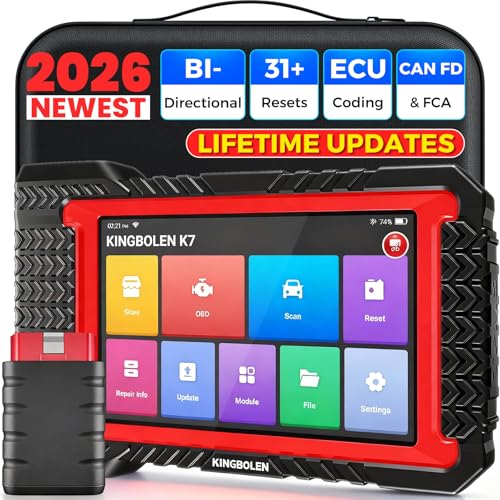
- No Annual Fees & 2026 Upgraded CAN FD: Why pay $199/year or more for updates? The 2026 newest Kingbolen K7 obd2 scanner features have been upgraded to Lifetime Updates without subscription fees, saving you significant costs in the long run. K7 scan tool also adds the CAN FD protocol for the latest GM models (2019+), enabling faster data transfer, reducing the risk of undetected errors
- 2026 Newest Top-tier Car Scanner: Kingbolen K7 diagnostic scan tool is equipped with most capabilities for daily repair/maintenance: Wireless diagnosis via Bluetooth, Bidirectional Test, ECU Online/Offline Code, 31+ Resets, PMI for Ford, Lincoln, Mazda, Global version for 100+ brand vehicles and 17 languages, no area limit, FCA AutoAuth
- OE-Level Full Systems Scan Tool: K7 professional diagnostic scanner with Auto Vin can do one-click to scan ECUs on most of vehicles, like pcm, ecm, eps, bcm, tpms, sas, a/c system... to read/clear code, view live data, freeze frame, read ecu info. 4-in-1 data stream graphics can make data viewing more intuitive. Detailed diagnostic reports will help you easily master the car situation as it can be shared by bluetooth or email! Adding workshop information can help your customers to know more
- Bidirectional Test/Active Test & ECU Code: Stop guessing and start fixing. Bidirectional scan tool Kingbolen K7 can perform real active test that can send commands to the vehicle's ECU to drive the actuators to work, like window, rear mirrors, sunroof, door, solenoids, wipers, headlamp, etc, helping you quickly find out bad parts and pinpoint faulty issues. K7 bidirectional scanner will be a good choice to save money and time on car repairs when performing complex maintenance and repair
- 31 Reset Functions: Avoid expensive dealership visits for simple services. Experience tells us that just a small repair service may cost a lot of money. Kingbolen K7 is a professional diagnostic scanner with 31 common maintenance services like Oil /SAS/EPB/TPMS Reset, Battery Matching, ABS Bleeding, Injector Code, etc. It effectively handles most of the car reset and relearning jobs, perfect for experienced DIYers and mechanics. Note: Functions in the menu vary across vehicles. Kindly check the compatibility before purchase
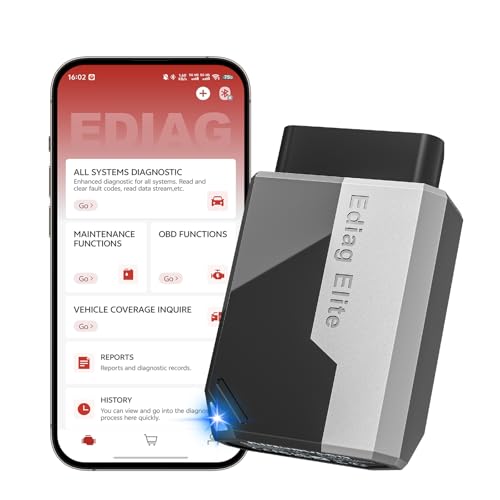
- 【Cost-effective Diagnostic Scan Tool】Lifetime updates without fee, No subscription fee required, No IP restrictions, Ediag Elite bluetooth scanner stands out. It can perform in-depth Full System diagnostics,15+ Reset Services, powerful Active Test, CANFD & FCA AutoAuth. Connect your phone via Bluetooth for diagnosis, providing a faster, smarter and smoother diagnostic experience. Easy to put in pocket, convenient to carry, keep track of the car's status anytime, anywhere. Best bang for your bucks.
- 【15+ Reset Service, Easy Problem Solving】 KINGBOLEN Ediag Elite obd2 scanner diagnostic scan tool comes with 15+ professional reset functions, including: Oil Reset, ABS Bleeding, Injector Code, SAS Reset, TPMS Reset, BMS Reset, AFS Reset, Sunroof Calibration, Brake Reset and more special functions in system diagnose menu. The ideal bluetooth scanner for mechanics and DIY enthusiasts, which can save unnecessary maintenance costs and significantly shorten repair time.
- 【Comprehensive Full Systems Diagnostic】 The Ediag Elite obd2 scanner bluetooth supports full system In-Depth diagnosis. It can read/clear fault codes, read real-time data/freeze frame, module information, and perform testing and reset functions for ECM, BCM, ABS, SRS, TPMS, TCM, BMS, SAS, A/C & RTM systems ect. It works with most car models after 1996, cover more than 150+ car brands. Supports 22 global languages for your convenience(EN, FR, ES, DE, IT, RU, PT, JP, TU...)
- 【Powerful Bidirectional Scan Tool & Active Test】 The obd2 code reader for Ediag Elite can perform real time active test that can send commands to the vehicle’s ECU to drive the actuators to work, such as turn on the radiator fan, modulate the throttle, open/close windows, etc. It can help you quickly find out the bad components and the cause of the fault, which can save you a lot of time. With BT 5.2 wireless connectivity, you can enjoy wireless diagnostics up to 33 feet.
- 【FCA AutoAuth & CANFD Compatibility】 Ediag Elite scan tool offers support with FCA Gateway Access, allowing you to perform protected functions on FCA vehicles, including Chrysler, Dodge, Jeep, Alfa Romeo, Fiat vehicles, etc.(Note:just allows you to access the FCA, but need to have your own FCA account) Supports the CAN-FD protocol, provide high-speed vehicle diagnostic communication and data transfer, working perfectly on GM vehicles produced after 2020, saving $100 to buy a CAN FD adapter.
Last update on 2026-06-12 / Affiliate links / Images from Amazon Product Advertising API
This product presentation was made with AAWP plugin.