
NHTSA ID Number: 10129112
Manufacturer Communication Number: ITB18-004
TSB/Document Date: 2018-02-21
Summary
VOLUNTARY SERVICE CAMPAIGN 2018 Q60 SPORT; POWER STEERING CONTROL MODULE REPROGRAMMING This bulletin applies to vehicles equipped with RWD (Rear Wheel Drive). INTRODUCTION Infiniti is conducting this voluntary service campaign on certain specific model year 2018 Q60 Sport and 2018 Q60 Red Sport vehicles equipped with Rear Wheel Drive (RWD) to reprogram the power steering control module. This service will be performed at no charge to the customer for parts or labor. IDENTIFICATION NUMBER Infiniti has assigned identification number P8301 to this campaign. This number must appear on all communication and documentation of any nature dealing with this campaign. DEALER RESPONSIBILITY Retailers are to repair vehicles falling within range of this campaign that enter the service department. This includes vehicles purchased from private parties, vehicles presented by transient (tourists) owners, and vehicles in a Retailer?s inventory.
If the PDF is very large, it may not load in the preview below.
Some older TSBs had multiple PDFs — visit the NHTSA Website to view all PDFs.
If the TSB PDF does not show, download or view it on the NHTSA Website.
Click on the (+) Plus Sign
Then Click on Associated Document(s)


- Advanced VCI Box, Industry-leading J2534 Pass-Thru...
- High-Speed OEM-Level Diagnostics & Programming: Unlock true...
- Coverage for 17 Car Brands & Ultra Reliability: Works...
- User-Friendly RLink Platform & Expert Support: TOPDON’s...
- 6.6 ft USB-C Cable & Portable Storage Case: The RLink J...
This product presentation was made with AAWP plugin.
Search NHTSA Database for Recalls
Search NHTSA Database for Vehicle Investigations
View Latest Vehicle Investigations
Search NHTSA Database for Vehicle Complaints
View Latest Vehicle Complaints
TSB/Document ID: ITB18-004
Replacement Service Bulletin Number:
MFR Communication Date: 2018-01-25
MFR Internal Campaign ID/Software Version:
Communication Type: Service Bulletin/Repair Instructions
NHTSA Components: STEERING:ELECTRIC POWER ASSIST SYSTEM
MFR Component System:
MFR Component Subsystem:
Previous TSB | Next TSB |
Reference:
Date:
ITB18-004
January 25, 2018
VOLUNTARY SERVICE CAMPAIGN
2018 Q60 SPORT; POWER STEERING CONTROL MODULE REPROGRAMMING
CAMPAIGN ID #:
P8301
APPLIED VEHICLES: 2018 Q60 Sport (V37) equipped with RWD
2018 Q60 Red Sport (V37) equipped with RWD
Check Service COMM or Dealer Business Systems (DBS)
National Service History to confirm campaign eligibility.
INTRODUCTION
Infiniti is conducting this voluntary service campaign on certain specific model year 2018 Q60 Sport and 2018 Q60 Red
Sport vehicles equipped with Rear Wheel Drive (RWD) to reprogram the power steering control module. This service will be
performed at no charge to the customer for parts or labor.
IDENTIFICATION NUMBER
Infiniti has assigned identification number P8301 to this campaign. This number must appear on all communication and
documentation of any nature dealing with this campaign.
DEALER RESPONSIBILITY
Retailers are to repair vehicles falling within range of this campaign that enter the service department. This includes vehicles
purchased from private parties, vehicles presented by transient (tourists) owners, and vehicles in a Retailer’s inventory.
Infiniti Bulletins are intended for use by qualified technicians, not 'do-it-yourselfers'. Qualified technicians are properly trained individuals who have
the equipment, tools, safety instruction, and know-how to do a job properly and safely. NOTE: If you believe that a described condition may apply to
a particular vehicle, DO NOT assume that it does. See your Infiniti retailer to determine if this applies to your vehicle.
1/22
SERVICE PROCEDURE
IMPORTANT: Before starting, make sure:
ASIST on the CONSULT PC has been synchronized (updated) to the current date.
All C-III plus software updates (if any) have been installed.
NOTE: The CONSULT PC automatically gets applicable reprogramming data during ASIST synchronization.
A screen print for Warranty documentation can be done from the CONSULT PC during this process while still
connected to the vehicle.
The CONSULT PC is connected to the internet via a cable or Wi-Fi.
Later in the procedure you will be required to enter your User Name and Password.
The CONSULT PC must be connected to the Internet.
If you do not know your User Name and Password, contact your Service Manager.
2/22
ITB18-004
1. Open the driver door.
Figure 1
IMPORTANT: The “Shipping Mode” must be turned OFF (White Storage Switch PUSHED-IN) to complete the
power steering control module reprogramming.
2. Verify the vehicle is out of “Shipping Mode”.
a. Remove the fuse box cover on the driver
side dash side finisher.
b. Push-in the Storage switch (white square
button).
Fuse Box
Cover
Storage
switch
Figure 2
3/22
ITB18-004
3. Connect the plus Vehicle Interface (plus VI) to the vehicle.
Make sure to use the correct VI for C-III plus (plus VI).
CAUTION: Make sure the plus VI is securly connected. If the plus VI connection is loose during
reprogramming, the process will be interrupted and the Power Steering Control Module may be damaged.
4. Connect the AC Adaptor to the CONSULT PC.
CAUTION: Be sure to connect the AC Adaptor. If the CONSULT PC battery voltage drops during
reprogramming, the process will be interrupted and the Power Steering Control Module may be damaged.
5. Connect the GR8 (battery charger) to the vehicle 12V battery.
Set the GR8 to the ECM power supply mode.
CAUTION: Be sure the battery charger is connected securely to the battery. Make sure the battery voltage
stays between 12.0V and 15.5V during reprogramming. If the battery voltage goes out of this range during
reprogramming, the Power Steering Control Module may be damaged.
6. Turn OFF all external Bluetooth® devices (e.g., cell phones, printers, etc.) within range of the CONSULT PC and the VI.
CAUTION: Make sure to turn OFF all external Bluetooth® devices. If Bluetooth® signal waves are within range
of the CONSULT PC and the VI during reprogramming, reprogramming may be interrupted and the Power
Steering Control Module may be damaged.
7. Turn the ignition ON with the engine OFF.
The engine must not start or run during the reprogramming procedure.
8. Turn OFF all vehicle electrical loads such as exterior lights, interior lights, HVAC, blower, rear defogger, audio, NAVI,
seat heater, steering wheel heater, etc.
IMPORTANT: Make sure to turn OFF all vehicle electrical loads. Make sure the battery voltage stays between
12.0V and 15.5V during reprogramming. If the battery voltage goes out of this range during reprogramming, the
Power Steering Control Module may be damaged.
4/22
ITB18-004
9. Turn ON the CONSULT PC.
10. Select CONSULT-III plus (open C-III plus).
11. Wait for the plus VI to be recognized.
The Serial number will display when the plus VI is recognized.
Plus VI is
recognized
Figure 3
12. Verify CONSULT-III plus is updated to version 73.50 or higher.
Step
12
Figure 4
5/22
ITB18-004
13. Select Diagnosis (All Systems).
Step
13
Figure 5
14. Check for DTCs.
If there are any DTCs other than EPS/DAST 3 DTCs; diagnose, perform repairs, and erase DTCs before
continuing.
If only EPS/DAST 3 DTCs are stored, select ERASE.
If no DTCs are stored, continue to the next step.
Erase
Figure 6
6/22
ITB18-004
15. Return to the home screen; select Home and then Yes.
Step
15
Figure 7
16. Select Re/programming, Configuration.
Step
16
Figure 8
7/22
ITB18-004
17. Use arrows (if needed) to view and read all precautions.
18. Check the box confirming the precautions have been read.
19. Select Next.
Step
17
Step
18
Step
19
Figure 9
20. If the screen in Figure 10 displays, select Automatic Selection (VIN).
If the screen in Figure 10 does NOT display, skip to Step 21.
Step
20
Example
Figure 10
8/22
ITB18-004
21. Make sure VIN or Chassis # matches the vehicle’s VIN.
22. If the correct VIN is displayed, select Confirm.
Step 21 Verify
here
Step
22
Figure 11
23. Select Confirm.
Step
23
Figure 12
9/22
ITB18-004
24. Select EPS/DAST 3.
Step
24
Figure 13
25. Select Reprogramming.
Step
25
Figure 14
10/22
ITB18-004
26. When you get to the screen shown in Figure 15, confirm reprogramming is needed as follows:
A. Find the Power Steering Control Module Part Number and write it on the repair order.
NOTE: This is the current Part Number (P/N).
Step
26 A
Step
27
Figure 15
B. Compare the P/N you wrote down to the numbers in the Current Power Steering Control Module Part Number
column in Table A below.
If there is a match, continue with the reprogramming procedure.
If there is not a match, reprogramming is not needed or it has already been done. Confirm this campaign
applies to the vehicle you are working on.
Table A
MODEL
CURRENT POWER STEERING CONTROL MODULE PART NUMBER: 28500 -
2018 Q60 Sport
5CA2C
27. Select Save.
11/22
ITB18-004

- 🎉[OTOFIX D1 Lite, Perfect Cost-effective Diagnostic Tool]: OTOFIX D1 Lite, a newest bidirectional scan tool from OTOFIX company, is a great choice for DIYers and repair shops. 👉This obd2 scanner diagnostic tool packs all practical functions: OE level all systems diagnoses, Bi-Directional Control, 38+ reset services fixing 99% of common problems, support DoIP & CANDF protocols and FCA
 AutoAuth, high-end hardware configuration. Worldwide vehicles and 🔥2 Years Free Updating🔥 covered.
 - 🎉[Bi-Directional Scan Tool, Active Test]: OTOFIX D1 Lite bluetooth obd2 scanner can also command ECUs and monitor the operation of the actuators to track down the problems of certain parts, like windows, sunroof, wipers, fuel pumps, etc., saving repair time & trouble. This makes OTOFIX D1 Lite the most cost-effective bidirectional scan tool.
- 🎉[2026 Newest, 38+ Hot Reset Functions]: Equipped with 38+ reset functions in one, the OTOFIX D1 lite automotive scanner diagnostic tool allows you to troubleshoot 99% of common vehicle problems. You can use this car diagnostic scanner holding enough functions to easily repair common vehicle models in your repair shops. Including Oil Reset, Injector Coding, Throttle, DPF Reset, SCR Reset, Gear Learning, Clutch Learning, Suspension, etc. Note* Reset functions vary by model.
- 🎉[OE Level Full Systems Diagnostics]: Unlike the 2-system and 4-system diagnostic tools, the OTOFIX auto scan tool can complete comprehensive system diagnostics within 5 minutes. It accesses and scans all available onboard systems like for Engine /AT /ABS /EPB /BMS /TPMS /SRS /SAS /Audio System /BCM /Air Conditioning / etc., to read & clear codes, view live data, and check ECU information. Note: Active test is not involved.
- 🎉[Powerful Hardware Configuration]: Designed with a fashion appearance & a 7” touchscreen and a weight of 463g, this OTOFIX D1 Lite OBD2 diagnostic scanner scan tool is convenient for everywhere and easy to use & store. Android9.0 OS and 2+64GB memory enhance multi-task smoothness and diagnostic operation, no more wasting too much time. 5800mAh battery allows hours-lasting use. WiFi & VCI1 also bring faster communication for your diagnostics.


- 🏆【2026 TOP OBD2 Scanner Diagnostic Tool】OTOFIX D1 Lite wireless obd2 scanner has upgraded hardware configuration and car coverage. The newly upgraded D1 Lite with 🔥OS Android 9.0🔥1.5Ghz 4 core high efficiency processor🔥2GB RAM+64GB ROM large storage🔥5800mAh large battery, more stable and longer lasting diagnostics🔥 38+ Reset🔥action tests🔥full system diagnostic🔥Supports MV105 endoscope🔥21+ Language Supports🔥100000+ vehicle coverage to meet all your daily maintenance needs.
- 👍【Bi-Directional Control / Active Test】D1 Lite obd2 scanner has bidirectional control(worth $300+), which is the most beloved feature among mechanic. If your headlights or car windows are broken, going to a repair shop will cost a lot of money. You can use D1 Lite to send execution commands to the ECU module and identify the repair status. Such as ABS, car windows, doors, valves, wipers, headlights, etc., effectively shorten diagnostic time and reduce diagnostic costs.
- 🔥【All Systems Diagnostics, In-depth Checking】This advanced OBD2 Scanner D1 Lite can perform OE-level diagnosis of all systems including engine, transmission, airbag, ABS, ESP, TPMS, gateway, steering, radio, and air conditioning for more than 100 brands. This diagnostic scanner supports essential functions, such as reading ECU version info, reading and clearing fault codes, and reading data streams.With just a simple click, it provides you with accurate and in-depth diagnostics.
- 🏆【38+ Reset Hot Functions】For repair workshops, holding an OTOFIX D1 Lite Auto scanner is a strong advantage over others. Its 38+ maintenance functions provide various solutions for all module repairs, including Oil Reset, TPMS Reset, Injector Coding, Suspension, Throttle Matching, etc., which will usher your repair business to a new pinnacle. Continuously updating will never make the functionality & compatibility out-of-date.
- 🏆【150+ Models, 10000+ Car Coverage & 16 Languages】D1 Lite is a comprehensive car diagnostic scan tool, help you to troubleshoot car issues fast for 95% US, European, Asian auto makes. ✅ With frequent updates and optimizations allow D1 Lite to cover more vehicles to meet your needs. ✅ Multilingual menu allows auto mechanics around the world to use it without language barriers. 🚩Note: Kindly send us the S/N of the device to authorize new language updates before changing the menu language.
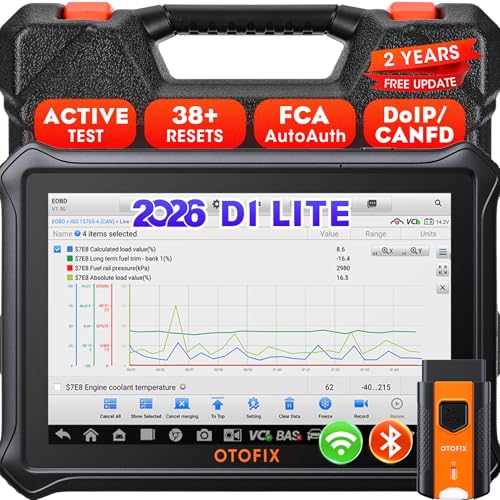
- 【2026 OTOFIX D1 Lite Gives the Best Value for Money】OTOFIX D1 Lite bidirectional scan tool is more FASTER and SMARTER with 2026 Enhanced Hardwares & New Functions! 👍Alternative Bluetooth +USB connect 👍2G+64GB 👍4x ARM Cortex-A35 (1.5GHz) Processor (5X Faster CPU) 👍Android 9.0 OS 👍5G GHz WiFi 👍CANFD&DOIP 👍 FCA AutoAuth 👍38+ Services 👍3K+ Bi-Directional Control 👍Full Systems Diagnose 👍2 Years Update 👍150+ Vehicle Coverage.
- 👍【Active Tests】 OTOFIX D1 Lite is a bi-directional scan tool that can send commands to, and also receive information from vehicle control modules. This way, you can quickly locate and repair faulty auto parts. For Example: send direct commands to ask the vehicle to turn on/off the radiator fan, lights, sound horn, fuel pump, modulate throttle, open/close windows, operate mirrors and more. *Note that only available tests will be displayed in the menu.
- 👍【38+ Service Functions】 OTOFIX D1 Lite scan tool offers 38+ of the hottest service functions that are commonly used for car repairs. That include Oil reset/SAS/EPB/BMS/Throttle/ABS bleeding, and 2065-new SUS/ADBLUE/NOX/Headlamp resets (and more) to help restore your car status after repairs are done. Compared to other diagnostic scanners for cars, the OTOFIX D1 Lite scanner is much more fully-featured. *Note that specific functions available depend on the make/model/year of your car.
- 👍【All System Diagnostics + Cloud Report Management】 This 2026 car scanner OTOFIX D1 Lite provides troubleshooting and data for all ECUs: read/clear DTCs, view graphic live data/VIN, and locate system faults for safe driving. With Cloud Report Management, you can save detailed reports to cloud servers and easily shared them with others via QR codes/emails/text messages. Others can access these reports from any device (smartphones/tablets/PCs …) anytime, and you can better manage repair work.
- 👍【99% Car Coverage】 This one-station car scanner diagnostic for all cars works on 150+ major car brands across the world. 1) It supports CAN-FD/DoIP protocols: compatible with GMCAVALIER/TRAX/Encore/Envision/GL8(LSY)/CT4/CT5 after 2019; Volvo after 2018; Land Rover/Jaguar after 2017; and BM.W F/G all chassis. 2) For models equipped with security modules (such as Renault & 2018+ FCA SGW), its built-in AutoAuth allows you to easily break diagnostic barriers after registration.
This product presentation was made with AAWP plugin.
Last update on 2026-05-13 / Affiliate links / Images from Amazon Product Advertising API