
NHTSA ID Number: 10120390
Manufacturer Communication Number: SP16-301
TSB/Document Date: 2017-10-21
Summary
On the vehicles affected by this bulletin, replace the turbocharger actuator (SRA).
Special Bulletin
Revision _:
SP16-301
Date
Expiration
Release
Page
02.2016
02.2018
2
1(11)
This document supersedes previous revisions.
VARIABLE GEOMETRY TURBOCHARGER (SRA) - ACTUATOR REPLACEMENT
Prevost vehicles
DESCRIPTION
On the vehicles affected by this bulletin, replace the turbocharger actuator (SRA).
MODEL YEAR(S) AND VEHICLES INVOLVED
NOTICE TO SERVICE CENTERS
Verify vehicle eligibility by checking warranty bulletin status with SAP or via ONLINE WARRANTY
SYSTEM available on Service / Warranty tab of Prevost website.
Model
X3-45 Commuter
Model Year : 2012
VIN
From 2PCG33495CC735053 up to 2PCG33495CC735232 incl.
This bulletin does not necessarily apply to all the above-mentioned vehicles, some vehicles may have been modified
before delivery. The owners of the vehicles affected by this bulletin will be advised by a letter indicating the Vehicle
Identification Number (VIN) of each vehicle concerned.
MATERIAL NEEDED
Order kit “SP16-301” which consists in:
Part No.
85013731
Description
ACTUATOR, TURBOCHARGER – SERVICE KIT
Qty
1
NOTE
Material can be obtained through regular channels.
Redact:
EL
Special Bulletin
SP16-301
Date
Expiration
Release
Page
02.2016
02.2018
2
2(11)
PROCEDURE
DANGER
Park vehicle safely, apply parking brake, stop engine. Prior to working on the vehicle, set the ignition
switch to the OFF position and trip the main circuit breakers equipped with a trip button. On Commuter
type vehicles, set the battery master switch (master cut-out) to the OFF position.
PREPARATION
1. Apply the parking brake and shift the
transmission to neutral. Shut off all electrical
loads. Turn the ignition key to the OFF
position.
2. Open the engine compartment door. Set the
rear start selector switch to the OFF position
(FIGURE 1).
FIGURE 1
3. Using pressure wash equipment, clean the turbocharger actuator while it is still mounted.
Note: Make sure all electrical connections and coolant pipes in the area of the turbocharger actuator are
securely fastened.
4. Use a coolant extractor (FIGURE 2) to drain the
coolant from the engine. An alternate method
is to drain the coolant into a suitable container
using the drain hose.
FIGURE 2
Redact:
EL
Special Bulletin
SP16-301
Date
Expiration
Release
Page
02.2016
02.2018
2
3(11)
GAINING ACCESS TO THE AREA
5. In order to reach the turbocharger area, the
radiator coolant return pipe shown on FIGURE 3
along with the furthest flexible hose must be
removed.
FIGURE 3
6. Loosen the hose clamps (4 clamps) shown on
FIGURE 4.
7. Remove the two (2) U‐clamps shown on
FIGURE 4.
8. Take the pipe out and the flexible hose with it.
FIGURE 4
Redact:
EL
Special Bulletin
SP16-301
Date
Expiration
Release
Page
02.2016
02.2018
2
4(11)
REMOVAL
9. Disconnect the actuator assembly electrical
connector at the wiring harness (FIGURE 5).
Cut any tie straps as needed.
FIGURE 5
10. Disconnect the coolant lines from the actuator
(FIGURE 6).
Caution: Protect the insides of the actuator
assembly
and
the
exposed
parts
from
contamination when removed. Failure to do so can
result in component malfunction or failure.
FIGURE 6
1) Coolant Return Port
2) Coolant Inlet Port
Redact:
EL
Special Bulletin
SP16-301
Date
Expiration
Release
Page
02.2016
02.2018
2
5(11)
11. Remove the actuator from the turbocharger.
Remove and discard the gasket (FIGURE 7).
FIGURE 7
1) Alignment Pin
2) Actuator Housing
3) Gasket
4) Screw (4 Required)
5) Grease Applicator Tube
INSTALLATION
12. Using gloves, manually rotate the turbocharger
sector gear back and forth (counterclockwise
and clockwise) (FIGURE 8). It should be noted
that when the sector gear is at the end of
travel, or at an end stop, it can require
significant force to overcome friction then, start
its motion in the opposite direction. This is
normal and not cause for concern. Apply more
force to move the sector gear. Once in motion,
the sector gear movement should be smooth,
without binding or sticking until it reaches its
end of travel (end stop).
FIGURE 8
Redact:
EL
Special Bulletin
SP16-301
Date
Expiration
Release
Page
02.2016
02.2018
2
6(11)
13. Rotate the sector gear fully counterclockwise
until contact is made with the end stop of the
variable geometry internal mechanism. 1/4 to
3/4 of the 3mm (0.118 inch) reference hole
should be visible at the edge of the sector gear
nearest the turbine housing (FIGURE 9).
FIGURE 9
ALIGNMENT HOLE INSPECTION, 3MM (0.118 INCH) HOLE
14. For turbochargers manufactured without the
small 3mm (0.118 inch) alignment hole, a
portion (half) of the 5mm (0.197 inch)
alignment hole should be exposed at the
compressor housing side of the sector gear
when the sector gear is fully rotated toward the
turbine housing (FIGURE 10).
FIGURE 10
ALIGNMENT HOLE INSPECTION, 5MM (0.197 INCH) HOLE
15. Rotate the sector gear fully clockwise. Make
sure that the alignment pin fits through the
sector gear into the alignment hole in the

- 💯【Conta.ct us for Support Directly】If you met any...
- 🔥🔥🔥【2026 AUTEL FLAGSHIP MK900BT MK900-BT, NEW...
- 🚗【3000+ ACTIVE TESTS (50➡3000+), SAME AS MS...
- 🚗【40+ HOT SERVICES FOR 150 MAKES (28+➡40+)】Full...
- 🚗【OE ALL SYSTEM DIAGNOSE, AUTO SCAN 2.0: SCAN LICENSE...


- 【TURN OFF CEL】 This AL319 car scanner diagnostic tool...
- 【EXTENSIVE APPLICATION】 Autel AL319 Compatible with...
- 【FOR END USER & DIYERS】 This error code reader AL319 is...
- 【USER-FRIENDLY DESIGN】 This OBD2 scanner and check...
- 【HIGH-QUALITY SERVICES】 12 months war.ranty from the...
Last update on 2026-06-12 / Affiliate links / Images from Amazon Product Advertising API
If the PDF is very large, it may not load in the preview below.
Some older TSBs had multiple PDFs — visit the NHTSA Website to view all PDFs.
If the TSB PDF does not show, download or view it on the NHTSA Website.
Click on the (+) Plus Sign
Then Click on Associated Document(s)
Search NHTSA Database for Recalls
Search NHTSA Database for Vehicle Investigations
View Latest Vehicle Investigations
Search NHTSA Database for Vehicle Complaints
View Latest Vehicle Complaints
TSB/Document ID: SP16-301
Replacement Service Bulletin Number:
MFR Communication Date: 2016-02-01
MFR Internal Campaign ID/Software Version:
Communication Type: Service Bulletin/Repair Instructions
NHTSA Components: ENGINE AND ENGINE COOLING:ENGINE:GASOLINE:TURBO/SUPERCHARGER
MFR Component System:
MFR Component Subsystem:
Previous TSB | Next TSB |
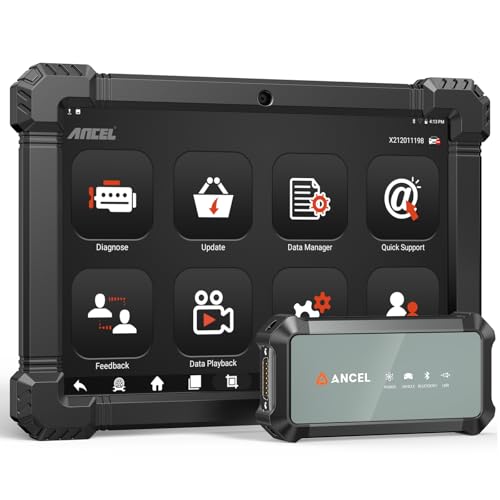
- 2026 ALL-IN-ONE HEAVY DUTY TRUCK SCANNER – BUILT FOR DIESEL DIAGNOSTICS:The ANCEL X7HD PRO combines full-system diagnostics, bi-directional control, ECU coding, HDOBD/OBD2 functions, and 42+ reset services in one powerful heavy duty truck scanner. This diesel scan tool helps technicians, fleet owners, and repair shops diagnose problems faster, reduce downtime, and complete more repairs without switching between multiple truck diagnostic tools. Features a 10.1" Android tablet, Bluetooth & Wi-Fi, live data graphing, and 2 years of f-ree updates
- 42+ RESET FUNCTIONS – MORE THAN A BASIC TRUCK CODE READER:Perform essential service functions including forced DPF regeneration, injector coding, speed limiter adjustment, idle adjustment, oil reset, ABS reset, SRS reset, EPB reset, throttle reset, and suspension calibration. Designed for real truck maintenance and fleet service, this commercial truck diagnostic scanner helps reduce dealer visits, avoid unnecessary downtime, and handle more repair jobs with one diesel diagnostic tool
- ACTIVE TEST & ECU CODING – ADVANCED BIDIRECTIONAL SCAN TOOL FOR TRUCKS:Quickly locate faults by activating components and sending commands directly to vehicle systems. Test injectors, ABS, throttle, cooling systems, and other modules in real time without unnecessary disassembly. ECU coding and module matching help adapt replacement parts, restore factory settings, and reduce repeat repairs, making this semi truck scan tool ideal for advanced troubleshooting and daily shop work
- FULL-SYSTEM HDOBD/OBD2 DIAGNOSTICS – WIDE TRUCK & ENGINE COVERAGE:Read and clear codes, monitor live data, freeze frame, and diagnose engine, transmission, ABS, body, and other major systems. Compatible with Freightliner
 , Kenworth, Peterbilt, Volvo, Mack, International, and other commercial truck brands, plus Cummins, Caterpillar, Detroit, Paccar, and Navistar diesel engines. Also supports full OBD2/EOBD diagnostics for standard vehicles, making it a versatile truck obd2 scanner for mixed fleets and repair shops
 - PROFESSIONAL HARDWARE + RELIABLE SUPPORT – BUILT FOR DAILY SHOP USE:This professional diesel diagnostic computer features a 10.1" touchscreen, Android 10.0 system, 6000mAh battery, Bluetooth/Wi-Fi connectivity, and built-in front & rear cameras for documenting repairs and remote troubleshooting. Includes 2 years of fr-ee updates, 1-year w-arranty, and responsive technical support. Contact [email protected] before purchase to confirm compatibility and supported functions for your truck or diesel engine

- 【Built for Heavy Duty Diesel Diagnostics】Designed for SAE J1939 and J1708 compliant trucks, buses, and diesel-powered commercial vehicles. HD601 truck scanner diagnostic tool helps owner-operators, small fleets, mobile technicians, and independent repair shops quickly identify fault codes, view live data, and make informed repair decisions—saving time, reducing downtime, and avoiding unnecessary shop visits
- 【Full System Diagnostics+All HD OBD Modes】The New HD601 heavy duty truck scanner delivers full-system diagnostics on SAE J1939 and J1708-compliant commercial vehicles—digging into engine, transmission, ABS, fuel, every system that keeps your rig rolling. It supports all HD OBD modes, giving you live data, freeze frame, ECU info, vehicle info, emissions data tracking, plus code reading and clearing. Not just what broke, but why—so you fix it right the first time. Pinpoint issues faster, cut repair costs, and spend less time on the shoulder
- 【Wide Heavy-Duty Vehicle Coverage】Supports a wide range of heavy-duty vehicle manufacturers and systems, including Freightliner, Kenworth, Peterbilt, Volvo, International, Detroit, Cummins, Paccar, Allison, Eaton, Bendix, Wabco, and more. Coverage varies by vehicle make, model, year, and system configuration. Contact our support team before purchase if compatibility verification is needed
- 【Speaks Major Truck Protocol】The New HD601 diesel truck scanner is built for American-made trucks—and supports the heavy‑duty protocols you' re most likely to run into on the road: SAE J1939, J1708/J1587, ISO 15765‑4, ISO 14230‑4, ISO 9141‑2, J1850 PWM/VPW, ISO 27145‑4, and EURO‑6. For most trucks, model years, and systems, it speaks the language your vehicle understands. Just plug it in and start diagnosing—no guesswork, no gatekeeping. Note: vehicle functions and module availability may vary by manufacturer and model year
- 【Save Hundreds on Diagnostic Fees】Why pay $150–300 for someone to read your codes? With the New ANCEL heavy duty truck scanner, you can pull fault codes yourself—in minutes, without leaving the truck. One or two uses pays for the tool. After that, every diagnostic is money back in your pocket. Smart investment for owner-operators, techs, and small fleets. Read and clear stored fault codes in minutes. Active fault codes may require repairs before they can be cleared
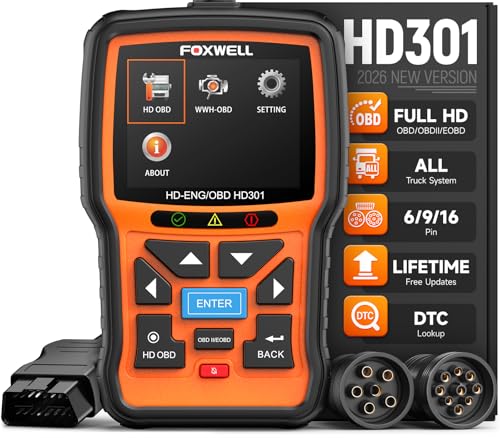
- 【One Tool, Total Fleet Coverage: 6/9/16 Pin Ready】Featuring an integrated 16-pin OBD2 connector and professional-grade 6-pin & 9-pin adapters, this heavy duty truck scanner provides extensive support for J1939, J1708, J1587, ISO 14230-4, ISO 15765-4 and ISO 9141-2, ISO 27145-4 protocols. It offers reliable diagnostic coverage for major American diesel brands—including Cummins, Paccar, Caterpillar, Detroit, and Freightliner—making it a versatile semi truck scanner for managing any diverse fleet.
- 【2 in 1 Diesel Code Reader & Advanced HD OBDII】Equipped with professional-grade diesel scanner capabilities, the HD301 features intuitive Read/Erase codes and turn off the "Check Engine" light. With the built-in DTC Lookup library, you can instantly access fault code definitions on-device without searching the internet. It also retrieves hundreds of essential live sensor data—such as coolant temperature, fuel pressure, and engine RPM—in a stable text format for precise and rapid troubleshooting. (Please note that the HD301 can not support DPF Regen.)
- 【Full System Truck Diagnostic】The FOXWELL HD301 heavy duty scan tool is engineered to deeply access and scan all available electronic control modules specifically for truck, including Engine, Transmission, ABS, SRS, Chassis, and Body Control. This professional truck scanner diagnostic tool allows you to identify issues across the entire vehicle, ensuring your rig stays in peak condition for the long haul.
- 【Versatile for most big Rigs: Commercial, Passenger & Beyond】Engineered for more than just trucks, this heavy duty scan tool offers extensive coverage for pickups, buses, trailers, and even marine vessels. From construction machinery (excavators, loaders) to agricultural equipment (tractors, harvesters), it provides a true all-in-one diagnostic solution.
- 【Plug-and-Play & No Subscription】Designed for the road! No WiFi, no batteries, and no complex App setup required. Simply plug it into your vehicle’s diagnostic port to start scanning immediately. Enjoy lifetime free software updates to keep your HD301 diesel truck scanner current with the latest vehicle models and features—without any hidden subscription fees—While overcoming language barriers with support for Spanish and English.
Last update on 2026-06-12 / Affiliate links / Images from Amazon Product Advertising API
This product presentation was made with AAWP plugin.