
NHTSA ID Number: 10117267
Manufacturer Communication Number: IK1200926
TSB/Document Date: 2017-09-08
Summary
ACM and DSI Troubleshooting
IK1200926 ACM and DSI Troubleshooting
Page 1 of 5
Countries:
CANADA, UNITED STATES Document ID: IK1200926
Availability:
ISIS
Revision:
0
Major System:
ENGINES
Created:
7/11/2013
Current Language: English
Last Modified: 6/5/2014
Other Languages: NONE
Author:
Viewed:
Jeff Novak
401
Less Info
Coding Information
Hide Details
Copy Link
Copy Relative Link
Bookmark
Add to Favorites
Provide Feedback
View My Bookmarks
Helpful
Not Helpful
5
0
Title : ACM and DSI Troubleshooting
Applies To : 2010 and 2013 Emission MaxxForce DT, 9 & 10
CHANGE LOG
6/3/14 - Changed wording of step 5
5/13/14 - Added step based diagnostics, revised parts list / verified stock
3/10/14 - Brand new article
DESCRIPTION
This document is for troubleshooting the Aftertreatment Control Module(ACM) and Down Stream Injection(DSI) assembly on the 2010 and 2013
emissions MaxxForce DT/9/10 engines.
NOTE: Before the ACM or DSI is ever replaced it should be thoroughly diagnosed. A majority of concerns are found to be wiring and connection
issues.
SYMPTOM
Intermittent or active codes associated with the ACM or DSI assembly
Diagnostic Trouble Codes
The following is a list of the most frequent codes that are a result of wiring or connection issues:
DTC
Description
3471-10
AFT Fuel Doser Valve Abnormal Rate of Change
34803
AFTFP1 signal Out of Range HIGH
60919
ACM not detected on J1939
34717
AFT Fuel Doser Valve Not Responding as Expected
34794
AFT Fuel Doser Valve Short to Ground
34824
AFT Fuel Shutoff Valve Short to Ground
Customer Complaint
- Check engine lamp (aftertreatment codes)
- Unit will not perform a regen (parked or rolling)
- Low power/de-rate (active 3719 codes)
DIAGNOSTICS
The ACM and DSI assembly should be thoroughly diagnosed before one is ever replaced. A majority of units with these codes are found to
have wiring issues with the module or assembly. The following steps highlight areas that should be checked for wiring or connection issues.
https://evalue.internationaldelivers.com/service_kb/DocTool/ArticleViewer.aspx?ControlID... 7/1/2014
IK1200926 ACM and DSI Troubleshooting
Page 2 of 5
Figure # 1: MaxxForce DT/9/10 Aftertreatment wiring diagram
Step 1: DSI connector inspection
The four connectors at the DSI assembly (AFTFP1, AFTFP2, AFTFD, AFTFIS)
should be checked for lose or broken pins. Verify connector pins are making proper Yes: Continue to Step 2.
contact by performing a pin drag test. Each of the four connectors should snap
No: Replace any connectors or pins that do not make secure
securely into place, if not then check for cracked connectors.
connections. Retest and verify aftertreatment fault does not
Are all four connectors and pins properly secured?
return.
Step 2: ACM/DSI wiring inspection
Wiring from the ACM to DSI should be inspected for any chafing and that its
properly routed. Also inspect the powers and grounds for any issues. If the issue is
centralized on a particular wire or circuit then it should be load tested and wiggled to Yes: Continue to Step 3.
pinpoint the issue.
No: Correct any wiring issues and make sure it is properly
routed. Retest and verify aftertreatment fault does not return.
Is wiring intact and properly routed?
*See figure #2
https://evalue.internationaldelivers.com/service_kb/DocTool/ArticleViewer.aspx?ControlID... 7/1/2014
IK1200926 ACM and DSI Troubleshooting
Page 3 of 5
Figure #2: Harness chafing(incorrectly routed)
Step 3: ACM connector inspection
The ACM 86Pin, 53pin and the 24Pin Engine/IP connector should be inspected
for connection issues at the pins. A weak pin or one that is not fully snapped into
the connector can create intermittent codes from engine vibration or road feedback. Yes: Continue to Step 4.
By removing the connector comb you can easily inspect pins and check their crimp
No: Replace any connector pins that do not make a good
on the wire.
connection or properly snap into the connector. Retest and
verify aftertreatment fault does not return.
Do all connector pins make a secure connection?
*See figure #3
Figure #3: Connector Inspection(ACM 86-Pin)
Step 4: Verifying ACM communication
For issues with the Controller Area Network (CAN) bus reference IK0800080.
Ensure the ACM is communicating on the CAN bus and has ignition power
when turned on. Using servicemaxx, the ACM will show up on the sniffer if it is
communicating. Check wiring and splices for any power supply issues. If the ACM
is not properly powered up it will not communicate on the bus.
Yes: Continue to Step 5.
No: Find and correct the wiring or connection issue. Retest
and verify aftertreatment fault does not return.
Does the ACM power up and communicate on the CAN bus?
Step 5: Verify fault codes
https://evalue.internationaldelivers.com/service_kb/DocTool/ArticleViewer.aspx?ControlID... 7/1/2014
IK1200926 ACM and DSI Troubleshooting
Page 4 of 5
Retest for the aftertreatment fault and verify that it is still a current issue (faults have been corrected by disconnecting and reconneting connectors
that had a bad/dirty connection). If all diagnostics have been completed and the fault code continues to return then a new ACM should be installed
(If available try a test ACM first). Verify the fault codes do not return after replacing the module.
Component Location
ACM - Is installed underneath the cab just below the drivers floorboard
DSI Assembly - Is on the left side of the engine, to the rear of the fuel filter module
Diagnostic Manual Updates
Follow the Engine Diagnostic Manual(click here) for proper voltage and wiring specifications. The information below has been updated from the
manual.
Updated ACM Voltage Referance (VREF)
‐ ACM P/N 1890993C1, KOEO voltage referance is 6V
‐ ACM P/N 7085804C1, KOEO voltage referance is 12V
‐ ACM P/N 7094050C1, KOEO voltage referance is 12V
SERVICE PARTS INFORMATION
- ACM Connector Part Numbers
ACM 53-Pin connector
ACM 86-Pin connector
Terminal 16GA
3710403C1
N/A
Terminal 20GA
3710402C1
3710402C1
- 24-Pin Engine/IP Connector Part Numbers
24-Pin(Female)
Terminal 20GA
(cavities 5-10 & 15-19)
3860055C1
Connector Body
3857801C1
- DSI Connector Part Numbers
AFTSV 2-Pin connector
AFTFP2 3-Pin connector
AFTFD 2Pin connector
AFTFIS 4-Pin connector
Terminal 18GA
3689960C1
3689959C1
3689960C1
3689959C1
Connector Body
Located in harness repair kit
Located in harness repair kit
Located in harness repair kit
Located in harness repair kit
WARRANTY INFORMATION
Warranty Claim Coding
https://evalue.internationaldelivers.com/service_kb/DocTool/ArticleViewer.aspx?ControlID... 7/1/2014
IK1200926 ACM and DSI Troubleshooting
Page 5 of 5
Group: 1200 - ENGINES
Noun:
1010 - Harness Aftertreatment Wiring
Standard Repair Time
Description
SRT Link
Hours
Wiring Repair(s)
A082004A
0.8
OTHER RESOURCES
MaxxForce DT/9/10 Diagnostic Manual
Aftertreatment Diagnostic Manual (I6/BB)
MaxxForce DT/9/10 Wiring Schematic
J1939 Data Link Troubleshooting
Feedback Information
Hide Details
Viewed:
400
Helpful:
5
Not Helpful: 0
Staff
ID
U022453
Client
ID
Comments
Created
Date
You received the following feedback From: u022453 - Chris Moran Email Address: SMTP:{Chris.Moran@navistar .com}Chris.Moran@navistar.com Feedback: Where 7/1/2014 9:17:21
is the ACM on the RE, CE and AE (in fact on all) buses?
AM
Copyright © 2014 Navistar, Inc.
https://evalue.internationaldelivers.com/service_kb/DocTool/ArticleViewer.aspx?ControlID... 7/1/2014

- 💯【Conta.ct us for Support Directly】If you met any...
- 🔥🔥🔥【2026 AUTEL FLAGSHIP MK900BT MK900-BT, NEW...
- 🚗【3000+ ACTIVE TESTS (50➡3000+), SAME AS MS...
- 🚗【40+ HOT SERVICES FOR 150 MAKES (28+➡40+)】Full...
- 🚗【OE ALL SYSTEM DIAGNOSE, AUTO SCAN 2.0: SCAN LICENSE...


- 【TURN OFF CEL】 This AL319 car scanner diagnostic tool...
- 【EXTENSIVE APPLICATION】 Autel AL319 Compatible with...
- 【FOR END USER & DIYERS】 This error code reader AL319 is...
- 【USER-FRIENDLY DESIGN】 This OBD2 scanner and check...
- 【HIGH-QUALITY SERVICES】 12 months war.ranty from the...
This product presentation was made with AAWP plugin.
If the PDF is very large, it may not load in the preview below.
Some older TSBs had multiple PDFs — visit the NHTSA Website to view all PDFs.
If the TSB PDF does not show, download or view it on the NHTSA Website.
Click on the (+) Plus Sign
Then Click on Associated Document(s)
Search NHTSA Database for Recalls
Search NHTSA Database for Vehicle Investigations
View Latest Vehicle Investigations
Search NHTSA Database for Vehicle Complaints
View Latest Vehicle Complaints
TSB/Document ID: IK1200926
Replacement Service Bulletin Number:
MFR Communication Date: 2014-06-05
MFR Internal Campaign ID/Software Version:
Communication Type: Service Bulletin/Repair Instructions
NHTSA Components: ELECTRICAL SYSTEM
MFR Component System:
MFR Component Subsystem:
Previous TSB | Next TSB |
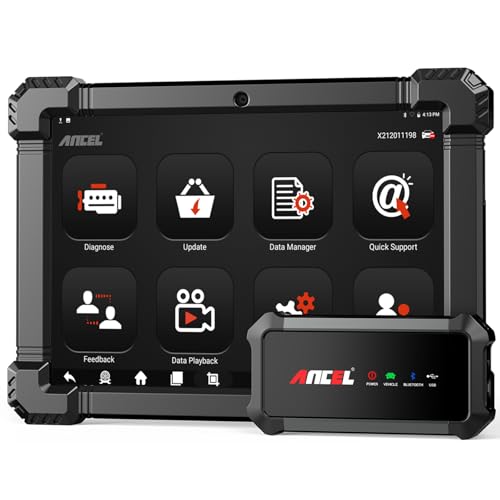
- 🔥🔥🔥2026 New Functions Making X7HD the Top Dog - Big Surprise!!! ANCEL X7HD truck scanner 10 major functional advantages .✅>Full HDOBD/OBD2 Function ✅>ALL System Diagnostic ✅>42+ Reset Function ✅>Active Test / Bi-Directional Control✅>ECU Coding✅>Graphing Live Data✅>Wide Compatibility ✅>2 Yrs Free Update✅>Remote Operation✅>Bluetooth 5.0 & Wifi In addition, 8 major hardware advantages: ✅>6000 mAh✅>10.1 inch Tablet✅>2G RAM
 ✅>32G ROM (Expandable to 128GB)✅>Data Record & Replay & Print✅>Android 10.0✅>Bluetooth 5.0 & Wifi✅>14 Languages
 - 🚛OEM DPF Forced Regen & Cylinder Cutout Test & more - ANCEL X7HD diesel scanner diagnostic tool not only supports DPF regeneration, DPF reset, DPF related information reset, DPR state reset, DPD forced regeneration etc, which helps you better solve the exhaust aftertreatment system problems, but also supports activate motor to do exhaust air in ABS Automatically. Moreover, it features TPMS activation, cylinder cut-off and learning functions
- 🚛Advanced ECU Coding & Programming - ANCEL X7HD 10.1inch truck scanner diagnostic tool is equipped with advanced ECU coding, supports Level calibration, Idle speed learning and Adjustment, Camshaft timing control learning, Control unit adaptations, Injector Codes, Read/Write VIN, Road speed limit optional vehicle speed set, etc... PLEASE NOTE that ECU codes are not compatible with all vehicles, please send us your VIN# to check vehicle compatibility
- 🚛42+ Reset Functions & Bidirectional Control - 2026 newest top heavy duty truck scan tool, comes with 42+ special services (ECU, Speed Limit and Idle Reset, Oil Reset, Injector Coding, EPB, ABS, SRS, Suspension, Throttle, etc. and always keep growing), which meet all your various needs for service and maintenance
- 🚛10 Inch All Systems Diesel Scanner & Full HDOBD/OBD2 Modes - ANCEL X7HD diesel truck scan tool supports all systems scan, such as Engine, Brake, Retarder, TECU Transmission, Tachograph, ABS, SRS, TPMS, EPB, SAS, ESP, and other vehicle systems, comes with 10 obd2 service modes: read/erase error codes, Data Stream, I/M Readiness, Vehicle Information, Actuations, DTC Lookup, EVAP, view freeze frame, etc
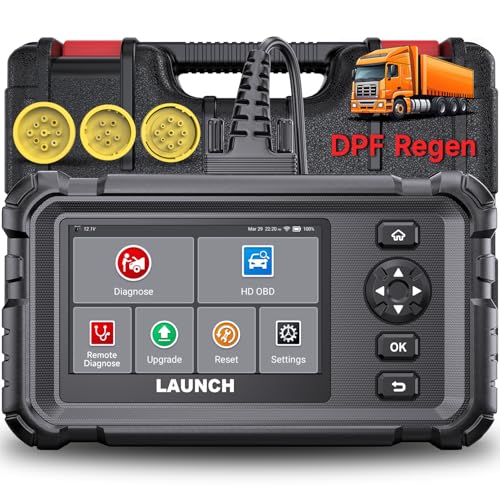
- Dealer-Level Diagnostics, Faster & Easier: The heavy duty truck scanner delivers full-system diagnostics for engine, ABS, transmission, and more, plus 7+ reset functions like DPF Regen and Speed Limit Adjust. Powered by a 1.3G CPU, 2GB RAM, 16GB storage, Android 8.1, and a 3000mAh battery, it runs smoothly for fast scanning, live data, reports, Auto VIN, Wi-Fi updates, and easy handheld use. It captures screenshots, replays live data, and generates reports to support your repair decisions.
- One Tool for 50+ Truck Brands: The diesel scanner supports J1939, J1708, J1587, and OBD2/CAN protocols, delivering broad coverage for major diesel trucks and commercial vehicles including Cummins, Cat, Detroit, Paccar, Volvo, Freightliner, Kenworth, Peterbilt, International, Mack, Isuzu, Hino, Scania, Mercedes-Benz, and more. Also supports Allison, Aisin, Eaton, WABCO, and Bendix, helping you diagnose more vehicles, reduce equipment costs, and handle more jobs with one professional scan tool.
- Diesel Truck DPF Regen & Reset Features: Experiencing loss of power, sluggish acceleration, or poor hill-climbing performance? These symptoms are often caused by a clogged or overloaded DPF. The truck diagnostic scanner offers OEM-level forced DPF regeneration, DPF reset, and DPD/DPR functions. This device extends DPF lifespan and efficiently diagnoses exhaust aftertreatment issues. It can significantly reduce diagnostic time and save you up to $3,000 or more in costly dealership fees.
- 7+ Resets - Perform Essential Procedures: The truck scanner features 7+ essential resets including DPF Regen clears carbon buildup; Oil Reset clears service light; Injector Coding matches new injectors; DEF Test checks urea injection; Speed Limit Adjust saves fuel; Cylinder Cutout pinpoints misfires; Clutch Relearn restores smooth engagement. Reset after maintenance or part replacement for proper truck operation. Vehicle compatibility varies. Email [email protected] to confirm before buying.
- Full System Diagnostic for Truck: The truck scanner diagnostic tool covers all systems like engine, ABS, transmission, SAS, SRS, TPMS and more. It reads fault codes and shows real-time data. Additionally, it includes full HD OBD and OBD2 modes: read/clear codes, live data stream, I/M readiness, freeze frame, DTC lookup, and more. When warning lights appear or performance issues arise, quickly identify which system is affected and gain the real-time data needed for accurate diagnosis.
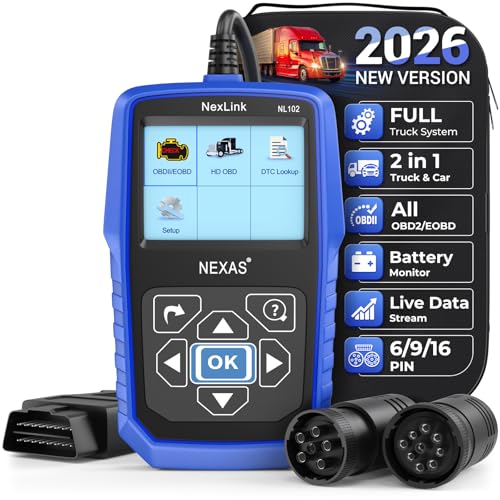
- Diagnose Heavy-Duty Truck Problems Fast — Read and clear fault codes and diagnose warning light issues on many Class 4–8 diesel trucks including Freightliner, Peterbilt, Kenworth, Volvo, Mack and Cummins-powered vehicles
- Help Reduce Downtime & Repair Costs — It offers full system diagnostics for major trucks meeting standard protocols, along with complete OBD2 functionality. Quickly check engine faults, view live truck data and identify issues before expensive repair shop visits or unnecessary repairs
- No complicated setup required — Simple menus and built-in DTC explanations make this truck code reader easy to use for owner-operators, mobile mechanics and small fleet maintenance
- Live Data & Built-in DTC Lookup — View real-time engine data and built-in truck fault code definitions directly on the scanner to help understand vehicle problems faster without searching through manuals
- Free Lifetime Updates & Technical Support — Includes free software updates plus responsive technical support for setup, compatibility and everyday truck diagnostics
This product presentation was made with AAWP plugin.
Last update on 2026-06-05 / Affiliate links / Images from Amazon Product Advertising API