
NHTSA ID Number: 10073781
Manufacturer Communication Number: 2014 A7
TSB/Document Date: 2016-06-22
Summary
SUMMARY TO BE PROVIDED ON A FUTURE DATE.
If the PDF is very large, it may not load in the preview below.
Some older TSBs had multiple PDFs — visit the NHTSA Website to view all PDFs.
If the TSB PDF does not show, download or view it on the NHTSA Website.
Click on the (+) Plus Sign
Then Click on Associated Document(s)

- 💝【Questions? We’re Here Anytime】MK808S is a...
- 🔥🔥🔥【2026 NEWLY RELEASED BI-DIRECTIONAL...
- 【28+ MOST POPULAR RESET SERVICE FOR 150 MAKES】Autel...
- 【ALL SYSTEM DIAGNOSTICS, FACTORY-LEVEL SCANNER】The...
- 【AUT0 SCAN & AUT0V1N, 10X FASTER】How much have you spent...


- 💯【Conta.ct us for Support Directly】If you met any...
- 🔥🔥🔥【2026 AUTEL FLAGSHIP MK900BT MK900-BT, NEW...
- 🚗【3000+ ACTIVE TESTS (50➡3000+), SAME AS MS...
- 🚗【40+ HOT SERVICES FOR 150 MAKES (28+➡40+)】Full...
- 🚗【OE ALL SYSTEM DIAGNOSE, AUTO SCAN 2.0: SCAN LICENSE...
This product presentation was made with AAWP plugin.
Search NHTSA Database for Recalls
Search NHTSA Database for Vehicle Investigations
View Latest Vehicle Investigations
Search NHTSA Database for Vehicle Complaints
View Latest Vehicle Complaints
TSB/Document ID: 2014 A7
Replacement Service Bulletin Number:
MFR Communication Date: 2016-06-30
MFR Internal Campaign ID/Software Version:
Communication Type: Service Bulletin/Repair Instructions
NHTSA Components: EQUIPMENT:OTHER:OWNERS/SERVICE/OTHER MANUAL
MFR Component System:
MFR Component Subsystem:
Previous TSB | Next TSB |
PERFECT DELIVERY INSPECTION (PDI)
2014
A7/S7/A7 TDI/RS 7
Client
Audi Delivery Guidelines
VIN
Delivery Date
Pre-Delivery
Ensure Final Vehicle Quality Inspection Is Completed
FF Enroll customer in Audi connect Services (http://MyAudiconnect.com/) (if equipped and Audi
connect Request to Initiate Services and T-Mobile T&C are signed)
FF Deactivate the connection prompts for the online services (TEL function button > Settings >
Connections > Data Connection > select No Prompt)
FF Inspect exterior for damage, dings, dents, and surface scratches
FF Check interior for cleanliness, grease marks and damage. Repair all defects prior to
customer delivery
FF Verify vehicle is equipped as specified and all accessories are installed
FF Check front/rear floor mats are locked in
Customer Priority Topics
1.____________________________________________________________________________________________________________________________________________________________
2.____________________________________________________________________________________________________________________________________________________________
3.____________________________________________________________________________________________________________________________________________________________
How long would the client like to spend on topics today?_______________________________________
Priority Delivery Topics
Personalize Vehicle Settings
FF Audio and Entertainment
System Controls
FF Bluetooth: Connect customer’s Bluetooth phone and assist in copying and accessing
phonebook entries. Ensure connection will occur automatically upon re-entry if desired.
Refer to www.audiusa.com/bluetooth for compatible phone list
FF HVAC (Heating, Ventilation,
Air Conditioning) Controls
FF Adjust mirrors, seats, and steering column to customer preference
FF Hands-Free Communications
FF Assist with radio station presets
FF Navigation System
FF Show how to connect iPod/MP3. Demonstrate AMI, SD cards and Aux-in jack (if equipped)
Introduce MMI Navigation System
FF Review the MMI controls and basic functionality (buttons: function, on/off, arrow control and back)
FF MMI touch control panel with integrated handwriting recognition (if equipped)
FF Input letters, numbers, symbols, add a space, delete a character
FF Moving a map and adjusting the sound distribution
FF Saving/selecting a radio station
FF Scroll through album covers (avail. if music is downloaded onto MMI hard drive)
FF Use the DVD main menu
FF Demo Audio Sources: Show how to connect iPod via AMI, MP3/SD cards, Bluetooth audio
player. Explain the Jukebox functionality
FF Explain CD and DVD loading/unloading
1 of 11
PERFECT DELIVERY INSPECTION (PDI)
2014 A7/S7/A7 TDI/RS 7 | Audi Delivery Guidelines
Client
VIN
Delivery Date
Interior
FF Show seat, mirrors and steering column adjustments
FF Demonstrate seat positioning using front seat controls. Show how to adjust headrest in all
different axis directions
FF Seat memory setting
FF Front seat ventilation
FF Mention seatbelt movement
FF Adjust exterior mirrors. Show how exterior mirrors fold in and how to make adjustments
in the MMI
FF Show how to activate heated mirrors
FF Explain exterior mirror tilt function
FF Demonstrate heated steering wheel operation (if equipped)
FF Show how to adjust comfort arm rest (longitudinal adjustment)
FF Sunroof operation
FF Climate control functions (front and rear). Explain “hi”/“lo” settings for faster heating
and cooling
FF Fan settings/speed
FF Explain that the small red triangle puts the system into AUTO mode and that it will
automatically adjust the fan speed to reach the temperature
FF Show how to activate seat heating/ventilation
FF Multifunction steering wheel functions (toggle, scrolling, menu button)
FF Explain Star (*) button on the steering wheel (if equipped) – If in the Preset Station List, press
the * button to cycle through presets. If in Station List, press * button to cycle through station list
FF Wiper/washer system/rain sensor
FF Cruise control/ACC (if equipped)
FF Demonstrate and explain Head-up Display (if equipped)
FF Review the Start-Stop-System info card with the customer. Explain the system functionality
(if applicable)
FF Show how to set daylight savings time and time zone manually
FF Driver Info Display/Trip Computer: Explain toggle function via “RESET” on stalk
Show the different tabs that will display
FF Show how to access the Vehicle functions within each tab. Point out the items that can be set
via the MMI (e.g., time, miles vs. km, etc.) Reset “Trip Comp 1 and 2” prior to delivery
FF Demonstrate valet function (ensure not activated) – refer to OM for details
FF Homelink® location and setup
FF Cooled glove box
FF “Passenger Side Airbag Off” light: Illuminates if no occupant in passenger seat or if
occupant is “out of position”
FF Show rear seat pass through
2 of 11
PERFECT DELIVERY INSPECTION (PDI)
2014 A7/S7/A7 TDI/RS 7 | Audi Delivery Guidelines
Client
VIN
Delivery Date
In Car Video Tutorials
FF Show the customer how to view the In Car Video Tutorials. Select the Car function button >
Owner’s Man. Control button and follow the prompts
FF Point out these videos can also be viewed on the Audi technology website:
http://audiusa.com/technology or at the Audi YouTube site at:
http://www.youtube.com/audiusa in the Audi Technology Tutorials section
Exterior
FF Demonstrate how to operate the power tailgate via the remote control master key, driver’s door,
and tailgate
FF Adjust tailgate height to customer preference. Demonstrate tailgate and height operation
FF Show how to open fuel door – push / pull release (show AdBlue fill – TDI only)
FF Explain the misfuel inhibitor feature on the fuel tank (TDI only)
FF Explain AdBlue and messages shown if AdBlue level is low or empty (TDI only)
Owner’s Documents
FF License/insurance/registration/title (if applicable)
FF Warranty & Maintenance Booklet (stamp to confirm PDI was completed). Adhere “vehicle
identification label” from the vehicle trunk to the inside cover of the Warranty &
Maintenance Booklet prior to delivery
FF 24-Hour Roadside Assistance information – ask customer to program number in their phone
FF Owner’s Manual, MMI Manual and other manuals as equipped
FF Take the Quick Start Guide from the glove box, open it, and demonstrate how to use it with the customer
FF Tire Warranty Booklet: Explain coverage from tire manufacturer
FF All keys (2 master, 1 emergency, 1 valet) – walk customer through programming
FF Provide Audi Care Information
FF Lemon Law Rights Booklet or Lemon Law Notice as required by law
Orientation Drive
FF Keyless Go: No ignition for key. Show how to start vehicle using Start/Stop button
FF Discuss that foot must be on brake when starting/stopping
FF Activate and demonstrate navigation system with real-time traffic
FF Demonstrate operation of Audi parking system plus with rear view camera and top or
corner view cameras (if equipped)
FF Explain Audi drive select modes and how to select/change modes
FF Night vision assistant: Show where the night vision assistant button is located. Show how
to adjust the various settings in the MMI
FF Demonstrate and explain the Engine Start/Stop feature
FF Explain adaptive cruise control with stop and go function. Explain the city auto e-brake feature
FF Explain Audi side assist functionality (if equipped): Point out the side assist button on the
driver’s side door. Show how to adjust the side assist light brightness in the MMI. Only works
at speeds over 19 mph (30 km/h)
3 of 11
PERFECT DELIVERY INSPECTION (PDI)
2014 A7/S7/A7 TDI/RS 7 | Audi Delivery Guidelines
Client
VIN
Delivery Date
Orientation Drive (continued)
FF Explain Audi active lane assist functionality (if equipped): Show how to set the steering wheel
vibration in the MMI. Show how to activate the system with the button on the turn signal.
Only works at speeds of 40 mph (65 km/h) or more
FF Explain Audi pre sense system with active safety system (based on installed equipment)
FF Explain the functionality of Audi braking guard and how to set in the MMI
FF Demonstrate Tiptronic function
FF Show how to set electromechanical parking brake
End the orientation drive in the service write-up area
Service Introduction
FF Tour service department and introduce to Service Manager and Service Consultant
FF Set up first service appointment
FF Ask customer if you can program service department’s phone # in their phone
4 of 11
PERFECT DELIVERY INSPECTION (PDI)
2014
A7/S7/A7 TDI/RS 7
Client
Audi Vehicle Condition
Report
VIN
Delivery Date
Initial PDI Vehicle Inspection
Complete the following checks within 2 business days (48 hours) of receiving a vehicle
FF Remove full body cover (if installed) following TSB 2009967. Check for transportation damage
Note: This is a two-person task
FF Verify all keys are included (2 master, 1 emergency, 1 valet)
FF Verify all wiper blades are enclosed in the trunk (in case transport wipers are installed)
FF Inspect painted surfaces/molding/glass
(If any defects [scratches/dings/dents/body damage] are found, contact your supervisor
to arrange for immediate repair)
FF Inspect body for paint defects and damage
FF Set tires to maximum recommended tire pressures listed on the B-pillar doorjamb, and
store tire pressure values in Car/System menu
FF Perform the A-battery test for new batteries in GFF. Scan GFF and select “No” when prompted
to run spec/actual. Select “Service work.” Select the battery test for new batteries as part of
the pre-delivery inspection and act according to the test result (ok, recharge, replace). Ensure
diagnosis log is uploaded to the GFF paperless server by selecting “ok” when tester wants to
send the current generated diagnosis protocol online.
(Note: Do not use Guided Functions. The diagnosis log will not be uploaded to GFF paperless)
5 of 11
PERFECT DELIVERY INSPECTION (PDI)
2014
A7/S7/A7 TDI/RS 7
Client
Audi Technician Report
VIN
Delivery Date
All items must be completed prior to customer delivery by an Audi technician
**Refer to the Service Work area of GFF for the PDI function tests
**Audi recommends using an Audi approved battery charger to prevent excessive battery discharge during inspection
Open Campaigns/Updates
FF Check ElsaWeb for open campaigns and updates. Perform if applicable
Battery Inspection
FF Check battery clamps for tightness. Tighten if required
FF Perform the A-battery test for new batteries in GFF. Scan GFF and select “No” when prompted
to run spec/actual. Select “Service work.” Select the battery test for new batteries as part of
the pre-delivery inspection and act according to the test result (ok, recharge, replace). Ensure
diagnosis log is uploaded to the GFF paperless server by selecting “ok” when tester wants to
send the current generated diagnosis protocol online. (Note: Do not use Guided Functions.
The diagnosis log will not be uploaded to GFF paperless)
Transport Mode Deactivation, DTC check, set service reminder
FF Deactivate vehicle transport mode (via Service Work)
FF Run an SVM specified/actual comparison. Go to Function Component Selection > SVM
FF Set service reminder (via Service Work-17-PDI, Resetting SRI at PDI, counter reset)
FF Set Adaptation Channel (via Service Work: 5F – Activating/Deactivating storage of music)
FF Deactivate self-leveling suspension transport mode using guided fault finding (if equipped)
FF Check engine oil level via the MMI – fill oil to the max level when the vehicle is at
operating temperature
Trunk Inspection
FF Install wheel bolt cover removal tool from PDI kit into trunk lid toolkit
FF Place the lug cap removal tool, located in the bypack, into the toolkit (where applicable)
FF Set spare tire pressure
Under the Hood Fluid Check and Inspection
FF Check all fluid levels and top off if necessary
Exterior
FF Test windshield washers for aim and function
FF Test exterior lighting functions
FF Check tailgate opening and closing with remote (if applicable)
FF Check key functionality: Including seat and steering wheel position memory (if applicable);
verify vehicle starts and runs with the start/stop button; verify all doors lock/unlock with
remote and advanced key, including all door handle sensors with the advanced key (if equipped)
6 of 11
PERFECT DELIVERY INSPECTION (PDI)
2014 A7/S7/A7 TDI/RS 7 | Audi Technician Report
Client
VIN
Delivery Date
Interior
FF Check operation of all switches: Locks, windows, seat adjustment, seat ventilation/heating
(front and rear where applicable) and child safety features. Check rear lid opening and closing
with switch in door (ignition must be on)
FF Rear view mirror: Check self-dimming function/lighting (if equipped)
FF Verify operation of all interior lights, including ambient lighting
FF Mirrors: Inspect folding, adjustments, RH tilt in reverse, and memory
FF Inspect operation of lighter, aux. outlet under armrest, under rear vent outlets, and in
luggage compartment on passenger side
FF Verify operation of all front and rear seat belts and latches
FF Check horn operation
FF Check sunroof operation (open/close/vent/deflector at edge)
FF Turn on the night vision camera and verify operation (if equipped)
FF Check rear spoiler operation using control in console
FF Rear Climate Controls: Verify heating and cooling functions and open all rear panel vents
(center and b-pillar)
FF Passenger side airbag: Verify operation of Passenger Occupant Detection System
FF Start-Stop-System info (if applicable): Verify the velum sticker is on the start/stop button.
Remove the start/stop information card from the car kit and place it in the glove box with
the owner’s manuals. Additional supply can be ordered via the Brand Store on AccessAudi
Radio
FF Verify operation of CD changer (if equipped)
FF Verify operation of DVD player
FF Verify operation of AMI
FF SD card slot: Insert SD card and test function
FF Verify HD Radio is turned “off” in Radio/Settings Menu
Audi MMI/Navigation
FF Verify and set Language and Measurement Units in Setup Menu
FF Set Time source setting to “GPS” and set Auto daylight savings time to “on”
Change time zone appropriate to the dealer location
FF Program the presets to local stations
FF Navigation: Set dealership location (for following back to dealership during road test)
FF Voice Activation: Press the “Talk” button and verify several commands
FF Vehicles with MMI 3G+ for Technician PDI
FF Set the “Music volume while parking” to 6 lines (accessed via MMI rear view camera
display, Settings > Music volume while Parking)(applies to vehicles with park assist
or rear view camera)
7 of 11
PERFECT DELIVERY INSPECTION (PDI)
2014 A7/S7/A7 TDI/RS 7 | Audi Technician Report
Client
VIN
Delivery Date
Onboard Video Tutorials
FF Load Onboard Video Tutorials
FF Turn ignition on
FF Insert the Onboard DVD into the DVD Drive
FF Select the CAR function button. System will initialize
FF Select the Owner’s Man. function by selecting the upper right control button
FF Select “Yes”
FF Select “CD/DVD”
FF Select “Start update”
FF Turn off ignition to start update (the update will take approx. 5 minutes)
FF Once completed, remove the disk and place back into the case for the next vehicle
Audi connect (if equipped)
FF Verify Audi connect Information Packet is present, including Audi brochure, T-Mobile
brochure, customer SIM card, T-Mobile Terms & Conditions (T&C)(if applicable)
FF Connect the dealer demo SIM card to the vehicle and make sure the system fully
connects to 2G or 3G (2G or 3G symbol with Box surrounding it)(only applies if in a
T-Mobile service area)
FF Enable Google Earth in the navigation settings and verify the white Google Logo appears
next to the 2G or 3G symbol
FF Ensure the wireless network is turned on (Telephone function button > Settings Ctrl button >
Connection > Wireless network connection > select “On”)
FF Check Wi-Fi hotspot functionality is enabled and verify the SSID is set to “AUDIXXXX,”
where XXXX = last four digits of VIN
On-Hoist Inspection
FF Remove Hoist Access Point Trim Covers if equipped (Prestige/S-Line only)
FF Inspect wheel bolts for proper torque using torque wrench
FF Check underside of vehicle for fluid leaks and loose components
FF Check steering, boots, brake system, hoses, tires and wheels for damage
FF Install wheel bolt covers from PDI kit on all wheels
FF Set tires to maximum recommended tire pressures listed on the B-pillar door jamb and
store tire pressure values in Car/System menu
FF Remove Transport Blocks from shocks
FF After removing transport blocks, secure Additional Springs (a.k.a. bump stops) by pressing
into tube of upper shock mount
8 of 11
PERFECT DELIVERY INSPECTION (PDI)
2014 A7/S7/A7 TDI/RS 7 | Audi Technician Report
Client
VIN
Delivery Date
Road Test
FF Check for squeaks, rattles and wind noise
FF Verify operation of Audi parking system plus with rear view camera and top or corner
view cameras (if equipped)
FF Verify Vehicle Head-up Display functionality. Verify the image can be adjusted properly in
the viewing area of the windshield (if equipped)
FF Verify engine performance and acceleration
FF Verify transmission operation, including shift paddles
FF Verify engine Start-Stop-System functionality (if equipped)
FF Check steering/tire alignment
FF Check heated steering wheel operation (if equipped)
FF Test drive vehicle applying brakes at least 4 times at 20 mph (35 km/h) to clean brake
rotors. Check for abnormal noise/vibration
FF Verify quality of radio reception in AM/FM/SAT bands
FF Verify cruise control/ACC with Stop & Go functionality (if equipped)
FF Verify Audi side assist functionality (if equipped)
FF Verify Audi active lane assist functionality (if equipped)
FF Climate Control: Check heating and cooling functions and open all panel vents
FF Seat heating and cooling (if equipped): Check for proper operation
FF Navigation function: Activate NAV and follow directions back to dealership. Verify NAV
directions are visible in Head-Up Display (if equipped)
Post-Road Test Inspection
FF Interrogate fault memory using the VAS tester and print Diagnostic Log
FF Record final mileage on checklist and sign checklist
FF Ensure the yellow tire pressure tag is installed on steering wheel
If Vehicle is for Showroom Display/Inventory Storage or Demo Use
FF Install showroom charger to ensure battery remains charged at all times
FF Apply Inventory Maintenance Sticker
FF Install permanent wiper blades (if for showroom display or demo use)
9 of 11
PERFECT DELIVERY INSPECTION (PDI)
2014
A7/S7/A7 TDI/RS 7
Client
Audi Vehicle Detail Report
VIN
Delivery Date
WARNING: Do NOT use accessories (radio, etc.) while performing detail, as this can discharge the battery.
Refer to TSB 2009967 for Detailer responsibilities, specific use of chemicals and for part numbers to order materials
Exterior – Prior to Delivery
FF Remove protective covering
FF Wash/Dry vehicle exterior including inside door jambs and under trunk
FF Inspect painted surfaces/molding/glass and remove any residue
(If any defects [scratches/dings/dents/body damage] are found, contact your supervisor
to arrange for immediate repair)
FF Inspect body for paint defects and damage
FF Check interior floors, sunroof, trunk, front and rear windshield, and all windows for water leaks
FF Apply either 3M™ Performance Finish Wax or 3M™ Perfect-It™ Show Car Paste Wax to wax
the vehicle
FF Clean front and rear windshield using 3MTM Glass Polishing Compound.
Refer to TSB 2020552 for details
FF Apply 3M Performance Finish wax to the wheels (except chrome wheels) to protect rims
from brake dust
Under Hood – Prior to Delivery
FF Wipe down engine compartment and remove excess water from grille and hood area
Important: Do not use dressings or chemicals containing silicone!
Interior – Prior to Delivery
FF Clean all glass/sunroof (if equipped/interior rear view mirror and visor mirrors)
FF Remove all trim protection/coverings/stickers/decals
WARNING! Do not remove airbag warning triangle/warning labels
FF Check upholstery/clean as required
FF Check for excessive grease on seat tracks/clean as required
FF Check all interior surfaces/compartments (including sun visors/headliner) for marks or
fingerprints. Clean as required
FF Vacuum carpet
FF Check luggage compartment and vacuum
FF Install front/rear floor mats (including locking clip/tabs if applicable)/check that color matches
Final Detail Quality Inspection
FF Re-inspect vehicle for surface scratches, swirl marks, paint chips, dents, wax residue, dust,
or lint, preferably in an area where vehicle is to be delivered. If this is not possible, inspect
vehicle in shop under fluorescent lights or in bright sunlight
10 of 11
PERFECT DELIVERY INSPECTION (PDI)
2014 A7/S7/A7 TDI/RS 7 | Inspection Verification
Client
VIN
Delivery Date
Audi Brand Specialist
I certify that all operations have been completed and this vehicle has been prepared in accordance
with Audi Procedures and Quality Standards.
Audi Brand Specialist Signature
Date
Porter
I certify that all operations have been completed and this vehicle has been prepared in accordance
with Audi Procedures and Quality Standards.
Porter Signature
Date
Technician
I certify that all operations have been completed and this vehicle has been prepared in accordance
with Audi Procedures and Quality Standards.
Technician Signature
Date
Detailer
I certify that all operations have been completed and this vehicle has been prepared in accordance
with Audi Procedures and Quality Standards.
Detailer Signature
Date
Would you like to schedule a Second Delivery?
FF No
FF Yes
Date
Time
By signing, I confirm all items in this checklist have been thoroughly reviewed with me and the statements below are true.
• Vehicle is clean and free of problems
• Received all keys and owner’s documentation
• Satisfied with features and controls explanations
Customer Signature
07-13-US
Date
11 of 11
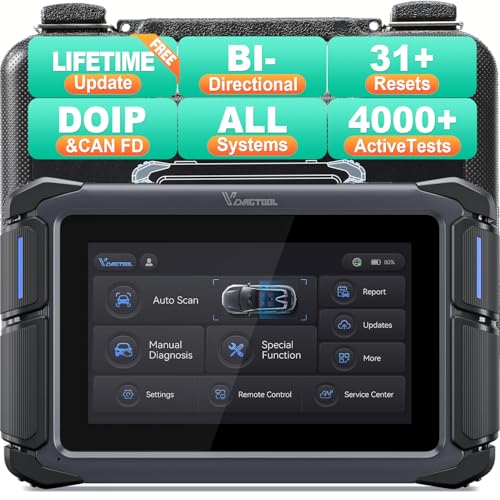
- Affordable Solution for Professional-grade Car Diagnostics & Repair: As the budget-friendly OBD2 scanner under $300, the VD70 Lite car diagnostic tool offers 31+ hot resets, full bi-directional controls with 4000+ active tests, all system diagnostics, 8-in-One live data graphing (export as CSV Export/Recording/Playback), CAN FD & DoIP protocols, and long-term free update. Additional features include Auto VIN & Auto Scan, diagnostic report sharing/printing, with coverage for over 10,000 vehicle models worldwide, suitable for DIYers, Car Owners, Technicians, and Mechanics on car repairs and maintenance tasks.
- OBD2 Scanner with Full Bi-directional Control: The Bidirectional scan tool VIDAGTOOL VD70 Lite performs 4000+ active tests that can send execution commands to the ECU module and identify the repair status, covering for windows, doors, ABS, valves, wipers, headlights, rear mirrors, sunroof,and more in-vehicle components. This bidirectional OBD2 scanner is a must-have diagnostic tool for auto technicians and mechanics on a budget! The available function tests vary by model—please check compatibility via vdiagtool2 @ outlook . c o m before purchase.
- OE All Systems Diagnostics & 8-IN-One Data Graphing: VD70 Lite is a dealer-level car scanner diagnostic tool with Auto VIN that can do in-depth diagnostics for 100+ modern car brands, covering all systems including engine, transmission, airbag, ABS, ESP, TPMS, radio, etc, to read/clear code, view live data, freeze frame, and read ECU info. This advanced OBD2 Scanner with 8-in-one data graphing and detailed diagnostic reports makes data viewing more intuitive, ensures quickly accurate repairs by identifying issues, and easily masters the car situation.
- Stay Ahead with 31+ Reset for Faster & Easier Repairs: VDIAGTOOL VD70 Lite scanner for car meets almost all daily maintenance needs for both home mechanics and workshops as a professional automotive scan tool. It can perform Oil Reset, ABS Bleed, Crank Sensor Relearn, Idle Relearn, Injector Coding, Window Initialization, HVAC Calibration, Suspension Calibration, Throttle Matching, etc, ensuring efficient repairs and complete maintenance. Besides, long-term free updates keep its functionality and broad vehicle compatibility up to date. Functions vary by model, please send us the Vehicle Model, Year, VIN for compatibility before purchase.
- 150+ Models, 10000+ Car Coverage & 22 Languages:As a powerful car computer diagnostic tool, VD70 Lite helps you to quickly troubleshoot issues for 95% of US, European, and Asian vehicles. Supporting 22 languages makes it a global car diagnostic scanner for auto mechanics worldwide without language barriers. Note: Simply provide your tool’s S/N and reach out to vdiagtool2 @ outlook . c o m to change the menu language.
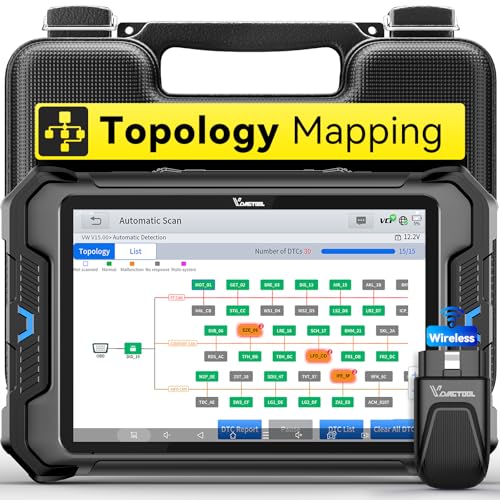
- Smarter Diagnostics, Broader Coverage, Greater Value Than $1,000+ Tools: The game-changing VD80BT OBD2 scanner delivers 4000+ active tests, 42+ hot services, advanced ECU coding, PMI & V.A.G Guided—all in one scanner for car. With OE-level full system scan and intelligent topology mapping that cuts diagnostic time by up to 50%, you'll work smarter and faster. Supporting FCA
 AutoAuth, CAN FD & DoIP protocols, this car scanner covers over 10,000 vehicle models worldwide. Built for serious pros and DIYers, it features 8" HD screen & 4+64GB storage, 7.3V fast charging with long-lasting battery, and 33–66ft stable wireless connection—making it the most complete diagnostic solution you’ll ever own
 - Intuitive Topology Map, Fast Locate Faults: Why waste time clicking module by module? VD80BT car diagnostic scanner takes diagnostics to the next level with its intuitive Topology Map—a premium feature usually found in $1000+ obd scanner. With one tap, it performs all system scan and presents all modules and DTCs in a clear, color-coded layout, boosting diagnostic efficiency by up to 200% and helping you locate issues instantly and reduce repair time and costs. Whether you're a pro boosting efficiency or a beginner learning diagnostics, this obd2 scanner diagnostic tool makes fault-finding faster and smarter for you. Note: varies by vehicle model, please check compatibility before purchase
- Wireless Connectivity Simplifies Bi-Directional Control: With 4000+ active tests, including throttle reset, window calibration and solenoid check, VD80BT bidirectional scan tool lets you diagnose and verify functions faster, smarter, and more efficiently. This scanner for car redefines flexibility in bi-directional control through a fully wireless connection, freeing you from the constraints of wired car diagnostic tool in the workshop. Imagine actively controlling components like the A/C clutch, fuel injector, ABS pump, or radiator fan within a wireless range of 33–66ft around the vehicle—all while enjoying stable, high-speed wireless diagnostic and real-time data monitoring
- 42+ Hot Services, One Powerful Scanner for Car: Why pay a shop $100 just to reset a light? VD80BT car scanner diagnostic tool gives you 42+ hot services from basic resets to advanced maintenance tasks like Crank Sensor Relearn, Injector Coding, ABS Bleeding, Oil Reset, Throttle Relearn, EPB, BMS Reset, Tire Size Reset and more. Plus, it offers 100+ vehicle-specific features including Idle Relearn, VIN Write, Brake Fluid Replacement, Fuel Trim Reset, ABS Initialization and more. Whether you’re resetting TPMS or fixing a stubborn SAS, this car computer diagnostic reader delivers shop-grade precision at a fraction of the cost. Varies by model. Send VIN to verify compatibility before purchase
- OE-Level Full System Diagnostics in Your Hands: Dominate diagnostics like a dealership with VD80BT scan tool for all vehicles, delivering factory-grade scanning for aLL systems—including ABS, SRS, ECM, TCM and more. View up to 8 PID graphs simultaneously to quickly catch intermittent issues and troubleshoot with confidence. Easily read and clear DTCs, retrieve freeze frame data, and run active tests for faster, more accurate repairs. It’s like having a dealership-grade scan tool in your pocket, complete with data playback and CSV export for in-depth analysis. Stop guessing and start fixing with surgical precision—professional diagnostics made simple and portable. Check compatibility Please

- 【OE-Level Full System Diagnostics-Lifetime F*REE Software Updates】The VDIAGTOOL D200 OBD2 Scanner for cars is a all system bidirectional scan tool that enjoy lifetime f*ree software updates, delivers complete system coverage. reading/clearing codes across engine, transmission, ABS, SAS, EPB, TPMS plus full access to body, chassis, powertrain and all control modules. This D200 Bidirectional car scanner works with most 1996+ OBD2 gasoline and hybrid cars and light trucks. It does NOT support pure electric and heavy-duty trucks. PLEASE CHECK COMPATIBILITY BEFORE ORDERING or Contact us with VIN to confirm compatibility.
- 【Supports OBD2 Full Functions-ZERO Subscription Fees】D200 Bidirectional OBD2 Scanner is a upgarde of universal car code reader. It supports OBD2 full functions to help you turn off the annoying instrument fault indicator, such as read/clear codes, O2 sensor test, I/M readiness, on-board monitor test, datastream, freeze frame, E-VAP system test, and retrieve vehicle information. This professional obd2 scanner diagnostic tool can full access to diagnostics, reset tools and maintenance features with a single payment. NOTE: The fault code can only be cleared after the vehicle's malfunction has been repaired; please ensure the vehicle issue is fixed before clearing the code.
- 【D200 Hidden 2 Advantages: 1. $169 Expandable 49+ Advanced Resets. 2. $199 Get J2534 P*a*s*s-Thru Programming】Your core car diagnostics and 26 reset remain lifetime f*ree for everyday maintenance. When you need deeper repair capability, upgrade with 3-year access for $169 in Store on VDIAGTOOL App, gaining 49+ advanced resets. D200 configured with J2534 hardware, upgrade only when you need without replacing the entire device. You also can Lifetime Unlock for $199 in Store one-time, perform module programming, software re~flashing and ECU data updates directly. Supports 17+ major brands, including for BMW, for Audi, for GM, for Ford and more. Note:D200 does‘t provide any OE software.
- 【Full Bidirectional Control / Active Tests】The D200 car scanner diagnostic tool is a true bidirectional scan tool that lets you send commands directly to the vehicle’s ECU for active tests. Quickly test fuel pumps, relays, solenoids, injectors, cooling fans, windows, sunroofs and more to verify operation instantly. Get dealership-level diagnostic control at a fraction of the cost (ofter $100-200$ per diagnostic visit), reduce guessworkand confirm repairs faster, avoid unnecessary parts replacement, towing fees and wait times.
- 【26 F*ree Essential Reset & Relearn Functions – Everyday Maintenance Made Easy】Handle common maintenance and repair jobs without visiting the shop. The D200 code readers & scan tools includes 26 f*ree high-demand reset functions, including Oil Reset, EPB Service, SAS Calibration, ABS Brake Bleeding, Throttle Relearn, Injector Coding, Headlight Adjustment, Tire Size Reset and more. Perfect for home car owners, mechanics and DIYers – just plug and diagnose anytime, anywhere! Note: Service functions vary by vehicle model—please confirm compatibility.
This product presentation was made with AAWP plugin.
Last update on 2026-05-12 / Affiliate links / Images from Amazon Product Advertising API