
NHTSA ID Number: 10069909
Manufacturer Communication Number: 12250A
TSB/Document Date: 2016-06-09
Summary
SUMMARY TO BE PROVIDED ON A FUTURE DATE.
If the PDF is very large, it may not load in the preview below.
Some older TSBs had multiple PDFs — visit the NHTSA Website to view all PDFs.
If the TSB PDF does not show, download or view it on the NHTSA Website.
Click on the (+) Plus Sign
Then Click on Associated Document(s)

- 💝【Questions? We’re Here Anytime】MK808S is a...
- 🔥🔥🔥【2026 NEWLY RELEASED BI-DIRECTIONAL...
- 【28+ MOST POPULAR RESET SERVICE FOR 150 MAKES】Autel...
- 【ALL SYSTEM DIAGNOSTICS, FACTORY-LEVEL SCANNER】The...
- 【AUT0 SCAN & AUT0V1N, 10X FASTER】How much have you spent...


- 💯【Conta.ct us for Support Directly】If you met any...
- 🔥🔥🔥【2026 AUTEL FLAGSHIP MK900BT MK900-BT, NEW...
- 🚗【3000+ ACTIVE TESTS (50➡3000+), SAME AS MS...
- 🚗【40+ HOT SERVICES FOR 150 MAKES (28+➡40+)】Full...
- 🚗【OE ALL SYSTEM DIAGNOSE, AUTO SCAN 2.0: SCAN LICENSE...
This product presentation was made with AAWP plugin.
Search NHTSA Database for Recalls
Search NHTSA Database for Vehicle Investigations
View Latest Vehicle Investigations
Search NHTSA Database for Vehicle Complaints
View Latest Vehicle Complaints
TSB/Document ID: 12250A
Replacement Service Bulletin Number:
MFR Communication Date: 2013-03-01
MFR Internal Campaign ID/Software Version:
Communication Type: Service Bulletin/Repair Instructions
NHTSA Components: EQUIPMENT
MFR Component System:
MFR Component Subsystem:
Previous TSB | Next TSB |
GM Bulletin No.: 12250A
Date: March 2013
Service Bulletin
SERVICE UPDATE
SUBJECT:
Service Update for Inventory and Customer Vehicles
Product Enhancements – Interior Trim
Expires with Base Warranty
MODELS:
2013 Cadillac XTS
XTS
The Part Information section has been revised to include an additional part number for
the felt. Steps 5 and 9 in the service procedure have been revised. Please discard all
copies of bulletin 12250.
This service update includes vehicles in dealer inventory and customer vehicles that
return to the dealership for any reason. This bulletin will expire at the end of the involved
vehicle's New Vehicle Limited Warranty period.
PURPOSE
This bulletin provides a service procedure to inspect and/or repair vehicle interior concerns that
may impact customer satisfaction on certain 2013 model year Cadillac XTS vehicles.
Replace the driver and front passenger seat track cover. The cover may not be fully
secure.
Inspect and, if necessary, replace the driver and/or passenger side center (B) pillar trim
panels. The trim panels may not be secure.
Inspect and, if necessary, reseat the front console cup holder. The holder may not be
seated properly.
Modify the 5 windshield defroster grille front plastic tabs. The tabs may not have a large
enough interference fit and could cause a buzz or rattle sound.
Inspect and, if necessary, repair or replace the IP storage compartment. The bin by the
driver's left knee may be noisy or not open properly.
Inspect and, if necessary, replace the floor console storage bin latch. The console may
not open.
Inspect, and if necessary, replace the windshield multifunction sensor mount bracket
cover. The retention features may be damaged.
Copyright 2013 General Motors. All Rights Reserved.
Page 2
March 2013
Bulletin No.: 12250A
This service procedure should be completed as soon as possible on involved vehicles
currently in dealer inventory and customer vehicles that return to the dealer for any type
of service during the New Vehicle Limited Warranty coverage period.
VEHICLES INVOLVED
All involved vehicles are identified by VIN in the Global Warranty Management System –
Investigate Vehicle History Application. Dealership technicians should always check this site to
confirm vehicle involvement prior to beginning any required inspections and/or repairs. It is
important to routinely use this tool to verify eligibility because not all similar vehicles may be
involved regardless of description or option content.
Additionally, a list of involved vehicles currently in dealer inventory is available on the “Service
Update Bulletin Information” link under the “Service” tab in GM GlobalConnect (US) or attached
to the GlobalConnect message (Canada) used to release this bulletin. Customer vehicles that
return for service, for any reason, and are still covered under the vehicle's base warranty should
also be checked for vehicle eligibility.
Page 3
March 2013
Bulletin No.: 12250A
PART INFORMATION
Note: All vehicles will require the seat track covers. Because very few vehicles will require the
replacement of the center pillar lower trim panel, windshield multifunction sensor mount bracket
cover, or IP knee bolster, please order parts only after the inspection determines replacement is
necessary.
Parts required to complete this service update are to be obtained from General Motors
Customer Care and Aftersales (GMCC&A). Please refer to your “involved vehicles listing”
before ordering parts. Normal orders should be placed on a DRO = Daily Replenishment Order.
In an emergency situation, parts should be ordered on a CSO = Customer Special Order.
Part Number
Description
23123126
COVER, D/SEAT OTR ADJR TRK FRT FIN (BLACK)
Quantity/
Vehicle
1
23123131
COVER, P/SEAT OTR ADJR TRK FRT FIN (BLACK)
1
23123127
COVER, F/SEAT OTR ADJR FRT FIN (SHALE)
1
23123132
COVER, F/SEAT OTR ADJR FRT FIN (SHALE)
1
23123128
COVER, D/SEAT OTR ADJR TRK FRT FIN (TITANIUM)
1
23123133
COVER, P/SEAT OTR ADJR TRK FRT FIN (TITANIUM)
1
23123129
COVER, D/SEAT OTR ADJR TRK FRT FIN (PLATINUM)
1
23123134
COVER, P/SEAT OTR ADJR TRK FRT FIN (PLATINUM)
1
23153805
LATCH, F/FLR CNSL A/RST (CHROME)
1 (If Req'd)
KT13486*
(30 mm x 10 ft roll)
or
KT13487*
(2-8x10 in. sheets)
Obtain from Kent
Automotive
Kent Automotive BRS (Felt) Tape Roll
(will service 15 vehicles)
or
Kent Automotive BRS (Felt) Sheet
(will service 20 vehicles)
As Needed
(Submit as
Net Item)
* Contact Kent Automotive at 1-888-937-5368 or www.kent-automotive.com. Do not order from
GMCC&A. We believe this source and their products to be reliable. There may be additional
manufacturers of such products/materials. General Motors does not endorse, indicate any
preference for, or assume any responsibility for the products or material from this firm or for any
such items that may be available from other sources.
Page 4
March 2013
Bulletin No.: 12250A
SERVICE PROCEDURE
2755689
1.
Remove the driver and passenger seat outer track front covers (1). Refer to Front Seat
Track Cover Replacement in SI.
2.
Install new driver and passenger seat outer track front covers (1). Refer to Front Seat Track
Cover Replacement in SI.
3257856
3.
Inspect driver and passenger side center pillar trim panels to determine if the panels fit
loose or have a gap between the lower and upper center pillar trim panels.
If the center pillar trim panels are not loose and no gap is present between the upper and
lower center-pillar trim panels, proceed to step 4.
If the lower center pillar trim panels are loose and there is a gap between the upper and
lower center pillar trim panels, replace the lower center pillar trim panel (s). Refer to
Center Pillar Lower Trim Panel Replacement in SI.
Page 5
March 2013
Bulletin No.: 12250A
2964017
4.
Inspect the condition and function of the console cup holder door assembly. The inner and
outer portions of the console cup holder door cover may not be snapped together. Pinch the
two corners of the door if they are separated to engage and snap fit the retention features.
2759601
Note: Contrary to what the replacement procedure in SI states, the windshield garnish moldings
do not require removal.
5.
Remove the windshield defroster grille. Use a flat bladed plastic trim tool to release the 12
retainers to prevent damage to the instrument panel upper trim panel.
6.
Place the windshield defroster grille on a clean level surface with the backside facing up.
7.
Using Kent Automotive BRS (Felt) Tape, P/N KT13486 or Sheet, KT13487, cut five 15 mm
x 60 mm strips.
Page 6
March 2013
Bulletin No.: 12250A
3257797
8.
Add the felt to the five windshield defroster grille front plastic tabs as shown. Completely
wrap each tab ensuring the felt tape covers the rib near the metal screen.
9.
Install the windshield defroster grille.
10. Locate the IP storage compartment.
11. Activate the IP storage compartment release mechanism 10 times to check the operation of
the IP storage compartment.
If the IP storage compartment does NOT make noise or ratchet while the IP storage
compartment door opens or closes, proceed to step 12.
If the IP storage compartment does make noise or ratchet while the IP storage
compartment door opens or closes, proceed to IP Storage Compartment Door Binds or
Opens Very Slowly or IP Storage Compartment Door Opens Very Fast and/or Creates
Zip Noise in this bulletin.
IP Storage Compartment Door Binds or Opens Very Slowly
Note: This procedure should move the rack upward slightly to release excessive engagement of
rack and pinion gears.
3258653
1.
Open bin door with release tabs.
2.
Loosen two screws.
Page 7
3.
March 2013
Bulletin No.: 12250A
While pulling downward on left side, tighten the left screw first and then tighten the right
screw.
Note: If the bin door is still slow, then repeat steps 2-3, but add an upward push at the bottom
right side BEFORE tightening the right screw. Replace the IP storage compartment if the
adjustment does not correct the condition. Refer to Instrument Panel Knee Bolster Replacement
in SI.
IP Storage Compartment Door Opens Very Fast and/or Creates Zip Noise
Note: This procedure should move the rack downward slightly to create more engagement of
the rack and pinion gears.
3258653
1.
Open bin door with release tabs.
2.
Ensure pinion gear is seated.
3.
Loosen two screws.
4.
While pulling downward on the right side, tighten the right screw first and then the left
screw.
Note: Replace the IP storage compartment if the adjustment does not correct the condition.
Refer to Instrument Panel Knee Bolster Replacement in SI.
12. Locate the floor console storage bin.
13. Open and close the floor console storage bin door by pressing the latch button.
Page 8
March 2013
Bulletin No.: 12250A
14. Pull outward lightly on the latch button to determine if the latch button disengages from the
floor console.
If the floor console door opens and closes properly and the latch button does NOT
disengage or separate from the floor console, proceed to step 15.
If the floor console door does NOT open and/or the latch button disengages or separates
from the floor console, replace the latch button with a new design latch button. Pull the
latch button outward and away from the floor console to completely remove the latch
button. Install the new latch button into the latch button cavity.
3258661
15. Locate the windshield multifunction sensor mount bracket cover. The inside rearview mirror
arm protrudes through the center of the windshield multifunction sensor mount bracket
cover.
16. Gently rock the windshield multifunction sensor mount bracket cover in a cross-car
direction. The cover should feel solid and not separate into two halves or fall off the
windshield.
If the windshield multifunction sensor mount bracket cover does not separate into two
halves or fall off the windshield, no further action is required.
If the windshield multifunction sensor mount bracket cover does separate into two halves
or falls off the windshield, proceed to step 17.
Page 9
March 2013
Bulletin No.: 12250A
3258663
17. Remove the windshield multifunction sensor mount bracket cover and inspect the molded-in
plastic clips located on the inside of the cover. Ensure the plastic clips are not bent or
damaged. Straighten the bent clips and reinstall the windshield multifunction sensor mount
bracket cover. Proceed to step 18. If the plastic clips are broken or badly damaged, replace
the windshield multifunction sensor mount bracket cover. Proceed to step 18.
3258669
18. Inspect the rain sensor harness routing. Ensure the rain sensor harness (1) is routed along
the side of the humidity sensor. Also ensure that the harness is routed inside of the “U”
shaped bracket (2). Refer to the illustration. Tuck excess harness in tight along the side of
the humidity sensor.
19. Turn inside rearview mirror lengthwise with the car.
Page 10
March 2013
Bulletin No.: 12250A
20. Position the upper and lower windshield multifunction sensor mount bracket covers around
the inside rearview mirror arm.
Note: Ensure the windshield multifunction sensor mount bracket cover locking tabs do NOT get
bent during installation of the cover.
21. Align covers together and snap the upper and lower covers together, ensuring the covers
are fully joined on all sides.
22. Seat the lower portion of the cover to the left side of the humidity sensor.
23. With both sides of the lower cover in place, push the lower cover into the windshield until a
click noise is heard from the left and right side of the cover.
24. Push the upper portion of the cover into the windshield until a click noise heard from the
left and right side of the cover.
25. Inspect the fit of the windshield multifunction sensor mount bracket cover. Ensure the cover
is fully seated to the bracket with no gaps present.
WARRANTY TRANSACTION INFORMATION
Submit a transaction using the table below.
Labor
Code
V2746
Description
Inspect Vehicle, Replace Seat Track Outer Covers, Secure Cup
Holder, Modify Windshield Defroster Grille Tabs
Add: Replace Center (B) Pillar Trim Panel(s)
Add: Adjust IP Storage Compartment
Add: Adjust IP Storage Compartment Door & Replace IP
Storage Compartment
Add: Replace Floor Console Storage Bin Latch
Add: Repair or Replace Windshield Multifunction Sensor Mount
Bracket Cover
Labor
Time
0.7
Net
Item
*
0.2
0.1
0.7
0.1
0.2
* The amount identified in "Net Item" should represent the actual sum total of the BRS (felt)
needed to perform the required repair, if necessary, not to exceed $1.50 USD, $2.80 CAD.
DEALER PROGRAM RESPONSIBILITY
Whenever a vehicle subject to this service update enters your vehicle inventory, or is in your
facility for service in the future, and the vehicle is still covered under the New Vehicle Limited
Warranty, you must take the steps necessary to be sure the service update correction has been
made before selling or releasing the vehicle.
GM bulletins are intended for use by professional technicians, NOT a "do-it-yourselfer". They are written to inform these technicians of conditions that
may occur on some vehicles, or to provide information that could assist in the proper service of a vehicle. Properly trained technicians have the tools,
equipment, safety instructions, and know-how to do a job properly and safely. If a condition is described, DO NOT assume that the bulletin applies to
your vehicle, or that your vehicle will have that condition. See your dealer for information on whether your vehicle may benefit from the information.
We Support
Voluntary Technician
Certification

- Stay Updated with Lifetime Access: This obd2 scanner includes lifetime free software updates for all app service functions. With a single payment, enjoy full access to diagnostics, reset tools, and maintenance features — zero subscription fees. A budget-friendly choice for weekend mechanics, home car owners, and DIYers, supporting vehicles from 1996 onward. Come to us with your VIN to check compatibility.
- Full Bidirectional Control/Active Tests & Stable Wireless Connectivity: This car code reader features full bidirectional control, allowing you to send commands to the vehicle's ECU for active tests on components such as fuel pumps, injectors, A/C clutches, windows, sunroofs, and more. This car scanner diagnostic tool helps DIYers quickly diagnose and test vehicle parts, cutting down troubleshooting and repair time. With BT 4.0 wireless connectivity, you can enjoy cable-free diagnostics up to 33 feet. Stand in your garage and test windows, wipers, or even engine components—all without needing to move around your car.
- Portable Car Scanner with 26 Resets: Scheduled vehicle maintenance with the A30M car diagnostic scanner can keep your vehicle in peak condition and save you big on dealership trips. The XTOOL A30M obd2 scanner diagnostic tool features essential reset and relearn functions, such as Oil Reset, EPB Reset (Electronic Parking Brake Release), SAS, ABS Brake Bleeding, Throttle Body Relearn, Injector Coding, Crank Sensor Relearn, Headlight Adjustment, and Tire Size Reset. Note: Service functions may vary by vehicle model – check compatibility beforehand!
- Wide Compatibility CAN FD & FCA
 Autoauth: This obd2 scanner diagnostic tool is compatible with over 85+ car brands from the U.S., Europe, and Asia, providing extensive coverage through a BT connection with your smartphone or iPad. Now upgraded to support the latest protocols, it includes FCA AutoAuth access for Chrysler, Jeep, Dodge, and Fiat (2018+), and supports CAN FD for GM (2020+) models, giving you greater access to newer vehicles and systems. Note: The FCA AutoAuth account is not included with the device. Users must register and pay separately through the official FCA AutoAuth website to access diagnostic functions for vehicles that require it.
 - Up to 8 Live Data Streams Graphing – Real-Time Graphing for Deeper Insight: This car scanner supports up to 8 live data streams simultaneously with intuitive, real-time graphing. Gain comprehensive insights into your vehicle’s performance, making it easier to spot issues, detect trends, and make informed diagnostic decisions with confidence.
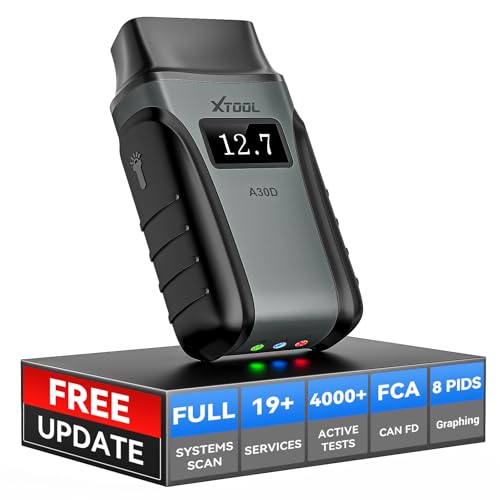
- Save $500+/Year with Pro-Level Diagnostics -No Subscriptions: The Portable XTOOL Anyscan A30D OBD2 scanner diagnostic tool includes free lifetime software updates for all app service functions, without extra cost. With a single payment, enjoy full access to diagnostics, relearn scan tools, and maintenance features. A cost-effective, smart choice for car owners and DIY enthusiasts, compatible with vehicles from 1996 onward. Please provide the car VIN and the special functions you need in advance so that we can confirm compatibility
- Bi-Directional Control for Faster Troubleshooting: Unlike a basic code reader, the A30D bi directional scan tool sends commands directly to your vehicle’s ECU to actively test components like fuel pump, valves, wipers, windows, doors, sunroof, and headlamps right from your smartphone. See component responses in real time without disassembly—perfect for brake jobs, electrical issues, and hard-to-find problems. This bidirectional obd2 scanner helps pinpoint faults faster, reduce guesswork, and avoid replacing good parts. An efficient, easy-to-use car scanner diagnostic tool built for DIYers, home garage users, and small-shop technicians who want real two-way scanner, not just codes
- 19 Reset Functions for Routine Maintenance: The A30D car diagnostic scanner provides 19 relearn functions without extra charges, including EPB Reset for parking brake replacement, TPMS Reset after tire changes, ABS Auto Bleeding, Oil Reset, SAS Reset, BMS Reset, Throttle Relearn, Injector C0ding, Gear Learning, Crank/Crankshaft/Cam/Ckp Sensor Relearn Tool, Transmission Match, Seat Calibration, Airbag Repair and more. This XTOOL A30D automotive scanner diagnostic tool supports preventive care, helping extend vehicle life and reduce costly shop visits. Functions vary by vehicle make and year—plz confirm compatibility before purchase
- Stable BT Connection & All-System & 8 Pids Live Data: The A30D wireless OBD2 scanner delivers a fast and stable wireless connection up to 33 feet, letting you move freely around the vehicle without tangled cables. Pair with with Android 9.0+ and iOS 10.0+ devices to turn your phone into a mobile auto scanner—perfect for home garages, driveways, or on-the-spot repairs. This full system scanner for cars provides real-time access to all major modules, including Engine, Gearbox, ABS, SRS, AC and more. with clear graphs, meters, and up to 8 PIDs displayed at once. This car code reader makes system monitoring visual, simple, easy to understand, and offering data logging for playback and deeper
- Wide Compatibility with CAN-FD & FCA Support: The A30D car computer diagnostic reader works with most 1996 and newer vehicles with a standard OBD2 port, including for Ford, for GM, for Toyota, for Honda, for Nissan,for Hyundai etc, with ongoing updates covering more car models and functions later. It also supports newer communication protocols like CAN-FD and FCA AutoAuth (Personal AutoAuth account and active subscription required, not included with the device!for Chrysler, for Dodge, for Jeep, for Fiat models). It is a future-ready automotive scanner diagnostic tool for households with multiple vehicles or part-time techs. Coverage vary by cars, plz check the compatibility first
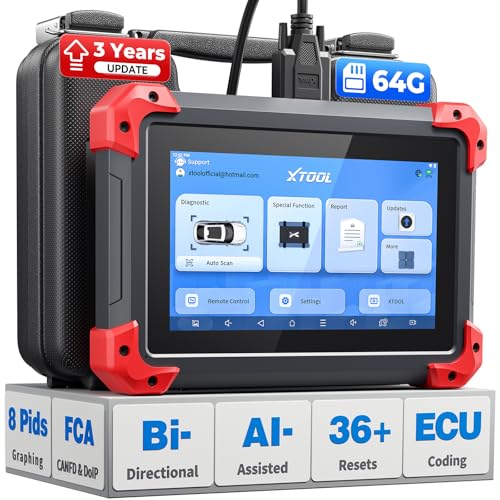
- 2026 Latest Version – Now Upgraded from 32GB to 64GB: XTOOL D7 obd2 scanner diagnostic tool with bidirectional is designed for DIY enthusiasts, professional mechanics. It now offers 64GB storage for smoother operation. Its 5000mAh battery (with 2500mAh 7.3V fast-charging) supports all-day use. With FCA, CAN FD, and DOIP protocol support, it covers more vehicle models and newer systems. A newly added battery voltage reading shows battery status before diagnostics, helping prevent low-voltage tests that could harm the vehicle. The V2.0 Diagnostic Report allows shops to personalize results with logos, customer details, and attachments to build trust and maintain records.
- Save $500+/Year with Pro-Level Diagnostics: Whether you're a DIYer, starting a repair business, or beginning work at an auto shop, XTOOL D7 car scanner offers advanced features typically found only in expensive professional OBD2 scanners - without the high price tag. With 4,000+ Active Tests & Bidirectional Pids, 36+ Special Functions, advanced module resets like SRS Reset, OE-level All-System Scan (one-click), FCA AutoAuth, CAN FD, DoIP, data export, and 8 PIDs graphing, the D7 auto scan tool covers 100,000+ vehicles (excluding Indian models). Includes 3-Year updates and supports the XV200 endoscope to detect em!ssions and intermittent issues.
- Full Bidirectional Advantage Over Other Code Readers & Scan Tools: The XTOOL D7 automotive scanner offers true bidirectional control plus advanced bidirectional PIDs, letting you send commands to components like A/C clutches, fuel injectors, windows, fans and more, while monitoring sensor responses live to catch elusive issues (even those without warning lights). Unlike budget bidirectional obd2 scanners limited to basic active tests,the D7 car fault scanner gives you full bidirectional control to run ABS pump tests, throttle position, turn fan on/off and solenoid tests, etc. No guessing, no extra fees—just smarter diagnostics
- OE-Level Full System Car Diagnostic Scanner with 8 Live Data Graphs: The XTOOL D7 is a pro-grade diagnostic tool that gives you full access to all vehicle systems—just like Snap on scanners & the factory scan tools, it delivers deep, accurate diagnostics you can trust. Easily view live data streams, retrieve freeze frame, and run active tests to pinpoint issues fast. With the ability to graph up to 8 PIDs at once, you can spot performance trends and troubleshoot like a pro. Whether you're a mechanic or car owner, with the D7 auto scanner you can stay ahead of problems and keep your vehicle running at its best
- High-value Automotive Scanner Diagnostic Tool with 36+ Special Function, Module Resets, Relearns, Calibrations, Adaptations & Initializations: XTOOL D7 diagnostic tool packs 36+ common & advanced maintenance, skip the $150 fee for battery registration after replacement, throttle body relearn after cleaning, or TPMS resets post-rotation, Auto bleed after the pad changes, or Electronic Parking Brake. Need to reset the transmission after towing? Crank sensor relearn for GM/for Dodge? Done. D7 also covered advanced functions like Ad~blue Reset, VIN Write, and many more professional OBD2 scanner functions that we can't list here. Text us your VIN + what you need, we’ll check the compatibility
This product presentation was made with AAWP plugin.
Last update on 2026-05-12 / Affiliate links / Images from Amazon Product Advertising API