
NHTSA ID Number: 10064397
Manufacturer Communication Number: 04-00-89-015I
TSB/Document Date: 2016-05-13
Summary
SUMMARY TO BE PROVIDED ON A FUTURE DATE.
If the PDF is very large, it may not load in the preview below.
Some older TSBs had multiple PDFs — visit the NHTSA Website to view all PDFs.
If the TSB PDF does not show, download or view it on the NHTSA Website.
Click on the (+) Plus Sign
Then Click on Associated Document(s)

- 💝【Questions? We’re Here Anytime】MK808S is a...
- 🔥🔥🔥【2026 NEWLY RELEASED BI-DIRECTIONAL...
- 【28+ MOST POPULAR RESET SERVICE FOR 150 MAKES】Autel...
- 【ALL SYSTEM DIAGNOSTICS, FACTORY-LEVEL SCANNER】The...
- 【AUT0 SCAN & AUT0V1N, 10X FASTER】How much have you spent...


- 💯【Conta.ct us for Support Directly】If you met any...
- 🔥🔥🔥【2026 AUTEL FLAGSHIP MK900BT MK900-BT, NEW...
- 🚗【3000+ ACTIVE TESTS (50➡3000+), SAME AS MS...
- 🚗【40+ HOT SERVICES FOR 150 MAKES (28+➡40+)】Full...
- 🚗【OE ALL SYSTEM DIAGNOSE, AUTO SCAN 2.0: SCAN LICENSE...
This product presentation was made with AAWP plugin.
Search NHTSA Database for Recalls
Search NHTSA Database for Vehicle Investigations
View Latest Vehicle Investigations
Search NHTSA Database for Vehicle Complaints
View Latest Vehicle Complaints
TSB/Document ID: 04-00-89-015I
Replacement Service Bulletin Number:
MFR Communication Date: 2014-11-01
MFR Internal Campaign ID/Software Version:
Communication Type: Service Bulletin/Repair Instructions
NHTSA Components: EQUIPMENT:OTHER:OWNERS/SERVICE/OTHER MANUAL
MFR Component System:
MFR Component Subsystem:
Previous TSB | Next TSB |
File in Section:
Service Bulletin
Bulletin No.:
Date:
00 - General Information
04-00-89-015I
November, 2014
WARRANTY ADMINISTRATION
Subject:
Warranty Administration – Required Operating Procedures (U.S. Only)
Models:
2015 and Prior GM Passenger Cars and Trucks
Attention: This service bulletin does not apply to GM of Canada Service Agents. GM of Canada
Agents should reference the General Motors of Canada Limited Service Policies and
Procedures Manual.
This Bulletin has been revised to align with the 2014 2nd Edition GM Service Policies and
Procedures Manual, released on November 18, 2014 and update the Service Management
Approvals and Transaction Authorizations table. Please discard Corporate Bulletin Number
04-00-89-015H.
The following 8 points are taken from the GM Service Policies and Procedures Manual (P&P). They represent key
GM requirements for service operations. For complete details of all policies and procedures, please refer to the P&P
Manual using the “P&P Manuals link” on the GlobalConnect Service Workbench.
These are minimum control requirements for GM work. Dealers have the discretion to establish more stringent
control requirements for GM, as well as customer pay and internal work.
1. AUTHORIZATION TO PERFORM REPAIRS
Each policy and warranty job card must be signed by the customer authorizing Service Agent to perform the
requested service/repairs. Authorization must be obtained at initial write-up and prior to any repairs being performed.
An authorization to perform repairs statement must be included on every job card. It is this statement customer(s)
must acknowledge (see example below).
4002475
There is to be a clear understanding of responsibility for all charges at the time the job card is written and while the
customer is present. Any changes regarding who is responsible for the charges require service management
authorization prior to repairs being performed. Customer must be provided a copy of the initial write-up document.
Acceptable Customer Signatures
• Actual signed job card on the authorization line of the job card. Signatures on other lines of the job card are not
acceptable.
• Early bird envelope or pre-write up worksheet, as long as all required job card information (refer to Article 3.2.2)
is included on the envelope/worksheet. These documents must be attached to the job card.
• Electronic authorization (e.g. obtained by tablet), as long as it is obtained prior to the repairs being performed
and customer acknowledges authorizing the repairs. E-signatures must be transferred to the job card and
subsequently deleted.
Customer Signature Unavailable
• If Service Agent is unable to obtain a customer signature, service management must state the reason and sign
on the authorization line on the job card, prior to any repairs being performed. Service management approval
(explanation, date, time, and signature/initials) is required.
• Any alternative customer concern documents such as an incomplete early-bird envelope must be attached to
the job card.
• On Service Agent-owned vehicles, including new and used vehicles in inventory, service management is to
sign the job card authorizing the work prior to repair. Service management approval (explanation, date, time,
and signature/initials) is required.
Reference: GM Service Policies & Procedures Manual 3.2.4
2. SERVICE MANAGEMENT APPROVALS AND TRANSACTION AUTHORIZATIONS
Service management approval in the form of a signature or initials, date, time and explanation documents the
supervision and consent of dealership service management for all scenarios.
4034764
Service Agents can view, print, or download the authorization matrix located in article 3.2.13.
Service Agent must designate one person who is ultimately responsible and accountable for the management of
warranty expense. All approvals must be issued by service management. When portions of responsibilities are
delegated to other members of management (e.g. Shop Foreman), those members must comply with GM Service
P&P requirements. Service technicians, warranty administrators, or non-supervisory hourly personnel must not be
empowered for these types of management approvals. All such delegation of approval must be monitored by the
service manager or director, on a routine basis, for compliance with GM Service P&P.
Reference: GM Service Policies & Procedures Manual 3.2.13.
3. DETAILS OF CONCERN, CAUSE AND CORRECTION
A clear and concise job card write-up is a requirement. All customer concern, cause, and correction comments must
be documented completely.
Details of Concern
The service advisor is responsible for confirming each customer concern as written on the job card. Vague
descriptions such as "repair oil leak," "engine stalls," “Service Engine soon light on” or coded descriptions of
customer concerns are not acceptable.
If a customer concern is added on after initial write-up, service agent is required to follow the requirements of
article 3.2.12.
Details of Cause
The technician must document on the shop copy of the job card all on-board diagnostic trouble codes (DTCs), test
equipment readings, suspension alignment before/after readings, brake rotor/drum before/after readings,
appropriate specifications, adjustments, circuit numbers, descriptive locations and indicators. Coded descriptions
are not acceptable. Technician documentation should include all relevant observations and is not limited to the items
listed above. All diagnostic time claimed must be substantiated by the technician’s comments.
The complete cause of the failure and a detailed correction as stated by the technician on the shop copy must be
transferred to all other copies of the job card/invoice and in the “Cause” comment field of the GWM claim by the
Warranty Administrator or responsible service management personnel.
Details of Correction
Technicians must detail the steps taken to correct the customer’s concern. Vague comments, such as replaced
engine, turned rotors, etc. are not acceptable.
Replacement of Powertrain/Drivetrain Assemblies
All Service Agents are required to retain the completed Powertrain/Drivetrain Replacement Authorization Request –
Repair Estimate – Replacement Component Assembly Estimate Worksheet (Cost Comparison Estimate) for
transmission/transfer case/engine assembly replacements. This worksheet must be completed in its entirety for all
parts needing to be replaced including the cost of these parts and attached to the job card, regardless of whether the
service agent needs to contact the PQC for approval. This worksheet must also be completed, regardless if GM
representative authorization was obtained for the assembly replacement. If assembly replacement is required due to
failure of a non-serviced sub-component, an explanation should be fully documented on the worksheet.
Exception: The cost comparison (price quote) from the parts department can be used instead of the Cost
Comparison Estimate, if the following information is generated as part of the form:
• Customer’s name and address
• Itemization of parts for repair estimate: part numbers, cost of parts, and quantity. Handwritten information is not
compliant with this requirement.
• Itemization of parts for assembly replacement: cost of assembly and core charges. Handwritten information is
not compliant with this requirement.
• Labor estimate for repairs. This can be handwritten but must be done on the parts repair estimate sheet.
• Labor estimate for assembly replacement. This can be handwritten but must be done on the assembly estimate
sheet.
Reference: GM Service Policies & Procedures Article 3.2.8, 3.2.12
4. LABOR TIME/HOURS
OLH (Other Labor Hours)
• OLH can only be considered for extenuating circumstances.
• The technician must contact service management for approval prior to the work being performed.
• Service management approval, in the form of an explanation with date, time and signature (or initials) is
required for the technician to proceed with OLH. Service management is responsible for the reasonableness for
the time and approval of the OLH request.
• Technician must record on the job card the reason for OLH. Technician must detail failure and steps taken to
facilitate repairs. Vague comments such as metal throughout are not acceptable.
• Separate on/off time punches are required on the technician’s time ticket for the OLH time claimed on each
labor operation with OLH.
Note: Punching on/off physical job cards does not meet technician timekeeping requirements and is
non-compliant and unacceptable.
• A technician does not need to exhaust base time to receive OLH.
• Technician inefficiency or lack of training is not sufficient justification for OLH. OLH is not an extension of
base time.
• Phone time with call center technical support activity cannot be charged to OLH. Normal road test to verify
repairs are part of Strategy-Based Diagnostics and are not eligible for OLH unless the extenuating
circumstance is documented and approved by service management.
• Diagnostic, reconditioning and other repair time for major powertrain components must be treated as OLH.
Approved and Recorded Diagnostic Time
GM follows "Strategy-Based Diagnosis/Symptom Diagnosis", which is an organized vehicle diagnostics approach for
finding the source/cause of a defined problem or identified symptom. This is accomplished by following consistent,
systematic and logical steps utilizing published diagnostic procedures and equipment. For example, finding the
source of an electrical problem by following the trouble trees and/or diagnostic charts, or finding a driveability
problem using a scan tool such as Techline equipment and following the trouble code diagnostic charts.
• Diagnostic/add time, as indicated in the GM Labour Time Guide, over and above the published base time must
be substantiated by technician comments and steps taken to facilitate repair. Service management
authorization is required prior to claim submission. Service managers are responsible for assuring complete
technician documentation and the reasonableness of the time required.
Straight Time
Straight time (ST) is time not published in the labor time guide. The technician must document all steps taken to
support repair. Management is responsible for the reasonableness of the request. The request needs to be
authorized by service management prior to claim submission.
Reference: GM Service Policies & Procedures Article 3.2.11
5. TECHNICIAN IDENTIFICATION AND ACCOUNTING OF LABOR TIME
All standard warranty and policy repair time must be documented on the technician’s time ticket by job card. This
includes the job card number and technician ID, along with actual date and start and stop time(s) while on premises
the same day.
All warranty and policy repair time for any customer concerns added to the job card (add-ons) after the initial job card
write-up and other labour hours (OLH) must have individual and specific on/off punch times on the technician’s time
ticket by job card line for repair(s) performed.
Note: Punching on/off physical job cards does not meet technician timekeeping requirements and is non-compliant
and unacceptable.
The following are related to the above requirements:
Multiple Vehicle Repairs
For multiple vehicles requiring reprogramming, as well as service update bulletins and field actions involving
inspections only (no parts replacement), the technician is not required to punch on/off time tickets by job card.
Technicians may not be clocked on two or more (multiple) job cards at the same time during standard warranty and/
or policy repairs.
For service update bulletins or field actions, when multiple VINs are worked on at once, the VIN list from the “Open
Recall Report”, or an Investigate Vehicle History (IVH) screen print must be attached to the job card. (Per the Service
P&P manual, the documentation must be retained for a minimum of 24 months.)
Note: Customer and/or internal repairs are excluded from this requirement.
It is permissible to work on a single standard warranty and/or policy repair event simultaneously with a customer
and/or internal repair event.
Multiple/Lateral Technicians
It is permissible for multiple technicians to work on the same vehicle, provided all warranty and policy repair time is
noted on the technician time ticket by job card and unique technician IDs are notated.
Note: Actual date and start and stop time(s) of repair(s) performed must be recorded on the technician’s time ticket
by job card.
Brand Maintenance Programs
Technicians who exclusively perform oil changes/tire rotations/MPI services are waived from individual time
requirements. The technician identification must be shown on the technician’s time ticket by job card.
Technicians performing standard warranty and/or policy repairs in addition to oil changes/tire rotations/MPI services
are required to follow established time documentation provisions stated in the P&P manual for standard warranty
and/or policy repairs. The technician identification must be shown on the technician’s time ticket by job card.
Broken Time Clocks
A broken time clock must be repaired or replaced immediately. Service management must write the actual start and
stop time(s) on the technician time ticket. The time ticket must be signed or initialed by service management for each
job card.
Reference: GM Service Policies & Procedures Article 3.2.9
6. PROPER DOCUMENTATION AND RETENTION OF WARRANTY PARTS
All parts used in the completion of warranty repairs must be recorded on the job card.
• Part numbers must be cross-referenced (line coded) on the job card to the specific repair in which they apply.
• All warranty parts removed must be returned to the parts department for proper tagging, retention, and return/
disposition. When parts are provided in the form of a kit and only a portion of the parts are required to perform
the repair, any unused components of the kit must be held for return/disposition.
• All replaced parts with visible defects must have the defective area clearly marked.
• PQC Assembly Returns – WPC and special request assembly returns require the proper documentation, cost
comparison sheet and copy of job card (all scenarios).
• Oil filters replaced under Brand Maintenance Programs must be discarded immediately to minimalize
environmental or safety risks. Cabin filters and engine air filters replaced under such programs must follow the
minimum warranty parts retention period.
Service Agents must retain for inspection all warranty parts for a minimum of fifteen (15) days from the date of credit
or until scrapped by a GM representative, whichever occurs first. Parts that have "core" value are required to be held
for a minimum of 24 hours after the Service Agent receives a Transaction Summary Report (Credit/Claim Memo)
showing a payment. If a warranty part return request is not received within 24 hours, then the specified core part(s)
should be returned to GM or to a GM approved rebuilder/remanufacturer immediately.
Reference: GM Service Policies & Procedures 3.2.7, 4.1.3
7. ACCURATE SUBLET CHARGES AND RECEIPTS
The following policies apply for repairs sublet by the Service Agent to repair shops (including other repair locations
owned by the Service Agent):
• Sublet repairs will be reimbursed at the Service Agent’s actual cost less any discounts or allowances that apply
to the sublet invoice or made available to the Service Agent on non-warranty repairs. Repairs are not to exceed
the Service Agent’s parts and/or Labor Time Guide allowance for the same repair. See GM Service Policies &
Procedures Article 2.5 for reimbursement details.
• Only Genuine GM parts are to be used.
• Dealer supplied parts used in the performance of sublet warranty repairs are eligible for the appropriate
handling allowance.
• Sublet repairs must not be shown on a warranty transaction as a Service Agent performed repair. If repair is
performed by the Service Agents’ body shop, then warranty transaction must reflect labor and parts as such
and sublet net item is not allowed.
• Sublet invoices are to contain customer name, VIN, date of repair and a complete description of repairs
performed. This information must be attached to the job card and be a part of the vehicle history file.
Reference: GM Service Policies & Procedures Articles 2.5, 2.7, 3.2
8. ADD-ON CUSTOMER CONCERN AFTER JOB CARD WRITE-UP
Any warranty/policy concern not expressed orally or in writing by the customer at initial write-up must be first
inspected and verified by the service manager before it is added to the job card. If the service manager determines
that the additional repair is necessary, he/she must be the person who adds it to the job card. This will serve as the
explanation portion of the service management authorization requirements. The service manager must also
document the date, time, signature (or initials) and explanation in detail what was inspected and why additional
repair is needed on the job card prior to the work being performed. Multiple additional concerns must each contain
this approval. There must be a clear understanding how the additional work became a concern (i.e. customer called
back, technician found during multi-point inspection) or other supporting documentation. The explanation must
specifically describe what the service manager saw or verified upon inspection or road test. The customer must be
contacted prior to work being performed for their permission to continue with the repair(s).
Individual and specific on/off punch times by job card line are required on the technician’s time ticket for add-on
repair(s) performed.
Note: Punching on/off physical job cards does not meet technician timekeeping requirements and is non-compliant
and unacceptable.
Regardless of the date, subsequent warranty customer concerns based on multi-point vehicle inspections are
considered added customer concerns and will be treated as such.
Reference: GM Service Policies & Procedures Articles 3.2.12
Frequently Asked Questions
Frequently Asked Questions
Q: Is straight time considered to be OLH and how does it relate to time accounting?
A: Straight time is not considered to be OLH. Straight time requests need to be authorized by service management
prior to claim submission.
Q: Do I have to punch on/off per job card line for warranty/policy repairs?
A: If one technician is working on the vehicle, he/she is only required to punch on/off their time ticket once per job
card, unless the vehicle has an add-on line, other labor hours, or additional diagnostic time needed for the repair.
Q: Do time punches on job cards qualify as acceptable time documentation?
A: No. The only acceptable time documentation is what is recorded on the time ticket for the technician. Technician
timekeeping on the job card is non-compliant and unacceptable.
Q: I have a job card with two or more (multiple) warranty lines that does not require any additional add-ons, OLH, or
diagnostic time. How many time punches are required for this repair?
A: Two. One at the start of the repair and one at the end of the repair.
Q: At the initial write-up of the job card, there were two or more (multiple) warranty lines on the card. It was
discovered that the vehicle had an open recall and that line was added after initial write-up. Do I need to secure the
Service Manager’s approval for the add line and do I need to punch on/off for the repair?
A: Yes. Technicians must obtain service management approval for add-ons and punch on/off the time ticket by job
card line.
Q: Can you provide me a couple of examples of the number of punches needed on a time ticket that contains OLH or
add-on repairs?
A: Examples provided below.
• One OLH item on the job card would equal a total of 4 punches.
• Punch on/off for the overall job card (2 punches)
• Punch on/off for the OLH approved work (2 punches)
• Note must have the date, time, reason why the OLH was approved and the Service Manager’s signature
or initials on the job card approving OLH prior to work being performed.
• An added line to a written job card and one OLH item would equal 6 total punches
• Punch on/off for the overall job card (2 punches). The start and end time for the total repair.
• Punch on/off for the OLH approved (2 punches)
• Note must have the date, time, reason why OLH was approved and the Service Manager’s signature or
initials on the job card approving OLH prior to work being performed.
• Punch on/off for “Add-on” line item approved (2 punches)
• Note: After initial write up, technicians are required to punch on/off any time a line item is added, or OLH, or
additional diagnostic time is added to a job card.
Q: How must the technician time ticket be documented?
A: Each job card that a technician works on, regardless of the number of warranty lines on the ticket, must contain
the following:
• Job Card Number
• Technician
• Actual date of the repair
• Start and stop time for the repair (electronic or manual clock on/off; cannot be handwritten)
Q: Can a technician work on multiple vehicles at once?
A: Yes, as long as the repairs are of the following types:
• Single standard warranty and/or policy repair event simultaneously with a customer and/or internal repair event
• Service Update Bulletin or Field Action that involves reprogramming
• Service Update Bulletin or Field Action which requires an inspection (no parts replacement)
Note: For service update bulletins or field actions, when multiple VINs are worked on at once, the VIN list from the
“Open Recall” report or an IVH screen print must be attached to the job card. (Per P&P, the documentation must be
retained for a minimum of 24 months.)
Q: As the technician is not required to punch on/off of customer pay work, how do I handle time accounting
documentation for repairs that may have started out as customer pay, but end up being warranty/policy?
A: The Service Manager must document the situation in detail on the job card, along with the date, time and
signature (or initials) per the standard service management authorization procedure.
Q: If my total repair elapsed time is on the customer pay line of the job card, but the job card had one customer pay
line and two warranty lines on the same ticket, would I be debited back for the repairs?
A: No, as long as the total elapsed time on the time ticket is reasonable to complete all the repairs outlined on the
job card.
Q: Is Certified Pre-Owned (CPO) considered a Brand Maintenance Program?
A: For the oil change portion of the program the answer is yes and technicians should follow the Brand Maintenance
guidelines outlined in this bulletin. All other repairs under the warranty portion of the CPO program should follow the
warranty guidelines outlined in this bulletin.
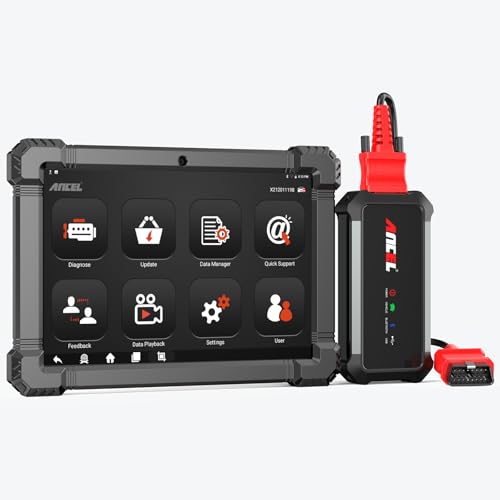
- 🔥🔥🔥2026 New Functions Making X7HD the Top Dog - Big Surprise!!! ANCEL X7HD truck scanner 10 major functional advantages .✅>Full HDOBD/OBD2 Function ✅>ALL System Diagnostic ✅>42+ Reset Function ✅>Active Test / Bi-Directional Control✅>ECU Coding✅>Graphing Live Data✅>Wide Compatibility ✅>2 Yrs Free Update✅>Remote Operation✅>Bluetooth 5.0 & Wifi In addition, 8 major hardware advantages: ✅>6000 mAh✅>10.1 inch Tablet✅>2G RAM
 ✅>32G ROM (Expandable to 128GB)✅>Data Record & Replay & Print✅>Android 10.0✅>Bluetooth 5.0 & Wifi✅>14 Languages
 - 🚛OEM DPF Forced Regen & Cylinder Cutout Test & more - ANCEL X7HD diesel scanner diagnostic tool not only supports DPF regeneration, DPF reset, DPF related information reset, DPR state reset, DPD forced regeneration etc, which helps you better solve the exhaust aftertreatment system problems, but also supports activate motor to do exhaust air in ABS Automatically. Moreover, it features TPMS activation, cylinder cut-off and learning functions
- 🚛Advanced ECU Coding & Programming - ANCEL X7HD 10.1inch truck scanner diagnostic tool is equipped with advanced ECU coding, supports Level calibration, Idle speed learning and Adjustment, Camshaft timing control learning, Control unit adaptations, Injector Codes, Read/Write VIN, Road speed limit optional vehicle speed set, etc... PLEASE NOTE that ECU codes are not compatible with all vehicles, please send us your VIN# to check vehicle compatibility
- 🚛42+ Reset Functions & Bidirectional Control - 2026 newest top heavy duty truck scan tool, comes with 42+ special services (ECU, Speed Limit and Idle Reset, Oil Reset, Injector Coding, EPB, ABS, SRS, Suspension, Throttle, etc. and always keep growing), which meet all your various needs for service and maintenance
- 🚛10 Inch All Systems Diesel Scanner & Full HDOBD/OBD2 Modes - ANCEL X7HD diesel truck scan tool supports all systems scan, such as Engine, Brake, Retarder, TECU Transmission, Tachograph, ABS, SRS, TPMS, EPB, SAS, ESP, and other vehicle systems, comes with 10 obd2 service modes: read/erase error codes, Data Stream, I/M Readiness, Vehicle Information, Actuations, DTC Lookup, EVAP, view freeze frame, etc
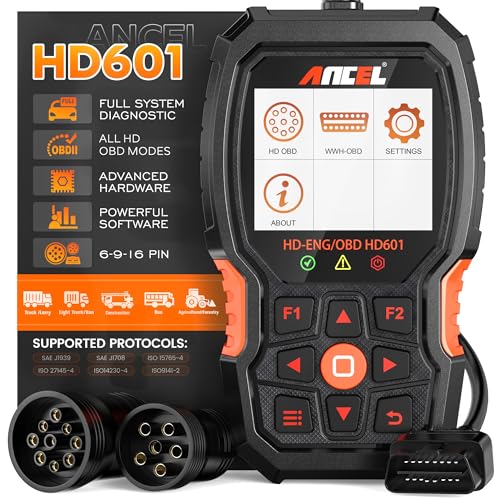
- 【Extensive Compatibility】HD601 heavy duty truck scanner supports 12V & 24V commercial vehicles and all major truck models that comply with standard protocols (SAE J1939, SAE J1708, ISO 14230-4, ISO 15765-4 and ISO 9141-2, ISO 27145-4 and Euro6). Fits for Cummins, Paccar, Detroit, Caterpillar, Freightliner, International, Peterbilt, Ford Heavy Truck, Class 4-Class 8 trucks, etc. It also supports engine diagnosis on most cars, minivans, light trucks and pickups
- 【 Full System Diagnostic】HD601 Diesel Scanner supports all system scans of heavy trucks compliant with standard protocols SAE J1939 & J1708, such as Engine, ABS, Transmission, Braking System, ESP, EPS, Fuel System, etc, It is a great scan tool for Cummins, Caterpillar, Detroit, Caterpillar, Maxxforce, Bendix,Wabash, Wabaco, Haldex, Allison, Eaton heavy trucks, With this truck tool, you can get deep analysis data about the system and do some repairs by yourself, saving much time and money. Note: Only heavy truck vehicles that comply with the above protocol can diagnose the entire system
- 【Enhanced Diesel OBD Scanner】The HD601 Diesel OBD Scanner offers unparalleled diagnostic capabilities for heavy-duty trucks. Beyond code reading, clearing, and live data display, it retrieves vehicle information, freeze frames, and DTCs. With 6, 9, and 16 pin cables, it ensures compatibility with various engines. This scanner's real-world testing prowess ensures comprehensive support for a wide array of heavy-duty truck engines, making it an indispensable tool for truck diagnostics
- 【DTC Library】+【Life Time Free Update】The built-in DTC library allows you to retrieve the codes directly without searching for the definition in the book. Whether you are a professional mechanic or a DIY car owner, HD601 diesel scanner explains the existing problem, makes it easier for you to understand code definitions and helps you locate vehicle faults. Note: This device cannot directly solve the fault. Plus, you get a lifetime free internet updates, so you always have the latest software for diagnostics in English and Spanish languages.
- 【Friendly Design, Easy of Use】This scanner is plug and play, simple and convenient, and very friendly for beginners. With improved buttons for easy menu navigation. The excellent 2.8 inch LCD color screen makes it easy to view the displayed results and gives you a better overview of your car's problem areas and the identified codes. In addition, the processor is super-fast and responds without lagging, providing maximum comfort and efficiency in diagnostic and service work
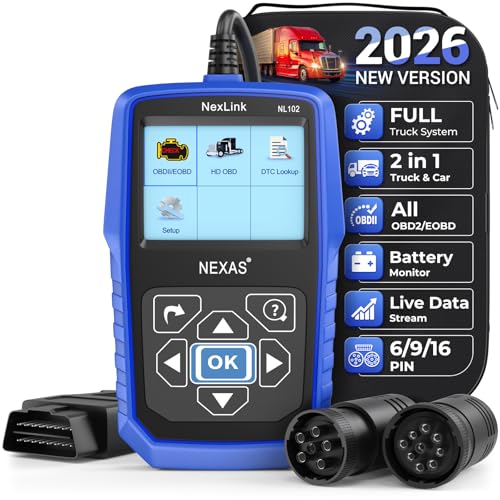
- Why NEXAS NL102 Truck Scan Tool? The NL102 outshines other truck scanner with its extensive diagnostic features. It offers full system diagnostics for major trucks meeting standard protocols, along with complete OBD2 functionality. Beyond read fault codes, clear codes and live data display, it enables vehicle info retrieval, freeze frame capture, and DTC lookup. Equipped with 6-pin, 9-pin, 16-pin connectors, it ensures broad truck compatibility. Plus, enjoy lifetime free updates in English, Spanish, and French, keeping your diagnostic scanner software current.
- Wide Compatibility - Friendly Reminder: To avoid compatibility issues, please confirm with us via Amazon Messages before purchasing. This heavy duty truck scanner is compatible with all heavy-duty trucks and semi that adhere to standard protocols (J1587, J1939, J1708). It covers a wide range of vehicle models, including Cummins, Detroit, Caterpillar, Freightliner, International, Kenworth, John Deere, Peterbilt, Sterling, Mack, Paccar, Western Star, Mercedes-Benz, Volvo, Scania, MAN, Renault, ERF, Foden, Seddon-Atkinson, Iveco, DAF, SISU, STEYR, ISUZU etc. Equipped with 6-pin, 9-pin, and 16-pin connectors for versatile device compatibility, ensuring stable plug-and-play connections.
- Save Hundreds of Money for All Heavy Duty Trucks – This diesel diagnostic scanner supports accurate full-system scans for all heavy-duty trucks that comply with standard protocols (J1587, J1939, and J1708). It can read and clear trouble codes across a range of vehicle systems, including the engine, transmission, instrument panel, drivetrain, brake system, suspension, ABS, ESP, EPS, fuel system, etc. The truck scanner communicates directly with your truck's computer to provide real-time data stream analysis, letting you pinpoint issues with precision. This cuts down on waste from unnecessary part replacements, saving you time and hundreds or even thousands of dollars.
- All OBD2 Functions + Battery Health Monitoring – Unlike many obd2 scanners on the market that only cover partial OBD2 features, ours gives you full OBD2 capability: read & clear codes, live data, freeze frame data, I/M readiness checks, EVAP tests, on-board monitor, O2 sensor tests, vehicle info, and DTC lookup. That means more detailed insights for pros and DIYers alike. The NL102 isn't just a code scanner – it's a battery saver. Regularly check your car's battery health, and catch issues before it dies completely. No more unexpected no-starts in the driveway or on the road. It diagnoses battery condition accurately, helping you avoid costly last-minute repairs.
- Plug and Play & One-click for DTC: NEXAS diesel scanner is user-friendly. It comes with an intuitive screen and easy-to-understand interface, making it accessible even for non-professionals to get started. And the built-in DTC library in the code reader allows you to directly retrieve codes without searching for definitions in books, making it easier to understand the code definitions and solve problems more quickly.
This product presentation was made with AAWP plugin.
Last update on 2026-05-11 / Affiliate links / Images from Amazon Product Advertising API