
NHTSA ID Number: 10064370
Manufacturer Communication Number: SSM62038
TSB/Document Date: 2016-05-13
Summary
SUMMARY TO BE PROVIDED ON A FUTURE DATE.
If the PDF is very large, it may not load in the preview below.
Some older TSBs had multiple PDFs — visit the NHTSA Website to view all PDFs.
If the TSB PDF does not show, download or view it on the NHTSA Website.
Click on the (+) Plus Sign
Then Click on Associated Document(s)

- 💝【Questions? We’re Here Anytime】MK808S is a...
- 🔥🔥🔥【2026 NEWLY RELEASED BI-DIRECTIONAL...
- 【28+ MOST POPULAR RESET SERVICE FOR 150 MAKES】Autel...
- 【ALL SYSTEM DIAGNOSTICS, FACTORY-LEVEL SCANNER】The...
- 【AUT0 SCAN & AUT0V1N, 10X FASTER】How much have you spent...


- 💯【Conta.ct us for Support Directly】If you met any...
- 🔥🔥🔥【2026 AUTEL FLAGSHIP MK900BT MK900-BT, NEW...
- 🚗【3000+ ACTIVE TESTS (50➡3000+), SAME AS MS...
- 🚗【40+ HOT SERVICES FOR 150 MAKES (28+➡40+)】Full...
- 🚗【OE ALL SYSTEM DIAGNOSE, AUTO SCAN 2.0: SCAN LICENSE...
This product presentation was made with AAWP plugin.
Search NHTSA Database for Recalls
Search NHTSA Database for Vehicle Investigations
View Latest Vehicle Investigations
Search NHTSA Database for Vehicle Complaints
View Latest Vehicle Complaints
TSB/Document ID: SSM62038
Replacement Service Bulletin Number:
MFR Communication Date: 2012-12-20
MFR Internal Campaign ID/Software Version:
Communication Type: Service Bulletin/Repair Instructions
NHTSA Components: ELECTRICAL SYSTEM:SOFTWARE
MFR Component System:
MFR Component Subsystem:
Previous TSB | Next TSB |
TOPIx - SSM62038 - Mongoose Update
Page 1 of 1
JAG Mongoose Updater 2012.pdf
Reference SSM62038
XK / X150
X-TYPE / X400
S-TYPE / X200
XJ / X351
Models
XF / X250
XK-SERIES / X100
XJ / X350
XJ V8 / X308
Title Mongoose Update
Category Diagnostic Software Hardware
Last modified 20-Dec-2012 00:00:00
Symptom 000102 WDS Patch / Update
Issue:
Mongoose Update
Released as part of DVD132 Patch 3
This enhancement improves the speed of the
communication between the Mongoose device and the
Content USB port of the SDD unit.
Action:
This allows Mongoose to be update to the latest level from
Mongoose JLR to Mongoose Pro JLR
Please see attachment for full instructions
http://topix.jaguar.jlrint.com/topix/service/archive/227373/index
1/3/2013
SDD SOFTWARE
UPDATE
MONGOOSE UPDATE
CHINESE
使⽤此列表选择您需要的语⾔
DUTCH
Gebruik de lijst om de gewenste taal te selecteren.
ENGLISH
Use the list to select the language you require
FRENCH
Sélectionnez dans la liste la langue souhaitée.
GERMAN
Wählen Sie die gewünschte Sprache aus der Liste aus.
ITALIAN
Utilizzare la lista per selezionare la lingua desiderata
JAPANESE
リストを使⽤し、必要な⾔語を選択してください。
PORTUGUESE
Use a lista ao lado para seleccionar a língua que necessita
RUSSIAN
Используйте прилагаемый список для выбора требуемого языка.
SPANISH
Seleccione en la lista el idioma que desee
Page 1 of 17
SDD SOFTWARE
UPDATE
MONGOOSE UPDATE
DATE: 12/2012
To update Mongoose JLR to Mongoose Pro JLR using the Drew Tech Mongoose update tool
The Panasonic Toughbook must have full internet connection during this process.
It is essential that you have the Original supplied Mongoose software installed on to your
Panasonic Toughbook before running the following process.
The Mongoose Device MUST BE DISCONNECTED from the SDD machine
Press “Windows Key”.
Select “All Programs, JLR, SDD, VCI Device Drivers, DrewTech Mongoose”
XP Machines require Net framework 3.5 to complete the install of MongoosePro Updater
You will see a progress bar, the installer is checking to see if Net framework 3.5 is installed. It
will then begin to download the Net framework 3.5 direct from the internet & install it. The time
for this to install depends on the machine, internet speed ETC, and varies from 5mins to over
60mins.
Please follow the prompts to complete the Mongoose JLR Update Tool Setup
Accept the terms in License Agreement & Click “Next”
Read the prompt & click OK
Leave the “Launch Mongoose Pro Updater” box ticked & click “Finish”
“Mongoose Pro JLR Updater” will now be launched.
Please follow further instruction prompts from this point on
XP Machines If a pop up box appears “Found New Hardware Wizard” – select the “No not at
this time” & click “Next”.
A new pop box may then appear – select “Install the software automatically [Recommended]”.
Once the process is complete – you will need to reboot your SDD unit before the Mongoose
device will get recognised as a Mongoose Pro JLR.
In some instances you may be required to access “System Information” page within SDD to
select the Mongoose Pro JLR device as your “Vehicle Connection Interface Device”
As below - If you get a screen displaying “Drivers Are Missing” – this is because you do not
have the original base installation drivers installed (this came on a disc with your Mongoose
when it was supplied to you)
Please install these drivers & reboot. Then launch the updater from “All Programs, Drewtech
Technologies, Mongoose Pro Updater”
Page 2 of 17
SDD 软件更新
MONGOOSE UPDATE
日期: 2012 年 12 月
使用 Drew Tech Mongoose 更新工具将 Mongoose JLR 更新为 Mongoose Pro JLR
此过程中 Panasonic Toughbook 必须完全连接网络。
运行以下步骤前,您的 Panasonic Toughbook 须安装原装 Mongoose 软件。
Mongoose 设备必须与 SDD 机器分离
按下“车窗钥匙”。
选择“所有程序,JLR,SDD,VCI 设备驱动程序,DrewTech Mongoose”
XP 机器需要 Net framework 3.5 完成 MongoosePror 更新的安装
Net framework 3.5 安装后,您将会看到一个进度条。 然后,它将会直接从互联网下载 Net
framework 3.5 并安装。 安装时间取决于设备,网速等,约为 5 分钟至超过 60 分钟。
请按照提示完成 Mongoose JLR 更新工具设置
接受许可证协议条款并单击“下一步”
读取提示并单击“确定”
在“Launch Mongoose Pro 更新”的方框里划勾并单击“完成”
“Launch Mongoose Pro 更新”现在将启动。
从此步开始,请遵循进一步说明提示
XP 设备如果出现弹出框“找到新硬件向导”-选择“否”并单击“下一步”。
可能随后会出现一个新弹出框-选择“自动安装软件[建议]”。
一旦完成过程-在 Mongoose 设备被识别为 Mongoose Pro JLR 前您将需要重启您的 SDD 装置
。
在某些情况下您可能需要访问“系统信息”主页内的 SDD 并选择 Mongoose Pro JLR 装置为您的
“车辆连接接口设备”
如下所示-如果出现屏幕显示“驱动程序缺失”-这是因为您没有安装原始基础驱动程序装置(位于
一张圆盘中,已与 Mongoose 一并提供给您)
请安装这些驱动程序并重启。 然后选择“所有程序,Drewtech Technologies,Mongoose Pro
更新”启动更新
第 3/17 页
SDD 软件更新
MONGOOSE UPDATE
日期: 2012 年 12 月
第 4/17 页
UPDATE
SDD-SOFTWARE
MONGOOSE UPDATE
Datum: 12/2012
Om Mongoose JLR bij te werken naar Mongoose Pro JLR met behulp van het update-tool Drew
Tech voor Mongoose
De Panasonic Toughbook moet tijdens deze procedure een volledig werkende
internetverbinding hebben.
Het is essentieel dat de originele Mongoose-software op uw Panasonic Toughbook is
geïnstalleerd voordat u de volgende procedure uitvoert.
Het Mongoose-apparaat MOET ZIJN LOSGEKOPPELD van de SDD-machine
Druk op de Windows-toets.
Selecteer “Alle programma's, JLR, SDD, VCI Device Drivers, DrewTech Mongoose”
Op XP machines moet Net framework 3.5 aanwezig zijn om de installatie te voltooien van
MongoosePro Updater
U ziet een voortgangsbalk, het installatieprogramma controleert of Net framework 3.5 is
geïnstalleerd. Vervolgens begint hij Net framework 3.5 direct van internet te downloaden en te
installeren. De tijd die nodig is voor deze installatie is afhankelijk van de machine,
internetsnelheid enz. en varieert van 5 minuten tot meer dan 60 minuten.
Volg de aanwijzingen om Mongoose JLR Update Tool Setup te voltooien
Accepteer de voorwaarden in de licentieovereenkomst en klik op "Volgende"
Lees de aanwijzing en klik op OK
Laat het vakje “Launch Mongoose Pro Updater” ingeschakeld en klik op “Finish”
“Mongoose Pro JLR Updater” wordt nu gestart.
Volg de aanwijzingen vanaf dit punt
XP machines Als een pop-upvenster verschijnt met de wizard voor nieuwe hardware,
selecteert u "Niet op dit moment" en klikt u op "Volgende".
Een nieuw pop-upvenster kan verschijnen - selecteer "De software automatisch installeren
[aanbevolen]".
Zodra het proces is voltooid - moet u uw SDD-apparaat opnieuw opstarten voordat het
Mongoose-apparaat wordt herkend als een Mongoose Pro JLR.
In sommige gevallen kan het nodig zijn om de pagina met systeeminformatie van het SDDsysteem te openen om de Mongoose Pro JLR te selecteren als "Vehicle Connection Interface
Device"
Als hieronder - Als u een scherm ziet met de mededeling dat er stuurprogramma's ontbreken,
komt dit omdat de oorspronkelijke stuurprogramma's niet zijn geïnstalleerd (deze zijn
geleverd op een schijfje bij uw Mongoose)
Monteer deze stuurprogramma's en start opnieuw op. Start vervolgens het updateprogramma
via “Alle programma's, Drewtech Technologies, Mongoose Pro Updater”
Pagina 5 van 17
UPDATE
SDD-SOFTWARE
MONGOOSE UPDATE
Datum: 12/2012
Pagina 6 van 17
MISE A JOUR
LOGICIEL SDD
MONGOOSE UPDATE
DATE : 12/2012
Pour mettre à jour Mongoose JLR vers Mongoose Pro JLR, à l'aide de l'outil de mise à jour
Mongoose Drew Tech
Le Panasonic Toughbook doit être connecté à Internet pendant ce processus.
Il est impératif que le logiciel original Mongoose qui vous a été fourni soit installé sur votre
ordinateur Panasonic Toughbook avant d'exécuter la procédure suivante.
Le périphérique Mongoose DOIT ÊTRE DÉBRANCHÉ de l'appareil SDD
Appuyez sur la touche "Windows".
Sélectionnez "Tous les programmes, JLR, SDD, Pilotes de périphériques du VCI, Mongoose
Drewtech"
Les appareils fonctionnant sous XP doivent disposer de Net framework 3.5 pour terminer
l'installation de la mise à jour de Mongoose Pro.
Vous verrez s'afficher une barre de progression, l'installateur vérifie si Net framework 3.5 est
installé. Il commencera alors le téléchargement de Net framework 3.5 directement sur Internet
et procédera à l'installation. Le temps d'installation dépend de la machine, de la vitesse de
connexion, etc., et peut prendre de 5 minutes à plus de 60 minutes.
Veuillez suivre les instructions pour terminer la configuration de l'outil de mise à jour
Mongoose JLR.
Acceptez les conditions du Contrat de licence et cliquez sur "Suivant"
Lisez le message et cliquez sur OK
Laissez la case "Lancer la mise à jour du logiciel Mongoose Pro" cochée et cliquez sur
"Terminer"
L'outil "Mise à jour du logiciel Mongoose Pro JLR" va maintenant être lancé.
Veuillez suivre les instructions supplémentaires qui s'affichent à partir de ce moment-là.
Appareils fonctionnant sous XP Si une boîte de dialogue "Assistant matériel détecté"
apparaît, sélectionnez "Pas maintenant" et cliquez sur "Suivant".
Une nouvelle fenêtre contextuelle peut alors apparaître. Sélectionnez "Installer le logiciel
automatiquement [recommandé]".
Une fois l'opération terminée, vous devez redémarrer votre unité SDD pour que le
périphérique Mongoose puisse être reconnu comme Mongoose Pro JLR.
Dans certains cas, il peut s'avérer nécessaire, pour accéder à la page "Informations système"
dans le SDD, de sélectionner Mongoose Pro JLR comme le "dispositif d'interface de
connexion" de votre véhicule.
Comme indiqué ci-dessous, si le message "Pilotes de logiciel manquants" apparaît à l'écran,
cela signifie que les pilotes de logiciel originaux ne sont pas installés (fournis sur disque avec
Mongoose).
Installez ces pilotes et réinitialisez. Lancez ensuite la mise à jour des logiciels à partir de
"Tous les Programmes, Drewtech technologies, Mise à jour Mongoose Pro"
Page 7 de 17
SDD
SOFTWAREUPDATE
MONGOOSE UPDATE
DATUM: 12/2012
An Upgrade von Mongoose JLR auf Mongoose Pro JLR mit dem Drew Tech MongooseAktualisierungstool.
Das Panasonic-Toughbook muss während dieses Vorgangs eine vollständige
Internetverbindung haben.
Es ist wichtig, dass die ursprünglich gelieferte Mongoose-Software auf dem PanasonicToughbook installiert ist, bevor Sie mit dem folgenden Verfahren beginnen.
Das Mongoose-Gerät MUSS vom SDD-Computer getrennt werden.
Die Windows-Taste drücken.
„Alle Programme > JLR > SDD > VCI Device Drivers (VCI-Gerätetreiber) > Drewtech
Mongoose“ auswählen
XP-Rechner benötigen NET-Framework 3.5 für die Installation der MongooseProAktualisierung.
Es wird ein Fortschrittsbalken angezeigt, und das Installationsprogramm prüft, ob NETFramework 3.5 installiert ist. NET-Framework 3.5 wird dann direkt aus dem Internet
heruntergeladen und installiert. Die hierfür benötigte Zeit ist abhängig vom Rechner, der
Internetgeschwindigkeit etc., und variiert zwischen 5 Minuten und über 60 Minuten.
Den Anweisungen folgen, um die Installation des Mongoose JLR-Aktualisierungstools
abzuschließen.
Den Bedingungen in der Lizenzvereinbarung zustimmen und auf „Next“ (Weiter) klicken.
Die angezeigte Meldung lesen und auf OK klicken.
Ein Häkchen bei „Launch Mongoose Pro Updater“ (Mongoose Pro-Aktualisierungstool
starten) setzen und auf „Fertigstellen“ klicken.
Das Mongoose Pro JLR-Aktualisierungstool wird gestartet.
Die im Folgenden angezeigten Anweisungen befolgen.
XP-Rechner Wird ein Einblendfenster mit dem Titel „Found New Hardware Wizard“ (Neuer
Hardware-Assistent gefunden) angezeigt, „No not at this time“ (Nicht jetzt) auswählen und auf
„Next“ (Weiter) klicken.
Möglicherweise wird ein weiteres Einblendfenster angezeigt. In diesem Fall „Install the
software automatically (Recommended)“ (Die Software automatisch installieren (empfohlen))
auswählen.
Sobald der Vorgang abgeschlossen ist, muss die SDD-Einheit neu gestartet werden, damit
das Mongoose-Gerät als ein Mongoose Pro JLR-Gerät erkannt wird.
In einigen Fällen müssen Sie das Fenster „System Information“ (Systeminformationen) in

- 🎉[OTOFIX D1 Lite, Perfect Cost-effective Diagnostic Tool]: OTOFIX D1 Lite, a newest bidirectional scan tool from OTOFIX company, is a great choice for DIYers and repair shops. 👉This obd2 scanner diagnostic tool packs all practical functions: OE level all systems diagnoses, Bi-Directional Control, 38+ reset services fixing 99% of common problems, support DoIP & CANDF protocols and FCA
 AutoAuth, high-end hardware configuration. Worldwide vehicles and 🔥2 Years Free Updating🔥 covered.
 - 🎉[Bi-Directional Scan Tool, Active Test]: OTOFIX D1 Lite bluetooth obd2 scanner can also command ECUs and monitor the operation of the actuators to track down the problems of certain parts, like windows, sunroof, wipers, fuel pumps, etc., saving repair time & trouble. This makes OTOFIX D1 Lite the most cost-effective bidirectional scan tool.
- 🎉[2026 Newest, 38+ Hot Reset Functions]: Equipped with 38+ reset functions in one, the OTOFIX D1 lite automotive scanner diagnostic tool allows you to troubleshoot 99% of common vehicle problems. You can use this car diagnostic scanner holding enough functions to easily repair common vehicle models in your repair shops. Including Oil Reset, Injector Coding, Throttle, DPF Reset, SCR Reset, Gear Learning, Clutch Learning, Suspension, etc. Note* Reset functions vary by model.
- 🎉[OE Level Full Systems Diagnostics]: Unlike the 2-system and 4-system diagnostic tools, the OTOFIX auto scan tool can complete comprehensive system diagnostics within 5 minutes. It accesses and scans all available onboard systems like for Engine /AT /ABS /EPB /BMS /TPMS /SRS /SAS /Audio System /BCM /Air Conditioning / etc., to read & clear codes, view live data, and check ECU information. Note: Active test is not involved.
- 🎉[Powerful Hardware Configuration]: Designed with a fashion appearance & a 7” touchscreen and a weight of 463g, this OTOFIX D1 Lite OBD2 diagnostic scanner scan tool is convenient for everywhere and easy to use & store. Android9.0 OS and 2+64GB memory enhance multi-task smoothness and diagnostic operation, no more wasting too much time. 5800mAh battery allows hours-lasting use. WiFi & VCI1 also bring faster communication for your diagnostics.
 AutoAuth, high-end hardware configuration. Worldwide vehicles and 🔥2 Years Free Updating🔥 covered.
- 🏆【2026 TOP OBD2 Scanner Diagnostic Tool】OTOFIX D1 Lite wireless obd2 scanner has upgraded hardware configuration and car coverage. The newly upgraded D1 Lite with 🔥OS Android 9.0🔥1.5Ghz 4 core high efficiency processor🔥2GB RAM+64GB ROM large storage🔥5800mAh large battery, more stable and longer lasting diagnostics🔥 38+ Reset🔥action tests🔥full system diagnostic🔥Supports MV105 endoscope🔥21+ Language Supports🔥100000+ vehicle coverage to meet all your daily maintenance needs.
- 👍【Bi-Directional Control / Active Test】D1 Lite obd2 scanner has bidirectional control(worth $300+), which is the most beloved feature among mechanic. If your headlights or car windows are broken, going to a repair shop will cost a lot of money. You can use D1 Lite to send execution commands to the ECU module and identify the repair status. Such as ABS, car windows, doors, valves, wipers, headlights, etc., effectively shorten diagnostic time and reduce diagnostic costs.
- 🔥【All Systems Diagnostics, In-depth Checking】This advanced OBD2 Scanner D1 Lite can perform OE-level diagnosis of all systems including engine, transmission, airbag, ABS, ESP, TPMS, gateway, steering, radio, and air conditioning for more than 100 brands. This diagnostic scanner supports essential functions, such as reading ECU version info, reading and clearing fault codes, and reading data streams.With just a simple click, it provides you with accurate and in-depth diagnostics.
- 🏆【38+ Reset Hot Functions】For repair workshops, holding an OTOFIX D1 Lite Auto scanner is a strong advantage over others. Its 38+ maintenance functions provide various solutions for all module repairs, including Oil Reset, TPMS Reset, Injector Coding, Suspension, Throttle Matching, etc., which will usher your repair business to a new pinnacle. Continuously updating will never make the functionality & compatibility out-of-date.
- 🏆【150+ Models, 10000+ Car Coverage & 16 Languages】D1 Lite is a comprehensive car diagnostic scan tool, help you to troubleshoot car issues fast for 95% US, European, Asian auto makes. ✅ With frequent updates and optimizations allow D1 Lite to cover more vehicles to meet your needs. ✅ Multilingual menu allows auto mechanics around the world to use it without language barriers. 🚩Note: Kindly send us the S/N of the device to authorize new language updates before changing the menu language.
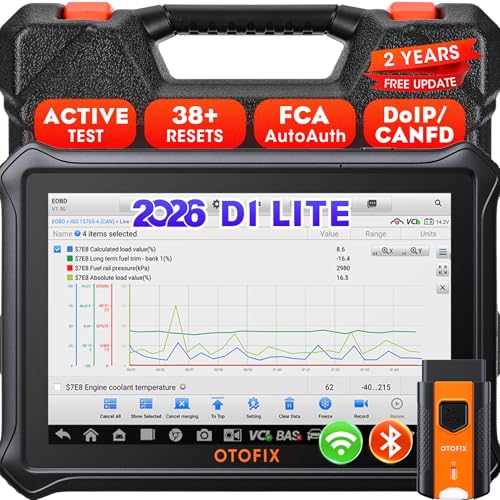
- 【2026 OTOFIX D1 Lite Gives the Best Value for Money】OTOFIX D1 Lite bidirectional scan tool is more FASTER and SMARTER with 2026 Enhanced Hardwares & New Functions! 👍Alternative Bluetooth +USB connect 👍2G+64GB 👍4x ARM Cortex-A35 (1.5GHz) Processor (5X Faster CPU) 👍Android 9.0 OS 👍5G GHz WiFi 👍CANFD&DOIP 👍 FCA AutoAuth 👍38+ Services 👍3K+ Bi-Directional Control 👍Full Systems Diagnose 👍2 Years Update 👍150+ Vehicle Coverage.
- 👍【Active Tests】 OTOFIX D1 Lite is a bi-directional scan tool that can send commands to, and also receive information from vehicle control modules. This way, you can quickly locate and repair faulty auto parts. For Example: send direct commands to ask the vehicle to turn on/off the radiator fan, lights, sound horn, fuel pump, modulate throttle, open/close windows, operate mirrors and more. *Note that only available tests will be displayed in the menu.
- 👍【38+ Service Functions】 OTOFIX D1 Lite scan tool offers 38+ of the hottest service functions that are commonly used for car repairs. That include Oil reset/SAS/EPB/BMS/Throttle/ABS bleeding, and 2065-new SUS/ADBLUE/NOX/Headlamp resets (and more) to help restore your car status after repairs are done. Compared to other diagnostic scanners for cars, the OTOFIX D1 Lite scanner is much more fully-featured. *Note that specific functions available depend on the make/model/year of your car.
- 👍【All System Diagnostics + Cloud Report Management】 This 2026 car scanner OTOFIX D1 Lite provides troubleshooting and data for all ECUs: read/clear DTCs, view graphic live data/VIN, and locate system faults for safe driving. With Cloud Report Management, you can save detailed reports to cloud servers and easily shared them with others via QR codes/emails/text messages. Others can access these reports from any device (smartphones/tablets/PCs …) anytime, and you can better manage repair work.
- 👍【99% Car Coverage】 This one-station car scanner diagnostic for all cars works on 150+ major car brands across the world. 1) It supports CAN-FD/DoIP protocols: compatible with GMCAVALIER/TRAX/Encore/Envision/GL8(LSY)/CT4/CT5 after 2019; Volvo after 2018; Land Rover/Jaguar after 2017; and BM.W F/G all chassis. 2) For models equipped with security modules (such as Renault & 2018+ FCA SGW), its built-in AutoAuth allows you to easily break diagnostic barriers after registration.
This product presentation was made with AAWP plugin.
Last update on 2026-05-11 / Affiliate links / Images from Amazon Product Advertising API