
NHTSA ID Number: 11034267
Manufacturer Communication Number: 19-01-26R
TSB/Document Date: 2026-07-02
Summary
This bulletin announces the repair procedure for the 12v terminal on the inverter to address concerns regarding corrosion buildup. (This is an revised version of the original bulletin.)
Keep any foreign matters such as water and dust from entering the inverter/converter
assembly.
•
Be CAREFUL not to make contact with the electronic components within the inverter/
converter assembly.
STEP 1: Remove the inverter/converter assembly
from the body of the vehicle using the work
procedures outlined in the applicable Service Manual.
Refer to STIS: Body & Electrical/WIRING SYSTEM
> HYBRID ELECTRIC VEHICLE > Inverter and
Converter Assembly
TIP 1: ALWAYS perform the required voltage
checks as outlined in the Service Manual. A zero-DC voltage reading at these required points is
vital for confirming safe working conditions.
CAUTION: ALWAYS wear high voltage insulation gloves when performing the voltage checks.
Continued...
Bulletin Number: 09-01-26; Revised: 03/26/26
Page 10 of 31
TIP 2: Removing the ECM provides additional cable slack
when working in the upper and lower engine area during
removal of the HV air conditioning cable.
STEP 2: CARFULLY remove the three retaining clips and the three rivets. The inverter/converter
insulation cover can then be removed.
CAUTION:
•
Release the rivets with a drill for removal. To prevent any damage to the inverter/
converter assembly, support the back side of the rivet with a trim tool or pliers.
•
The spacers attached to the cover MUST be reused. DO NOT discard the spacers.
STEP 3: Remove the two HV air condition cable
mounting bolts. Release the retaining clip and move the
HV air conditioning cable to allow room for workspace.
STEP 4: Remove the hose clamps from the connections.
Remove the two water pipe mounting bolts. Install rubber
caps onto the aluminum pipes to prevent any coolant
drippage while working. The water pipe can then be
lowered to allow access to the inverter/converter assembly.
Continued...
Bulletin Number: 09-01-26; Revised: 03/26/26
Page 11 of 31
STEP 5: Remove the five inverter protector
mounting bolts. The inverter protector can then be
removed.
STEP 6: Place the inverter/converter
assembly on two wooden blocks.
STEP 7: Remove the two mounting bolts
for the inverter stay. The stay can then be removed.
STEP 8: Remove the mounting bolts and stays
holding the rear inverter bracket. The rear bracket
assembly can then be removed.
IMPORTANT NOTE: The mounting bolts are
one-time use parts and can be discarded. The stays
are NOT to be discarded and MUST be re-used.
Continued...
Bulletin Number: 09-01-26; Revised: 03/26/26
Page 12 of 31
IMPORTANT: Insulated tools and gloves MUST
be used for STEPS 9, 10, & 11.
STEP 9: Remove the three mounting bolts for the
main battery connector. The connector can then be
removed.
STEP 10: Remove the two mounting bolts for the
HV air conditioning cable. The HV air conditioning
cable can then be removed and discarded.
STEP 11: Remove the two mounting bolts for the
front inverter/converter bracket assembly. The
bracket assembly and insulator can then be
removed.
STEP 12: Remove the two mounting bolts for the
terminal block cover. The terminal block cover can
then be removed.
CAUTION: DO NOT TOUCH the center screw
of the terminal block cover.
Continued...
Bulletin Number: 09-01-26; Revised: 03/26/26
Page 13 of 31
STEP 13: Remove the ten mounting bolts for the
motor cable terminal block. The motor cable
terminal block can then be removed.
STEP 14: Cover the opening of each electrical connection with masking tape. This will reduce the
risk of foreign matter intrusion.
Continued...
Bulletin Number: 09-01-26; Revised: 03/26/26
Page 14 of 31
STEP 15: Rotate the inverter/converter assembly so the 12v terminal is facing upward.
STEP 16: Place the inverter/converter assembly on two wooden blocks. Align the bolt head of the
cover with the wooden blocks. DO NOT place the block directly on the cover.
CAUTION: CAREFULLY place the inverter/converter assembly on the wooden blocks as
shown in the images provided below in order to prevent any damage to the connector and cover.
Continued...
Bulletin Number: 09-01-26; Revised: 03/26/26
Page 15 of 31
STEP 17: Remove the eight mounting bolts
front the converter lid. Prepare a small
flathead screwdriver with tape wrapped
around the blade. CAREFULLY remove the
inverter/converter lid as shown in the images
below.
EXAMPLE
IMPORTANT CAUTIONS:
•
DO NOT damage the sealing surface of the inverter/converter assembly.
•
DO NOT lift the screwdriver handle in the upward direction. ONLY push the handle of
the screwdriver in the downward direction when inserted between the lid and case.
•
ONLY insert the blade portion of the screwdriver between the lid and case. Deep
insertion of the screwdriver can cause damage to the case and internal components.
•
Work with bare hands or insulated gloves in order to prevent any static electricity and
foreign mater intrusion into the internal electrical components.
Continued...
Bulletin Number: 09-01-26; Revised: 03/26/26
Page 16 of 31
STEP 18: CAREFULLY retrieve any sealant that may have dropped into the case. DO NOT touch
any of the internal components. Remove the three mounting bolts for the 12v terminal.
Once the mounting bolts are removed, pull the
terminal away from the case to remove.
CAUTION: Confirm the original seal is removed with the
terminal and is not left inside the case.
STEP 19: Insert the NEW 12v terminal of the countermeasure
HV air conditioning cable into the hole of the inverter rear
bracket. Align the location pins on the terminal. Torque the
OUTER mounting bolts to 6Nm (4.4ft-lbs). Torque the INNER
mounting bolt to 5Nm (3.7ft-lbs).
CAUTION: When passing the 12v terminal through the inverter
rear bracket and during subsequent operations, ALWAYS handle
the cable and bracket with care. Avoid applying any force to the
terminal or rubber cap. Temporarily place the bracket in position
until assembly to prevent any interference.
STEP 20: Install the NEW 12v terminal and cable assembly by aligning the location pins on the
terminal to the inverter case. Torque the OUTER mounting bolts to 6Nm (4.4ft-lbs). Torque the
INNER mounting bolt to 5Nm (3.7ft-lbs). NOTE: The image below does not show the cable attached.
Continued...
Bulletin Number: 09-01-26; Revised: 03/26/26
Page 17 of 31
CAUTION: CONFIRM the bus bar portion of the 12v terminal is not positioned on top of the
bus bar located inside the case.
STEP 21: Detach the scraper from
the prevention cover (From Kit #
SOA635176). Discard the scraper since it is
not to be used for this procedure.
STEP 22: CONFIRM no sealant has
dropped into the case.
STEP 23: Rotate the inverter/converter
assembly with the terminal block connection
facing upward. This position will help
prevent removed sealant from entering the
internal case.
Continued...
Bulletin Number: 09-01-26; Revised: 03/26/26
Page 18 of 31
STEP 24: Install the sealant drop prevention
cover and secure it with masking tape.
STEP 25: Using a suitable plastic scraper or plastic
razor blade, removed any sealant adhered to the
case sealing surface. ONLY the protruding sealant
is required to be removed. Thin amounts of sealant
without protrusions do not have any affect on the
sealing performance.
STEP 26: Remove residual sealant fragments with
the adhesive side of masking tape.
STEP 27: Clean the surface area with a clean cloth.
CAUTION: DO NOT use a blow gun or
brake/parts cleaner. This can cause damage
to the inverter/converter internals and cause
insufficient sealant curing.
Continued...
Bulletin Number: 09-01-26; Revised: 03/26/26
Page 19 of 31
STEP 28: Once the sealant has been sufficiently removed and the sealing surface is clean and free of
debris, rotate the inverter/converter with sealing surface facing upward.
CAUTION: CONFIRM the inverter/converter is positioned with the mounting bolts on the
wooden blocks. DO NOT cause any damage to the connector or cover.
STEP 29: Remove any masking tape securing the prevention cover to the case.
STEP 30: Apply a 3mm (0.12in) diameter bead of Three Bond 1207F as detailed in the images
below.
Continued...
Bulletin Number: 09-01-26; Revised: 03/26/26
Page 20 of 31
STEP 30: Remove the sealant drop prevention cover.
NOTE: The sealant drop prevention cover is NOT a one-time use tool and is designed for repeated
usage. It is important to keep the cover clean and sealant free for future usage.
STEP 31: Install the inverter lid. Install the eight mounting
bolts by hand. Torque the bolts to 7.3Nm (5.4ft-lbs) in the
order specified in the right image.
STEP 32: Perform the torques sequence a second time.
CAUTIONS:
•
The inverter lid MUST be installed within three
minutes after the Three Bond application.
•
The torque procedure MUST be performed within fifteen minutes after the Three Bond
application.
•
Three Bond 1207F requires 24 hours to become fully cured. The vehicle MUST not be
exposed to heavy moisture such as car wash, rain, and snow until this 24-hour cure time
is complete.
STEP 33: Rotate the inverter/converter assembly on the wooden blocks as shown in the image below.
Continued...
Bulletin Number: 09-01-26; Revised: 03/26/26
Page 21 of 31
STEP 34: Remove the masking tape from the electrical connections. Prepare the following specialty
tools.
STEP 35: Mark the bolt heads of the
Flange Bolts (p.n.010406200) and
(p.n.010406120) for identification and
to prevent possible mixing with any
original equipment hardware.
STEP 36: Install the Repair Tool
(p.n.99804AN030) using the four Flange
Bolts (p.n.010406200) in place of the motor
cable terminal block connection. Tighten
the bolts in an X-Pattern and torque to 5Nm
(5Nm (3.7ft-lbs).
CAUTION: DO NOT use the originally
supplied bolts used for the motor cable
terminal block. CAREFULLY tighten the
bolts evenly. Uneven tightening may cause
incorrect leak detection results.
Continued...
Bulletin Number: 09-01-26; Revised: 03/26/26
Page 22 of 31
STEP 37: Install Connector Holder 1
(p.n.81911FL010) and Connector Holder 2
(p.n.81911FL050) in place of the main battery
cable connection and the HV air conditioning
cable connection. Secure the Holders using the
four Flange Bolts (p.n.010406120). Torque the
Flange Bolts to 5Nm (5Nm (3.7ft-lbs).
STEP 38: Install Connector Holder 3
(p.n.81911FL030) and Connector Holder 4
(p.n.81911FL030) in place of the upper HV
air conditioning connection.
CAUTION: CONFIRM the connection is
secure by pressing down on the lock lever
to ensure it is fully locked. An unsecure
connection may cause incorrect leak detection
results.
STEP 39: Insert the provided silicon hose nozzle
of the portable leak detector.
NOTE: The inner diameter of the hose is 7mm
(0.28 inches).
STEP 40: Connect the opposite end of the
silicon hose to the nozzle located on Repair Tool
(p.n.99804AN030).
Continued...
Bulletin Number: 09-01-26; Revised: 03/26/26
Page 23 of 31
STEP 41: Connect a 12v external power supply
to the portable leak detector.
STEP 42: Confirm the Power LED in ON.
STEP 44: Press the “Air Only Test”
button to begin the leakage test.
Continued...
Bulletin Number: 09-01-26; Revised: 03/26/26
Page 24 of 31
STEP 44: During the leakage test, confirm the float stays at the bottom.
CAUTION: If leakage is detected, check connection conditions, the testing equipment for
damage and/or deformation of the inverter/converter lid then re-test. If no visible fault is found
and leakage is still found, removed the inverter/converter lid, clean and reseal the lid then
retest.
Continued...
Bulletin Number: 09-01-26; Revised: 03/26/26
Page 25 of 31
STEP 45: Apply masking tape to the mounting surfaces of the front and rear brackets. Cover the 12v
terminal with masking tape. Apply the rustproof wax (3M Cavity Wax Plus) to the contact area of the
inverter lid and case. Spray the area by moving the nozzle at a rate of about 50mm (2 inches) per 1
second. Perform two full rotations of application.
CAUTIONS:
•
The rustproof wax does not completely cure. Avoid touching the wax during work
procedures.
•
Thoroughly shake the can prior to use. Attach the nozzle to allow optimum distribution.
Continued...
Bulletin Number: 09-01-26; Revised: 03/26/26
Page 26 of 31
STEP 46: Confirm there is a sufficient
application of the rustproof wax. Remove all
leakage testing tools and masking tape.
CAUTION: Clean any wax that has made
contact with resin portion of the 12v terminal
and/or the mounting surfaces of the front &
rear brackets.
Continued...
Bulletin Number: 09-01-26; Revised: 03/26/26
Page 27 of 31
IMPORTANT: Insulated tools MUST be
used for STEP 47, 50, and 51.
STEP 47: Install the motor cable terminal block.
Torque the four outer bolts in an X-pattern to
7.5Nm (5.5ft-lbs). Torque the inner six bolts to
7.5Nm (5.5ft-lbs).
STEP 48: Install the terminal block cover.
Torque the mounting bolts to 7.5Nm (5.5ft-lbs).
STEP 49: Install the front inverter/converter
bracket and insulator. Torque the two mounting
bolts to 18Nm (13.3ft-lbs).
STEP 50: Connect the NEW HV air conditioning
cable. Tighten the two mounting bolts to 7.5Nm
(5.5ft-lbs).
Continued...
Bulletin Number: 09-01-26; Revised: 03/26/26
Page 28 of 31
STEP 51: Connect the main battery cable.
Torque the three mounting bolts to 7.5Nm
(5.5ft-lbs).
STEP 52: Install the NEW inverter rear bracket
using NEW mounting bolts. Torque the mounting
bolts to 18Nm (13.3ft-lbs).
CAUTION: DO NOT drop or hit the new
mounting bracket. This can cause the painted
surface to be damaged compromising its
corosion protective strength.
STEP 53: Install the inverter stay using the two
original mounting bolts. Torque the mounting
bolts to 18Nm (13.3ft-lbs).
STEP 54: Reinstall the inverter protector with the
original mounting bolts in the following order.
8. Bolt (a)
9. Bolt (b)
10. Bolts (c)
Torque the mounting bolts in the same order to
18Nm (13.3ft-lbs).
Continued...
Bulletin Number: 09-01-26; Revised: 03/26/26
Page 29 of 31
STEP 55: Removed the rubber caps from the
water pipe. Reinstall the coolant hoses and
clamps. Reattach the water pipe to the inverter/
converter assembly using the original mounting
bolts. Torque the bolts to 7.5Nm (5.5ft-lbs).
STEP 56: Secure the HV air condition cable to
the inverter/converter using the original bolts and
the new retaining clip. Torque the bolts to 7.5Nm
(5.5ft-lbs).
STEP 57: Connect the HV air conditioning cable
to the 12v terminal. Torque the NEW nut to
7.5Nm (5.5ft-lbs).
STEP 62: Reinstall all parts in the reverse order
of disassembly.
CAUTION: Three Bond 1207F requires 24
hours to become fully cured. The vehicle
MUST not be exposed to heavy moisture such
as car wash, rain, and snow until this 24-hour
cure time complete.
Continued...
Bulletin Number: 09-01-26; Revised: 03/26/26
Page 30 of 31
WARRANTY / CLAIM INFORMATION:
For vehicles within the Federal Hybrid System Warranty or covered by an active Subaru Added Security
Classic or Gold plan, this repair may be submitted using the following claim information:
Labor Description
Labor Operation #
Labor Time
Fail Code
Inverter Cable Terminal & Bracket R&R
A840386
4.3H
FDA-42
NOTE: Up to $5.00 can be claimed in sublet for materials used during this procedure.
IMPORTANT REMINDERS:
•
SOA strongly discourages the printing and/or local storage of service information as previously
released information and electronic publications may be updated at any time.
•
Always check for any open recalls or campaigns anytime a vehicle is in for servicing.
•
Always refer to STIS for the latest service information before performing any repairs.
Continued...
Bulletin Number: 09-01-26; Revised: 03/26/26
Page 31 of 31

- 💯【Conta.ct us for Support Directly】If you met any...
- 🔥🔥🔥【2026 AUTEL FLAGSHIP MK900BT MK900-BT, NEW...
- 🚗【3000+ ACTIVE TESTS (50➡3000+), SAME AS MS...
- 🚗【40+ HOT SERVICES FOR 150 MAKES (28+➡40+)】Full...
- 🚗【OE ALL SYSTEM DIAGNOSE, AUTO SCAN 2.0: SCAN LICENSE...


- 【TURN OFF CEL】 This AL319 car scanner diagnostic tool...
- 【EXTENSIVE APPLICATION】 Autel AL319 Compatible with...
- 【FOR END USER & DIYERS】 This error code reader AL319 is...
- 【USER-FRIENDLY DESIGN】 This OBD2 scanner and check...
- 【HIGH-QUALITY SERVICES】 12 months war.ranty from the...
If the PDF is very large, it may not load in the preview below.
Some older TSBs had multiple PDFs — visit the NHTSA Website to view all PDFs.
If the TSB PDF does not show, download or view it on the NHTSA Website.
Click on the (+) Plus Sign
Then Click on Associated Document(s)
Search NHTSA Database for Recalls
Search NHTSA Database for Vehicle Investigations
View Latest Vehicle Investigations
Search NHTSA Database for Vehicle Complaints
View Latest Vehicle Complaints
TSB/Document ID: 19-01-26R
Replacement Service Bulletin Number:
MFR Communication Date: 2026-06-27
MFR Internal Campaign ID/Software Version:
Communication Type: Service Bulletin/Repair Instructions
NHTSA Components: ELECTRICAL SYSTEM
MFR Component System:
MFR Component Subsystem:
Previous TSB | Next TSB |
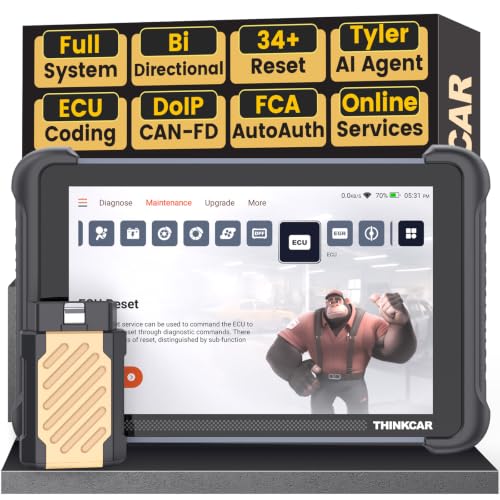
- [Notice] When you receive a used device, it may be a customer return resold by Amazon without inspection. You can exchange it for a new one through Amazon. As this situation is unavoidable, we sincerely apologize. For any issues, contacting us via Amazon's "Messages" is the best way. THINKSCAN 689BT Bidirectional Scan Tool Can Be Used Immediately After It is Turned On, Without Complicated Registration Process, Which is More Convenient & Quick.
- AI-Assisted Diagnosis Upgrade:Connect your THINKSCAN 689BT diagnostic scanner to WiFi and free-upgrade the software to unlock Tyler AI Agent. Get step-by-step diagnostic guidance, illustrated guides, and smart parts recommendations. One tap jumps to Amazon for real-time pricing. Boost efficiency up to 300% and finish jobs faster. Upgrade your shop today.
- Full Bi-Directional Control & 3000+ Active Tests: Take control and test components like actuators, fuel injectors, relays, and cooling fans in real time. You’ll quickly see if the problem is in the part itself or the control module — saving you hours of guesswork and frustrating trial-and-error.
- Advanced ECU Coding Capabilities: Handle module matching and hidden feature activation with confidence. When you replace an ECU or want to customize settings, this obd2 scanner diagnostic bi directional tool gives you the professional-level capabilities you need without the dealership price tag.
- 34+ Useful Reset and Maintenance Functions: Complete everyday service tasks smoothly with a wide range of helpful reset and maintenance functions. Whether you’re keeping up with regular upkeep or tackling a specific job, this car scanner diagnostic tool makes maintenance simpler and less stressful for both DIYers and pros.

- Top Reasons to Choose the D7S OBD2 Scanner: XTOOL D7S car scan tool, an upgrade of XTOOL D7, offers comprehensive features for automotive technicians, workshops, and DIY enthusiasts 1. Upgraded Hardware: 2+64GB memory, rear camera, intuitive interface, foldable bracket 2. Complete Diagnostics: FCA
 Autoauth, OE-level all system scan, 39+ maintenance services, 4K+ bidirectional, CANFD/DoIP protocol 3. Advanced Capabilities: ECU coding, PMI functions 4. Wide Compatibility: Support 10,000+ models, covering 99% vehicle brands 5. Multi-language: Available in 22+ languages, No IP Restrictions 6. 3-Year Updates: Save 300 bucks on software updates for the latest features and optimizations
 - 2026 Upgraded D7S Car Scanner Features: The newly 2026 D7S V2.0 scanner for car brings exciting features for advanced vehicle diagnostics and enhanced user experience 1. FCA AutoAuth: Now supports FCA SGW module for Chrysler, for Jeep, for Dodge (2018+), for Fiat (2017+), enabling faster vehicle communication without gateway restrictions 2. PMI (Offline ECU Programming): Allows for Ford, for Lincoln, and for Mazda ECU programming for new modules 3. Optimized Diagnostic Report 2.0: Personalized reports with logos and customer info for auto shops. Note: Compatibility varies by cars, please check before order
- Cost-effective ECU Coding Scan Tool for Specific Brands: Enhance your vehicle's performance with XTOOL D7S! This obd2 scanner all systems bidirectional offers advanced capabilities at an affordable price, supports online for BMW, for Benz and offline for BENZ, for MIT, along with PMI functions for Ford, for Mazda, and for Lincoln. Ideal for technicians and DIY enthusiasts, this automotive scanner diagnostic tool optimizes vehicle performance and enhances the driving experience. Note: Not for all cars and modules, please send car VIN to check the compatibility before purchase
- OE All System Diagnostic & 8 Pids Graphing: XTOOL D7S is a comprehensive all system bi directional obd2 scanner that delivers dealer-level diagnostics, completely controlling over your vehicle’s performance and health. This automotive scan tool can read and clear DTCs, view live data and ECU information, retrieve freeze frames, and perform active tests and full obd2 functions. This bi-directional scan tool can can identify your vehicle's make, model, and year information with just one click and show up to 8 PIDs live data with options for CSV viewing, playback, and recording for in-depth analysis. It is easy-to-use for both professionals and beginners, helping pinpoint issues efficiently
- 3 Years Software Update, Value for Money: With 3 years of software updates and 22+ languages(no IP restrictions), XTOOL D7S auto scanner code scanner ensures ongoing compatibility for the latest car models and improved diagnostic functions. This all system vehicle diagnostic scanner comes with a 30-day return policy and a 24-month repair for dependable performance. XTOOL are dedicated to your satisfaction, so enjoy seamless support and lifetime expert assistance. Should you encounter any issues or concerns, don’t hesitate to reach out XTOOL. D7S with newest update with 22 languages freely transfer without authorization, check details from setting-language or from XTOOL

- 🔥 Historical lowest pr-ice now on sa-le--hot se-lling.
- 【🎈𝗜𝗙𝟳𝟰𝟱 𝗽𝗲𝗿𝗳𝗼𝗿𝗺𝘀 𝟲 𝗲𝘀𝘀𝗲𝗻𝘁𝗶𝗮𝗹 𝗿𝗲𝘀𝗲𝘁 𝗳𝘂𝗻𝗰𝘁𝗶𝗼𝗻𝘀—𝗔𝗕𝗦 𝗕𝗹𝗲𝗲𝗱𝗶𝗻𝗴, 𝗢𝗶𝗹 𝗥𝗲𝘀𝗲𝘁, 𝗘𝗣𝗕, 𝗦𝗔𝗦, 𝗧𝗵𝗿𝗼𝘁𝘁𝗹𝗲 𝗥𝗲𝗹𝗲𝗮𝗿𝗻, 𝗮𝗻𝗱 𝗕𝗠𝗦—𝗽𝘂𝘁𝘁𝗶𝗻𝗴 𝗽𝗿𝗼𝗳𝗲𝘀𝘀𝗶𝗼𝗻𝗮𝗹-𝗴𝗿𝗮𝗱𝗲 𝗺𝗮𝗶𝗻𝘁𝗲𝗻𝗮𝗻𝗰𝗲 𝗯𝗮𝗰𝗸 𝗶𝗻 𝘆𝗼𝘂𝗿 𝗵𝗮𝗻𝗱𝘀.】Spongy brakes? Stuck oil light? Parking brake won't release? Off-center steering? Rough idle after battery disconnect? Draining battery? IF745 handles all with a few taps. One tool covers six dealer-level resets, saving hundreds in labor costs. ❗ NOTE: Does NOT support bidirectional control, coding, or programming.
- 【✨ 𝗜𝗙𝟳𝟰𝟱 𝗴𝗼𝗲𝘀 𝗯𝗲𝘆𝗼𝗻𝗱 𝗯𝗮𝘀𝗶𝗰 𝗰𝗼𝗱𝗲 𝗿𝗲𝗮𝗱𝗶𝗻𝗴 𝘄𝗶𝘁𝗵 𝟭𝟬 𝗶𝗻𝘁𝗲𝗴𝗿𝗮𝘁𝗲𝗱 𝗳𝘂𝗻𝗰𝘁𝗶𝗼𝗻𝘀—𝗗𝗧𝗖 𝗟𝗼𝗼𝗸𝘂𝗽, 𝗜/𝗠 𝗥𝗲𝗮𝗱𝗶𝗻𝗲𝘀𝘀, 𝗙𝗿𝗲𝗲𝘇𝗲 𝗙𝗿𝗮𝗺𝗲, 𝗟𝗶𝘃𝗲 𝗗𝗮𝘁𝗮, 𝗢𝟮𝗦, 𝗢𝗕𝗠, 𝗘𝗩𝗔𝗣, 𝗮𝗻𝗱 𝗺𝗼𝗿𝗲. 】Pulling a code tells you something is wrong. IF745 tells you what the code means, when the fault happened, and what data surrounds it. Pass emissions with one I/M Readiness tap. Freeze the fault moment with Freeze Frame. Monitor live sensor data in real time. Turn cryptic codes into clear answers.
- 【🛒 𝗜𝗙𝟳𝟰𝟱 𝗽𝗲𝗿𝗳𝗼𝗿𝗺𝘀 𝗳𝘂𝗹𝗹-𝘀𝘆𝘀𝘁𝗲𝗺 𝗱𝗶𝗮𝗴𝗻𝗼𝘀𝘁𝗶𝗰𝘀 𝗮𝗰𝗿𝗼𝘀𝘀 𝗮𝗹𝗹 𝗺𝗼𝗱𝘂𝗹𝗲𝘀—𝗲𝗻𝗴𝗶𝗻𝗲, 𝗔𝗕𝗦, 𝗮𝗶𝗿𝗯𝗮𝗴, 𝘁𝗿𝗮𝗻𝘀𝗺𝗶𝘀𝘀𝗶𝗼𝗻, 𝘀𝘁𝗲𝗲𝗿𝗶𝗻𝗴, 𝘀𝘂𝘀𝗽𝗲𝗻𝘀𝗶𝗼𝗻, 𝗯𝗼𝗱𝘆 𝗲𝗹𝗲𝗰𝘁𝗿𝗼𝗻𝗶𝗰𝘀, 𝗮𝗻𝗱 𝗺𝗼𝗿𝗲. 】Warning lights on but you don't know why? Skip the $100+ diagnostic fee at the shop. Run a complete self-check from your driveway. IF745 reads and clears fault codes, retrieves ECU info, and displays live data from every accessible module—delivering a full vehicle health report in minutes, without leaving home.
- 【✅𝗜𝗙𝟳𝟰𝟱 𝗳𝗲𝗮𝘁𝘂𝗿𝗲𝘀 𝗮 𝟳-𝗶𝗻𝗰𝗵 𝗱𝗶𝘀𝗽𝗹𝗮𝘆, 𝗲𝗿𝗴𝗼𝗻𝗼𝗺𝗶𝗰 𝗱𝗲𝘀𝗶𝗴𝗻, 𝗪𝗶-𝗙𝗶 𝘂𝗽𝗱𝗮𝘁𝗲𝘀, 𝗮𝗻𝗱 𝘇𝗲𝗿𝗼 𝘀𝘂𝗯𝘀𝗰𝗿𝗶𝗽𝘁𝗶𝗼𝗻 𝗳𝗲𝗲𝘀 𝗳𝗼𝗿 𝗵𝗮𝘀𝘀𝗹𝗲-𝗳𝗿𝗲𝗲 𝗱𝗶𝗮𝗴𝗻𝗼𝘀𝘁𝗶𝗰𝘀.】Large screen means no squinting. Intuitive navigation and customizable data displays put key info at your fingertips. Wi-Fi delivers lifetime free updates without a computer. No recurring fees. No hidden costs. Just a reliable tool that works as hard as you do.
This product presentation was made with AAWP plugin.