
NHTSA ID Number: 11025477
Manufacturer Communication Number: 25-01-080G
TSB/Document Date: 2025-11-12
Summary
Certain GV70 (JK1) vehicles may exhibit a Data Communication Unit (DCU) software error due to the internal timer initialization logic not being implemented. The DCU module may shut down telematics services after one year. This bulletin provides instructions to perform a software update for the DCU module.
CAMPAIGN
25-01-080G
NOVEMBER 2025
GV70 (JK1)
DCU SOFTWARE UPDATE
(LIMITED COVERAGE CAMPAIGN L02G)
IMPORTANT
Retailers must perform this field action on all affected vehicles within 5 year / 60,000 mile New
Vehicle Limited Warranty (NVLW) prior to retail delivery to a guest and whenever an affected
vehicle is in the shop for any maintenance or repair. See Warranty Information section for more
details.
Access the “Vehicle Information” screen via WebDCS to verify “Warranty Start Date” and ensure the
vehicle is within NVLW, observing mileage prior to any repair work.
Description: Certain GV70 (JK1) vehicles may exhibit a Data Communication Unit (DCU) software
error due to the internal timer initialization logic not being implemented. The DCU module may shut
down telematics services after one year. This bulletin provides instructions to perform a software update
for the DCU module.
Applicable Vehicles:
2026
GV70 (JK1)
02/18/2025 – 09/10/2025
SST Information:
VCI 3
G0VPNNN006
+
19-Pin Cable
G1XDDCA020
VCI 3 comes with
the 19-pin cable
(P/N G1XDDCA020
included here
for reference)
Website:
https://genesisessentialtools.com/
Email:
[email protected]
VCI 2
Ethernet
Communication
Interface (ECI)
Kit
G1XDDMN002
+
G0XDDMN052
If using VCI 2, the
ECI Kit will be
required to
complete software
updates.
Phone: 1-855-763-6630
Hours: 7 AM – 7 PM CST
NOTE: VCI 2 can NO longer be ordered but can be used for the updates in this TSB.
Circulate To: General Manager, Service Manager, Parts Manager, Warranty Manager, Service
Advisors, Technicians, Body Shop Manager, Fleet Repair
GDS Information:
GV70 (JK1)
DCU
1312
JK1 PE DCU LOGIC IMPROVEMENT (NA)
(*or use a later available event as listed in the GDS DCU Update screen if one is available.)
NOTE: The software update is subject to an OTA (Over-the-Air) option and may be completed by
guests with active Genesis Connected Services subscriptions.
Warranty Information:
GV70 (JK1)
50D280R0
DCU Software Update 0.4 M/H
96510-ARNA0
M73
ZZ3
NOTE 1: Submit claim on Claim Entry Screen as “Campaign” type.
NOTE 2: 5 year / 60,000 mile New Vehicle Limited Warranty (NVLW) applies to the part(s) and repair
procedure(s) outlined in this TSB. Prior to beginning any repair work, ensure the part(s) associated
with the repair procedure are within NVLW, observing mileage and Warranty Start Date or date of first
use. If the subject part(s) are out of warranty coverage, the retailer has the option to submit a PA
Request for goodwill consideration on a case-by-case basis.
NOTE 3: If any part(s) not subject to this TSB are found in need of replacement while performing the
repair procedure, and the affected part(s) are still under warranty, the retailer may submit a separate
claim using the same repair order. If the part(s) not subject to this TSB are out of warranty coverage,
the retailer has the option to submit a PA Request for goodwill consideration on a case-by-case basis.
NOTE 4: This TSB includes repair validation photos. Op times include VIN, mileage, and photo
capture of the ECU Update “Success” result screen as outlined in the Digital Documentation Policy.
ROM ID Information:
120.CA.011606.011606
GV70 (JK1)
1312
DCU
96510-ARNA0
120.CA.011870.011870
120.NA.012054.01205
120.CA.011951.011951
TSB #: 25-01-080G
Page 2 of 8
Service Procedure:
DIGITAL DOCUMENTATION
This TSB includes repair validation photos. Refer to the latest Warranty Digital Documentation
Policy for requirements.
NOTICE
Perform the GDS ECU update in Auto Mode.
•
If the ECU update fails in Auto Mode, perform the update in Manual Mode to recover.
NOTICE
Ensure the vehicle’s battery charge is above 11.0 Volts and the tablet’s battery charge is above
30% before performing a software update to avoid failure.
i
Information
•
Turn OFF all lamps (do NOT leave head lamp switch in auto mode) and accessories.
•
Perform update with the ignition switch in the ON position.
•
Do NOT disconnect any cables connected to the vehicle or scan tool during the update.
•
Do NOT start the engine during the update.
•
Do NOT turn OFF the ignition switch during the update.
TSB #: 25-01-080G
Page 3 of 8
i
Information
Refer to TSB 23-GI-005G for detailed information on configuring Ethernet communication for
setup.
1.
Connect the Ethernet Communication
Interface (ECI) DLC cable to the OBD
connector of the vehicle.
2.
Connect the VCI DLC cable to the ECI.
3.
Select the appropriate tablet cable
(type C, 5-pin) to the ECI.
4.
Connect the cable to the tablet PC.
i
Information
VCI 2: Connect the GDS tablet (wired) or PC (wireless) using the ECI kit.
VCI 3: Connect the GDS tablet to the vehicle using the 19-pin cable.
i
•
Information
If using VCI 2, please wait for the Wi-Fi Direct timer to complete to ensure the Wi-Fi Direct
connection is established. Do NOT select Bluetooth Only.
TSB #: 25-01-080G
Page 4 of 8
1.
Enter the following digits exactly as shown for
IP address, DNS address, Netmask and
Default gateway.
Save and close.
i
Information
Ensure the following IP settings on your
tablet matches the below before
proceeding with the software update.
2.
Perform the ECU update in Auto Mode.
i
Information
Refer to TSB # 24-GI-016G, “ECU
Update Procedure for Tablet-Based
Genesis Smart”, for additional
information.
TSB #: 25-01-080G
Page 5 of 8
3.
Verify the ROM ID by selecting the DCU
system to scan the vehicle’s current ROM ID.
NOTICE
Check the current ROM ID version and
compare it to the ROM ID Information
table before attempting to perform the
software update.
NOTICE
If the update fails, remove the power
connector from the in-cabin fuse box for
at least 5 seconds. Reassemble and
retry the update.
i
Information
The screenshots within this service
procedure refers to a GV70 Internal
Engine Combustion (ICE) vehicle from
Hyundai Motor Manufacturing Alabama
factory, but is also applicable to the GV70
ICE vehicle from Hyundai Motor
Company.
4.
Once the ECU update is 100% complete,
follow the prompts on the screen to cycle the
ignition OFF for at least 10 seconds to reset
the control unit (certain models may take up to
30 seconds).
i
Information
Use the Refresh button to reset the
timer.
TSB #: 25-01-080G
Page 6 of 8
5.
OTA initialization (A) should perform
automatically:
• If OTA initialization performs
automatically, then proceed with the
service procedure.
•
A
If the OTA initialization process fails,
complete it manually under:
S/W Management > CCU_CCNF Central Communication Unit (CCNF)
> OTA Initialization (B).
Follow the instructions on the screen.
B
6.
DIGITAL
DOCUMENTATION
Using the tablet or GDS screen capture
function, take a screenshot of the ECU
Update “Success” result screen.
Upload the photo to STUI.
NOTE: The VIN/Date/Time/Mileage photo
imprint is NOT required for GDS
screenshots.
TSB #: 25-01-080G
Page 7 of 8
7.
Perform an All Systems Fault Code search
and erase DTC history that had incidentally
occurred from the ECU update.
8.
Start the engine to confirm proper operation of
the vehicle.
9.
The service procedure is now complete.
NOTICE
If the ECU update fails in Auto Mode, perform the update in Manual Mode using the password(s)
below.
Manual Mode Password:
1312
TSB #: 25-01-080G
JK1 PE DCU 96510-ARNA0
2123
Page 8 of 8


- [J2534 Pass-Thru Programmer] - TOPDON RLink J2534 is...
- [All-in-One OEM Reprogramming and Diagnostics] - When...
- [Tested, Trusted, and Proven for Accuracy] - TOPDON RLink...
- [One-Click Installation, Continuous Updates] - The exclusive...
- [Works with Windows Compatibility and OEM Software...

This product presentation was made with AAWP plugin.
If the PDF is very large, it may not load in the preview below.
Some older TSBs had multiple PDFs — visit the NHTSA Website to view all PDFs.
If the TSB PDF does not show, download or view it on the NHTSA Website.
Click on the (+) Plus Sign
Then Click on Associated Document(s)
Search NHTSA Database for Recalls
Search NHTSA Database for Vehicle Investigations
View Latest Vehicle Investigations
Search NHTSA Database for Vehicle Complaints
View Latest Vehicle Complaints
TSB/Document ID: 25-01-080G
Replacement Service Bulletin Number:
MFR Communication Date: 2025-11-04
MFR Internal Campaign ID/Software Version: L02G
Communication Type: Service Campaign
NHTSA Components: ELECTRICAL SYSTEM
MFR Component System:
MFR Component Subsystem:
Previous TSB | Next TSB |
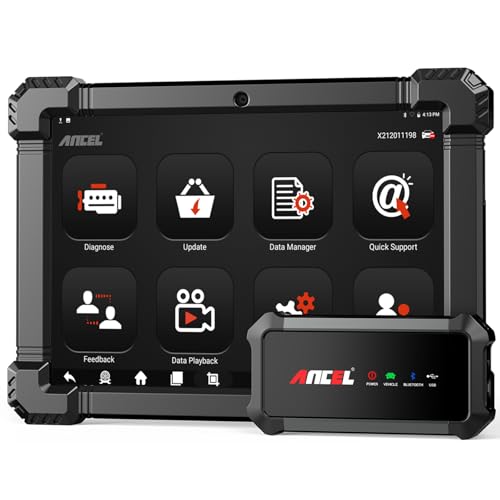
- 🔥🔥🔥2026 New Functions Making X7HD the Top Dog - Big Surprise!!! ANCEL X7HD truck scanner 10 major functional advantages .✅>Full HDOBD/OBD2 Function ✅>ALL System Diagnostic ✅>42+ Reset Function ✅>Active Test / Bi-Directional Control✅>ECU Coding✅>Graphing Live Data✅>Wide Compatibility ✅>2 Yrs Free Update✅>Remote Operation✅>Bluetooth 5.0 & Wifi In addition, 8 major hardware advantages: ✅>6000 mAh✅>10.1 inch Tablet✅>2G RAM
 ✅>32G ROM (Expandable to 128GB)✅>Data Record & Replay & Print✅>Android 10.0✅>Bluetooth 5.0 & Wifi✅>14 Languages
 - 🚛OEM DPF Forced Regen & Cylinder Cutout Test & more - ANCEL X7HD diesel scanner diagnostic tool not only supports DPF regeneration, DPF reset, DPF related information reset, DPR state reset, DPD forced regeneration etc, which helps you better solve the exhaust aftertreatment system problems, but also supports activate motor to do exhaust air in ABS Automatically. Moreover, it features TPMS activation, cylinder cut-off and learning functions
- 🚛Advanced ECU Coding & Programming - ANCEL X7HD 10.1inch truck scanner diagnostic tool is equipped with advanced ECU coding, supports Level calibration, Idle speed learning and Adjustment, Camshaft timing control learning, Control unit adaptations, Injector Codes, Read/Write VIN, Road speed limit optional vehicle speed set, etc... PLEASE NOTE that ECU codes are not compatible with all vehicles, please send us your VIN# to check vehicle compatibility
- 🚛42+ Reset Functions & Bidirectional Control - 2026 newest top heavy duty truck scan tool, comes with 42+ special services (ECU, Speed Limit and Idle Reset, Oil Reset, Injector Coding, EPB, ABS, SRS, Suspension, Throttle, etc. and always keep growing), which meet all your various needs for service and maintenance
- 🚛10 Inch All Systems Diesel Scanner & Full HDOBD/OBD2 Modes - ANCEL X7HD diesel truck scan tool supports all systems scan, such as Engine, Brake, Retarder, TECU Transmission, Tachograph, ABS, SRS, TPMS, EPB, SAS, ESP, and other vehicle systems, comes with 10 obd2 service modes: read/erase error codes, Data Stream, I/M Readiness, Vehicle Information, Actuations, DTC Lookup, EVAP, view freeze frame, etc
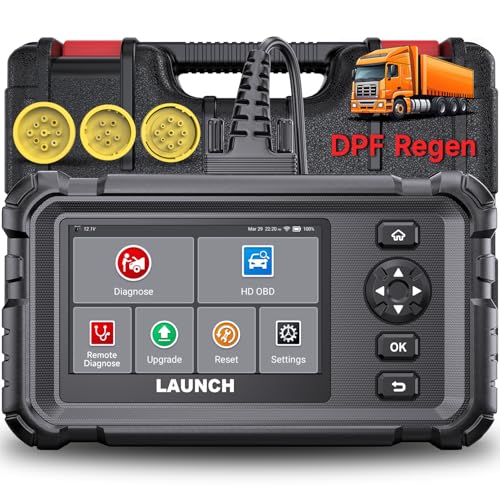
- Dealer-Level Diagnostics, Faster & Easier: The heavy duty truck scanner delivers full-system diagnostics for engine, ABS, transmission, and more, plus 7+ reset functions like DPF Regen and Speed Limit Adjust. Powered by a 1.3G CPU, 2GB RAM, 16GB storage, Android 8.1, and a 3000mAh battery, it runs smoothly for fast scanning, live data, reports, Auto VIN, Wi-Fi updates, and easy handheld use. It captures screenshots, replays live data, and generates reports to support your repair decisions.
- One Tool for 50+ Truck Brands: The diesel scanner supports J1939, J1708, J1587, and OBD2/CAN protocols, delivering broad coverage for major diesel trucks and commercial vehicles including Cummins, Cat, Detroit, Paccar, Volvo, Freightliner, Kenworth, Peterbilt, International, Mack, Isuzu, Hino, Scania, Mercedes-Benz, and more. Also supports Allison, Aisin, Eaton, WABCO, and Bendix, helping you diagnose more vehicles, reduce equipment costs, and handle more jobs with one professional scan tool.
- Diesel Truck DPF Regen & Reset Features: Experiencing loss of power, sluggish acceleration, or poor hill-climbing performance? These symptoms are often caused by a clogged or overloaded DPF. The truck diagnostic scanner offers OEM-level forced DPF regeneration, DPF reset, and DPD/DPR functions. This device extends DPF lifespan and efficiently diagnoses exhaust aftertreatment issues. It can significantly reduce diagnostic time and save you up to $3,000 or more in costly dealership fees.
- 7+ Resets - Perform Essential Procedures: The truck scanner features 7+ essential resets including DPF Regen clears carbon buildup; Oil Reset clears service light; Injector Coding matches new injectors; DEF Test checks urea injection; Speed Limit Adjust saves fuel; Cylinder Cutout pinpoints misfires; Clutch Relearn restores smooth engagement. Reset after maintenance or part replacement for proper truck operation. Vehicle compatibility varies. Email [email protected] to confirm before buying.
- Full System Diagnostic for Truck: The truck scanner diagnostic tool covers all systems like engine, ABS, transmission, SAS, SRS, TPMS and more. It reads fault codes and shows real-time data. Additionally, it includes full HD OBD and OBD2 modes: read/clear codes, live data stream, I/M readiness, freeze frame, DTC lookup, and more. When warning lights appear or performance issues arise, quickly identify which system is affected and gain the real-time data needed for accurate diagnosis.
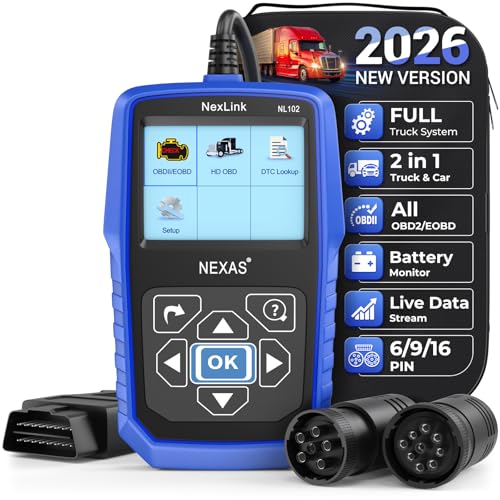
- Diagnose Heavy-Duty Truck Problems Fast — Read and clear fault codes and diagnose warning light issues on many Class 4–8 diesel trucks including Freightliner, Peterbilt, Kenworth, Volvo, Mack and Cummins-powered vehicles
- Help Reduce Downtime & Repair Costs — It offers full system diagnostics for major trucks meeting standard protocols, along with complete OBD2 functionality. Quickly check engine faults, view live truck data and identify issues before expensive repair shop visits or unnecessary repairs
- No complicated setup required — Simple menus and built-in DTC explanations make this truck code reader easy to use for owner-operators, mobile mechanics and small fleet maintenance
- Live Data & Built-in DTC Lookup — View real-time engine data and built-in truck fault code definitions directly on the scanner to help understand vehicle problems faster without searching through manuals
- Free Lifetime Updates & Technical Support — Includes free software updates plus responsive technical support for setup, compatibility and everyday truck diagnostics
This product presentation was made with AAWP plugin.
Last update on 2026-06-08 / Affiliate links / Images from Amazon Product Advertising API