
NHTSA ID Number: 11024263
Manufacturer Communication Number: 25-01-060H TSB
TSB/Document Date: 2025-10-14
Summary
Certain Tucson (NX4M) vehicles may exhibit a Data Communication Unit (DCU) software error due to the internal timer initialization logic not being implemented. The DCU module may shut down telematics services after one year. This bulletin provides instructions to perform a software update for the DCU module.
If the PDF is very large, it may not load in the preview below.
Some older TSBs had multiple PDFs — visit the NHTSA Website to view all PDFs.
If the TSB PDF does not show, download or view it on the NHTSA Website.
Click on the (+) Plus Sign
Then Click on Associated Document(s)


- Advanced VCI Box, Industry-leading J2534 Pass-Thru...
- High-Speed OEM-Level Diagnostics & Programming: Unlock true...
- Coverage for 17 Car Brands & Ultra Reliability: Works...
- User-Friendly RLink Platform & Expert Support: TOPDON’s...
- 6.6 ft USB-C Cable & Portable Storage Case: The RLink J...
This product presentation was made with AAWP plugin.
Search NHTSA Database for Recalls
Search NHTSA Database for Vehicle Investigations
View Latest Vehicle Investigations
Search NHTSA Database for Vehicle Complaints
View Latest Vehicle Complaints
TSB/Document ID: 25-01-060H TSB
Replacement Service Bulletin Number:
MFR Communication Date: 2025-10-09
MFR Internal Campaign ID/Software Version: TDFB
Communication Type: Service Campaign
NHTSA Components: ELECTRICAL SYSTEM
MFR Component System:
MFR Component Subsystem:
Previous TSB | Next TSB |
GROUP
NUMBER
CAMPAIGN
Technical Service Bulletin
25-01-060H
DATE
MODEL(S)
SEPTEMBER 2025
TUCSON (NX4M)
DCU SOFTWARE UPDATE
(SERVICE CAMPAIGN TDFB)
SUBJECT:
IMPORTANT
Dealers must perform this service campaign on all affected vehicles prior to customer retail delivery
and whenever an affected vehicle is in the shop for any maintenance or repair.
Access the “Vehicle Information” screen via WebDCS to identify open campaigns.
Description: Certain Tucson (NX4M) vehicles may exhibit a Data Communication Unit (DCU) software
error due to the internal timer initialization logic not being implemented. The DCU module may shut
down telematics services after one year. This bulletin provides instructions to perform a software update
for the DCU module.
Applicable Vehicles (Certain):
Model Year
Model
Production Dates
2025
Tucson (NX4M)
06/05/2024 – 03/31/2025
SST Information:
Tool Name
Tool Number
VCI 3
G0VHNNN06
19-Pin Cable
Figure
Remarks
Ordering Information
+
VCI 3 comes with
the 19-pin cable
(P/N G1XDDCA020
included here
for reference)
Website:
https://hyundaiessentialtools.com/
G1XDDCA020
Email:
[email protected]
VCI 2
Ethernet
Communication
Interface (ECI)
Kit
G1XDDMN001
+
G0XDDMN052
If using VCI 2, the
ECI Kit will be
required to
complete software
updates.
Phone: 1-855-763-9199
Hours: 7 AM – 7 PM CST
Circulate To: General Manager, Service Manager, Parts Manager, Warranty Manager, Service
Advisors, Technicians, Body Shop Manager, Fleet Repair
DCU SOFTWARE UPDATE (SERVICE CAMPAIGN TDFB)
SUBJECT:
GDS Information:
Model
System
Event Number*
Description
Tucson
NX4 OB PE/NX4 PE/NX4 PE HEV/NX4 PHEV/NX4a
DCU
1297
(NX4M)
PE/NX4m PE DCU LOGIC IMPROVEMENT (NA)
(*or use a later available event listed in the GDS DCU Update screen if one is available.)
NOTE 1: The software update is subject to an OTA (Over-the-Air) option and may be completed by
customers with active Bluelink Services subscriptions.
Warranty Information:
Model
Op. Code
Operation
Op. Time
Causal Part
Nature
Code
Cause
Code
Tucson (NX4M)
250M13R0
DCU Software
Update
0.4 M/H
96510-N9140
W11
ZZ3
NOTE 1: Submit claim on Claim Entry Screen as “Campaign” type.
NOTE 2: If a part is found in need of replacement while performing this campaign and the affected
part is still under warranty, submit a separate claim using the same repair order. If the affected part is
out of warranty, submit a Prior Approval request for goodwill consideration prior to performing the
work.
NOTE 3: This TSB includes repair validation photos. Op times include VIN, mileage, and photo
capture of the ECU Update “Success” screen as outlined in the Digital Documentation Policy.
ROM ID Information:
Model
Tucson
(NX4M)
Event
1297
TSB #: 25-01-060H
System
DCU
ECU
Part Number
96510-N9140
ROM ID
Current
Latest
120.NA.011509.011509
120.NA.011606.011606
120.NA.011646.011646
120.NA.011951.011951
120.NA.012054.012054
Page 2 of 7
SUBJECT:
DCU SOFTWARE UPDATE (SERVICE CAMPAIGN TDFB)
Service Procedure:
DIGITAL DOCUMENTATION
This TSB includes repair validation photos. Refer to the latest Warranty Digital Documentation
Policy for requirements.
NOTICE
You must initially perform the GDS ECU update in Auto Mode.
• If the ECU update starts but then fails in Auto Mode, perform the update in Manual Mode
to recover.
NOTICE
Ensure the vehicle’s battery charge is above 11.0 Volts and the tablet’s battery charge is above
30% before performing a software update to avoid update failure.
i
Information
•
Turn OFF all lamps (do NOT leave head lamp switch in auto mode) and all accessories.
•
Perform update with the ignition switch in the ON position.
•
Do NOT disconnect any cables connected to the vehicle or scan tool during the update.
•
Do NOT start the engine during the update.
•
Do NOT turn OFF the ignition switch during the update.
TSB #: 25-01-060H
Page 3 of 7
SUBJECT:
DCU SOFTWARE UPDATE (SERVICE CAMPAIGN TDFB)
Configuration of Ethernet Communication on Tablet PC
i
Information
Refer to TSB 23-GI-006H for detailed information on configuring Ethernet communication for
setup.
1.
Connect the Ethernet Communication
Interface (ECI) DLC cable to the OBD
connector of the vehicle.
2.
Connect the VCI DLC cable to the ECI.
3.
Select the appropriate tablet cable
(type C, 5-pin) to the ECI.
4.
Connect the cable to the tablet PC.
i
Information
VCI 2: Connect the GDS tablet (wired) or PC (wireless) using the ECI kit.
VCI 3: Connect the GDS tablet to the vehicle using the 19-pin cable.
TSB #: 25-01-060H
Page 4 of 7
DCU SOFTWARE UPDATE (SERVICE CAMPAIGN TDFB)
SUBJECT:
ECU Update Procedure
1.
Perform the ECU update in Auto Mode.
i
Information
Refer to TSB # 25-GI-011H, “ECU
Update Procedure for Tablet-Based
GDS-Smart”, for additional information.
2.
Verify the ROM ID by selecting the DCU
system to scan the vehicle’s current ROM ID.
NOTICE
Check the current ROM ID version and
compare it to the ROM ID Information
table before attempting to perform the
software update.
NOTICE
If the update fails, remove the power
connector from the in-cabin fuse box for
at least 5 seconds, or disconnect the
negative (–) 12V battery terminal then
wait at least 5 seconds. Reassemble and
retry the update.
i
Information
The screenshots within this service
procedure refers to Tucson Hybrid , but is
also applicable to Tucson Internal
Combustion Engine (ICE) vehicles.
TSB #: 25-01-060H
Page 5 of 7
DCU SOFTWARE UPDATE (SERVICE CAMPAIGN TDFB)
SUBJECT:
3.
After the ECU update process shows 100%
complete, follow the prompts on the screen to
cycle the ignition OFF for at least 10 seconds
to reset the control unit (certain models may
take up to 30 seconds).
i
Information
Use the Refresh button to reset the
timer.
4.
OTA initialization (A) should perform
automatically:
• If OTA initialization performs
automatically, then proceed with the
service procedure.
•
A
If the OTA initialization process fails,
complete it manually under:
S/W Management > CCU_CCNF Central Communication Unit (CCNF)
> OTA Initialization (B).
Follow the instructions on the screen.
B
TSB #: 25-01-060H
Page 6 of 7
SUBJECT:
5.
DCU SOFTWARE UPDATE (SERVICE CAMPAIGN TDFB)
DIGITAL
DOCUMENTATION
Take a screenshot of the ECU update
Success screen using your tablet and
upload to STUI.
6.
Perform an All Systems Fault Code search
and erase DTC history that had incidentally
occurred from the ECU update.
7.
Start the engine to confirm proper operation of
the vehicle.
8.
The service procedure is now complete.
NOTICE
If the ECU update fails in Auto Mode, perform the update in Manual Mode using the password(s)
below.
Manual Mode Password:
Event
ECU Menu
Password
1297
NX4M PE DCU 96510-N9140
2419
TSB #: 25-01-060H
Page 7 of 7

- [Notice] When you receive a used device, it may be a customer return resold by Amazon without inspection. You can exchange it for a new one through Amazon. As this situation is unavoidable, we sincerely apologize. For any issues, contacting us via Amazon's "Messages" is the best way, and we’ll provide a solution within 24 hours. THINKSCAN 689BT Can Be Used Immediately After It is Turned On, Without Complicated Registration Process, Which is More Convenient & Quick.
- [Good News] THINKSCAN 689BT is the most competitive automotive scan tool to date, offering wireless updates with no subscription fees(valued 500Buc.ks) . With all the features of THINKTOOL PD8,PRO, built on Android 10 platform with 4-core CPU, 4GB RAM
 and 64GB ROM, serving up to 5X faster than older MAX/MINI/PLUS vehicle scanners, no more slow and delayed feedbacks, it's time to update your garage tool.
 - [Big Money Saver] Premium THINKSCAN 689BT Wireless Diagnostic Scanner, save up to 400USD per year, includes all useful features: Full bi-directional controls, ECU coding, 34+ services, OEM all system diagnostics, Worldwide vehicles coverage, CAN FD & DoIP, FCA AutoAuth(The 689BT only provides a login and purchase portal, and users are required to register for an FCA account and pay a membership fee in order to perform the relevant automotive diagnostics)
- [3000+ Active Tests]Active testing is one of the most useful features in automotive maintenance and greatly improves mechanic efficiency. THINKCAR 689BT bidirectional scanner can send action commends to vehicle sub-systems or components for active test without using vehicle controls. It can perform various tests such as: EVAP Test, Fuel Trim Reset, Injector Buzz Test, Window/ Mirror/ Door Lock Test, Pump and Value Tests, etc. Get functions from "Diagnose>Car Model>System>Active Test".
- [Hot Advanced Features] 689BT bidirectional tool newly adds ECU Coding, Power Balance, Flash Hidden Functions, Reset Adaptive Data, Match Replaced Components, Customize OE-Settings. Such as: 1. changing the color of interior lights 2. switching on/off the auto hold, 3. customizing dash kits 4. activating the auto side mirror folding function 5. disables auto start-stop. Note: Coding functions vary by model&year.
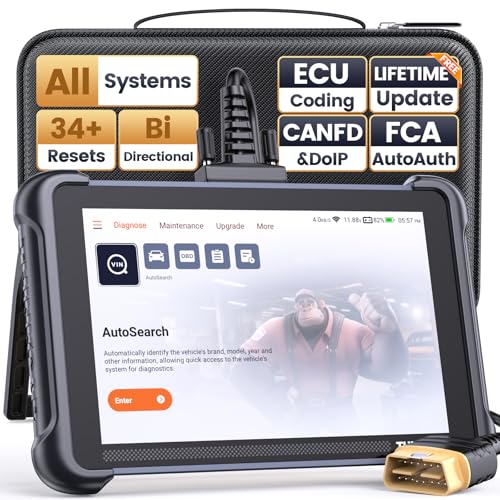
- 【Warm Tips】Wired THINKSCAN 689 is connected through a detachable OBDII cable, and we also have added OBD2 Extension Cable (about 60 cm/2 feet) as g ift, enabling customers handling vehicle repairs with ease. Just click "Bundles Item" above to get it.
- 【Professional Car Diagnostic Tool】Tired of renew fees? Thinkscan 689 scanner provides dealer-level advanced functions for lifetime f.r.e.e update for auto mechanics and repair shops. 34+ Services, 3000+ Active Test, ECU Coding, 140+ Brands Coverage, FCA AutoAuth, CANFD&DOIP Protocol, Component Matching, Power Balance, V.A.G Guided, Compatible with Google Chrome integration, etc. With strong hardware backing, 64G Memory, Android 10, 4-core processors, and 4150mAh battery. Thinkscan 689 brings you the best as your daily business helper and never lets you drop the ball!
- 【Over 34 Reset Service, Adaptation + Relearn + Calibration + Initialization + Matching】Made for workshops, Thinkscan 689 scanner provides 34+ services for worldwide vehicles: such as Gear/SAS/EPB/TPMS/D.P.F/I.M.M.O/BMS/ETS/Oil/Brake/AFS/GEARBOX/SUNROOF/SUS Reset, ABS Bleed, Injector coding, etc. Warm tips: Compatibility may vary on vehicles' model and year, please contact seller before purchase to make sure it works well on your cars.
- 【Real Active Test】Thinkscan 689 scan tool features over 3000+ full bi-directional control ability, to send commands to vehicle’s systems/components, to verify system input/output without using the vehicle's controls, e.g. turn on the radiator fan, modulate the throttle, open/close windows, operate mirrors, Injector Buz Test, turn on interior&exterior lights, sound horn, test door lock actuators, turn on/off front/rear side ACM Solenoid, Vehicle level position calibration, Wheel Speed Sensor Supply.
- 【Comprehensive Solutions with Advanced Features】Take your vehicle customization to the next level with the Thinkscan 689's advanced ECU coding capabilities. This scan tool provides power balance, PMI, unlock more new features and enhance performance by activating dormant functions, customizing OE settings, matching replaced components, and reprogramming adaptive data to elevate your driving experience. Note: Compatibility varies by car models, please check before order.

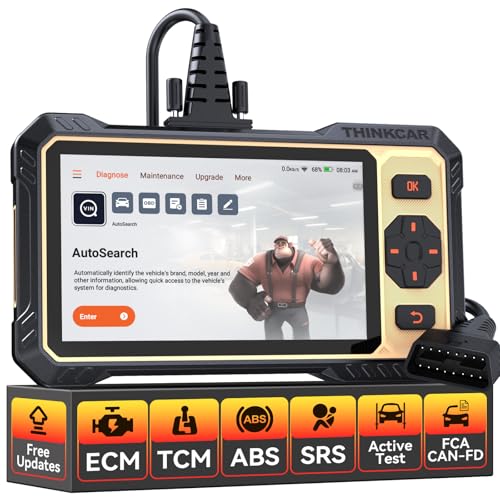
- 【Powerful Bidirectional Control -- Active Test】Good News! The THINKSCAN 662 obd2 scanner has bidirectional control function,which is the most popular feature among mechanics.This function is mainly used to test whether the executing components in the electronic control system can work normally,By requesting information from the vehicle's ECU or sending commands to the ECU module to execute commands and identify maintenance status,quickly locate the cause of the fault.Such as ABS,Fuel Injectors,Adjusting Throttle,Coolant Fans,Radiator Fans,Coolant Pumps,EV.AP Test, Fuel Trim Reset,Injector Buzz Test,Pump/ Value Test,etc. Effectively shorten diagnosis time and reduce diagnosis costs.
- 【Unlock Pro-Level Diagnostics With Half Costs】 THINKSCAN 662 obd2 scanner diagnostic tool Delivers Premium Scanning Power for Half the Price! The OBD2 scanner can handle common issues with ECM,TCM,ABS,SRS. It can easily read and clear fault codes, analyze data streams, and ensure quick identification of problems. THINKSCAN 662 bidirectional scan tool has 12 practical reset functions, including Airbag Reset,ABS Bleeding,BMS,Brake Reset, D.P.F,Throttle Adaptation,Injector Coding,OIL Reset,steering angle Reset,Gearbox,TPMS,and more. The car scanner diagnostic tool very suitable for DIY enthusiasts, car repair technicians, and small and medium-sized repair shops.
- 【Multi Functional Intelligent Car Scanner Diagnostic Tool】 Automatic VIN + Real-time Data + DTC Lookup + Historical Diagnostic Records: This OBD2 scanner features auto serch technology, allowing for car recognition without the need for manual input. The real-time data of the car ECU is read and displayed in the form of text or a 4-in-1 merged waveform chart. You can save, share, print or send the entire inspection report via email for analysis. Historical diagnostic reports help you quickly identify vehicle issues and understand the condition of the vehicle. The built-in 'feedback' module provides customized repair Operation recommendations from our certified professionals.
- 【Upgraded Hardware + Ergonomically Engineered】 THINKSCAN 662 OBD2 scanner has a friendly combination of touch screen and physical buttons with an ergonomic appearance for comfortable use.Experience 2x faster scans and 50% longer lifespan vs standard models.This scanner para autos boast a 4-core 1.8GHz CPU,6.2-inch HD touch screen,2GB RAM + 32GB ROM storage capacity,a long-lasting 4150mAh battery,Android 8 ensures lightning-fast bootup and processing.The scanner is robust with rubberized protection that you can store and use in the trunk or garage.Whether you are engaged in Home car maintenance or road rescue car repair,this car scanner can help you perfectly solve car problems.
- 【Effortless Setup & Scanning - Intuitive for All Skill Levels】No More Complicated Scanners! The User Interface is as User-Friendly as THINKCAR 689BT! Truly Plug-and-Play,The downward sliding setup shortcut portal and drawer function shortcut portal make you use this scan tool as easy as using your own cell phone.The car scanner supports setup screenshot,screen recording,volume adjustment,this scan tool includes product e-manuals,instructional videos,and fault code libraries,users can check the usage guide,perfect for DIY car owners,Maintenance technician.If your father,husband,brother,boyfriend enjoys car repairs,THINKSCAN 662 is a great gift choice, and it has amazing family value.
This product presentation was made with AAWP plugin.
Last update on 2026-05-13 / Affiliate links / Images from Amazon Product Advertising API