
NHTSA ID Number: 11022809
Manufacturer Communication Number: 37071
TSB/Document Date: 2025-09-05
Summary
This is a Technical Journal: EX90 Software download issues - If SWDL fails and HLCM is in "Not responding", it is normal. HLCM is in silent mode and therefore not listening to diagnostic commands. Continue with the next SWDL attempt without any action
If the PDF is very large, it may not load in the preview below.
Some older TSBs had multiple PDFs — visit the NHTSA Website to view all PDFs.
If the TSB PDF does not show, download or view it on the NHTSA Website.
Click on the (+) Plus Sign
Then Click on Associated Document(s)



- Advanced VCI Box, Industry-leading J2534 Pass-Thru...
- High-Speed OEM-Level Diagnostics & Programming: Unlock true...
- Coverage for 17 Car Brands & Ultra Reliability: Works...
- User-Friendly RLink Platform & Expert Support: TOPDON’s...
- 6.6 ft USB-C Cable & Portable Storage Case: The RLink J...
This product presentation was made with AAWP plugin.
Search NHTSA Database for Recalls
Search NHTSA Database for Vehicle Investigations
View Latest Vehicle Investigations
Search NHTSA Database for Vehicle Complaints
View Latest Vehicle Complaints
TSB/Document ID: 37071
Replacement Service Bulletin Number:
MFR Communication Date: 2025-08-28
MFR Internal Campaign ID/Software Version:
Communication Type: Service Bulletin/Repair Instructions
NHTSA Components: UNKNOWN OR OTHER
MFR Component System:
MFR Component Subsystem:
Previous TSB | Next TSB |
Volvo Car USA LLC
Technical Journal
Technical Journal Title
Ref. No.
EX90 Software download issues - temporary solutions (Key Tag info TJ 37071.5.0
Included)
Issuer (Dept.)
Technical Service
Issue Date
Status Date
2/6/25
2/17/25
Car Market
Partner
Function Group
United States and Canada
3 US 7510 Volvo Car USA
3018
Function Description
Page
Software
Page 1 of 8
Rows beginning with * are modified
Note! If using a printed copy of this Technical Journal, first check for the latest online version.
Attachment
File Name
File Size
HUD.JPG
0.0269 MB
VCU1.JPG
0.0581 MB
VIDA yellow message.JPG
0.0147 MB
VIDA1_EX90.JPG
0.0175 MB
VIDA2_EX90.JPG
0.0278 MB
VIDA3_EX90.JPG
0.0170 MB
VIDA4_EX90.jpg
0.0650 MB
WPC.JPG
0.0129 MB
DESCRIPTION:
If the software download fails, please follow the advice under “Service”.
CSC Customer Symptom Codes
Code
Description
1Z
Service/repair/Software update failed
47
Central locking/Glovebox locking/unlocking does not work
2V
Technician information/Software/Vehicle communication/Not for warranty use
DTC Diagnostic Trouble Codes
Vehicle Type
Type Eng
356
Eng
Desc
Sales Body Gear
Steer
Model Year
2025-9999
Plant
Chassis range
Struc Week
Range
0000001-0999999
202417-999952
Technical Journal 37071.5.0
SERVICE:
#1. If SWDL fails and HLCM is in “Not responding”, it is normal. HLCM is in silent mode and
therefore not listening to diagnostic commands.
Continue with the next SWDL attempt without any action.
#2. If SWDL fails due to Silent mode (picture VIDA1_EX90), follow this:
*• Check if HLCM is in fail safe mode under “Components” - “High- to Low-voltage Converter
Module (HLCM)” - “Diagnostic Sequences” - “Recovering HLCM from fail save mode”
•
Check VIUP (PGWM and PGWA) is in Default. If not, follow “Recover VIUP/D failed
SWDL” under point #3 below.
•
Check that HVBM is in Default.
a. If it is not in Default, perform a 12V reset with VIDA for more than 10 minutes.
b. If it is in Programming, perform a reload of HVBM.
•
Check that HVB SOC is above 2%. If not, charge the HVB.
*• If all of the above is okay and SWDL still fails due to Silent mode, open the VIDA diagnostic
sequence under “Service Functions” - “Disconnect Main Battery” and deactivate and
activate HLCM converting and try again.
If the issue still remains, contact RTS through a Support Needed vehicle report in TIE.
#3. If SWDL failed due to the VIUP/D being partly installed (picture VIDA2_EX90), follow this:
Check if VIUP/D is in Programming or Not responding.
a. If VIUP/D is in Programming:
aa. Perform a 12V reset with VIDA diagnostic sequence under “Service Function” “Disconnect Main Battery”, 30 minutes.
ab. Reload VIUP/D.
b. If VIUP/D is not responding:
ba. Perform a 12V reset with VIDA diagnostic sequence under “Service Function” “Disconnect Main Battery”, 30 minutes. (try at least 3 times).
bb. If we get VIUP/D in Programming, perform a reload.
bc. If VIUP/D is still in not responding, contact RTS through a Support Needed vehicle
report in TIE.
•
How to do a 12V hard reset if 12V reset with VIDA fails (step #2 & #3):
Alt a:
a1. Disconnect 12V batteries.
a2. VIDA => Software installation => Advanced test => Reset
*a3. Connect 12V batteries after more than 10 minutes. Ensure the main (rear) battery is
connected first. It is crucial to wait at least 30 seconds before mounting the redundant
(front) battery.
Alt b:
b1. Disconnect 12V batteries.
b2. Access the VCU in the front passenger compartment and disconnect connector (see
picture VCU1) on the VCU for more than 10 seconds.
*b3. Connect 12V batteries after more than 10 minutes. Ensure the main (rear) battery is
connected first. It is crucial to wait at least 30 seconds before mounting the redundant
(front) battery.
Page 2 of 8
2025-02-17
Technical Journal 37071.5.0
#4. If there is a VIDA message “Purchase Failed - StatusCode: 502 ServerCode: 10” (picture
VIDA3_EX90)
Contact RTS through a Support Needed vehicle report in TIE.
#5 Pairing of key tag:
a. Charge the key tag on the WPC.
If not charging, follow TJ 37030.
b. Pairing of key tag fails:
Car needs to be in status Available or higher => close and reopen driver door.
*Make sure that WPC is active and charging the key tag.
c. Pairing of key tag fails:
If you get message in VIDA, “...potential issue between key and Wireless Phone Charger...”
(picture WPC), perform a TCAM reload, “Yes” to replace hardware.
Then retry pairing.
d. Key tag pairing may be lost after SW download.
Check key tag pairing by removing the NFC card from the car, enter the car with the key tag
and check if it’s possible to put car in D or R.
If message “No Key found” appears - pairing is required via “Keyless vehicle key Appl” SWDL.
#6. PDS upgrade yellow message – not complete!
After PDS is done with yellow message “..SW installed needs verification..” (picture VIDA Yellow
message), perform the following steps:
1. Click “OK” or “Cancel” on the error message.
2. Revoke the software.
3. Re-download the PDS.
Check key tag pairing again.
#7. General VIDA warning messages:
a. General VIDA warning messages, example “no response HUD” (picture HUD) after PDS
upgrade:
If the warning message appears after PDS installation, please perform a reset of vehicle
under Advanced Test Option in VIDA and check if the ECU is in Default, if not repeat this
step 2 more times.
If problems still occur, contact RTS through a Support Needed vehicle report in TIE.
b. General VIDA warning message, example “Critical failure” (picture VIDA4_EX90)
If the warning message appears in the beginning of PDS installation follow below:
If usage mode is “Convenience” make sure that no one is seated in the car and try again.
If the problem still exists, turn off climate in CSD.
If problems still occur, contact RTS through a Support Needed vehicle report in TIE.
#8. If a vehicle readout is done and some nodes are Not Responding follow the steps below:
a. Generic method.
Perform reset 3 times under VIDA => Software installation => Advanced test => Reset.
If 3rd reset doesn’t set the ECUs to Default or Extended, then run VIDA “Service Function”
- “Disconnect Main Battery”.
If problems still occur, contact RTS through a Support Needed vehicle report in TIE.
2025-02-17
Page 3 of 8
Technical Journal 37071.5.0
b.
NFCA Not Responding.
If NFCA is not responding, disconnect driver door connector 30 seconds and then check
under VIDA => Software installation => Advanced test if NFCA is in Default.
#9. Glove box cannot be opened.
Follow method in VIDA IE ID: VCC-522725-2 “Emergency opening of glove box”.
#10. Window calibration after SWDL:
After SWDL installation, one or several windows can lose calibration.
*Follow method in VIDA IE ID: VCC-524977-2 “Door Window Motor Initialization”
*#11. Certificates
*If there have been downloading issues and the car has been recovered, verify that the
certificates are valid in VIDA by navigating to Diagnostic > Remote Services > Connectivity >
Cloud
Abbreviations:
SWDL = Software Download
VIUP = Vehicle Integration Unit Passenger side
VIUD = Vehicle Integration Unit Driver side
PGWM = Passenger side Gateway Module
PGWA = Passenger side Gateway module A
HLCM = High- to Low-voltage Converter Module
HVBM = High Voltage Battery Module
HVB = High Voltage Battery
SOC = State Of Charge
12V = 12 Volt
RMDB = Rear Main Distribution Box
WPC = Wireless Phone Charger
NFCA = Near Field Communication module A
Warranty claim info:
To get a warranty claim accepted for a job described in this TJ, use the corresponding VST OP
number stated in this TJ.
Note that the TJ number must be stated in the repair order text.
Page 4 of 8
2025-02-17
Technical Journal 37071.5.0
VST Operation Number
VST Operation Number
Description
99923-2
General Reimbursement acc to TJ
VEHICLE REPORT:
Yes, please submit a Vehicle Report if the service solution described in this TJ has no effect. Use
concern area “Vehicle Report” and sub concern area “Support needed”, use function group 3018.
To view TJ attachments continue to next page. This TJ has eight attachments.
2025-02-17
Page 5 of 8
Technical Journal 37071.5.0
Page 6 of 8
2025-02-17
Technical Journal 37071.5.0
2025-02-17
Page 7 of 8
Technical Journal 37071.5.0
Page 8 of 8
2025-02-17

- 🎉[OTOFIX D1 Lite, Perfect Cost-effective Diagnostic Tool]: OTOFIX D1 Lite, a newest bidirectional scan tool from OTOFIX company, is a great choice for DIYers and repair shops. 👉This obd2 scanner diagnostic tool packs all practical functions: OE level all systems diagnoses, Bi-Directional Control, 38+ reset services fixing 99% of common problems, support DoIP & CANDF protocols and FCA
 AutoAuth, high-end hardware configuration. Worldwide vehicles and 🔥2 Years Free Updating🔥 covered.
 - 🎉[Bi-Directional Scan Tool, Active Test]: OTOFIX D1 Lite bluetooth obd2 scanner can also command ECUs and monitor the operation of the actuators to track down the problems of certain parts, like windows, sunroof, wipers, fuel pumps, etc., saving repair time & trouble. This makes OTOFIX D1 Lite the most cost-effective bidirectional scan tool.
- 🎉[2026 Newest, 38+ Hot Reset Functions]: Equipped with 38+ reset functions in one, the OTOFIX D1 lite automotive scanner diagnostic tool allows you to troubleshoot 99% of common vehicle problems. You can use this car diagnostic scanner holding enough functions to easily repair common vehicle models in your repair shops. Including Oil Reset, Injector Coding, Throttle, DPF Reset, SCR Reset, Gear Learning, Clutch Learning, Suspension, etc. Note* Reset functions vary by model.
- 🎉[OE Level Full Systems Diagnostics]: Unlike the 2-system and 4-system diagnostic tools, the OTOFIX auto scan tool can complete comprehensive system diagnostics within 5 minutes. It accesses and scans all available onboard systems like for Engine /AT /ABS /EPB /BMS /TPMS /SRS /SAS /Audio System /BCM /Air Conditioning / etc., to read & clear codes, view live data, and check ECU information. Note: Active test is not involved.
- 🎉[Powerful Hardware Configuration]: Designed with a fashion appearance & a 7” touchscreen and a weight of 463g, this OTOFIX D1 Lite OBD2 diagnostic scanner scan tool is convenient for everywhere and easy to use & store. Android9.0 OS and 2+64GB memory enhance multi-task smoothness and diagnostic operation, no more wasting too much time. 5800mAh battery allows hours-lasting use. WiFi & VCI1 also bring faster communication for your diagnostics.

- 🏆【2026 TOP OBD2 Scanner Diagnostic Tool】OTOFIX D1 Lite wireless obd2 scanner has upgraded hardware configuration and car coverage. The newly upgraded D1 Lite with 🔥OS Android 9.0🔥1.5Ghz 4 core high efficiency processor🔥2GB RAM+64GB ROM large storage🔥5800mAh large battery, more stable and longer lasting diagnostics🔥 38+ Reset🔥action tests🔥full system diagnostic🔥Supports MV105 endoscope🔥21+ Language Supports🔥100000+ vehicle coverage to meet all your daily maintenance needs.
- 👍【Bi-Directional Control / Active Test】D1 Lite obd2 scanner has bidirectional control(worth $300+), which is the most beloved feature among mechanic. If your headlights or car windows are broken, going to a repair shop will cost a lot of money. You can use D1 Lite to send execution commands to the ECU module and identify the repair status. Such as ABS, car windows, doors, valves, wipers, headlights, etc., effectively shorten diagnostic time and reduce diagnostic costs.
- 🔥【All Systems Diagnostics, In-depth Checking】This advanced OBD2 Scanner D1 Lite can perform OE-level diagnosis of all systems including engine, transmission, airbag, ABS, ESP, TPMS, gateway, steering, radio, and air conditioning for more than 100 brands. This diagnostic scanner supports essential functions, such as reading ECU version info, reading and clearing fault codes, and reading data streams.With just a simple click, it provides you with accurate and in-depth diagnostics.
- 🏆【38+ Reset Hot Functions】For repair workshops, holding an OTOFIX D1 Lite Auto scanner is a strong advantage over others. Its 38+ maintenance functions provide various solutions for all module repairs, including Oil Reset, TPMS Reset, Injector Coding, Suspension, Throttle Matching, etc., which will usher your repair business to a new pinnacle. Continuously updating will never make the functionality & compatibility out-of-date.
- 🏆【150+ Models, 10000+ Car Coverage & 16 Languages】D1 Lite is a comprehensive car diagnostic scan tool, help you to troubleshoot car issues fast for 95% US, European, Asian auto makes. ✅ With frequent updates and optimizations allow D1 Lite to cover more vehicles to meet your needs. ✅ Multilingual menu allows auto mechanics around the world to use it without language barriers. 🚩Note: Kindly send us the S/N of the device to authorize new language updates before changing the menu language.
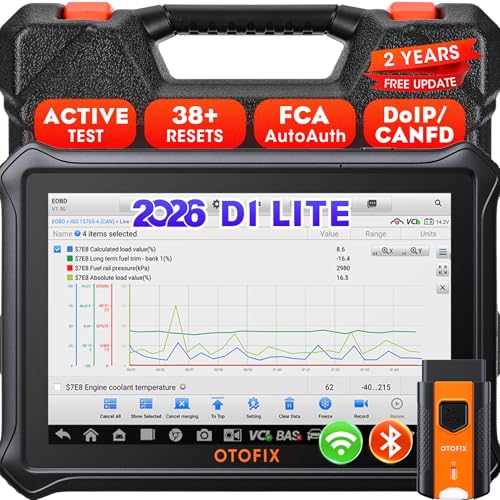
- 【2026 OTOFIX D1 Lite Gives the Best Value for Money】OTOFIX D1 Lite bidirectional scan tool is more FASTER and SMARTER with 2026 Enhanced Hardwares & New Functions! 👍Alternative Bluetooth +USB connect 👍2G+64GB 👍4x ARM Cortex-A35 (1.5GHz) Processor (5X Faster CPU) 👍Android 9.0 OS 👍5G GHz WiFi 👍CANFD&DOIP 👍 FCA AutoAuth 👍38+ Services 👍3K+ Bi-Directional Control 👍Full Systems Diagnose 👍2 Years Update 👍150+ Vehicle Coverage.
- 👍【Active Tests】 OTOFIX D1 Lite is a bi-directional scan tool that can send commands to, and also receive information from vehicle control modules. This way, you can quickly locate and repair faulty auto parts. For Example: send direct commands to ask the vehicle to turn on/off the radiator fan, lights, sound horn, fuel pump, modulate throttle, open/close windows, operate mirrors and more. *Note that only available tests will be displayed in the menu.
- 👍【38+ Service Functions】 OTOFIX D1 Lite scan tool offers 38+ of the hottest service functions that are commonly used for car repairs. That include Oil reset/SAS/EPB/BMS/Throttle/ABS bleeding, and 2065-new SUS/ADBLUE/NOX/Headlamp resets (and more) to help restore your car status after repairs are done. Compared to other diagnostic scanners for cars, the OTOFIX D1 Lite scanner is much more fully-featured. *Note that specific functions available depend on the make/model/year of your car.
- 👍【All System Diagnostics + Cloud Report Management】 This 2026 car scanner OTOFIX D1 Lite provides troubleshooting and data for all ECUs: read/clear DTCs, view graphic live data/VIN, and locate system faults for safe driving. With Cloud Report Management, you can save detailed reports to cloud servers and easily shared them with others via QR codes/emails/text messages. Others can access these reports from any device (smartphones/tablets/PCs …) anytime, and you can better manage repair work.
- 👍【99% Car Coverage】 This one-station car scanner diagnostic for all cars works on 150+ major car brands across the world. 1) It supports CAN-FD/DoIP protocols: compatible with GMCAVALIER/TRAX/Encore/Envision/GL8(LSY)/CT4/CT5 after 2019; Volvo after 2018; Land Rover/Jaguar after 2017; and BM.W F/G all chassis. 2) For models equipped with security modules (such as Renault & 2018+ FCA SGW), its built-in AutoAuth allows you to easily break diagnostic barriers after registration.
This product presentation was made with AAWP plugin.
Last update on 2026-05-12 / Affiliate links / Images from Amazon Product Advertising API