
NHTSA ID Number: 11010439
Manufacturer Communication Number: SC-22-144
TSB/Document Date: 2024-11-12
Summary
Software upgrade to allow vehicle to precondition the AC while charging the vehicle.
If the PDF is very large, it may not load in the preview below.
Some older TSBs had multiple PDFs — visit the NHTSA Website to view all PDFs.
If the TSB PDF does not show, download or view it on the NHTSA Website.
Click on the (+) Plus Sign
Then Click on Associated Document(s)



- Advanced VCI Box, Industry-leading J2534 Pass-Thru...
- High-Speed OEM-Level Diagnostics & Programming: Unlock true...
- Coverage for 17 Car Brands & Ultra Reliability: Works...
- User-Friendly RLink Platform & Expert Support: TOPDON’s...
- 6.6 ft USB-C Cable & Portable Storage Case: The RLink J...
This product presentation was made with AAWP plugin.
Search NHTSA Database for Recalls
Search NHTSA Database for Vehicle Investigations
View Latest Vehicle Investigations
Search NHTSA Database for Vehicle Complaints
View Latest Vehicle Complaints
TSB/Document ID: SC-22-144
Replacement Service Bulletin Number:
MFR Communication Date: 2022-11-12
MFR Internal Campaign ID/Software Version: SC-22-144
Communication Type: Service Bulletin/Repair Instructions
NHTSA Components: ELECTRICAL SYSTEM
MFR Component System:
MFR Component Subsystem:
Previous TSB | Next TSB |
ISSUE DATE:
SERVICE BULLETIN SUBJECT:
VINs or MODELS AFFECTED:
COMPLETE BY:
SERVICE BULLETIN #:
Labor Operation Code:
11/10/2022
800 Volt Limited Release Vehicle Controller Software Update
Service Specified Buses
Next Service Opportunity
SB-22-144
N/A
NOTICE! It is expected that this process may require up to one hour per bus.
Please schedule appropriately to minimize vehicle downtime.
VEHICLE CONTROLLER SOFTWARE UPDATE
Description
This procedure describes the process for updating the Vehicle Controller software to the latest version.
Headquarters: 1815 Rollins Road, Burlingame, CA 94010
East Coast Manufacturing: 1 Whitlee Court, Greenville, SC 29607
West Coast Manufacturing: 383 Cheryl Lane, City of Industry, CA 91789
1|Page
Tools/Programs Required
Tools Required:
• Laptop Computer
• Nexiq USB-Link 2
Programs Required:
• Proterra Diagnostics Tool
Software Files Required / Preparation
IMPORTANT: NEVER access the software from the USB memory device, ALWAYS copy the
software files to your computer hard drive and access the software from this location. Secure the
bus with the Vehicle Master Disconnect in the rear ON.
Component
Part Number
Version
Vehicle Controller
063191
4.8.1
It is recommended that you copy the entire “service bulletin files” folder to your local machine in order
to more effectively keep track of the software versions you are deploying:
\\bus.local\files\Engineering\Service Bulletins\Service Bulletin Files for SC-22-144\
Summary of Software Changes:
Vehicle Controller:
•
•
Allows pre-conditioning during manual charging.
Allows chiller operation during manual charging.
Headquarters: 1815 Rollins Road, Burlingame, CA 94010
East Coast Manufacturing: 1 Whitlee Court, Greenville, SC 29607
West Coast Manufacturing: 383 Cheryl Lane, City of Industry, CA 91789
2|Page
VEHICLE SOFTWARE UPDATE PROCEDURE
Description
This document contains the necessary information to update the Proterra Vehicle Integration
Controller. This controller provides the electrical integration of ancillary systems on 800V models. It
owns the vehicle operational state control, startup and shutdown, steering, pneumatics, thermal
management, and brake interlock controls.
Tools/Programs Required
Tools Required:
• Laptop Computer
• Nexiq USB-Link 2
Programs Required:
• Proterra Diagnostics Tool
Software Files Required / Preparation
It is recommended that you download any files local to your machine. To program the vehicle
controller, you will need a *.hex data file. This file will contain memory address and data information
that will be written to the controller in order to update the user code space. This will not update the
boot loader or other firmware files.
IMPORTANT! NEVER access the software from the USB memory device, ALWAYS copy the
software files to your computer hard drive and access the software from this location.
Headquarters: 1815 Rollins Road, Burlingame, CA 94010
East Coast Manufacturing: 1 Whitlee Court, Greenville, SC 29607
West Coast Manufacturing: 383 Cheryl Lane, City of Industry, CA 91789
3|Page
Preparing the Vehicle to be Programmed
When programming a vehicle, it is critical that the low-voltage batteries remain connected throughout
the process. Ensure that the LV batteries are fully charged before starting the process. If they are
low, use the vehicle to recharge them buy turning on high-voltage or place the bus on a low-voltage
charger for the duration of the process.
Connecting to the Vehicle
1. Power up and login to the Proterra-Supplied laptop or a comparable PC that has the Proterra
Diagnostics Tool software installed with a valid license.
2. Turn on the 12/24V rear Vehicle Master Disconnect located at the curbside rear charge port
access panel.
Vehicle Master
Disconnect
3. Connect the Nexiq USB Link2 device to the laptop and to the OBDII Diagnostic Port located in
the streetside wheel well box.
4. Press and hold the streetside wheel well “Work Light” switch until the work lights turn on.
5. On the laptop, double-click on the “Proterra Diagnostics Tool” software icon to start the
software.
Headquarters: 1815 Rollins Road, Burlingame, CA 94010
East Coast Manufacturing: 1 Whitlee Court, Greenville, SC 29607
West Coast Manufacturing: 383 Cheryl Lane, City of Industry, CA 91789
4|Page
6. When the program opens, read and click “OK” for the high-voltage safety prompt.
7. On the Home tab, select the appropriate device from the drop down and click “Connect”.
8. Once the diagnostic tool has connected to the vehicle, a VIN number and connection status
will be displayed on the Home screen, and tabs available to navigate. If you do not see the
Home Screen, check that the low-voltage batteries are connected and that the Nexiq tool is
plugged in.
NOTE: 800V Proterra vehicles are equipped with an automatic battery disconnect that will
protect the low-voltage batteries from a deep discharge.
9. Before beginning the programming process, check the bus for existing faults by clicking on the
“Diagnostics” button below and make a note of any found.
Headquarters: 1815 Rollins Road, Burlingame, CA 94010
East Coast Manufacturing: 1 Whitlee Court, Greenville, SC 29607
West Coast Manufacturing: 383 Cheryl Lane, City of Industry, CA 91789
5|Page
Update Using the Proterra Diagnostic Tool
1. Click on the “Overhead Charging” button on the left side of the screen.
NOTE: If the bus that you are working on is not capable of overhead charging, skip to step 3
below.
Click “Overhead
Charging”
2. Record the value displayed in the “Vehicle Tag” data field. This will be re-entered into the
controller after the software update.
Record Vehicle Tag
Headquarters: 1815 Rollins Road, Burlingame, CA 94010
East Coast Manufacturing: 1 Whitlee Court, Greenville, SC 29607
West Coast Manufacturing: 383 Cheryl Lane, City of Industry, CA 91789
6|Page
3. Navigate to the “Configuration” tab in the left menu.
Click
CONFIGURATION
4. Select the option for Vehicle Controller “Start Flash”.
NOTICE: The “Initial Flash” button is only for offline programing of the Vehicle Controller with
an Offline Programming Kit.
Beside Vehicle Controller,
Click START FLASH
Headquarters: 1815 Rollins Road, Burlingame, CA 94010
East Coast Manufacturing: 1 Whitlee Court, Greenville, SC 29607
West Coast Manufacturing: 383 Cheryl Lane, City of Industry, CA 91789
7|Page
5. In the pop-up window, select the software flash file to load the controller. The correct file is
named SW_VIC_4.8.1.
Select the file and
Click “Open”
6. The Programming window will come up and may take a few minutes to complete.
7. After completing the software update, turn off the “Work Light” switch inside the streetside
wheel well box.
8. Click on the “Overhead Charging” button on the left side of the screen.
NOTE: If the bus that you are working on is not capable of overhead charging, skip to step 10
below.
9. Turn OFF the 12/24V rear Vehicle Master Disconnect located behind the vehicle curbside rear
charge port access panel, wait ten seconds, and then turn back to ON.
Headquarters: 1815 Rollins Road, Burlingame, CA 94010
East Coast Manufacturing: 1 Whitlee Court, Greenville, SC 29607
West Coast Manufacturing: 383 Cheryl Lane, City of Industry, CA 91789
8|Page
10. Verify that the vehicle turns on with no faults and that it is capable of charging.
11. Return the vehicle to service.
Headquarters: 1815 Rollins Road, Burlingame, CA 94010
East Coast Manufacturing: 1 Whitlee Court, Greenville, SC 29607
West Coast Manufacturing: 383 Cheryl Lane, City of Industry, CA 91789
9|Page
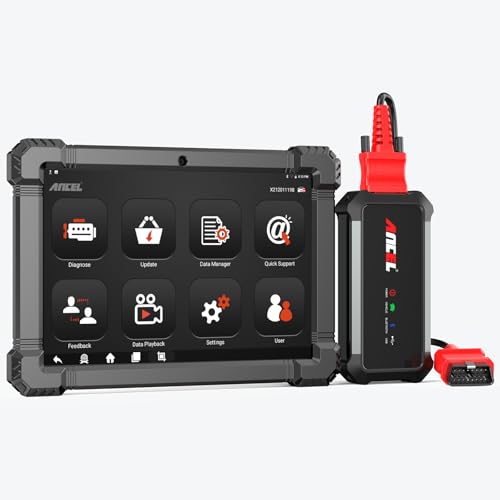
- 🔥🔥🔥2026 New Functions Making X7HD the Top Dog - Big Surprise!!! ANCEL X7HD truck scanner 10 major functional advantages .✅>Full HDOBD/OBD2 Function ✅>ALL System Diagnostic ✅>42+ Reset Function ✅>Active Test / Bi-Directional Control✅>ECU Coding✅>Graphing Live Data✅>Wide Compatibility ✅>2 Yrs Free Update✅>Remote Operation✅>Bluetooth 5.0 & Wifi In addition, 8 major hardware advantages: ✅>6000 mAh✅>10.1 inch Tablet✅>2G RAM
 ✅>32G ROM (Expandable to 128GB)✅>Data Record & Replay & Print✅>Android 10.0✅>Bluetooth 5.0 & Wifi✅>14 Languages
 - 🚛OEM DPF Forced Regen & Cylinder Cutout Test & more - ANCEL X7HD diesel scanner diagnostic tool not only supports DPF regeneration, DPF reset, DPF related information reset, DPR state reset, DPD forced regeneration etc, which helps you better solve the exhaust aftertreatment system problems, but also supports activate motor to do exhaust air in ABS Automatically. Moreover, it features TPMS activation, cylinder cut-off and learning functions
- 🚛Advanced ECU Coding & Programming - ANCEL X7HD 10.1inch truck scanner diagnostic tool is equipped with advanced ECU coding, supports Level calibration, Idle speed learning and Adjustment, Camshaft timing control learning, Control unit adaptations, Injector Codes, Read/Write VIN, Road speed limit optional vehicle speed set, etc... PLEASE NOTE that ECU codes are not compatible with all vehicles, please send us your VIN# to check vehicle compatibility
- 🚛42+ Reset Functions & Bidirectional Control - 2026 newest top heavy duty truck scan tool, comes with 42+ special services (ECU, Speed Limit and Idle Reset, Oil Reset, Injector Coding, EPB, ABS, SRS, Suspension, Throttle, etc. and always keep growing), which meet all your various needs for service and maintenance
- 🚛10 Inch All Systems Diesel Scanner & Full HDOBD/OBD2 Modes - ANCEL X7HD diesel truck scan tool supports all systems scan, such as Engine, Brake, Retarder, TECU Transmission, Tachograph, ABS, SRS, TPMS, EPB, SAS, ESP, and other vehicle systems, comes with 10 obd2 service modes: read/erase error codes, Data Stream, I/M Readiness, Vehicle Information, Actuations, DTC Lookup, EVAP, view freeze frame, etc
 ✅>32G ROM (Expandable to 128GB)✅>Data Record & Replay & Print✅>Android 10.0✅>Bluetooth 5.0 & Wifi✅>14 Languages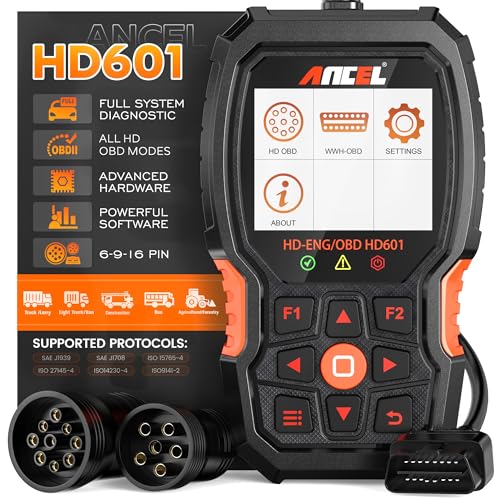
- 【Extensive Compatibility】HD601 heavy duty truck scanner supports 12V & 24V commercial vehicles and all major truck models that comply with standard protocols (SAE J1939, SAE J1708, ISO 14230-4, ISO 15765-4 and ISO 9141-2, ISO 27145-4 and Euro6). Fits for Cummins, Paccar, Detroit, Caterpillar, Freightliner, International, Peterbilt, Ford Heavy Truck, Class 4-Class 8 trucks, etc. It also supports engine diagnosis on most cars, minivans, light trucks and pickups
- 【 Full System Diagnostic】HD601 Diesel Scanner supports all system scans of heavy trucks compliant with standard protocols SAE J1939 & J1708, such as Engine, ABS, Transmission, Braking System, ESP, EPS, Fuel System, etc, It is a great scan tool for Cummins, Caterpillar, Detroit, Caterpillar, Maxxforce, Bendix,Wabash, Wabaco, Haldex, Allison, Eaton heavy trucks, With this truck tool, you can get deep analysis data about the system and do some repairs by yourself, saving much time and money. Note: Only heavy truck vehicles that comply with the above protocol can diagnose the entire system
- 【Enhanced Diesel OBD Scanner】The HD601 Diesel OBD Scanner offers unparalleled diagnostic capabilities for heavy-duty trucks. Beyond code reading, clearing, and live data display, it retrieves vehicle information, freeze frames, and DTCs. With 6, 9, and 16 pin cables, it ensures compatibility with various engines. This scanner's real-world testing prowess ensures comprehensive support for a wide array of heavy-duty truck engines, making it an indispensable tool for truck diagnostics
- 【DTC Library】+【Life Time Free Update】The built-in DTC library allows you to retrieve the codes directly without searching for the definition in the book. Whether you are a professional mechanic or a DIY car owner, HD601 diesel scanner explains the existing problem, makes it easier for you to understand code definitions and helps you locate vehicle faults. Note: This device cannot directly solve the fault. Plus, you get a lifetime free internet updates, so you always have the latest software for diagnostics in English and Spanish languages.
- 【Friendly Design, Easy of Use】This scanner is plug and play, simple and convenient, and very friendly for beginners. With improved buttons for easy menu navigation. The excellent 2.8 inch LCD color screen makes it easy to view the displayed results and gives you a better overview of your car's problem areas and the identified codes. In addition, the processor is super-fast and responds without lagging, providing maximum comfort and efficiency in diagnostic and service work
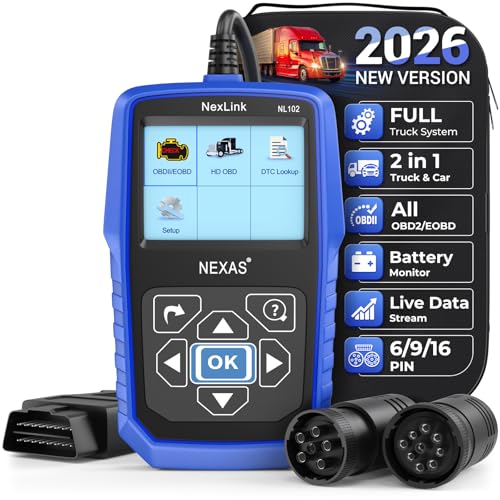
- Why NEXAS NL102 Truck Scan Tool? The NL102 outshines other truck scanner with its extensive diagnostic features. It offers full system diagnostics for major trucks meeting standard protocols, along with complete OBD2 functionality. Beyond read fault codes, clear codes and live data display, it enables vehicle info retrieval, freeze frame capture, and DTC lookup. Equipped with 6-pin, 9-pin, 16-pin connectors, it ensures broad truck compatibility. Plus, enjoy lifetime free updates in English, Spanish, and French, keeping your diagnostic scanner software current.
- Wide Compatibility - Friendly Reminder: To avoid compatibility issues, please confirm with us via Amazon Messages before purchasing. This heavy duty truck scanner is compatible with all heavy-duty trucks and semi that adhere to standard protocols (J1587, J1939, J1708). It covers a wide range of vehicle models, including Cummins, Detroit, Caterpillar, Freightliner, International, Kenworth, John Deere, Peterbilt, Sterling, Mack, Paccar, Western Star, Mercedes-Benz, Volvo, Scania, MAN, Renault, ERF, Foden, Seddon-Atkinson, Iveco, DAF, SISU, STEYR, ISUZU etc. Equipped with 6-pin, 9-pin, and 16-pin connectors for versatile device compatibility, ensuring stable plug-and-play connections.
- Save Hundreds of Money for All Heavy Duty Trucks – This diesel diagnostic scanner supports accurate full-system scans for all heavy-duty trucks that comply with standard protocols (J1587, J1939, and J1708). It can read and clear trouble codes across a range of vehicle systems, including the engine, transmission, instrument panel, drivetrain, brake system, suspension, ABS, ESP, EPS, fuel system, etc. The truck scanner communicates directly with your truck's computer to provide real-time data stream analysis, letting you pinpoint issues with precision. This cuts down on waste from unnecessary part replacements, saving you time and hundreds or even thousands of dollars.
- All OBD2 Functions + Battery Health Monitoring – Unlike many obd2 scanners on the market that only cover partial OBD2 features, ours gives you full OBD2 capability: read & clear codes, live data, freeze frame data, I/M readiness checks, EVAP tests, on-board monitor, O2 sensor tests, vehicle info, and DTC lookup. That means more detailed insights for pros and DIYers alike. The NL102 isn't just a code scanner – it's a battery saver. Regularly check your car's battery health, and catch issues before it dies completely. No more unexpected no-starts in the driveway or on the road. It diagnoses battery condition accurately, helping you avoid costly last-minute repairs.
- Plug and Play & One-click for DTC: NEXAS diesel scanner is user-friendly. It comes with an intuitive screen and easy-to-understand interface, making it accessible even for non-professionals to get started. And the built-in DTC library in the code reader allows you to directly retrieve codes without searching for definitions in books, making it easier to understand the code definitions and solve problems more quickly.
This product presentation was made with AAWP plugin.
Last update on 2026-05-11 / Affiliate links / Images from Amazon Product Advertising API