
NHTSA ID Number: 11006603
Manufacturer Communication Number: SC-24-009
TSB/Document Date: 2024-08-24
Summary
Software update for the 800vRRs Vehicle and Body Software to reduce the radiator fan current draw to 80%. Additionally corrects a bug to properly route ESM faults away from the coolant light icon.
Subject
800vRR Vehicle Controller V4.10.2 and ESM V3.0.7 Update
Issue Date
04/02/2024
Service Bulletin Number
SC-24-009
Models Affected
Service Specified Vehicles
Complete By
Next Service Opportunity
Labor Operation Code
EN70Z
Description
Software update for the 800vRRs Vehicle and Body Software to
reduce the radiator fan current draw to 80%. Additionally fix a bug
to properly route ESM faults away from the coolant light icon.
Labor Table
Operation
1
Steps 1-30
Technicians
Hours
Labor Time (T x H)
1
.75
.75 Hours
Total Labor Time:
.75 Hours
Contact the Phoenix Customer Service Team with any
questions related to the following procedure.
864-438-0000
[email protected]
SC-24-009
Page 1 of 10
Parts Required:
066259
Service Retrofit Kit, BUSCOM 3.0 Software Package, 800V RR-ZX5
SOFTWARE, VEHICLE CONTROLLER RR-ZX5 M580,
066257
v4.10.2
066269
SOFTWARE, ESM, 800V, 3.0.7
Qty.
UOM
1
1
EA
EA
Qty.
UOM
Tools Required:
•
Phoenix Diagnostic Tool (PDT)
•
•
•
•
Nesiq USB Link2
•
•
•
•
•
•
•
•
•
•
•
•
•
•
•
•
•
•
SC-24-009
Page 2 of 10
Change Notes:
Vehicle Controller:
Several calibrations, including those for radiator fan max speed and ambient temperature sensor
fault detection were incorrect.
ESM:
Roadrunner Diagnostic lamp responses are modified to make it consistent with newer generations of
vehicles.
Protect lamps were turned off as a part of the change.
Software Package Link: https://business-site-7460.my.salesforce.com/sfc/p/Ho000002fy70/a/
Ho000000vhSu/TOqfjrs9iIZaHgHpE4b0ug5434XhDZ5ymaukwJKuSXo
Password: A9xmGDN5
IMPORTANT! NEVER access the software from the USB memory device, ALWAYS copy the software files to your computer hard drive and access the software from this location. Secure the bus
with the Vehicle Master Disconnect in the rear ON.
Ensure prior software campaigns have been completed. Body Controller Software must be equal to
or greater than V7.0.1. Charge Controller software version must be equal to or greater than V3.0.1.
Preparing the Vehicle to be Programmed:
When programming a vehicle, it is critical that the low-voltage batteries remain connected throughout the process. Ensure that the LV batteries are fully charged before starting the process. If they
are low, use the vehicle to recharge them buy turning on high-voltage or place the bus on a lowvoltage charger for the duration of the procedure.
ESM Controller Update
Step 1:
Power up and login to the Phoenix-Supplied laptop or a comparable PC that has the Phoenix Diagnostics Tool software installed with a valid license.
Step 2:
Ensure the SW Package is on the computer’s hard drive and unzipped if applicable. For this section
the SW “066269 ESM_HV_BMS_RoadRunner_Bootloader_20240207_1147_FULL” is to be used.
Step 3:
Turn ON the 12/24V rear Vehicle Master Disconnect located at the curbside rear charge port access
panel.
SC-24-009
Page 3 of 10
Step 4:
Connect the Nexiq USB Link2 device to the laptop and to the OBDII Diagnostic Port located in the
streetside wheel well box
Step 5:
Press and hold the streetside wheel well WORK LIGHT switch until the work lights turn on.
Step 6:
On the laptop, double-click on the Proterra Diagnostics Tool software icon to start the software.
Step 7:
When the program opens, read and click “OK” for the high-voltage safety prompt.
Step 8:
On the Home tab, select the appropriate device from the drop down and click “Connect”.
SC-24-009
Page 4 of 10
Step 9:
Once the diagnostic tool has connected to the vehicle, a VIN number and connection status will be
displayed on the Home screen, and tabs available to navigate. If you do not see the Home Screen,
check that the low-voltage batteries are connected and that the Nexiq tool is plugged in.
NOTE: 800V Proterra vehicles are equipped with an automatic battery disconnect that will protect
the low-voltage batteries from a deep discharge.
Step 10:
Before beginning the programming process, check the bus for existing faults by clicking on the
“Diagnostics” button below and make a note of any found.
Step 11:
Navigate to the “Software Versions” tab and take a screenshot of the current software versions incase any issues arise.
Step 12:
Turn the bus High-Voltage Master Switch to Accessory at the Driver's Workplace and ensure the
Dash screen is ON. Set the Hazard Switch to ON.
SC-24-009
Page 5 of 10
Step 13:
Click on the “Configuration Tab” to open the Configuration screen and then click start flash on the
“Battery Master Controller” section.
Step 14:
When prompted select file “066269
ESM_HV_BMS_RoadRunner_Bootloader_20240207_1147_FULL” from your hard drive, select
open.
Step 15:
The Proterra Diagnostic Tool will attempt to connect to the device.
NOTE: You may receive an error on the first attempt. If so, retry by clicking the ESM Controller Start
Flash button again.
Step 16:
When the software update begins, the following screens will be displayed.
SC-24-009
Page 6 of 10
Step 17:
Once the following screen displays the update is now complete.
Step 18:
Close the Proterra Diagnostic Tool (PDT), turn off work light and cycle the buses power and verify no
faults.
Vehicle Controller Software Update
Step 19:
One again, ensure the LV batteries and laptop are charged.
Step 20:
Power up and login to the Proterra-Supplied laptop or a comparable PC that has the Proterra Diagnostics Tool software installed with a valid license.
Step 21:
Turn ON the 12/24V rear Vehicle Master Disconnect located at the curbside rear charge port access
panel.
Vehicle Master
Disconnect
SC-24-009
Page 7 of 10
Step 22:
Turn OFF the bus High-Voltage Master Switch at the Driver's Workplace and ensure the Dash
screen is OFF.
Step 23:
Connect the Nexiq USB Link2 device to the laptop and to the OBDII Diagnostic Port located in the
streetside wheel well box.
Step 24:
If vehicle is equipped with overhead charging, please use the Proterra diagnostic tool to navigate to
the “Overhead Charging” page and record the vehicle tag number. This will be re-entered at the end
of this section.
Step 25:
Navigate to the “Configuration Tab” then Click Start Flash for the Vehicle Controller Sections.
SC-24-009
Page 8 of 10
Step 26:
When prompted select file “VIC_v4.10.2.hex” from your hard drive, select open.
Step 27:
The Programming window will come up and will take several minutes to complete. Its important to
note do not switch screens or have any CAN tools to be running in the background.
Step 28:
Once the software update is complete navigate to the Overhead Charging screen and set the Vehicle Tag Number previously recorded.
Step 29:
Close the PDT, turn off work light, turn off the bus at the rear master switch located at the rear
curbside access panel.
SC-24-009
Page 9 of 10
Step 30 (Wiring Inspections):
Inspect each of the radiator fan terminals for any heat damage.
Step 31:
Inspect the rear 48 way for heat damage in the connector body.
Step 32:
Finally the power and ground must be checked at the rear VEC. Please disconnect the corresponding plugs for the radiator fan circuitry and check the connector and pins for heat damage. The common plugs will be PC341, PC342, and PC337 the grounds 1QC001, 2QC001, and 3QC001. Check
you schematics to verify due to model and configuration differences
Step 33:
If any heat damage is found please take photos and escalate the findings to the back office support
team.
SC-24-009
Page 10 of


- [J2534 Pass-Thru Programmer] - TOPDON RLink J2534 is...
- [All-in-One OEM Reprogramming and Diagnostics] - When...
- [Tested, Trusted, and Proven for Accuracy] - TOPDON RLink...
- [One-Click Installation, Continuous Updates] - The exclusive...
- [Works with Windows Compatibility and OEM Software...

This product presentation was made with AAWP plugin.
If the PDF is very large, it may not load in the preview below.
Some older TSBs had multiple PDFs — visit the NHTSA Website to view all PDFs.
If the TSB PDF does not show, download or view it on the NHTSA Website.
Click on the (+) Plus Sign
Then Click on Associated Document(s)
Search NHTSA Database for Recalls
Search NHTSA Database for Vehicle Investigations
View Latest Vehicle Investigations
Search NHTSA Database for Vehicle Complaints
View Latest Vehicle Complaints
TSB/Document ID: SC-24-009
Replacement Service Bulletin Number:
MFR Communication Date: 2024-05-16
MFR Internal Campaign ID/Software Version: SC-24-009
Communication Type: Service Bulletin/Repair Instructions
NHTSA Components: ENGINE AND ENGINE COOLING:COOLING SYSTEM:FAN
MFR Component System:
MFR Component Subsystem:
Previous TSB | Next TSB |
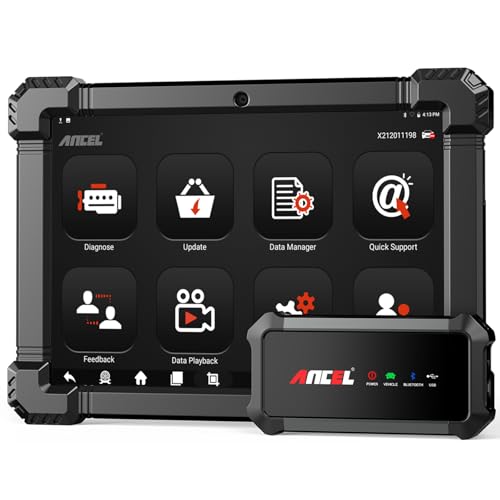
- 🔥🔥🔥2026 New Functions Making X7HD the Top Dog - Big Surprise!!! ANCEL X7HD truck scanner 10 major functional advantages .✅>Full HDOBD/OBD2 Function ✅>ALL System Diagnostic ✅>42+ Reset Function ✅>Active Test / Bi-Directional Control✅>ECU Coding✅>Graphing Live Data✅>Wide Compatibility ✅>2 Yrs Free Update✅>Remote Operation✅>Bluetooth 5.0 & Wifi In addition, 8 major hardware advantages: ✅>6000 mAh✅>10.1 inch Tablet✅>2G RAM
 ✅>32G ROM (Expandable to 128GB)✅>Data Record & Replay & Print✅>Android 10.0✅>Bluetooth 5.0 & Wifi✅>14 Languages
 - 🚛OEM DPF Forced Regen & Cylinder Cutout Test & more - ANCEL X7HD diesel scanner diagnostic tool not only supports DPF regeneration, DPF reset, DPF related information reset, DPR state reset, DPD forced regeneration etc, which helps you better solve the exhaust aftertreatment system problems, but also supports activate motor to do exhaust air in ABS Automatically. Moreover, it features TPMS activation, cylinder cut-off and learning functions
- 🚛Advanced ECU Coding & Programming - ANCEL X7HD 10.1inch truck scanner diagnostic tool is equipped with advanced ECU coding, supports Level calibration, Idle speed learning and Adjustment, Camshaft timing control learning, Control unit adaptations, Injector Codes, Read/Write VIN, Road speed limit optional vehicle speed set, etc... PLEASE NOTE that ECU codes are not compatible with all vehicles, please send us your VIN# to check vehicle compatibility
- 🚛42+ Reset Functions & Bidirectional Control - 2026 newest top heavy duty truck scan tool, comes with 42+ special services (ECU, Speed Limit and Idle Reset, Oil Reset, Injector Coding, EPB, ABS, SRS, Suspension, Throttle, etc. and always keep growing), which meet all your various needs for service and maintenance
- 🚛10 Inch All Systems Diesel Scanner & Full HDOBD/OBD2 Modes - ANCEL X7HD diesel truck scan tool supports all systems scan, such as Engine, Brake, Retarder, TECU Transmission, Tachograph, ABS, SRS, TPMS, EPB, SAS, ESP, and other vehicle systems, comes with 10 obd2 service modes: read/erase error codes, Data Stream, I/M Readiness, Vehicle Information, Actuations, DTC Lookup, EVAP, view freeze frame, etc
 ✅>32G ROM (Expandable to 128GB)✅>Data Record & Replay & Print✅>Android 10.0✅>Bluetooth 5.0 & Wifi✅>14 Languages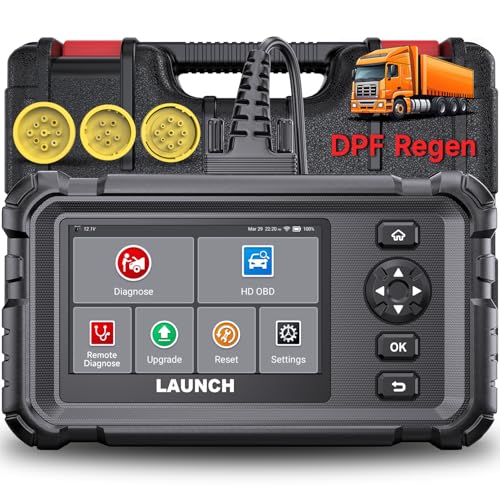
- Dealer-Level Diagnostics, Faster & Easier: The heavy duty truck scanner delivers full-system diagnostics for engine, ABS, transmission, and more, plus 7+ reset functions like DPF Regen and Speed Limit Adjust. Powered by a 1.3G CPU, 2GB RAM, 16GB storage, Android 8.1, and a 3000mAh battery, it runs smoothly for fast scanning, live data, reports, Auto VIN, Wi-Fi updates, and easy handheld use. It captures screenshots, replays live data, and generates reports to support your repair decisions.
- One Tool for 50+ Truck Brands: The diesel scanner supports J1939, J1708, J1587, and OBD2/CAN protocols, delivering broad coverage for major diesel trucks and commercial vehicles including Cummins, Cat, Detroit, Paccar, Volvo, Freightliner, Kenworth, Peterbilt, International, Mack, Isuzu, Hino, Scania, Mercedes-Benz, and more. Also supports Allison, Aisin, Eaton, WABCO, and Bendix, helping you diagnose more vehicles, reduce equipment costs, and handle more jobs with one professional scan tool.
- Diesel Truck DPF Regen & Reset Features: Experiencing loss of power, sluggish acceleration, or poor hill-climbing performance? These symptoms are often caused by a clogged or overloaded DPF. The truck diagnostic scanner offers OEM-level forced DPF regeneration, DPF reset, and DPD/DPR functions. This device extends DPF lifespan and efficiently diagnoses exhaust aftertreatment issues. It can significantly reduce diagnostic time and save you up to $3,000 or more in costly dealership fees.
- 7+ Resets - Perform Essential Procedures: The truck scanner features 7+ essential resets including DPF Regen clears carbon buildup; Oil Reset clears service light; Injector Coding matches new injectors; DEF Test checks urea injection; Speed Limit Adjust saves fuel; Cylinder Cutout pinpoints misfires; Clutch Relearn restores smooth engagement. Reset after maintenance or part replacement for proper truck operation. Vehicle compatibility varies. Email [email protected] to confirm before buying.
- Full System Diagnostic for Truck: The truck scanner diagnostic tool covers all systems like engine, ABS, transmission, SAS, SRS, TPMS and more. It reads fault codes and shows real-time data. Additionally, it includes full HD OBD and OBD2 modes: read/clear codes, live data stream, I/M readiness, freeze frame, DTC lookup, and more. When warning lights appear or performance issues arise, quickly identify which system is affected and gain the real-time data needed for accurate diagnosis.
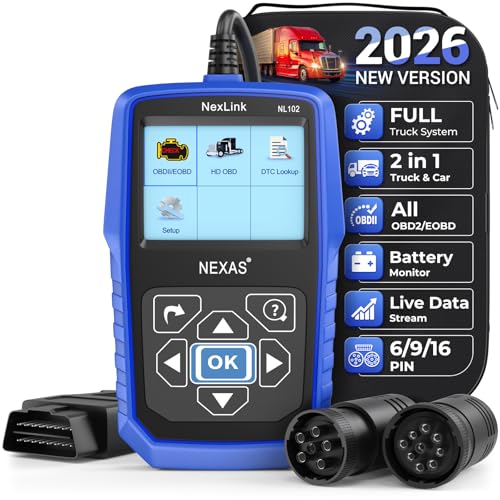
- Diagnose Heavy-Duty Truck Problems Fast — Read and clear fault codes and diagnose warning light issues on many Class 4–8 diesel trucks including Freightliner, Peterbilt, Kenworth, Volvo, Mack and Cummins-powered vehicles
- Help Reduce Downtime & Repair Costs — It offers full system diagnostics for major trucks meeting standard protocols, along with complete OBD2 functionality. Quickly check engine faults, view live truck data and identify issues before expensive repair shop visits or unnecessary repairs
- No complicated setup required — Simple menus and built-in DTC explanations make this truck code reader easy to use for owner-operators, mobile mechanics and small fleet maintenance
- Live Data & Built-in DTC Lookup — View real-time engine data and built-in truck fault code definitions directly on the scanner to help understand vehicle problems faster without searching through manuals
- Free Lifetime Updates & Technical Support — Includes free software updates plus responsive technical support for setup, compatibility and everyday truck diagnostics
This product presentation was made with AAWP plugin.
Last update on 2026-06-07 / Affiliate links / Images from Amazon Product Advertising API