
NHTSA ID Number: 10248788
Manufacturer Communication Number: 14378
TSB/Document Date: 2024-01-16
Summary
Steering Assembly Bolt Not Properly Torqued
Bulletin No.: 14378
Date: June 2014
Recall Bulletin
PRODUCT SAFETY RECALL
SUBJECT:
Steering Assembly Bolt Not Properly Torqued
MODELS:
2014 Buick Regal
Regal
2014 Cadillac XTS
2014 Chevrolet Camaro, Impala
It is a violation of Federal law for a dealer to deliver a new motor vehicle or any new or used item
of motor vehicle equipment (include a tire) covered by this notification under a sale or lease until
the defect or noncompliance is remedied.
All involved vehicles that are in dealer inventory (new or used) must be held and not delivered
to customers, dealer traded, released to auction, or used for demonstration purposes until the
repair contained in this bulletin has been performed on the vehicle.
CONDITION
General Motors has decided that a defect, which relates to motor vehicle safety, exists in certain
2014 model year Buick Regal, Cadillac XTS, and Chevrolet Camaro and Impala vehicles. Some
of these vehicles may have fasteners that are not torqued to specifications at the interface of the
intermediate shaft and the steering gear and/or at the lower control arm to the lower ball joint. If
these fasteners are improperly torqued, they could back out and the vehicle could exhibit loss of
steering and lead to a crash.
CORRECTION
Dealers are to inspect the joints and verify the torque on the fastener.
VEHICLES INVOLVED
All involved vehicles are identified by Vehicle Identification Number on the Investigate Vehicle
History screen in GM Global Warranty Management system. Dealership service personnel
should always check this site to confirm vehicle involvement prior to beginning any required
inspections and/or repairs. It is important to routinely use this tool to verify eligibility because
not all similar vehicles may be involved regardless of description or option content.
For dealers with involved vehicles, a listing with involved vehicles containing the complete
vehicle identification number, customer name, and address information has been prepared and
will be provided to US and Canadian dealers through the GM GlobalConnect Recall Reports, or
sent directly to export dealers. Dealers will not have a report available if they have no involved
vehicles currently assigned.
Copyright 2014 General Motors. All Rights Reserved.
Page 2
June 2014
Bulletin No.: 14378
The listing may contain customer names and addresses obtained from Motor Vehicle
Registration Records. The use of such motor vehicle registration data for any purpose other
than follow-up necessary to complete this recall is a violation of law in several
states/provinces/countries. Accordingly, you are urged to limit the use of this report to the followup necessary to complete this recall.
PART INFORMATION
No parts are required.
SERVICE PROCEDURE
Note: All vehicles involved in this field action bulletin will require an I-shaft bolt inspection.
Refer to I-shaft Bolt Inspection in this bulletin to inspect the I-shaft bolt. The following three
vehicles, however, will require additional inspections.
2G1175S36E9159731 (1 additional inspection)
2G61M5S37E9158011 (3 additional inspections)
2GEXG6U37E9161659 (1 additional inspection)
I-Shaft Bolt Inspection – All Chevrolet Impala, Buick Regal and Cadillac XTS Vehicles
1. Move the front driver seat to the full rearward position.
3949699
2. Locate the intermediate steering shaft lower bolt (1).
3. Verify the intermediate steering shaft lower bolt (1) is tightened to a minimum of
26 Nm (19 lb-ft).
If the bolt is tightened to 26 Nm (19 lb-ft), no further action is required.
If the bolt is NOT tightened to a minimum of 26 Nm (19 lb-ft), tighten the bolt to 34 Nm
(25 lb-ft).
Page 3
June 2014
Bulletin No.: 14378
I-Shaft Bolt Inspection – Chevrolet Camaro
1. Open the hood.
3949697
2. Locate (2) the steering gear pinion bolt (3). The steering gear pinion bolt (3) is located on
the driver side of the engine compartment. Refer to photograph.
3. Verify the steering gear pinion bolt (3) is tightened to a minimum of 45 Nm (33 lb-ft).
If the bolt is tightened to a minimum 45 Nm (33 lb-ft), no further action is required.
If the bolt is NOT tightened to a minimum of 45 Nm (33 lb-ft), tighten the bolt to 50 Nm
(37 lb ft).
Cadillac XTS Left Side Steering Knuckle Nut Inspection GNA Suspension: VIN
2GEXG6U37E9161659
1. Raise and support the vehicle. Refer to Lifting and Jacking the Vehicle in SI.
2904794
2. Locate the steering knuckle nut (1). This nut connects the lower control arm and ball joint.
Refer to photograph.
Page 4
June 2014
Bulletin No.: 14378
3. Inspect the steering knuckle nut (1) using a calibrated torque wrench. Move the nut not
more than 5 degrees and note the static torque reading. Verify the steering knuckle nut is
tightened to a minimum of 130 Nm (96 lb-ft).
If the nut is tightened to a minimum 130 Nm (96 lb-ft), proceed to step 4. No further
action is required.
If the nut is NOT tightened to a minimum of 130 Nm (96 lb-ft), tighten the nut to
145 Nm (107 lb-ft). Proceed to step 4 after tightening the nut.
4. Lower the vehicle. Refer to Lifting and Jacking the Vehicle in SI.
Cadillac XTS Left Side Steering Knuckle Nut Inspection GNB Suspension: VIN
2G61M5S37E9158011
1. Raise and support the vehicle. Refer to Lifting and Jacking the Vehicle in SI.
2381096
2. Locate the steering knuckle nut (3). This nut connects the lower control arm and ball joint.
Refer to photograph.
3. Inspect the steering knuckle nut (3) using a calibrated torque wrench. Move the nut not
more than 5 degrees and note the static torque reading. Verify the steering knuckle nut is
tightened to a minimum of 120 Nm (89 lb-ft).
If the nut is tightened to a minimum 120 Nm (89 lb-ft), proceed to step 4. No further
action is required.
If the nut is NOT tightened to a minimum of 120 Nm (89 lb-ft), tighten the bolt to
115 Nm (85 lb ft) + 120 degrees. Proceed to Cadillac XTS Left Side Tie Rod Nut
Inspection: VIN 2G61M5S37E9158011 in this bulletin, after tightening the nut.
Page 5
June 2014
Bulletin No.: 14378
Cadillac XTS Left Side Tie Rod Nut Inspection: VIN 2G61M5S37E9158011
1. Remove the front tire and wheel assembly. Refer to Tire and Wheel Removal and
Installation in SI.
2784020
2. Locate the tie rod nut (1).
3. Inspect the tie rod nut (1) using a calibrated torque wrench. Move the nut not more than 5
degrees and note the static torque reading. Verify the tie rod nut is tightened to a minimum
of 36 Nm (27 lb-ft).
If the nut is tightened to a minimum 36 Nm (27 lb-ft), proceed to steps 5 and 6. No
further action is required.
If the nut is NOT tightened to a minimum of 36 Nm (27 lb-ft), tighten the bolt to
35 Nm (26 lb -ft) + 30 degrees. Proceed to Cadillac XTS Front Wheel Hub Nut: VIN
2G61M5S37E9158011 in this bulletin after tightening the nut.
Cadillac XTS Front Wheel Hub Nut: VIN 2G61M5S37E9158011
2607977
1. Locate the front wheel hub nut (1).
Page 6
June 2014
Bulletin No.: 14378
2. Inspect the front wheel hub nut (1) using a calibrated torque wrench. Move the nut not more
than 5 degrees and note the static torque reading. Verify the front wheel hub nut is
tightened to a minimum of 225 Nm (166 lb-ft).
If the nut is tightened to a minimum 225 Nm (166 lb-ft), proceed to steps 5 and 6. No
further action is required.
If the nut is NOT tightened to a minimum of 225 Nm (166 lb-ft), tighten the bolt to
225 Nm (166 lb-ft). Proceed to steps 5 and 6 after tightening the nut.
3. Install the front tire and wheel assembly. Refer to Tire and Wheel Removal and Installation
in SI.
4. Lower the vehicle. Refer to Lifting and Jacking the Vehicle in SI.
Chevrolet Impala Front Wheel Hub Nut: VIN 2G1175S36E9159731
1. Raise and support the vehicle. Refer to Lifting and Jacking the Vehicle in SI.
2. Remove the front tire and wheel assembly. Refer to Tire and Wheel Removal and
Installation in SI.
2607977
3. Locate the front wheel hub nut (1).
4. Inspect the front wheel hub nut (1) using a calibrated torque wrench. Move the nut not more
than 5 degrees and note the static torque reading. Verify the front wheel hub nut is
tightened to a minimum of 225 Nm (166 lb-ft).
If the nut is tightened to a minimum 225 Nm (166 lb-ft), proceed to steps 5 and 6. No
further action is required.
If the nut is NOT tightened to a minimum of 225 Nm (166 lb-ft), tighten the nut to
225 Nm (166 lb-ft). Proceed to steps 5 and 6 after tightening the nut.
5. Install the front tire and wheel assembly. Refer to Tire and Wheel Removal and Installation
in SI.
6. Lower the vehicle. Refer to Lifting and Jacking the Vehicle in SI.
Page 7
June 2014
Bulletin No.: 14378
COURTESY TRANSPORTATION – For US and Canada
The General Motors Courtesy Transportation program is intended to minimize customer
inconvenience when a vehicle requires a repair that is covered by the New Vehicle Limited
Warranties. The availability of courtesy transportation to customers whose vehicles are within
the warranty coverage period and involved in a product program is very important in maintaining
customer satisfaction. Dealers are to ensure that these customers understand that shuttle
service or some other form of courtesy transportation is available and will be provided at no
charge. Dealers should refer to the General Motors Service Policies and Procedures Manual
for Courtesy Transportation guidelines.
WARRANTY TRANSACTION INFORMATION
Submit a transaction using the table below. All transactions should be submitted as a ZFAT
transaction type, unless noted otherwise.
Labor
Code
9100691
Description
Inspect I-Shaft Bolt Torque – No Further Action Req'd
Labor
Time
0.2
(N/A for VIN 2G1175S36E9159731, 2G61M5S37E9158011 and
2GEXG6U37E9161659)
9100692
9100693
9100694
9100695
9100696
9100697
9100698
Inspect & Tighten I-Shaft Bolt Torque
(N/A for VIN 2G1175S36E9159731, 2G61M5S37E9158011 and
2GEXG6U37E9161659)
VIN 2G61M5S37E9158011- Inspect I-Shaft Bolt, Steering Knuckle
Nut, Tie Rod Nut & Wheel Nut Torque– No Further Action Req'd
VIN 2G61M5S37E9158011- Inspect & Tighten I-Shaft Bolt,
Steering Knuckle Nut, Tie Rod Nut, &/or Wheel Nut
VIN 2G1175S36E9159731 - Inspect I-Shaft Bolt & Wheel Hub Nut
– No Further Action Req'd
VIN 2G1175S36E9159731 – Inspect & Tighten I-Shaft Bolt &/or
Wheel Hub Nut
VIN 2GEXG6U37E9161659 – Inspect I-Shaft Bolt & Steering
Knuckle Torque – No Further Action Req'd
VIN 2GEXG6U37E9161659 – Inspect & Tighten I-Shaft Bolt &/or
Steering Knuckle Torque
0.3
0.9
1.0-1.3*
0.6
0.7-0.8*
0.5
0.6-0.7*
* Labor time submitted should be the inspection time plus 0.1 hours for each joint that required
tightening.
CUSTOMER NOTIFICATION – For US and Canada
General Motors will notify customers of this recall on their vehicle.
CUSTOMER NOTIFICATION – For Export
Letters will be sent to known owners of record located within areas covered by the US National
Traffic and Motor Vehicle Safety Act.
Page 8
June 2014
Bulletin No.: 14378
DEALER RECALL RESPONSIBILITY – For US and Export (US States, Territories,
and Possessions)
It is a violation of Federal law for a dealer to deliver a new motor vehicle or any new or used item
of motor vehicle equipment (including a tire) covered by this notification under a sale or lease
until the defect or noncompliance is remedied.
The US National Traffic and Motor Vehicle Safety Act provides that each vehicle that is subject
to a recall of this type must be adequately repaired within a reasonable time after the customer
has tendered it for repair. A failure to repair within sixty days after tender of a vehicle is prima
facie evidence of failure to repair within a reasonable time. If the condition is not adequately
repaired within a reasonable time, the customer may be entitled to an identical or reasonably
equivalent vehicle at no charge or to a refund of the purchase price less a reasonable allowance
for depreciation. To avoid having to provide these burdensome remedies, every effort must be
made to promptly schedule an appointment with each customer and to repair their vehicle as
soon as possible. In the recall notification letters, customers are told how to contact the US
National Highway Traffic Safety Administration if the recall is not completed within a reasonable
time.
DEALER RECALL RESPONSIBILITY – All
All unsold new vehicles in dealers' possession and subject to this recall must be held and
inspected/repaired per the service procedure of this recall bulletin before customers take
possession of these vehicles.
Dealers are to service all vehicles subject to this recall at no charge to customers, regardless of
mileage, age of vehicle, or ownership, from this time forward.
Customers who have recently purchased vehicles sold from your vehicle inventory, and for which
there is no customer information indicated on the dealer listing, are to be contacted by the dealer.
Arrangements are to be made to make the required correction according to the instructions
contained in this bulletin. Recall follow-up cards should not be used for this purpose, since the
customer may not as yet have received the notification letter.
In summary, whenever a vehicle subject to this recall enters your vehicle inventory, or is in your
dealership for service in the future, you must take the steps necessary to be sure the recall
correction has been made before selling or releasing the vehicle.
GM bulletins are intended for use by professional technicians, NOT a "do-it-yourselfer". They are written to inform these technicians of conditions that
may occur on some vehicles, or to provide information that could assist in the proper service of a vehicle. Properly trained technicians have the tools,
equipment, safety instructions, and know-how to do a job properly and safely. If a condition is described, DO NOT assume that the bulletin applies to
your vehicle, or that your vehicle will have that condition. See your dealer for information on whether your vehicle may benefit from the information.
We Support
Voluntary Technician
Certification

- Durable Ratchet Head: Made from Hardened treated Chrome...
- Easy Storage: A sturdy plastic storage case is included...
- Easy to Read: High Contrast & Dual Range Scale. Accurate...
- Accessories included: 1/2" Drive 5" long Extension Bar
- Simple and Reliable: “Click” sound tells the preset...
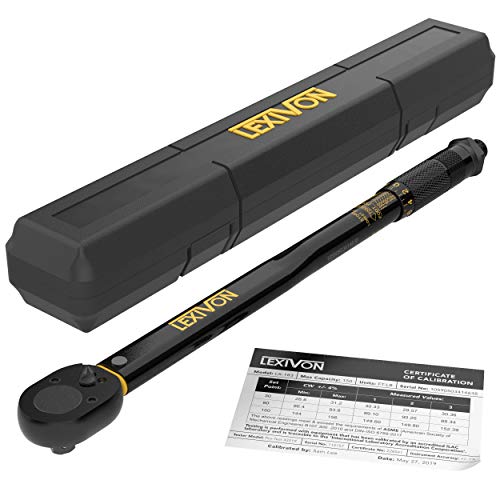
- PRECISE & HIGH QUALITY - Manufactured in Taiwan, our torque...
- DURABLE - Built to last, featuring a reinforced ratchet gear...
- LONGEVITY - Protect your investment with our proprietary...
- PERFORMANCE - Easily read and set torque levels with our...
- OMFORT - Equipped with a reversible ratchet head that drives...
Last update on 2026-05-30 / Affiliate links / Images from Amazon Product Advertising API
If the PDF is very large, it may not load in the preview below.
Some older TSBs had multiple PDFs — visit the NHTSA Website to view all PDFs.
If the TSB PDF does not show, download or view it on the NHTSA Website.
Click on the (+) Plus Sign
Then Click on Associated Document(s)
Search NHTSA Database for Recalls
Search NHTSA Database for Vehicle Investigations
View Latest Vehicle Investigations
Search NHTSA Database for Vehicle Complaints
View Latest Vehicle Complaints
TSB/Document ID: 14378
Replacement Service Bulletin Number:
MFR Communication Date: 2014-06-01
MFR Internal Campaign ID/Software Version:
Communication Type: Service Bulletin/Repair Instructions
NHTSA Components: STEERING
MFR Component System:
MFR Component Subsystem:
Previous TSB | Next TSB |

- [2026 Top-Tier Hardware and Software Upgrade]: Topdon ArtiDiag900 Lite scanner has enhanced hardware and latest features, including Android 11.0, 5x faster CPU, 10000mAh battery for 12 hours of continuous operation, stable wireless diagnosis with Bluetooth 5.0, 8-inch touchscreen. Added bi-directional control, wireless diagnosis, battery testing (optional), and DTC repair guide
- [TOPDON Bidirectional Scan Tool]: This bidirectional obd2 scanner sends commands to the vehicle's ECU for active testing, enabling users to accurately and quickly locate faulty components such as injectors, coolant pumps, windows, wipers, headlights, mirrors, etc. The bidirectional control scanner is the ideal choice for workshops/automotive repair shops as it significantly reduces mechanic's diagnostic time.
- [Wireless Bluetooth Diagnostic Experience]: The AD900 Lite scan tool comes with a Bluetooth 5.0 VCI, supporting a wireless diagnostic range of up to 33 feet (10 meters), allowing you to diagnose without being confined to cables or tight spaces. Stable and fast wireless diagnosis provides a comfortable repair environment. It also offers VCI cables to increase connectivity options.
- [DTC Repair Guide Function]: Easily diagnose issues with your vehicle and receive guidance on repairs with the topdon scan tool's fault code definitions for all systems,maximize your diagnostic capabilities. This function is compatible with Chrysler
 /Dodge/Jeep/Fiat 2010-2014 and expanding with continual updates,the AritDiag 900 Lite car diagnostic scanner is the must-have tool for any technician or DIY enthusiast.
 - [OE-Level Full System Diagnostics]:AritDiag900 Lite full system diagnostic scanner can scan ALL available modules(Engine, Transmission, Airbag, ABS, ESP, TPMS, Gateway, Steering, Radio, Air conditioning, ect.) to✔read ECU info, ✔read/clear codes, ✔view live data stream, ✔retrieves freeze-frame, ✔perform active tests, and more. With just a simple click, it provides you with accurate and in-depth diagnostics.

- Bi-Directional Control, Quickly Locate Problems: Turn your phone into a professional diagnostic tool. You can send commands from your phone to the ECU to test injectors, cooling fans, headlights, A/C clutch, windows, wipers, and more. See which one doesn't respond. Helps you quickly locate the problem and save time. No need to tear things apart, avoid blind disassembly.
- Flexible Subscription, Choose Advanced Features as Needed: TopScan Lite provides free-for-life access to core diagnostics, including full system scan, code reading, performance tests, and repair information. After purchase, advanced features (bi-directional control, service operations, live data, code clearing, and AI functions) are free-for-the-first-year. After the first year, if you want to use advanced features, you need to subscribe on a monthly, quarterly, or yearly basis. As new models and reset functions are updated, the tool will also be continuously upgraded.
- Full System Diagnostics, No Fault Hides: Unlike basic diagnostic tools that only cover 4 systems, TopScan can scan all systems. Read and clear trouble codes, view live data streams, and generate a complete vehicle health report – all issues are clear at a glance. Covers 10,000+ vehicle models and is compatible with 99.99% of vehicles.
- AI Assistant - TopFix: Think of TopFix as your personal AI mechanic. It leverages a repair database and OEM data to deliver clear, step-by-step repair solutions. Features include AI Q&A, one-click translation, and a full repair log, making your diagnostic process simpler and more efficient.
- 8+ Hot Resets, Keep Your Car in Top Shape: One-tap resets for oil, throttle, EPB, steering angle, DPF, ABS, BMS, and airbag. It enables car owners to easily perform essential maintenance, ensuring the vehicle stays in optimal condition and extends its service life.

- Dual WiFi & 10.1" Touchscreen: Provides a stable, high-speed wireless link 3x faster than bluetooth, and a responsive, professional interface. Topdon ONE obd2 scanner diagnostic tool ensures smooth, non-lagging diagnostic scan, boosting mechanic efficiency
- J2534 Pass-Thru Support: The included ONE VCI supports the J2534 standard, allowing it to function as a pass-thru device when paired with OEM diagnostic software.Through TOPDON’s RLink platform, technicians can perform dealer-level coding, expanding in-house capabilities without investing in multiple factory automotive scan tools
- OE Topology Mapping: Visualize the vehicle’s ECU network exactly as it’s built.Zoom, pan, and highlight specific modules to pinpoint component issues with precision.Topology mapping displays real-time communication between modules
- 50 Plus Service Functions: Covers high-demand services like ADAS calibration, DPF regen, TPMS reset, ABS bleed, and throttle adaptation.Expands your service menu, allows you to charge premium rates, and turns away zero jobs due to lack of tooling. Vehicle-specific functionality may vary
- Advaned ECU Coding: 10 of the most serviced brands in North America, including full ECU coding and flash hidden support for BMW, VW, Au-di, Benz, Porsche, Toyota, Ni ssan and more. Enables module replacement, feature customization, and personal settings with automatic backup or restore.Lets your shop safely offer high-margin customization services, attracting more customers and boosting profit
Last update on 2026-06-12 / Affiliate links / Images from Amazon Product Advertising API
This product presentation was made with AAWP plugin.