
NHTSA ID Number: 10241811
Manufacturer Communication Number: Subaru TechTips
TSB/Document Date: 2023-09-05
Summary
Subaru Service and Technical Support Line Newsletter. (QMR of the month).
If the PDF is very large, it may not load in the preview below.
Some older TSBs had multiple PDFs — visit the NHTSA Website to view all PDFs.
If the TSB PDF does not show, download or view it on the NHTSA Website.
Click on the (+) Plus Sign
Then Click on Associated Document(s)

- 💝【Questions? We’re Here Anytime】MK808S is a...
- 🔥🔥🔥【2026 NEWLY RELEASED BI-DIRECTIONAL...
- 【28+ MOST POPULAR RESET SERVICE FOR 150 MAKES】Autel...
- 【ALL SYSTEM DIAGNOSTICS, FACTORY-LEVEL SCANNER】The...
- 【AUT0 SCAN & AUT0V1N, 10X FASTER】How much have you spent...


- 💯【Conta.ct us for Support Directly】If you met any...
- 🔥🔥🔥【2026 AUTEL FLAGSHIP MK900BT MK900-BT, NEW...
- 🚗【3000+ ACTIVE TESTS (50➡3000+), SAME AS MS...
- 🚗【40+ HOT SERVICES FOR 150 MAKES (28+➡40+)】Full...
- 🚗【OE ALL SYSTEM DIAGNOSE, AUTO SCAN 2.0: SCAN LICENSE...
This product presentation was made with AAWP plugin.
Search NHTSA Database for Recalls
Search NHTSA Database for Vehicle Investigations
View Latest Vehicle Investigations
Search NHTSA Database for Vehicle Complaints
View Latest Vehicle Complaints
TSB/Document ID: Subaru TechTips
Replacement Service Bulletin Number:
MFR Communication Date: 2023-08-10
MFR Internal Campaign ID/Software Version:
Communication Type: Service Bulletin/Repair Instructions
NHTSA Components: UNKNOWN OR OTHER
MFR Component System:
MFR Component Subsystem:
Previous TSB | Next TSB |
July 2023
Subaru Service and Technical Support Line Newsletter
Articles Contained
in this Issue
01
© 2023 Subaru of America, Inc. All rights reserved.
TechShare QMR of the Month
Click on a title below to jump to the article.
Click the date located in the footer to return to page 1.
CODE ARTICLE...................................................................PAGE
(00) STIS New Releases..................................... 21
(01) QMR of the Month......................................1-2
(01) QMR of the Month Award
Presentations................................................ 2
Tech Tips Greatest Tips
(01) UNDERSTANDING POWER SUPPLY.............3-5
(07) Door Lock Backup Unit Revisited –
Door locks inop. after the vehicle
is shut off.................................................6-10
(10) Air Conditioning Refrigerant Types............ 11
(15) All Vehicles Equipped With CP 1.5,
Auxiliary Port Noise.................................... 12
(15) Microphone Troubleshooting.................13-16
(15) Repairing Starlink Telematics DTCs......16-18
(20) Solterra Power Windows inop, Accessory
Illuminated Sill Plates............................19-20
SUBARU TECHLINE HOLIDAYS
& HOURS OF OPERATION
We are pleased to announce this month’s TechShare QMR of the Month
Winner:
Alejandro Guerrero from
Subaru of Englewood in Englewood, NJ
Alejandro created a high quality QMR using TechShare reporting on a
customer’s concern of Check Engine Light on- DTC: P0560 stored.
Alejandro’s report included detailed diagnostic steps, high-quality photos,
and video.
Please refer to the following link to review the TechShare QMR in detail.
https://subarutechshare.com/qmrs/TS-240092
In appreciation for going the extra mile and sharing his experience with
us, Alejandro will be receiving the following from his District Service
Quality Manager:
$500.00 Snap-On gift card
Mon. - Thurs.
8:30AM - 7:30PM EST
Friday
10:30AM - 5:00PM EST
Saturday
9:00AM - 3:00PM EST
CAUTION: VEHICLE SERVICING PERFORMED BY UNTRAINED PERSONS
COULD RESULT IN SERIOUS INJURY TO THOSE PERSONS OR TO OTHERS.
The Subaru TechTIPS newsletter is intended for use by professional Technicians ONLY. Articles are written
to inform those Technicians of conditions that may occur in some vehicles, or to provide information
that could assist in the proper servicing of the vehicle. Properly trained Technicians have the equipment,
tools, safety instructions, and know-how to do the job correctly and safely. If a condition is described,
DO NOT assume that your vehicle has or will have that condition. Impreza, Legacy, Justy, Loyale,
Outback, Forester, Subaru SVX, WRX, WRX STI, Baja, Tribeca, BRZ, XV Crosstrek, Ascent, Crosstrek
Hybrid, Solterra and “Quality Driven” are Registered Trademarks.
July 2023 TechTIPS
Continued on the next page
SUBARU OF AMERICA, INC. IS
ISO 14001 COMPLIANT
ISO 14001 is the international standard for excellence in Environmental Management Systems.
Please recycle or dispose of automotive products
in a manner that is friendly to our environment
and in accordance with all local, state and federal laws and regulations.
Page 1 of 22
01
QMR of the Month (CONTINUED)
The other Regional winners selected from QMRs submitted during July 2022 were:
•
Perpetuo Silan from Farrish Subaru
•
Michael Baier from Ramsey Subaru of Des Moines
•
Yih Horng Lee from Puente Hills Subaru
•
Darin Richey from Colonial Subaru
Any Subaru Technician can participate in the TechShare QMR of the Month program. See the November
2022 issues of TechTIPS for full details. You just might see your name and photo in a future issue of
TechTIPS!
01
QMR of the Month Award Presentations
As part of our “enhanced” QMR of the Month recognition program, we will include a photo (whenever
available) of the recipient’s award presentation in TIPS. The winner selected from QMR of the Month
submissions received during July 2023 was Alejandro Guerrero, Technician at Subaru of Englewood,
Englewood, NJ.
Alejandro is shown above (2nd from the left) after being presented with his $500.00 Snap-On Gift Card,
Neiko inspection light, and Neiko hood lamp. To Alejandro’s right is Subaru of Englewood Dealer Principal
Ted Sieboled. To Alejandro’s left is Subaru Distributors Corporation’s District Service and Quality Manager
Greg Beach, Subaru of Englewood Service Manager John Simoes, and Subaru of Englewood
General Manager John Lopes.
Congratulations and THANK YOU to our July 2023 QMR of the Month Award recipient!
Continued on the next page
July 2023 TechTIPS
Page 2 of 22
This series features TechTIPS articles frequently referred to by Techline. This month’s feature is from
February 2018.
01
UNDERSTANDING POWER SUPPLY
The Techline continues to receive calls from Technicians not understanding power supply. The
power supply is found under Body & Electrical/WIRING SYSTEM. It is supplied to assist with
identifying and tracing power flow. If unable to communicate with a specific module or, a vehicle
comes in with multiple issues, check the power supply. MB= Main Box (under hood fuse box) FB=
Fuse Box (in car fuse box).
EXAMPLE 1: 2015 Legacy-No start-No communication to ECM
After scanning all systems and finding no communication to the ECM, the Technician should be
checking the power supply next. A quick review of the power supply shows MB-38, MB-42 and
MB-45 all supply power to ECM. Find the circuits (MB-38, MB-42, MB-45) then follow up the
page to see where they get powered. MB-38 is powered by fuse #25. MB-42 is power for the
main relay coil side. MB-45 is powered by fuse # 16. The next step is check the fuses. In this
example fuse #25 was blown.
Continued on the next page
July 2023 TechTIPS
Page 3 of 22
01
UNDERSTANDING POWER SUPPLY (CONTINUED)
Continued on the next page
July 2023 TechTIPS
Page 4 of 22
01
UNDERSTANDING POWER SUPPLY (CONTINUED)
EXAMPLE 2: 2010 Forester-RES Inoperative-Horn inoperative-No communication to BIU
A quick review of the Power supply reveals all three affected circuits are on MB-21. MB-21 is
supplied power by the horn relay. A continuity check on the coil side of the horn relay yielded a
faulty horn relay.
July 2023 TechTIPS
Continued on the next page
Page 5 of 22
07
Door Lock Backup Unit Revisited – Door locks inop. after the vehicle is shut off
Techline has been receiving an increase of calls with a concern of the power door locks being inoperative.
Some Technicians have noticed with the vehicle running, the door locks will work normally. Once the
vehicle is shut off, the door locks may work a few times and then become inoperative again. This will
affect both the master door lock switch and the key fob buttons. The August 2021 TechTIPS explains
the operation of the battery Backup Unit and its location.
That TechTIP is shown below:
Techline has received calls about identifying a newly implemented device for the door lock system.
The battery Backup Unit was implemented into vehicles outlined in the chart below. The Backup Unit
provides power to the door locks in the event of a collision that disables the standard 12v power
source. When the vehicle receives a strong impact, all the doors and the rear gate are automatically
unlocked, to prevent passengers from being trapped. The device is mounted above or near the Audio
Unit in most cases. Please refer to STIS for specific model removal/installation, and inspection.
NOTE: When the ignition is turned on, the capacitor in the device is charged for 90 seconds.
When Diagnosing the door locks and the Backup Unit, check the fuses!
When a vehicle is presented with a concern of inoperative door locks, the first step is to determine if
the door locks work when the vehicle is running. If they work normally with the vehicle running but
stop working once the vehicle is shut off, or only a few times and then operate slowly, the fuses for the
Backup Unit should be inspected. If the door locks are inoperative all the time from any input (switch
or key fob), use STIS to diagnose the concern.
Below is a wiring diagram from a ’19 Outback. Always use STIS to verify the wiring diagram for the
vehicle being repaired.
Continued on the next page
July 2023 TechTIPS
Page 6 of 22
07
Door Lock Backup Unit Revisited – Door locks inop. after the vehicle is shut off
(CONTINUED)
On this ’19 Outback, the 3 fuses powering the Backup Unit are the same for Push Button (Keyless
Access) or turn-key (Keyless Entry) vehicles. Techline has found in almost all cases one of these 3
fuses is missing or blown causing the door locks to become inoperative after the engine is shut off
and the Backup Unit capacitor is depleted.
Below is an example of a ’23 Ascent wiring diagram showing the fuses that need to be inspected.
Continued on the next page
July 2023 TechTIPS
Page 7 of 22
07
Door Lock Backup Unit Revisited – Door locks inop. after the vehicle is shut off
(CONTINUED)
Below is an example of a ’20 Outback. On this vehicle, determining which fuses power the Backup
Unit using the wiring diagram is more difficult. The Backup Unit can only be found in the Power Supply
wiring diagram. The Backup Unit is shown in other wiring diagrams, but those diagrams do not show
the fuses that need to be inspected.
Continued on the next page
July 2023 TechTIPS
Page 8 of 22
07
Door Lock Backup Unit Revisited – Door locks inop. after the vehicle is shut off
(CONTINUED)
Following the wires highlighted above will lead to the 3 fuses needing to be inspected. Please see the
wiring diagram shown below showing those 3 fuses.
Continued on the next page
July 2023 TechTIPS
Page 9 of 22
07
Door Lock Backup Unit Revisited – Door locks inop. after the vehicle is shut off
(CONTINUED)
Techline has found that in almost all cases one of these 3 fuses is missing or blown causing the door
locks to become inoperative after the engine is shut off and the Backup Unit capacitor is depleted.
After verifying the 3 fuses to the Backup Unit are not missing or blown, the next step would be to verify
power is received at the Backup Unit on the 3 pins listed in the vehicles wiring diagram.
Continued on the next page
July 2023 TechTIPS
Page 10 of 22
10
Air Conditioning Refrigerant Types
When servicing an A/C system, it is IMPERATIVE to know the type of refrigerant you are dealing with
and what vehicles each type is found in. The chart below can be used to identify this. This information
is also on the A/C label found on the underside of the hood, along with the compressor oil type and
system capacity.
The picture below shows how to find this information when using the Service Manual. This is also
where the compressor oil type can be found. This is especially important when servicing BEV and
Hybrid vehicles as the oil used in these systems is specifically designed to be non-conductive.
NOTE: When servicing a BEV or Hybrid vehicle, see click path Subarunet > Service Operations&
Technical > Service Tools and Equipment > Subaru Minimum Retailer Equipment List for a list of
required tools.
NOTE: Always follow the Service Manual directions for handling of refrigerant.
For handling of refrigerant see:
Heater & Air Conditioner/Ventilator > HVAC System > General Description > Caution
For A/C specifications see:
Heater & Air Conditioner/Ventilator > HVAC System > General Description > Specification
Continued on the next page
July 2023 TechTIPS
Page 11 of 22
15
All Vehicles Equipped With CP 1.5, Auxiliary Port Noise
This applies to all CP 1.5 equipped vehicles, currently that includes:
MY23+ Legacy/Outback
MY23+ Ascent
MY24+ Crosstrek/Impreza
The auxiliary USB port has changed for CP 1.5 equipped vehicles. If “AUX” is selected as the source
while nothing is plugged into the port, there may be an abnormal noise heard through the speakers.
This condition is normal, and no parts should be replaced for this concern.
To prevent this noise, do not select “AUX” as the source without a device plugged into that port.
Starting with 23MY Legacy/Outback and Ascent, a new UNIT-AUX TERMINAL with illuminated USBtype C port is incorporated as part of the CP1.5 infotainment system.
On this type of AUX port, when AUX is selected as audio source without any device connected to
UNIT-AUX TERMINAL, a buzzer type noise may be heard from the audio system while the illumination
light is turned on.
If the customer reports a noise coming from the audio system while the headlights are turned on, the
above-mentioned characteristics may be the cause.
Continued on the next page
July 2023 TechTIPS
Page 12 of 22
15
Microphone Troubleshooting
This diagnostic flow chart has been created to help Technicians understand the power flow of the
overhead console microphone used for Bluetooth, projection applications (Apple CarPlay/Android
Auto), Telematics calls and the Voice Recognition System. The microphone is supplied power (5 volts)
by the DCM and is used by both the DCM and the Infotainment system in most vehicles. If the vehicle
does not have Telematics, the Audio unit will be the 5V power supply. For older vehicles equipped with
a Denso F10 or Clarion audio unit, Technicians will need to reference STIS closely for similar wiring.
These diagnostics incorporate points of failure Techline has previously experienced. The customer
does not need a Telematics subscription for the DCM to provide power to the microphone, but the
Technician will not be able to make an outbound Telematics call for testing.
The Telematics, Bluetooth, and Voice Recognition System only use the front tweeter speakers to
broadcast sound inside the vehicle. The speakers can be tested using the SSM4 Active Test in the
“Telematics”, Audio”, “Navigation” or “Infotainment” (depending on vehicle equipment). The front
tweeters also have individual DTCs that may set. Always perform an all-DTC scan before beginning
these diagnostics. These diagnostics do not apply to Solterra.
Caution: The DCM should NEVER be swapped between vehicles.
*Note: If the vehicle being diagnosed is not equipped with Telematics or does not have a current
STARLINK subscription, when the testing below directs a Technician to perform an outbound Telematics
call, an outbound Bluetooth or projection app call should be made instead.
1. Make an outbound call via Bluetooth or projection app (CarPlay or Android Auto). Can the
called individual hear you clearly?
Yes, the called person can hear you clearly, proceed to Step 3.
No, proceed to Step 2.
2. What is the value selected for “Microphone Volume” or “Call Volume”? Refer to page 7 of the
March 2022 TechTIPS to checking these settings.
a. Adjust the setting to zero and make another outbound Bluetooth or projection app call,
does the system operate as designed? Can the called person hear you clearly?
Yes, review March 2022 TechTIPS and educate the customer on the microphone volume
settings, proceed to Step 8.
No, proceed to Step 3 (Microphone operational test).
Techline recommendation, this would be the ideal time to test both the customer’s phone and the
Technician’s phone.
3. Perform the microphone operational test. Does the Infotainment system register sound?
a. On Harman equipped vehicles, enter Factory mode by pressing and holding the “Home”
button while pressing the “Tune” knob twice. Speak sternly from a seated position as this
audio unit also has the ability to play back what was spoken into the microphone.
Continued on the next page
July 2023 TechTIPS
Page 13 of 22
15
Microphone Troubleshooting (CONTINUED)
b. On CP 1 and CP 1.5 equipped vehicles, enter Factory mode by holding the passenger
side temperature up and down buttons and pressing the “Tune” knob twice. Navigate to
the microphone check. Speak sternly. This should generate 1 bar, clapping will generate
2-3 bars.
Yes, the microphone functions as designed, proceed to Step 8 (complete a Telematics
call*).
No, proceed to Step 4 (checking the voltage at the microphone).
Techline recommends using the wiring diagram for Telematics to locate the three fuses that provide
power. Reference “Fuse and Relay” and make sure that the fuses listed are in the correct locations.
Verify there is voltage on both sides of all three fuses. BLOWN OR MISSING FUSES ARE THE MOST
COMMON POINT OF FAILURE.
4. Using STIS, follow directions for CAREFULLY removing the overhead console. Using STIS,
locate the appropriate wiring diagram. If the vehicle is equipped with Telematics, use the
“Telematics” wiring diagram, if the vehicle is not equipped with Telematics, use the “Overhead”,
“Stereo Camera” or “Antenna” page in the “Audio”, “Navigation” or “Infotainment” wiring
diagram (depending on vehicle equipment).
a. Open the I/O chart for Telematics, Cockpit Control, or Infotainment (depending on vehicle
equipment). Determine which pin is the 5V reference from the DCM or Audio unit (typically
the red wire at the overhead console).
Continued on the next page
July 2023 TechTIPS
Page 14 of 22
15
Microphone Troubleshooting (CONTINUED)
b. With the appropriate tools, back probe the microphone power supply at the red wire
and prepare to measure the available voltage.
With the ignition on, what is the available voltage at the red wire?
If the microphone has 4.5 – 5V, proceed to Step 5.
If the microphone has 1.1 - 3.4V, proceed to Step 6.
If the microphone has 0 - .6V, proceed to Step 7 (check power at the DCM).
5. With the red wire still back probed and the DVOM displaying the voltage, make an outbound
Telematics call*.
a. Is the available voltage 4.5V or higher consistently AND the Starlink operator can hear
you clearly?
Yes, complete the call and prepare to make an outbound Bluetooth or projection app call.
At this point the system is working correctly, the Technician will need to determine if the
vehicle is repaired or if it is a customer phone concern.
6. If the static microphone voltage measured was 1.1 - 3.4V, monitor the voltage while making
an outbound Telematics call*. Push the i-button once and speak with the STARLINK operator.
Does the voltage at the red wire jump to approximately 5V while on the call?
Yes, this may indicate a more advanced problem. Perform an all-DTC scan and collect 15
seconds of Telematics data from the SSM then contact Techline. All test results up to this
step should be documented for review.
No, the voltage does not change from 1.1 - 3.4V when making an outbound call. Using STIS,
find the I/O chart for Telematics (or the Audio unit if not equipped with Telematics) in STIS.
Measure the output voltage at the back of the DCM (or from the Audio unit if not equipped
with Telematics). Inspect the wiring and connectors between the DCM (or from the Audio
unit if not equipped with Telematics) and overhead console. The 5V power from the DCM
or Audio unit needs to be restored to the overhead console. Voltage drop and split half
techniques should be used here.
7. The microphone has 0 - .6V. Inspect for power at the DCM (or from the Audio unit if not
equipped with Telematics), typically pins A8, A10, and A20. Connector number and color
may vary. Use the “Telematics”, “Audio”, “Navigation” or “Infotainment” wiring diagram
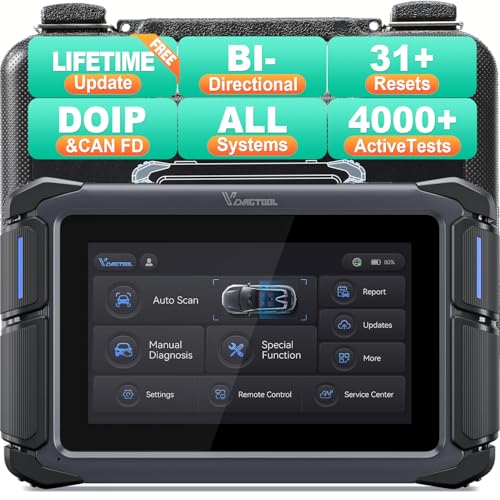
- Affordable Solution for Professional-grade Car Diagnostics & Repair: As the budget-friendly OBD2 scanner under $300, the VD70 Lite car diagnostic tool offers 31+ hot resets, full bi-directional controls with 4000+ active tests, all system diagnostics, 8-in-One live data graphing (export as CSV Export/Recording/Playback), CAN FD & DoIP protocols, and long-term free update. Additional features include Auto VIN & Auto Scan, diagnostic report sharing/printing, with coverage for over 10,000 vehicle models worldwide, suitable for DIYers, Car Owners, Technicians, and Mechanics on car repairs and maintenance tasks.
- OBD2 Scanner with Full Bi-directional Control: The Bidirectional scan tool VIDAGTOOL VD70 Lite performs 4000+ active tests that can send execution commands to the ECU module and identify the repair status, covering for windows, doors, ABS, valves, wipers, headlights, rear mirrors, sunroof,and more in-vehicle components. This bidirectional OBD2 scanner is a must-have diagnostic tool for auto technicians and mechanics on a budget! The available function tests vary by model—please check compatibility via vdiagtool2 @ outlook . c o m before purchase.
- OE All Systems Diagnostics & 8-IN-One Data Graphing: VD70 Lite is a dealer-level car scanner diagnostic tool with Auto VIN that can do in-depth diagnostics for 100+ modern car brands, covering all systems including engine, transmission, airbag, ABS, ESP, TPMS, radio, etc, to read/clear code, view live data, freeze frame, and read ECU info. This advanced OBD2 Scanner with 8-in-one data graphing and detailed diagnostic reports makes data viewing more intuitive, ensures quickly accurate repairs by identifying issues, and easily masters the car situation.
- Stay Ahead with 31+ Reset for Faster & Easier Repairs: VDIAGTOOL VD70 Lite scanner for car meets almost all daily maintenance needs for both home mechanics and workshops as a professional automotive scan tool. It can perform Oil Reset, ABS Bleed, Crank Sensor Relearn, Idle Relearn, Injector Coding, Window Initialization, HVAC Calibration, Suspension Calibration, Throttle Matching, etc, ensuring efficient repairs and complete maintenance. Besides, long-term free updates keep its functionality and broad vehicle compatibility up to date. Functions vary by model, please send us the Vehicle Model, Year, VIN for compatibility before purchase.
- 150+ Models, 10000+ Car Coverage & 22 Languages:As a powerful car computer diagnostic tool, VD70 Lite helps you to quickly troubleshoot issues for 95% of US, European, and Asian vehicles. Supporting 22 languages makes it a global car diagnostic scanner for auto mechanics worldwide without language barriers. Note: Simply provide your tool’s S/N and reach out to vdiagtool2 @ outlook . c o m to change the menu language.
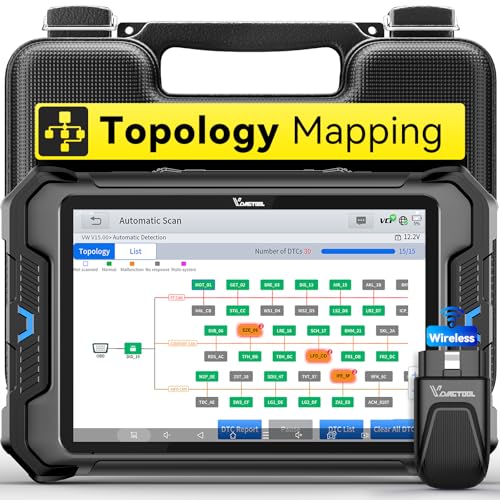
- Smarter Diagnostics, Broader Coverage, Greater Value Than $1,000+ Tools: The game-changing VD80BT OBD2 scanner delivers 4000+ active tests, 42+ hot services, advanced ECU coding, PMI & V.A.G Guided—all in one scanner for car. With OE-level full system scan and intelligent topology mapping that cuts diagnostic time by up to 50%, you'll work smarter and faster. Supporting FCA
 AutoAuth, CAN FD & DoIP protocols, this car scanner covers over 10,000 vehicle models worldwide. Built for serious pros and DIYers, it features 8" HD screen & 4+64GB storage, 7.3V fast charging with long-lasting battery, and 33–66ft stable wireless connection—making it the most complete diagnostic solution you’ll ever own
 - Intuitive Topology Map, Fast Locate Faults: Why waste time clicking module by module? VD80BT car diagnostic scanner takes diagnostics to the next level with its intuitive Topology Map—a premium feature usually found in $1000+ obd scanner. With one tap, it performs all system scan and presents all modules and DTCs in a clear, color-coded layout, boosting diagnostic efficiency by up to 200% and helping you locate issues instantly and reduce repair time and costs. Whether you're a pro boosting efficiency or a beginner learning diagnostics, this obd2 scanner diagnostic tool makes fault-finding faster and smarter for you. Note: varies by vehicle model, please check compatibility before purchase
- Wireless Connectivity Simplifies Bi-Directional Control: With 4000+ active tests, including throttle reset, window calibration and solenoid check, VD80BT bidirectional scan tool lets you diagnose and verify functions faster, smarter, and more efficiently. This scanner for car redefines flexibility in bi-directional control through a fully wireless connection, freeing you from the constraints of wired car diagnostic tool in the workshop. Imagine actively controlling components like the A/C clutch, fuel injector, ABS pump, or radiator fan within a wireless range of 33–66ft around the vehicle—all while enjoying stable, high-speed wireless diagnostic and real-time data monitoring
- 42+ Hot Services, One Powerful Scanner for Car: Why pay a shop $100 just to reset a light? VD80BT car scanner diagnostic tool gives you 42+ hot services from basic resets to advanced maintenance tasks like Crank Sensor Relearn, Injector Coding, ABS Bleeding, Oil Reset, Throttle Relearn, EPB, BMS Reset, Tire Size Reset and more. Plus, it offers 100+ vehicle-specific features including Idle Relearn, VIN Write, Brake Fluid Replacement, Fuel Trim Reset, ABS Initialization and more. Whether you’re resetting TPMS or fixing a stubborn SAS, this car computer diagnostic reader delivers shop-grade precision at a fraction of the cost. Varies by model. Send VIN to verify compatibility before purchase
- OE-Level Full System Diagnostics in Your Hands: Dominate diagnostics like a dealership with VD80BT scan tool for all vehicles, delivering factory-grade scanning for aLL systems—including ABS, SRS, ECM, TCM and more. View up to 8 PID graphs simultaneously to quickly catch intermittent issues and troubleshoot with confidence. Easily read and clear DTCs, retrieve freeze frame data, and run active tests for faster, more accurate repairs. It’s like having a dealership-grade scan tool in your pocket, complete with data playback and CSV export for in-depth analysis. Stop guessing and start fixing with surgical precision—professional diagnostics made simple and portable. Check compatibility Please

- 【OE-Level Full System Diagnostics-Lifetime F*REE Software Updates】The VDIAGTOOL D200 OBD2 Scanner for cars is a all system bidirectional scan tool that enjoy lifetime f*ree software updates, delivers complete system coverage. reading/clearing codes across engine, transmission, ABS, SAS, EPB, TPMS plus full access to body, chassis, powertrain and all control modules. This D200 Bidirectional car scanner works with most 1996+ OBD2 gasoline and hybrid cars and light trucks. It does NOT support pure electric and heavy-duty trucks. PLEASE CHECK COMPATIBILITY BEFORE ORDERING or Contact us with VIN to confirm compatibility.
- 【Supports OBD2 Full Functions-ZERO Subscription Fees】D200 Bidirectional OBD2 Scanner is a upgarde of universal car code reader. It supports OBD2 full functions to help you turn off the annoying instrument fault indicator, such as read/clear codes, O2 sensor test, I/M readiness, on-board monitor test, datastream, freeze frame, E-VAP system test, and retrieve vehicle information. This professional obd2 scanner diagnostic tool can full access to diagnostics, reset tools and maintenance features with a single payment. NOTE: The fault code can only be cleared after the vehicle's malfunction has been repaired; please ensure the vehicle issue is fixed before clearing the code.
- 【D200 Hidden 2 Advantages: 1. $169 Expandable 49+ Advanced Resets. 2. $199 Get J2534 P*a*s*s-Thru Programming】Your core car diagnostics and 26 reset remain lifetime f*ree for everyday maintenance. When you need deeper repair capability, upgrade with 3-year access for $169 in Store on VDIAGTOOL App, gaining 49+ advanced resets. D200 configured with J2534 hardware, upgrade only when you need without replacing the entire device. You also can Lifetime Unlock for $199 in Store one-time, perform module programming, software re~flashing and ECU data updates directly. Supports 17+ major brands, including for BMW, for Audi, for GM, for Ford and more. Note:D200 does‘t provide any OE software.
- 【Full Bidirectional Control / Active Tests】The D200 car scanner diagnostic tool is a true bidirectional scan tool that lets you send commands directly to the vehicle’s ECU for active tests. Quickly test fuel pumps, relays, solenoids, injectors, cooling fans, windows, sunroofs and more to verify operation instantly. Get dealership-level diagnostic control at a fraction of the cost (ofter $100-200$ per diagnostic visit), reduce guessworkand confirm repairs faster, avoid unnecessary parts replacement, towing fees and wait times.
- 【26 F*ree Essential Reset & Relearn Functions – Everyday Maintenance Made Easy】Handle common maintenance and repair jobs without visiting the shop. The D200 code readers & scan tools includes 26 f*ree high-demand reset functions, including Oil Reset, EPB Service, SAS Calibration, ABS Brake Bleeding, Throttle Relearn, Injector Coding, Headlight Adjustment, Tire Size Reset and more. Perfect for home car owners, mechanics and DIYers – just plug and diagnose anytime, anywhere! Note: Service functions vary by vehicle model—please confirm compatibility.
This product presentation was made with AAWP plugin.
Last update on 2026-05-12 / Affiliate links / Images from Amazon Product Advertising API