
NHTSA ID Number: 10241305
Manufacturer Communication Number: TB011402
TSB/Document Date: 2023-08-28
Summary
Update Programming, Fuel Door Will Not Open
If the PDF is very large, it may not load in the preview below.
Some older TSBs had multiple PDFs — visit the NHTSA Website to view all PDFs.
If the TSB PDF does not show, download or view it on the NHTSA Website.
Click on the (+) Plus Sign
Then Click on Associated Document(s)


- Advanced VCI Box, Industry-leading J2534 Pass-Thru...
- High-Speed OEM-Level Diagnostics & Programming: Unlock true...
- Coverage for 17 Car Brands & Ultra Reliability: Works...
- User-Friendly RLink Platform & Expert Support: TOPDON’s...
- 6.6 ft USB-C Cable & Portable Storage Case: The RLink J...
This product presentation was made with AAWP plugin.
Search NHTSA Database for Recalls
Search NHTSA Database for Vehicle Investigations
View Latest Vehicle Investigations
Search NHTSA Database for Vehicle Complaints
View Latest Vehicle Complaints
TSB/Document ID: TB011402
Replacement Service Bulletin Number:
MFR Communication Date: 2014-02-12
MFR Internal Campaign ID/Software Version:
Communication Type: Service Bulletin/Repair Instructions
NHTSA Components: ENGINE AND ENGINE COOLING:ENGINE:ENGINE CONTROL MODULE (ECU/ECM):SOFTWARE
MFR Component System:
MFR Component Subsystem:
Previous TSB | Next TSB |
Technical Bulletin
Model(s)
Year
Eng. Code
Trans. Code
VIN Range From
VIN Range To
All
All
7spd Auto DSG
1.4L Hybrid
Jetta Hybrid
(0CG)
2013 - 2014
(CNLA)
DQ200
Condition
01 14 02 February 12, 2014 2033454 Supersedes Technical Bulletin V011321 dated July 31, 2013 as software is
fully released.
Update Programming, Fuel Door Will Not Open
The complaint may also be the fuel door release switch is non-functional.
The following fault code may be stored in the Central Electronics Fault Memory:
DTC
Description
00332
Activation for Tank Flap Implausible Signal
Note:
DO NOT diagnose or replace any components due to fuel door not operating before performing the update
function as explained in the bulletin.
Tip:
This software update is designed to re-program the ECM, Power Electronics Module, and/or Battery Management
Control Module with new software. The re-programming itself should carry out the updates without technician
intervention. Please ensure all control module software as applicable has been updated after the flash is
completed.
Technical Background
If within a few seconds the ignition is switched OFF, the fuel door release is activated, and then the ignition is
switched ON again (up to 2 seconds after fuel door release activation, depending on CAN network status), the
engine control module may lose its basic settings of the fuel door lock. The complaint may be that the fuel door
release switch is non-functional. This condition will prevent the fuel door from being opened.
The engine control module must be re-programmed in order to correct this concern.
Page 1 of 6 plus attachment
© 2014 Volkswagen Group of America, Inc.
All rights reserved. Information contained in this document is based on the latest information available at the time of printing and is subject to the copyright and other
intellectual property rights of Volkswagen Group of America, Inc., its affiliated companies and its licensors. All rights are reserved to make changes at any time without notice.
No part of this document may be reproduced, stored in a retrieval system, or transmitted in any form or by any means, electronic, mechanical, photocopying, recording, or
otherwise, nor may these materials be modified or reposted to other sites, without the prior expressed written permission of the publisher.
Technical Bulletin
Production Solution
Updated software introduced in production.
Service
Update-Programming Procedure:
Tip:
To Update-Programming using SVM, review and follow instructions in Technical Bulletin Instance 2014603
“Software Version Management”.
The SVM Process must be completed in its entirety so the database receives the update confirmation response. A
warranty claim may not be reimbursed if there is no confirmation response to support the claim.
Note:
Prior to launching the VAS-PC and ODIS service diagnostic applications and starting control module update
process, confirm tester screen saver and power settings in accordance with Special Tools and Equipment Service Information Circular # VVT-12-02. Failure to do so may result in the tester entering power save mode
during data transfer, and subsequent control module failure.
When using a VAS 6150/5051B or VAS 5052A tester in conjunction with a VAS 5054A wireless transmitter head
for a flash procedure, please connect a USB cable between the transmitter head and the tester. Failure to do so
may lead to errors during the flash procedure.
VAS tools must only be used with their power adapters plugged in. Under no circumstances should they be used
on battery power alone during the programming procedure.
Critical Warning: The Midtronics Battery Charger must be connected to the vehicle battery for the duration of the
programming, to ensure the battery state of charge remains above 12.5 volts during the update process. If the
battery drops below 12.5 volts, the programming could fail which may result in damage to the control module.
Control modules damaged by inadequate voltage will not be covered under the warranty policy. The technician
should verify the vehicle voltage prior to starting the update process, and should monitor the voltage for the
duration of the update.
Page 2 of 6 plus attachment
© 2014 Volkswagen Group of America, Inc.
All rights reserved. Information contained in this document is based on the latest information available at the time of printing and is subject to the copyright and other
intellectual property rights of Volkswagen Group of America, Inc., its affiliated companies and its licensors. All rights are reserved to make changes at any time without notice.
No part of this document may be reproduced, stored in a retrieval system, or transmitted in any form or by any means, electronic, mechanical, photocopying, recording, or
otherwise, nor may these materials be modified or reposted to other sites, without the prior expressed written permission of the publisher.
Technical Bulletin
• Update the Engine Control Module (Address Word 01) using the SVM Unit code as listed in the table below:
Model
Engine Code
Old Software
Part No.
Old Software
Version
New Software
Part No.
New Software
Version (or
Higher)
SVM Unit
Code
CNLA
04E 209 023
All
04E 906 023
6808
384C
CNLA
04E 209 023 G
All
04E 906 023 G
6807
384C
2013
Jetta Hybrid
2014
Jetta Hybrid
This SVM Unit Code also includes an update to the Power Electronics Control Module. If the control module
software is already up to date, update programming will not be performed.
• Update the Power Electronics Control Module (Address Word 51) using the SVM Unit code as listed in the
table below:
Model
Engine Code
Old Software
Part No.
Old Software
Version
New Software
Part No.
New Software
Version (or
Higher)
SVM Unit
Code
All
5C0 907 080 E
0535
384C
5C0 907 080 C
Jetta Hybrid
CNLA
5C0 907 080 D
05C 907 080 E
This SVM Unit Code also includes an update to the Battery Management Control Module. If the control module
software is already up to date, update programming will not be performed.
• Update the Battery Management Control Module (Address Word 8C) using the SVM Unit code as listed in
the table below:
Model
Engine Code
Old Software
Part No.
Old Software
Version
New Software
Part No.
New Software
Version (or
Higher)
SVM Unit
Code
Jetta Hybrid
CNLA
5C6 915 182 B
0551
5C6 915 182 B
0601
384C
Page 3 of 6 plus attachment
© 2014 Volkswagen Group of America, Inc.
All rights reserved. Information contained in this document is based on the latest information available at the time of printing and is subject to the copyright and other
intellectual property rights of Volkswagen Group of America, Inc., its affiliated companies and its licensors. All rights are reserved to make changes at any time without notice.
No part of this document may be reproduced, stored in a retrieval system, or transmitted in any form or by any means, electronic, mechanical, photocopying, recording, or
otherwise, nor may these materials be modified or reposted to other sites, without the prior expressed written permission of the publisher.
Technical Bulletin
The procedure can be found in GFF under Functions/ Component Selection, Software Version Management,
Adapting Software.
WARNING:
Radiator Fan(s) may cycle ON high speed during the Update Process! There is a risk that personal injury may
result if contact is made with spinning fan blades.
Keep hands and all objects away from Radiator Fan(s) during Update Process!
Tip:
The SVM Process must be completed in its entirety so the database receives the update confirmation response. A
warranty claim may not be reimbursed if there is no confirmation response to support the claim or action is carried
out that is not explicitly stated in the Technical Bulletin.
Ensure attached ECM/TCM Tuning Form has been completed and signed by customer as required in SVM
Technical Bulletin Instance 2014603.
Page 4 of 6 plus attachment
© 2014 Volkswagen Group of America, Inc.
All rights reserved. Information contained in this document is based on the latest information available at the time of printing and is subject to the copyright and other
intellectual property rights of Volkswagen Group of America, Inc., its affiliated companies and its licensors. All rights are reserved to make changes at any time without notice.
No part of this document may be reproduced, stored in a retrieval system, or transmitted in any form or by any means, electronic, mechanical, photocopying, recording, or
otherwise, nor may these materials be modified or reposted to other sites, without the prior expressed written permission of the publisher.
Technical Bulletin
Warranty
To determine if this procedure is covered under Warranty, always refer to the Warranty Policies and
1)
Procedures Manual
Model(s)
Year(s)
Eng.
Code(s)
Jetta Hybrid
2013-2014
Trans.
Code(s)
VIN Range From
VIN Range To
All
All
All
1.4L
(CNLA)
SAGA Coding
Claim Type:
Use applicable Claim Type
1)
Damage
Service Number:
HST
Damage Location (Depends on
Service No.)
--
Use applicable when indicated in
ElsaWeb (L/R)
Code
2470
0039
Parts Manufacturer
Jetta Hybrid
Labor Operation : Charge Battery
3)
27068950 = 10 TU
Labor Operation : Update Programming
3)
24702599 = 40 TU
Causal Part: Select Labor Operation
24702599
Diagnostic Time
GFF Time expenditure
01500000 = 30 TU max.
Road Test
01210002 = 00 TU
3ME
2)
4)
YES
NO
01210004 = 00 TU
Technical Diagnosis
01320000 = 00 TU max.
NO
Claim Comment: Input “As per Technical Bulletin 2033454” in comment section of Warranty Claim.
1)
Vehicle may be outside any Warranty in which case this Technical Bulletin is informational only
2)
Code per warranty vendor code policy.
3)
Labor Time Units (TUs) are subject to change with ELSA updates.
Page 5 of 6 plus attachment
© 2014 Volkswagen Group of America, Inc.
All rights reserved. Information contained in this document is based on the latest information available at the time of printing and is subject to the copyright and other
intellectual property rights of Volkswagen Group of America, Inc., its affiliated companies and its licensors. All rights are reserved to make changes at any time without notice.
No part of this document may be reproduced, stored in a retrieval system, or transmitted in any form or by any means, electronic, mechanical, photocopying, recording, or
otherwise, nor may these materials be modified or reposted to other sites, without the prior expressed written permission of the publisher.
Technical Bulletin
4)
Documentation required per Warranty Policies and Procedures Manual.
Required Parts and Tools
No Special Parts required.
Tool Description
Tool No:
Midtronics Battery Tester/Charger
InCharge 940 (INC-940)
VAS Diagnostic Tool
VAS 5051B, VAS 5052A, VAS 6150/X & VAS 6160/X
with:
ODIS Service 2.0.0 or higher with current online
updates
Additional Information
All part and service references provided in this Technical Bulletin are subject to change and/or removal.
Always check with your Parts Dept. and Repair Manuals for the latest information.
Page 6 of 6 plus attachment
© 2014 Volkswagen Group of America, Inc.
All rights reserved. Information contained in this document is based on the latest information available at the time of printing and is subject to the copyright and other
intellectual property rights of Volkswagen Group of America, Inc., its affiliated companies and its licensors. All rights are reserved to make changes at any time without notice.
No part of this document may be reproduced, stored in a retrieval system, or transmitted in any form or by any means, electronic, mechanical, photocopying, recording, or
otherwise, nor may these materials be modified or reposted to other sites, without the prior expressed written permission of the publisher.
OWNER INFORMATION ABOUT CONTROL MODULE TUNING*
ACKNOWLEDGEMENT AND AUTHORIZATION FOR
REPROGRAMMING (REFLASHING) OF CONTROL MODULE(S)
*) “TUNING” is described as the addition of or modification of any component which causes a
Volkswagen vehicle to perform outside the normal parameters and specifications approved by
Volkswagen Group of America / Volkswagen Group Canada.
Date:
Dealer Number:
Vehicle Identification Number:
Repair Order Number:
Dealer stamp
I
, owner or driver of the above identified Volkswagen, confirm:
- “Tuning” as described above (especially power increasing modifications) has NOT been
performed on my vehicle.
- “Tuning” as described above has been performed on my vehicle and the following components
were modified or installed:
TUNING was performed by (Please provide Company name and telephone number, if you wish us
to contact them):
I understand that if my Control Module is determined to have been tuned, any damage caused by
the tuning of the Control Module (including adverse emissions consequences) will not be covered
by VWGoA / VGC warranties.
I am permitting an authorized Volkswagen Dealer to reflash (update) my Control Module, and by
doing so, I understand that this process will automatically overwrite (destroy) and permanently
delete any tuning program that was previously installed on the Control Module of my Volkswagen
vehicle.
By signing below, I fully acknowledge and understand that the tuning program will not be restored
and VWGoA / VGC, will not be liable in any way for the loss of tuning data.
Signature of Customer
E 2014 Volkswagen Group of America Inc. All rights reserved. Information contained in this document is based on the latest information available at the time of printi ng and is subject to the copyright and other intellectual
property rights of VGoA / VGCA Inc., its affiliated companies and its licensors. All rights are reserved to ma ke changes at any time without notice. No part of this document may be reproduced, stored in a retrieval system, or transmitte d in any
form or by any means, electronic, mechanical, photocopying, recording, or otherwise, nor may these materials be modified or rep osted to other sites, without the prior expressed written permission of the publisher .

- 🎉[OTOFIX D1 Lite, Perfect Cost-effective Diagnostic Tool]: OTOFIX D1 Lite, a newest bidirectional scan tool from OTOFIX company, is a great choice for DIYers and repair shops. 👉This obd2 scanner diagnostic tool packs all practical functions: OE level all systems diagnoses, Bi-Directional Control, 38+ reset services fixing 99% of common problems, support DoIP & CANDF protocols and FCA
 AutoAuth, high-end hardware configuration. Worldwide vehicles and 🔥2 Years Free Updating🔥 covered.
 - 🎉[Bi-Directional Scan Tool, Active Test]: OTOFIX D1 Lite bluetooth obd2 scanner can also command ECUs and monitor the operation of the actuators to track down the problems of certain parts, like windows, sunroof, wipers, fuel pumps, etc., saving repair time & trouble. This makes OTOFIX D1 Lite the most cost-effective bidirectional scan tool.
- 🎉[2026 Newest, 38+ Hot Reset Functions]: Equipped with 38+ reset functions in one, the OTOFIX D1 lite automotive scanner diagnostic tool allows you to troubleshoot 99% of common vehicle problems. You can use this car diagnostic scanner holding enough functions to easily repair common vehicle models in your repair shops. Including Oil Reset, Injector Coding, Throttle, DPF Reset, SCR Reset, Gear Learning, Clutch Learning, Suspension, etc. Note* Reset functions vary by model.
- 🎉[OE Level Full Systems Diagnostics]: Unlike the 2-system and 4-system diagnostic tools, the OTOFIX auto scan tool can complete comprehensive system diagnostics within 5 minutes. It accesses and scans all available onboard systems like for Engine /AT /ABS /EPB /BMS /TPMS /SRS /SAS /Audio System /BCM /Air Conditioning / etc., to read & clear codes, view live data, and check ECU information. Note: Active test is not involved.
- 🎉[Powerful Hardware Configuration]: Designed with a fashion appearance & a 7” touchscreen and a weight of 463g, this OTOFIX D1 Lite OBD2 diagnostic scanner scan tool is convenient for everywhere and easy to use & store. Android9.0 OS and 2+64GB memory enhance multi-task smoothness and diagnostic operation, no more wasting too much time. 5800mAh battery allows hours-lasting use. WiFi & VCI1 also bring faster communication for your diagnostics.


- 🏆【2026 TOP OBD2 Scanner Diagnostic Tool】OTOFIX D1 Lite wireless obd2 scanner has upgraded hardware configuration and car coverage. The newly upgraded D1 Lite with 🔥OS Android 9.0🔥1.5Ghz 4 core high efficiency processor🔥2GB RAM+64GB ROM large storage🔥5800mAh large battery, more stable and longer lasting diagnostics🔥 38+ Reset🔥action tests🔥full system diagnostic🔥Supports MV105 endoscope🔥21+ Language Supports🔥100000+ vehicle coverage to meet all your daily maintenance needs.
- 👍【Bi-Directional Control / Active Test】D1 Lite obd2 scanner has bidirectional control(worth $300+), which is the most beloved feature among mechanic. If your headlights or car windows are broken, going to a repair shop will cost a lot of money. You can use D1 Lite to send execution commands to the ECU module and identify the repair status. Such as ABS, car windows, doors, valves, wipers, headlights, etc., effectively shorten diagnostic time and reduce diagnostic costs.
- 🔥【All Systems Diagnostics, In-depth Checking】This advanced OBD2 Scanner D1 Lite can perform OE-level diagnosis of all systems including engine, transmission, airbag, ABS, ESP, TPMS, gateway, steering, radio, and air conditioning for more than 100 brands. This diagnostic scanner supports essential functions, such as reading ECU version info, reading and clearing fault codes, and reading data streams.With just a simple click, it provides you with accurate and in-depth diagnostics.
- 🏆【38+ Reset Hot Functions】For repair workshops, holding an OTOFIX D1 Lite Auto scanner is a strong advantage over others. Its 38+ maintenance functions provide various solutions for all module repairs, including Oil Reset, TPMS Reset, Injector Coding, Suspension, Throttle Matching, etc., which will usher your repair business to a new pinnacle. Continuously updating will never make the functionality & compatibility out-of-date.
- 🏆【150+ Models, 10000+ Car Coverage & 16 Languages】D1 Lite is a comprehensive car diagnostic scan tool, help you to troubleshoot car issues fast for 95% US, European, Asian auto makes. ✅ With frequent updates and optimizations allow D1 Lite to cover more vehicles to meet your needs. ✅ Multilingual menu allows auto mechanics around the world to use it without language barriers. 🚩Note: Kindly send us the S/N of the device to authorize new language updates before changing the menu language.
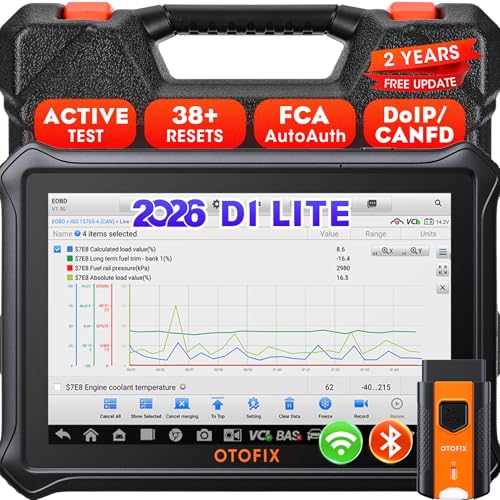
- 【2026 OTOFIX D1 Lite Gives the Best Value for Money】OTOFIX D1 Lite bidirectional scan tool is more FASTER and SMARTER with 2026 Enhanced Hardwares & New Functions! 👍Alternative Bluetooth +USB connect 👍2G+64GB 👍4x ARM Cortex-A35 (1.5GHz) Processor (5X Faster CPU) 👍Android 9.0 OS 👍5G GHz WiFi 👍CANFD&DOIP 👍 FCA AutoAuth 👍38+ Services 👍3K+ Bi-Directional Control 👍Full Systems Diagnose 👍2 Years Update 👍150+ Vehicle Coverage.
- 👍【Active Tests】 OTOFIX D1 Lite is a bi-directional scan tool that can send commands to, and also receive information from vehicle control modules. This way, you can quickly locate and repair faulty auto parts. For Example: send direct commands to ask the vehicle to turn on/off the radiator fan, lights, sound horn, fuel pump, modulate throttle, open/close windows, operate mirrors and more. *Note that only available tests will be displayed in the menu.
- 👍【38+ Service Functions】 OTOFIX D1 Lite scan tool offers 38+ of the hottest service functions that are commonly used for car repairs. That include Oil reset/SAS/EPB/BMS/Throttle/ABS bleeding, and 2065-new SUS/ADBLUE/NOX/Headlamp resets (and more) to help restore your car status after repairs are done. Compared to other diagnostic scanners for cars, the OTOFIX D1 Lite scanner is much more fully-featured. *Note that specific functions available depend on the make/model/year of your car.
- 👍【All System Diagnostics + Cloud Report Management】 This 2026 car scanner OTOFIX D1 Lite provides troubleshooting and data for all ECUs: read/clear DTCs, view graphic live data/VIN, and locate system faults for safe driving. With Cloud Report Management, you can save detailed reports to cloud servers and easily shared them with others via QR codes/emails/text messages. Others can access these reports from any device (smartphones/tablets/PCs …) anytime, and you can better manage repair work.
- 👍【99% Car Coverage】 This one-station car scanner diagnostic for all cars works on 150+ major car brands across the world. 1) It supports CAN-FD/DoIP protocols: compatible with GMCAVALIER/TRAX/Encore/Envision/GL8(LSY)/CT4/CT5 after 2019; Volvo after 2018; Land Rover/Jaguar after 2017; and BM.W F/G all chassis. 2) For models equipped with security modules (such as Renault & 2018+ FCA SGW), its built-in AutoAuth allows you to easily break diagnostic barriers after registration.
This product presentation was made with AAWP plugin.
Last update on 2026-05-12 / Affiliate links / Images from Amazon Product Advertising API