
NHTSA ID Number: 10240834
Manufacturer Communication Number: FAQ1401
TSB/Document Date: 2023-08-21
Summary
Functions, Software & Hardware Issues
If the PDF is very large, it may not load in the preview below.
Some older TSBs had multiple PDFs — visit the NHTSA Website to view all PDFs.
If the TSB PDF does not show, download or view it on the NHTSA Website.
Click on the (+) Plus Sign
Then Click on Associated Document(s)



- Advanced VCI Box, Industry-leading J2534 Pass-Thru...
- High-Speed OEM-Level Diagnostics & Programming: Unlock true...
- Coverage for 17 Car Brands & Ultra Reliability: Works...
- User-Friendly RLink Platform & Expert Support: TOPDON’s...
- 6.6 ft USB-C Cable & Portable Storage Case: The RLink J...
This product presentation was made with AAWP plugin.
Search NHTSA Database for Recalls
Search NHTSA Database for Vehicle Investigations
View Latest Vehicle Investigations
Search NHTSA Database for Vehicle Complaints
View Latest Vehicle Complaints
TSB/Document ID: FAQ1401
Replacement Service Bulletin Number:
MFR Communication Date: 2014-03-10
MFR Internal Campaign ID/Software Version:
Communication Type: Service Bulletin/Repair Instructions
NHTSA Components: EQUIPMENT:OTHER:OWNERS/SERVICE/OTHER MANUAL
MFR Component System:
MFR Component Subsystem:
Previous TSB | Next TSB |
Functions, Software & Hardware Issues
Note: New or Revised issues are marked accordingly.
The following prerequisites and FAQs apply to all VAS diagnostic devices unless noted otherwise.
Please confirm the following:
The device is plugged in to the power adapter or base station (where applicable) and switched
on.
The device battery is fully charged and maintained.
The device fully boots to the Windows desktop.
The latest “installation version” of ODIS Service is installed on the device. (Please refer to
Current ODIS Service Software Versions” document located in Service Net).
New
Q. Why am I receiving an invalid license error after installing Windows 7®?
A. The most likely cause is that you didn’t order a new license after installing Windows 7®. This is
necessary since the hardware ID changes.
New
Q. Do I need to request a new license and certificate after installing Windows 7®?
A. Yes. Installing Windows 7® will change the hardware ID, so a new license and certificate are
required.
New
Q. Once I update to Windows 7 and obtain my new license and certificate, do I need to keep my old
license and certificate that I have for Windows XP®?
A. No. Please delete all old license, certificates and hardware ID’s
New
Q. Which devices can run Windows 7®?
A. VAS6150A/B/C and VAS6160/A.
New
Q. Can I install my own copy of Windows 7® on my VAS6150?
A. It’s not recommended and will not be supported.
New
Q. Can VAS-PC be installed on a Windows 7® VAS device?
A. No. It will corrupt ODIS Service and cause you to perform a full BIOS Windows 7® recovery to
resolve.
New
Q. Why was my eShop license request denied?
A. The most likely cause of a denial is that the hardware ID was not placed in both fields. Please follow the
steps in our ServiceNet document ODIS Service Installation Phase 1 - Preparation & License
Request Instructions (eShop)
New
Q. Why shouldn’t I install Internet Explorer 10 or 11 on my Windows 7® VAS device?
A. Internet Explorer 10 or 11 will not work with ODIS Service Infomedia. If you have already
upgraded, a complete BIOS Windows 7® recovery is necessary to get Infomedia to work properly.
New
Q. How do I add the 5054A Diagnostic head to my VAS device?
A. The install steps are slightly different when running ODIS Service only. Please refer to “VAS 5054A
Transmitter Head – Bluetooth® & EDIC Configuration – ODIS Service Only”
New
Q. When I click on Info in ODIS Service, I’m prompted for an ID and PW. What do I use?
A. You will enter your AccessAudi.com ID and PW.
New
Q. Why won’t my Infomedia information doesn’t display?
A. This new feature is available with Windows 7® running ODIS Service 2.1.0. For further troubleshooting
steps, please follow the ServiceNet document ODIS Service Infomedia Setup Instructions.
Revised
Q. We received a new ODIS Service DVD but we haven’t installed the previous version on one of our
testers. Is it necessary to load the previous version first?
A. No, ODIS V2.1.0 is the latest “ Installation Version” and it’s a prerequisite for any “Update
Versions” that may follow until such time that a new “Installation Version” (complete uninstall &
reinstall) is required. Always refer to the “Current ODIS Service Software Versions” document located in
ServiceNet for the most up to date version information.
Q. What is best way to ensure ODIS Service is configured correctly to retrieve online updates?
A.
Check
Preparation
Dealership network bandwidth: Minimum 6 mbps (single franchise) or 8 mbps (dual franchise).
(Download speeds are easily determined via any of the “Speed Test” Internet sites).
ODIS Service security certificate must installed:
Refer to Service Information – ODIS Service document title: ODIS Service Installation Phase 3 –
Security Certificate Request & Installation Instructions
Open network connection available: Test > Internet Explorer > Google.
Anti-virus software configured with ODIS Service Mirrorserver2 URL exclusion: Refer to anti-virus
software documentation or ask IT Professional for assistance.
Check
VWAG Group Systems URLs allowed through firewall:
Refer to Service Information – VAS Tester document title: VAS Diagnostic Devices – Required
Open Internet Addresses (URLs).
Confirm Settings (ODIS Service running)
Connection method: > Admin > Connections > Connection Types: Set to Internet (not CPN)
Mirrorserver2 URL:
> Admin > Connections > Mirrorserver2 URL: Set to https://mirrorserver2.vwhub.com/dav/
If not as shown, click Reset.
Also confirm that the User and Password entry fields are empty.
Q. How do I configure the Email Outbox server?
A. As each dealership has unique network and email types, we are unable to assist with configuration
advice that is specific to your dealership. For information on various configuration options, please refer
to Service Information document: “ODIS Service Email Outbox Configuration Guide”.
Q. When I first click “Start Diagnostics”, a login screen appears. When I put in my GeKo ID and PW,
an error message appears. Do I need a different ID and PW for ODIS Service?
A. No. Click “Cancel” to proceed with diagnosis. The Global User ID prompt at start of diagnosis
does not apply to the North American market. Please refer to Service Information document: “Global
User ID Prompt at Start of Diagnosis” .
Q. I’m having trouble submitting a paperless GFF log using ODIS Service. What do I need to confirm
first?
A. A number of different causes could result in not being able send ODIS Service logs. Use the
following checklist:
Device connected to dealership network (run Internet Explorer to test):
ODIS Service certificate installed (as per Phase 3 instr.).
Got to Admin > Connections > Brand Settings section. Ensure that the configuration is set to
“Internet”.
Go to Admin > Connections > Mirror Server 2 configuration section. Ensure that the Mirror
Server 2 URL is: https://mirrorserver2.vwhub.com/dav/ …and that the Mirror Server user and
password entry fields are empty.
User enters valid GeKo ID and password in the Global User ID and password prompt.
To send a test log: Connect to a vehicle and run a vehicle module scan, then > Admin > Data >
Diagnostic log > Send.
Q. What password do I use to import my ODIS Service Certificate?
A. Use the first 32 alpha-numeric characters (only) of the Hardware ID which you saved during your
eShop license request.
Q. The GFF protocol log I sent from ODIS Service is not showing in GFF Paperless. How can I fix this?
A. If you received a “log was successfully sent” message when sending the GFF log but it’s not showing
in GFF Paperless, please ensure there are less than 100 characters in the Dealer data field under
Admin > General > Dealer data. Having more than 100 characters will cause the GFF log to not
show up in GFF Paperless. Typically, the field should only contain your dealer number and name.
Q. When I attempt to send my GFF log, I receive an error message of “The current operating mode
does not allow the diagnostic protocol to be sent. The system will try again later”.
A. This error indicates ODIS Service is in Road Test Mode. Under Extras, select Road test and Cancel
Road Test mode.
Q. Where can I see what Brand Version I have installed?
A. Under Info, Select Versions. The version is listed as didb_GFS-a.en_US: X.XXXX.XXXX. Note: The
XXXX indicates the version number which is similar to the old VAS PC Brand update naming
convention. If you have chosen other languages during ODIS Service installation, those will also
show. For example, German will be didb_GFS-a.de_US: X.XXXX.XXXX.
Q. What does the error ODS6501E General Database access error when opening ODIS Service
indicate?
A. Please contact Diagnostic Tester Software Support at 888-896-1298; we may be able to resolve this
without a re-load of ODIS Service.
Q. How fast of an Internet Connection should I have to allow for smooth online updates?
A. We recommend 6 Mbps for a single franchise or 8Mbps if you’re a dual franchise.

- Stay Updated with Lifetime Access: This obd2 scanner includes lifetime free software updates for all app service functions. With a single payment, enjoy full access to diagnostics, reset tools, and maintenance features — zero subscription fees. A budget-friendly choice for weekend mechanics, home car owners, and DIYers, supporting vehicles from 1996 onward. Come to us with your VIN to check compatibility.
- Full Bidirectional Control/Active Tests & Stable Wireless Connectivity: This car code reader features full bidirectional control, allowing you to send commands to the vehicle's ECU for active tests on components such as fuel pumps, injectors, A/C clutches, windows, sunroofs, and more. This car scanner diagnostic tool helps DIYers quickly diagnose and test vehicle parts, cutting down troubleshooting and repair time. With BT 4.0 wireless connectivity, you can enjoy cable-free diagnostics up to 33 feet. Stand in your garage and test windows, wipers, or even engine components—all without needing to move around your car.
- Portable Car Scanner with 26 Resets: Scheduled vehicle maintenance with the A30M car diagnostic scanner can keep your vehicle in peak condition and save you big on dealership trips. The XTOOL A30M obd2 scanner diagnostic tool features essential reset and relearn functions, such as Oil Reset, EPB Reset (Electronic Parking Brake Release), SAS, ABS Brake Bleeding, Throttle Body Relearn, Injector Coding, Crank Sensor Relearn, Headlight Adjustment, and Tire Size Reset. Note: Service functions may vary by vehicle model – check compatibility beforehand!
- Wide Compatibility CAN FD & FCA
 Autoauth: This obd2 scanner diagnostic tool is compatible with over 85+ car brands from the U.S., Europe, and Asia, providing extensive coverage through a BT connection with your smartphone or iPad. Now upgraded to support the latest protocols, it includes FCA AutoAuth access for Chrysler, Jeep, Dodge, and Fiat (2018+), and supports CAN FD for GM (2020+) models, giving you greater access to newer vehicles and systems. Note: The FCA AutoAuth account is not included with the device. Users must register and pay separately through the official FCA AutoAuth website to access diagnostic functions for vehicles that require it.
 - Up to 8 Live Data Streams Graphing – Real-Time Graphing for Deeper Insight: This car scanner supports up to 8 live data streams simultaneously with intuitive, real-time graphing. Gain comprehensive insights into your vehicle’s performance, making it easier to spot issues, detect trends, and make informed diagnostic decisions with confidence.
 Autoauth: This obd2 scanner diagnostic tool is compatible with over 85+ car brands from the U.S., Europe, and Asia, providing extensive coverage through a BT connection with your smartphone or iPad. Now upgraded to support the latest protocols, it includes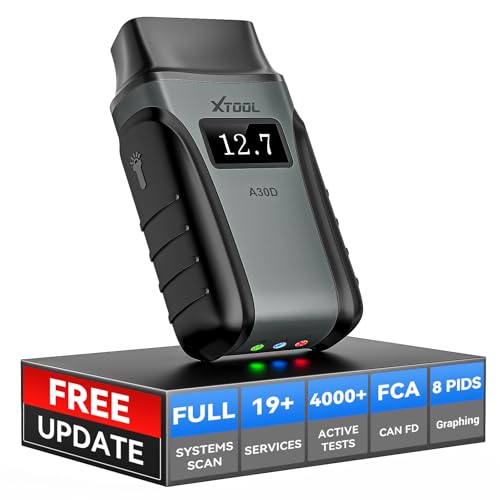
- Save $500+/Year with Pro-Level Diagnostics -No Subscriptions: The Portable XTOOL Anyscan A30D OBD2 scanner diagnostic tool includes free lifetime software updates for all app service functions, without extra cost. With a single payment, enjoy full access to diagnostics, relearn scan tools, and maintenance features. A cost-effective, smart choice for car owners and DIY enthusiasts, compatible with vehicles from 1996 onward. Please provide the car VIN and the special functions you need in advance so that we can confirm compatibility
- Bi-Directional Control for Faster Troubleshooting: Unlike a basic code reader, the A30D bi directional scan tool sends commands directly to your vehicle’s ECU to actively test components like fuel pump, valves, wipers, windows, doors, sunroof, and headlamps right from your smartphone. See component responses in real time without disassembly—perfect for brake jobs, electrical issues, and hard-to-find problems. This bidirectional obd2 scanner helps pinpoint faults faster, reduce guesswork, and avoid replacing good parts. An efficient, easy-to-use car scanner diagnostic tool built for DIYers, home garage users, and small-shop technicians who want real two-way scanner, not just codes
- 19 Reset Functions for Routine Maintenance: The A30D car diagnostic scanner provides 19 relearn functions without extra charges, including EPB Reset for parking brake replacement, TPMS Reset after tire changes, ABS Auto Bleeding, Oil Reset, SAS Reset, BMS Reset, Throttle Relearn, Injector C0ding, Gear Learning, Crank/Crankshaft/Cam/Ckp Sensor Relearn Tool, Transmission Match, Seat Calibration, Airbag Repair and more. This XTOOL A30D automotive scanner diagnostic tool supports preventive care, helping extend vehicle life and reduce costly shop visits. Functions vary by vehicle make and year—plz confirm compatibility before purchase
- Stable BT Connection & All-System & 8 Pids Live Data: The A30D wireless OBD2 scanner delivers a fast and stable wireless connection up to 33 feet, letting you move freely around the vehicle without tangled cables. Pair with with Android 9.0+ and iOS 10.0+ devices to turn your phone into a mobile auto scanner—perfect for home garages, driveways, or on-the-spot repairs. This full system scanner for cars provides real-time access to all major modules, including Engine, Gearbox, ABS, SRS, AC and more. with clear graphs, meters, and up to 8 PIDs displayed at once. This car code reader makes system monitoring visual, simple, easy to understand, and offering data logging for playback and deeper
- Wide Compatibility with CAN-FD & FCA Support: The A30D car computer diagnostic reader works with most 1996 and newer vehicles with a standard OBD2 port, including for Ford, for GM, for Toyota, for Honda, for Nissan,for Hyundai etc, with ongoing updates covering more car models and functions later. It also supports newer communication protocols like CAN-FD and FCA AutoAuth (Personal AutoAuth account and active subscription required, not included with the device!for Chrysler, for Dodge, for Jeep, for Fiat models). It is a future-ready automotive scanner diagnostic tool for households with multiple vehicles or part-time techs. Coverage vary by cars, plz check the compatibility first
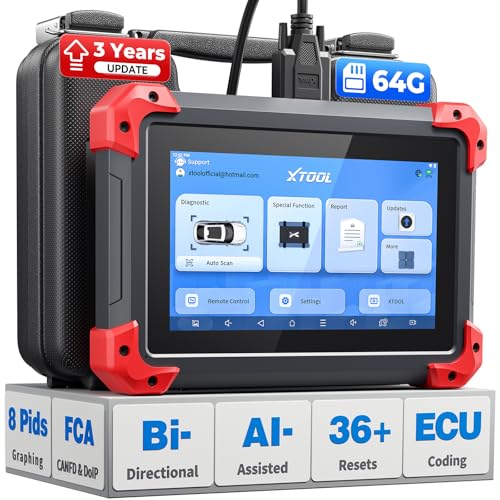
- 2026 Latest Version – Now Upgraded from 32GB to 64GB: XTOOL D7 obd2 scanner diagnostic tool with bidirectional is designed for DIY enthusiasts, professional mechanics. It now offers 64GB storage for smoother operation. Its 5000mAh battery (with 2500mAh 7.3V fast-charging) supports all-day use. With FCA, CAN FD, and DOIP protocol support, it covers more vehicle models and newer systems. A newly added battery voltage reading shows battery status before diagnostics, helping prevent low-voltage tests that could harm the vehicle. The V2.0 Diagnostic Report allows shops to personalize results with logos, customer details, and attachments to build trust and maintain records.
- Save $500+/Year with Pro-Level Diagnostics: Whether you're a DIYer, starting a repair business, or beginning work at an auto shop, XTOOL D7 car scanner offers advanced features typically found only in expensive professional OBD2 scanners - without the high price tag. With 4,000+ Active Tests & Bidirectional Pids, 36+ Special Functions, advanced module resets like SRS Reset, OE-level All-System Scan (one-click), FCA AutoAuth, CAN FD, DoIP, data export, and 8 PIDs graphing, the D7 auto scan tool covers 100,000+ vehicles (excluding Indian models). Includes 3-Year updates and supports the XV200 endoscope to detect em!ssions and intermittent issues.
- Full Bidirectional Advantage Over Other Code Readers & Scan Tools: The XTOOL D7 automotive scanner offers true bidirectional control plus advanced bidirectional PIDs, letting you send commands to components like A/C clutches, fuel injectors, windows, fans and more, while monitoring sensor responses live to catch elusive issues (even those without warning lights). Unlike budget bidirectional obd2 scanners limited to basic active tests,the D7 car fault scanner gives you full bidirectional control to run ABS pump tests, throttle position, turn fan on/off and solenoid tests, etc. No guessing, no extra fees—just smarter diagnostics
- OE-Level Full System Car Diagnostic Scanner with 8 Live Data Graphs: The XTOOL D7 is a pro-grade diagnostic tool that gives you full access to all vehicle systems—just like Snap on scanners & the factory scan tools, it delivers deep, accurate diagnostics you can trust. Easily view live data streams, retrieve freeze frame, and run active tests to pinpoint issues fast. With the ability to graph up to 8 PIDs at once, you can spot performance trends and troubleshoot like a pro. Whether you're a mechanic or car owner, with the D7 auto scanner you can stay ahead of problems and keep your vehicle running at its best
- High-value Automotive Scanner Diagnostic Tool with 36+ Special Function, Module Resets, Relearns, Calibrations, Adaptations & Initializations: XTOOL D7 diagnostic tool packs 36+ common & advanced maintenance, skip the $150 fee for battery registration after replacement, throttle body relearn after cleaning, or TPMS resets post-rotation, Auto bleed after the pad changes, or Electronic Parking Brake. Need to reset the transmission after towing? Crank sensor relearn for GM/for Dodge? Done. D7 also covered advanced functions like Ad~blue Reset, VIN Write, and many more professional OBD2 scanner functions that we can't list here. Text us your VIN + what you need, we’ll check the compatibility
This product presentation was made with AAWP plugin.
Last update on 2026-05-12 / Affiliate links / Images from Amazon Product Advertising API