
NHTSA ID Number: 10232195
Manufacturer Communication Number: MC23-03
TSB/Document Date: 2023-03-02
Summary
Kawasaki motorcycles come with four types of batteries. While some require activation and others are pre-activated, they all require charging and additional maintenance charging if activated and allowed to sit in the vehicle for an extended time on the showroom floor or in storage. The following is a summary of activation and charging guidelines for each battery type.
MC 23-03
SERVICE
February 14, 2023
Page 1 of 5
MODELS: Kawasaki Motorcycles
TITLE:
KAWASAKI BATTERY ACTIVATION REQUIREMENTS
SERVICE POLICY
SUBJECT
Kawasaki motorcycles come with four types of batteries. While some require activation and others are preactivated, they all require charging and additional maintenance charging if activated and allowed to sit in the
vehicle for an extended time on the showroom floor or in storage.
The following is a summary of activation and charging guidelines for each battery type. Refer to the appropriate
Assembly & Preparation Manual for activation and charging procedures for each specific model.
KAWASAKI APPROVED CHARGERS
As outlined in bulletin SP23-01, in order to properly activate the battery delivered with each Kawasaki vehicle,
Kawasaki dealers are required to have the correct battery charging and testing equipment for all types of batteries
used in Kawasaki products. The following are chargers approved by Kawasaki.
Conventional/Sealed/Pre-Serviced Lead-Acid Chargers
MAKE
MODEL
KAWASAKI PART #
TecMATE
OptiMATE PRO-1 DUO (TM-650) Single-Battery
TecMATE
BatteryMATE 150-9 (TS02) Single-Battery
N/A
TecMATE
OptiMATE PRO-4 (TS53) Four-Bank
N/A
TecMATE
OptiMATE Pro-8 (TS45) Eight-Bank
N/A
TecMATE
OptiMATE 3 (TM431) Single Bank
N/A
YUASA
CHRISTIE
MB-2040/2060 Four-Bank
C10122S Two-Bank
57001-TM-650
©2023, Kawasaki Motors Corp., U.S.A.
57001-TM-650
022-0148DLWH
N/A
KAWASAKI APPROVED CHARGERS (cont’d)
Lithium-Ion Chargers
MAKE
MODEL
KAWASAKI PART #
TecMATE
OptiMATE Lithium 4s (TM-291) 12.8V 5A Single-Bank
C57001-291
TecMATE
OptiMATE Lithium 4s (TM-471) 0.8 amp Single-Bank
C57001-471
Skyrich
Skyrich (HBC-LF0201) 12V 2A Single Bank
N/A
C57001-291
C57001-471
5 AMP
0.8 AMP
DEALERS
CONSUMERS
Always charge batteries according to the instructions on the Kawasaki-approved charger. Charging
batteries at a rate higher than specified may ruin the battery. Charging at a high rate causes excess
heat that can warp the internal plates and cause shorting. Higher-than-normal charging rates also cause
the plates to shed active material, allowing deposits to accumulate which can lead to internal shorting.
Do not charge lithium-ion batteries with a lead-acid battery charger. Lead-acid battery chargers do not
include the proper charging method for lithium-ion batteries and will damage them. Lithium-ion chargers
approved by Kawasaki apply minimal amperage to the battery to detect its current voltage and then
applies the proper charge based on returned voltage. Lithium-ion chargers contain functionality to prevent
overcharging and damage to the battery.
DANGER
Batteries produce an explosive gas mixture of hydrogen and oxygen that can cause
serious injury and burns if ignited. Keep the battery away from sparks and open
flames during charging. When using a battery charger, connect the battery to the
charger before turning on the charger. This procedure prevents sparks at the battery
terminals which could ignite any battery gases.
CONVENTIONAL
Model:
KLR™650
Activation
1. Remove filling plugs and sealing tube,
discard tube.
2. Install vent hose.
3. Fill battery with electrolyte (sulfuric acid
dilution with a specific gravity of 1.280).
NOTICE: Electrolyte is not included with
battery. Do not use water or any other
liquid to activate.
4. Let the battery stand at least one hour so
the liquid can thoroughly soak the plates.
Move or gently tap battery to expel any
bubbles between the plates.
NOTICE: if electrolyte level drops below
the upper line, refill the battery with more
electrolyte before charging.
Charging
1. Charge for 3-5 hours at a current equivalent to 1/10th of the battery’s rated capacity (Amp
Hours). Charging the battery at a higher rate causes excess heat, which can warp the plates and
permanently damage the battery.
Example: Charge at 1.4 amps for a 14 amp-hour battery.
2. Check electrolyte level during charging. If it has fallen, fill with distilled water to the upper level and
charge for another hour at same rate to mix the water and acid.
3. After charging, install plugs and finger tighten.
4. Wash off any spilled acid with a water and baking soda solution, then dry.
5. Check voltage. If not at least 12.6 volts repeat charging cycle.
ABSORBED GLASS MAT (AGM)
Models:
KLX®110/140, Z125 PRO, KLX®250,Versys® -X 300/650/1000LT,
Ninja® 400/ZX™-6R/1000 ABS/ZX™-14R,, Concours® 14 ABS,Vulcan® 900/1700
Activation
1. Make sure that the model name of the
electrolyte container matches that on the
battery; the names must match.
NOTICE: Each battery comes with its
own specific electrolyte container; using
the wrong container will incorrectly fill
the battery with electrolyte which can
shorten battery life, deteriorate battery
performance and cause electrolyte to
spill from the battery.
MATCHING
MODEL
NUMBERS
2. Remove filler ports sealing sheet from battery, and strip of caps from electrolyte container. Retain
strip of caps.
3. Place the electrolyte container with the six sealed cells into the filler ports of the battery. Holding the
container level, evenly push it down to break the seals of all six cells. You should see air bubbles
rise into each cell as the ports fill.
If there are no air bubbles or if the container cells do not empty completely, tap the container to
help the electrolyte flow into the battery.
NOTICE: Do not remove the container from the battery until all electrolyte has entered the
battery. Doing so can shorten the service life of the battery.
4. After the battery is filled, leave the empty electrolyte container in
place and let the battery stand for a minimum of 30 minutes so
that the separator mats within the cells of the battery can absorb
the electrolyte.
NOTICE: Failure to allow adequate time for the electrolyte to
fully saturate the separator mats can shorten the service life of
the battery
5. Place the strip of caps loosely over the filler ports and press down
firmly with both hands to seat the strip into the battery. Do not
pound or hammer the strip of caps. When properly installed, the
strip of caps will be level with the top of the battery.
Charging:
1. Place on Kawasaki approved sealed-battery charger and charge according to the charger’s
instructions.
2. Let battery sit for 30 minutes after initial charge, then check voltage with a voltmeter. If voltage is
not at least 12.6 volts, repeat charging cycle.
3. To ensure maximum battery life and customer satisfaction, load test the battery at three times its
amp-hour rating for 15 seconds. Re-check voltage and if less than 12.6 volts repeat charging cycle
and load test. If still below 12.6 volts the battery is defective.
AGM - PRE-SERVICED/CHARGED
Models:
Ninja® 650/ZX™-10R/H2/H2 SX/H2R,
Vulcan® S, Z650
Preparation and Charging:
1. During Preparation for sale, check battery
voltage with a volt meter to make sure it
meets the minimum 12.6 volts. For inventory
units, periodically check voltage and charge if
below 12.6 volts.
NOTE: Because batteries discharge at
different rates based on varying conditions,
check voltage every month on any inventory
unit.
2. Prior to delivering a purchased unit to
a customer, charge the battery to 100%
following the instructions on a Kawasakiapproved charger.
LITHIUM-ION
Model: KX™450
Activation:
No activation is required for the KX450 battery.
Charging:
Due to transportation regulations, the KX450 lithium-ion
battery is shipped in a state of 30% charge. All 2019
KX450 batteries must be charged to 100% on a Kawasaki
approved lithium-ion charger prior to delivery to the
customer.
1. Charge the battery according to the instructions on the
Kawasaki-approved lithium-ion battery charger.
2. For inventory units, measure battery voltage regularly
and charge if voltage is less than 12.8 volts.
TIPS TO PREVENT PREMATURE BATTERY FAILURE
•
Use the correct charger
•
Be sure electrolyte pack matches AGM battery
•
Be sure all electrolyte drains from pack into battery
o
•
•
Allow at least 30 minutes for the electrolyte to soak into the electrode plates.
o
The electrolye must be fully absorbed by the plates since it helps create the chemical reaction
between the positive and negative plates during charging.
o
If the battery is rushed to charging before the electrolyte can be fully absorbed, there is a
potential for acid leakage.
Provide initial charge to 100% state of charge
o
•
If not initially charged to 100%, the battery may never reach its full performance potential and
may never reach 100% state of charge, leading to poor performance and shorter life.
For any activated batteries in inventory units, provide a refresh charge every 30 days to maintain
battery voltage.
o
•
A battery that is not filled with the correct amount of acid will have poor performance and
a shorter life than expected, depending on the amount of acid missing from the battery.
Batteries are designed to operate with a certain acid level and not enough acid will cause the
batteries to dry out faster, can cause a faster discharge and lower performance.
Batteries continuously discharge. Failure to maintain an activated battery can allow voltage to
drop to levels that allow sulfation to form within the battery plates. Sulfated batteries may be
damaged beyond repair and are not warrantable.
Store batteries in a dark, cool and dry area.
HAVE A PROCESS FOR CHARGING BATTERIES FOR VEHICLE SALES
•
Each dealer manages this process differently. The most important step in ensuring your
customers don’t leave your dealership with an improperly activated battery is that your dealership
has a process for activating batteries for sold vehicles.
•
Allow adequate set-up time so that the battery can be properly activated and charged prior to
delivery to the customer.
•
Avoid activating and charging batteries until a vehicle is sold.
•
Create a rotation to refresh charge for any activated and charged batteries, whether in a vehicle
or for over-the-counter replacement batteries, every 30 days.

- High density negative paste, improves performance and...
- Enhanced life alloy or Silver Calcium stamped alloy...
- Calcium lead positive grid, maximizes conductivity and...
- Robust envelope separator with puncture resistant back...
- Vent cap design that resists acid leakage


- High density negative paste, improves performance and...
- Enhanced life alloy or Silver Calcium stamped alloy...
- Calcium Lead positive grid, maximizes conductivity and...
- Robust Envelope Separator with puncture-resistant back...
- Vent cap design that resists acid leakage
Last update on 2026-06-29 / Affiliate links / Images from Amazon Product Advertising API
If the PDF is very large, it may not load in the preview below.
Some older TSBs had multiple PDFs — visit the NHTSA Website to view all PDFs.
If the TSB PDF does not show, download or view it on the NHTSA Website.
Click on the (+) Plus Sign
Then Click on Associated Document(s)
Search NHTSA Database for Recalls
Search NHTSA Database for Vehicle Investigations
View Latest Vehicle Investigations
Search NHTSA Database for Vehicle Complaints
View Latest Vehicle Complaints
TSB/Document ID: MC23-03
Replacement Service Bulletin Number:
MFR Communication Date: 2023-02-14
MFR Internal Campaign ID/Software Version:
Communication Type: Service Bulletin/Repair Instructions
NHTSA Components: ELECTRICAL SYSTEM
MFR Component System:
MFR Component Subsystem:
Previous TSB | Next TSB |

- Stay Updated with Lifetime Access: This obd2 scanner includes lifetime free software updates for all app service functions. With a single payment, enjoy full access to diagnostics, reset tools, and maintenance features — zero subscription fees. A budget-friendly choice for weekend mechanics, home car owners, and DIYers, supporting vehicles from 1996 onward. Come to us with your VIN to check compatibility.
- Full Bidirectional Control/Active Tests & Stable Wireless Connectivity: This car code reader features full bidirectional control, allowing you to send commands to the vehicle's ECU for active tests on components such as fuel pumps, injectors, A/C clutches, windows, sunroofs, and more. This car scanner diagnostic tool helps DIYers quickly diagnose and test vehicle parts, cutting down troubleshooting and repair time. With BT 4.0 wireless connectivity, you can enjoy cable-free diagnostics up to 33 feet. Stand in your garage and test windows, wipers, or even engine components—all without needing to move around your car.
- Portable Car Scanner with 26 Special Functions: Scheduled vehicle maintenance with the A30M car diagnostic scanner can keep your vehicle in peak condition and save you big on dealership trips. The XTOOL A30M obd2 scanner diagnostic tool features essential reset and relearn functions, such as Oil Reset, EPB Reset (Electronic Parking Brake Release), SAS, ABS Brake Bleeding, Throttle Body Relearn, Injector Coding, Crank Sensor Relearn, Headlight Adjustment, and Tire Size Reset. Note: Service functions may vary by vehicle model – check compatibility beforehand!
- Wide Compatibility CAN FD & FCA
 Autoauth: This obd2 scanner diagnostic tool is compatible with over 85+ car brands from the U.S., Europe, and Asia, providing extensive coverage through a BT connection with your smartphone or iPad. Now upgraded to support the latest protocols, it includes FCA AutoAuth access for Chrysler, Jeep, Dodge, and Fiat (2018+), and supports CAN FD for GM (2020+) models, giving you greater access to newer vehicles and systems. Note: The FCA AutoAuth account is not included with the device. Users must register and pay separately through the official FCA AutoAuth website to access diagnostic functions for vehicles that require it.
 - Up to 8 Live Data Streams Graphing – Real-Time Graphing for Deeper Insight: This car scanner supports up to 8 live data streams simultaneously with intuitive, real-time graphing. Gain comprehensive insights into your vehicle’s performance, making it easier to spot issues, detect trends, and make informed diagnostic decisions with confidence.
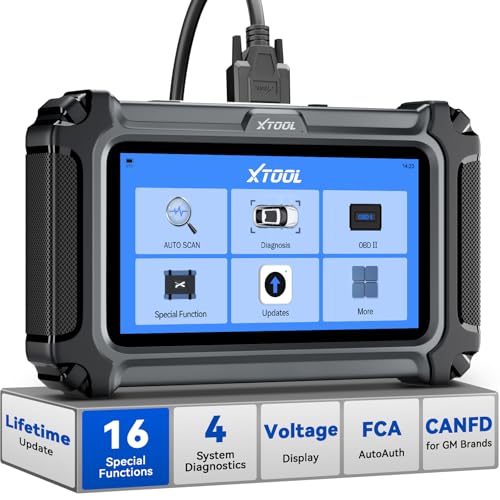
- Comprehensive OBD2 Scanner with 16 Resets: The XTOOL D5S car code reader and vehicle reset tool provides an advanced diagnostic solution with 16 commonly needed reset functions, including Electronic Parking Brake Reset (EPB Reset), SAS, BMS Reset (Battery Test), Throttle Body Relearn, TPMS Reset, ABS Bleeding, Injector Coding, Gearbox Match, Suspension Adjustment, Headlight, Window Initialization, Crank Sensor Relearn and more. Equipped with CAN FD Protocol and FAC AutoAuth, the D5S obd2 scanner diagnostic tool ensures compatibility with a broad range of modern vehicles, allowing users to address common maintenance needs quickly. NOTE: Please Check the Compatibility before ordering.
- 4 Main System Car Scanner & Full OBD2 Diagnostics: The XTOOL D5S car code reader is ideal for home mechanics, DIYers, and professionals, providing access to Transmission/Engine/ABS/SRS systems to read DTCs, Live data can be displayed in text or up to 4 PID data graphs, along with full OBD2 diagnostics to check the engine light on, other obd2 issues and routine maintenance. This car diagnostic scanner ensures you can keep your vehicles in top condition, avoiding costly repairs or unexpected breakdowns. NOTE: Some vehicles display three systems after connection because the transmission and engine of some vehicles are integrated into one.
- Check Engine Code Reader & Real-Time Engine Monitoring: Whether you're a car owner, a DIYer, or run a repair shop, the XTOOL D5S obd2 scanner diagnostic tool makes engine diagnostics fast and frustration-free, reading and explaining trouble codes in seconds—no confusion. Check live data like fuel trim, 02 sensor voltage, RPM, and coolant temp to pinpoint mis~fires, rough idle, or sensor issues. After repairs, simply use the D5S check engine code reader and reset tool to turn off the check engine light and confirm the problem’s fixed—saving time, money, and unnecessary shop visits. - Note: If the check engine light comes back on, it indicates the original problem still exists.
- Portable Car Scanner for ABS and SRS: XTOOL D5S gives you peace of mind when ABS or airbag warning lights come on. It reads and clears ABS codes to help you fix brake sensor, traction control, or wheel speed issues, and supports ABS bleeding after repairs like caliper or master cylinder replacement. For airbag systems, it scans and clears SRS codes related to airbags, seatbelt tensioners, and crash sensors. Whether you're doing repairs at home or running a small shop, the D5S is a cost-effective solution for safety diagnostics. Note: If a fault code returns after clearing, it usually means the issue hasn’t been fully resolved. Please check the compatibility before ordering.
- Transmission Warning Light ON? Here’s the Transmission Diagnostic and Reset Tool You Need: The XTOOL D5S is more than just a basic car scanner—it’s an easy-to-use transmission diagnostic tool. From rough shifts to slipping gears, the D5S lets you read and clear transmission trouble codes, monitor real-time TCM data, and perform transmission resets after fluid changes or repairs. Whether you’re a hands-on car owner or a pro running a busy shop, this OBD2 scanner with transmission functions helps you catch problems early—saving you time, money, and future headaches.. Note: Clearing fault codes is equivalent to a reset on some vehicles, but not all. For help, contact XTOOL Tech Support.
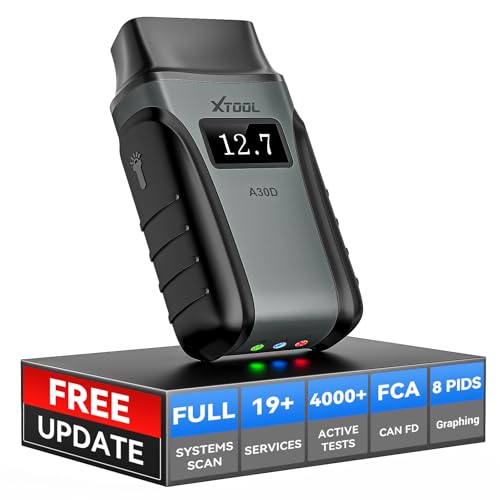
- Save $500+/Year with Pro-Level Diagnostics -No Subscriptions: The Portable XTOOL Anyscan A30D OBD2 scanner diagnostic tool includes free lifetime software updates for all app service functions, without extra cost. With a single payment, enjoy full access to diagnostics, relearn scan tools, and maintenance features. A cost-effective, smart choice for car owners and DIY enthusiasts, compatible with vehicles from 1996 onward. Please provide the car VIN and the special functions you need in advance so that we can confirm compatibility
- Bi-Directional Control for Faster Troubleshooting: Unlike a basic code reader, the A30D bi directional scan tool sends commands directly to your vehicle’s ECU to actively test components like fuel pump, valves, wipers, windows, doors, sunroof, and headlamps right from your smartphone. See component responses in real time without disassembly—perfect for brake jobs, electrical issues, and hard-to-find problems. This bidirectional obd2 scanner helps pinpoint faults faster, reduce guesswork, and avoid replacing good parts. An efficient, easy-to-use car scanner diagnostic tool built for DIYers, home garage users, and small-shop technicians who want real two-way scanner, not just codes
- 19 Reset Functions for Routine Maintenance: The A30D car diagnostic scanner provides 19 relearn functions without extra charges, including EPB Reset for parking brake replacement, TPMS Reset after tire changes, ABS Auto Bleeding, Oil Reset, SAS Reset, BMS Reset, Throttle Relearn, Injector C0ding, Gear Learning, Crank/Crankshaft/Cam/Ckp Sensor Relearn Tool, Transmission Match, Seat Calibration, Airbag Repair and more. This XTOOL A30D automotive scanner diagnostic tool supports preventive care, helping extend vehicle life and reduce costly shop visits. Functions vary by vehicle make and year—plz confirm compatibility before purchase
- Stable BT Connection & All-System & 8 Pids Live Data: The A30D wireless OBD2 scanner delivers a fast and stable wireless connection up to 33 feet, letting you move freely around the vehicle without tangled cables. Pair with with Android 9.0+ and iOS 10.0+ devices to turn your phone into a mobile auto scanner—perfect for home garages, driveways, or on-the-spot repairs. This full system scanner for cars provides real-time access to all major modules, including Engine, Gearbox, ABS, SRS, AC and more. with clear graphs, meters, and up to 8 PIDs displayed at once. This car code reader makes system monitoring visual, simple, easy to understand, and offering data logging for playback and deeper
- Wide Compatibility with CAN-FD & FCA Support: The A30D car computer diagnostic reader works with most 1996 and newer vehicles with a standard OBD2 port, including for Ford, for GM, for Toyota, for Honda, for Nissan,for Hyundai etc, with ongoing updates covering more car models and functions later. It also supports newer communication protocols like CAN-FD and FCA AutoAuth (Personal AutoAuth account and active subscription required, not included with the device!for Chrysler, for Dodge, for Jeep, for Fiat models). It is a future-ready automotive scanner diagnostic tool for households with multiple vehicles or part-time techs. Coverage vary by cars, plz check the compatibility first
Last update on 2026-06-23 / Affiliate links / Images from Amazon Product Advertising API
This product presentation was made with AAWP plugin.