
NHTSA ID Number: 10201772
Manufacturer Communication Number: 09-021-21-3818b
TSB/Document Date: 2021-10-02
Summary
All Mazda Connect vehicles in new car inventory must be updated to the software version listed below in this TSB as part of the New Car Ready Step 3 process. Make sure the new vehicle specialist receives a copy of this bulletin. Some vehicles may experience the symptoms mentioned below, which can be fixed with the latest software update (Version 74.00.230 or later). NOTE: For 2016 CX-9 with version earlier than 59.00.441, the tachometer function will be removed from the Active Driving Display as part of Mazda’s continuing efforts to improve safety and reduce driver distraction. Please explain this to the customer before updating the software. If the customer agrees, turn off the tachometer display on the AD-Display tab in MAZDA CONNECT Settings before performing the update. NOTE: If the customer has customized MAZDA CONNECT with something like a different background using unauthorized software, make sure they know the following information before updating MAZDA CONNECT to avoid any issues later on. Updating MAZDA CONNECT to the latest version will erase any customization created by unauthorized software. Unauthorized customization software will not work on the latest version of MAZDA CONNECT software. The latest version of MAZDA CONNECT software cannot be rolled back to an earlier version. Mazda does not recommend unauthorized customization of MAZDA CONNECT due to the possibility of unexpected problems. Any issues related to this will not be covered under Mazda warranty policy.
If the PDF is very large, it may not load in the preview below.
Some older TSBs had multiple PDFs — visit the NHTSA Website to view all PDFs.
If the TSB PDF does not show, download or view it on the NHTSA Website.
Click on the (+) Plus Sign
Then Click on Associated Document(s)


- Advanced VCI Box, Industry-leading J2534 Pass-Thru...
- High-Speed OEM-Level Diagnostics & Programming: Unlock true...
- Coverage for 17 Car Brands & Ultra Reliability: Works...
- User-Friendly RLink Platform & Expert Support: TOPDON’s...
- 6.6 ft USB-C Cable & Portable Storage Case: The RLink J...
This product presentation was made with AAWP plugin.
Search NHTSA Database for Recalls
Search NHTSA Database for Vehicle Investigations
View Latest Vehicle Investigations
Search NHTSA Database for Vehicle Complaints
View Latest Vehicle Complaints
TSB/Document ID: 09-021-21-3818b
Replacement Service Bulletin Number:
MFR Communication Date: 2021-09-13
MFR Internal Campaign ID/Software Version:
Communication Type: Service Bulletin/Repair Instructions
NHTSA Components: EQUIPMENT ADAPTIVE/MOBILITY
MFR Component System:
MFR Component Subsystem:
Previous TSB | Next TSB |
BULLETIN NOTES
All Mazda Connect vehicles in new car inventory must be updated to the software version listed below in this TSB as part
of the New Car Ready Step 3 process. Make sure the new vehicle specialist receives a copy of this bulletin.
This bulletin supersedes the previously issued bulletin(s) listed below. The changes are noted below in Red.
Previously Issued TSBs:
Date(s) Issued
09-021/21
09-030/20
08/06/21 and 07/08/21
09/15/20
09-022/19
12/19/19 and 06/06/19
09-010/18
12/05/18, 06/06/18 and 03/19/18
09-017/17
08/23/17, 07/12/17, 06/05/17 and 05/16/17
09-024/16
11/16/16, 07/05/16, 05/03/16 and 04/19/16
09-022/15
08/10/15, 06/02/15, 06/10/15 and 07/01/15
09-006/14
01/24/14, 03/25/14, 03/28/14, 04/23/14, 05/01/14, 06/05/14
and 09/16/14
09-034/13 (MSP41)
12/4/13
APPLICABLE MODEL(S)/VINS
2014-2018 Mazda3
2016-2021 Mazda2 (Mexico spec) with VINS lower than 3MDDJ******406154 (produced before December 1, 2020)
2016-2021 Mazda6
2016-2021 CX-3 with VINS lower than JM1DK******505297 (produced before October 7, 2020)
2016-2020 CX-5
2021 CX-5 (Canada and Mexico spec only)
2016-2020 CX-9
2021 CX-9 (Canada and Mexico spec only)
2016-2021 MX-5
Page 1 of 8
09/15/2021 02:50 PM tlawrenc
DESCRIPTION
Some vehicles may experience the symptoms mentioned below, which can be fixed with the latest software update
(Version 74.00.230 or later).
NOTE: For 2016 CX-9 with version earlier than 59.00.441, the tachometer function will be removed from the
Active Driving Display as part of Mazda’s continuing efforts to improve safety and reduce driver distraction.
Please explain this to the customer before updating the software. If the customer agrees, turn off the tachometer
display on the AD-Display tab in MAZDA CONNECT Settings before performing the update.
NOTE: If the customer has customized MAZDA CONNECT with something like a different background using
unauthorized software, make sure they know the following information before updating MAZDA CONNECT to avoid any
issues later on.
•
•
•
•
Updating MAZDA CONNECT to the latest version will erase any customization created by unauthorized software.
Unauthorized customization software will not work on the latest version of MAZDA CONNECT software.
The latest version of MAZDA CONNECT software cannot be rolled back to an earlier version.
Mazda does not recommend unauthorized customization of MAZDA CONNECT due to the possibility of
unexpected problems. Any issues related to this will not be covered under Mazda warranty policy.
The system performance has been improved as follows:
(Ver. 74.00.230 and later)
• [Mazda6 (US 2019-2021)], [CX-5 (US 2019-2021)], [CX-9 (US 2019-2021)] SiriusXM radio does not work properly.
(SiriusXM cannot be selected, only certain channels appear in the list, the sound turns off and/or the center
display shows an error message such as “Check SiriusXM Tuner” or “Unable to Connect to SiriusXM Radio”.)
(From V70.00.367 and later)
• [Except English] The translation of the message for the back camera is not correct.
• The Maintenance notification function (except when using Flexible setting) may stop counting after replacing the
instrument cluster. It resumes counting after a factory reset operation.
• The speed limit for the other direction may appear in the navigation screen. To correct, the map version must be
18Q4 or later in addition to a CMU update.
• A phone number (including pause symbols) registered as a favorite may not be dialed and the “Loading” message
continues.
• The "Display Off" function does not work if activated while a road name etc. is displayed at the top of the screen.
• The information (artist, title, album etc.) for a track on a USB audio device may not appear.
• [Ver. 70.00.110 or later] Certain USB audio devices (SONY NW-A45 and NW-A35 etc.) may not be recognized.
• Certain Android smartphones (HUAWEI P20, P30 Pro and Mate 20 Pro etc.) may not work as a USB audio
device.
• Country information (such as alcohol limit etc.) in the navigation screen may not be correct. To correct, the country
information has been removed in the latest version.
• The information (artist, title, album etc.) for an ogg format file in a USB audio device does not appear correctly.
• The play list may not work for a USB audio device with Android 9 or later OS.
• SiriusXM radio does not work properly. (SiriusXM cannot be selected; only certain channels appear in the list; the
sound turns off and/or the center display shows an error message such as “Check SiriusXM Tuner” or “Unable to
Connect to SiriusXM Radio”.
• The play list may not work for certain USB audio devices (HUAWEI P20 Pro with Android OS 8.1 etc.) when used
Page 2 of 8
09/15/2021 02:50 PM tlawrenc
•
•
•
•
•
•
•
•
•
as a USB audio device.
The CMU may reboot when playing a CD/DVD.
The CMU may reboot while driving.
Changes for sound setting (Bass, Treble, Fade, Balance) may not be kept after going into sleep mode.
[With Traffic Sign Recognition System (TSR)] While in ACC-ON mode, improper setting items (Speeding, Speed
Limit) appear in the navigation setting.
While playing tracks from a USB memory, artist and album names may appear as “unknown”.
While playing tracks from a USB memory, certain mp3 file will not start showing “Loading” message.
Some of the favorite destinations appear duplicated and may not allow editing or deleting.
Right after starting the engine when trying to see the 360° view monitor screen, the black screen may continue for
20 seconds.
When the transmission is shifted into Reverse, the rear view does not appear.
(From V70.00.352 and later)
• [Mazda6 (US 2018-2019) (Mexico 2019-2020)] The center display turns to a black screen due to the back light of
the display turning off. (Further improved)
• [Mazda6 (US 2018-2020)], [CX5 (US 2019-2020)], [CX9 (US 2019-2020)], [MX-5 (US 2019-2020) starting with
JM1ND******308517 (built after Apr. 11, 2019)] When listening to SiriusXM radio, the sound turns off and the audio
source changes to one of the others by itself, and the center display shows an error message such as “Sirius
Channel Unavailable” or “Unable to Connect to SiriusXM Radio”.
(From V70.00.335 and later)
• In the CMU update package, the latest Gracenote® database has been included.
• The System Update screen menu shows “Update package” instead of “Reinstallation Package”. The Fail-Safe
Package” has been removed.
• The brand icon on CarPlay screen has been updated.
• Font and location of texts like i-stop, i-ELOOP and average data on Fuel Economy Monitor screen have been
improved.
• When using SiriusXM Travel Link, block letters of direction are greyed out on the Fuel Prices and Parking screens.
• On the Home screen, white stains appear in the status bar.
• [MX-5 RF] When talking on BT hands-free, the person on the other end hears strange voices (like an echo).
• [Mazda6 (US 2018-2019MY) (Mexico 2019-2020MY)] Center display turns to a black screen because the back
light of the display turns off.
• In LAS and LDWS setting menu, “Rumble” appears as “Rumbl.”.
• The Display OFF setting is not kept when the ignition is turned off and on before the CMU goes into sleep mode.
• When using SiriusXM Travel Link, the subscription status for each service should appear (subscription Information
screen has been added).
• When using SiriusXM Travel Link, the business hours should appear for parking lots (business hours screen has
been added).
• If a “subscription suspended” event occurs when listening to Sirius XM, an incorrect dialog screen appears instead
of changing the channel to Ch 1.
• When radio is selected for audio source and a hands free call is finished, the radio sounds for a very short period
of time even when it is muted.
• After engine start, trhe screen freezes at the loading status.
• If the gear is shifted to reverse to display the rearview monitor while loading data from a USB device (when USB is
selected for audio source), the screen changes to the Home screen instead of the USB audio screen when shifting
Page 3 of 8
09/15/2021 02:50 PM tlawrenc
to drive or a forward gear.
• When an artist is selected using voice command for USB audio, the wrong artist’s album may be selected.
• After parking, the current location on the navigation screen may not move until turning the ignition off and on.
• [Android Auto used at the south latitude or the west longitude (CarPlay is not applicable)] When ACC is on or
engine is running in a location where the GPS signal is unavailable, a wrong current location (Ex. China) appears
on applications such as navigation, weather forecast etc. When the GPS signal becomes available, cthe orrect
current location appears.
(From V70.00.100 and later)
•
•
•
•
•
•
•
•
•
•
•
•
•
•
•
•
•
•
•
Even if the vehicle is not equipped with SiriusXM, it appears in the source list.
When playing audio files on a USB memory device, it may take a long time to start playing.
When playing certain BT audio devices, “Unknown” is displayed for track, artist and album names.
During a call, another call will not be displayed on the screen if it comes in within 30 seconds of the start of the
current call.
On certain vehicles equipped with a Multi-Information Display (MID) in the speedometer, inactive customization
item ”Sync Average and Trip A” is not grayed out and looks active.
When using certain mobile devices, the sender name for a SMS message appears differently (i.e., first and last
names appear in reverse order) from the contact list (phonebook).
When playing music with a play list on a USB memory device, the play list does not appear if the play list consists
of more than 50 tracks and includes a title longer than 128 characters.
When pressing the volume knob to mute, an audio source will not pause. With the improved software, CD, USB
memory device or BT audio will now pause.
When returning to the Fuel Economy Monitor, it does not remember the previously displayed page, Control Status
or Fuel Consumption.
When playing audio using an Android device via USB connection, it suddenly skips to another track.
When playing audio files on a USB memory device, it stops playing and will not go to the next track.
When playing mp4 audio files in an Android device via USB connection, they are not displayed nor played. With
the improved software, mp4 audio files can be displayed and played, but mp4 video files are still not applicable.
When playing a play list for mp4 audio files on a USB memory device, they are not displayed nor played.
Play list shuffle play for a USB memory device will not resume correctly and repeats playing the first track several
times.
In the Fuel Economy Monitor, Average Fuel Economy History shows data in wrong order.
When receiving another call during a call via BT hands-free, selecting “Hold + Answer” results in a black screen.
The call is still active but the screen will not recover until turning the ignition switch to off.
After using voice recognition on an iPhone via BT connection, the center display continues showing own phone
number and will not return to the previous screen.
While driving, the screen freezes and reboots or continues rebooting.
[Canada] If there is a failure to reset the oil maintenance monitor using the trip meter switch on the instrument
cluster after the oil maintenance monitor reset operation on the center display, the following can happen.
The wrench mark (Oil Change Due message) will not clear using the reset menu.
The wrench mark (Oil Change Due message) will be displayed even if it is before the oil change due time.
Shuffle play for a USB memory device will not play all tracks.
Album art may not appear correctly.
A play list on a USB memory device will not show all of the tracks if the data with an invalid file path in it exceeds
100 tracks.
When playing audio files on a USB memory device, it plays the same track twice with a slight delay in between.
The home screen is shown and will not move to another screen.
○
○
•
•
•
•
•
Page 4 of 8
09/15/2021 02:50 PM tlawrenc
• After updating the CMU, the contact list (phonebook) and the call history for an iPhone will not appear.
• A BT connected iPhone shows the pop up screen prompting download of the “Navibridge” application.
(From 59.00.546)
• Rear view monitor brightness settings have been disabled for compliance requirement.
(From 59.00.545)
• [Only vehicles with V59.00.544, except 2017-2018 Mazda3 (Mexico built)] When using Driving Position Memory, a
beep sound may not be heard when the driving position adjustment is completed. Display settings for navigation
guidance on Active Driving Display may not be kept for the seat position memory.
(From 59.00.544)
• When playing a BT audio device, album art is now available when it is found in the Gracenote® database in the
CMU.
• Speed limit is displayed on the navigation screen.
• Android 8.0 device is not recognized via USB connection.
• [Only vehicles without Active Driving Display] Traffic Sign Recognition System (TSR) does not keep the alert
threshold setting value when performing Factory Reset.
• Wrong caller name is displayed for incoming calls.
• Fuel Economy Monitor may display wrong unit and/or draw bars multiple times instead of once a minute.
• Cell phone screen flickers when connected via USB.
• Traffic Sign Recognition System (TSR) does not alert at the the correct speed limit alert setting. It may alert at +6
mile for +10 mile setting.
• [Version 59.00.540 only] House number not found error pop-up displayed when trying to enter a new address.
(From 59.00.540)
•
•
•
•
•
•
•
•
•
When Pandora® is connecting to the vehicle, the screen color and the logo have been changed.
Warning Guidance “i-ELOOP Charging” in the center display has been removed.
i-Pod nano 5th gen will not play.
[Only vehicles equipped with the Forward Sensing Camera] Warning Guidance message to clear foggy windshiled
is shown even if it is not foggy. (The message has been changed.)
Fuel Economy Monitor may draw bars twice a minute instead of once a minute.
[Canada and Mexico] Some vehicles in Fixed engine oil maintenance mode may experience that the remaining
mileage does not decrease.
[USA] Some vehicles in Flexible engine oil maintenance mode may experience that the remaining mileage returns
to 620 miles (1000 km) from less than 620 miles (1000 km).
[CX-9 with Active Driving Display] Speed limit display in the MAZDA CONNECT screen has been disabled.
The setting tab works as if the ignition is in ACC instead of ON.
(From 59.00.502)
• USB Auto run vulnerability described in Forbes article.
• System stability and response of the CMU.
Page 5 of 8
09/15/2021 02:50 PM tlawrenc
- Minimize unexpected reboots and blank or frozen screens.
- Faster start up.
- Faster operational response.
• Connectivity and stability for BT devices.
- Improved stability of connection.
- Reduced connection error with internet radio applications.
• Stability for USB audio device.
- Faster response when hundreds of songs are being read out of USB audio devices.
• Connection stability and functionality with iPhone.
- Device name can be displayed not only via BT connection but also via USB connection.
- Improved stability when iPhone is connected via both BT and USB.
(From 59.00.441)
• With ignition ON, “SCBS Unavailable” or “LDWS Unavailable” message may be displayed due to false error
detection by CMU, but the systems actually do work. No DTC is stored in memory and no message appears in the
multi-information display. (2014-2015 Mazda3 equipped with SCBS, LDWS and CMU version 59.00.441/443/445)
(From 59.00.330)
•
•
•
•
DTC U0100:00 [CONNECTIVITY MASTER UNIT] (communication error with PCM) is stored.
Warning guidances displayed both for LDWS and HBC (CX-3 with LDWS / without HBC only).
Improper OFF selection in the Setting Interval menu under Oil Change (CX-9 only).
Resetting with “Fixed” data will not reset “Flexible” data. (CX-9 only).
(From 55.00.760)
• Navigation or other screens freeze or reboot.
• Issues with Pandora Radio.
• USB device fails to start playing, resume or display music information. BT audio device fails when starting to play,
resume or connect.
• Paired BT device will not connect. Removing the paired BT device from the vehicle (but not the vehicle from the
phone) results in an endless “Deleting” message.
(From previous)
•
•
•
•
•
Some street names in Canada are not displayed.
Navigation does not allow to set certain cities as destination.
Navigation does not announce voice guidance for street names.
Navigation turns to a black screen, but the menu bar remains.
Turn -by-turn navigation guidance does not display on the active driving display (for vehicles with 55.00.750).
Page 6 of 8
09/15/2021 02:50 PM tlawrenc
• Every time the navigation is turned on, the vehicle position starts from the location (dealer) where the CMU was
updated from version 55.00.650 to 55.00.750.
• Navigation or other screen turn black, freeze or reboot.
• System does not recognize USB/SD card.
• Some menu of music source selection is grayed out.
• When using the call button on the cell phone to make a call, the call sound is short.
• Favorites disappear.
• Vehicle current position is not accurate enough.
• Rear view monitor does not show up on screen.
• Text information of HD radio is not displayed when switching music source.
• When asking for current location with voice command “Where am I?”, the system responds with “Your location is
comma.”
• Contact information cannot be loaded correctly from phones other than iPhone.
NOTE: Mazda is working to make further improvements to the Mazda Connect Infotainment System software, and may
issue future software updates to improve system operation and performance. Software version updates can be found on
MGSS under IDS/Infotainment.
Customers having any of these concerns should have their vehicle repaired using the following repair procedure.
REPAIR PROCEDURE
1. Verify customer concern.
2. Update MAZDA CONNECT with software version 74.00.230 or later using the MAZDA CONNECT Update Instructions
on MGSS.
CAUTION: More than one software version can be placed on a memory stick, but Mazda recommends placing only one
version on a memory stick to avoid updating the system with the wrong version.
3. Verify repair.
Page 7 of 8
09/15/2021 02:50 PM tlawrenc
WARRANTY INFORMATION
NOTE:
• If SSP98 is OPEN, submit the claim using SSP98 warranty information.
• If SSP98 is CLOSED, submit the claim using this TSB warranty information.
• If vehicle is NOT SUBJECT to SSP98, submit the claim using this TSB warranty information.
•
•
•
•
This warranty information applies only to verified customer complaints on vehicles eligible for warranty repair.
This repair will be covered under Mazda’s New Vehicle Limited Warranty term.
Additional diagnostic time cannot be claimed for this repair.
For Mazda3, check the SSP98 status first.
Warranty Type
A
Symptom Code
62
Damage Code
9W
Part Number Main Cause
Quantity
Operation Number / Labor Hours:
5555-RP-CMU
0
All except 2019-2021 M6, CX-5, CX-9: XX703FFX / 0.3 Hrs.
2019-2021 M6, CX-5, CX-9: XX740AFX / 0.3 Hrs.
Page 8 of 8
09/15/2021 02:50 PM tlawrenc

- OBD2 Bluetooth Scanner Lifetime Update: Ediag Elite offers revolutionary Advantage Lifetime Updates with unlimited access to the superior 15+ reset service, bidirectional testing and full system diagnostics.The Ediag Elite is an excellent Bluetooth OBD2 scanner diagnostic tool ideal for DIY's and private car owners.
- Bidirectional Test for Quickly Locating Problems: The Bidirectional Scan tool allows you to send commands directly from your smartphone to your vehicle for active testing. This feature helps to quickly narrow down problems such as air conditioning clutches, windows, doors, sunroofs, etc., reducing diagnostic time for mechanics and helping DIY users locate faults more easily. In addition, Ediag Elite provides fault analysis and repair guidance to help you solve problems efficiently.
- 15+ Maintenance Resets: The current version introduces 15+ popular special features: Oil Reset, Headlight Matching, Bleeding Reset, TPMS Reset, BMS Reset, Gear Box Relearn, Throttle Learning, Injector Coding, SAS Reset and more special functions in system diagnose menu. These functions make it easy for owners to carry out the necessary maintenance and servicing, ensuring that your vehicle stays in top condition, prolonging its service life and preventing common problems and breakdowns. Note: The Special function vary by model& year, Reach us check compatibility.
- Wide Compatibility CANFD & FCA
 Autoauth: Compatible with GM, Ford, Toyota, Chrysler, Honda, Mazda, Nissan, Mitsubishi, Hyundai, KIA with standard OBD2 port from 1996 to newer. More car brands and features will be released gradually. Newest Ediag Elite scanner supports CANFD Protocol and FCA cars. Note: Coverage may vary on different vehicle by model& year ,Please contact us to confirm compatibility before purchase.
 - Perfect for Monitoring The Health of Your Vehicle: Ediag Elite is designed to make vehicle maintenance simple and efficient. With intelligent Auto VIN quick recognition, it is easy to connect to your car without the need for manual input. Real-time data is visualized in a variety of formats, including graphs, numeric, meter displays and clear 4-in-1 data charts, allowing you to effortlessly monitor real-time data. Data logging/reporting is available for playback and further analysis

- No Annual Fees & 2026 Upgraded CAN FD: Why pay $199/year or more for updates? The 2026 newest Kingbolen K7 obd2 scanner features have been upgraded to Lifetime Updates without subscription fees, saving you significant costs in the long run. K7 scan tool also adds the CAN FD protocol for the latest GM models (2019+), enabling faster data transfer, reducing the risk of undetected errors
- 2026 Newest Top-tier Car Scanner: Kingbolen K7 diagnostic scan tool is equipped with most capabilities for daily repair/maintenance: Wireless diagnosis via Bluetooth, Bidirectional Test, ECU Online/Offline Code, 31+ Resets, PMI for Ford, Lincoln, Mazda, Global version for 100+ brand vehicles and 17 languages, no area limit, FCA AutoAuth
- OE-Level Full Systems Scan Tool: K7 professional diagnostic scanner with Auto Vin can do one-click to scan ECUs on most of vehicles, like pcm, ecm, eps, bcm, tpms, sas, a/c system... to read/clear code, view live data, freeze frame, read ecu info. 4-in-1 data stream graphics can make data viewing more intuitive. Detailed diagnostic reports will help you easily master the car situation as it can be shared by bluetooth or email! Adding workshop information can help your customers to know more
- Bidirectional Test/Active Test & ECU Code: Stop guessing and start fixing. Bidirectional scan tool Kingbolen K7 can perform real active test that can send commands to the vehicle's ECU to drive the actuators to work, like window, rear mirrors, sunroof, door, solenoids, wipers, headlamp, etc, helping you quickly find out bad parts and pinpoint faulty issues. K7 bidirectional scanner will be a good choice to save money and time on car repairs when performing complex maintenance and repair
- 31 Reset Functions: Avoid expensive dealership visits for simple services. Experience tells us that just a small repair service may cost a lot of money. Kingbolen K7 is a professional diagnostic scanner with 31 common maintenance services like Oil /SAS/EPB/TPMS Reset, Battery Matching, ABS Bleeding, Injector Code, etc. It effectively handles most of the car reset and relearning jobs, perfect for experienced DIYers and mechanics. Note: Functions in the menu vary across vehicles. Kindly check the compatibility before purchase

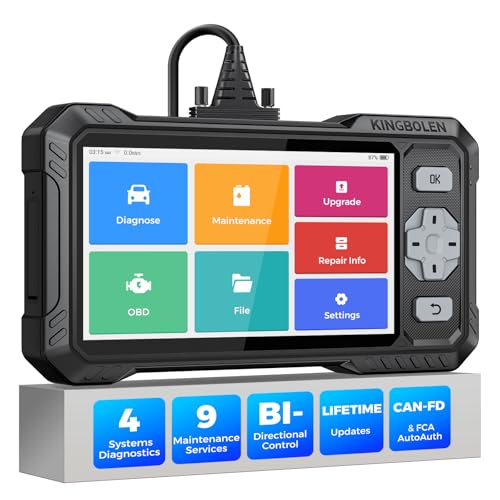
- WHY S608 STANDS OUT:2026 Kingbolen S608 is the only scanner <200 bucks that offers powerful active tests on Engine, ABS, SRS, and Transmission systems. Offers 9 resets,Covers 110+ global brands with a 6.2'' larger touchscreen
- KINGBOLEN'S NEW BIDIRECTIONAL SCAN TOOL: As the 2026 upgraded version of S600, our Newest S608 obd2 scanner has the powerful Bi-directional Control on Engine, ABS, SRS, and Transmission systems. It can send commands to the ECUs of actuators for functional tests and work status checks, such as ABS, fuel injectors, adjusting throttle, coolant pumps, EVAP test, fuel trim reset, etc. No more Guesswork. Quickly identify problem components without teardown, get fuss-free results in seconds.
- 【9 HOT RESET SERVICES CAR SCANNER】Tired of costly mechanic trips for common resets? The Kingbolen S608 obd2 scanner lets you do it yourself, even for beginners—quickly and effortlessly! It offers 9 hot reset functions: Oil/EPB Reset, ABS Bleeding, SAS Calibration, DPF Regeneration, Injector Coding, BMS Matching, Throttle Adaptation, Gear Learning. Stop paying mechanics for 5-minute jobs. Save hundreds per year! 🚗*Function vary from vehicle models. reach us to check compatibility firstly!
- 【4 SYSTEM DIAGNOSTIC TOOL + FULL OBDII FUNCTIONS】Kingbolen S608 is an OBDII scanner and 4 systems diagnostic tool made for home mechanics, DIYers, and professionals. You can access Engine, ABS, SRS, Transmission fault codes, track live data in graphs, and onboard DTC library lookup to find the right troubleshooting procedure, and diagnose with full 10 OBD2 test modes to fix most of emission issues. Give your aging cars routine maintenance to avoid costly repairs, a breakdown, or even a crash.
- 【NEW CAN FD, FCA/RENAULT SGW, 140+ BRANDS】Kingbolen S608 scanner for car supports 140+ vehicle brands, 100,000+ models, 28 languages and can be used worldwide. S608 stays up-to-date with modern vehicles, allows secure access to 2017+ FCA cars and 2015+ Renault cars (📢*Need to purchase an AutoAuth/Renault account by yourself), and supports the latest CAN-FD protocol for 2019+ GM/Chrysler, enabling 2X faster data transfer and more precise diagnostics. 🚗*Check compatibility before purchase.
This product presentation was made with AAWP plugin.
Last update on 2026-05-12 / Affiliate links / Images from Amazon Product Advertising API