
NHTSA ID Number: 10201666
Manufacturer Communication Number: 21B53
TSB/Document Date: 2021-09-30
Summary
Certain 2021 Model Year Mustang Mach-E Vehicles Equipped with Phone as a Key Option Gateway Module Programming to Activate Phone as a Key; In some of the affected vehicles, a misconfigured Enhanced Central Gateway (ECG) module prevents Phone as a Key from functioning.
If the PDF is very large, it may not load in the preview below.
Some older TSBs had multiple PDFs — visit the NHTSA Website to view all PDFs.
If the TSB PDF does not show, download or view it on the NHTSA Website.
Click on the (+) Plus Sign
Then Click on Associated Document(s)

- 💝【Questions? We’re Here Anytime】MK808S is a...
- 🔥🔥🔥【2026 NEWLY RELEASED BI-DIRECTIONAL...
- 【28+ MOST POPULAR RESET SERVICE FOR 150 MAKES】Autel...
- 【ALL SYSTEM DIAGNOSTICS, FACTORY-LEVEL SCANNER】The...
- 【AUT0 SCAN & AUT0V1N, 10X FASTER】How much have you spent...


- 💯【Conta.ct us for Support Directly】If you met any...
- 🔥🔥🔥【2026 AUTEL FLAGSHIP MK900BT MK900-BT, NEW...
- 🚗【3000+ ACTIVE TESTS (50➡3000+), SAME AS MS...
- 🚗【40+ HOT SERVICES FOR 150 MAKES (28+➡40+)】Full...
- 🚗【OE ALL SYSTEM DIAGNOSE, AUTO SCAN 2.0: SCAN LICENSE...
This product presentation was made with AAWP plugin.
Search NHTSA Database for Recalls
Search NHTSA Database for Vehicle Investigations
View Latest Vehicle Investigations
Search NHTSA Database for Vehicle Complaints
View Latest Vehicle Complaints
TSB/Document ID: 21B53
Replacement Service Bulletin Number:
MFR Communication Date: 2021-09-07
MFR Internal Campaign ID/Software Version:
Communication Type: Service Bulletin/Repair Instructions
NHTSA Components: ELECTRICAL SYSTEM
MFR Component System:
MFR Component Subsystem:
Previous TSB | Next TSB |
David J. Johnson
Director
Service Engineering Operations
Ford Customer Service Division
Ford Motor Company
P. O. Box 1904
Dearborn, Michigan 48121
September 7, 2021
TO:
All U.S. Ford and Lincoln Dealers
SUBJECT:
NEW VEHICLE DELIVERY HOLD
Customer Satisfaction Program 21B53
Certain 2021 Model Year Mustang Mach-E Vehicles Equipped with Phone as a Key
Option
Gateway Module Programming to Activate Phone as a Key
PROGRAM TERMS
This program will be in effect through September 30, 2022, for vehicles within the new bumper-tobumper warranty coverage period.
AFFECTED VEHICLES
Vehicle
Model Year
Assembly Plant
Mustang
Mach-E
2021
Cuautitlan
Build Dates
July 6, 2021 through July 24, 2021
Affected vehicles are identified in OASIS and FSA VIN Lists.
REASON FOR THIS PROGRAM
In some of the affected vehicles, a misconfigured Enhanced Central Gateway (ECG) module prevents
Phone as a Key from functioning.
SERVICE ACTION
Before delivering any new in-stock vehicles involved in this program, dealers are to reprogram the
ECG module to the latest level. This service must be performed on all affected vehicles at no charge
to the vehicle owner.
OWNER NOTIFICATION MAILING SCHEDULE
Owner letters are expected to be mailed the week of October 4, 2021. Dealers should repair any
affected vehicles that arrive at their dealerships, whether or not the customer has received a letter.
ATTACHMENTS
Attachment I:
Attachment II:
Attachment III:
Administrative Information
Labor Allowances and Parts Ordering Information
Technical Information
© Copyright 2021 Ford Motor Company
QUESTIONS & ASSISTANCE
For questions and assistance, contact the Special Service Support Center (SSSC) via the SSSC Web
Contact Site. The SSSC Web Contact Site can be accessed through the Professional Technician
System (PTS) website using the SSSC link listed at the bottom of the OASIS VIN report screen or
listed under the SSSC tab.
Sincerely,
David J. Johnson
© Copyright 2021 Ford Motor Company
ATTACHMENT I
Page 1 of 2
NEW VEHICLE DELIVERY HOLD
Customer Satisfaction Program 21B53
Certain 2021 Model Year Mustang Mach-E vehicles equipped with Phone as a Key option
Gateway Module Programming to Activate Phone as a Key
OASIS ACTIVATION
OASIS will be activated on September 7, 2021.
FSA VIN LISTS ACTIVATION
FSA VIN Lists will be available through https://web.fsavinlists.dealerconnection.com on September 7,
2021.
NOTE: Your FSA VIN Lists may contain owner names and addresses obtained from motor vehicle
registration records. The use of such motor vehicle registration data for any purpose other than in
connection with this program is a violation of law in several states, provinces, and countries.
Accordingly, you must limit the use of this listing to the follow-up necessary to complete this service
action.
SOLD VEHICLES
• Correct affected vehicles identified in OASIS which are brought to your dealership within the
applicable Bumper-To-Bumper warranty coverage period.
• Dealers are to prioritize repairs of customer vehicles over repairs of new and used vehicle
inventory.
STOCK VEHICLES
• Correct all affected units in your new vehicle inventory before delivery.
TITLE BRANDED / SALVAGED VEHICLES
Affected title branded and salvaged vehicles are eligible for this service action.
OWNER REFUNDS
Refunds are not approved for this program.
RENTAL VEHICLES
Rental vehicles are not approved for this program.
ADDITIONAL REPAIR (LABOR TIME AND/OR PARTS)
Additional repairs identified as necessary to complete the FSA should be managed as follows:
• For related damage and access time requirements, refer to the Warranty and Policy Manual /
Section 6 – Ford & Lincoln Program Policies / General Information & Special Circumstances
for FSA’s / Related Damage.
• For vehicles within new vehicle bumper-to-bumper warranty coverage, no SSSC approval is
required, although related damage must be on a separate repair line with the “Related
Damage” radio button checked.
o Ford vehicles – 3 years or 36,000 miles
• For vehicles outside new vehicle bumper-to-bumper warranty coverage, submit an Approval
Request to the SSSC Web Contact Site prior to completing the repair.
© Copyright 2021 Ford Motor Company
ATTACHMENT I
Page 2 of 2
NEW VEHICLE DELIVERY HOLD
Customer Satisfaction Program 21B53
Certain 2021 Model Year Mustang Mach-E vehicles equipped with Phone as a Key option
Gateway Module Programming to Activate Phone as a Key
CLAIMS PREPARATION AND SUBMISSION
• Claim Entry: Enter claims using Dealer Management System (DMS) or One Warranty
Solution (OWS) online.
o When entering claims:
▪ Claim type 31: Field Service Action. The FSA number 21B53 is the sub code.
▪ Customer Concern Code (CCC): A93
▪ Condition Code (CC): 42
▪ Causal Part Number: 14G617
▪ Part Quantity: 0
o For additional claims preparation and submission information, refer to the Recall and
Customer Satisfaction Program (CSP) Repairs in the OWS User Guide.
• Related Damage/Additional labor and/or parts: Must be claimed as Related Damage on a
separate repair line from the FSA with same claim type and sub code as described in Claim
Entry above.
IMPORTANT: Click the Related Damage Indicator radio button.
© Copyright 2021 Ford Motor Company
ATTACHMENT II
Page 1 of 1
NEW VEHICLE DELIVERY HOLD
Customer Satisfaction Program 21B53
Certain 2021 Model Year Mustang Mach-E vehicles equipped with Phone as a Key option
Gateway Module Programming to Activate Phone as a Key
LABOR ALLOWANCES
Description
Reprogram Gateway Control Module to the latest level.
Labor Operation
Labor Time
MT21B53B
Up to 1.0 Hours
PARTS REQUIREMENTS / ORDERING INFORMATION
Parts are not required to complete this repair.
© Copyright 2021 Ford Motor Company
ATTACHMENT III
PAGE 1 OF 2
CUSTOMER SATISFACTION PROGRAM 21B53
CERTAIN 2021 MODEL YEAR MACH-E VEHICLES — GATEWAY MODULE
SOFTWARE UPDATE
SERVICE PROCEDURE
Module Programming
1. Connect a battery charger to the 12V battery.
NOTE: Verify that the negative cable of the charger is installed on a chassis or engine ground, and not
the 12 volt battery negative terminal to prevent the battery saver mode from activating on the
vehicle.
NOTE: If the diagnostic software does not load or if the vehicle cannot be identified properly, make sure
there is a good internet connection and the Vehicle Communication Module II (VCM II) is properly
connected to the Data Link Connector (DLC).
NOTE: Make sure the Ford Diagnostic and Repair System (FDRS) does not enter sleep mode during
module configuration.
2. Launch Ford Diagnostic and Repair System (FDRS).
NOTE: Vehicle information is automatically retrieved by the diagnostic software and a Network Test is
run. Vehicle identification data appears on the screen when this is complete.
3. Click 'Read VIN from Vehicle' or manually enter the Vehicle Identification Number (VIN).
NOTE: Available modules are shown on the left hand (LH) side of the screen, and available procedures
are listed on the right hand (RH) side of the screen. Modules that are communicating are
highlighted in green.
4. Select Toolbox tab.
5. From the list on the LH side of the screen, select GWM.
6. From the list on the RH side of the screen, select GWM - Gateway Module (GWM) Software
Update.
7. Click RUN. Follow all on-screen instructions carefully.
8. From the list on the RH side of the screen, select Self-Test and click RUN.
9. Click the Run Selected Tests button in the lower right.
10. Click the Clear & Retest button at the top of the screen to clear Diagnostic Trouble Codes (DTC's) in
all modules.
11. Disconnect the battery charger from the 12V battery.
12. The repair is complete.
CPR © 2021 FORD MOTOR COMPANY
DEARBORN, MICHIGAN 48121
09/2021
ATTACHMENT III
PAGE 2 OF 2
CUSTOMER SATISFACTION PROGRAM 21B53
Important Information for Module Programming
NOTE: When programming a module, use the following basic checks to ensure programming completes
without errors.
• Make sure the 12V battery is fully charged before carrying out the programming steps and connect
FDRS/scan tool to a power source.
NOTE: A good internet connection is necessary to identify the vehicle and to load the diagnostic software.
• Inspect Vehicle Communication Module II (VCM II)/Vehicle Communication and Measurement Module
(VCMM) and cables for any damage. Make sure scan tool connections are not interrupted during
programming.
• A hardwired connection is strongly recommended.
• Turn off all unnecessary accessories (radio, heated/cooled seats, headlamps, interior lamps, HVAC
system, etc.) and close doors.
• Disconnect/depower any aftermarket accessories (remote start, alarm, power inverter, CB radio,etc.).
• Follow all scan tool on-screen instructions carefully.
• Disable FDRS/scan tool sleep mode, screensaver, hibernation modes.
• Create all sessions key on engine off (KOEO). Starting the vehicle before creating a session will cause
errors within the programming inhale process.
Recovering a module when programming has resulted in a blank module
a. Disconnect the VCMII or VCMM from the data link connector (DLC) and your PC.
b. After ten seconds, reconnect the VCMII/VCMM to the DLC and the PC. Launch FDRS. The
VCMII/VCMM icon should turn green in the bottom right corner of the screen. If it does not,
troubleshoot the FDRS to VCM connection.
c. If you are using the same FDRS as the initial programming attempt, select the appropriate VIN from
the Vehicle Identification menu. If you are using a different FDRS, select “Read VIN from Vehicle”
and proceed through the Network Test.
d. In the Toolbox menu, navigate to the failed module and Download/Run Programmable Module
Installation (PMI). Follow the on-screen prompts. When asked if the original module is installed,
select “No” and continue through the installation application.
e. Once programming has completed, a screen may list additional steps required to complete the
programming process. Make sure all applicable steps are followed in order.
CPR © 2021 FORD MOTOR COMPANY
DEARBORN, MICHIGAN 48121
09/2021
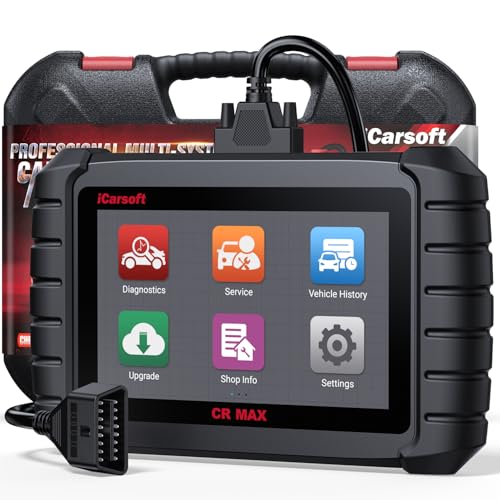
- WHY CHOOSE THE 2025 CR MAX -Upgrade the latest diagnostic capabilities for all vehicles after 1996: upgrade to 49+maintenance services; 46 extra specific functions; real all systems/all control modules diagnose; over 40K+ bidirectional actuation tests for diagnosing all control moduels of cars; Powerful full OBD2 Functions; built-in ECU Coding for BMW
 / Audi/ VW/ RollsRoyce; Fr ee V.A.G Guide Function; Battery retistration for new battery adaptation and more. It covers all vehicle diagnostic services and some special professional vehicle maintenance servces, assists you to do home DIY vehicle maintenance or car repair as a pro technician.
 - NEWEST IN INNOVATION FULL OBD2 SERVICES- iCarsoft auto car diagnostic scanner compatible with CAN-FD, CR MAX can do it all-reads and clears trouble codes, ALL SYSTEM DIAGNOSIS such as engine, transmission, ABS and airbag etc. CR MAX code reader for all cars can perform I/M Readiness, Live Data, Freeze Frame, Vehicle Information, Monitor Test, On-Board Monitor, E vap System Test,O2 Sensor Test,DTC Library Lookup,etc. (Warm Tips: If you car is after 2023,please contact us for compatibility; 3. It comes with 16PIN OBD2 diagnostic adapter, please check your car diagnostic socket if it is 16pin socket, if your car is 14pin diagnostic socket please contact us for the solution.)
- 49 RESET+ 46 SERVICES- Performs: Oil Reset, EPB,SAS,Throttle, D-P - F, Battery, ABS, Injector, TPMS, Suspension, AC, Head Lamp, Body Stablity, Engine, Tramsmission, Airbag, Seat, Door-Win-Roof, Fuel Pump, Door, E-G- R.+21 NEWEST SERVICES( Need update scanner)-AdBlue, Clutch, Crankshaft, High Voltage Battery, Cruise Control, NO xSensor, Rain Sensor, Stop And Start, Turbocharger, Head Up Display, Radar Camera, Vehicle Setup, Cyliner Misfire Check,Speedlimitassist, ControlUnitReset,OxygenSensor, Seatbelt. Extra 46+ extra services based on car brand.(Tips: Quantity of reset/ calibration fucitons are based on car system that your vehicle model has)
- REVOLUTIONARY 40000+BIDIRECTIONAL ACTIVE TESTS: Upgraded CR Max scanner equip with numberous of actuational test items for covering all available vehicle control modules, no longer only do simple light test or window test like other scanners, performs hardware modules test and software control modules test for checking car units or new updated control moduels work well or not after maintenance/ repair/ re-installation/ control system updated (Example for Benz- Roller Sun Blind test; Backup Camera test ;Self-test; EPB test; Transport Mode test;Boost Pressure Positioner test; Fuel Pump test; AND MORE!!).(Warm tip: The available test items are based on control modules your car has)
- ECU CODING+ BATTERY REGISTRATION- Powerful ECU Coding service for BMW/MINI/RollsRoyce / Audi/VW/Seat/Skoda/Bentley/Bugatti/Lamborghini, Improves Engine Power Performance and Optimizes Fuel Efficiency and Match New Hardware Unit to car and Customized a comfortable Driving Modes and Fixes & Updates Original Software Bug. The battery test function for checking car battery health, perform battery reset (BMS ) for replacing a damaged or aging car battery with a new one and register new battery to car ECU

- Scanner POR V2.0 with all obd2 services
- Do the scanning for engine
- Support OBDII/EOBD Ten Modes of Operation

- 【Designed for Most Mercedes-Benz, Sprinter and Smart from 1996-2023】As every car model of Benz has its-owned specific car system and ECUs, not all models are equipped with a complete vehicle ECU, which may cause the scanner to be unable to perform all listed reset services on some models, or even completely incompatible. Like For Sprinter's newer models, it support diagnostic functions only, lacking support for specialized service functions.. So please tell us the car's VIN and required service before purchase for compatibility check. You may also refer to the instructions in the eighth image of the main product photos to perform your inquiry.
- 【Up to 38 Reset Services】MB V3.0 2026 Version diagnostic tool performs Up to 38 maintenance services - Oil Rest , SAS, EPB, ETC, D-P-F, TPMS, ABS, Suspension, Air Conditioner, Head Lamp, Body Stability, Engine Control, Seat, Fuel Pump, Air-Filter, Engine Idle, Door, Im-mo-bilizer, Injector Coding, Transmission Control, Miscellaneous, Adblue, BMS, Cluth, Water Pump, NOxSensor, Rain/Light Sensor, Start/Stop, Radar/Camera, Cylinder Shutoff Test, Speed Limit Assist, Control Unit Reset, Oxygen Sensor, Seat Belt, Cruise Control System, Turbocharger, Crankshaft, Language Setting and etc. (Tips: Please update the software after receiving the product to obtain new service functions)
- 【OE-Level All System OBD2 Scanner】iCarsoft MB V3.0 (2026 Version) diagnostic scanner offers comprehensive OBDII services, allowing you to quickly scan all systems, including the Engine, ABS, SAS, SRS, TPMS, TCM, Fuel Pump System, ESP, EPB, EPS, Suspension, SCM, Adaptive Systems, and more. It supports functions such as reading and erasing codes, checking I/M readiness, viewing freeze frame data, performing O2 sensor tests, conducting on-board monitoring, testing the evap system, auto VIN retrieval, and reading both generic and specific codes, as well as DTCs and battery tests.
- 【Bidirectional Scan Tool】iCarsoft MB V3.0 (2026 Version) Bidirectional scanner supports activate or control a vehicle system or component, allows commanding cars’ modules and receiving info from the ECU to perform active tests on individual components, including EVAP/ABS Motor Pump/Windows/Sunroof and more, to pinpoint fault causes & resolve issues,and allows you to re-learn certain components after making repairs or replacement.
- 【Real Time Record & Graph View】iCarsoft MB V3.0 (2026 Version) can automatically record vehicle text history and identify vehicle information. Preserve real-time data information. View & Graph Live Data. Support Data Review and Print. Multi-language: English, German, Dutch, Spanish, French and so on. We promise to offer Lifetime updates (Lifetime free Update via PC), and confidence in products. We also provide 1 year warranty + extra lifetime hardware free repair if you need it in the future. We prioritize user experience & strive to meet your expectations. Please do feel free to reach out to us if you have any question or problem about the usage, our tech team will service you in time.
This product presentation was made with AAWP plugin.
Last update on 2026-05-12 / Affiliate links / Images from Amazon Product Advertising API