
NHTSA ID Number: 10198412
Manufacturer Communication Number: W50 Combo Rev2
TSB/Document Date: 2021-06-28
Summary
Customer Satisfaction Notification W50 Driver Air Bag
Revision (2) May 2021
Dealer Service Instructions for:
Customer Satisfaction Notification W50
Driver Air Bag
NOTE: Parts MUST be RETURNED ignore information in PRAS system.
SPECIAL RETURN INSTRUCTIONS ON PAGES 2 and 3 - DO NOT SCRAP!
NOTE: Parts Information Section has been revised. In order for customers to
receive their cash gift card they will need to contact 833-585-0144 and complete
a short survey.
Remedy Available
2011-2012 (LX) Chrysler 300
300
NOTE: Some vehicles above may have been identified as not involved in this
campaign and therefore have been excluded from this campaign.
IMPORTANT: Some of the involved vehicles may be in dealer used vehicle
inventory. Dealers should complete this campaign service on these vehicles
before retail delivery. Dealers should also perform this campaign on vehicles in
for service. Involved vehicles can be determined by using the VIP inquiry process.
Subject
Although not currently under recall, FCA is requesting that certain customers
allow dealers to replace their Driver Air Bag (DAB). The manufacturer of the air
bag has requested the assistance of various automakers to obtain a large number of
air bag inflators from around the country for testing.
Repair
The DAB will be replaced and the original DAB will be returned to the
manufacturer for testing.
Copyright 2021, FCA US LLC, All Rights Reserved
(tdb)
Customer Satisfaction Notification W50 – Driver Air Bag
Page 2
NOTE: SPECIAL DAB RETURN INSTRUCTIONS ON PAGES 2 and 3 - DO NOT SCRAP!
Parts Information
NOTE: All involved vehicle owners known to FCA are being notified of the
service requirement by phone. An appointment will be scheduled by a threeway phone call between the third-party, customer and dealer. Once the
appointment is scheduled, the dealer will order the part on the customer’s
behalf.
SPECIAL NOTE: The dealer will order the driver air bag with the part
number supplied by the third party agent. The part will be shipped from the
PDC. Dealer should confirm part has arrived before customer comes in for
service visit.
The appropriate DAB for each vehicle is VIN specific.
VIN specific parts application is available through the Global Recall System
(GRS) and Vehicle Information Plus (VIP).
To use GRS, enter DealerCONNECT, click on the “Service” tab, click on
“Global Recall System,” enter the recall number in the “Recall Code:”
box, and select “VIN” in the “List By:” drop down menu.
To use VIP, enter DealerCONNECT, click on the “Service” tab, click on
“Single VIN Inquiry,” enter the VIN and mileage, click “View,” then
click on the “Coverages” tab and view the “Recall” section.
Required parts should be ordered through DealerConnect Parts Order.
Parts Return
NOTE: Parts MUST be RETURNED ignore information in PRAS system
Parts Manager: Please follow these instructions. Print a copy of the yellow
colored page and tape it over two sides of the box so it can be easily identified by
the return facility.
Air bag must be picked up once removed, do not hold with standard recall parts.
NOTE: Parts MUST be RETURNED ignore information in PRAS system.
Customer Satisfaction Notification W50 – Driver Air Bag
Page 3
NOTE: SPECIAL DAB RETURN INSTRUCTIONS ON PAGES 2 and 3 - DO NOT SCRAP!
Parts: Manager
HEALTHY INFLATOR RETURN
Please print a copy of this page and tape it over two sides of the box so it
can be easily identified by the return facility.
This will get returned with other Takata Airbag returns.
HEALTHY INFLATOR RETURN
NOTE: Parts MUST be RETURNED ignore information in PRAS system.
Customer Satisfaction Notification W50 – Driver Air Bag
Page 4
NOTE: SPECIAL DAB RETURN INSTRUCTIONS ON PAGES 2 and 3 - DO NOT SCRAP!
Special Tools
The following special tools are required to perform this repair:
NPN
wiTECH MicroPod II
NPN
Laptop Computer
NPN
wiTECH Software
NOTE: Parts MUST be RETURNED ignore information in PRAS system.
Customer Satisfaction Notification W50 – Driver Air Bag
Page 5
NOTE: SPECIAL DAB RETURN INSTRUCTIONS ON PAGES 2 and 3 - DO NOT SCRAP!
Service Procedure
WARNING: To avoid serious or fatal injury on vehicles equipped with air
bags, disable the Supplemental Restraint System (SRS) before attempting any
steering wheel, steering column, air bag, seat belt tensioner, impact sensor or
instrument panel component diagnosis or service. Disconnect and isolate the
battery negative (ground) cable, then wait two minutes for the system
capacitor to discharge before performing further diagnosis or service. This is
the only sure way to disable the SRS. Failure to take the proper precautions
could result in accidental air bag deployment.
At no time should any source of electricity be permitted near the inflator on
the back of a non-deployed air bag. When carrying a non-deployed air bag,
the trim cover or air bag cushion side of the unit should be pointed away from
the body to minimize injury in the event of an accidental deployment. If the
air bag unit is placed on a bench or any other surface, the trim cover or air
bag cushion side of the unit should face upward to minimize movement in the
event of an accidental deployment.
WARNING: To avoid serious or fatal injury, use extreme care to prevent any
foreign material from entering the Driver Air bag (DAB), or becoming
entrapped between the DAB cushion and the DAB trim cover. Failure to
observe this warning could result in occupant injuries upon air bag
deployment.
WARNING: To avoid serious or fatal injury, the driver air bag trim cover
must never be painted. Replacement air bags are serviced with trim covers in
the original colors. Paint may change the way in which the material of the
trim cover responds to an air bag deployment. Failure to observe this warning
could result in occupant injuries upon air bag deployment.
NOTE: Parts MUST be RETURNED ignore information in PRAS system.
Customer Satisfaction Notification W50 – Driver Air Bag
Page 6
NOTE: SPECIAL DAB RETURN INSTRUCTIONS ON PAGES 2 and 3 - DO NOT SCRAP!
Service Procedure [Continued]
A. Removal
1. Disconnect the Intelligent Battery
Sensor (IBS) then disconnect and
isolate the negative cable from the
battery. Wait two minutes for the
system capacitor to discharge before
further service.
2. Remove the screw access covers
from each side of the steering wheel
rear trim cover (Figure 1).
ACCESS COVER
Figure 1 – Screw Access Cover
SCREW
3. Working through the access holes in
each side of the steering wheel rear
trim cover, remove the two screws
that secure the DAB and floating horn
switch unit to the steering wheel
armature (Figure 2).
4. Pull the DAB and floating horn
switch unit away from the steering
wheel far enough to access the
electrical connections on the back side
of the unit (Figure 3).
Figure 2 – DAB and Floating Horn
Switch Unit Screw
ELECTRICAL
CONNECTIONS
DAB AND HORN
SWITCH UNIT
DAB SCREWS
Figure 3 – Electrical Connections
NOTE: Parts MUST be RETURNED ignore information in PRAS system.
Customer Satisfaction Notification W50 – Driver Air Bag
Page 7
NOTE: SPECIAL DAB RETURN INSTRUCTIONS ON PAGES 2 and 3 - DO NOT SCRAP!
Service Procedure [Continued]
5. Disconnect the steering wheel
wire harness connector from
the floating horn switch
connector on the back of the
DAB unit (Figures 4 and 5).
HORN SWITCH CONNECTOR
DAB AND HORN
SWITCH UNIT
DAB CONNECTORS
Figure 4 – Horn Switch Connector
HORN SWITCH CONNECTOR
DAB CONNECTORS
INTEGRAL LATCHES
Figure 5 – Driver Air Bag
NOTE: Parts MUST be RETURNED ignore information in PRAS system.
Customer Satisfaction Notification W50 – Driver Air Bag
Page 8
NOTE: SPECIAL DAB RETURN INSTRUCTIONS ON PAGES 2 and 3 - DO NOT SCRAP!
Service Procedure [Continued]
CAUTION: Do not pull on the clockspring pigtail wires or pry on the
connector insulators to disengage them from the Driver Air bag (DAB)
inflator initiator connector receptacles. Improper removal of these pigtail
wires and their connector insulators can result in damage to the air bag
circuits or the connector insulators.
6. The clockspring DAB pigtail wire connector insulators are secured by integral
latches to the air bag inflator connector receptacles, which are located on the
back of the DAB housing. Pinch both latches firmly, then pull the insulators
straight out from the air bag inflator to disconnect them from the connector
receptacles (Figures 5 and 6).
7. Remove the DAB from the steering wheel. Do not discard, the DAB must be
returned to the manufacturer for testing. Place the removed DAB in the same
box the new DAB was received in.
DAB CONNECTOR
INTEGRAL LATCH
HORN SWITCH CONNECTOR
DAB CONNECTOR
INTEGRAL LATCH
Figure 6 – Driver Air Bag
NOTE: Parts MUST be RETURNED ignore information in PRAS system.
Customer Satisfaction Notification W50 – Driver Air Bag
Page 9
NOTE: SPECIAL DAB RETURN INSTRUCTIONS ON PAGES 2 and 3 - DO NOT SCRAP!
Service Procedure [Continued]
B. Installation
1. Position the NEW DAB and floating horn switch unit close enough to the
steering wheel to reconnect the electrical connections to the back of the air bag
housing (Figure 4).
2. Reconnect the steering wheel wire harness connector to the floating horn switch
connector on the back of the DAB unit (Figures 4 and 5).
3. Reconnect the wire connectors to the air bag inflator connector receptacles by
pressing straight in on the connector insulator. Be certain to engage each keyed
and color-coded connector to the matching connector receptacle. You can be
certain that each connector is fully engaged in its receptacle by listening
carefully for a distinct, audible click as the connector latches snap into place
(Figures 5 and 6).
4. Carefully position the DAB and floating horn switch unit into the steering
wheel hub. Be certain that none of the steering wheel wiring is pinched between
the air bag housing or the horn switch and the steering wheel armature
(Figure 3).
5. Working through the access holes in each side of the steering wheel rear trim
cover, install and tighten the two screws that secure the floating horn switch and
DAB unit to the steering wheel armature. Tighten the screws to 13 N·m
(10 ft. lbs.) (Figure 2).
6. Install the screw access covers on each side of the steering wheel rear trim
cover (Figure 1).
7. Do not reconnect the negative cable to the battery at this time. The
Supplemental Restraint System (SRS) Verification Test procedure should be
performed following service of any SRS component.
NOTE: The following procedure should be performed using the wiTECH
scan tool to verify proper SRS operation following the service or
replacement of any SRS component. Be certain that the wiTECH scan tool
contains the latest version of the proper diagnostic software.
NOTE: Parts MUST be RETURNED ignore information in PRAS system.
Customer Satisfaction Notification W50 – Driver Air Bag
Page 10
NOTE: SPECIAL DAB RETURN INSTRUCTIONS ON PAGES 2 and 3 - DO NOT SCRAP!
Service Procedure [Continued]
NOTE: During the following SRS test, the battery negative cable remains
disconnected and isolated as it was during the component removal and
installation procedures.
8. Connect the wiTECH micro pod II to the 16-way Data Link Connector (DLC).
The DLC is located on the driver side lower edge of the instrument panel, near
the steering column opening cover and outboard of the steering column.
NOTE: Follow the appropriate SRS verification test procedure either
Step 8 or Step 9 depending on ignition type.
9. If the vehicle is equipped with Standard Key Ignition. Failure to follow these
instructions may result in possible serious or fatal in jury.
a. Turn the ignition switch to the “RUN” position then exit the vehicle with the
scan tool and close the doors.
b. Check to be certain that nobody is in the vehicle, then connect the battery
negative cable to the battery post and tighten the clamp nut to 5 N·m
(44 in. lbs.). Connect the IBS.
10. If the vehicle is equipped with Keyless Go. Failure to follow these instructions
may result in possible serious or fatal in jury.
a. Remove the Occupant Restraint Controller (ORC) fuse (Figure 7).
b. Connect the battery negative cable to
the battery post and tighten the clamp
nut to 5 N·m (44 in. lbs.). Connect the
IBS.
ORC FUSE
c. Wait two minutes before proceeding.
d. Cycle the ignition to the on position.
e. Reconnect the ORC fuse (Figure 7).
Figure 7 – ORC Fuse
NOTE: Parts MUST be RETURNED ignore information in PRAS system.
Customer Satisfaction Notification W50 – Driver Air Bag
Page 11
NOTE: SPECIAL DAB RETURN INSTRUCTIONS ON PAGES 2 and 3 - DO NOT SCRAP!
Service Procedure [Continued]
11. Open the wiTECH 2.0 website.
12. Enter your “User id” and “Password” and your “Dealer Code”, then select
“Sign In” at the bottom of the screen. Click “Accept”.
13. Starting at the “Vehicle Selection” screen, select the appropriate vehicle and
Device Name.
14. From the “Action Items” screen, click “All DTCs”, select “Clear All DTCs”,
click “Continue” and then click “Close”.
15. If DTCs are still stored, cycle the ignition OFF/ON to change DTC status from
“active” to “stored” then clear DTCs again.
16. Turn the ignition switch to the “OFF” position for about 15 seconds, and then
back to the “RUN” position. Observe the air bag indicator in the instrument
cluster.
The air bag indicator should illuminate from four to six seconds, and then
go out. This indicates that the SRS is functioning normally and that the
repairs are complete.
If the air bag indicator fails to light or the light remains ON, there is still
an active SRS fault or malfunction. Refer to the appropriate diagnostic
information to diagnose the problem.
17. Turn the ignition to the “OFF” position.
18. Close the hood and remove the wiTECH micro pod II from the DLC.
19. Return the vehicle to the customer.
NOTE: Parts MUST be RETURNED ignore information in PRAS system.
Customer Satisfaction Notification W50 – Driver Air Bag
Page 12
NOTE: SPECIAL DAB RETURN INSTRUCTIONS ON PAGES 2 and 3 - DO NOT SCRAP!
Completion Reporting and Reimbursement
Claims for vehicles that have been serviced must be submitted on the
DealerCONNECT Claim Entry Screen located on the Service tab. Claims paid
will be used by FCA to record Customer Satisfaction Notification service
completions and provide dealer payments.
Use the following labor operation number and time allowance:
Replace Air Bag Module
Labor Operation
Number
Time
Allowance
19-W5-01-82
0.4 hours
NOTE: See the Warranty Administration Manual, Recall Claim Processing
Section, for complete claim processing instructions.
Dealer Notification
To view this notification on DealerCONNECT, select “Global Recall System” on
the Service tab, then click on the description of this notification.
Owner Notification and Service Scheduling
All involved vehicle owners known to FCA are being notified of the service
requirement by phone.
NOTE: Parts MUST be RETURNED ignore information in PRAS system.
Customer Satisfaction Notification W50 – Driver Air Bag
Page 13
NOTE: SPECIAL DAB RETURN INSTRUCTIONS ON PAGES 2 and 3 - DO NOT SCRAP!
Vehicle Lists, Global Recall System, VIP and Dealer Follow Up
VIN lists may contain confidential, restricted owner name and address information that was
obtained from the Department of Motor Vehicles of various states. Use of this information is
permitted for this notification only and is strictly prohibited from all other use.
Additional Information
If you have any questions or need assistance in completing this action, please
contact your Service and Parts District Manager.
Customer Service / Field Operations
FCA US LLC
NOTE: Parts MUST be RETURNED ignore information in PRAS system.
This notice applies to your vehicle,
CUSTOMER SATISFACTION NOTIFICATION
Driver Air Bag
[Model Year and Model]
VIN XXXXXXXXXXXXXXXXX
W50
LOGO
VEHICLE PICTURE
Dear [Name],
At FCA US LLC, we recognize that the success of our business depends on the satisfaction of
our customers. We are constantly monitoring the quality of our products and looking for
opportunities to improve our vehicles even after they are sold. Because your long-term
satisfaction is important to us, we are contacting you on important improvements we would
like to make to your vehicle [1]. This will be done at no charge to you.
We are recommending the following improvements be performed on certain [2011 and 2012
model year (LX) Chrysler 300] vehicles.
WHY DOES MY VEHICLE NEED REPAIRS?
Although not currently under recall, FCA is requesting that certain customers allow dealers to
replace their Driver Air Bag (DAB). The manufacturer of the air bag has requested the
assistance of various automakers to obtain a large number of air bag inflators from around the
country for testing.
YOUR SCHEDULING OPTIONS
1. RECOMMENDED OPTION
Call your authorized Chrysler /
Dodge / Jeep® / RAM Dealership
2. Call the FCA Recall Assistance
Center at 1-800-853-1403. An
agent
can
confirm
part
availability and help schedule an
appointment
3. Visit recalls.mopar.com, scan the
QR code below, or download the
Mopar Owner’s Companion App.
QR Code
HOW DO I RESOLVE THIS CUSTOMER SATISFACTION NOTIFICATION?
FCA US will repair your vehicle free of charge (parts and labor). To do this, your dealer will
replace the DAB. The estimated repair time is one hour. In addition, your dealer will require
your vehicle for proper check-in, preparation, and check-out during your visit, which may
require more time. Your time is important to us, so we recommend that you schedule a service
appointment to minimize your inconvenience. Please bring this letter with you to your
dealership.
TO SCHEDULE YOUR FREE REPAIR,
CALL YOUR CHRYSLER, DODGE, JEEP OR RAM DEALER TODAY
WHAT IF I ALREADY PAID TO HAVE THIS REPAIR COMPLETED?
If you have already experienced this specific condition and have paid to have it repaired, you
may visit www.fcarecallreimbursement.com to submit your reimbursement request online. [2]
Once we receive and verify the required documents, reimbursement will be sent to you within
60 days. If you have had previous repairs performed and/or already received reimbursement,
you may still need to have the repair performed.
We apologize for any inconvenience, but are sincerely concerned about your satisfaction.
Thank you for your attention to this important matter.
Get access to recall notifications,
locate your nearest dealer, and more
through this website or Mopar
Owner’s Companion App. You will be
asked to provide your Vehicle
Identification Number (VIN) to
protect and verify your identity.
DEALERSHIP INSTRUCTIONS
Please reference CSN W50.
Customer Assistance/Field Operations
FCA US LLC
Mr. Mrs. Customer
1234 Main Street
Hometown, MI 48371
[1] If you no longer own this vehicle, please help us update our records. Call the FCA Recall Assistance Center at 1-800-853-1403 to update your information.
[2] You can also mail in your original receipts and proof of payment to the following address for reimbursement consideration: FCA Customer Assistance, P.O. Box 218004, Auburn Hills, MI 48321-8007, Attention: Recall Reimbursement.


Last update on 2026-06-23 / Affiliate links / Images from Amazon Product Advertising API
If the PDF is very large, it may not load in the preview below.
Some older TSBs had multiple PDFs — visit the NHTSA Website to view all PDFs.
If the TSB PDF does not show, download or view it on the NHTSA Website.
Click on the (+) Plus Sign
Then Click on Associated Document(s)
Search NHTSA Database for Recalls
Search NHTSA Database for Vehicle Investigations
View Latest Vehicle Investigations
Search NHTSA Database for Vehicle Complaints
View Latest Vehicle Complaints
TSB/Document ID: W50 Combo Rev2
Replacement Service Bulletin Number:
MFR Communication Date: 2021-05-27
MFR Internal Campaign ID/Software Version:
Communication Type: Service Bulletin/Repair Instructions
NHTSA Components: AIR BAGS
MFR Component System:
MFR Component Subsystem:
Previous TSB | Next TSB |

- 【OE-Level Full System Diagnostics-Lifetime F*REE Software Updates】The VDIAGTOOL D200 OBD2 Scanner for cars is a all system bidirectional scan tool that enjoy lifetime f*ree software updates, delivers complete system coverage. reading/clearing codes across engine, transmission, ABS, SAS, EPB, TPMS plus full access to body, chassis, powertrain and all control modules. This D200 Bidirectional car scanner works with most 1996+ OBD2 gasoline and hybrid
 cars and light trucks. It does NOT support pure electric and heavy-duty trucks. PLEASE CHECK COMPATIBILITY BEFORE ORDERING or Contact us with VIN to confirm compatibility.
 - 【Supports OBD2 Full Functions-ZERO Subscription Fees】D200 Bidirectional OBD2 Scanner is a upgarde of universal car code reader. It supports OBD2 full functions to help you turn off the annoying instrument fault indicator, such as read/clear codes, O2 sensor test, I/M readiness, on-board monitor test, datastream, freeze frame, E-VAP system test, and retrieve vehicle information. This professional obd2 scanner diagnostic tool can full access to diagnostics, reset tools and maintenance features with a single payment. NOTE: The fault code can only be cleared after the vehicle's malfunction has been repaired; please ensure the vehicle issue is fixed before clearing the code.
- 【D200 Hidden 2 Advantages: 1. $169 Expandable 49+ Advanced Resets. 2. $199 Get J2534 P*a*s*s-Thru Programming】Your core car diagnostics and 26 reset remain lifetime f*ree for everyday maintenance. When you need deeper repair capability, upgrade with 3-year access for $169 in Store on VDIAGTOOL App, gaining 49+ advanced resets. D200 configured with J2534 hardware, upgrade only when you need without replacing the entire device. You also can Lifetime Unlock for $199 in Store one-time, perform module programming, software re~flashing and ECU data updates directly. Supports 17+ major brands, including for BMW, for Audi, for GM, for Ford and more. Note:D200 does‘t provide any OE software.
- 【Full Bidirectional Control / Active Tests】The D200 car scanner diagnostic tool is a true bidirectional scan tool that lets you send commands directly to the vehicle’s ECU for active tests. Quickly test fuel pumps, relays, solenoids, injectors, cooling fans, windows, sunroofs and more to verify operation instantly. Get dealership-level diagnostic control at a fraction of the cost (ofter $100-200$ per diagnostic visit), reduce guessworkand confirm repairs faster, avoid unnecessary parts replacement, towing fees and wait times.
- 【26 F*ree Essential Reset & Relearn Functions – Everyday Maintenance Made Easy】Handle common maintenance and repair jobs without visiting the shop. The D200 code readers & scan tools includes 26 f*ree high-demand reset functions, including Oil Reset, EPB Service, SAS Calibration, ABS Brake Bleeding, Throttle Relearn, Injector Coding, Headlight Adjustment, Tire Size Reset and more. Perfect for home car owners, mechanics and DIYers – just plug and diagnose anytime, anywhere! Note: Service functions vary by vehicle model—please confirm compatibility.

- 【A MUST-HAVE TOOL FOR DIYERS】 - VDIAGTOOL VD10 car code reader is an incredibly useful obd scanner for each car owner or hobbyist, even for those with little to no experience when it comes to vehicle mechanics! Similar to a fixd car diagnostic tool, using this car diagnostic scanner is extremely easy. All you have to do is attach it to your car OBDII port and you can diagnose car problems in seconds! Read Codes (DTCs); Clear Codes; Live Data; View Freeze Frame; I/M Readiness; Vehicle Information.
- 【KEEP ENGINE IN GOOD STATUS】 - VDIAGTOOL check engine code reader brings a fast access to scan, read the car fault code, show its definition on the screen instantly, troubleshooting to find the root causes of problems, erase the engine fault code and turn off the MIL (Malfunction Indicator Light). Similar to a fixd car diagnostic tool, this car code reader helps ensure your engine stays in top condition.
- 【READ/CLEAR CODES & DTC LOOKUP】- No search online & saving your time, this vehicle car code reader retrieves generic (P0, P2, P3, and U0), manufacturer specific (P1, P3, and U1) codes, pending codes and displays DTC definitions based on the built-in database(more than 3000 codes) on the TFT screen, find out the root causes and clear the codes after fixed.
- 【LIVE DATA & RETRIEVE FREEZE FRAME】 - This diagnostic scan tool for accurate diagnosis enables you to retrieve data from vehicle sensors, such as Engine RPM, Intake air temperature, Short/Long term fuel, Misfire data and etc. The freeze frame is stored in the PCM together with the diagnostic trouble code (DTC) related to the fault. Comparable to a fixd car diagnostic tool, the VD10 car code reader car scanner can be a valuable & practical diagnostic aid and also greatly help when diagnosing intermittent problems.
- 【I/M READINESS for THE S-nn-0-g CHECK】- OBDII vehicle may not pass the annual inspection unless the required monitors since reset are complete. So you should at least read the readiness monitors and make sure they are ready. This car obd2 scanner diagnostic tool is equipped with I/M readiness function to check the operations of the e-m-issi0n system on OBD2 compliant vehicles, run I/M monitor readiness test, checking if the pass vehicle s-m-0-g inspection.
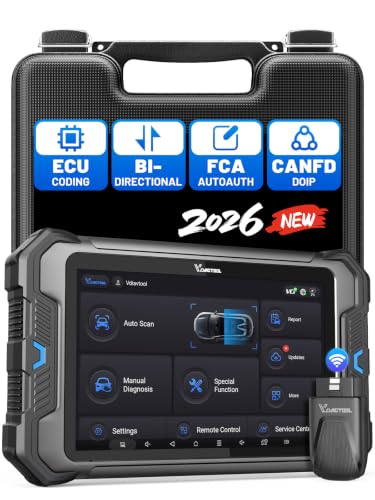
- 【Professional Diagnostics】 The VD80 BT Lite bidirectional obd2 scanner is a professional OBD2 scanner diagnostic tool, delivering vehicle diagnostics right in your own garage. It supports 4,000+ active diagnostic tests, 28+ maintenance service functions, ECU coding, PMI calibration, brake service reset, and OEM-grade full-system vehicle scanning—perfect for DIYers and pros looking for powerful automotive tools. The available function tests vary by model—please to confirm compatibility.
- 【ADVANCED ECU CODE, CUSTOMIZE OE-SETTINGS】As a complete car code reader and reset tool, the VD80 BT Lite bidirectional obd2 scanner supports ECU coding for VW, for Audi, for BMW, for Benz, for Mitsubishi and more. PMI function for Ford/for Lincoln/for Mazda, supports copy data into new module. Step-by-step Guided Diagnostics makes complex jobs easier—making this one of the most reliable code readers & scan tools on the market.
- 【100000+ Vehicles Compatibility – CAN FD/DOIP】 VD80 BT Lite Auto Scanner Compatible with 100,000+ vehicles worldwide, this bidirectiona car scanner works with all OBD2-compliant vehicles manufactured after 1996, covering more than 100 brands worldwide. It also supports CAN FD, DOIP and FCA Secure Gateway protocols, boost 2X faster data transfer, covers 99% of U.S., EU and Asian cars. With 22 languages and 2 years of f*ree updates—future-proofing your car reader diagnostic for all cars.
- 【28+ Maintenance Services & Calibration Functions】VD80 BT Lite scanner for car Supports 28 maintenance services, including resetting oil and service lights after routine maintenance, registering new batteries for proper system operation, and clear clogged filters and restore performance. Additionally, it calibrates TPMS sensors after tire rotations, resets brake systems after pad replacements, relearns steering angle sensors after alignments, and more. These functions help your vehicle quickly and accurately return to peak performance—without the costly dealer visits.
- 【True Bidirectional Control – Diagnose with Confidence】Standing out with full-system coverage and extensive active test capabilities, the VD80 BT Lite bidirectional scan tool retrieves data from electronic control units and performs a wide range of active tests. You can real-time control over modules like fuel pumps, windows, A/C clutches, and relays. Perform 100+ advanced functions including throttle adaptation, injector coding, VIN write, idle relearn, and ABS bleed—helping you fix it right the first time with this all-in-one car diagnostic scanner.
Last update on 2026-06-23 / Affiliate links / Images from Amazon Product Advertising API
This product presentation was made with AAWP plugin.