
NHTSA ID Number: 10189798
Manufacturer Communication Number: KC-400
TSB/Document Date: 2021-04-05
Summary
FSB 284-070 DTC P0194-00 and/or P016E-00, Fuel Rail Pressure Sensor (RPS) and wiring harness, Replacement
If the PDF is very large, it may not load in the preview below.
Some older TSBs had multiple PDFs — visit the NHTSA Website to view all PDFs.
If the TSB PDF does not show, download or view it on the NHTSA Website.
Click on the (+) Plus Sign
Then Click on Associated Document(s)

- Restores fuel economy
- Stabilizes ethanol
- Maximizes horsepower
- Improves responsiveness
- For use in both gasoline and diesel engines

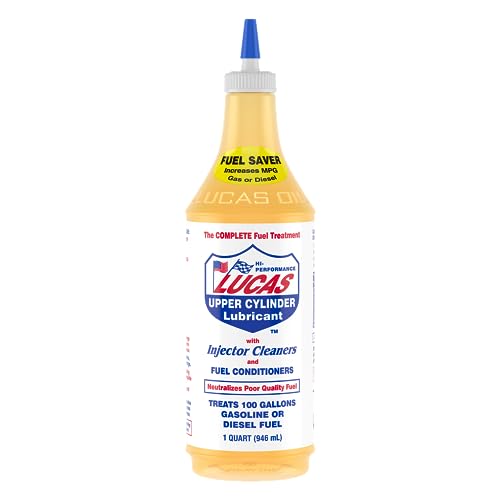
This product presentation was made with AAWP plugin.
Search NHTSA Database for Recalls
Search NHTSA Database for Vehicle Investigations
View Latest Vehicle Investigations
Search NHTSA Database for Vehicle Complaints
View Latest Vehicle Complaints
TSB/Document ID: KC-400
Replacement Service Bulletin Number:
MFR Communication Date: 2021-03-09
MFR Internal Campaign ID/Software Version:
Communication Type: Service Bulletin/Repair Instructions
NHTSA Components: ELECTRICAL SYSTEM
MFR Component System:
MFR Component Subsystem:
Previous TSB | Next TSB |
3/31/2021
Content creation stages KC-274
Mack Chassis - Vehicles Equipped With A Vertical
Selective Catalytic Reduction (SCR) System Diagnostic Trouble Codes ( DTC ) P1031 With
Possible P24DA Lighting The Malfunction Indicator
Lamp ( MIL ) - US17+OBD16 (GHG17, Common Rail
Fuel System) Emi
Internal Content
DO NOT Replace the PM sensor for P1031 and/or P24DA on
vehicles con gured as described above prior to performing the
steps below.
Verify the chassis emissions level
- Details can be found in the Product Details box on the Product
tab in PTT as seen below:
Review the Detailed Status Information for the relevant code on
the DTC Readout.
Once the chassis is con rmed to be US17+OBD16 or US17+OBD18:
Software improvements have been made that address this DTC.
UI
; LiveThere
are two documents that should be reviewed:
1/3
3/31/2021
Content creation stages KC-274
1. Product Improvement PI0883 Engine Control Module (ECM)
and Aftertreatment Control Module (ACM), Software Updates
was released July 2018. This product improvement should
appear under the Campaigns section of the Product screen of
Premium Tech Tool (PTT) when rst connecting to the vehicle.
Applicability to this campaign should be checked rst.
- The Service Program document can be found on the
dealer Mack Trucks eMedia.
• Note: There will be a prompt to sign in to the Trucks
Dealer Portal site if necessary.
• Searching for PI0883 will return a link to the bulletin.
- If the PI applies to the product it is not necessary to
proceed to the Field Service Bulletin below.
2. Field Service Bulletin FSB 284-067 Engine Control Module
(ECM) and Aftertreatment Control Module (ACM),
Reprogramming has been released and should be reviewed if
the Product Improvement does not apply to the vehicle.
- The FSB document can be found on Mack Trucks eMedia or
under the Service tab in Impact.
• Searching for 284-067 will return a link to the document
in either application.
3. If either of the above documents applied and there are no
other issues present, the vehicle should be released when
software updates have been completed.
If software is current according to the bulletin, refer to CBR
Solution CBR-193 for more information.
If other symptoms or related codes are present, normal
diagnostics will need to be performed to determine the cause.
2/3
3/31/2021
Content creation stages KC-274
Tags
k00527512
p103100
p1031
p1031-00
p24da-00
p24da00
Related links and attachments
No links or attachments available
Feedback
Give feedback
to help improve the content of this article
3/3
3/31/2021
Content creation stages KC-193
Mack Chassis - Particulate Matter (PM) Sensor
Diagnostic Trouble Codes (DTC) Illuminating The
Malfunction Indicator Lamp (MIL); Tech Tip TT-0142016 - US14+OBD16, US17+OBD16 And Newer
Emissions, Common Model Year 2017 And Newer
- To Be Used For EVERY
Internal Content
This Solution is relevant regardless of previous visits
and sensor replacements. At this time, multiple
sensor failures are not uncommon, regardless of
how new the sensor is. The same procedure should
be followed for every instance.
PLEASE NOTE: Instructions have been updated as of
20 June 2019. If diagnostics indicate that sensor
replacement is required, please follow FSB 284 - 068
Exhaust Particulate Sensor, Repair ( 2016 ) or FSB 284
- 069 ( 2017 ) Exhaust Particulate Sensor, Repair. An
eService case is not required
Precautions
1. The PM sensor is a smart sensor (12V supply and CAN lines) with
an orientation tab as seen below:
Installation torque of 50
Nm +/- 5 Nm
;
Live UI
1/5
3/31/2021
Content creation stages KC-193
2. PM sensors need to be handled carefully. Dropping them most
likely results in permanent damage to the sensor. Keep cap on the
sensor until ready to install the sensor to avoid any contamination.
3. NEVER (DO NOT) apply anti-seize to install the PM sensor. If for
some reason someone applied it before this repair, thoroughly clean
the threads and sealing surfaces while replacing the sensor.
4. A removed PM sensor should be capped immediately (cap from
replacement sensor) and packaged carefully, if returning to warranty
or investigation purposes.
Repair
IMPORTANT:
• If a chassis arrives with a derate warning active, the PM sensor
is not the source of the derate and there is a separate existing
issue.
• Prior to installing a new sensor for any of the steps below,
gently shake the sensor and ensure it does not rattle. If noise is
heard, another sensor should be used.
1. Verify the chassis emissions level
- Details can be found in the Product Details box on the Product
tab in PTT as seen below:
• For US17+OBD16 (Common Rail Fuel System) Chassis setting
DTCs P24DA or P1031 ONLY:
- Software improvements have been released to address this code.
UI
; LiveRefer
to CBR Solution CBR-274.
2/5
3/31/2021
Content creation stages KC-193
• For US17+OBD16 Chassis setting any other codes for the PM
Sensor, Proceed with instructions below.
• For US14+OBD16 (Commonly 2017 model year): Proceed with
instructions below.
2. Check the DTC Status
Only troubleshoot PM sensor faults if the fault is Active or
Con rmed as shown below.
3. Follow the set of instructions for the relevant DTC(s):
• P1033, P1034, P24D0 or U02A3 fault codes (Con rmed or Active)
- These PM sensor fault codes require connections and wiring
harness checks for power supply and CAN communications. Repair
can be veri ed with just KEY ON as diagnostics run immediately.
- If wiring harness and connections check isolates the problem
to the sensor:
1. Remove the sensor from the exhaust.
2. Obtain a new sensor. Gently shake the new sensor to ensure
it does not rattle.
NOTE: A sensor that rattles should not be installed.
3. Install the new sensor.
4. Clear the DTCs and release the vehicle.
1. Replace the PM sensor with the latest part. Gently shake the
new sensor to ensure it does not rattle.
NOTE: A sensor that rattles should not be installed.
2. Update the Engine Control Module (EMS) software and
clear all codes.
3. Release the vehicle.
- If the PM sensor is the current part number:
; Live UI 1. Verify that the EMS software is current.
https://volvo-trkna-prod1.pegacloud.net/prweb/PRAuth/app/VolvoKM_/iNPUIKpeinqPJi2G0hH930k43USdE1gb*/!TABTHREAD3?pyActivity=%40basec…
3/5
3/31/2021
Content creation stages KC-193
2. Remove the sensor from the exhaust.
3. Obtain a new sensor. Gently shake the new sensor to ensure
it does not rattle.
NOTE: A sensor that rattles should not be installed.
4. Install the new sensor.
5. Clear the DTCs and release the vehicle.
• All other PM sensor fault codes (Con rmed or Active)
P24B3, P24AF, P2AB0, P24B1, P24B0, P24DA, P24B7, P24B5, P24D1,
P24FC, P24AE, P24B4, and P1032. (Highlighted are common faults).
1. Verify that the EMS software is current.
2. Remove the sensor from the exhaust.
3. Obtain a new sensor. Gently shake the new sensor to ensure it
does not rattle.
NOTE: A sensor that rattles should not be installed.
4. Install the new sensor.
5. Clear the DTCs and release the vehicle.
Tags
k59554255
p1031
p1032-00
p1033-00
p1034-00
p249c-00
p24ae-13
p24af-00
p24b0-00
p24b1-00
p24b3-13
p24b4-92
p24b5-00
p24b7-00
p24d0-00
p24d1-00
p24da-00
p24fc-00
; Live UI
p103300
p103400
p2ab0-47
p249c00
p103200
p24ae13
4/5
3/31/2021
Content creation stages KC-193
p24af00
p24b000
p24b100
p24b313
p24b492
p24b500
p24b700
p24d000
p24d100
p24da00
p24fc00
Related links and attachments
No links or attachments available
p2ab047
Feedback
Give feedback
to help improve the content of this article
5/5
IMPACT 4.07.110
3/31/2021
(June 2018)
Information
Software updates with enhancements are available for the engine control module (ECM) and aftertreatment control
module (ACM) for VOLVO D11, D13 and D16 engines on OBD2017 and OBD2018 vehicles built from January 1, 2017
to March 01, 2018.
Follow the reprogramming procedure in the following order as outlined in this document:
ECM reprogramming
ACM reprogramming
The software updates address the following Diagnostic Trouble Codes (DTCs):
P0420 – Catalyst System Efficiency Below Threshold
P02FA – Diesel Intake Air Flow Position Sensor Minimum / Maximum
P24DA – Particulate Matter Sensor Exhaust Sample Error Bank 1
P009E – Fuel Pressure Relief Control Performance / Stuck Off
P0471 – Engine Exhaust Back Pressure Circuit Range/Performance
P1031 – Particulate Matter Sensor Clogged Tip
Check the current main software for ECM and ACM to determine the action required as shown in the table below.
Action Required
ECM
Main Software
Action Required
D11 / D13
Equal or Less Than
23080716
Update to Latest
Software
D16
Equal or Less Than
22825014
Update to Latest
Software
ACM
Main Software
Action Required
D11 / D13
/ D16
Equal or Less Than
23004689 (D11)
22883002 (D13)
22825000 (D16)
Update to Latest
Software
Required Tools
Premium Tech Tool (PTT) version 2.06.35 or higher
VOCOM Diagnostic Connector 88890304
Communication Interface 88890300
Note: Using other interfaces may affect programming speed.
Note: Check Premium Tech Tool version by clicking on Help tab and then click on “About Tech Tool”.
Copyright to this documentation belongs to the Volvo Group. No reproduction, copying, change, amendment or other similar disposal is entitled without prior written consent by
the Volvo Group
The information contained herein is current at the time of its original distribution, but is subject to change. The reader is advised that printed copies are uncontrolled.
2/7
IMPACT 4.07.110
3/31/2021
Software Update Procedure
You must read and understand the precautions and guidelines in Service Information, group 20, "General Safety
Practices, Engines" before performing this procedure. If you are not properly trained and certified in this procedure, ask
your supervisor for training before you perform it.
Danger
Do not attempt to repair or service this vehicle without having sufficient training, the correct service literature
and the proper tools. Failure to follow this could make the vehicle unsafe and lead to serious personal injury or
death.
1. Park the vehicle on a level surface.
2. Apply the parking brake.
3. Place the transmission in neutral or park.
4. Install the wheel chocks.
5. Connect Premium Tech Tool (PTT) to the vehicle diagnostics connector using the 16 pin OBD cable 88890304
and Communication Interface 88890300. Connect the PC to a functional LAN or modem connection and a 120
Volt AC source.
6. Turn the ignition switch “ON”.
7. Log in to PTT and Identify Vehicle is displayed.
8. Once the vehicle has been identified, enter the Work Order Number information, then click Start Work.
Copyright to this documentation belongs to the Volvo Group. No reproduction, copying, change, amendment or other similar disposal is entitled without prior written consent by
the Volvo Group
The information contained herein is current at the time of its original distribution, but is subject to change. The reader is advised that printed copies are uncontrolled.
3/7
IMPACT 4.07.110
3/31/2021
9. From the Main Menu select Program and then Program Electronic Control Unit 1700-08-03-39. Then click Start.
10. Select Engine Control Module (EMS).
Copyright to this documentation belongs to the Volvo Group. No reproduction, copying, change, amendment or other similar disposal is entitled without prior written consent by
the Volvo Group
The information contained herein is current at the time of its original distribution, but is subject to change. The reader is advised that printed copies are uncontrolled.
4/7
IMPACT 4.07.110
3/31/2021
11. Select Program to update the ECM with the latest software.
12. Certain conditions must be met to continue with programming: battery voltage above 10v, parking brake applied,
and ignition key in ON position with engine not running. When all conditions have been met, click Continue to
proceed with programming.
Copyright to this documentation belongs to the Volvo Group. No reproduction, copying, change, amendment or other similar disposal is entitled without prior written consent by
the Volvo Group
The information contained herein is current at the time of its original distribution, but is subject to change. The reader is advised that printed copies are uncontrolled.
5/7
IMPACT 4.07.110
3/31/2021
13. Select “I accept” to agree to the terms and press continue to proceed.
Note: In the United States and Canada, the programing is NOT chargeable. An invoice will not be generated.
Copyright to this documentation belongs to the Volvo Group. No reproduction, copying, change, amendment or other similar disposal is entitled without prior written consent by

- 🔥🔥🔥2026 New Functions Making X7HD the Top Dog - Big Surprise!!! ANCEL X7HD truck scanner 10 major functional advantages .✅>Full HDOBD/OBD2 Function ✅>ALL System Diagnostic ✅>42+ Reset Function ✅>Active Test / Bi-Directional Control✅>ECU Coding✅>Graphing Live Data✅>Wide Compatibility ✅>2 Yrs Free Update✅>Remote Operation✅>Bluetooth 5.0 & Wifi In addition, 8 major hardware advantages: ✅>6000 mAh✅>10.1 inch Tablet✅>2G RAM
 ✅>32G ROM (Expandable to 128GB)✅>Data Record & Replay & Print✅>Android 10.0✅>Bluetooth 5.0 & Wifi✅>14 Languages
 - 🚛OEM DPF Forced Regen & Cylinder Cutout Test & more - ANCEL X7HD diesel scanner diagnostic tool not only supports DPF regeneration, DPF reset, DPF related information reset, DPR state reset, DPD forced regeneration etc, which helps you better solve the exhaust aftertreatment system problems, but also supports activate motor to do exhaust air in ABS Automatically. Moreover, it features TPMS activation, cylinder cut-off and learning functions
- 🚛Advanced ECU Coding & Programming - ANCEL X7HD 10.1inch truck scanner diagnostic tool is equipped with advanced ECU coding, supports Level calibration, Idle speed learning and Adjustment, Camshaft timing control learning, Control unit adaptations, Injector Codes, Read/Write VIN, Road speed limit optional vehicle speed set, etc... PLEASE NOTE that ECU codes are not compatible with all vehicles, please send us your VIN# to check vehicle compatibility
- 🚛42+ Reset Functions & Bidirectional Control - 2026 newest top heavy duty truck scan tool, comes with 42+ special services (ECU, Speed Limit and Idle Reset, Oil Reset, Injector Coding, EPB, ABS, SRS, Suspension, Throttle, etc. and always keep growing), which meet all your various needs for service and maintenance
- 🚛10 Inch All Systems Diesel Scanner & Full HDOBD/OBD2 Modes - ANCEL X7HD diesel truck scan tool supports all systems scan, such as Engine, Brake, Retarder, TECU Transmission, Tachograph, ABS, SRS, TPMS, EPB, SAS, ESP, and other vehicle systems, comes with 10 obd2 service modes: read/erase error codes, Data Stream, I/M Readiness, Vehicle Information, Actuations, DTC Lookup, EVAP, view freeze frame, etc

- 【Extensive Compatibility】HD601 heavy duty truck scanner supports 12V & 24V commercial vehicles and all major truck models that comply with standard protocols (SAE J1939, SAE J1708, ISO 14230-4, ISO 15765-4 and ISO 9141-2, ISO 27145-4 and Euro6). Fits for Cummins, Paccar, Detroit, Caterpillar, Freightliner, International, Peterbilt, Ford Heavy Truck, Class 4-Class 8 trucks, etc. It also supports engine diagnosis on most cars, minivans, light trucks and pickups
- 【 Full System Diagnostic】HD601 Diesel Scanner supports all system scans of heavy trucks compliant with standard protocols SAE J1939 & J1708, such as Engine, ABS, Transmission, Braking System, ESP, EPS, Fuel System, etc, It is a great scan tool for Cummins, Caterpillar, Detroit, Caterpillar, Maxxforce, Bendix,Wabash, Wabaco, Haldex, Allison, Eaton heavy trucks, With this truck tool, you can get deep analysis data about the system and do some repairs by yourself, saving much time and money. Note: Only heavy truck vehicles that comply with the above protocol can diagnose the entire system
- 【Enhanced Diesel OBD Scanner】The HD601 Diesel OBD Scanner offers unparalleled diagnostic capabilities for heavy-duty trucks. Beyond code reading, clearing, and live data display, it retrieves vehicle information, freeze frames, and DTCs. With 6, 9, and 16 pin cables, it ensures compatibility with various engines. This scanner's real-world testing prowess ensures comprehensive support for a wide array of heavy-duty truck engines, making it an indispensable tool for truck diagnostics
- 【DTC Library】+【Life Time Free Update】The built-in DTC library allows you to retrieve the codes directly without searching for the definition in the book. Whether you are a professional mechanic or a DIY car owner, HD601 diesel scanner explains the existing problem, makes it easier for you to understand code definitions and helps you locate vehicle faults. Note: This device cannot directly solve the fault. Plus, you get a lifetime free internet updates, so you always have the latest software for diagnostics in English and Spanish languages.
- 【Friendly Design, Easy of Use】This scanner is plug and play, simple and convenient, and very friendly for beginners. With improved buttons for easy menu navigation. The excellent 2.8 inch LCD color screen makes it easy to view the displayed results and gives you a better overview of your car's problem areas and the identified codes. In addition, the processor is super-fast and responds without lagging, providing maximum comfort and efficiency in diagnostic and service work

- Why NEXAS NL102 Truck Scan Tool? The NL102 outshines other truck scanner with its extensive diagnostic features. It offers full system diagnostics for major trucks meeting standard protocols, along with complete OBD2 functionality. Beyond read fault codes, clear codes and live data display, it enables vehicle info retrieval, freeze frame capture, and DTC lookup. Equipped with 6-pin, 9-pin, 16-pin connectors, it ensures broad truck compatibility. Plus, enjoy lifetime free updates in English, Spanish, and French, keeping your diagnostic scanner software current.
- Wide Compatibility - Friendly Reminder: To avoid compatibility issues, please confirm with us via Amazon Messages before purchasing. This heavy duty truck scanner is compatible with all heavy-duty trucks and semi that adhere to standard protocols (J1587, J1939, J1708). It covers a wide range of vehicle models, including Cummins, Detroit, Caterpillar, Freightliner, International, Kenworth, John Deere, Peterbilt, Sterling, Mack, Paccar, Western Star, Mercedes-Benz, Volvo, Scania, MAN, Renault, ERF, Foden, Seddon-Atkinson, Iveco, DAF, SISU, STEYR, ISUZU etc. Equipped with 6-pin, 9-pin, and 16-pin connectors for versatile device compatibility, ensuring stable plug-and-play connections.
- Save Hundreds of Money for All Heavy Duty Trucks – This diesel diagnostic scanner supports accurate full-system scans for all heavy-duty trucks that comply with standard protocols (J1587, J1939, and J1708). It can read and clear trouble codes across a range of vehicle systems, including the engine, transmission, instrument panel, drivetrain, brake system, suspension, ABS, ESP, EPS, fuel system, etc. The truck scanner communicates directly with your truck's computer to provide real-time data stream analysis, letting you pinpoint issues with precision. This cuts down on waste from unnecessary part replacements, saving you time and hundreds or even thousands of dollars.
- All OBD2 Functions + Battery Health Monitoring – Unlike many obd2 scanners on the market that only cover partial OBD2 features, ours gives you full OBD2 capability: read & clear codes, live data, freeze frame data, I/M readiness checks, EVAP tests, on-board monitor, O2 sensor tests, vehicle info, and DTC lookup. That means more detailed insights for pros and DIYers alike. The NL102 isn't just a code scanner – it's a battery saver. Regularly check your car's battery health, and catch issues before it dies completely. No more unexpected no-starts in the driveway or on the road. It diagnoses battery condition accurately, helping you avoid costly last-minute repairs.
- Plug and Play & One-click for DTC: NEXAS diesel scanner is user-friendly. It comes with an intuitive screen and easy-to-understand interface, making it accessible even for non-professionals to get started. And the built-in DTC library in the code reader allows you to directly retrieve codes without searching for definitions in books, making it easier to understand the code definitions and solve problems more quickly.
This product presentation was made with AAWP plugin.
Last update on 2026-05-13 / Affiliate links / Images from Amazon Product Advertising API