
NHTSA ID Number: 10186604
Manufacturer Communication Number: 059-Z01-14
TSB/Document Date: 2021-02-03
Summary
Installation Instructions: Conversion Kit for G4 Stainless Steel Disc Brakes to G5 Caliper with Ceramic Brake Pads
If the PDF is very large, it may not load in the preview below.
Some older TSBs had multiple PDFs — visit the NHTSA Website to view all PDFs.
If the TSB PDF does not show, download or view it on the NHTSA Website.
Click on the (+) Plus Sign
Then Click on Associated Document(s)

- Mixes well with conventional fluids
- Low-moisture formula provides excellent vapor lock...
- Ideal for hydraulic and disc brakes


- Provides an extra margin of safety in extreme braking...
- Mix of polyglycol ethers ensures hot brake-system operation...
- Excellent for ABS, disc and drum brake systems
- Delivers braking power when needed by avoiding a spongy...
- Both wet and dry boiling points exceed the minimum...
This product presentation was made with AAWP plugin.
Search NHTSA Database for Recalls
Search NHTSA Database for Vehicle Investigations
View Latest Vehicle Investigations
Search NHTSA Database for Vehicle Complaints
View Latest Vehicle Complaints
TSB/Document ID: 059-Z01-14
Replacement Service Bulletin Number:
MFR Communication Date: 2021-02-01
MFR Internal Campaign ID/Software Version:
Communication Type: Service Bulletin/Repair Instructions
NHTSA Components: EQUIPMENT
MFR Component System:
MFR Component Subsystem:
Previous TSB | Next TSB |
INSTALLATION INSTRUCTIONS
Conversion Kit for “G4” Stainless Steel Disc Brakes to “G5” Caliper with Ceramic Brake Pads
Operating Information
If the trailer is used in salt water, it is highly recommended that you
rinse off the brakes with fresh water after each use to reduce the effects
of saltwater corrosion and salt build-up (residue).
Use DOT 3 brake fluid only. DOT 3 can be labeled as “synthetic”.
DO NOT USE SILICONE BASED BRAKE FLUID.
When backing a trailer with disc brakes, you must have a lockout
device on the actuator or preferably an electrically operated solenoid
to stop brake pressure to the disc brakes. The solenoid is mounted at
the rear of the actuator, between the master cylinder and brake line.
The solenoid has a wire that is connected to your back up lights. When
the tow vehicle transmission is put in reverse, the reverse light voltage
activates the solenoid. This will either stop or redirect the brake fluid to
keep the brakes from operating while in reverse.
Your trailer should tow easily. Disc brakes operate at a higher
temperature than drum brakes. This is normal and is very similar to the
way disc brakes operate on your vehicle. If for any reason your trailer
does not tow easily or wants to veer to one side, stop and investigate
immediately and solve the problem.
Towing a trailer (even a trailer with brakes) puts an added load on the
tow vehicle’s handling and braking capabilities. Do not follow to closely;
you will need extra distance to maneuver and to stop.
10”/9.6”G4/G5
Stainless Steel Disc Brake
Conversion- 5 Lug or 9.6”
Rotors (10”)
Towing downhill puts added stress on both the tow vehicle and the trailer.
Slow down before you start on an incline and maintain a controlled
downhill speed with repeated application of brakes followed by a cooling
period when brakes are not applied. It is very important to start off with a
slow speed and maintain it rather than trying to slow down from a higher
speed. Should you feel the brakes on the trailer or tow vehicle are running
hot or showing signs of fade, stop immediately on the side of the road
and allow the brakes to cool before resuming your trip.
1.
Should you feel that the tow vehicle brakes or trailer brakes are
not working properly; have the tow vehicle and trailer brake system
inspected. Make sure your trailer’s GVWR is within the tow vehicles
capacity. If your trailer has multiple axles, verify that the GVWR of the
trailer does not exceed the capacity of the brakes, which is 3,750 lbs.
on 10” (5 lug) brakes and 6,000 lbs. on 12” (6 lug) brakes, per axle.
Some states require brakes on all axles.
Disc brakes require the use of an actuator designed for disc brakes. If
you are replacing drum brakes, you must also change the actuator to
a disc brake model. Using a drum brake actuator with disc brakes will
cause overheating, loss of braking power and possible brake failure.
©2021 Dexter Axle Company | www.dexteraxle.com
-1-
Caliper
Slider Pin
Mounting
Bracket
Spindle
Nut/Bolt
Intergal Style Rotor
Brake
Flange
Stainless
Steel
Rotor
2.
If installation is on a completed trailer, remove tire/wheel.
3.
Disc Brakes require the use of flexible brake lines attached to the
caliper. The calipers “float” and should not be used with metal
brake lines that will restrict movement and cause overheating or
brake failure. If you are replacing existing brakes and have metal
brake lines, either replace the metal brake lines with a Dexter
flexible brake line kit or add flexible extensions to the metal lines
to connect to the disc brake calipers.
4.
Disconnect existing brake line. Elevate the end of the brake hose to
keep brake fluid from draining out.
5.
Remove the bolts and nuts holding the caliper-mounting bracket to
the brake flange of the axle.
6.
G5 brakes come with pre-assembled mounting brackets and
stainless steel slider pins. DO NOT REMOVE SLIDER PINS. If the slider
pins are removed for any reason the threads must be cleaned and
a new coat of LIQUID LOCTITE® 263 or equivalent to the internal
threads of the mounting bracket only. Be careful not to get LOCTITE®
on slider pins or bushings. Torque slider pins to 40 ft. lbs.
7.
Place the assembled G5 caliper onto the slider pins of the
assembled mounting bracket. Slide the assembled caliper and
mounting over the stainless steel rotor, with the rotor between the
two brake pads in the caliper. Using the bolts and nuts provided
or the existing hardware, attach the mounting bracket to the brake
After long trips or downhill towing, your brakes could become very hot and
it is a good idea to let them cool down before submerging in cold water.
The change in temperature of very hot brakes submerged in water creates
additional stress on the parts and could cause damage to your brakes.
Pads must be replaced when the friction material is 3/32” or less.
Original Dexter brake pads for the G5 Stainless Steel disc brakes have
a ceramic pad material and a stainless steel backing plate that aids in
corrosion resistance.
Elevate the trailer on a level
surface using the trailer
manufacturer’s instructions.
Always use jack stands for
support. Do not depend on
a jack to support the trailer.
Block wheels to keep trailer
from rolling.
Swivel Brake Line Connector
059-Z01-14 (08151) Rev. A | 2021.02
Rotor/Hub
per
8.
flange of the axle. Preferred
caliper positions are 12:00, 9:00
and 3:00 o’clock. The brake
flange will determine the exact
positioning. Torque bracket bolts
to 40 ft. lbs.
Slide caliper onto slider pins
Caliper has a swivel inlet
connector for the brake hose and
a stainless steel bleeder valve. You
may need to swap the positions of
the swivel connector and bleeder
valve. The bleeder valve should
have the top or highest position
on the caliper. Turn the swivel
brake connector so that the brake
line easily connects to the caliper
and does not allow the brake
line to interfere with the frame or
suspension. Tighten the bolt on
the swivel connector to 20 ft. lbs.
flexible brake line kit or add flexible extensions to the metal lines
to connect to the disc brake calipers.
Caliper
Rotor/Hub
4.
Disconnect existing brake Caliper
line. Elevate the end of the brake hose to
keep brake fluid from draining out.
5.
Remove the bolts and nuts holding the caliper-mounting bracket to
the brake flange of the axle. You will re-use the mounting bracket
spacer to install the new G5 caliper.
Slider Pin
Slider Pin
Your G5 brake caliper
Slide the Caliper onto the slider pins
Mounting
Mounting
comes
with
a
preBracket
Bracket
assembled mounting
Slider Pins
bracket and stainless
Slide caliper/mounting
steel slider pins. DO
bracket over rotor
NOT REMOVE SLIDER
PINS. If the slider pins
Caliper
Spacer
are removed for any
Brake Line
Brake Line reason the threads must
Caliper
be cleaned and a new
Mounting
Bolt &Bracket
coat of LIQUID LOCTITE®
Nyloc Nut
263 or equivalent to
Bolt &
Mounting
Caliper
Nyloc Nut
Bracket
the internal threads of the
Slide the caliper over the
Mounting
9. Rotor/Hub
Connect
the flexible brake line to
mounting
bracket
only.
Be
mounting
bracket and rotor
Bracket
the
swivel connector.
careful not to get LOCTITE®
Brake
10. Repeat this assembly for the other
on slider pins or bushings.
Flange
Slider Pin
wheels if required.
Torque
slider
pins
to
40
ft.
Brake
Bolt & Nyloc Nut
lbs.
Caliper
Flange
Mounting
11. Install tire/wheel assembly(s),
Bracket Brake
&
tighten wheel nuts to Trailer
Bolt
& Nyloc Nut 7. Place the assembled G5
Flange
Mounting
manufacturer or wheel
caliper onto the slider
Plate
Brake
manufacturer’s specifications. Test Bolt mounting bracket to
pins of the assembled
Flange
wheel for excessive tightness or
mounting bracket. Slide
the brake flange
Spacer
Slider Pins
excessive play. Re-tension spindle
the assembled caliper and
Brake Line
nut if necessary.
Slidermounting
Pins over the stainless
Caliper
steel
rotor, with the rotor
12. Bleed brakes according to the
Bolt &
between
the two brake pads
Nyloc Nut
Spacer
trailer actuator’s instructions.
Caliper
Spacer
Mounting
in the caliper.
Bracket
Caliper
13. Road test vehicle in a safe place
Spacer
8. Re-use the spacer bracket
before traveling on main roads
that goes between the
Mounting
in traffic. VERY IMPORTANT: REBrake
Bracket
caliper
mounting
bracket
Flange
Bolts &
Mounting
CHECK LUG NUTS FOR PROPER
and
the
axle
brake
flange.
Nyloc Nuts
Bracket
Bolt
&
Nyloc
Nut
TORQUE AFTER 25 MILES OF
Using
the
bolts
and
nuts
USE. Brake
Flange
provided, or the existing
Brake
Swivel Brake
12”G4/G5 Stainless Steel
hardware, attach the
Line Connector
Flange
mounting bracket to the
Disc Brake Conversion - 6
brake flange of the axle.
Bolt mounting bracket to the
Lug 12” Rotors
Caliper
Preferred caliper positions
brake flange
Slider Pin
1. Elevate the trailer on a level
are 12:00, 9:00 and 3:00
Mounting
surface using the trailer
Bracket
“o’clock”. The brake flange
Nut/Bolt
manufacturer’s instructions.
will determine the exact
Swivel Brake
Always use jack stands for
positioning. Torque bracket
Line Connector
Spacer
support. Do not depend on a
Brake Line
bolts to 40 ft. lbs.
jack to support the trailer. Block Intergal Style Rotor
Spacer
Spacer
9. Caliper has a swivel inlet
wheels to keep trailer from rolling.
Brake
connector for the brake hose
Flange
Stainless
2. If installation is on a completed
Steel
and a stainless steel bleeder
Rotor
trailer, remove tire/wheel.
valve. You may need to swap
the positions of the swivel
3. Disc Brakes require the use of flexible brake lines attached to the
connector and bleeder valve.
caliper. The calipers “float” and should not be used with metal
The bleeder valve should have
brake lines that will restrict movement and cause overheating or
Bolts &
the top or highest position
brake failure. If you are replacing existing brakes and have metal
Nyloc Nuts
Bolts
&
on the caliper. Turn the swivel
brake lines, either replace the metal brake lines with a Dexter
Nyloc Nuts
©2021 Dexter Axle Company | www.dexteraxle.com
6.
-2-
059-Z01-14 (08151) Rev. A | 2021.02
Brake
Flange
brake connector so that the
Attach brake line and position
brake line easily connects to
swivel brake line connector
the caliper and does not allow
and tighten
the brake line to interfere
with the frame or suspension.
Swivel Brake
Line Connector
Tighten the bolt on the swivel
Brake Line
connector
to 20 ft. lbs.
Spacer
Removing the Hub/Rotor
10. Connect the flexible brake
line to the swivel connector.
1.
The G4 and G5 Stainless Steel Disc Brake have an integral style rotor.
Hub and rotor are assembled as one piece, and will come off as one.
2.
Elevate the trailer on a level surface using the trailer manufacturer’s
instructions. Always use jack stands for support. Do not depend on a
jack to support the trailer. Block wheels to keep trailer from rolling.
3.
Remove the tire/wheel assembly.
4.
Remove the caliper by removing the mounting bolts from the
mounting bracket and brake flange. Lift the mounting bracket and
caliper assembly as one unit, off of the rotor. Be careful to hold
the caliper in place so that it does not fall and pull on the brake
hose. Support the caliper and mounting bracket so that it does not
“hang” from the brake line.
5.
Remove the grease cap from the hub by prying around the edge of
the cap.
6.
Bend the locking tang washer to the “free” position. If spindle is
equipped with a cotter key, straighten cotter key to remove.
7.
Remove the spindle nut in a counter clockwise direction and
remove the spindle washer.
8.
Remove the hub from the spindle. Be careful not to allow bearings
to fall out of the hub.
9.
Clean bearing and cup surfaces, repack with lithium marine grade
grease.
11. Repeat this assembly for the
other wheels.
12. Install tire/wheel assembly(s),
tighten
Bolts
& wheel nuts to Trailer
Nyloc
Nuts
manufacturer
or wheel
manufacturer’s specifications.
Test wheel for excessive
tightness or excessive play. Re-tension spindle nut if necessary.
13. Bleed brakes according to the trailer actuator’s instructions.
14. Road test vehicle in a safe place before traveling on main roads
in traffic. VERY IMPORTANT: RE-CHECK LUG NUTS FOR PROPER
TORQUE AFTER 25 MILES OF USE.
Replacement of Brake Pads
1.
Elevate the trailer on a level surface using the trailer manufacturer’s
instructions. Always use jack stands for support. Do not depend on a
jack to support the trailer. Block wheels to keep trailer from rolling.
2.
Remove the tire/wheel assembly. Inspect the rotor surface. Check
for excessive wear or grooves that may affect braking.
3.
Inspect brake pads. Minimum thickness is 3/32”. Pads should be
replaced if less then minimum thickness.
4.
Remove the caliper by first removing the mounting bolts from the
mounting bracket and brake flange. Lift the mounting bracket and
caliper assembly off of the rotor. Be careful to hold the caliper in
place so that it does not fall and pull on the brake hose. The inside
pad is spring loaded in the caliper piston. Pry this pad out gently
with a flat blade screwdriver. The outside pad is held in place with
a center mounted spring tab. After removing the inside pad, the
outside pad can be pulled from the caliper.
5.
Clean the rotor with a brake cleaning spray. Replace brake pads
in the reverse order. For ease of assembly, make sure the piston in
the caliper is fully depressed into the caliper.
6.
Reattach the mounting bracket to the axle brake flange, sliding
the caliper over the rotor. Tighten the four mounting bracket bolts.
Torque bolts to 40 lbs.
7.
Should you remove the slider pins for any reason, clean the
threads on the slider bolts and mounting plate and apply a coating
of LIQUID LOCTITE® 263 or similar brand of thread lock to the
mounting bracket only. Tighten slider pins to 40 ft lbs. DO NOT
REASSEMBLE WITHOUT APPLYING LOCTITE® TO THE SLIDER
PIN THREADS AND THE BACKING PLATE. SLIDER PINS WITHOUT
LOCTITE® APPLIED COULD BACK OUT AND CAUSE PERMANENT
DAMAGE TO YOUR BRAKES AND TRAILER.
©2021 Dexter Axle Company | www.dexteraxle.com
10. Place hub on spindle in reverse order as listed above. Rotate the
hub while tightening the spindle nut to approximately 50 ft lbs. This
translates into full hand pressure with a 12” long set of pliers or
12” long wrench.
11. Loosen the spindle nut to release the torque, do not rotate hub.
12. Tighten the spindle nut until snug, backing out only to line up the
locking tang washer or cotter pin.
13. Bend the locking tang tab or cotter pin in place.
14. Reattach the mounting bracket to the axle brake flange, sliding the
caliper over the rotor. Tighten the four mounting bracket bolts.
15. Should you remove the caliper slider bolts for any reason, clean
the threads of the slider bolts & mounting bracket and apply a new
coat of LIQUID LOCTITE® 263 or equivalent to the internal threads
of the mounting bracket only. Tighten pins to 40 ft lbs. DO NOT
REASSEMBLE WITHOUT APPLYING LIQUID LOCTITE® 263 TO THE
BACKING PLATE ONLY. WITHOUT LOCTITE® APPLIED; THE SLIDER
PINS COULD BACK OUT AND CAUSE PERMANENT DAMAGE TO
YOUR BRAKES AND TRAILER.
16. Replace cap. Install tire/wheel assembly, tighten wheel nuts to Trailer
manufacturer or wheel manufacturer’s specifications. Test wheel for
excessive tightness or excessive play. Readjust in necessary.
17. Road test vehicle in a safe place before traveling on main roads
in traffic. VERY IMPORTANT: RE-CHECK LUG NUTS FOR PROPER
TORQUE AFTER 25 MILES OF USE.
-3-
059-Z01-14 (08151) Rev. A | 2021.02
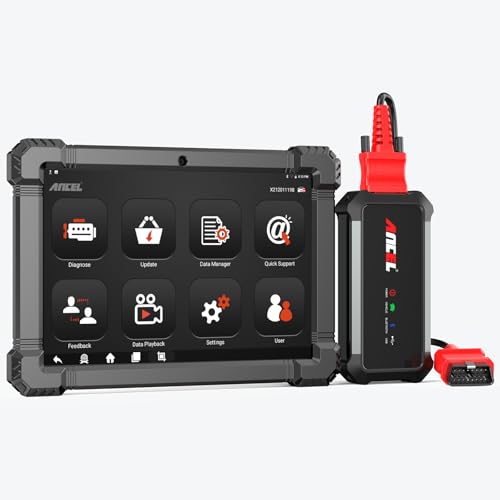
- 🔥🔥🔥2026 New Functions Making X7HD the Top Dog - Big Surprise!!! ANCEL X7HD truck scanner 10 major functional advantages .✅>Full HDOBD/OBD2 Function ✅>ALL System Diagnostic ✅>42+ Reset Function ✅>Active Test / Bi-Directional Control✅>ECU Coding✅>Graphing Live Data✅>Wide Compatibility ✅>2 Yrs Free Update✅>Remote Operation✅>Bluetooth 5.0 & Wifi In addition, 8 major hardware advantages: ✅>6000 mAh✅>10.1 inch Tablet✅>2G RAM
 ✅>32G ROM (Expandable to 128GB)✅>Data Record & Replay & Print✅>Android 10.0✅>Bluetooth 5.0 & Wifi✅>14 Languages
 - 🚛OEM DPF Forced Regen & Cylinder Cutout Test & more - ANCEL X7HD diesel scanner diagnostic tool not only supports DPF regeneration, DPF reset, DPF related information reset, DPR state reset, DPD forced regeneration etc, which helps you better solve the exhaust aftertreatment system problems, but also supports activate motor to do exhaust air in ABS Automatically. Moreover, it features TPMS activation, cylinder cut-off and learning functions
- 🚛Advanced ECU Coding & Programming - ANCEL X7HD 10.1inch truck scanner diagnostic tool is equipped with advanced ECU coding, supports Level calibration, Idle speed learning and Adjustment, Camshaft timing control learning, Control unit adaptations, Injector Codes, Read/Write VIN, Road speed limit optional vehicle speed set, etc... PLEASE NOTE that ECU codes are not compatible with all vehicles, please send us your VIN# to check vehicle compatibility
- 🚛42+ Reset Functions & Bidirectional Control - 2026 newest top heavy duty truck scan tool, comes with 42+ special services (ECU, Speed Limit and Idle Reset, Oil Reset, Injector Coding, EPB, ABS, SRS, Suspension, Throttle, etc. and always keep growing), which meet all your various needs for service and maintenance
- 🚛10 Inch All Systems Diesel Scanner & Full HDOBD/OBD2 Modes - ANCEL X7HD diesel truck scan tool supports all systems scan, such as Engine, Brake, Retarder, TECU Transmission, Tachograph, ABS, SRS, TPMS, EPB, SAS, ESP, and other vehicle systems, comes with 10 obd2 service modes: read/erase error codes, Data Stream, I/M Readiness, Vehicle Information, Actuations, DTC Lookup, EVAP, view freeze frame, etc
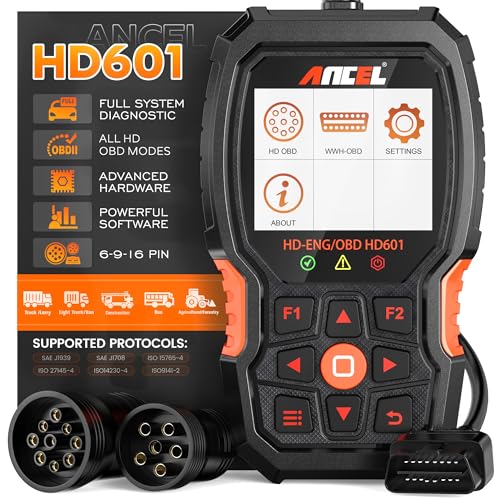
- 【Extensive Compatibility】HD601 heavy duty truck scanner supports 12V & 24V commercial vehicles and all major truck models that comply with standard protocols (SAE J1939, SAE J1708, ISO 14230-4, ISO 15765-4 and ISO 9141-2, ISO 27145-4 and Euro6). Fits for Cummins, Paccar, Detroit, Caterpillar, Freightliner, International, Peterbilt, Ford Heavy Truck, Class 4-Class 8 trucks, etc. It also supports engine diagnosis on most cars, minivans, light trucks and pickups
- 【 Full System Diagnostic】HD601 Diesel Scanner supports all system scans of heavy trucks compliant with standard protocols SAE J1939 & J1708, such as Engine, ABS, Transmission, Braking System, ESP, EPS, Fuel System, etc, It is a great scan tool for Cummins, Caterpillar, Detroit, Caterpillar, Maxxforce, Bendix,Wabash, Wabaco, Haldex, Allison, Eaton heavy trucks, With this truck tool, you can get deep analysis data about the system and do some repairs by yourself, saving much time and money. Note: Only heavy truck vehicles that comply with the above protocol can diagnose the entire system
- 【Enhanced Diesel OBD Scanner】The HD601 Diesel OBD Scanner offers unparalleled diagnostic capabilities for heavy-duty trucks. Beyond code reading, clearing, and live data display, it retrieves vehicle information, freeze frames, and DTCs. With 6, 9, and 16 pin cables, it ensures compatibility with various engines. This scanner's real-world testing prowess ensures comprehensive support for a wide array of heavy-duty truck engines, making it an indispensable tool for truck diagnostics
- 【DTC Library】+【Life Time Free Update】The built-in DTC library allows you to retrieve the codes directly without searching for the definition in the book. Whether you are a professional mechanic or a DIY car owner, HD601 diesel scanner explains the existing problem, makes it easier for you to understand code definitions and helps you locate vehicle faults. Note: This device cannot directly solve the fault. Plus, you get a lifetime free internet updates, so you always have the latest software for diagnostics in English and Spanish languages.
- 【Friendly Design, Easy of Use】This scanner is plug and play, simple and convenient, and very friendly for beginners. With improved buttons for easy menu navigation. The excellent 2.8 inch LCD color screen makes it easy to view the displayed results and gives you a better overview of your car's problem areas and the identified codes. In addition, the processor is super-fast and responds without lagging, providing maximum comfort and efficiency in diagnostic and service work

- Why NEXAS NL102 Truck Scan Tool? The NL102 outshines other truck scanner with its extensive diagnostic features. It offers full system diagnostics for major trucks meeting standard protocols, along with complete OBD2 functionality. Beyond read fault codes, clear codes and live data display, it enables vehicle info retrieval, freeze frame capture, and DTC lookup. Equipped with 6-pin, 9-pin, 16-pin connectors, it ensures broad truck compatibility. Plus, enjoy lifetime free updates in English, Spanish, and French, keeping your diagnostic scanner software current.
- Wide Compatibility - Friendly Reminder: To avoid compatibility issues, please confirm with us via Amazon Messages before purchasing. This heavy duty truck scanner is compatible with all heavy-duty trucks and semi that adhere to standard protocols (J1587, J1939, J1708). It covers a wide range of vehicle models, including Cummins, Detroit, Caterpillar, Freightliner, International, Kenworth, John Deere, Peterbilt, Sterling, Mack, Paccar, Western Star, Mercedes-Benz, Volvo, Scania, MAN, Renault, ERF, Foden, Seddon-Atkinson, Iveco, DAF, SISU, STEYR, ISUZU etc. Equipped with 6-pin, 9-pin, and 16-pin connectors for versatile device compatibility, ensuring stable plug-and-play connections.
- Save Hundreds of Money for All Heavy Duty Trucks – This diesel diagnostic scanner supports accurate full-system scans for all heavy-duty trucks that comply with standard protocols (J1587, J1939, and J1708). It can read and clear trouble codes across a range of vehicle systems, including the engine, transmission, instrument panel, drivetrain, brake system, suspension, ABS, ESP, EPS, fuel system, etc. The truck scanner communicates directly with your truck's computer to provide real-time data stream analysis, letting you pinpoint issues with precision. This cuts down on waste from unnecessary part replacements, saving you time and hundreds or even thousands of dollars.
- All OBD2 Functions + Battery Health Monitoring – Unlike many obd2 scanners on the market that only cover partial OBD2 features, ours gives you full OBD2 capability: read & clear codes, live data, freeze frame data, I/M readiness checks, EVAP tests, on-board monitor, O2 sensor tests, vehicle info, and DTC lookup. That means more detailed insights for pros and DIYers alike. The NL102 isn't just a code scanner – it's a battery saver. Regularly check your car's battery health, and catch issues before it dies completely. No more unexpected no-starts in the driveway or on the road. It diagnoses battery condition accurately, helping you avoid costly last-minute repairs.
- Plug and Play & One-click for DTC: NEXAS diesel scanner is user-friendly. It comes with an intuitive screen and easy-to-understand interface, making it accessible even for non-professionals to get started. And the built-in DTC library in the code reader allows you to directly retrieve codes without searching for definitions in books, making it easier to understand the code definitions and solve problems more quickly.
This product presentation was made with AAWP plugin.
Last update on 2026-05-12 / Affiliate links / Images from Amazon Product Advertising API