
NHTSA ID Number: 10185658
Manufacturer Communication Number: LIT-020-00
TSB/Document Date: 2021-01-21
Summary
Tow Assist ABS & Sway Mitigation System Installation Manual
If the PDF is very large, it may not load in the preview below.
Some older TSBs had multiple PDFs — visit the NHTSA Website to view all PDFs.
If the TSB PDF does not show, download or view it on the NHTSA Website.
Click on the (+) Plus Sign
Then Click on Associated Document(s)

- 💝【Questions? We’re Here Anytime】MK808S is a...
- 🔥🔥🔥【2026 NEWLY RELEASED BI-DIRECTIONAL...
- 【28+ MOST POPULAR RESET SERVICE FOR 150 MAKES】Autel...
- 【ALL SYSTEM DIAGNOSTICS, FACTORY-LEVEL SCANNER】The...
- 【AUT0 SCAN & AUT0V1N, 10X FASTER】How much have you spent...


- 💯【Conta.ct us for Support Directly】If you met any...
- 🔥🔥🔥【2026 AUTEL FLAGSHIP MK900BT MK900-BT, NEW...
- 🚗【3000+ ACTIVE TESTS (50➡3000+), SAME AS MS...
- 🚗【40+ HOT SERVICES FOR 150 MAKES (28+➡40+)】Full...
- 🚗【OE ALL SYSTEM DIAGNOSE, AUTO SCAN 2.0: SCAN LICENSE...
This product presentation was made with AAWP plugin.
Search NHTSA Database for Recalls
Search NHTSA Database for Vehicle Investigations
View Latest Vehicle Investigations
Search NHTSA Database for Vehicle Complaints
View Latest Vehicle Complaints
TSB/Document ID: LIT-020-00
Replacement Service Bulletin Number:
MFR Communication Date: 2021-01-20
MFR Internal Campaign ID/Software Version:
Communication Type: Service Bulletin/Repair Instructions
NHTSA Components: EQUIPMENT
MFR Component System:
MFR Component Subsystem:
Previous TSB | Next TSB |
INSTALLATION MANUAL
TOW ASSIST ABS & SWAY MITIGATION SYSTEM
Introduction.................................................................2
Suggested Tools..................................................................2
Tow Assist Brake Control Module - “ECU”.............................3
Trailer Requirements ....................................................3
Wheel Speed Sensor Availability..........................................3
Chassis Rail Mounting Suitability.........................................3
Mounting Examples.............................................................3
Mounting.....................................................................3
Universal Bracket................................................................3
Mounting Location on the Trailer..........................................4
Mounting Orientation & Accuracy........................................4
ECU Orientation Requirements............................................4
Recommended ECU Mounting Hardware.............................4
Recommended ECU Mounting Technique.............................4
Light Module Mounting Location..........................................5
Wiring..........................................................................5
Wire Identification & Correct Connection.............................5
Wheel Speed Sensor Connectors........................................5
Brake Magnet Connectors...................................................5
Wiring Harness.............................................................5
Harness Routing Overview...................................................6
Wire Harness Diagram with Breakaway Only........................6
Wire Harness Diagram with On Board Battery......................6
Power Harness....................................................................7
Axle Harness.......................................................................7
Common Ground Wiring Point .............................................7
Additional Installation Steps.........................................8
ECU Initial Start Up.......................................................9
Valid Brake Signal from Brake Controller..............................9
Configuration Software.................................................9
Introduction
!
CAUTION
This is the safety alert symbol. It is used to alert you to potential
injury hazards. Obey all safety messages that follow this symbol to
avoid possible injury or death.
The purpose of this document is to detail the installation requirements
and guidelines for the Tow Assist. Detail within this document is provided
by Dexter as a guideline to the proper and correct installation for trailer
manufacturers and installers. This installation advice is based on the
design of the Tow Assist system and experience from system testing.
CAUTION
The Dexter Tow Assist system should only be installed by a qualified
technician.
Installation steps listed in this manual are not meant to cover every
trailer type, but provide the required elements needed to install the Tow
Assist successfully. Each trailer type may require steps not individually
stated but implied.
CAUTION
Please review and understand all installation manual instructions
before beginning installation. Many steps are sequential so it is
necessary to complete all elements as instructed.
Suggested Tools
ƒ Zip Ties
ƒ Wire/Cable Clamps (strain relief for wires at ECU)
ƒ Non-Abrasive Cleaner “Rubbing Alcohol” (for light installation)
ƒ Phillips Screwdriver/Drill Bit
ƒ 5/16” Nut Driver Bit
ƒ Drill & Drill Bits
ƒ Tape Measure
ƒ Side Cutters
ƒ 1-1/2” Hole Saw
Configuration File Setup......................................................9
Configuration from Saved File............................................10
Verification Startup After Configuration..............................12
Advanced Software Capabilities..................................12
ECU Status.......................................................................12
System Faults...................................................................12
Reference..................................................................13
Limited Warranty........................................................14
ECU Mounting Template..............................................15
2021.01 | 2
Scan to visit the Tow
Assist Website
Scan to view video
about the
Tow Assist System
TOW ASSIST INSTALLATION MANUAL
ABS & SWAY MITIGATION SYSTEM
Tow Assist Brake Control Module - “ECU”
Mounting Examples
Below is a model of the Tow Assist Brake Control Module. This will be
referred to throughout the manual as the ECU (Electronic Control Unit).
It is mandatory to provide an adequate solution to protect the ECU,
axle/power harness against road debris or vertical impact. Each trailer
design is unique and must be addressed individually upon installation.
Failure to do so will have an effect on product life and performance.
Examples of additional mounting/protection highlighted in red. 5.9” of
vertical clearance is needed to protect the ECU and harness plug from
road debris.
TOP
Universal
Mounting
Bracket
C-SECTION
MOUNTING
RHS (SHORT)
MOUNTING
TOW ASSIST ™
ABS & SWAY MITIGATION SYSTEM
UP
Powered by
“B” Connector
Axle Harness
UP
“A” Connector
Power Harness
Trailer Requirements
FRONT OF TRAILER
Wheel Speed Sensor Availability
The trailer to which Tow Assist is to be fitted must have axles equipped
with Tow Assist brakes and hub-drums. Wheel speed sensors are designed
into the Tow Assist brake and are an integral part of the system.
TRUSS SECTION
MOUNTING
Z-SECTION
MOUNTING
Chassis Rail Mounting Suitability
Ideal mounting surface is a Rectangular Hollow Section (RHS) chassis
rail with a minimum height of 5.9”. Area of chassis rail that contacts
bracket to be within a flatness of 0.011”. The height of the chassis
rail protects the ECU and connectors from on-coming projectiles and
the rigidity of a rectangular steel or aluminum section provides a solid
mounting surface with a reduction of ECU vibration.
Other C-Section, short height RHS, Truss and Z-Section chassis
rails are allowed with a minimum height of 1.77” to meet mounting
requirements. Additional mounting and/or protection surface (IE, an
adapter plate) solidly fixed on the chassis rail to accommodate the
vibration and protection requirements of the ECU may be required. See
ECU chassis mounting examples in the following section.
TOW ASSIST INSTALLATION MANUAL
ABS & SWAY MITIGATION SYSTEM
5.9” CLEARANCE
Trailer chassis rail material and structure can vary significantly between
different manufacturers and types of trailers. The chassis rail or cross
member of the trailer is where you will mount the ECU and is therefore
the major mechanical interface between the trailer and the ECU. It
is important that the structural integrity of the chassis rail or cross
member is suitable since it is where the ECU mounts. Unsuitable
structural integrity can result in vibration and damage to the ECU.
Mounting
Universal Bracket
The ECU is supplied with a pre-attached Universal Mounting Bracket.
The bracket provides a mounting interface between the ECU and the
trailer chassis. The bracket is designed to meet the strength, stiffness
and vibration requirements. The pre-attached universal mounting
bracket should not be removed, adjusted or modified during installation.
Selection of the ECU mounting location should always accommodate
the mounting bracket as well as space to work. Damage or removal of
the bracket may affect the performance of the Tow Assist system.
2021.01 | 3
Mounting Location on the Trailer
ƒ The ECU should be mounted so the top edge of the Universal
Mounting Bracket is parallel to the chassis or carrying surface
of the unit. When mounted on a finished unit this should place
the X and Y axis no more than ±5° from parallel to the ground.
NOTE: THE Universal Mounting Bracket SHOULD NOT CONTACT
THE FLOOR. Allowance of 1/8” air gap is appropriate to avoid
transmission of unwanted vibration.
The recommended mounting location for the ECU is shown below:
ƒ The mounting location should allow for proper clearance of
the axle and power harness connections as well as mounting
hardware. Upon installation, the ECU and harness connections
should not receive contact from external materials from the unit.
ƒ Variation from the recommended tolerances and requirements
for mounting the ECU may result in malfunction.
Trailer Y-Axis
ƒ In general, the best performance and robustness is achieved
when the bracket is mounted with minimum tolerance.
Exceeding the tolerances of these mounting requirements may
result in poor performance or malfunction.
ƒ As close as possible to the centerline of the trailer, +/- 1 foot is
allowed. Midway between the left and right wheels.
Trailer X-Axis
ƒ On a chassis rail which is closest to all the braked wheels. For
example, locate the ECU nearest the axle for a single axle trailer,
in between the axles on a tandem axle trailer and over the
center axle on triple axle trailer.
ƒ Locate the ECU on the backside of the chassis rail or designated
mounting structure. Orient the universal mounting bracket
supplied on the ECU towards the front of the trailer. The Tow
Assist product label should point towards the back of the trailer.
Recommended ECU Mounting Hardware
The recommended mounting hardware is a #12-14 x 1”, Hex Flange
Head screw. There are 4 mounting screws provided with the install
kit, (Dexter part number 007-585-00). The supplied screw should be
torqued to 4.4 ± 1 ft lbs (6 ± 1.5 Nm) to ensure secure mounting to
the chassis rail.
Trailer Z-Axis
ƒ Vertical mounting position should locate the ECU as close to the
floor as possible to ensure adequate protection. IMPORTANT: THE
Universal Mounting Bracket SHOULD NOT CONTACT THE FLOOR.
Other mounting locations on the trailer are possible as long as they
meet the mounting example requirements and axle harness limits. On
a multi-axle installation, do not mount the ECU behind the rear axle as
the increased vibration may result in performance issues.
Mounting Orientation & Accuracy
Tow Assist mounting orientation must be strictly adhered to, any
deviation from these instructions may result in reduced system
performance. The ECU must be mounted in the same manner as the
figure below.
TRAILER FLOOR/DECK
Upon determining the proper location and orientation, the final
attachment is important. The Tow Assist install kit is supplied with
hardware appropriate to attach the ECU to light gauge steel. All
four holes should be pre-drilled to avoid shift during installation.
Alternative frame materials may require hardware not supplied in the
kit. Doing so is considered acceptable if fasteners meet or exceed
those supplied with the kit. All four attachment points should be used
during installation. NOTE: DRILLING OR WELDING OF THE UNIVERSAL
MOUNTING BRACKET IS NOT ALLOWED. THERE IS A MOUNTING
TEMPLATE AT THE BACK OF THIS MANUAL.
ECU Mounting Holes
Please see the ECU Mounting Template on page 15.
FRONT
X-AXIS
Y-AXIS
TRAILER
CHASSIS
RAIL
Recommended ECU Mounting Technique
X-AXIS
3
2
4
Z-AXIS
Z-AXIS
View: From left trailer wheel to
right trailer wheel.
Y-AXIS
1
View: Looking toward the front of the
trailer.
TOW ASSIST ™
ABS & SWAY MITIGATION SYSTEM
UP
Powered by
UP
ECU Orientation Requirements
ƒ The ECU must be mounted perpendicular to the ground.
This vertical orientation (Z-Axis) should be with the harness
connectors facing downward.
2021.01 | 4
TOW ASSIST INSTALLATION MANUAL
ABS & SWAY MITIGATION SYSTEM
Light Module Mounting Location
The Tow Assist uses an indicator light module to notify the driver of
system function and potential diagnostic codes. Driver notification is
an essential part of a safety system. The light module does not have
a regulated location. Dexter recommends that it be located in a place
easily visible to the driver through the tow-vehicle mirror(s) while sitting
in the driver’s seat. Please see the suggested locations marked in red in
Figure 1 and Figure 2.
Figure 1:
CAUTION
Proper harness must be used based on number of axles in
installation. Using the incorrect harness may result in malfunction.
Trailer configuration wiring is dependent on the number of braked axles
on the trailer. Please note that the Tow Assist system requires all axles
to be equipped with Tow Assist brakes and hub-drums. The following
configurations are valid for the Tow Assist system:
ƒ Single Axle Trailer: A single front axle (FL & FR) should be
selected during trailer variant configuration.
ƒ Tandem Axle Trailer (all axles braked): Both braked axles Front
& Rear (FL, FR, RL, RR) are selected and controlled by Tow Assist.
ƒ Triple Axle Trailer (all axles braked): All braked axles Front,
Center & Rear (FL, FR, CL, CR, RL, RR) are selected and
controlled by Tow Assist.
Wheel Speed Sensor Connectors
Light Module
Figure 2:
Wheel Speed Sensors will connect at the brakes to the wiring harness
with a 2-pin Molex® connector. They are covered with a vinyl cap, green
on right side, yellow on the left and are located on the back (in board)
side of the brake.
Light Module
Wiring
The Tow Assist wiring harness manages connection points with
weatherproof connectors and nylon braided shroud to ensure system
function. The wiring diagram and color code chart are meant to provide
a general understanding and unit requirements to perform the harness
installation section.
CAUTION
Only an experienced technician should route and install wiring.
Wire Identification & Correct Connection
Harness is color coded to match the plug on the brake to assist with
right and left identification.
Brake Magnet Connectors
Brake magnets will connect to the wiring harness with a 2-pin Weather
Pack® connector and are adjacently located to sensor connector.
Wiring Harness
Your Tow Assist system comes with a two-piece wiring harness that
provides cabling to connect to the tow vehicle connections, ECU and
braked wheel ends. It consists of a power/communication harness
consisting of wires for power with integral 30A fuse, ground, brake
request, ground connection, OBD2 communication cable with integral
4A fuse and the indicator light cable. The other half of the harness is
the axle harness that comes in single, tandem and triple configurations.
This harness connects the wheel speed sensors and brake magnets
from each wheel to the ECU. Install the harness only after the ECU and
axles have been securely mounted. Due to the variation of trailer types,
this is meant as an overview, not as step by step instructions.
Tandem Axle Harness and 30’ Power Harness Example
Please see Figure 3 in the reference section.
TOW ASSIST INSTALLATION MANUAL
ABS & SWAY MITIGATION SYSTEM
2021.01 | 5
Harness Routing Overview
Diagram for Tow Assist wiring only. Additional wiring to connect the tow vehicle is still required. This is for illustration only, not exact routing locations.
Brake Request Wire Lead
Indicator Lamp Harness
Ground Wire Lead
Magnet Output Harness
Wheel Speed Sensor Harness
ECU Power Supply Routing
ECU
Signal
Connections
Positive
Power Supply
Negative
Indicator Light
Start Point
Trailer Power
Supply
Trailer Power
Supply
ECU Power
Supply Fuse
End Point
ECU Connector
Wheel Speed
Sensors
Wheel Speed
Signal/Power
(1-6)
ECU Connector
Magnet Brake
Brake Magnet
Signal (1-6)
ECU Connector
ECU Ground
ECU Connector
*ECU not powered during breakaway feed through braking
Junction
Box
Common
Ground Point
Operation
Signal Warning ECU Connector LED Module
Signal Ground
Service Brake Tow Vehicle
Brake Request Wire (from tow Brake Signal
vehicle EBC)
(Trailer Plug)
Wire Harness Diagram with Breakaway Only
Black - Battery Charge
Common
Ground Point
Brake Magnet
(1-6)
Trailer Supply
Ground
Trailer Power
Supply (onboard battery
or tow vehicle
power
30A
Charger
7 Circuit Plug
Lanyard
Breakaway
Battery
Tow
Assist
Power
Harness
Breakaway
Switch
Blue (Brake Req)
Blue (Brake)
ECU Connector
White (Ground)
Wheel Speed
Sensor (1-6)
Brake Magnet
(1-6)
Common
Ground Point
Common
Ground Point
White (Ground)
Wire Harness Diagram with On Board Battery
Junction
Box
Black - Battery Charge
Red (Battery Fused)
30A
Charger
7 Circuit Plug
On Board Battery
Lanyard
Brake Magnet
Signal (1-6)
Red (Battery Fused)
Breakaway
Switch
Blue (Brake)
White (Ground)
Tow
Assist
Power
Harness
Blue (Brake Req)
White (Ground)
Common
Ground Point
When routing the wiring harness, take care that the wiring harness is not
damaged by routing via sharp corners or edges.
Make sure that the wiring harness is fixed after each connector at the
ECU as described in the power harness section.
2021.01 | 6
TOW ASSIST INSTALLATION MANUAL
ABS & SWAY MITIGATION SYSTEM
Power Harness
The power harness is designed to allow routing down the left side of the
trailer from the ECU. It can be routed other ways as application dictates,
but the harnesses must exit the ECU to the left. The power harness

- [Notice] When you receive a used device, it may be a customer return resold by Amazon without inspection. You can exchange it for a new one through Amazon. As this situation is unavoidable, we sincerely apologize. For any issues, contacting us via Amazon's "Messages" is the best way, and we’ll provide a solution within 24 hours. THINKSCAN 689BT Can Be Used Immediately After It is Turned On, Without Complicated Registration Process, Which is More Convenient & Quick.
- [Good News] THINKSCAN 689BT is the most competitive automotive scan tool to date, offering wireless updates with no subscription fees(valued 500Buc.ks) . With all the features of THINKTOOL PD8,PRO, built on Android 10 platform with 4-core CPU, 4GB RAM
 and 64GB ROM, serving up to 5X faster than older MAX/MINI/PLUS vehicle scanners, no more slow and delayed feedbacks, it's time to update your garage tool.
 - [Big Money Saver] Premium THINKSCAN 689BT Wireless Diagnostic Scanner, save up to 400USD per year, includes all useful features: Full bi-directional controls, ECU coding, 34+ services, OEM all system diagnostics, Worldwide vehicles coverage, CAN FD & DoIP, FCA AutoAuth(The 689BT only provides a login and purchase portal, and users are required to register for an FCA account and pay a membership fee in order to perform the relevant automotive diagnostics)
- [3000+ Active Tests]Active testing is one of the most useful features in automotive maintenance and greatly improves mechanic efficiency. THINKCAR 689BT bidirectional scanner can send action commends to vehicle sub-systems or components for active test without using vehicle controls. It can perform various tests such as: EVAP Test, Fuel Trim Reset, Injector Buzz Test, Window/ Mirror/ Door Lock Test, Pump and Value Tests, etc. Get functions from "Diagnose>Car Model>System>Active Test".
- [Hot Advanced Features] 689BT bidirectional tool newly adds ECU Coding, Power Balance, Flash Hidden Functions, Reset Adaptive Data, Match Replaced Components, Customize OE-Settings. Such as: 1. changing the color of interior lights 2. switching on/off the auto hold, 3. customizing dash kits 4. activating the auto side mirror folding function 5. disables auto start-stop. Note: Coding functions vary by model&year.
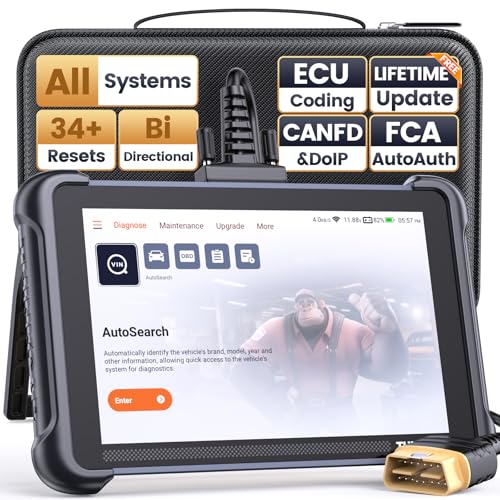
- 【Warm Tips】Wired THINKSCAN 689 is connected through a detachable OBDII cable, and we also have added OBD2 Extension Cable (about 60 cm/2 feet) as g ift, enabling customers handling vehicle repairs with ease. Just click "Bundles Item" above to get it.
- 【Professional Car Diagnostic Tool】Tired of renew fees? Thinkscan 689 scanner provides dealer-level advanced functions for lifetime f.r.e.e update for auto mechanics and repair shops. 34+ Services, 3000+ Active Test, ECU Coding, 140+ Brands Coverage, FCA AutoAuth, CANFD&DOIP Protocol, Component Matching, Power Balance, V.A.G Guided, Compatible with Google Chrome integration, etc. With strong hardware backing, 64G Memory, Android 10, 4-core processors, and 4150mAh battery. Thinkscan 689 brings you the best as your daily business helper and never lets you drop the ball!
- 【Over 34 Reset Service, Adaptation + Relearn + Calibration + Initialization + Matching】Made for workshops, Thinkscan 689 scanner provides 34+ services for worldwide vehicles: such as Gear/SAS/EPB/TPMS/D.P.F/I.M.M.O/BMS/ETS/Oil/Brake/AFS/GEARBOX/SUNROOF/SUS Reset, ABS Bleed, Injector coding, etc. Warm tips: Compatibility may vary on vehicles' model and year, please contact seller before purchase to make sure it works well on your cars.
- 【Real Active Test】Thinkscan 689 scan tool features over 3000+ full bi-directional control ability, to send commands to vehicle’s systems/components, to verify system input/output without using the vehicle's controls, e.g. turn on the radiator fan, modulate the throttle, open/close windows, operate mirrors, Injector Buz Test, turn on interior&exterior lights, sound horn, test door lock actuators, turn on/off front/rear side ACM Solenoid, Vehicle level position calibration, Wheel Speed Sensor Supply.
- 【Comprehensive Solutions with Advanced Features】Take your vehicle customization to the next level with the Thinkscan 689's advanced ECU coding capabilities. This scan tool provides power balance, PMI, unlock more new features and enhance performance by activating dormant functions, customizing OE settings, matching replaced components, and reprogramming adaptive data to elevate your driving experience. Note: Compatibility varies by car models, please check before order.
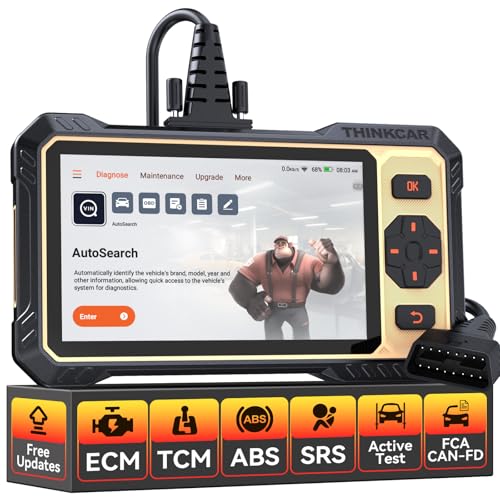
- 【Powerful Bidirectional Control -- Active Test】Good News! The THINKSCAN 662 obd2 scanner has bidirectional control function,which is the most popular feature among mechanics.This function is mainly used to test whether the executing components in the electronic control system can work normally,By requesting information from the vehicle's ECU or sending commands to the ECU module to execute commands and identify maintenance status,quickly locate the cause of the fault.Such as ABS,Fuel Injectors,Adjusting Throttle,Coolant Fans,Radiator Fans,Coolant Pumps,EV.AP Test, Fuel Trim Reset,Injector Buzz Test,Pump/ Value Test,etc. Effectively shorten diagnosis time and reduce diagnosis costs.
- 【Unlock Pro-Level Diagnostics With Half Costs】 THINKSCAN 662 obd2 scanner diagnostic tool Delivers Premium Scanning Power for Half the Price! The OBD2 scanner can handle common issues with ECM,TCM,ABS,SRS. It can easily read and clear fault codes, analyze data streams, and ensure quick identification of problems. THINKSCAN 662 bidirectional scan tool has 12 practical reset functions, including Airbag Reset,ABS Bleeding,BMS,Brake Reset, D.P.F,Throttle Adaptation,Injector Coding,OIL Reset,steering angle Reset,Gearbox,TPMS,and more. The car scanner diagnostic tool very suitable for DIY enthusiasts, car repair technicians, and small and medium-sized repair shops.
- 【Multi Functional Intelligent Car Scanner Diagnostic Tool】 Automatic VIN + Real-time Data + DTC Lookup + Historical Diagnostic Records: This OBD2 scanner features auto serch technology, allowing for car recognition without the need for manual input. The real-time data of the car ECU is read and displayed in the form of text or a 4-in-1 merged waveform chart. You can save, share, print or send the entire inspection report via email for analysis. Historical diagnostic reports help you quickly identify vehicle issues and understand the condition of the vehicle. The built-in 'feedback' module provides customized repair Operation recommendations from our certified professionals.
- 【Upgraded Hardware + Ergonomically Engineered】 THINKSCAN 662 OBD2 scanner has a friendly combination of touch screen and physical buttons with an ergonomic appearance for comfortable use.Experience 2x faster scans and 50% longer lifespan vs standard models.This scanner para autos boast a 4-core 1.8GHz CPU,6.2-inch HD touch screen,2GB RAM + 32GB ROM storage capacity,a long-lasting 4150mAh battery,Android 8 ensures lightning-fast bootup and processing.The scanner is robust with rubberized protection that you can store and use in the trunk or garage.Whether you are engaged in Home car maintenance or road rescue car repair,this car scanner can help you perfectly solve car problems.
- 【Effortless Setup & Scanning - Intuitive for All Skill Levels】No More Complicated Scanners! The User Interface is as User-Friendly as THINKCAR 689BT! Truly Plug-and-Play,The downward sliding setup shortcut portal and drawer function shortcut portal make you use this scan tool as easy as using your own cell phone.The car scanner supports setup screenshot,screen recording,volume adjustment,this scan tool includes product e-manuals,instructional videos,and fault code libraries,users can check the usage guide,perfect for DIY car owners,Maintenance technician.If your father,husband,brother,boyfriend enjoys car repairs,THINKSCAN 662 is a great gift choice, and it has amazing family value.
This product presentation was made with AAWP plugin.
Last update on 2026-05-12 / Affiliate links / Images from Amazon Product Advertising API