
NHTSA ID Number: 10170732
Manufacturer Communication Number: L-SB-0020-19_Rev
TSB/Document Date: 2020-01-27
Summary
TSB: REVISION NOTICE December 6, 2019 Rev1: ? Applicability has been updated to include 2018 ? 2020 model year Lexus vehicles. ? The Parts Information section has been updated. Any previous printed versions of this bulletin should be discarded. Some 2018 ? 2020 model year Lexus vehicles equipped with the Enform? 2.0 Navigation System require a Special Service Tool (SST) USB flash drive to update the map, points of interest, and system software. The SST is used with applicable vehicles to deliver the update; however, the process for generating license keys differs from previous generations. Before attempting to perform a map update, the head unit?s expiration date must be checked. If the expiration date is still valid, a license key may be generated without the use of an activation card number. Updating the maps without the use of an activation card number is considered an Embedded Navigation Update (refer to pg. 10) and performing this process does not extend the duration of telematic map services. If the head unit?s expiration date is expired or will expire within the next 90 days, it should be recommended to the customer to purchase an activation number. Utilizing an activation number will initiate a Dynamic Navigation Update (refer to pg. 4). This Dynamic Navigation Update will perform the Embedded Navigation Update and provide telematic map services for a period of two years from the day that the Dynamic Navigation Update is performed. Activation card numbers are provided in an activation card number pamphlet available through the normal parts ordering system. Follow the process in this bulletin to perform the update.
L-SB-0020-19
Rev1
April 17, 2019
Enform 2.0 Navigation Map Update Process
Service
Category
Audio/Visual/Telematics
Section
Navigation/Multi Info Display
Market USA
Applicability
YEAR(S)
MODEL(S)
2019 - 2020
ES300H, ES350
2019 - 2020
LC500, LC500H
2018 - 2020
LS500, LS500H
2018 - 2020
NX300, NX300H
2018 - 2020
RC F, RC300, RC350
2020
RX350
2019 - 2020
UX200, UX250H
ADDITIONAL INFORMATION
REVISION NOTICE
December 6, 2019 Rev1:
Applicability has been updated to include 2018 – 2020 model year Lexus vehicles.
The Parts Information section has been updated.
Any previous printed versions of this bulletin should be discarded.
© 2019 Lexus, a division of Toyota Motor Sales, USA
Page 1 of 15
L-SB-0020-19
Rev1
April 17, 2019
Page 2 of 15
Enform 2.0 Navigation Map Update Process
Introduction
Some 2018 – 2020 model year Lexus vehicles equipped with the Enform™ 2.0 Navigation
System require a Special Service Tool (SST) USB flash drive to update the map, points of
interest, and system software. The SST is used with applicable vehicles to deliver the update;
however, the process for generating license keys differs from previous generations.
Before attempting to perform a map update, the head unit’s expiration date must be checked.
If the expiration date is still valid, a license key may be generated without the use of an activation
card number. Updating the maps without the use of an activation card number is considered an
Embedded Navigation Update (refer to pg. 10) and performing this process does not extend the
duration of telematic map services. If the head unit’s expiration date is expired or will expire within
the next 90 days, it should be recommended to the customer to purchase an activation number.
Utilizing an activation number will initiate a Dynamic Navigation Update (refer to pg. 4). This
Dynamic Navigation Update will perform the Embedded Navigation Update and provide telematic
map services for a period of two years from the day that the Dynamic Navigation Update
is performed.
Activation card numbers are provided in an activation card number pamphlet available through
the normal parts ordering system. Follow the process in this bulletin to perform the update.
NOTE
Map data is released once each year through the shipment of an SST USB flash drive to each dealer.
The SST MUST be stored in the SST cabinet to ensure it can be easily found.
© 2019 Lexus, a division of Toyota Motor Sales, USA
L-SB-0020-19
Rev1
April 17, 2019
Page 3 of 15
Enform 2.0 Navigation Map Update Process
Introduction (continued)
Perform Embedded
Navigation Update
Go to Pg. 10
Perform Dynamic
Navigation Update
Go to Pg. 4
Warranty Information
OP CODE
DESCRIPTION
TIME
OFP
T1
T2
N/A
Not Applicable to Warranty
–
–
–
–
© 2019 Lexus, a division of Toyota Motor Sales, USA
L-SB-0020-19
Rev1
April 17, 2019
Page 4 of 15
Enform 2.0 Navigation Map Update Process
Required Tools & Equipment
SPECIAL SERVICE TOOLS (SST)
PART NUMBER
QTY
USB Drive Navigation Update – AWTEC*
TLAW-SD017-19F
1
*Essential SST.
NOTE
Additional SSTs may be ordered by calling 1-800-933-8335.
Dynamic Navigation Update
1. Search TIS for ANY available firmware updates for the selected model and model year
vehicle. Complete the firmware update(s) BEFORE installing the map data.
2. Cycle the ignition ON (Engine/Hybrid/EV system OFF).
NOTE
Vehicles WITHOUT Smart Key system:
Turn the ignition key to the ON position.
Vehicles WITH Smart Key system:
Press the Engine Start Stop switch two times with the brake pedal released.
3. Select the MAP button on the touch pad.
Figure 1.
© 2019 Lexus, a division of Toyota Motor Sales, USA
L-SB-0020-19
Rev1
April 17, 2019
Enform 2.0 Navigation Map Update Process
Dynamic Navigation Update (continued)
4. Select the Map Options icon on the
navigation screen.
Figure 2.
5. Select Map Data on the
Map Options menu.
Figure 3.
6. Record the map version and expiration
date from the navigation screen.
Figure 4.
7. Select Legal Info.
Figure 5.
8. Record the map update ID.
Figure 6.
© 2019 Lexus, a division of Toyota Motor Sales, USA
Page 5 of 15
L-SB-0020-19
Rev1
April 17, 2019
Enform 2.0 Navigation Map Update Process
Dynamic Navigation Update (continued)
Log into TIS.
10. Log into the Navigation Update Wizard.
Figure 7.
A. Select the TIS tab.
B. Select the Diagnostics tab.
C. Select the Navigation tab.
D. Re-enter your password.
E. Select Login.
11. Select AWTEC from the Select Navigation
Manufacturer dropdown menu.
Figure 8.
12. Enter the vehicle’s VIN and head unit
expiration date.
NOTE
It is recommended to perform a
Dynamic Navigation Update under the
following conditions:
The expiration date is expired.
The expiration date will expire in 90 days
or less.
The customer would like to continue the
dynamic navigation system for a period of
2 years from the date of the update.
13. Enter the activation card number from the
inside of the pamphlet (obtained from the
parts department).
Figure 9.
14. Select Submit.
© 2019 Lexus, a division of Toyota Motor Sales, USA
Page 6 of 15
L-SB-0020-19
Rev1
April 17, 2019
Enform 2.0 Navigation Map Update Process
Dynamic Navigation Update (continued)
15. Enter the navigation data into the
Navigation Update Wizard form.
Figure 10.
\
A. Select the correct USB part number
(found on the SST packaging, starts
with “TLAW”).
B. Input the map update ID into TIS
(without hyphens).
C. Input the map version into TIS
(without hyphens).
D. Enter the VIN.
E. Enter the repair order number.
F. Enter the expiration date.
G. Select Submit.
16. Check off each item AFTER confirming
that it is correct. If ANY of the information
is incorrect, select the back button.
Figure 11.
17. Select Confirm.
18. Note the license key that is generated.
(It is recommended to print this page.)
Figure 12.
© 2019 Lexus, a division of Toyota Motor Sales, USA
Page 7 of 15
L-SB-0020-19
Rev1
April 17, 2019


- [J2534 Pass-Thru Programmer] - TOPDON RLink J2534 is...
- [All-in-One OEM Reprogramming and Diagnostics] - When...
- [Tested, Trusted, and Proven for Accuracy] - TOPDON RLink...
- [One-Click Installation, Continuous Updates] - The exclusive...
- [Works with Windows Compatibility and OEM Software...

This product presentation was made with AAWP plugin.
If the PDF is very large, it may not load in the preview below.
Some older TSBs had multiple PDFs — visit the NHTSA Website to view all PDFs.
If the TSB PDF does not show, download or view it on the NHTSA Website.
Click on the (+) Plus Sign
Then Click on Associated Document(s)
Search NHTSA Database for Recalls
Search NHTSA Database for Vehicle Investigations
View Latest Vehicle Investigations
Search NHTSA Database for Vehicle Complaints
View Latest Vehicle Complaints
TSB/Document ID: L-SB-0020-19_Rev
Replacement Service Bulletin Number:
MFR Communication Date: 2019-12-06
MFR Internal Campaign ID/Software Version:
Communication Type: Service Bulletin/Repair Instructions
NHTSA Components: EQUIPMENT:ELECTRICAL:NAVIGATIONAL SYSTEM(GLOBAL POSITIONING SYSTEM)
MFR Component System:
MFR Component Subsystem:
Previous TSB | Next TSB |
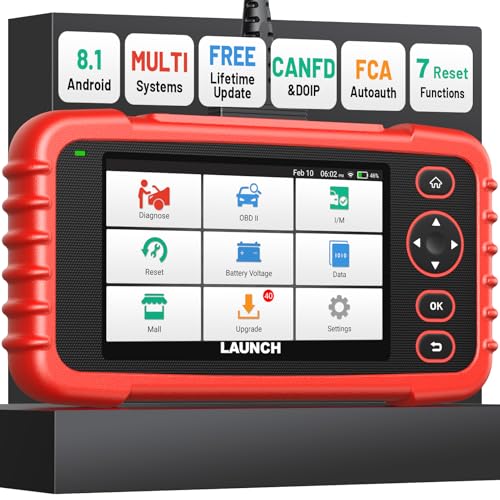
- [Newly Added in 2026: 7 Reset Functions] The 2026 new version of the OBD2 scanner diagnostic tool CRP123X V3.0 Elite has new special functions for F.REE: Throttle Ad.aptation, Oil/SAS/BMS/Brake Reset, D-P.F Re.generation and ABS Service. Before you visit a mechanic, launch obd2 Scanner CRP123X Elite can perform a more in-depth diagnosis of the car system and provide accurate data within minutes. What's more, the list of compatible models has been expanded. Upgrading frequency is regular, occurring monthly even weekly.
- 🔥[FCA AutoAuth + CAN FD & DoIP] As an upgraded version of the LAUNCH CRP123X/CRP129X, FOXWELL NT614, and ANCEL FX2000, The Newest LAUNCH CRP123X V3.0 auto diagnostic scanner supports the following new protocols: CAN-FD for 2020 and newer G.M and Chrysler
 models, as well as DoIP for V.olvo, Land Rover/Jaguar, and B.MW F/G chassis. With integrated AutoAuth, you can diagnose 2018 and newer FCA cars equipped with S.GW. Note: CAN-FD and DoIP protocols require an additional obd2 cable. *Menus vary by make, model, and year of gasoline or diesel engine vehicle. Email us your VIN data.
 - 🔥[No extra software fee. Works on 90 vehicle brands.] Most OBD2 scanners work with vehicles manufactured after 2001. However, the LUNCH OBD2 scanner is compatible with OBDII-equipped vehicles built after 1996 and works with more than 90 vehicle brands. One-click lifetime updates over WIFI 2.4&5.0Ghz keep the car software current and ensure constant coverage additions, diagnose vehicles from 1996 to 2026 with a massive global database. Android 8.1 ensures lightning-fast boot-up and processing.
- [Accurate & Intuitive Multi System Diagnosis] Will you be confused about what happens when the warning light of transmission, ABS, and SRS Airbag check engine flashes? Launch obd2 scanner diagnostic tool CRP123X V3.0 to pinpoint the problem components for a faster diagnosis for your car instead of taking your car to the dealership. Generate vehicle health reports with one click and share them via email over Wi-Fi to help avoid blind maintenance. And will turn off the warning light for you after fixing the problem, make to know more about your cars and do your own repair.
- [Multiple Display of Live Data + DTC Code Definition Explanation] Launch car tools show real-time data of oil temp, pressure, transmission temp, engine speed, coolant temperature, you will know which car part is abnormal. Data can be shown in a single, multi- graph, and merge two graphs for analysis(or 4-in-1 merged waveform graph),you can save, share, print, or email the overall inspection report for easier analysis.🔥Code Search,DTC Library provide massive information. Inbuilt “Feedback” module provides customized repair suggestions from our certified professionals.
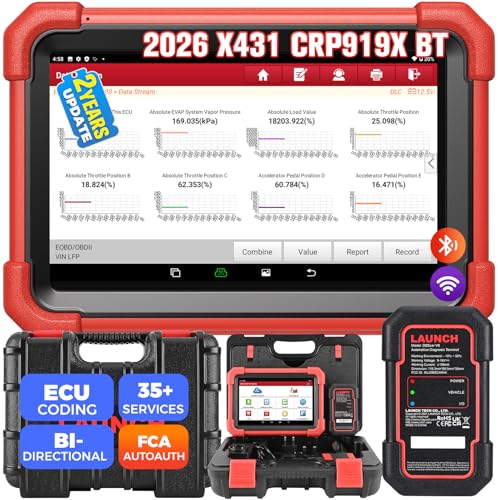
- 【2026 Most-cost-effective LAUNCH Scanner】 LAUNCH X431 CRP919XBT, upgraded from CRP919X, includes a VCI for wireless data transmission (3Mbps max). ✅HARDWARE: MTK's chip + doubled memory & battery capacity ensure 5X faster & smoother navigation than OBD2 scanner diagnostic tools in the same category. ✅SOFTWARE: Its productive features (same as LAUNCH X431 scanners), 99% car coverage, more-frequent software renewals, field-tested accurate database, are superior to most competitors on market.
- 【FCA AutoAuth + CANFD&DOIP】 LAUNCH X431 CRP919XBT uses a newly-developed wireless connector “DBSCar VII VCI” instead of a connection cable. You can be at workbench or any location around vehicle while running diagnostics. ✅With this VCI, this OBD2 scanner supports new protocols of tomorrow: CANFD for 2020-now GM&Chrysler Models; DoIP for Volvo, Land Rover/Jaguar, BMW F/G Chassis. ✅And with integrated AutoAuth, you can diagnose 2018+ FCA SGW-equipped cars without separate adapters.
- 【ECU Coding & 35+ Reset Services】 For just 500 bucks you’ll get fully-featured ECU coding & resets/relearns from LAUNCH X431 CRP919XBT. 👍Online Code for VW/Audi/Skoda/Ford/Lincoln/Mazda; 👍Open/close hidden functions; 👍Personalized modifications/changeover; 👍Shortcut to 35+ special functions like “Oil Reset/Brake Reset/Throttle Adaptation” etc., to quickly meet your daily repair needs. 🚩100+ more resets/relearns are under “car brand – system” waiting to explore.
- 【All Brands All System Scan】 With a market focus, LAUNCH X431 CRP919XBT boasts a complete filed-tested database for your deeper dive into car's health to handle more complex repairs. Back up by leading LAUNCH technology, you can do all system coding/scans/read&clear codes/bidirectional control/resets covering 99% cars, unlike many scanners for cars on market (x-tool) with fake advertisement claiming to “do it all” but in reality, they ONLY work for certain cars with limited services.
- 【Bi-directional Control】This LAUNCH bidirectional scan tool CRP919XBT allows technicians to command specific vehicle components (like solenoids, relays) to monitor real-time working status, without using the vehicle controls. Achieve fast, accurate diagnostics and take control like never before. Turn on the radiator fan, modulate the throttle, open or close windows, operate mirrors, Injector Buz Test, turn on interior and exterior lights, sound horn, etc.
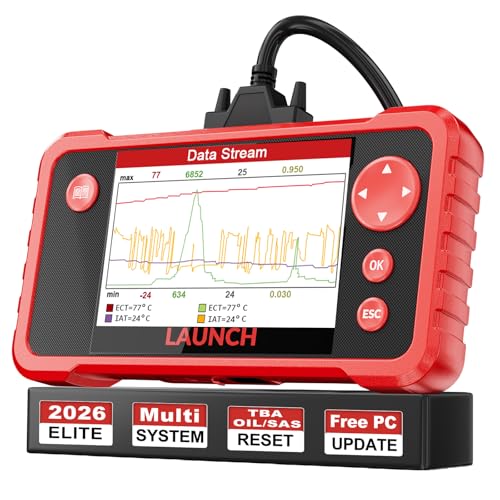
- 【Great Ideal For Every Car Owner】Prefect choice for your father, husband, brother or boyfriend. EVERY CAR OWNER WILL NEED IT! Also, the lifetime update is provided for more vehicle coverage, bug fixes. SAVE AT LEAST $1000+ PER YEAR!Get LAUNCH CRP123 V2.0 car diagnostic scanner and give your lover a surprise!*R each us to Get the Extra Gifts :Protective Case Storage Bag.
- 【Newly Added 3 Reset Functions】CRP123 V2.0 obd2 scanner with upgrades it offers Throttle Adaptation,Oil Reset and SAS Reset functions for FREE now!! Optimize your engine performance with Throttle Adaptation, reset your oil life system with ease to save time and money on maintenance, and enhance your vehicle's handling and safety with SAS Reset.Covering more daily repairs,become the most cost-effective product in its price range,save your time and money!
- 【 Read & Clear/Reset Engine/ABS/SRS/Transmission Diagnostic Scan Tool 】LAUNCH CRP123 V2.0 OBD2 Scanner can test Engine, Transmission, ABS and Airbag four systems, also reads and resets code, displays data stream graphic, stores and playbacks dynamic data stream,helps to quick analysis and diagnosis.
- 【 Error Fault Code Reader】Except the full 10 modes OBD2 diagnostic functions like, retrieving I/M readiness, Freeze Frame Data, Read Dynamic Data stream and Vehicle Information, O2 Sensor Test, EVAP Test of Fuel Tank System (Mode 8) and Advanced On-board Monitoring (Mode 6), launch crp123 v2.0 obd2 scanner can not only reveal what error codes your car is producing, but also erase your vehicle’s check engine light after problem fixed, the DTC help and explanation also tell you the exact problem.
- 【 Live Data Graphing + Read/Record/Playback Data stream + Print diagnostic data 】Live Data Graphing,more intuitive to know your vehicle’s problem.4 inches Screen Screen ;Print Function:Print the diagnose result easily; with user manual and register & update tutorial video uploaded in the link by us,you can Look up it anytime by ONE-CLICK.
This product presentation was made with AAWP plugin.
Last update on 2026-06-05 / Affiliate links / Images from Amazon Product Advertising API