
NHTSA ID Number: 10163010
Manufacturer Communication Number: 2019 June TechTi
TSB/Document Date: 2019-07-22
Summary
Subaru Service and Technical Support Line Newsletter.
If the PDF is very large, it may not load in the preview below.
Some older TSBs had multiple PDFs — visit the NHTSA Website to view all PDFs.
If the TSB PDF does not show, download or view it on the NHTSA Website.
Click on the (+) Plus Sign
Then Click on Associated Document(s)

- 💝【Questions? We’re Here Anytime】MK808S is a...
- 🔥🔥🔥【2026 NEWLY RELEASED BI-DIRECTIONAL...
- 【28+ MOST POPULAR RESET SERVICE FOR 150 MAKES】Autel...
- 【ALL SYSTEM DIAGNOSTICS, FACTORY-LEVEL SCANNER】The...
- 【AUT0 SCAN & AUT0V1N, 10X FASTER】How much have you spent...


- 💯【Conta.ct us for Support Directly】If you met any...
- 🔥🔥🔥【2026 AUTEL FLAGSHIP MK900BT MK900-BT, NEW...
- 🚗【3000+ ACTIVE TESTS (50➡3000+), SAME AS MS...
- 🚗【40+ HOT SERVICES FOR 150 MAKES (28+➡40+)】Full...
- 🚗【OE ALL SYSTEM DIAGNOSE, AUTO SCAN 2.0: SCAN LICENSE...
This product presentation was made with AAWP plugin.
Search NHTSA Database for Recalls
Search NHTSA Database for Vehicle Investigations
View Latest Vehicle Investigations
Search NHTSA Database for Vehicle Complaints
View Latest Vehicle Complaints
TSB/Document ID: 2019 June TechTi
Replacement Service Bulletin Number:
MFR Communication Date: 2019-06-19
MFR Internal Campaign ID/Software Version:
Communication Type: Service Bulletin/Repair Instructions
NHTSA Components: EQUIPMENT
MFR Component System:
MFR Component Subsystem:
Previous TSB | Next TSB |
home
June 2019
Subaru Service and Technical Support Line Newsletter
ARTICLES CONTAINED
IN THIS ISSUE
Click on a title below to jump to the article.
Click the date located in the footer to return to page 1.
CODE ARTICLE...............................PAGE
(00)
STIS New Releases...................... 7
(01)
QMR of the Month........................ 1
(01)
QMR of the Month Award
Presentations ............................. 2
Tech Tips Greatest Tips
(01)
Understanding DTCs and How to
Proceed Properly with Repairs........ 3
(01)
CPO Procedure for Turbocharged
Subaru Vehicles.......................... 4
(02)
H6 Cylinder Head Replacement
Precaution................................. 4
(07)
Identical Electrical Connectors........ 5
(07)
2019 Forester Door Mirror Reverse
Tilt-Down Feature........................ 5
(16)
Vibration After Transmission Or Engine
Removal.................................... 6
SUBARU TECHLINE HOLIDAYS
& HOURS OF OPERATION
Independence Day: (Closed)
Thursday, July 4, 2019
Labor Day: (Closed)
Monday, September, 2019
Mon. - Thurs.
8:30AM - 7:30PM EST
Friday
10:30AM - 5:00PM EST
Saturday
9:00AM - 3:00PM EST
01
© 2019 Subaru of America, Inc. All rights reserved.
QMR OF THE MONTH
We are pleased to announce this month’s Winner of QMR of the Month:
Tau Jeppesen from
Young Subaru in Ogden, UT.
This month’s winning QMR involved a 2019 Outback 3.6R which
presented with a crank / no-start condition. After Tau confirmed
the reported condition, a failed fuel pressure test aimed him at the
fuel pump and related wiring as his first points of inspection. Tau
supplied an auxiliary power source to the fuel pump and the engine
started normally. He then proceeded with power supply checks while
working his way forward from the fuel pump to the fuel pump relay.
Further inspection revealed there was no ground signal coming from
the ECM to activate and close the fuel pump relay. Because his SSM
data for the ECM showed the pump was being commanded ON,
Tau felt there was a problem within the ECM which unfortunately,
was not the case. After replacement, the no-start condition persisted
although, the fuel pump relay was now operating normally. Next,
Tau removed the trunk trim panel to access the fuel pump controller
and proceeded with more voltage checks at the harness connection.
His checks revealed less than 1 volt was present on the controller’s
power supply wire. Using his DVOM and the split-half technique, Tau
isolated the root cause of the low voltage issue as a poor contact at
Pin 12 of harness connector B60. Repairing the poor connection
restored proper voltage to the fuel pump controller and normal engine
starting. Tau’s excellent QMR was accompanied by a selection of
detailed photos and test results to supplement his report.
In appreciation for going the extra mile and sharing his experience
with us, Tau will be receiving the following:
A $500.00 Snap-On gift card.
CONTINUED ON THE NEXT PAGE
CAUTION: VEHICLE SERVICING PERFORMED BY UNTRAINED PERSONS
COULD RESULT IN SERIOUS INJURY TO THOSE PERSONS OR TO OTHERS.
SUBARU OF AMERICA, INC. IS
ISO 14001 COMPLIANT
The Subaru TechTIPS newsletter is intended for use by professional Technicians ONLY. Articles are
written to inform those Technicians of conditions that may occur in some vehicles, or to provide
information that could assist in the proper servicing of the vehicle. Properly trained Technicians
have the equipment, tools, safety instructions, and know-how to do the job correctly and safely.
If a condition is described, DO NOT assume that your vehicle has or will have that condition.
Impreza, Legacy, Justy, Loyale, Outback, Forester, Subaru SVX, WRX, WRX STI, Baja, Tribeca,
BRZ, XV Crosstrek, Ascent, Crosstrek Hybrid and “Quality Driven” are Registered Trademarks.
ISO 14001 is the international standard for
excellence in Environmental Management
Systems. Please recycle or dispose of
automotive products in a manner that is
friendly to our environment and in accordance
with all local, state and federal laws and
regulations.
June 2019 TechTIPS
Page 1 of 8
01
QMR OF THE MONTH (CONTINUED)
The other Regional winners selected from QMRs submitted during April 2019 were:
•
Alan Garza from Gillman Subaru Southwest in Houston, TX
•
Craig DeMeo from Granite Subaru in Hudson, NH
•
Daniel Loszko from Subaru South Boulevard in Charlotte, NC
•
Alejandro Guerrero from Subaru of Englewood in Englewood, NJ
Any Subaru Technician can participate in the QMR of the Month program. See the February 2013 and
January 2016 issues of Tech TIPS for full details. You just might see your name and photo in a future issue
of Tech TIPS!
01
QMR OF THE MONTH AWARD PRESENTATIONS
As part of our “enhanced” QMR of the Month
recognition program, we will be including a photo
(whenever available) of the recipient’s award
presentation in TIPS. The winner selected from QMR
of the Month submissions received during April 2019,
was Tau Jeppesen, a Technician from Young Subaru
in Ogden, UT.
Tau is shown to the right being presented with his
$500.00 Snap-On Gift Card by SOA Field Service
Engineer, Alan Barton. Congratulations and THANK
YOU to our April 2019 QMR of the Month Award
recipient!
June 2019 TechTIPS
CONTINUED ON THE NEXT PAGE
Page 2 of 8
This series features TechTIPS articles frequently referred to by Techline. This month’s feature from
September 2015 helps Technicians understand which DTC to diagnose when multiple are present.
01
UNDERSTANDING DTCS AND HOW TO PROCEED PROPERLY WITH REPAIRS
The Techline has been receiving calls from Technicians who in some cases are following the wrong
trouble tree when diagnosing DTCs. When a vehicle comes in with multiple codes stored, you
should always look at the Freeze-Frame (FF) data and the Time Count PID first. This will be the best
place to get a direction as to what the first DTC to set in the affected system was. Never clear any
DTCs until all have been recorded and the corresponding FF data saved electronically.
In the example below, a customer could come in with a traction (VDC) light, Check Engine light and
A/T Temp light on. If the root cause issue is not current, they could come in with no warning lights
on at all. The Technician connects the SSM and the following DTCs are stored:
•
VDC code C1424 (ECM failure): DTC indicates there is a code in the ECM.
•
ECM code P0700 (AT request MIL on): DTC indicates there is a code in the TCM.
•
TCM code P0841 (Secondary Pressure Sensor malfunction): This DTC is the root-cause
issue and should be the code the Technician diagnoses first.
In this case, the other codes (C1424 and P0700) are secondary codes. The TCM informed the other
control modules of its failure by setting the P0841. Whenever a control module has an issue and
stores a DTC, there is a strong possibility of DTCs in other modules due to the interdependence of
one system on another through operation of the high-speed CAN system.
You may also see CAN communication codes stored. These DTCs should be interpreted as
secondary or by-product codes unless no other codes are stored. Always check each system for
DTCs as once the issue has subsided, the only place you will see the DTC is in the affected system.
An All-System scan will only provide current codes which in the example above, would be the C1424.
June 2019 TechTIPS
CONTINUED ON THE NEXT PAGE
Page 3 of 8
01
CPO PROCEDURE FOR TURBOCHARGED SUBARU VEHICLES
Due to the high number of phone
calls presented to the Techline, we
felt it necessary to remind retailers
of the correct CPO procedures for
Turbocharged Subar u vehicles.
Checking the CID/CVN over the phone
for CPO purposes is NOT the correct
procedure. The information below
was published in the September 2015
TechTIPS Newsletter:
Please ensure all criteria are met
before sending in a CPO CID/CVN
Certification request to avoid delays.
Once the vehicle has passed this part of the inspection process, you should proceed with the rest of the
decision-making process on certifying the vehicle.
As the CPO 152-point inspection form indicates, if a vehicle has ANY performance modifications, it cannot be enrolled as a Subaru Certified Pre-Owned vehicle. If there are any other non-performance related
modifications, the vehicle must be returned to stock, with all stock/OEM parts installed before it can be
enrolled as Certified. Non-compliance to these requirements may result in chargeback to the retailer for
replacements after it is sold as a Subaru CPO unit.
02
H6 CYLINDER HEAD REPLACEMENT PRECAUTION
Techline has received reports from the field concerning
AVCS related DTCs after H6 cylinder head replacement.
When replacing H6 cylinder heads, thoroughly inspect
both the new and old cylinder heads to ensure all parts
not included with the new cylinder head have been
transferred. The image to the right shows one of the oil
galley plugs that must be transferred from the old cylinder
head.
June 2019 TechTIPS
CONTINUED ON THE NEXT PAGE
Page 4 of 8
07
IDENTICAL ELECTRICAL CONNECTORS
Most electrical connectors in Subaru vehicles have unique designs that allow them to be plugged in to
only one component. However, this does not apply to all connectors. Some connectors have the same
physical shape and will connect to multiple components. These connectors don’t always have the same
power, ground, or signal pins. If the component receives the incorrect circuit path, the component could
be damaged. This is very common when installing Keyless Access Control Modules. Below are some
examples of identical connectors for different components.
07
2019 FORESTER DOOR MIRROR REVERSE TILT-DOWN FEATURE
When backing up the vehicle, the front passenger’s side outside mirror will turn downward automatically
to provide better rear visibility. The outside mirror glass will return to its original position approximately 9
seconds after shifting out of reverse or when the ignition is turned off. This feature is turned on and off via
the combination meter setting screen. By default, only the passenger mirror will tilt down. If requested by
a customer, the driver mirror can also be enabled to tilt down in reverse. This setting can be accessed by
using SSM and changing the appropriate power seat memory setting. Instructions to enable this are found
in the Service Manual under: POWER SEAT MEMORY(DIAGNOSTICS) > Customize.
Items
Initial setting
value
Seat retraction setting*1
OFF
Reverse-linked mirror ON/
OFF setting*1
ON
Reverse-linked mirror
target setting
Passenger’s
seat
Reverse-linked mirror
position last memory
setting
Setting value
Note
OFF
DMS seat retraction setting is turned to
OFF.
ON
DMS seat retraction setting is turned to
ON.
OFF
Reverse-linked mirror is set to OFF.
ON
Reverse-linked mirror is set to ON.
Both seats
Mirrors on both sides are set as a reverselinked mirror.
Passenger’s seat
Only passenger’s side mirror is set as a
reverse-linked mirror.
OFF
Reverse-linked mirror last memory is set
to OFF.
ON
Reverse-linked mirror last memory is set
to ON.
OFF
*1: For this item, customization through MFD or combination meter is possible. If a customization conflict
occurs, the latest customization request is accepted.
June 2019 TechTIPS
CONTINUED ON THE NEXT PAGE
Page 5 of 8
16
VIBRATION AFTER TRANSMISSION OR ENGINE REMOVAL
Techline has received increasing concerns of vibration after transmission or engine removal. Multiple
cases have been identified where the vibration has been traced back to the snout of the torque converter
being broken. This can happen if the torque converter holder tool is not used. When removing an engine or
transmission the component needs to be released as straight as possible without any rocking or pitching.
The photo above shows the nose of the torque converter is broken off and remaining in the crankshaft.
Also note, there is no torque converter holder tool installed to the transmission.
Torque converter with broken nose.
During component removal it is imperative to follow all steps of the procedure as outlined in the Service
Manual. In addition, always confirm both dowel pins are installed in the engine block before engine reinstallation to insure proper engine to transmission alignment.
June 2019 TechTIPS
CONTINUED ON THE NEXT PAGE
Page 6 of 8
00
STIS NEW RELEASES
ITEM
CODE
16-122-19
18-196-19
WTV-81R
12-267-19
A091SFL000
07-155-19
TIPS_SE_
June19
12-265-19
12-266-19
ITEM TYPE
CREATED
DATE
TITLE
Technical Service Bulletin
Service Manual Correction
Subaru Product/Campaign Bulletin
Technical Service Bulletin
Accessory Installation Guide
Technical Service Bulletin
DTC P0842- Revised Diagnostics...
Service Manual Corrections
Electronic Parking Brake (EPB)...
Front Bumper Cover Gap / Loose...
2020MY Impreza Engine Block He...
Power Rear Gate (PRG) Control ...
19-Jun-19
17-Jun-19
14-Jun-19
13-Jun-19
13-Jun-19
12-Jun-19
TechTIPS NewsLetter
2019 June TechTIPS Air Conditi...
12-Jun-19
EyeSight Camera Cover (Sunglas...
Door Trim Panels- Small Dents...
2020 Ascent Service Manual V0
Harman Kardon Gen 3 Audio Ampl...
Revised B1650 Diagnostics and...
EyeSight Camera Cover Removal...
Reprogramming File Availabilit...
2020 Outback Rear Bumper Cover
Electronic Parking Brake (EPB)...
Left Rear Door Glass Replaceme...
Sunshine Orange (Code AK) Pain...
2019 Forester Crossbar
2019 Forester Crossbar
Exhaust Pipe Front (EPF) Repla...
Tumble Generator Valve (TGV) -...
DTC B2513, Revised Power Rear ...
Harman Kardon Head Unit FMVS...
2020MY Outback 2nd Row Sunsh...
Replacement Ignition Switch Re...
2020MY Legacy Rear Seat Covers
2020MY Outback Rear Seat Cover...
Power Rear Gate (PRG) Control...
Telematics System Diagnostic Q...
PORT INSTALLATION: 2019MY...
11-Jun-19
11-Jun-19
11-Jun-19
10-Jun-19
7-Jun-19
4-Jun-19
3-Jun-19
3-Jun-19
3-Jun-19
3-Jun-19
30-May-19
29-May-19
29-May-19
28-May-19
28-May-19
28-May-19
23-May-19
23-May-19
22-May-19
22-May-19
22-May-19
22-May-19
21-May-19
21-May-19
Technical Service Bulletin
Technical Service Bulletin
Service Diagnostics
15-235-18R
Technical Service Bulletin
07-84-14R
Technical Service Bulletin
12-261-19R
Technical Service Bulletin
15-205-16R
Technical Service Bulletin
E771SAN100 Accessory Installation Guide
06-58-17R
Technical Service Bulletin
WUG-92
Subaru Product/Campaign Bulletin
12-256-19R
Technical Service Bulletin
S0A367010
Accessory Installation Guide
SOA367021
Accessory Installation Guide
WUB-87
Subaru Product/Campaign Bulletin
02-182-19
Technical Service Bulletin
07-154-19
Technical Service Bulletin
WTZ-85R
Subaru Product/Campaign Bulletin
F501SAN000 Accessory Installation Guide
WUF-91R
Subaru Product/Campaign Bulletin
F411SAN010 Accessory Installation Guide
F411SAN000 Accessory Installation Guide
07-143-18R
Technical Service Bulletin
15-242-19
Technical Service Bulletin
H461SXC000 Accessory Installation Guide
All revised publications are highlighted in yellow.
June 2019 TechTIPS
CONTINUED ON THE NEXT PAGE
Page 7 of 8
*** NOW YOU CAN E-MAIL YOUR TECHTIPS INPUT AND SUGGESTIONS TO: TECH@SUBARU.COM ***
This is your chance to offer suggestions for use in future issues of TechTIPS! Make sure
that if you e-mail us, you place in the subject line of your e-mail “For TechTIPS Newsletter”.
Thank you!
MODEL:
YEAR:
VIN:
Description of situation encountered:
Your suggestion for repair procedure, product improvements, etc.:
Please attach separate sheets, if necessary. You may also want to include Service Manual
diagrams or references, or your own drawings to assist in describing your suggestion. All
information submitted becomes the property of Subaru of America, Inc. Permission is granted to
Subaru of America, Inc. to print your name and suggestions in TechTIPS and other Subaru of
America, Inc. publications. Mail items to: PO Box 9103; Camden, NJ 08101-9877.
Your Name:
Signature:
Dealer’s Name:
City:
Date:
Dealer Code:
SUBARU
TECHLINE
Hours of Operation
June 2019 TechTIPS
Monday – Thursday 8:30 am to 7:30 pm
Friday 10:30 am to 5 pm and Saturday 9 am to 3 pm
Page 8 of 8

- 🎉[OTOFIX D1 Lite, Perfect Cost-effective Diagnostic Tool]: OTOFIX D1 Lite, a newest bidirectional scan tool from OTOFIX company, is a great choice for DIYers and repair shops. 👉This obd2 scanner diagnostic tool packs all practical functions: OE level all systems diagnoses, Bi-Directional Control, 38+ reset services fixing 99% of common problems, support DoIP & CANDF protocols and FCA
 AutoAuth, high-end hardware configuration. Worldwide vehicles and 🔥2 Years Free Updating🔥 covered.
 - 🎉[Bi-Directional Scan Tool, Active Test]: OTOFIX D1 Lite bluetooth obd2 scanner can also command ECUs and monitor the operation of the actuators to track down the problems of certain parts, like windows, sunroof, wipers, fuel pumps, etc., saving repair time & trouble. This makes OTOFIX D1 Lite the most cost-effective bidirectional scan tool.
- 🎉[2026 Newest, 38+ Hot Reset Functions]: Equipped with 38+ reset functions in one, the OTOFIX D1 lite automotive scanner diagnostic tool allows you to troubleshoot 99% of common vehicle problems. You can use this car diagnostic scanner holding enough functions to easily repair common vehicle models in your repair shops. Including Oil Reset, Injector Coding, Throttle, DPF Reset, SCR Reset, Gear Learning, Clutch Learning, Suspension, etc. Note* Reset functions vary by model.
- 🎉[OE Level Full Systems Diagnostics]: Unlike the 2-system and 4-system diagnostic tools, the OTOFIX auto scan tool can complete comprehensive system diagnostics within 5 minutes. It accesses and scans all available onboard systems like for Engine /AT /ABS /EPB /BMS /TPMS /SRS /SAS /Audio System /BCM /Air Conditioning / etc., to read & clear codes, view live data, and check ECU information. Note: Active test is not involved.
- 🎉[Powerful Hardware Configuration]: Designed with a fashion appearance & a 7” touchscreen and a weight of 463g, this OTOFIX D1 Lite OBD2 diagnostic scanner scan tool is convenient for everywhere and easy to use & store. Android9.0 OS and 2+64GB memory enhance multi-task smoothness and diagnostic operation, no more wasting too much time. 5800mAh battery allows hours-lasting use. WiFi & VCI1 also bring faster communication for your diagnostics.

- 🏆【2026 TOP OBD2 Scanner Diagnostic Tool】OTOFIX D1 Lite wireless obd2 scanner has upgraded hardware configuration and car coverage. The newly upgraded D1 Lite with 🔥OS Android 9.0🔥1.5Ghz 4 core high efficiency processor🔥2GB RAM+64GB ROM large storage🔥5800mAh large battery, more stable and longer lasting diagnostics🔥 38+ Reset🔥action tests🔥full system diagnostic🔥Supports MV105 endoscope🔥21+ Language Supports🔥100000+ vehicle coverage to meet all your daily maintenance needs.
- 👍【Bi-Directional Control / Active Test】D1 Lite obd2 scanner has bidirectional control(worth $300+), which is the most beloved feature among mechanic. If your headlights or car windows are broken, going to a repair shop will cost a lot of money. You can use D1 Lite to send execution commands to the ECU module and identify the repair status. Such as ABS, car windows, doors, valves, wipers, headlights, etc., effectively shorten diagnostic time and reduce diagnostic costs.
- 🔥【All Systems Diagnostics, In-depth Checking】This advanced OBD2 Scanner D1 Lite can perform OE-level diagnosis of all systems including engine, transmission, airbag, ABS, ESP, TPMS, gateway, steering, radio, and air conditioning for more than 100 brands. This diagnostic scanner supports essential functions, such as reading ECU version info, reading and clearing fault codes, and reading data streams.With just a simple click, it provides you with accurate and in-depth diagnostics.
- 🏆【38+ Reset Hot Functions】For repair workshops, holding an OTOFIX D1 Lite Auto scanner is a strong advantage over others. Its 38+ maintenance functions provide various solutions for all module repairs, including Oil Reset, TPMS Reset, Injector Coding, Suspension, Throttle Matching, etc., which will usher your repair business to a new pinnacle. Continuously updating will never make the functionality & compatibility out-of-date.
- 🏆【150+ Models, 10000+ Car Coverage & 16 Languages】D1 Lite is a comprehensive car diagnostic scan tool, help you to troubleshoot car issues fast for 95% US, European, Asian auto makes. ✅ With frequent updates and optimizations allow D1 Lite to cover more vehicles to meet your needs. ✅ Multilingual menu allows auto mechanics around the world to use it without language barriers. 🚩Note: Kindly send us the S/N of the device to authorize new language updates before changing the menu language.
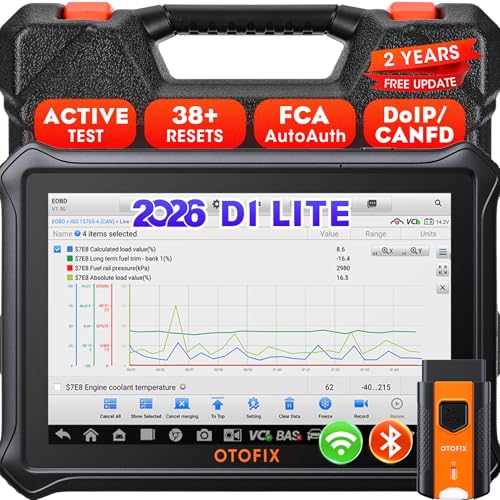
- 【2026 OTOFIX D1 Lite Gives the Best Value for Money】OTOFIX D1 Lite bidirectional scan tool is more FASTER and SMARTER with 2026 Enhanced Hardwares & New Functions! 👍Alternative Bluetooth +USB connect 👍2G+64GB 👍4x ARM Cortex-A35 (1.5GHz) Processor (5X Faster CPU) 👍Android 9.0 OS 👍5G GHz WiFi 👍CANFD&DOIP 👍 FCA AutoAuth 👍38+ Services 👍3K+ Bi-Directional Control 👍Full Systems Diagnose 👍2 Years Update 👍150+ Vehicle Coverage.
- 👍【Active Tests】 OTOFIX D1 Lite is a bi-directional scan tool that can send commands to, and also receive information from vehicle control modules. This way, you can quickly locate and repair faulty auto parts. For Example: send direct commands to ask the vehicle to turn on/off the radiator fan, lights, sound horn, fuel pump, modulate throttle, open/close windows, operate mirrors and more. *Note that only available tests will be displayed in the menu.
- 👍【38+ Service Functions】 OTOFIX D1 Lite scan tool offers 38+ of the hottest service functions that are commonly used for car repairs. That include Oil reset/SAS/EPB/BMS/Throttle/ABS bleeding, and 2065-new SUS/ADBLUE/NOX/Headlamp resets (and more) to help restore your car status after repairs are done. Compared to other diagnostic scanners for cars, the OTOFIX D1 Lite scanner is much more fully-featured. *Note that specific functions available depend on the make/model/year of your car.
- 👍【All System Diagnostics + Cloud Report Management】 This 2026 car scanner OTOFIX D1 Lite provides troubleshooting and data for all ECUs: read/clear DTCs, view graphic live data/VIN, and locate system faults for safe driving. With Cloud Report Management, you can save detailed reports to cloud servers and easily shared them with others via QR codes/emails/text messages. Others can access these reports from any device (smartphones/tablets/PCs …) anytime, and you can better manage repair work.
- 👍【99% Car Coverage】 This one-station car scanner diagnostic for all cars works on 150+ major car brands across the world. 1) It supports CAN-FD/DoIP protocols: compatible with GMCAVALIER/TRAX/Encore/Envision/GL8(LSY)/CT4/CT5 after 2019; Volvo after 2018; Land Rover/Jaguar after 2017; and BM.W F/G all chassis. 2) For models equipped with security modules (such as Renault & 2018+ FCA SGW), its built-in AutoAuth allows you to easily break diagnostic barriers after registration.
This product presentation was made with AAWP plugin.
Last update on 2026-05-12 / Affiliate links / Images from Amazon Product Advertising API