
NHTSA ID Number: 10158801
Manufacturer Communication Number: Campaign T3G - S
TSB/Document Date: 2019-04-22
Summary
Hyundai Motor America is conducting a Service Campaign to update the display audio software on certain 2019 Veloster vehicles. Service Campaign T3Q provides a procedure to update the display audio software for blank home screen.
If the PDF is very large, it may not load in the preview below.
Some older TSBs had multiple PDFs — visit the NHTSA Website to view all PDFs.
If the TSB PDF does not show, download or view it on the NHTSA Website.
Click on the (+) Plus Sign
Then Click on Associated Document(s)


- Advanced VCI Box, Industry-leading J2534 Pass-Thru...
- High-Speed OEM-Level Diagnostics & Programming: Unlock true...
- Coverage for 17 Car Brands & Ultra Reliability: Works...
- User-Friendly RLink Platform & Expert Support: TOPDON’s...
- 6.6 ft USB-C Cable & Portable Storage Case: The RLink J...
This product presentation was made with AAWP plugin.
Search NHTSA Database for Recalls
Search NHTSA Database for Vehicle Investigations
View Latest Vehicle Investigations
Search NHTSA Database for Vehicle Complaints
View Latest Vehicle Complaints
TSB/Document ID: Campaign T3G - S
Replacement Service Bulletin Number:
MFR Communication Date: 2019-03-13
MFR Internal Campaign ID/Software Version:
Communication Type: Service Bulletin/Repair Instructions
NHTSA Components: EQUIPMENT:ELECTRICAL:RADIO/TAPE DECK/CD ETC.
MFR Component System:
MFR Component Subsystem:
Previous TSB | Next TSB |
Service Campaign T3G Dealer Best Practice
Date: March 13, 2019
Attn: Dealer Principal/General Manager/Service Manager/Parts Manager
Subject: Service Campaign T3G: SONATA / SANTA FE SPORT / TUCSON ENGINE DTC P1326 - WIRING INSPECTION /
INSTALLATION AND ENGINE REPLACEMENT (TSB #19-01-006H supersedes TSB# 18-01-032-2)
Updates To This Document
•
Date
Verbiage Update: Service Actions (Reception) – additional details provided regarding SRC and 3rd Party
Rentals.
03/13/19
***IMPORTANT Retail Vehicles***
Dealers must perform this campaign on all affected vehicles prior to customer retail delivery and whenever an affected vehicle is in the
shop for any maintenance or repair. When a vehicle arrives at the service department, access Hyundai Motor America’s “warranty vehicle
information” screen via WEBDCS to identify open campaigns
Affected Vehicles
Hyundai has launched a Service Campaign for applicable vehicles with 2.0L Turbo and 2.4L engines that may experience the Check
Engine warning lamp illuminated with DTC P1326.
The affected vehicles include:
•
•
•
•
•
Certain 2011-2014 MY Sonata (YF) vehicles with 2.0L Turbo and 2.4L engines
Certain 2015-2018 MY Sonata (LF) vehicles with 2.0L Turbo and 2.4L engines
Certain 2013-2018 MY Santa Fe Sport (AN) vehicles with 2.0L Turbo and 2.4L engines
Certain 2014-2015 MY Tuscon (LM) vehicles with 2.4L engines
Certain 2018 MY Tucson (TL) vehicles with 2.4L engines
Hyundai is initiating this action to ensure the quality of its vehicles and the continued satisfaction of Hyundai customers.
Description
Applicable vehicles with 2.0L Turbo and 2.4L engines may experience the Check Engine warning lamp illuminated with DTC P1326.
Follow the procedure on TSB #19-01-006H (supersedes TSB# 18-01-032-2) to inspect the vehicle and install a wire harness extension or
replacement engine based on the inspection results.
Service Action
Reservation – Always check the Vehicle Information Screen in WebDCS for open campaigns and recalls, and
advise the customer on time requirements.
• Make sure to check your appointment reservation settings and verify customer information. This will help reduce
unplanned work and speed up the customer check in process.
• Make sure to review Blue Link alerts with DTC P1326 and reach out accordingly.
• Provide customer with transportation options such as SRC or alternative vehicle.
Readiness – Review this announcement and the accompanying FAQs with all Service and Parts staff including
Reservationist/BDC. Also, complete all applicable training, check your reservation capacity settings (you can set separate
capacities for every recall/campaign), confirm email addresses for campaign appointments, and that you have all necessary
tools, campaign parts and shop equipment as needed.
• Make sure to have necessary Special Service Tools to perform campaign (see TSB for more details).
• This campaign can possibly require additional repairs after initial inspection; make sure to prepare for unplanned work and
maintain sufficient staff to keep vehicles moving through the shop.
Reception – Always check the Vehicle Information Screen in WebDCS for open campaigns and recalls, and print a
copy for technicians. Provide SRC or an alternative vehicle, as needed. If a customer has declined the campaign,
note this on the repair order and request the customer’s signature next to the statement.
• It is important to explain to each customer during the reception step of the service process what happens if their vehicle
requires additional repairs after the inspection process.
• Make sure to advise customers of potential vehicle down time and provide alternative transportation such as an SRC or 3rd
party rental.
All customers that come in with P1326 or “Engine Protection Mode” should be provided an SRC or
alternative 3rd Party Rental. All SRC or Rental claims will be reimbursed regardless of PA’s decision to
cover the engine replacement.
• Do not charge diagnosis for vehicles that previously had campaign 953 performed and return to the dealership in “Engine
Protection Mode” or with DTC P1326.
Repair – Always plug in the GDS before starting the repair. Make sure to complete an MPI on all vehicles and Quality
Control your work.
• This campaign can possibly require additional repairs. Make sure refer to the most current TSB for all necessary steps of
the repair process.
• If the engine is seized or knocking or the inspection cannot be completed: Submit a PA request for engine replacement
with a GDS screenshot showing the VIN # and DTC P1326. When approved, replace the engine with service kits. Perform
the wiring inspection after engine replacement.
• Make sure to quality control work after repair is complete and confirm condition is resolved.
• If an engine replacement is required, PA may request dealers to perform additional steps before approving replacement.
Dealers will be compensated for this additional time and such steps may include connecting the GDS to retrieve additional
information from the vehicle.
Return – Review all completed campaign and repairs to answer any customer questions. Also, schedule the customer’s
next service.
• It’s important to explain to each customer during the return step of the service process that the 953 Engine Improvement
Campaign is still active and they should contact the dealership if any Check Engine Light is illuminated or Engine
Protection Mode is activated.
Reconnect – Follow up for customer satisfaction.
Parts
Order the required parts based on the vehicle inspection results on page 7 of the TSB #19-01-006H (supersedes TSB# 18-01-032-2).
Customer Notification
•
None
Thank you for your prompt attention to this important matter and continued commitment to Hyundai customers.
Hyundai Motor America
Key Contact Information
Contact Information
Dealer Support
Description
Parts
[email protected]
1-800-545-4515
Parts ordering hotline
Techline
1‐800‐325‐6604
Warranty HELPREP Line
1‐877‐446‐2922
Vehicle Technical Support for Hyundai Dealer
Technicians
Warranty Claim questions for Hyundai Dealers
Warranty Prior Approval (PA) Center
1‐844-371-3808
Warranty Prior Approval (PA) Center for Hyundai Dealers
Xtime Technical Support
[email protected]
1‐866‐984‐6355
Assistance with Car Care Scheduling:
• Appointment / Shop Capacity Management /
Campaign Integration / Operation Codes
AutoLoop Technical Support
[email protected]
1-877-850-2010
CDK Technical Support
https://serviceconnect.support.cdk.com/
Assistance with Car Care Scheduling:
• Appointment / Shop Capacity Management /
Campaign Integration / Operation Codes
Assistance with Car Care Scheduling:
• Appointment / Shop Capacity Management /
Campaign Integration / Operation Codes
Customer Support
Contact Information
Description
Hyundai Customer Care Center
(Recall /Campaign Questions)
1‐855‐671‐3059
Customer questions or concerns related to recall or
service campaigns
Hyundai Recall / Campaign
Website
Hyundai Customer Care Center
(General Questions)
Updated information related to the specific recall or
service campaign
Customers general questions, non‐campaign
related
Hyundai Roadside Assistance
1-800-243-7766
1‐800‐633‐5151
Hyundai Roadside Assistance
Key Reference Information
Campaign Central
Name
Car Care Scheduling (Xtime) - Tutorials
Car Care Scheduling (Xtime) - Recall Appointment
Notification
Source
Consolidated repository of recall and service campaign dealer best practices.
Located on the service tab homepage in www.HyundaiDealer.com
www.HyundaiDealer.com > Service > Dealer Resources > Documents Library >
Car Care Scheduling
1.
2.
3.
4.
5.
Log into Xtime
Under the menu at the top left, select ‘CONFIGURE’
Under the dealership tab, click “EMAIL COMMUNICATION”
Slide the toggle to “ADVANCED”
Populate as many e-mails as desired in the “PARTS DESK EMAIL FIELD”
Parts – Campaign Parts Management (CPM)
Procedure
As applicable; www.HyundaiDealer.com > Parts > Documents Library >
Campaign Parts Management
Service Rental Car (SRC) Program
www.HyundaiDealer.com > Service tab > SRC Fleet Mgmt Software
Technical Service Bulletin (TSB)
Uncompleted Campaign VIN Listing
www.HyundaiDealer.com > Service tab > Hyundai Tech Info
A listing of vehicles is located on WEBDCS> SERVICE tab> select
UNCOMPLETED CAMPAIGN VIN LISTING
– Dealer Stock (New, SRC, CPO, etc.) and Retailed.
Recall Campaign Website
NHTSA Website
www.hyundaiusa.com/recall
www.safercar.gov
Appendix
Previous Updates To This Document
•
Service Campaign T3G Launch
Date
02/15/19
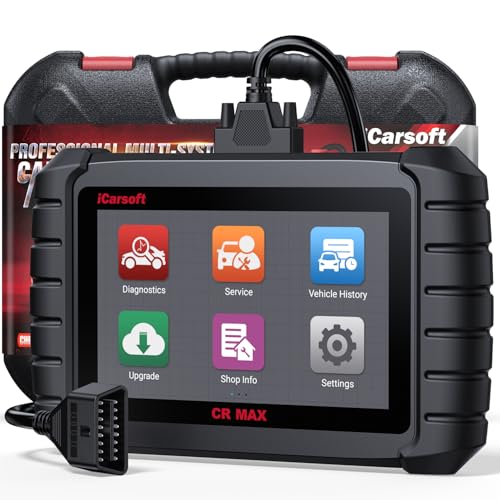
- WHY CHOOSE THE 2025 CR MAX -Upgrade the latest diagnostic capabilities for all vehicles after 1996: upgrade to 49+maintenance services; 46 extra specific functions; real all systems/all control modules diagnose; over 40K+ bidirectional actuation tests for diagnosing all control moduels of cars; Powerful full OBD2 Functions; built-in ECU Coding for BMW
 / Audi/ VW/ RollsRoyce; Fr ee V.A.G Guide Function; Battery retistration for new battery adaptation and more. It covers all vehicle diagnostic services and some special professional vehicle maintenance servces, assists you to do home DIY vehicle maintenance or car repair as a pro technician.
 - NEWEST IN INNOVATION FULL OBD2 SERVICES- iCarsoft auto car diagnostic scanner compatible with CAN-FD, CR MAX can do it all-reads and clears trouble codes, ALL SYSTEM DIAGNOSIS such as engine, transmission, ABS and airbag etc. CR MAX code reader for all cars can perform I/M Readiness, Live Data, Freeze Frame, Vehicle Information, Monitor Test, On-Board Monitor, E vap System Test,O2 Sensor Test,DTC Library Lookup,etc. (Warm Tips: If you car is after 2023,please contact us for compatibility; 3. It comes with 16PIN OBD2 diagnostic adapter, please check your car diagnostic socket if it is 16pin socket, if your car is 14pin diagnostic socket please contact us for the solution.)
- 49 RESET+ 46 SERVICES- Performs: Oil Reset, EPB,SAS,Throttle, D-P - F, Battery, ABS, Injector, TPMS, Suspension, AC, Head Lamp, Body Stablity, Engine, Tramsmission, Airbag, Seat, Door-Win-Roof, Fuel Pump, Door, E-G- R.+21 NEWEST SERVICES( Need update scanner)-AdBlue, Clutch, Crankshaft, High Voltage Battery, Cruise Control, NO xSensor, Rain Sensor, Stop And Start, Turbocharger, Head Up Display, Radar Camera, Vehicle Setup, Cyliner Misfire Check,Speedlimitassist, ControlUnitReset,OxygenSensor, Seatbelt. Extra 46+ extra services based on car brand.(Tips: Quantity of reset/ calibration fucitons are based on car system that your vehicle model has)
- REVOLUTIONARY 40000+BIDIRECTIONAL ACTIVE TESTS: Upgraded CR Max scanner equip with numberous of actuational test items for covering all available vehicle control modules, no longer only do simple light test or window test like other scanners, performs hardware modules test and software control modules test for checking car units or new updated control moduels work well or not after maintenance/ repair/ re-installation/ control system updated (Example for Benz- Roller Sun Blind test; Backup Camera test ;Self-test; EPB test; Transport Mode test;Boost Pressure Positioner test; Fuel Pump test; AND MORE!!).(Warm tip: The available test items are based on control modules your car has)
- ECU CODING+ BATTERY REGISTRATION- Powerful ECU Coding service for BMW/MINI/RollsRoyce / Audi/VW/Seat/Skoda/Bentley/Bugatti/Lamborghini, Improves Engine Power Performance and Optimizes Fuel Efficiency and Match New Hardware Unit to car and Customized a comfortable Driving Modes and Fixes & Updates Original Software Bug. The battery test function for checking car battery health, perform battery reset (BMS ) for replacing a damaged or aging car battery with a new one and register new battery to car ECU

- Scanner POR V2.0 with all obd2 services
- Do the scanning for engine
- Support OBDII/EOBD Ten Modes of Operation

- 【Designed for Most Mercedes-Benz, Sprinter and Smart from 1996-2023】As every car model of Benz has its-owned specific car system and ECUs, not all models are equipped with a complete vehicle ECU, which may cause the scanner to be unable to perform all listed reset services on some models, or even completely incompatible. Like For Sprinter's newer models, it support diagnostic functions only, lacking support for specialized service functions.. So please tell us the car's VIN and required service before purchase for compatibility check. You may also refer to the instructions in the eighth image of the main product photos to perform your inquiry.
- 【Up to 38 Reset Services】MB V3.0 2026 Version diagnostic tool performs Up to 38 maintenance services - Oil Rest , SAS, EPB, ETC, D-P-F, TPMS, ABS, Suspension, Air Conditioner, Head Lamp, Body Stability, Engine Control, Seat, Fuel Pump, Air-Filter, Engine Idle, Door, Im-mo-bilizer, Injector Coding, Transmission Control, Miscellaneous, Adblue, BMS, Cluth, Water Pump, NOxSensor, Rain/Light Sensor, Start/Stop, Radar/Camera, Cylinder Shutoff Test, Speed Limit Assist, Control Unit Reset, Oxygen Sensor, Seat Belt, Cruise Control System, Turbocharger, Crankshaft, Language Setting and etc. (Tips: Please update the software after receiving the product to obtain new service functions)
- 【OE-Level All System OBD2 Scanner】iCarsoft MB V3.0 (2026 Version) diagnostic scanner offers comprehensive OBDII services, allowing you to quickly scan all systems, including the Engine, ABS, SAS, SRS, TPMS, TCM, Fuel Pump System, ESP, EPB, EPS, Suspension, SCM, Adaptive Systems, and more. It supports functions such as reading and erasing codes, checking I/M readiness, viewing freeze frame data, performing O2 sensor tests, conducting on-board monitoring, testing the evap system, auto VIN retrieval, and reading both generic and specific codes, as well as DTCs and battery tests.
- 【Bidirectional Scan Tool】iCarsoft MB V3.0 (2026 Version) Bidirectional scanner supports activate or control a vehicle system or component, allows commanding cars’ modules and receiving info from the ECU to perform active tests on individual components, including EVAP/ABS Motor Pump/Windows/Sunroof and more, to pinpoint fault causes & resolve issues,and allows you to re-learn certain components after making repairs or replacement.
- 【Real Time Record & Graph View】iCarsoft MB V3.0 (2026 Version) can automatically record vehicle text history and identify vehicle information. Preserve real-time data information. View & Graph Live Data. Support Data Review and Print. Multi-language: English, German, Dutch, Spanish, French and so on. We promise to offer Lifetime updates (Lifetime free Update via PC), and confidence in products. We also provide 1 year warranty + extra lifetime hardware free repair if you need it in the future. We prioritize user experience & strive to meet your expectations. Please do feel free to reach out to us if you have any question or problem about the usage, our tech team will service you in time.

This product presentation was made with AAWP plugin.
Last update on 2026-05-13 / Affiliate links / Images from Amazon Product Advertising API