
NHTSA ID Number: 10156314
Manufacturer Communication Number: IK0800510
TSB/Document Date: 2019-04-01
Summary
Cooper Bussmann Inverter Information/Diagnostics; only models with feature code 0008XDM or 0008XDN and built after 05/12/2014
IK0800510 - Cooper Bussmann Inverter Information/Diagnostics
Page 1 of 12
Countries:
CANADA, UNITED STATES, MEXICO Document ID: IK0800510
Availability:
ISIS, FleetISIS, NotSIR
Revision:
9
Major System:
ELECTRICAL SYSTEM
Created:
2/23/2015
Current Language: English
Last Modified: 11/15/2018
Other Languages: NONE
Author:
Viewed:
Charles Schroeder
4070
Less Info
Coding Information
Hide Details
Copy Link
Copy Relative Link
Bookmark
Add to Favorites
Provide Feedback
Helpful
Not Helpful
23
11
View My Bookmarks
Title : Cooper Bussmann Inverter Information/Diagnostics
Applies To : ProStar/LoneStar built after 05/12/2014 with 0008XDM,0008XDN feature codes
Change Log
Please refer to the change log text box below for recent changes to this article:
11/15/2018 ‐ Added link to the 1200W Xantrex Power Inverter
10/27/2017 ‐ Author updated for feedback purposes
06/06/2016 ‐ Removed non working Table of Contents
10/05/2015 ‐ Added Electrical Outlet Breaker Inspection step to Failed Inverter Operational checks in the fault code troubleshooting section.
08/03/2015 ‐ Author updated for feedback purposes
05/04/2015 ‐ Change Title to reflect name on Inverter label
Introduction
International ProStar and LoneStar vehicles built after 05/12/2014 will use the 1800W inverter with AGM batteries.
◦ For information on the 1200W Xantrex Freedom X Inverter, please reference IK0800579 ‐ Xantrex 1200W Power Inverter
Information
The Cooper Bussmann Inverter is designed to create either 1kW / 1.8kW of pure sine wave 115VAC 60Hz power from a 12V battery
source. The units low Total Harmonic Distortion ( 10.5 ± 0.3 VDC and < 16.0 ± 0.3 VDC
https://evalue.internationaldelivers.com/service_kb/DocTool/ArticleViewer.aspx?ControlI...
12/5/2018
IK0800510 - Cooper Bussmann Inverter Information/Diagnostics
Page 4 of 12
Unit start up voltage (Mid setting):
> 11.8 ± 0.3 VDC and < 16.0 ± 0.3 VDC
Unit start up voltage (High setting):
> 12.2 ± 0.3 VDC and < 16.0 ± 0.3 VDC
DC Input Warning and Shutdown
Condition
UVSD setting
Setting
± 0.3Vdc
Display
Audible alarm
Comment
Over voltage instant shutdown
Lo, mid or hi
16.0
E02
Beep @ 1 Hz
Note 1
Over voltage recovery
Lo, mid or hi
15.5
‐‐
‐‐
Note 2
Under voltage instant shutdown Lo, mid or hi
10.0
‐‐
‐‐
Note 3
Under voltage shutdown
Lo
10.5
E01
Beep @ 1 Hz
Note 4
Under voltage warning
Lo
11.0
E05
Beep @ 0.33 Hz ‐‐
Under voltage recovery
Lo
12.0
‐‐
‐‐
‐‐
Under voltage shutdown
Mid
11.8
E01
Beep @ 1 Hz
Note 4
Under voltage warning
Mid
12.1
E05
Beep @ 0.33 Hz ‐‐
Under voltage recovery
Mid
12.6
‐‐
‐‐
‐‐
Under voltage shutdown
Hi
12.2
E01
Beep @ 1 Hz
Note 5
Under voltage warning
Hi
12.2
E05
Beep @ 0.33 Hz ‐‐
Under voltage recovery
Hi
13.0
‐‐
‐‐
‐‐
1. Unit will shut down instantly and restart automatically if voltage returns to less than 15.5V
within 30 seconds
2. If DC voltage is not less than 15.5V within 30 seconds, unit will require manual reset by power
button
3. Unit will shut off instantly if DC voltage drops below 10V regardless of settings
4. Unit will shut off if DC voltage is below shutdown for 10 seconds
5. Unit will shut off if DC voltage is below shutdown for value for 3 minutes
AC output short circuit protection
A short circuit may be applied to the AC output continuously during inverter mode without damage to any components. Unit will shut
down within 10 seconds, and display will indicate ‘E03’ with the buzzer beeping @ 1 Hz.
Manual reset is required to restart Inverter after AC Overload or Short Circuit shutdown. System will automatically reset AC Overload or
Short Circuit shutdown error when utility is available. The supplemental protector or the branch protection specified in the Installation
Guide should be open under bypass short circuit output condition.
Incorrect connection protection
Inverter DC input protection
• AC input and AC output: AC Input Line and Neutral reverse connection cannot be detected. Input and output ac terminals are
labeled and unit should be installed by a professional installer.
• Charger DC output protection: Reverse polarity on DC terminal will open the CD input fuses in the Cooper Bussman Inverter.
This damage is not covered under warranty.
AC output protection
External AC source applied to the inverter AC output may damage the inverter. This damage is not covered by warranty.
Troubleshooting
The following Fault codes are provided on digital display when system Fault/Warning occurs:
https://evalue.internationaldelivers.com/service_kb/DocTool/ArticleViewer.aspx?ControlI...
12/5/2018
IK0800510 - Cooper Bussmann Inverter Information/Diagnostics
Page 5 of 12
Fault Codes ‐ Displayed in LCD
E01
DC Input Under‐Voltage Shutdown. Unit is detecting an input DC voltage which is too low and it is shutting down. This fault can
be caused by a discharged or undersized battery. Incorrect DC wiring length and gauge or fault DC connection can also cause this
fault.
E02
DC Input Over‐Voltage Shutdown. This fault could be due to a problem in the vehicle charging system. Unit will resume normal
operation when voltage returns to the allowed input voltage range.
E03
Inverter Output Overload (or Short Circuit) Shutdown. Unit is being severely overloaded. Reduce the load.
If this fault occurs in shore power mode the unit must be reset. To reset, remove AC loads and turn inverter power off and on.
Also inspect electrical outlet as seen in step 2 of this code's diagnostics.
E04
Inverter Over‐Temperature Shutdown. Unit is shutting down to protect itself from thermal damage. Place the unit in a location
with lower ambient temperature or improve air flow around the unit.
E05
DC Input Under‐Voltage Warning. Unit is detecting an input DC voltage which is too low and it is warning the user that it will
shut down within 10 seconds. This fault can be caused by a discharged or undersized battery. Incorrect DC wiring length and
gauge can also cause this fault.
E06
Inverter Output Overload Warning. Inverter is detecting an overload and it is warning that it is going to shut down within 10
seconds. Reduce load and inverter will keep operating normally.
E07
Inverter Over‐Temperature Warning. Inverter is approaching its maximum operating temperature and it will shut down within
10 seconds. Reduce load or/and move the inverter to a location with lower ambient temperature or better air flow.
E08
Not used
E09
Not used
E10
Charger Output Over Voltage Shutdown. Battery charger has detected a battery voltage above normal operating range.
Vehicle charging system may be damaged.
E11
Battery not accepting charge. Inverter is trying to charge the battery, but battery voltage is not increasing over time. Battery
may be damaged
E12
Transfer Relay Over‐Temperature Shutdown. Relay that switches inverter to shore power mode is running at an unusually high
temperature and unit it is shutting down to protect itself. This could be due to an overload condition in shore power mode.
Reduce the load and unit will return to normal operation
AC input surge protection
• 175 J MOV is connected across the Line and Neutral of AC Input
Charger DC output over voltage shutdown
•
•
•
•
Battery over voltage protection: 16.0 ± 0.5Vdc (Error code: E10)
Audio Alarm: Beep @ 1 Hz and AC charger is latched off
Bypass mode is available
To reset error code, remove AC Input and turn unit off and on
Dead battery charging
Battery voltage must meet the following conditions or Error code E11 will display:
• Initial battery voltage must be 10V or higher for charge to commence
• In event battery voltage drops below 10V after charge is initiated (added load) maximum time for battery voltage to rise above 10V
in Bulk charge: 15 minutes
• Audio alarm: Beep @ 1 Hz and AC charger is latched off following 15 minute delay
• Bypass mode is available
• To reset error code, remove AC Input and cycle unit off and on until reset
( Back to Top )
Fault Code Troubleshooting
Inverter Inoperative Operational Checks
https://evalue.internationaldelivers.com/service_kb/DocTool/ArticleViewer.aspx?ControlI...
12/5/2018
IK0800510 - Cooper Bussmann Inverter Information/Diagnostics
Step
Symptom Verification
Page 6 of 12
Decision
Attempt to power on inverter from the
display panel
Yes: Go to Step 2
Does inverter turn on?
No: Go to Step 3
#1
Step
Symptom Verification
Inspect the electrical outlet
Decision
Yes: Press the reset button, and retest with a
load (Microwave, Refrigerator, etc...).
Release the truck if the inverter is able to
support the load. If issue is still present go to
Step 3.
#2
Is an amber light on like illustrated above?
Step
No: Go to Step 3
Power To Inverter
Check for minimum of 12v at inverter.
Decision
Yes: Got to step 4
#3 is 12v or more present at inverter
No: Determine cause of missing 12v, repair
and retest
Step
Ground to Inverter
Check for ground to inverter.
Decision
Yes: Got to Step 5
#4 Is ground present at inverter?
No: Determine cause of missing ground to
inverter, repair fault, and retest.
Step
Check Display Panel Connections
Decision
Remove display panel and inspect cable
Yes: make repairs as necessary. The cable
connections for damaged pins, chaffing or other and/or display can be replaced individually.
issues. The cable is housed within the sleeper Retest operation after repairs.
harness. Check for rubbing, sharp bends in the
#5 cable or sharp edges.
Are any issues identified with cable or
connections?
No: Replace inverter. Retest for proper
system operation
https://evalue.internationaldelivers.com/service_kb/DocTool/ArticleViewer.aspx?ControlI...
12/5/2018
IK0800510 - Cooper Bussmann Inverter Information/Diagnostics
Page 7 of 12
Fault Code E01/E05/E11
Step
Inspect Battery Cables and Connections
1. Inspect Battery Cable Connections per
IK0800482
2. Inspect Battery Cable Connections at the
#1 inverter
Were cables free of corrosion/issues?
Step
Decision
Yes: Go to Step 2
No: Perform all necessary repairs and retest for
symptom
Battery Test
Decision
Yes: Go to step 3
#2 Perform Battery Test (IK0800482)
Did Batteries Pass testing
Step
No: Perform all necessary repairs and retest for
symptom
Voltage Drop Test Positive Cable
Decision
Check voltage drop between batter to inverter Yes: Replace positive cable
cables
#3
Step
Was voltage drop greater than .3v?
No: Perform all necessary repairs and retest
for symptom
Voltage Drop Test Negative Cable
Decision
Yes: Replace negative cable
Check voltage drop between batter to inverter
#4 cables
Was voltage drop greater than .3v?
No: Restore truck to operating condition and
contact supervisor.
Inverter Turns on but is inoperative(Associated with code E03,E06)
Step
Symptom Verification
Decision
#1
Does inverter turn on and display show E03
plus an alarm sound?
Yes: Go to Step 2
https://evalue.internationaldelivers.com/service_kb/DocTool/ArticleViewer.aspx?ControlI...
12/5/2018
IK0800510 - Cooper Bussmann Inverter Information/Diagnostics
Page 8 of 12
No: Interview driver for further information.
Inquire about loads that might have been used
at the time of concern.
Step
Symptom Verification
Inspect the electrical outlet

- 💯【Conta.ct us for Support Directly】If you met any...
- 🔥🔥🔥【2026 AUTEL FLAGSHIP MK900BT MK900-BT, NEW...
- 🚗【3000+ ACTIVE TESTS (50➡3000+), SAME AS MS...
- 🚗【40+ HOT SERVICES FOR 150 MAKES (28+➡40+)】Full...
- 🚗【OE ALL SYSTEM DIAGNOSE, AUTO SCAN 2.0: SCAN LICENSE...


- 【TURN OFF CEL】 This AL319 car scanner diagnostic tool...
- 【EXTENSIVE APPLICATION】 Autel AL319 Compatible with...
- 【FOR END USER & DIYERS】 This error code reader AL319 is...
- 【USER-FRIENDLY DESIGN】 This OBD2 scanner and check...
- 【HIGH-QUALITY SERVICES】 12 months war.ranty from the...
If the PDF is very large, it may not load in the preview below.
Some older TSBs had multiple PDFs — visit the NHTSA Website to view all PDFs.
If the TSB PDF does not show, download or view it on the NHTSA Website.
Click on the (+) Plus Sign
Then Click on Associated Document(s)
Search NHTSA Database for Recalls
Search NHTSA Database for Vehicle Investigations
View Latest Vehicle Investigations
Search NHTSA Database for Vehicle Complaints
View Latest Vehicle Complaints
TSB/Document ID: IK0800510
Replacement Service Bulletin Number:
MFR Communication Date: 2018-11-15
MFR Internal Campaign ID/Software Version:
Communication Type: Service Bulletin/Repair Instructions
NHTSA Components: ELECTRICAL SYSTEM
MFR Component System:
MFR Component Subsystem:
Previous TSB | Next TSB |

- Stay Updated with Lifetime Access: This obd2 scanner includes lifetime free software updates for all app service functions. With a single payment, enjoy full access to diagnostics, reset tools, and maintenance features — zero subscription fees. A budget-friendly choice for weekend mechanics, home car owners, and DIYers, supporting vehicles from 1996 onward. Come to us with your VIN to check compatibility.
- Full Bidirectional Control/Active Tests & Stable Wireless Connectivity: This car code reader features full bidirectional control, allowing you to send commands to the vehicle's ECU for active tests on components such as fuel pumps, injectors, A/C clutches, windows, sunroofs, and more. This car scanner diagnostic tool helps DIYers quickly diagnose and test vehicle parts, cutting down troubleshooting and repair time. With BT 4.0 wireless connectivity, you can enjoy cable-free diagnostics up to 33 feet. Stand in your garage and test windows, wipers, or even engine components—all without needing to move around your car.
- Portable Car Scanner with 26 Special Functions: Scheduled vehicle maintenance with the A30M car diagnostic scanner can keep your vehicle in peak condition and save you big on dealership trips. The XTOOL A30M obd2 scanner diagnostic tool features essential reset and relearn functions, such as Oil Reset, EPB Reset (Electronic Parking Brake Release), SAS, ABS Brake Bleeding, Throttle Body Relearn, Injector Coding, Crank Sensor Relearn, Headlight Adjustment, and Tire Size Reset. Note: Service functions may vary by vehicle model – check compatibility beforehand!
- Wide Compatibility CAN FD & FCA
 Autoauth: This obd2 scanner diagnostic tool is compatible with over 85+ car brands from the U.S., Europe, and Asia, providing extensive coverage through a BT connection with your smartphone or iPad. Now upgraded to support the latest protocols, it includes FCA AutoAuth access for Chrysler, Jeep, Dodge, and Fiat (2018+), and supports CAN FD for GM (2020+) models, giving you greater access to newer vehicles and systems. Note: The FCA AutoAuth account is not included with the device. Users must register and pay separately through the official FCA AutoAuth website to access diagnostic functions for vehicles that require it.
 - Up to 8 Live Data Streams Graphing – Real-Time Graphing for Deeper Insight: This car scanner supports up to 8 live data streams simultaneously with intuitive, real-time graphing. Gain comprehensive insights into your vehicle’s performance, making it easier to spot issues, detect trends, and make informed diagnostic decisions with confidence.
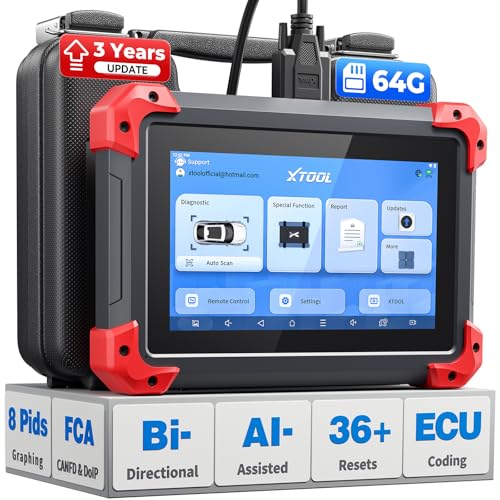
- 2026 Latest Version – Now Upgraded from 32GB to 64GB: XTOOL D7 obd2 scanner diagnostic tool with bidirectional is designed for DIY enthusiasts, professional mechanics. It now offers 64GB storage for smoother operation. Its 5000mAh battery (with 2500mAh 7.3V fast-charging) supports all-day use. With FCA, CAN FD, and DOIP protocol support, it covers more vehicle models and newer systems. A newly added battery voltage reading shows battery status before diagnostics, helping prevent low-voltage tests that could harm the vehicle. The V2.0 Diagnostic Report allows shops to personalize results with logos, customer details, and attachments to build trust and maintain records.
- Save $500+/Year with Pro-Level Diagnostics: Whether you're a DIYer, starting a repair business, or beginning work at an auto shop, XTOOL D7 car scanner offers advanced features typically found only in expensive professional OBD2 scanners - without the high price tag. With 4,000+ Active Tests & Bidirectional Pids, 36+ Special Functions, advanced module resets like SRS Reset, OE-level All-System Scan (one-click), FCA AutoAuth, CAN FD, DoIP, data export, and 8 PIDs graphing, the D7 auto scan tool covers 100,000+ vehicles (excluding Indian models). Includes 3-Year updates and supports the XV200 endoscope to detect em!ssions and intermittent issues.
- Full Bidirectional Advantage Over Other Code Readers & Scan Tools: The XTOOL D7 automotive scanner offers true bidirectional control plus advanced bidirectional PIDs, letting you send commands to components like A/C clutches, fuel injectors, windows, fans and more, while monitoring sensor responses live to catch elusive issues (even those without warning lights). Unlike budget bidirectional obd2 scanners limited to basic active tests,the D7 car fault scanner gives you full bidirectional control to run ABS pump tests, throttle position, turn fan on/off and solenoid tests, etc. No guessing, no extra fees—just smarter diagnostics
- OE-Level Full System Car Diagnostic Scanner with 8 Live Data Graphs: The XTOOL D7 is a pro-grade diagnostic tool that gives you full access to all vehicle systems—just like Snap on scanners & the factory scan tools, it delivers deep, accurate diagnostics you can trust. Easily view live data streams, retrieve freeze frame, and run active tests to pinpoint issues fast. With the ability to graph up to 8 PIDs at once, you can spot performance trends and troubleshoot like a pro. Whether you're a mechanic or car owner, with the D7 auto scanner you can stay ahead of problems and keep your vehicle running at its best
- High-value Automotive Scanner Diagnostic Tool with 36+ Special Function, Module Resets, Relearns, Calibrations, Adaptations & Initializations: XTOOL D7 diagnostic tool packs 36+ common & advanced maintenance, skip the $150 fee for battery registration after replacement, throttle body relearn after cleaning, or TPMS resets post-rotation, Auto bleed after the pad changes, or Electronic Parking Brake. Need to reset the transmission after towing? Crank sensor relearn for GM/for Dodge? Done. D7 also covered advanced functions like Ad~blue Reset, VIN Write, and many more professional OBD2 scanner functions that we can't list here. Text us your VIN + what you need, we’ll check the compatibility
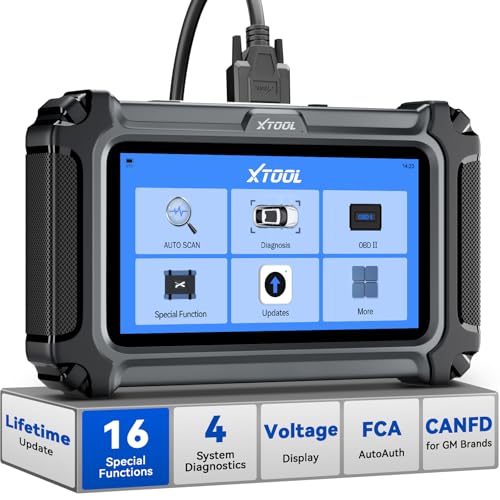
- Comprehensive OBD2 Scanner with 16 Resets: The XTOOL D5S car code reader and vehicle reset tool provides an advanced diagnostic solution with 16 commonly needed reset functions, including Electronic Parking Brake Reset (EPB Reset), SAS, BMS Reset (Battery Test), Throttle Body Relearn, TPMS Reset, ABS Bleeding, Injector Coding, Gearbox Match, Suspension Adjustment, Headlight, Window Initialization, Crank Sensor Relearn and more. Equipped with CAN FD Protocol and FAC AutoAuth, the D5S obd2 scanner diagnostic tool ensures compatibility with a broad range of modern vehicles, allowing users to address common maintenance needs quickly. NOTE: Please Check the Compatibility before ordering.
- 4 Main System Car Scanner & Full OBD2 Diagnostics: The XTOOL D5S car code reader is ideal for home mechanics, DIYers, and professionals, providing access to Transmission/Engine/ABS/SRS systems to read DTCs, Live data can be displayed in text or up to 4 PID data graphs, along with full OBD2 diagnostics to check the engine light on, other obd2 issues and routine maintenance. This car diagnostic scanner ensures you can keep your vehicles in top condition, avoiding costly repairs or unexpected breakdowns. NOTE: Some vehicles display three systems after connection because the transmission and engine of some vehicles are integrated into one.
- Check Engine Code Reader & Real-Time Engine Monitoring: Whether you're a car owner, a DIYer, or run a repair shop, the XTOOL D5S obd2 scanner diagnostic tool makes engine diagnostics fast and frustration-free, reading and explaining trouble codes in seconds—no confusion. Check live data like fuel trim, 02 sensor voltage, RPM, and coolant temp to pinpoint mis~fires, rough idle, or sensor issues. After repairs, simply use the D5S check engine code reader and reset tool to turn off the check engine light and confirm the problem’s fixed—saving time, money, and unnecessary shop visits. - Note: If the check engine light comes back on, it indicates the original problem still exists.
- Portable Car Scanner for ABS and SRS: XTOOL D5S gives you peace of mind when ABS or airbag warning lights come on. It reads and clears ABS codes to help you fix brake sensor, traction control, or wheel speed issues, and supports ABS bleeding after repairs like caliper or master cylinder replacement. For airbag systems, it scans and clears SRS codes related to airbags, seatbelt tensioners, and crash sensors. Whether you're doing repairs at home or running a small shop, the D5S is a cost-effective solution for safety diagnostics. Note: If a fault code returns after clearing, it usually means the issue hasn’t been fully resolved. Please check the compatibility before ordering.
- Transmission Warning Light ON? Here’s the Transmission Diagnostic and Reset Tool You Need: The XTOOL D5S is more than just a basic car scanner—it’s an easy-to-use transmission diagnostic tool. From rough shifts to slipping gears, the D5S lets you read and clear transmission trouble codes, monitor real-time TCM data, and perform transmission resets after fluid changes or repairs. Whether you’re a hands-on car owner or a pro running a busy shop, this OBD2 scanner with transmission functions helps you catch problems early—saving you time, money, and future headaches.. Note: Clearing fault codes is equivalent to a reset on some vehicles, but not all. For help, contact XTOOL Tech Support.
Last update on 2026-06-10 / Affiliate links / Images from Amazon Product Advertising API
This product presentation was made with AAWP plugin.