
NHTSA ID Number: 10142819
Manufacturer Communication Number: 2250754
TSB/Document Date: 2018-07-16
Summary
The wiring powering the router is back-feeding to the Xantrex invertor causing a potential failure of the invertor.
If the PDF is very large, it may not load in the preview below.
Some older TSBs had multiple PDFs — visit the NHTSA Website to view all PDFs.
If the TSB PDF does not show, download or view it on the NHTSA Website.
Click on the (+) Plus Sign
Then Click on Associated Document(s)


This product presentation was made with AAWP plugin.
Search NHTSA Database for Recalls
Search NHTSA Database for Vehicle Investigations
View Latest Vehicle Investigations
Search NHTSA Database for Vehicle Complaints
View Latest Vehicle Complaints
TSB/Document ID: 2250754
Replacement Service Bulletin Number:
MFR Communication Date: 2018-06-13
MFR Internal Campaign ID/Software Version:
Communication Type: Service Bulletin/Repair Instructions
NHTSA Components: ELECTRICAL SYSTEM
MFR Component System:
MFR Component Subsystem:
Previous TSB | Next TSB |
SERVICE BULLETIN
DEPARTMENT OF COMPLIANCE
VEHICLE SAFETY AND RECALL MANAGEMENT
BUILDING 11
423 N MAIN ST
MIDDLEBURY, INDIANA 46540-9218
Technical Service Bulletin: 225-0754
O
Integrity
O
Safety
O
Quality
O
Customer Service
June 13, 2018
This Notice applies to your vehicle VIN listed above.
Dear Forest River Customer:
Forest River is alerting you to an issue involving certain 2018 – 2019 – Galleria - GAB24FLM, GAB24QM and GAB24TM
Class B motorhome recreational vehicles. Please carefully review the attached document pertaining to your vehicle.
WHAT IS THE ISSUE?
The wiring powering the router is back-feeding to the Xantrex invertor causing a potential failure of the invertor.
OWNERS: WHAT SHOULD YOU DO?
Please contact your dealer without delay and request a service appointment to schedule the free repair. Forest River has
notified dealerships of this Technical Service Bulletin and have provided them with remedy instructions. The vehicle
Owner is responsible for making arrangements to have the work completed. Please state you have been notified by
Forest River of the issue and provide the TSB number (located at the top of this page) to the dealership. It is also helpful
to give the dealership a copy of this letter when you take your vehicle in for the repair.
You may visit www.forestriverinc.com to search for dealer locations.
HOW LONG WILL THE REMEDY PROCESS TAKE?
The estimated time of repair is .50 hours. However, the dealership may need to keep your vehicle or schedule an
appointment with you for a later date to fit into their regular service schedule.
DEALERS: WHAT SHOULD YOU DO?
Please review the included document from Xantrex.
Condition of payment:
A picture of the battery serial number, Battery Management Serial Number and Router is required.
TSB NUMBER
225-0754
DESCRIPTION
R/R XANTREX CUSTOM ROUTER HARNESS
REPAIR CODE
10-250754
TIME ALLOWED
.25 HRS
MAY FOREST RIVER ASSIST YOU FURTHER?
CONTACT
XANTRAX CUSTOMER SERVICE
GALLERIA CUSTOMER SERVICE
PHONE
(800) 670-0707
(574) 825-8590
PLEASE NOTE: FEDERAL LAW REQUIRES THAT ANY VEHICLE LESSOR RECEIVING THIS SERVICE BULLETIN
NOTICE MUST FORWARD A COPY OF THIS NOTICE TO THE LESSEE WITHIN TEN DAYS.
Sincerely,
Forest River, Inc.
Engineer
Office of Corporate Compliance
Page 1 of 1
TM
TM
Freedom e-GEN: Remove Custom
Router Harness
976-0609-01-01/C
June 2018
Service Bulletin
EXCLUSION FOR DOCUMENTATION
UNLESS SPECIFICALLY AGREED TO IN WRITING, SELLER (A) MAKES NO WARRANTY AS TO THE ACCURACY, SUFFICIENCY OR SUITABILITY OF ANY TECHNICAL OR OTHER INFORMATION PROVIDED IN ITS MANUALS
OR OTHER DOCUMENTATION; (B) ASSUMES NO RESPONSIBILITY OR LIABILITY FOR LOSSES, DAMAGES, COSTS OR EXPENSES, WHETHER SPECIAL, DIRECT, INDIRECT, CONSEQUENTIAL OR INCIDENTAL, WHICH
MIGHT ARISE OUT OF THE USE OF SUCH INFORMATION. THE USE OF ANY SUCH INFORMATION WILL BE ENTIRELY AT THE USER’S RISK; AND (C) REMINDS YOU THAT IF THIS MANUAL IS IN ANY LANGUAGE OTHER
THAN ENGLISH, ALTHOUGH STEPS HAVE BEEN TAKEN TO MAINTAIN THE ACCURACY OF THE TRANSLATION, THE ACCURACY CANNOT BE GUARANTEED. APPROVED CONTENT IS CONTAINED WITH THE ENGLISH
LANGUAGE VERSION.
DANGER
RISK OF FIRE, ELECTRIC SHOCK, EXPLOSION, AND ARC FLASH
This Service Bulletin is in addition to, and incorporates by reference, the
relevant product manuals for each Freedom e-GEN System component.
Before reviewing this Service Bulletin you must read the relevant product
manuals. Unless specified, information on safety, specifications, installation,
and operation is as shown in the primary documentation received with the
Freedom e-GEN System component. Ensure you are familiar with that
information before proceeding.
Failure to follow these instructions will result in death or serious injury.
DANGER
RISK OF FIRE, ELECTRIC SHOCK, EXPLOSION, AND ARC FLASH
All work shall be performed by qualified service personnel equipped with
appropriate personal protective equipment (PPE).
Failure to follow these instructions will result in death or serious injury.
Audience
OEM installers (Authorized Service Centers and Dealers) of the e-GEN power system.
Immediate Actions Required For e-GEN Systems Purchased before June 2018
1. Replace the custom router harness (PN: 881-0020-12) with the new router power
harness provided in the kit.
2. Configure the Freedom SW settings through the Conext ComBox using the provided
USB thumb drive.
3. If the existing wireless router in the system is not connecting with the tablet, call Xantrex
to request a replacement router.
Freedom e-GEN Components Affected
•
•
•
custom router harness (PN: 881-0020-12)
Freedom SW
wireless router, only if it is not working
Copyright © 2018 Schneider Electric. All Rights Reserved. All trademarks are owned by Schneider Electric Industries SAS or its affiliated companies.
For local customer technical support go to: http://www.xantrex.com/power-products-support.
Service Bulletin
Required Materials Provided from the Kit
•
•
new router power harness
USB thumb drive with pre-loaded configuration files.
NOTE: Do not modify the content of the USB thumb drive.
Removing and Replacing the Custom Router Harness
NOTE: Completion time is approximately 15-20 minutes.
1. Ensure all power sources are disconnected, including but not limited to:
•
Disabling the Freedom SW inverter
•
Turning off the vehicle engine and ignition system
•
Unplugging shore power
•
Turning off the BMS
DANGER
HAZARD OF FIRE, ELECTRIC SHOCK, EXPLOSION, OR ARC FLASH
•
Make sure all energy sources, including other energy source not listed above, are
removed and properly locked out before proceeding.
•
Use proper PPE and insulated tools to prevent accidental short-circuit.
Failure to follow these instructions will result in death or serious injury.
2. Locate the wireless router.
The router is placed inside the seat compartment next to and below the
counter stove. You must remove the seat cushion top and compartment
cover and possibly two more wooden table tops to expose the router and the
Conext ComBox.
seat
cushion
3. Locate the custom router harness (PN: 881-0020-12) which connects to the
ComBox Xanbus port and the power port of the wireless router.
You may have to untuck and pull out the harness from underneath other
objects inside the compartment.
2 of 6
976-0609-01-01 rev C
Freedom e-GEN: Remove Custom Router Harness
4. Remove the custom router harness (PN: 881-0020-12).
A
B
a.
b.
custom
router
harness
c.
d.
C
e.
Unplug the barrel connector (A) from the router's power
port.
Unplug the network cable connector (B) from the
ComBox Xanbus port.
Remove the network terminator from the port (C) on the
custom router harness and immediately plug it into the
ComBox Xanbus port from which the network cable
connector (B) was removed.
NOTE: If there is no network terminator on the custom
router harness then use the network terminator provided
in the kit.
Make sure there are two network terminators in the
system. One on the Freedom SW and the other on the
Conext ComBox.
Discard the rest of the harness.
5. Install the new power router harness to power the router from the Freedom
SW’s DC terminals.
a. Remove the two screws securing the Freedom SW to the floor.
b. Carefully slide the Freedom SW away from the wall to easily access the
DC terminals.
c. Remove the DC terminal covers to expose the DC terminals.
d. Attach the two DC ring lug connectors to the Freedom SW DC terminals
on top of the battery cable lugs.
to the router
12V/2A
3-inch
clearance from
the wall
e. Replace the DC terminal covers over the DC terminals.
976-0609-01-01 rev C
3 of 6
Service Bulletin
f.
Carefully slide the Freedom SW back near the wall and allow for a 3-inch
clearance for better airflow.
As a guide, place the flange against the right passenger-side seat
support. Secure the Freedom SW to the floor by drilling new holes and
fastening the two screws.
g. Route the harness DC cables and the barrel connector end into the
compartment where the Conext ComBox and wireless router reside.
h. Plug the DC cable barrel connector to the router’s power port.
NOTE: Take note of the brand of the wireless router. There is a barrel plug
adapter provided in the kit.
If the existing wireless router is a Belkin, then you need to use the barrel
plug adapter from the kit.
If the existing wireless router is a Netgear, then do not use the barrel plug
adapter from the kit because using this adapter may result in loose
connection under vibration.
6. Turn on the BMS from the system remote panel to enable battery power to the
Freedom SW. Wait for at least 3 minutes for Freedom SW and Conext
ComBox to finish booting up.
7. Proceed to “Updating Freedom SW Settings through ComBox Using USB”.
Updating Freedom SW Settings through ComBox Using USB
NOTE: Completion time is under 10 minutes.
1. Disable the Freedom SW and disconnect all AC appliances before
proceeding.
NOTE: During the update process, the Freedom SW will enter Safe Mode
and stop inverter AC output.
2. Locate the Conext ComBox inside the seat compartment.
3. Check to ensure the Conext ComBox front LEDs are solid green.
4. Plug the provided USB thumb drive into the USB Host port under the plastic
cover on the front of the Conext ComBox.
5. Observe the configuration process which will automatically begin.
The Memory LED on the front of the Conext ComBox will start blinking. Do
not unplug the USB thumb drive until the Memory LED stops blinking and
turns off. The configuration process will take about 1 minute to complete.
NOTE: If the configuration process takes too long or too short, or if any red
LED on the Conext ComBox starts blinking, then it is an indication that the
operation is not successful. In such a case, unplug the USB and re-insert it to
the Conext ComBox to retry.
6. Remove the USB thumb drive from the USB port on the Conext ComBox only
after the blinking has stopped and the front LEDs have returned to solid
green.
4 of 6
976-0609-01-01 rev C
Freedom e-GEN: Remove Custom Router Harness
Verifying Freedom SW Settings
1. Make sure that the wireless router has finished booting up. Enable the
wireless function on the router, if necessary.
2. Turn on the Wi-Fi function on the tablet and connect to the wireless router.
If the tablet does not connect to the wireless router, then look for the reset
button on the back of the router. Use a pointed object to push and release
the button. Do not press and hold the reset button. Wait for the router to boot
up and try to connect to the tablet again. If the tablet is still not connecting to
the router, call Xantrex.
If the tablet connects to the wireless router, then proceed to the next step.
3. Log in to the Conext ComBox Freedom SW app using the tablet.
4. Scan through the Freedom SW settings and ensure they are set as follows.
Table 1 Inverter Settings
Parameter
Value
Low Batt Cut Out
10.5 V
LBCO Delay
10 sec
High Batt Cut Out
14.8 V
Table 2 Charger Settings
Parameter
Value
Battery Type
Custom
Table 3 Custom Battery Settings
976-0609-01-01 rev C
Parameter
Value
Equalize Support
Disabled
Bulk Voltage
14.6 V
Absorb Voltage
14.6 V
Float Voltage
13.4 V
Batt Capacity
600 Ah
Max Charge Rate
100%
Charge Cycle
3-Stage
Default Batt Temp
Warm
ReCharge Volts
12.4 V
Absorb Time
30 min
Auto Charge Enable
Enabled
5 of 6
Service Bulletin
NOTE: If the settings on the Freedom SW do not match the settings above,
then the configuration is not successful. Re-insert the USB to the Conext
ComBox to repeat the configuration process. After re-configuration, refresh
the Conext ComBox Freedom SW app to verify the new settings have been
applied.
NOTE: The USB thumb drive can be reused to program the Freedom SW in
other e-GEN systems as long as the content on the USB has not been
modified.
5. Replace the seat cover and the seat cushion top onto the compartment.
6 of 6
976-0609-01-01 rev C

- 🎉[OTOFIX D1 Lite, Perfect Cost-effective Diagnostic Tool]: OTOFIX D1 Lite, a newest bidirectional scan tool from OTOFIX company, is a great choice for DIYers and repair shops. 👉This obd2 scanner diagnostic tool packs all practical functions: OE level all systems diagnoses, Bi-Directional Control, 38+ reset services fixing 99% of common problems, support DoIP & CANDF protocols and FCA
 AutoAuth, high-end hardware configuration. Worldwide vehicles and 🔥2 Years Free Updating🔥 covered.
 - 🎉[Bi-Directional Scan Tool, Active Test]: OTOFIX D1 Lite bluetooth obd2 scanner can also command ECUs and monitor the operation of the actuators to track down the problems of certain parts, like windows, sunroof, wipers, fuel pumps, etc., saving repair time & trouble. This makes OTOFIX D1 Lite the most cost-effective bidirectional scan tool.
- 🎉[2026 Newest, 38+ Hot Reset Functions]: Equipped with 38+ reset functions in one, the OTOFIX D1 lite automotive scanner diagnostic tool allows you to troubleshoot 99% of common vehicle problems. You can use this car diagnostic scanner holding enough functions to easily repair common vehicle models in your repair shops. Including Oil Reset, Injector Coding, Throttle, DPF Reset, SCR Reset, Gear Learning, Clutch Learning, Suspension, etc. Note* Reset functions vary by model.
- 🎉[OE Level Full Systems Diagnostics]: Unlike the 2-system and 4-system diagnostic tools, the OTOFIX auto scan tool can complete comprehensive system diagnostics within 5 minutes. It accesses and scans all available onboard systems like for Engine /AT /ABS /EPB /BMS /TPMS /SRS /SAS /Audio System /BCM /Air Conditioning / etc., to read & clear codes, view live data, and check ECU information. Note: Active test is not involved.
- 🎉[Powerful Hardware Configuration]: Designed with a fashion appearance & a 7” touchscreen and a weight of 463g, this OTOFIX D1 Lite OBD2 diagnostic scanner scan tool is convenient for everywhere and easy to use & store. Android9.0 OS and 2+64GB memory enhance multi-task smoothness and diagnostic operation, no more wasting too much time. 5800mAh battery allows hours-lasting use. WiFi & VCI1 also bring faster communication for your diagnostics.


- 🏆【2026 TOP OBD2 Scanner Diagnostic Tool】OTOFIX D1 Lite wireless obd2 scanner has upgraded hardware configuration and car coverage. The newly upgraded D1 Lite with 🔥OS Android 9.0🔥1.5Ghz 4 core high efficiency processor🔥2GB RAM+64GB ROM large storage🔥5800mAh large battery, more stable and longer lasting diagnostics🔥 38+ Reset🔥action tests🔥full system diagnostic🔥Supports MV105 endoscope🔥21+ Language Supports🔥100000+ vehicle coverage to meet all your daily maintenance needs.
- 👍【Bi-Directional Control / Active Test】D1 Lite obd2 scanner has bidirectional control(worth $300+), which is the most beloved feature among mechanic. If your headlights or car windows are broken, going to a repair shop will cost a lot of money. You can use D1 Lite to send execution commands to the ECU module and identify the repair status. Such as ABS, car windows, doors, valves, wipers, headlights, etc., effectively shorten diagnostic time and reduce diagnostic costs.
- 🔥【All Systems Diagnostics, In-depth Checking】This advanced OBD2 Scanner D1 Lite can perform OE-level diagnosis of all systems including engine, transmission, airbag, ABS, ESP, TPMS, gateway, steering, radio, and air conditioning for more than 100 brands. This diagnostic scanner supports essential functions, such as reading ECU version info, reading and clearing fault codes, and reading data streams.With just a simple click, it provides you with accurate and in-depth diagnostics.
- 🏆【38+ Reset Hot Functions】For repair workshops, holding an OTOFIX D1 Lite Auto scanner is a strong advantage over others. Its 38+ maintenance functions provide various solutions for all module repairs, including Oil Reset, TPMS Reset, Injector Coding, Suspension, Throttle Matching, etc., which will usher your repair business to a new pinnacle. Continuously updating will never make the functionality & compatibility out-of-date.
- 🏆【150+ Models, 10000+ Car Coverage & 16 Languages】D1 Lite is a comprehensive car diagnostic scan tool, help you to troubleshoot car issues fast for 95% US, European, Asian auto makes. ✅ With frequent updates and optimizations allow D1 Lite to cover more vehicles to meet your needs. ✅ Multilingual menu allows auto mechanics around the world to use it without language barriers. 🚩Note: Kindly send us the S/N of the device to authorize new language updates before changing the menu language.
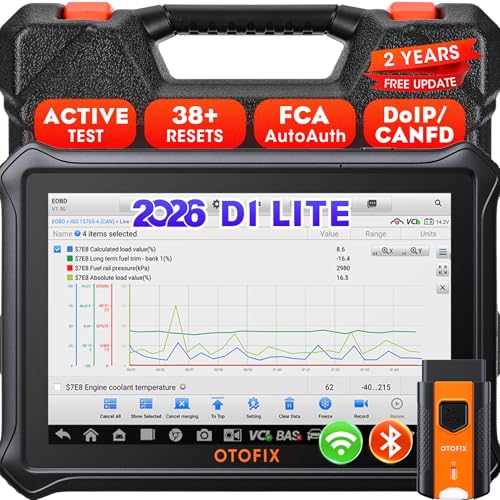
- 【2026 OTOFIX D1 Lite Gives the Best Value for Money】OTOFIX D1 Lite bidirectional scan tool is more FASTER and SMARTER with 2026 Enhanced Hardwares & New Functions! 👍Alternative Bluetooth +USB connect 👍2G+64GB 👍4x ARM Cortex-A35 (1.5GHz) Processor (5X Faster CPU) 👍Android 9.0 OS 👍5G GHz WiFi 👍CANFD&DOIP 👍 FCA AutoAuth 👍38+ Services 👍3K+ Bi-Directional Control 👍Full Systems Diagnose 👍2 Years Update 👍150+ Vehicle Coverage.
- 👍【Active Tests】 OTOFIX D1 Lite is a bi-directional scan tool that can send commands to, and also receive information from vehicle control modules. This way, you can quickly locate and repair faulty auto parts. For Example: send direct commands to ask the vehicle to turn on/off the radiator fan, lights, sound horn, fuel pump, modulate throttle, open/close windows, operate mirrors and more. *Note that only available tests will be displayed in the menu.
- 👍【38+ Service Functions】 OTOFIX D1 Lite scan tool offers 38+ of the hottest service functions that are commonly used for car repairs. That include Oil reset/SAS/EPB/BMS/Throttle/ABS bleeding, and 2065-new SUS/ADBLUE/NOX/Headlamp resets (and more) to help restore your car status after repairs are done. Compared to other diagnostic scanners for cars, the OTOFIX D1 Lite scanner is much more fully-featured. *Note that specific functions available depend on the make/model/year of your car.
- 👍【All System Diagnostics + Cloud Report Management】 This 2026 car scanner OTOFIX D1 Lite provides troubleshooting and data for all ECUs: read/clear DTCs, view graphic live data/VIN, and locate system faults for safe driving. With Cloud Report Management, you can save detailed reports to cloud servers and easily shared them with others via QR codes/emails/text messages. Others can access these reports from any device (smartphones/tablets/PCs …) anytime, and you can better manage repair work.
- 👍【99% Car Coverage】 This one-station car scanner diagnostic for all cars works on 150+ major car brands across the world. 1) It supports CAN-FD/DoIP protocols: compatible with GMCAVALIER/TRAX/Encore/Envision/GL8(LSY)/CT4/CT5 after 2019; Volvo after 2018; Land Rover/Jaguar after 2017; and BM.W F/G all chassis. 2) For models equipped with security modules (such as Renault & 2018+ FCA SGW), its built-in AutoAuth allows you to easily break diagnostic barriers after registration.
This product presentation was made with AAWP plugin.
Last update on 2026-05-28 / Affiliate links / Images from Amazon Product Advertising API