
NHTSA ID Number: 10137252
Manufacturer Communication Number: 15-NA-066
TSB/Document Date: 2018-05-21
Summary
This informational bulletin provides information on 2016 Chevrolet Camaro New Model Features.
If the PDF is very large, it may not load in the preview below.
Some older TSBs had multiple PDFs — visit the NHTSA Website to view all PDFs.
If the TSB PDF does not show, download or view it on the NHTSA Website.
Click on the (+) Plus Sign
Then Click on Associated Document(s)

- 💝【Questions? We’re Here Anytime】MK808S is a...
- 🔥🔥🔥【2026 NEWLY RELEASED BI-DIRECTIONAL...
- 【28+ MOST POPULAR RESET SERVICE FOR 150 MAKES】Autel...
- 【ALL SYSTEM DIAGNOSTICS, FACTORY-LEVEL SCANNER】The...
- 【AUT0 SCAN & AUT0V1N, 10X FASTER】How much have you spent...


- 💯【Conta.ct us for Support Directly】If you met any...
- 🔥🔥🔥【2026 AUTEL FLAGSHIP MK900BT MK900-BT, NEW...
- 🚗【3000+ ACTIVE TESTS (50➡3000+), SAME AS MS...
- 🚗【40+ HOT SERVICES FOR 150 MAKES (28+➡40+)】Full...
- 🚗【OE ALL SYSTEM DIAGNOSE, AUTO SCAN 2.0: SCAN LICENSE...
This product presentation was made with AAWP plugin.
Search NHTSA Database for Recalls
Search NHTSA Database for Vehicle Investigations
View Latest Vehicle Investigations
Search NHTSA Database for Vehicle Complaints
View Latest Vehicle Complaints
TSB/Document ID: 15-NA-066
Replacement Service Bulletin Number:
MFR Communication Date: 2015-11-23
MFR Internal Campaign ID/Software Version:
Communication Type: Service Bulletin/Repair Instructions
NHTSA Components: EQUIPMENT
MFR Component System:
MFR Component Subsystem:
Previous TSB | Next TSB |
For the Camaro SS, the standard brakes include 13.6-inch (345 mm) front rotors with four-piston fixed calipers and 13.3-inch (338 mm) rear rotors with
four piston fixed calipers.
Hill Start Assist
When stopped on a hill, the hill start assist feature prevents the vehicle from rolling before driving off, whether facing uphill or downhill by holding the brake
pressure during the transition between when the driver releases the brake pedal and starts to accelerate. The EBCM calculates the brake pressure, which is
needed to hold the vehicle on an incline or grade greater than 5% and locks that pressure for up to two seconds by commanding the appropriate solenoid
valves ON and OFF when the brake pedal is released. The stop lamps will stay illuminated during the hill start assist operation even though the brake pedal is
released. This is considered normal operation.
Brake Bleeding
When performing brake system bleeding on any model, you must refer to the proper procedure in SI. On LT models equipped with base brakes — RPO JL9,
the brake bleed procedure in SI has additional steps to enable proper bleeding of that system. Refer to SI and follow the revised procedure.
Electronic Park Brake (EPB) System Description and Operation (RPO J77) — SS Models
Notice: SS Models utilize what is called an Electronic Park Brake (EPB) cable puller system.
The electronic park brake (EPB) apply input force is transferred and evenly distributed, through the park brake cables and the park brake cable equalizer, to the
left and right park brake apply levers. The park brake apply levers multiply and transfer the apply input force to the park brake actuators which expand the park
brake shoe toward the friction surface of the drum-in-hat portion of the rear brake rotor in order to prevent the rotation of the rear tire and wheel assemblies.
Electronic Park Brake (EPB) Apply (RPO J77) — SS Models
The EPB can be applied any time the vehicle is stopped or in motion. The electric parking brake is applied by momentarily lifting up on the park brake control
switch. The red park brake light will momentarily flash while the parking brake is being applied. Once fully applied, the red park brake light will turn ON. If the
electric parking brake is applied while the vehicle is in motion, a chime will sound, and the message "Release Park Brake Switch" will be displayed.
Electronic Park Brake (EPB) Release (RPO J77) — SS Models
To release the EPB, turn the ignition switch to the ON or RUN position, apply and hold the brake pedal, and push down momentarily on the park brake control
switch. When the electric parking brake is released the red park brake light turns OFF. The EPB can be used to prevent roll back for vehicles with a manual
transmission taking off on a hill. In a situation where no roll back is desired, an applied electric parking brake will allow both feet to be used for the clutch and
accelerator pedals in preparation for starting the vehicle moving in the intended direction. In this situation, perform the normal clutch and accelerator actions
required to begin moving the vehicle. There is no need to push the switch to release the electric parking brake. To disable this feature lift and hold the park
brake control switch while the vehicle is in motion, this will keep the electric parking brake applied.
Electric Parking Brake Switch (RPO J71, Motor on Caliper) — LT Models
Notice: LT Models utilize what is called a “Motor on Caliper”, which is a small motor attached to the top of the caliper and when the customer
presses the button, it applies this motor and thus the rear parking brake. This is integrated in the rear caliper.
Vehicles with the electric parking brake have a switch in the center console, which takes the place of the manual parking brake system, the foot pedal and
release handle. In case of insufficient electrical power, the electric parking brake CANNOT be applied or released.
Electric Parking Brake Apply (RPO J71, Motor on Caliper) — LT Models
The electric parking brake can be applied any time the vehicle is stopped or in motion. The electric parking brake is applied by momentarily lifting up on the park
brake control switch. The red park brake light will momentarily flash while the parking brake is being applied. Once fully applied, the red park brake light will turn
ON. If the electric parking brake is applied while the vehicle is in motion, a chime will sound, and the message "Release Park Brake Switch" will be displayed.
Electric Parking Brake Release (RPO J71, Motor on Caliper) — LT Models
11
To release the electric parking brake, turn the ignition switch to the ON or RUN position, apply and hold the brake pedal, and push down momentarily on the
park brake control switch. When the electric parking brake is released the red park brake light turns OFF. The electric parking brake can be used to prevent
roll back for vehicles with a manual transmission taking off on a hill. In a situation where no roll back is desired, an applied electric parking brake will allow both
feet to be used for the clutch and accelerator pedals in preparation for starting the vehicle moving in the intended direction. In this situation, perform the normal
clutch and accelerator actions required to begin moving the vehicle. There is no need to push the switch to release the electric parking brake. To disable this
feature lift and hold the park brake control switch while the vehicle is in motion, this will keep the electric parking brake applied.
Suspension
The Camaro features a new, multi-link MacPherson strut front suspension with Camaro-specific geometry. The double-pivot design provides a more precise
feeling of control, including more linear and communicative feel from the quick-ratio electric power steering system. At the rear, a new five-link independent
suspension yields outstanding wheel control and reduces “squat” during acceleration. The use of lightweight components, including aluminum front suspension
links and steel rear suspension links with lightening holes, contributed to a 26 pound (12 kg) reduction in the overall suspension weight.
Magnetic Ride Control is available on the Camaro SS for the first time. Previously limited to the Camaro ZL1, the active suspension reads road and driving
conditions 1,000 times per second, and automatically adjusts the damper settings to optimize ride comfort and control.
Steering
All models will incorporate quick-ratio Electric Power Steering (EPS). Each trim level will have a unique and customized steering effort and feel. Two steering
gears will be offered, both with variable ratio. The SS models will offer an overall faster ratio with 2.5 turns lock-to-lock.
Tires / Wheels
Notice: If the Customer has a flat tire with run-flat tires, the DIC will display a message of zero tire pressure.
Goodyear tires are used on all models as follows:
•
The Camaro LT features standard 18-inch wheels matched with Goodyear Eagle® Sport AS (all-season) 245 mm tires. An inflator kit comes standard with
all 18-inch tires.
•
The Camaro LT available 20-inch wheels matched with Goodyear Eagle® F1 Asymmetric AS (all-season) EMT (extended mobility technology) 245mm
run-flat tires. This 20-inch tire blends the attributes of the 18-inch tire with all season capability with the steering response of the 20-inch summer tire.
The 20-inch tires are run-flat with a driving distance of 50 miles (80 km).
•
The Camaro SS features standard 20-inch aluminum wheels with Goodyear Eagle F1 Asymmetric 2 EMT (extended mobility technology) performance tires
with a staggered fitment of 245 mm front and 275 mm rear width. All four wheels are 12.7 mm wider than previous fifth-generation SS wheels. The 20inch tires are run-flat with a driving distance of 50 miles (80 km). SS tires are summer-only tires.
Driver Mode Control — Tour, Sport, Snow/Ice and Track Settings
Driver Mode Control
Driver Mode Control adds a sportier feel, provides a more comfortable ride, or assists in different weather conditions or terrain. This system simultaneously
changes the software calibration of various sub-systems. Depending on the option package, available features, and mode selected, the suspension, steering,
and powertrain will change calibrations to achieve the desired mode characteristics. If the vehicle is equipped with Magnetic Ride Control, selecting the various
Driver Modes adjusts the ride of the vehicle to enhance the ride performance for the road conditions and the selected mode.
While in the Sport and/or Track Modes, the vehicle monitors driving behavior and automatically enables Performance Shift Features when spirited driving is
detected. These features maintain lower transmission gears to increase available engine braking and improve acceleration response. The vehicle will exit these
features and return to normal operation after a short period when no spirited driving is detected.
•
Driver Mode Control Switch: The Driver Mode Control has three or four modes: Tour, Sport, Snow/Ice, and Track. The Track Mode is for V8 models
only. Press the UP or DOWN arrow on the MODE control switch on the center console to make a mode selection. Pressing the switch will display a
graphic of all available ride modes and change to the next mode. The Tour and Sport Modes will feel similar on a smooth road. Select a new setting
whenever driving conditions change.
12
•
Tour Mode: Use for normal city and highway driving to provide a smooth, soft ride. When selected, the Tour Mode indicator will display in the Driver
Information Center (DIC).
•
Sport Mode: Use when road conditions or personal preference demand a more controlled response. When selected, the Sport Mode indicator will
display in the DIC. When in Sport Mode, the vehicle will shift automatically but hold a lower gear longer than it would in the normal driving mode based on
braking, throttle input, and vehicle lateral acceleration. The steering will change to provide more precise control. If the vehicle has Magnetic Ride Control,
the suspension will change to provide better cornering performance. If the vehicle is equipped with Active Exhaust, the exhaust valves will open earlier
and more often. Competitive Driving Mode can be accessed through this mode by pressing the button with the Traction Control/StabiliTrak® icon twice.
•
Snow/Ice Mode: Use when more traction is needed during slippery conditions. The vehicle will upshift normally when the vehicle is moving. The
acceleration will adjust to help provide a smoother launch. The transmission will also shift differently to assist in maintaining traction. When selected, the
Snow/Ice Mode indicator will display in the DIC. This feature is not intended for use when the vehicle is stuck in sand, mud, ice, snow, or gravel.
•
Track Mode (SS Only): Use when maximum vehicle handling is desired. When selected, the Track Mode indicator will display in the DIC. When in Track
Mode, the automatic transmission and steering will function similar to Sport Mode. The accelerator pedal is adjusted to give maximum control during the
highest level of spirited driving. The Magnetic Ride Control will be set to the optimum level for vehicle responsiveness. If the vehicle is equipped with
Active Exhaust, the exhaust valves will open. Competitive Driving Mode can be accessed through this mode by pressing the button with the Traction
Control/StabiliTrak® icon.
Driver Mode Control — Competitive Driving Mode Settings
•
Competitive Driving Mode (SS Only): Competitive Driving Mode and Launch Control are systems designed to allow increased performance while
accelerating and/or cornering. This is accomplished by regulating and optimizing the engine, brakes, and suspension performance. These modes are for
use at a closed course race track and are not intended for use on public roads. They will not compensate for a driver’s inexperience or lack of
familiarity with the race track. Drivers who prefer to allow the system to have more control of the engine, brakes, and suspension are advised to turn the
normal TCS and StabiliTrak® systems ON.
•
Competitive Driving Mode (SS Only): Competitive Driving Mode allows full engine power while the StabiliTrak system helps maintain directional control
of the vehicle by selective brake application. In this mode, TCS is OFF and Launch Control is available. Adjust your driving style to account for the
available engine power.
Notice: This feature is intended for use during closed course race events where consistent zero to sixty and quarter mile times are
desirable.
•
Launch Control (SS Only): The Launch Control feature is available, within Competitive Driving Mode, to allow the driver to achieve high levels of vehicle
acceleration in a straight line. Launch Control is a form of traction control that manages tire spin while launching the vehicle. Launch Control is only
available when the following criteria are met:
–
Competitive Driving Mode is selected.
–
The vehicle is not moving.
–
The steering wheel is pointing straight.
•
Launch Control - Manual Transmissions (SS Only): The clutch is pressed and the vehicle is in 1 (First) gear. The accelerator pedal is rapidly applied
to wide open throttle. The Launch Control feature will initially limit engine speed as the driver rapidly applies the accelerator pedal to wide open throttle.
Allow the engine rpm to stabilize. A smooth, quick release of the clutch, while maintaining the fully pressed accelerator pedal, will manage wheel slip.
•
Launch Control - Automatic Transmissions (SS Only): The brake pedal must be firmly pressed to the floor, equivalent to a panic brake event. The
accelerator pedal is rapidly applied to wide open throttle. If the vehicle rolls due to wide open throttle, release the throttle, press the brake pedal more
firmly, and re-apply the accelerator to wide open throttle. After the vehicle is launched, the system continues in Competitive Driving Mode.
Accessories and Performance Parts Portfolio
Refer to the Accessory Information Guide in Global Connect for a complete list of available accessories.
Driver Assistance Systems
Rear Vision Camera
Notice: Periodically clean the rear vision camera (RVC) lens, which is located above the rear license plate with clean water and a soft cloth.
Rear vision camera (RVC) is standard on all models. When the vehicle is shifted into R (Reverse), an image of the area behind the vehicle appears in the
infotainment screen. The previous screen displays when the vehicle is shifted out of R after a short delay.
To see the previous screen sooner, perform one of the following:
•
Press a button on the infotainment system.
•
Shift into P (Park).
To turn the RVC Guidance Lines or Rear Park Assist Symbols ON or OFF, go to Rear Camera in the Settings menu.
13
Rear Park Assist
Available on 2LT and standard on the 2SS is Rear Park Assist. When the vehicle is in R (Reverse), detected objects are indicated by audible beeps. The
interval between beeps becomes shorter as the vehicle gets closer to an object. When the distance is less than 16 in. (40 cm), the beeps are continuous for
5 seconds. The system only operates at speeds of less than 5 mph (8 km/h).
Lane Change Alert (LCA)
If equipped, the LCA system is a lane-changing aid that assists drivers with avoiding lane change crashes that occur with moving vehicles in the side blind zone
(or spot) areas or with vehicles rapidly approaching these areas from behind. The LCA warning display will illuminate in the corresponding outside side mirror
and will flash if the turn signal is ON. The Side Blind Zone Alert (SBZA) system is included as part of the LCA system. The SBZA system is a lane-changing aid
that assists drivers with avoiding crashes that occur with moving vehicles in the side blind zone (or spot) areas. When the vehicle is in a forward gear, the left
or right side mirror display will illuminate if a moving vehicle is detected in that blind zone. If the turn signal is activated and a vehicle is also detected on the same
side, the display will flash as an extra warning not to change lanes.
Rear Cross Traffic Alert (RCTA) System
Standard on the 2SS and available on the 2LT, the RCTA system uses a triangle with an arrow displayed on the RVC screen to warn of traffic behind your
vehicle that may cross your vehicle's path while in R (Reverse). In addition, beeps will sound.
Wireless Inductive Smartphone Charging System
Wireless charging is standard on the 2SS and available on the 2LT. If equipped, the vehicle has a wireless charging pad at the back of the floor console.
The wireless inductive charging system for smartphones is Compatible with Powermat and other in-phone wireless charging technologies, this convenient
feature eliminates the need for charging cords. An increasing number of smartphones have wireless charging either embedded or as an option. To charge a
compatible device using the wireless inductive charging system, the device is simply placed on the rubberized pad.
The system is capable of charging the batteries of many aftermarket devices, including cell phones, PDAs, pagers, MP3 players, etc.
A compatible device is one that is compliant with the Power Matters Alliance (PMA) or Wireless Power Consortium’s (WPC) Qi Standard, meaning that it is
equipped with a PMA or Qi wireless charge “receiver” that will work with the charge “transmitter” installed in the vehicle. A device may use built-in charging
circuitry or an adapter (an external plug-in device which contains the charging circuitry).
When the Interruptible Retained Accessory Power (RAP) relay is closed (when the vehicle ignition is in Run or Accessory position), the system is able to
detect the device, establish communications with the device to confirm it is a compatible device, and then deliver charging power to the device via the wireless
interface.
If a non-compatible device or metallic foreign object is detected, the system will not transfer power. The charger monitors its internal temperature and will shut
down if it the charger temperature exceeds 185°F (85°C).
The BCM will detect that the device battery is charging and send a serial data message to the infotainment touch screen, which will indicate a device is currently
charging. When the battery charging symbol is toggling ON and OFF, it indicates a thermal limit has been reached and the device will not charge. Charging may
also be interrupted while driving over rough conditions.
⇒
If the device does not charge or stops charging, remove it from the pad for approximately 3–5 seconds before returning the mobile device to the pad to
continue charging.
To check for phone or other device compatibility, Go to www.gmtotalconnect.com. or in Canada, Go to www.gmtotalconnect.ca (English) or
www.connexiontotalegm.ca (French).
Air Bags
The sixth-generation Camaro will have eight air bags compared to the fifth-generation having six air bags. The two additional air bags are driver and front
14
passenger knee air bags.
Chevrolet MyLink™ with Phone Integration Technology
Infotainment Options
The Camaro offers three different infotainment options. Availability varies based on the model.
•
Radio — RPO IOB: Radio infotainment system - Midlevel HMI, midlevel connectivity, No Apps Infotainment, 7-inch (178 mm) color touchscreen ICS
display. Bluetooth® provided via OnStar®. Bring your own media.
•
Radio — RPO IO5: Radio infotainment system - Uplevel HMI, enhanced connectivity, including OnStar® Directions. Base connectivity features plus 8inch (203 mm) color touchscreen ICS display.
•
Radio — RPO IO6: Radio infotainment system - Embedded navigation radio system, uplevel HMI. Enhanced connectivity features plus 8-inch (203 mm)
color touchscreen ICS display.
Chevrolet MyLink™ — RPOs IO5 and IO6
The 2016 Camaro has Chevrolet’s MyLink infotainment system gives owners a smart and simple way to access Apple CarPlay and Android Auto (Android Auto
was a mid-model year introduction – see bulletin 16-NA-042 for more details). Each of these system builds off of the features smartphone users rely on most,
with many controlled via voice commands using a button on the steering wheel. That helps drivers spend more time with their eyes on the road and hands on
the wheel. New volume control and other physical buttons reduce complexity and enhance the system’s intuitiveness.
–
Apple CarPlay™ puts iPhone® features on the vehicle’s display in a smart, simple manner, allowing drivers to make calls, send and receive messages
and listen to music right from the touchscreen or by voice via Siri®. Supported apps for Apple CarPlay™ include Phone, Messages, Maps, Music and
compatible third-party apps. For a full list of supported apps visit: www.Apple.com/ios/carplay
–
Android Auto™ is built around Google Maps™, Google Now™ and the ability to talk to Google®, as well as a growing audio and messaging app
ecosystem that includes WhatsApp, Skype, Google Play Music, Spotify, and podcast players. For a full list of supported apps visit:
www.Android.com/auto
Using either application is simple. A “Projection” icon on the MyLink™ screen is visible when a phone is not connected and changes to indicate Apple
CarPlay™ or Android Auto™ when a compatible phone is connected via a USB. Apple CarPlay™ requires an iPhone® 5 or later and Android Auto™ requires a
phone running the Android Lollipop 5.0 operating system or above.
Compatible apps need to be downloaded to a phone before using.
OnStar® 4G LTE with Built-In Wi-Fi Hotspot
Notice: To retrieve the SSID and password for the Wi-Fi hotspot, press the OnStar® Voice Command button on the rearview mirror, wait for the
prompt, and then say "Wi-Fi settings." The information will be displayed on the screen. For assistance, press the blue OnStar® button or call 1888-4-ONSTAR (1-888-466-7827).
The OnStar® built-in Wi-Fi hotspot supports up to seven mobile devices so passengers can connect to the content they want. OnStar® with 4G LTE offers a
stronger, more reliable signal; and it’s built-in, so it’s easy to use. Plus, it’s connected to your vehicle battery, so you’re always fully charged for the adventure
ahead.
15
The powerful OnStar® connection also enables improved access to existing OnStar® safety and security services, including the ability to transmit voice and
data simultaneously. That means OnStar® advisors can run a diagnostic check without ever leaving the call, making customer interactions quicker and more
seamless. It’s the most comprehensive in-vehicle safety and connectivity system available.
Towing / Transport / Recovery
Caution: Incorrectly towing a disabled vehicle may cause damage. The damage would not be covered by the vehicle warranty. DO NOT lash or
hook to suspension components. Use the proper straps around ALL of the tires to secure the vehicle.
Tow Hook / Access Point and Cover
The tow hook (shown installed) access point on the Camaro was uniquely packaged in the front grille to keep a clean, bold, front end appearance. The LT and
the GM accessory grille do not have a tow hook access cover. To access the tow hook access point on the SS, a small cover will need to be removed.
Towing and Recovery of a Disabled Vehicle
Transport the vehicle on a flatbed car carrier only. A wheel lift tow truck could damage the vehicle. Consult your dealer or a professional towing service if the
disabled vehicle must be towed.
•
DO NOT hook, pull or secure the vehicle using any of the under body or suspension components.
•
Recover/transport the vehicle using a flatbed car carrier only.
•
Once on a flatbed, secure the vehicle to the bed using a nylon strap type harness over all four tires.
1.
If it is necessary to use the flat bed mounted winch to recover the vehicle, locate the recover tow eye secured in the rear compartment storage area.
2.
Carefully open the cover in the front fascia. V6 and V8 models differ. Refer to the Owner Manual.
3.
Install the tow eye into the socket by turning it clockwise until it stops.
4.
Attach the recovery cable to the installed tow eye and load the vehicle onto the flatbed.
Trailer Towing
The vehicle was neither designed nor intended to tow a trailer.
Recreational Vehicle Towing
The vehicle was neither designed nor intended to be towed with any of its wheels on the ground.
Training Courses — United States and Canada
Notice: Other Global Regions should refer to their local GM Training sources as applicable.
The majority of the systems found on this vehicle are taught in GM’s core curriculum from a conceptual theory and operation perspective. The North American
technical training core curriculum structure is system based.
To access all of the available training courses visit the following website:
–
In the United States, Go to > www.centerlearning.com
–
In Canada, Go to > GM GlobalConnect and select “Centre of Learning”
Training Course Name or System – Course Number and Description
Course Name or System
Course Number and Description
New Model Launch
#10316.39W 2016 Chevrolet Camaro New Model Launch (WBT)
(U.S. and Canada)
2016 Chevrolet Camaro New Model Launch
16
ENGINE-GAS, 6 CYL, 3.6L, V6, DI, DOHC, VVT, ALUM, GEN 2
#16440.20D Engines: New and Updates for RPOs LF4 LGXLGW
L3A LV7 LE2 LWN
ENGINE-GAS, 8 CYL, 6.2L, DI, AFM, VVT, HO,ALUM, GMNA
#16440.18D Engines: New and Updates for RPOs LT1,LV3, LUZ,
LKW, LF3, L83, L86
TRANSMISSION-AUTO 8 SPD, 8L45
#17440.16D Transmissions: New and Updates for 8L45and Aisin
AF50
TRANSMISSION-AUTO 8 SPD, 8L90
#17440.15 Transmissions: New and Updates for 8L90Automatic
Transmission RPO M5U
TRANSMISSION-MAN 6 SPD, TREMEC, 85MM,2.66 1ST, 0.50
6TH, O/D
#17043.45V GM TR6060 Tremec 6-Speed TransmissionOverhaul
TRANSMISSION-MAN 6 SPD, 81MM, 4.45 1ST,2.83 2ND, 1.98
3RD, 1.40 4TH, 1.00 5TH, 0.76
Special Tools
The following new tools were released for the 2016 Camaro:
Tool #
Description
CH-47976-513
AFIT Adapter G2C, STOP/START with SENT Fuel Sensor
CH-47976-507
AFIT Adapter, SENT Fuel Pressure
CH-47976-511
Cable, G5, Active Fuel Injection Tester (AFIT) SIDI
DT-50905-3
Adapter, Clutch Air Travel Fixture Used with DT-50905-1 Base
DT-51087
Installer, Case Extension Bearing
DT-51088
Installer, Turbine Shaft Seal
DT-51089
Installer, Clutch Housing Bearing
DT-51196
Installer, Stator Shaft Seal
DT-51791
Removers, Front Cover Slide Hammer Adapters (Set of 2)
EN-42385-70
Head Bolt Thread Repair Torque Plate
EN-44226-5
Crankshaft Button
EN-46335-A
Valve Spring Compressor - Head On
EN-51333
Timing Chain Retainer
EN-51760
Flywheel Holder
EN-51766
Crankshaft Rear Oil Seal Installation Tool
17
EN-51767
Stretchy Belt Tool Installer
DT-50806
Bushing Replacer
DT-51075
Remover Legs, 4th Speed Driven Gear
DT-51076
Installer, Bearing and Gear
DT-51077
Shift Rail Seal Installer (Installs Below Flush)
DT-51263
Pinion Flange Installer Adapter (Linamar RDM - Camaro & CT6)
DT-51750
Pinion Seal Installer (Linamar RDM - Camaro & CT6)
EN-28540-A (or J-28540-A)
Seal Installer, Output Shaft (Linamar RDM - Camaro & CT6)
Version Information
Version
2
Modified
Oct. 28, 2016 – Updated Chevrolet MyLink™ information and Training Courses.
Trademark Footnotes
Android™ is a Trademark of Google Inc.
Android Auto™ is a Trademark of Google Inc.
Apple® is a Registered Trademark of Apple Inc.
Apple CarPlay™ is a Trademark of Apple Inc.
The Bluetooth® Word Mark and Logos are Registered Trademarks Owned by Bluetooth SIG, Inc.
dexos® is a Registered Trademark of General Motors LLC
dexos1® Icons are Registered Trademarks of General Motors LLC
Chevrolet MyLink™ is a Trademark of General Motors LLC
Goodyear Eagle® is a Registered Trademark of The Goodyear Tire & Rubber Company
Google® is a Registered Trademark of Google Inc.
Hydra-Matic™ is a Trademark of General Motors LLC
iPhone® is a Registered Trademark of Apple Inc.
OnStar® is a Registered Trademark of OnStar LLC
Siri® is a registered Trademark of Apple Inc.
GM bulletins are intended for use by professional technicians, NOT a "do-it-yourselfer". They are written to inform these technicians of conditions that may
occur on some vehicles, or to provide information that could assist in the proper service of a vehicle. Properly trained technicians have the equipment, tools,
safety instructions, and know-how to do a job properly and safely. If a condition is described, DO NOT assume that the bulletin applies to your vehicle, or that
your vehicle will have that condition. See your GM dealer for information on whether your vehicle may benefit from the information.
WE SUPPORT VOLUNTARY TECHNICIAN CERTIFICATION
18

- 🎉[OTOFIX D1 Lite, Perfect Cost-effective Diagnostic Tool]: OTOFIX D1 Lite, a newest bidirectional scan tool from OTOFIX company, is a great choice for DIYers and repair shops. 👉This obd2 scanner diagnostic tool packs all practical functions: OE level all systems diagnoses, Bi-Directional Control, 38+ reset services fixing 99% of common problems, support DoIP & CANDF protocols and FCA
 AutoAuth, high-end hardware configuration. Worldwide vehicles and 🔥2 Years Free Updating🔥 covered.
 - 🎉[Bi-Directional Scan Tool, Active Test]: OTOFIX D1 Lite bluetooth obd2 scanner can also command ECUs and monitor the operation of the actuators to track down the problems of certain parts, like windows, sunroof, wipers, fuel pumps, etc., saving repair time & trouble. This makes OTOFIX D1 Lite the most cost-effective bidirectional scan tool.
- 🎉[2026 Newest, 38+ Hot Reset Functions]: Equipped with 38+ reset functions in one, the OTOFIX D1 lite automotive scanner diagnostic tool allows you to troubleshoot 99% of common vehicle problems. You can use this car diagnostic scanner holding enough functions to easily repair common vehicle models in your repair shops. Including Oil Reset, Injector Coding, Throttle, DPF Reset, SCR Reset, Gear Learning, Clutch Learning, Suspension, etc. Note* Reset functions vary by model.
- 🎉[OE Level Full Systems Diagnostics]: Unlike the 2-system and 4-system diagnostic tools, the OTOFIX auto scan tool can complete comprehensive system diagnostics within 5 minutes. It accesses and scans all available onboard systems like for Engine /AT /ABS /EPB /BMS /TPMS /SRS /SAS /Audio System /BCM /Air Conditioning / etc., to read & clear codes, view live data, and check ECU information. Note: Active test is not involved.
- 🎉[Powerful Hardware Configuration]: Designed with a fashion appearance & a 7” touchscreen and a weight of 463g, this OTOFIX D1 Lite OBD2 diagnostic scanner scan tool is convenient for everywhere and easy to use & store. Android9.0 OS and 2+64GB memory enhance multi-task smoothness and diagnostic operation, no more wasting too much time. 5800mAh battery allows hours-lasting use. WiFi & VCI1 also bring faster communication for your diagnostics.

- 🏆【2026 TOP OBD2 Scanner Diagnostic Tool】OTOFIX D1 Lite wireless obd2 scanner has upgraded hardware configuration and car coverage. The newly upgraded D1 Lite with 🔥OS Android 9.0🔥1.5Ghz 4 core high efficiency processor🔥2GB RAM+64GB ROM large storage🔥5800mAh large battery, more stable and longer lasting diagnostics🔥 38+ Reset🔥action tests🔥full system diagnostic🔥Supports MV105 endoscope🔥21+ Language Supports🔥100000+ vehicle coverage to meet all your daily maintenance needs.
- 👍【Bi-Directional Control / Active Test】D1 Lite obd2 scanner has bidirectional control(worth $300+), which is the most beloved feature among mechanic. If your headlights or car windows are broken, going to a repair shop will cost a lot of money. You can use D1 Lite to send execution commands to the ECU module and identify the repair status. Such as ABS, car windows, doors, valves, wipers, headlights, etc., effectively shorten diagnostic time and reduce diagnostic costs.
- 🔥【All Systems Diagnostics, In-depth Checking】This advanced OBD2 Scanner D1 Lite can perform OE-level diagnosis of all systems including engine, transmission, airbag, ABS, ESP, TPMS, gateway, steering, radio, and air conditioning for more than 100 brands. This diagnostic scanner supports essential functions, such as reading ECU version info, reading and clearing fault codes, and reading data streams.With just a simple click, it provides you with accurate and in-depth diagnostics.
- 🏆【38+ Reset Hot Functions】For repair workshops, holding an OTOFIX D1 Lite Auto scanner is a strong advantage over others. Its 38+ maintenance functions provide various solutions for all module repairs, including Oil Reset, TPMS Reset, Injector Coding, Suspension, Throttle Matching, etc., which will usher your repair business to a new pinnacle. Continuously updating will never make the functionality & compatibility out-of-date.
- 🏆【150+ Models, 10000+ Car Coverage & 16 Languages】D1 Lite is a comprehensive car diagnostic scan tool, help you to troubleshoot car issues fast for 95% US, European, Asian auto makes. ✅ With frequent updates and optimizations allow D1 Lite to cover more vehicles to meet your needs. ✅ Multilingual menu allows auto mechanics around the world to use it without language barriers. 🚩Note: Kindly send us the S/N of the device to authorize new language updates before changing the menu language.
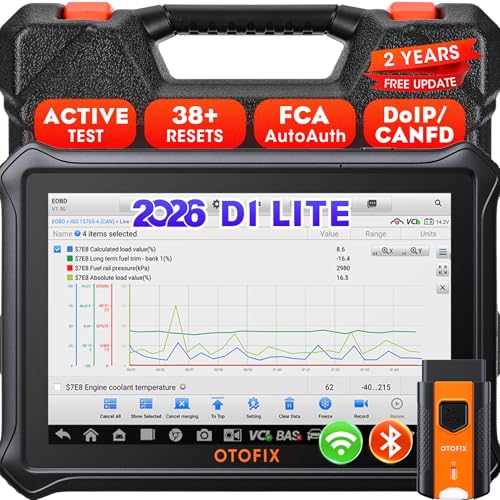
- 【2026 OTOFIX D1 Lite Gives the Best Value for Money】OTOFIX D1 Lite bidirectional scan tool is more FASTER and SMARTER with 2026 Enhanced Hardwares & New Functions! 👍Alternative Bluetooth +USB connect 👍2G+64GB 👍4x ARM Cortex-A35 (1.5GHz) Processor (5X Faster CPU) 👍Android 9.0 OS 👍5G GHz WiFi 👍CANFD&DOIP 👍 FCA AutoAuth 👍38+ Services 👍3K+ Bi-Directional Control 👍Full Systems Diagnose 👍2 Years Update 👍150+ Vehicle Coverage.
- 👍【Active Tests】 OTOFIX D1 Lite is a bi-directional scan tool that can send commands to, and also receive information from vehicle control modules. This way, you can quickly locate and repair faulty auto parts. For Example: send direct commands to ask the vehicle to turn on/off the radiator fan, lights, sound horn, fuel pump, modulate throttle, open/close windows, operate mirrors and more. *Note that only available tests will be displayed in the menu.
- 👍【38+ Service Functions】 OTOFIX D1 Lite scan tool offers 38+ of the hottest service functions that are commonly used for car repairs. That include Oil reset/SAS/EPB/BMS/Throttle/ABS bleeding, and 2065-new SUS/ADBLUE/NOX/Headlamp resets (and more) to help restore your car status after repairs are done. Compared to other diagnostic scanners for cars, the OTOFIX D1 Lite scanner is much more fully-featured. *Note that specific functions available depend on the make/model/year of your car.
- 👍【All System Diagnostics + Cloud Report Management】 This 2026 car scanner OTOFIX D1 Lite provides troubleshooting and data for all ECUs: read/clear DTCs, view graphic live data/VIN, and locate system faults for safe driving. With Cloud Report Management, you can save detailed reports to cloud servers and easily shared them with others via QR codes/emails/text messages. Others can access these reports from any device (smartphones/tablets/PCs …) anytime, and you can better manage repair work.
- 👍【99% Car Coverage】 This one-station car scanner diagnostic for all cars works on 150+ major car brands across the world. 1) It supports CAN-FD/DoIP protocols: compatible with GMCAVALIER/TRAX/Encore/Envision/GL8(LSY)/CT4/CT5 after 2019; Volvo after 2018; Land Rover/Jaguar after 2017; and BM.W F/G all chassis. 2) For models equipped with security modules (such as Renault & 2018+ FCA SGW), its built-in AutoAuth allows you to easily break diagnostic barriers after registration.
This product presentation was made with AAWP plugin.
Last update on 2026-05-11 / Affiliate links / Images from Amazon Product Advertising API