
NHTSA ID Number: 10132474
Manufacturer Communication Number: T-SB-0274-17
TSB/Document Date: 2018-04-02
Summary
TSB: Some Japan produced 2018 model year Camry and Camry HV vehicles equipped with Entune? 3.0 Audio (version 1000) or earlier may experience one or both of the following conditions: ? Bluetooth continuously connects and disconnects ? EntuneTM Apps Voice Recognition is inoperative A software update is now available to address these conditions. Follow the Software Update Procedure in this bulletin to update the software.
T-SB-0274-17
August 18, 2017
Entune Audio Head Unit Software Update (Pioneer)
Service
Category
Audio/Visual/Telematics
Section
Navigation/Multi Info Display
Market USA
Applicability
YEAR(S)
MODEL(S)
2018
Camry, Camry HV
ADDITIONAL INFORMATION
Introduction
Some Japan produced 2018 model year Camry and Camry HV vehicles equipped with Entune™
3.0 Audio (version 1000) or earlier may experience one or both of the following conditions:
Bluetooth continuously connects and disconnects
EntuneTM Apps Voice Recognition is inoperative
A software update is now available to address these conditions. Follow the Software Update
Procedure in this bulletin to update the software.
Warranty Information
OP CODE
DESCRIPTION
TIME
OFP
T1
T2
EL1703
Software Update
0.3
86140-33380
86140-06440
87
74
APPLICABLE WARRANTY
This repair is covered under the Toyota Basic Warranty. This warranty is in effect for 36 months
or 36,000 miles, whichever occurs first, from the vehicle’s in-service date.
Warranty application is limited to occurrence of the specified condition described in
this bulletin.
© 2017 Toyota Motor Sales, USA
Page 1 of 6
T-SB-0274-17
August 18, 2017
Page 2 of 6
Entune Audio Head Unit Software Update (Pioneer)
Software Update Information
MODEL
HEAD UNIT
SOFTWARE UPDATE FILE
Camry
Camry HV
Entune™ 3.0 Audio
17TDT0NA-EA00_0001.kwi
MULTIMEDIA SOFTWARE FILE DOWNLOAD
The Multimedia software update file may be downloaded directly from this Service Bulletin by
clicking on the file name in the table above. Once downloaded, the file may be copied directly to a
commonly available blank USB flash drive.
For USB flash drive requirements and download instructions: Refer to the Technical Information
System (TIS): Diagnostics – Reprogramming – Reference Documents –
“Multimedia Software Download Instructions.”
Software Update Procedure
1. Start the engine.
2. Press the “Menu” button on the radio
faceplate then select Setup.
Figure 1.
3. Select General on the “Setup” screen.
Figure 2.
© 2017 Toyota Motor Sales, USA
T-SB-0274-17
August 18, 2017
Page 3 of 6
Entune Audio Head Unit Software Update (Pioneer)
Software Update Procedure (Continued)
4. Scroll down and select Software Update.
Figure 3.
5. Verify that the software version is the same
or earlier than indicated in the Introduction.
Figure 4.
6. If the software needs to be updated, download the software from the Software Update
Information section onto an empty USB drive.
NOTE
If "IG-OFF" occurs, repeat steps 1 – 4 to reenter the "Software Update" screen.
7. Insert the prepared USB drive into the
vehicle’s USB port.
Figure 5.
© 2017 Toyota Motor Sales, USA
T-SB-0274-17
August 18, 2017
Page 4 of 6
Entune Audio Head Unit Software Update (Pioneer)
Software Update Procedure (Continued)
8. Verify that the NEW software is up to date on the “Software Update” screen.
Table 1. Software Version Information
Entune™ 3.0 Audio
TYPE
CURRENT VERSION
NEW VERSION
1000
1001
Audio
9. Press the Update Software button in the
lower right hand corner.
Figure 6.
10. Select OK on the
“Software Update Detail” screen.
Figure 7.
11. Select Agree on the
“Terms of Service” screen.
Figure 8.
© 2017 Toyota Motor Sales, USA
T-SB-0274-17
August 18, 2017
Entune Audio Head Unit Software Update (Pioneer)
Software Update Procedure (Continued)
12. Select Yes on the “Would you like to start the
software update?” pop-up.
Figure 9.
13. Once the head unit begins installation the
update will take about 10 minutes.
Figure 10.
NOTE
Do NOT turn off the engine or ACC
BEFORE the software is ready
for updating.
Do NOT pull the USB drive out of the
vehicle USB port BEFORE the software
is ready for updating.
14. When the “The software is ready for
updating.” screen appears, turn OFF
the ignition.
Figure 11.
15. Turn the ignition ON to complete the software update.
16. Once the software update has completed, remove the USB drive.
© 2017 Toyota Motor Sales, USA
Page 5 of 6
T-SB-0274-17
August 18, 2017
Page 6 of 6
Entune Audio Head Unit Software Update (Pioneer)
Software Update Procedure (Continued)
17. Perform Steps 1 – 4 to verify the software
version matches the Current Software
Version Information table below.
Figure 12.
Table 2. Software Version Information
TYPE
Audio
Entune™ 3.0 Audio
CURRENT VERSION
NEW VERSION
1001
–
© 2017 Toyota Motor Sales, USA


- [J2534 Pass-Thru Programmer] - TOPDON RLink J2534 is...
- [All-in-One OEM Reprogramming and Diagnostics] - When...
- [Tested, Trusted, and Proven for Accuracy] - TOPDON RLink...
- [One-Click Installation, Continuous Updates] - The exclusive...
- [Works with Windows Compatibility and OEM Software...

Last update on 2026-05-22 / Affiliate links / Images from Amazon Product Advertising API
If the PDF is very large, it may not load in the preview below.
Some older TSBs had multiple PDFs — visit the NHTSA Website to view all PDFs.
If the TSB PDF does not show, download or view it on the NHTSA Website.
Click on the (+) Plus Sign
Then Click on Associated Document(s)
Search NHTSA Database for Recalls
Search NHTSA Database for Vehicle Investigations
View Latest Vehicle Investigations
Search NHTSA Database for Vehicle Complaints
View Latest Vehicle Complaints
TSB/Document ID: T-SB-0274-17
Replacement Service Bulletin Number:
MFR Communication Date: 2017-08-18
MFR Internal Campaign ID/Software Version:
Communication Type: Service Bulletin/Repair Instructions
NHTSA Components: EQUIPMENT:ELECTRICAL
MFR Component System:
MFR Component Subsystem:
Previous TSB | Next TSB |
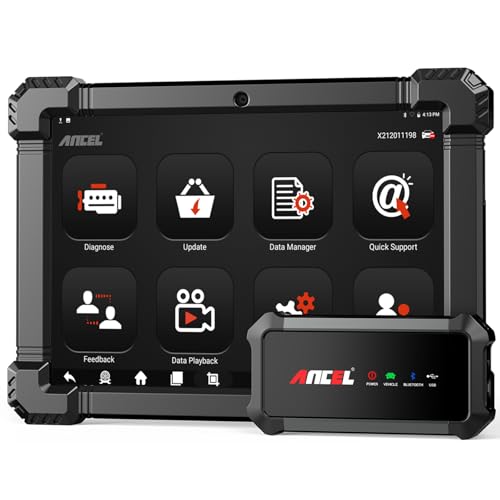
- 🔥🔥🔥2026 New Functions Making X7HD the Top Dog - Big Surprise!!! ANCEL X7HD truck scanner 10 major functional advantages .✅>Full HDOBD/OBD2 Function ✅>ALL System Diagnostic ✅>42+ Reset Function ✅>Active Test / Bi-Directional Control✅>ECU Coding✅>Graphing Live Data✅>Wide Compatibility ✅>2 Yrs Free Update✅>Remote Operation✅>Bluetooth 5.0 & Wifi In addition, 8 major hardware advantages: ✅>6000 mAh✅>10.1 inch Tablet✅>2G RAM
 ✅>32G ROM (Expandable to 128GB)✅>Data Record & Replay & Print✅>Android 10.0✅>Bluetooth 5.0 & Wifi✅>14 Languages
 - 🚛OEM DPF Forced Regen & Cylinder Cutout Test & more - ANCEL X7HD diesel scanner diagnostic tool not only supports DPF regeneration, DPF reset, DPF related information reset, DPR state reset, DPD forced regeneration etc, which helps you better solve the exhaust aftertreatment system problems, but also supports activate motor to do exhaust air in ABS Automatically. Moreover, it features TPMS activation, cylinder cut-off and learning functions
- 🚛Advanced ECU Coding & Programming - ANCEL X7HD 10.1inch truck scanner diagnostic tool is equipped with advanced ECU coding, supports Level calibration, Idle speed learning and Adjustment, Camshaft timing control learning, Control unit adaptations, Injector Codes, Read/Write VIN, Road speed limit optional vehicle speed set, etc... PLEASE NOTE that ECU codes are not compatible with all vehicles, please send us your VIN# to check vehicle compatibility
- 🚛42+ Reset Functions & Bidirectional Control - 2026 newest top heavy duty truck scan tool, comes with 42+ special services (ECU, Speed Limit and Idle Reset, Oil Reset, Injector Coding, EPB, ABS, SRS, Suspension, Throttle, etc. and always keep growing), which meet all your various needs for service and maintenance
- 🚛10 Inch All Systems Diesel Scanner & Full HDOBD/OBD2 Modes - ANCEL X7HD diesel truck scan tool supports all systems scan, such as Engine, Brake, Retarder, TECU Transmission, Tachograph, ABS, SRS, TPMS, EPB, SAS, ESP, and other vehicle systems, comes with 10 obd2 service modes: read/erase error codes, Data Stream, I/M Readiness, Vehicle Information, Actuations, DTC Lookup, EVAP, view freeze frame, etc
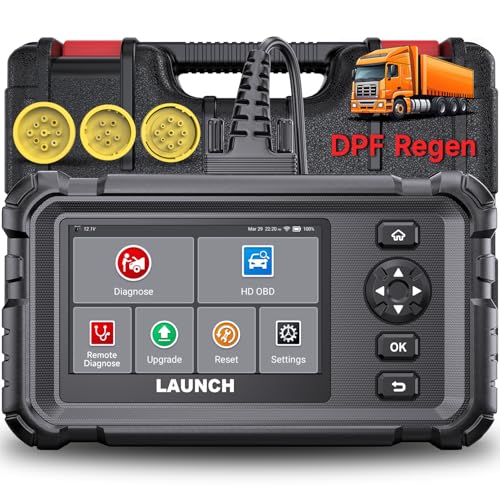
- Dealer-Level Diagnostics, Faster & Easier: The heavy duty truck scanner delivers full-system diagnostics for engine, ABS, transmission, and more, plus 7+ reset functions like DPF Regen and Speed Limit Adjust. Powered by a 1.3G CPU, 2GB RAM, 16GB storage, Android 8.1, and a 3000mAh battery, it runs smoothly for fast scanning, live data, reports, Auto VIN, Wi-Fi updates, and easy handheld use. It captures screenshots, replays live data, and generates reports to support your repair decisions.
- Diesel Truck DPF Regen & Reset Features: Experiencing loss of power, sluggish acceleration, or poor hill-climbing performance? These symptoms are often caused by a clogged or overloaded DPF. The truck diagnostic scanner offers OEM-level forced DPF regeneration, DPF reset, and DPD/DPR functions. This device extends DPF lifespan and efficiently diagnoses exhaust aftertreatment issues. It can significantly reduce diagnostic time and save you up to $3,000 or more in costly dealership fees.
- 7+ Resets - Perform Essential Procedures: The truck scanner features 7+ essential resets including DPF Regen clears carbon buildup; Oil Reset clears service light; Injector Coding matches new injectors; DEF Test checks urea injection; Speed Limit Adjust saves fuel; Cylinder Cutout pinpoints misfires; Clutch Relearn restores smooth engagement. Reset after maintenance or part replacement for proper truck operation. Vehicle compatibility varies. Email [email protected] to confirm before buying.
- One Tool for 50+ Truck Brands: The diesel scanner supports J1939, J1708, J1587, and OBD2/CAN protocols, delivering broad coverage for major diesel trucks and commercial vehicles including Cummins, Cat, Detroit, Paccar, Volvo, Freightliner, Kenworth, Peterbilt, International, Mack, Isuzu, Hino, Scania, Mercedes-Benz, and more. Also supports Allison, Aisin, Eaton, WABCO, and Bendix, helping you diagnose more vehicles, reduce equipment costs, and handle more jobs with one professional scan tool.
- Full System Diagnostic for Truck: The truck scanner diagnostic tool covers all systems like engine, ABS, transmission, SAS, SRS, TPMS and more. It reads fault codes and shows real-time data. Additionally, it includes full HD OBD and OBD2 modes: read/clear codes, live data stream, I/M readiness, freeze frame, DTC lookup, and more. When warning lights appear or performance issues arise, quickly identify which system is affected and gain the real-time data needed for accurate diagnosis.
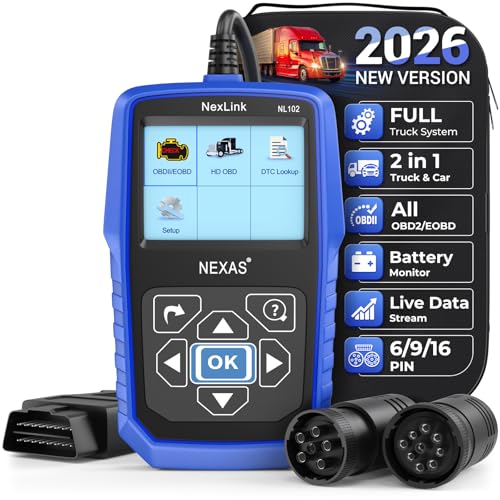
- Diagnose Heavy-Duty Truck Problems Fast — Read and clear fault codes and diagnose warning light issues on many Class 4–8 diesel trucks including Freightliner, Peterbilt, Kenworth, Volvo, Mack and Cummins-powered vehicles
- Help Reduce Downtime & Repair Costs — It offers full system diagnostics for major trucks meeting standard protocols, along with complete OBD2 functionality. Quickly check engine faults, view live truck data and identify issues before expensive repair shop visits or unnecessary repairs
- No complicated setup required — Simple menus and built-in DTC explanations make this truck code reader easy to use for owner-operators, mobile mechanics and small fleet maintenance
- Live Data & Built-in DTC Lookup — View real-time engine data and built-in truck fault code definitions directly on the scanner to help understand vehicle problems faster without searching through manuals
- Free Lifetime Updates & Technical Support — Includes free software updates plus responsive technical support for setup, compatibility and everyday truck diagnostics
Last update on 2026-05-22 / Affiliate links / Images from Amazon Product Advertising API
This product presentation was made with AAWP plugin.