
NHTSA ID Number: 10130500
Manufacturer Communication Number: NTB18-014a
TSB/Document Date: 2018-03-26
Summary
2013-2016 NV200 AND 2014-2016 TAXI; OCCUPANT CLASSIFICATION RETROFIT SERVICE INFORMATION The information in this bulletin is provided for customers who have concerns with their Occupant Classification System (OCS) operation after all campaigns have been completed. Follow the steps in this bulletin to determine if this OCS retrofit procedure is applicable to the vehicle you are working on. DETERMINE IF OCS RETROFIT APPLIES 1. Check Service COMM to confirm if OCS reprogramming campaign has been completed (R1607 / NTB16-054). Completed: - Write on the repair order the date it was completed and by which dealer. - Go to step 2. Not Completed: - Complete campaign R1607 / NTB16-054. - No further action needed. OCS retrofit does NOT apply.
Only move side trim enough to
access back of harness clip.
Back of harness clip
Seat side trim
Figure 17
11/21
NTB18-014a
Seat trim clip
25. Unfasten seat trim clip from seat frame
near OCS sensor at rear of seat.
Seat trim does not need to be
removed from seat.
26. Disconnect OCS sensor at rear of seat.
OCS sensor
Figure 18
27. At this point, the old OCS harness is disconnected from all connections and mounting
points and can be completely removed from the seat.
28. Replace OCS control unit.
OCS control unit is held on with 2 screws.
Use new OCS control unit listed in the Parts Information.
Seatbelt harness pass through
29. Install new seatbelt buckle.
Torque seatbelt buckle anchor bolt
to: 49 N•m (5.0 kg-m, 36 ft-lb).
30. Route new seatbelt harness through
seat frame pass-through.
Seatbelt buckle
anchor bolt
31. Attach seatbelt buckle harness clip.
Harness clip
Figure 19
12/21
NTB18-014a
32. Connect new seatbelt buckle harness
connector to seat frame.
Seatbelt buckle
harness connector
33. Attach seatbelt buckle harness clip.
Harness clip
Figure 20
34. Install new OCS harness in same
location as old OCS harness.
Connecting the rear OCS sensor
electrical connector first will aid in
new OCS harness installation.
Rear OCS sensor
harness has 1 clip
Front OCS
sensor harness
has 2 clips
Figure 21
35. Continue installation of the new OCS harness in reverse order of removal (refer to step
26 and work backwards to step 14).
36. Reinstall front passenger seat drawer.
13/21
NTB18-014a
37. Reinstall the seat into the vehicle in
reverse order of removal.
Reconnect vehicle harnesses to seat
harnesses.
Torque mounting bolts to: 40 N•m
(4.1 kg-m, 30 ft-lb).
Refer to Figure 22 for torque
sequence.
Figure 22
38. Reconnect the battery cables, positive cable first.
39. Reset/reinitialize systems as needed.
Refer to the ESM section, PG – Power, Supply & Ground Elements for a listing of
systems that require reset/initialization after reconnecting the 12V battery.
Look in the PG section index for ADDITIONAL SERVICE WHEN REMOVING
BATTERY NEGATIVE TERMINAL.
This list often includes items such as audio, power windows, clock, etc.
40. Perform Zero Point Reset, using CONSULT III plus, on the next page.
14/21
NTB18-014a
Zero Point Reset
1. Prepare the vehicle for OCS zero point reset as follows:
Level the vehicle.
No objects on the passenger seat or in the storage bin.
No occupants in the vehicle – including the servicing technician.
PC is outside of the vehicle on a suitable support.
Do not set the PC on the vehicle.
Do not touch the vehicle during the OCS zero point reset.
Minimize vibrations of the vehicle.
2. Connect the plus VI to the vehicle.
3. Open / start CONSULT-III plus (C-III plus).
4. Turn the ignition ON, with engine OFF (engine not running/not in ready mode).
5. Wait for the plus VI to be recognized.
The Serial No. will display when the plus VI is recognized.
6. Select Diagnosis (One System).
7. Scroll C-III plus (All systems) and select OCCUPANT DETECTION.
Step 7
Scroll
Figure 1A
15/21
NTB18-014a
8. Select Zero point reset function.
9. Select Start.
Step 8
Step 9
Figure 2A
10. Select Next.
Step 10
Figure 3A
16/21
NTB18-014a
11. Select Start and then proceed to step 12.
After selecting Start, if Figure 5A is displayed:
a. Check the OCS control unit and confirm that harness connector is completely
seated.
b. Turn the ignition OFF and then restart procedure from step 4 on page 15.
Step 11
Figure 4A
Figure 5A
17/21
NTB18-014a
12. Zero point reset will display “EXECUTING”.
Figure 6A
13. When finished, "Completed" will display next to “Current status”.
Select End and then proceed to step 14.
Figure 7A
18/21
Step 13
NTB18-014a
14. Turn the ignition OFF and then back ON and observe the air bag warning light and front
passenger airbag status light:
The air bag warning light
The front passenger airbag status light
should illuminate for 7 seconds and
then either stay illuminated or go out depending on the occupation of the front
passenger seat.
should illuminate for 7 seconds and then go out.
Front Passenger Airbag Status Light Operation
CONDITION
DESCRIPTION
Empty
Empty front passenger seat
Bag or Child or Child Restraint
Nobody/Somebody
or Small Adult in the front
passenger seat
Adult
Adult in front passenger seat
ON (illuminated)
FRONT
PASSENGER AIR
BAG STATUS
DISABLED
ON (illuminated)
DISABLED
OFF (dark)
ENABLED
PASSENGER AIR BAG
INDICATOR LIGHT
NOTE: If the air bag warning light or the front passenger airbag status light does not
operate as described above there may be an issue not covered by this bulletin.
Refer to ASIST and the appropriate Service Manual for additional diagnostic and
repair information.
15. Provide the customer with a printed copy of FRONT PASSENGER AIR BAG STATUS
LIGHT OPERATION (see last page).
19/21
NTB18-014a
PARTS INFORMATION
DESCRIPTION
PART NUMBER
QUANTITY
Controller Assy-Occupant Sensor
(OCS Control Unit)
98856 – 9SE0A
1
Seatbelt Buckle – Black
86842 – 9SF8A
1
OCS Harness
87019 – 9SB1B
1
CLAIMS INFORMATION
Submit a “CM” line claim using the following claims coding:
CM ID
DESCRIPTION
OP CODE
FRT
P7322
Perform OCS Retrofit
P73221
1.0 hr.
20/21
NTB18-014a
NOTE: Please print this page and place a copy in the vehicle.
OCS SYSTEM OPERATION
The OCS system enables or disables the front passenger air bag
depending on the weight applied to the front passenger seat. Front
passenger air bag status (Enabled or Disabled) is indicated by the
front passenger air bag status lamp pictured here
When the front passenger seat is empty, the passenger air bag status lamp should be
ON (illuminated) which means the passenger air bag is Disabled.
When the front passenger seat is occupied by an adult, the passenger air bag status
lamp should be OFF (dark) which means the passenger air bag is Enabled.
When the front passenger seat is occupied by a child, a child restraint, or a small adult,
the passenger air bag status lamp should be ON (illuminated) which means the
passenger air bag is Disabled.
CONDITION
DESCRIPTION
PASSENGER AIR BAG
INDICATOR LIGHT
Empty
Empty front passenger seat
ON (illuminated)
FRONT
PASSENGER AIR
BAG STATUS
DISABLED
ON (illuminated)
DISABLED
OFF (dark)
ENABLED
Nobody/Somebody
Adult
Bag or Child or Child Restraint
or Small Adult in the front
passenger seat
Adult in front passenger seat
21/21
NTB18-014a

- 💯【Conta.ct us for Support Directly】If you met any...
- 🔥🔥🔥【2026 AUTEL FLAGSHIP MK900BT MK900-BT, NEW...
- 🚗【3000+ ACTIVE TESTS (50➡3000+), SAME AS MS...
- 🚗【40+ HOT SERVICES FOR 150 MAKES (28+➡40+)】Full...
- 🚗【OE ALL SYSTEM DIAGNOSE, AUTO SCAN 2.0: SCAN LICENSE...


- 【TURN OFF CEL】 This AL319 car scanner diagnostic tool...
- 【EXTENSIVE APPLICATION】 Autel AL319 Compatible with...
- 【FOR END USER & DIYERS】 This error code reader AL319 is...
- 【USER-FRIENDLY DESIGN】 This OBD2 scanner and check...
- 【HIGH-QUALITY SERVICES】 12 months war.ranty from the...
Last update on 2026-06-12 / Affiliate links / Images from Amazon Product Advertising API
If the PDF is very large, it may not load in the preview below.
Some older TSBs had multiple PDFs — visit the NHTSA Website to view all PDFs.
If the TSB PDF does not show, download or view it on the NHTSA Website.
Click on the (+) Plus Sign
Then Click on Associated Document(s)
Search NHTSA Database for Recalls
Search NHTSA Database for Vehicle Investigations
View Latest Vehicle Investigations
Search NHTSA Database for Vehicle Complaints
View Latest Vehicle Complaints
TSB/Document ID: NTB18-014a
Replacement Service Bulletin Number:
MFR Communication Date: 2018-02-14
MFR Internal Campaign ID/Software Version:
Communication Type: Service Bulletin/Repair Instructions
NHTSA Components: EQUIPMENT:OTHER:OWNERS/SERVICE/OTHER MANUAL
MFR Component System:
MFR Component Subsystem:
Previous TSB | Next TSB |
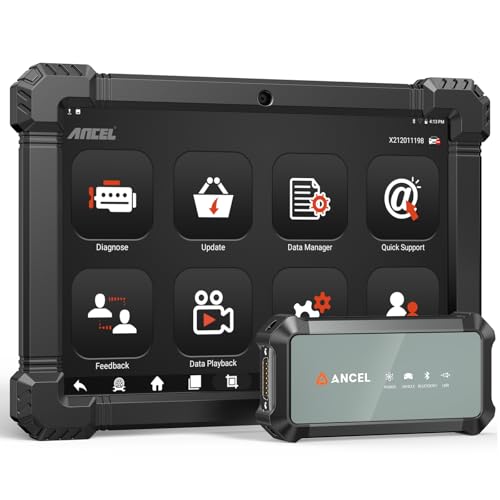
- 2026 ALL-IN-ONE HEAVY DUTY TRUCK SCANNER – BUILT FOR DIESEL DIAGNOSTICS:The ANCEL X7HD PRO combines full-system diagnostics, bi-directional control, ECU coding, HDOBD/OBD2 functions, and 42+ reset services in one powerful heavy duty truck scanner. This diesel scan tool helps technicians, fleet owners, and repair shops diagnose problems faster, reduce downtime, and complete more repairs without switching between multiple truck diagnostic tools. Features a 10.1" Android tablet, Bluetooth & Wi-Fi, live data graphing, and 2 years of f-ree updates
- 42+ RESET FUNCTIONS – MORE THAN A BASIC TRUCK CODE READER:Perform essential service functions including forced DPF regeneration, injector coding, speed limiter adjustment, idle adjustment, oil reset, ABS reset, SRS reset, EPB reset, throttle reset, and suspension calibration. Designed for real truck maintenance and fleet service, this commercial truck diagnostic scanner helps reduce dealer visits, avoid unnecessary downtime, and handle more repair jobs with one diesel diagnostic tool
- ACTIVE TEST & ECU CODING – ADVANCED BIDIRECTIONAL SCAN TOOL FOR TRUCKS:Quickly locate faults by activating components and sending commands directly to vehicle systems. Test injectors, ABS, throttle, cooling systems, and other modules in real time without unnecessary disassembly. ECU coding and module matching help adapt replacement parts, restore factory settings, and reduce repeat repairs, making this semi truck scan tool ideal for advanced troubleshooting and daily shop work
- FULL-SYSTEM HDOBD/OBD2 DIAGNOSTICS – WIDE TRUCK & ENGINE COVERAGE:Read and clear codes, monitor live data, freeze frame, and diagnose engine, transmission, ABS, body, and other major systems. Compatible with Freightliner
 , Kenworth, Peterbilt, Volvo, Mack, International, and other commercial truck brands, plus Cummins, Caterpillar, Detroit, Paccar, and Navistar diesel engines. Also supports full OBD2/EOBD diagnostics for standard vehicles, making it a versatile truck obd2 scanner for mixed fleets and repair shops
 - PROFESSIONAL HARDWARE + RELIABLE SUPPORT – BUILT FOR DAILY SHOP USE:This professional diesel diagnostic computer features a 10.1" touchscreen, Android 10.0 system, 6000mAh battery, Bluetooth/Wi-Fi connectivity, and built-in front & rear cameras for documenting repairs and remote troubleshooting. Includes 2 years of fr-ee updates, 1-year w-arranty, and responsive technical support. Contact [email protected] before purchase to confirm compatibility and supported functions for your truck or diesel engine
 ,
, 
- 【Built for Heavy Duty Diesel Diagnostics】Designed for SAE J1939 and J1708 compliant trucks, buses, and diesel-powered commercial vehicles. HD601 truck scanner diagnostic tool helps owner-operators, small fleets, mobile technicians, and independent repair shops quickly identify fault codes, view live data, and make informed repair decisions—saving time, reducing downtime, and avoiding unnecessary shop visits
- 【Full System Diagnostics+All HD OBD Modes】The New HD601 heavy duty truck scanner delivers full-system diagnostics on SAE J1939 and J1708-compliant commercial vehicles—digging into engine, transmission, ABS, fuel, every system that keeps your rig rolling. It supports all HD OBD modes, giving you live data, freeze frame, ECU info, vehicle info, emissions data tracking, plus code reading and clearing. Not just what broke, but why—so you fix it right the first time. Pinpoint issues faster, cut repair costs, and spend less time on the shoulder
- 【Wide Heavy-Duty Vehicle Coverage】Supports a wide range of heavy-duty vehicle manufacturers and systems, including Freightliner, Kenworth, Peterbilt, Volvo, International, Detroit, Cummins, Paccar, Allison, Eaton, Bendix, Wabco, and more. Coverage varies by vehicle make, model, year, and system configuration. Contact our support team before purchase if compatibility verification is needed
- 【Speaks Major Truck Protocol】The New HD601 diesel truck scanner is built for American-made trucks—and supports the heavy‑duty protocols you' re most likely to run into on the road: SAE J1939, J1708/J1587, ISO 15765‑4, ISO 14230‑4, ISO 9141‑2, J1850 PWM/VPW, ISO 27145‑4, and EURO‑6. For most trucks, model years, and systems, it speaks the language your vehicle understands. Just plug it in and start diagnosing—no guesswork, no gatekeeping. Note: vehicle functions and module availability may vary by manufacturer and model year
- 【Save Hundreds on Diagnostic Fees】Why pay $150–300 for someone to read your codes? With the New ANCEL heavy duty truck scanner, you can pull fault codes yourself—in minutes, without leaving the truck. One or two uses pays for the tool. After that, every diagnostic is money back in your pocket. Smart investment for owner-operators, techs, and small fleets. Read and clear stored fault codes in minutes. Active fault codes may require repairs before they can be cleared
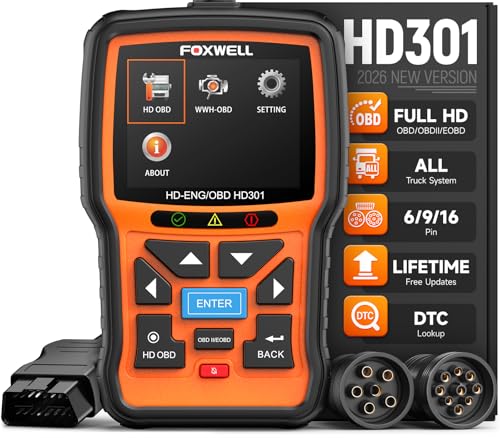
- 【One Tool, Total Fleet Coverage: 6/9/16 Pin Ready】Featuring an integrated 16-pin OBD2 connector and professional-grade 6-pin & 9-pin adapters, this heavy duty truck scanner provides extensive support for J1939, J1708, J1587, ISO 14230-4, ISO 15765-4 and ISO 9141-2, ISO 27145-4 protocols. It offers reliable diagnostic coverage for major American diesel brands—including Cummins, Paccar, Caterpillar, Detroit, and Freightliner—making it a versatile semi truck scanner for managing any diverse fleet.
- 【2 in 1 Diesel Code Reader & Advanced HD OBDII】Equipped with professional-grade diesel scanner capabilities, the HD301 features intuitive Read/Erase codes and turn off the "Check Engine" light. With the built-in DTC Lookup library, you can instantly access fault code definitions on-device without searching the internet. It also retrieves hundreds of essential live sensor data—such as coolant temperature, fuel pressure, and engine RPM—in a stable text format for precise and rapid troubleshooting. (Please note that the HD301 can not support DPF Regen.)
- 【Full System Truck Diagnostic】The FOXWELL HD301 heavy duty scan tool is engineered to deeply access and scan all available electronic control modules specifically for truck, including Engine, Transmission, ABS, SRS, Chassis, and Body Control. This professional truck scanner diagnostic tool allows you to identify issues across the entire vehicle, ensuring your rig stays in peak condition for the long haul.
- 【Versatile for most big Rigs: Commercial, Passenger & Beyond】Engineered for more than just trucks, this heavy duty scan tool offers extensive coverage for pickups, buses, trailers, and even marine vessels. From construction machinery (excavators, loaders) to agricultural equipment (tractors, harvesters), it provides a true all-in-one diagnostic solution.
- 【Plug-and-Play & No Subscription】Designed for the road! No WiFi, no batteries, and no complex App setup required. Simply plug it into your vehicle’s diagnostic port to start scanning immediately. Enjoy lifetime free software updates to keep your HD301 diesel truck scanner current with the latest vehicle models and features—without any hidden subscription fees—While overcoming language barriers with support for Spanish and English.
Last update on 2026-06-12 / Affiliate links / Images from Amazon Product Advertising API
This product presentation was made with AAWP plugin.