
NHTSA ID Number: 10130299
Manufacturer Communication Number: GCI-A0255-02
TSB/Document Date: 2018-03-13
Summary
GENERAL CONSUMER INFORMATION PERTAINING TO AN OWNER'S MANUAL
ta eS
COCCCCCUCCUCCUC CALC E CREE CEUTA TELL AAAS AT
VAULTS SST
EXTERNAL POWER
AQ meter / 30 foot 30 amp power cord is provided in the exterior power cord compartment located
on the driver’s rear side of the unit. To make an external power connection, remove the cord from
the compartment and plug it into any adequate 110 volt power source to activate to all power circuits.
The connector is rated for 30 amp capacity. Note: the male end of the power cord is a 30 amp plug,
therefore you may require an adapter to convert the plug into the 110 style, most RV parks are
equipped with 30 amp plug ins.
MONITOR PANEL
There is a monitor panel located above the main entrance side doors. [n this panel is the carbon
monoxide sensor, water heater control switch, generator control switch (optional) and the water
pump control switch which also monitors the black, grey and fresh water tank levels.
AUXILIARY BATTERY
Your motorhome is equipped with an auxiliary battery besides the factory battery in order to provide
12 volt power to your interior components and not create a drain on the chassis battery. The chassis
battery is not tied into the living coach area system in order to provide constant starting power for the
engine.
An isolator is installed to allow both batteries to be charged when the engine is running, but will not
allow the chassis battery to discharge when there is a demand from the living area system. This
battery is automatically charged whenever the motorhome is running, the time required to charge will
depend on how low the battery is. The auxiliary battery will charge at a slower rate when you are
using driving lights, chassis air conditioning, etc.
Normally, the isolator requires no regular maintenance.
AUXILIARY BATTERY LOCATION
Your auxiliary battery is located at the rear of the unit on the passenger’s side corner under the floor
(except Excel-MP and MPL models). This is totally sealed off to the interior of the unit and vented to
the exterior. Access to this battery will be by relocating the passenger side backrest and the rear
seat and backrest cushions and removing the interior lid at floor level which is carpeted and heid in
place by two screws. Remove the screws and lid to gain full access to the battery. Accessability may
be simplified by working at the rear of the unit with the rear door open.
In the Excel-MP and MPL models you will find the location of the auxiliary battery at the rear of the
unit above floor level in a separate compartment. Access to this will be by relocating the rear seat
and backrest cushions and removing the interior compartment lid which is held in by screws.
Remove the screws and lid to gain full access to the battery. Accessability may be simplified by
working at the rear of the unit with the rear door open.
ty,
: thats
ve ; he an ‘
we te an ie ’ phate
-r ‘ es oe. a why + as ‘ Oe as ale
Bera OG aa
CUCCCCCCCCOCECCCCOCCCACUCUCULUL ULLAL ALAA ALLL aa itt
VASASSSRRUATUASRRARRRRDRADD ODOR DDD DDD DDD D DDD D DD DD
BATTERY CARE
Your auxiliary battery must be regularly cleaned and maintained atleast.once.a_ month in order to
provide a reliable-and-constant power source to your motorhome. To ensure satisfactory battery
performance, battery terminal cleanliness is essential.
See manufacturer’s instructions for detailed maintenance recommendations.
WARNING: Batteries give. off explosive gases that can cause severe personal injury. Do not smoke,
keep open flames and other sources of ignition well away from the battery. Remember, batteries can
and do, EXPLODE !
WARNING: Battery electrolyte can cause severe eye damage and skin burns. Wear goggles, rubber
gloves and a protective apron when working with batteries.
Maintain the battery as follows unless the battery manufacturer has other instructions and
recommendations:
1. Keep the battery case clean and dry.
2. Make certain that the battery cable connections are clean and tight.
3. Identify the cables as positive (+) or negative (-) before making any battery connections. Always
emove the negative (-) cable first and connect. it last, to reduce the risk of arcing.
4. To remove corrosion from the battery terminals, remove cables from battery and battery from
compartment. Wash the terminals and posts with an ammonia solution or a solution consisting of
1/4 pound of baking soda in 1 quart of water. Be sure the vent plugs are tight to prevent cleaning
solution from entering the cells. After cleaning, flush the outside of the battery and the surrounding
areas of the compartment with clean water.
5. Maintain the electrolyte level by adding distilled water. Water level shall be kept 1/4” below the
bottom of the fill tubes. The water component of the electrolyte evaporates, but the sulphuric acid
component remains. For this reason, add water, not electrolyte to the battery.
6. Use a battery hydrometer to check the specific gravity of the electrolyte in each battery cell.
Charge the battery if the specific gravity measures less than. L215. Do not overcharge the battery.
Stop charging the battery when the electrolyte specific gravity reaches 1.260, at approximately 80
degrees F. (27 degrees C.) Let the battery coo! down prior to usage.
7. Replace the battery into the compartment and reconnect the cables tightly. Replace the lid and
screw down tightly to provide a good seal.
lf your unit is equipped with a generator it will be located under the floor at the rear of the unit. Access
to this is from underneath the chassis, there is no access through the interior in order to prevent
exhaust gases seeping into the living compartment.
The generator will provide an added source of power to run the electrical system when you are not
plugged into a 110 volt power source. To start your generator you will see an Onan start/stop switch
located on the monitor panel. Simply hold the button down until the generator starts, it may take a
few seconds initially for it to start. Your generator draws its gas supply from your chassis gas tank,
but won't drain it for YOU MUST HAVE A MINIMUM OF A 1/4 TANK OF GAS FOR THE
GENERATOR TO RUN. Once the generator is running, it is now supplying power to the entire
electrical system, just as if it was plugged into a 110 volt power source.
If your motorhome is not equipped with the generator and you wish to install it at a later date, have
an authorized dealer install this equipment. You will have to remove your underchassis rear
compartment to allow room for your generator. YOU MUST PERMANENTLY SEAL THE REAR
COMPARTMENT ACCESS LID THROUGH THE FLOOR in order to prevent exhaust gases seeping
into the living space of your motorhome. You will not be able to have access to the generator through
this lid.
If your motorhome was purchased without a generator but wired to be ready for a generator, it has a
‘Supplementary Generator Overcurrent Protector’ installed. This is located underneath the sofa/bed
behind the convertor covered by a screwed down lid. This device protects against a future
generators charging circuit overcharging and damaging all of your appliances. If this device is
activated you need to reset it by simply pressing in the button.
See manufacturer’s operating manual for complete operating instructions and maintenance
procedures.
a a
Mi se
eee ie
™, - 4
NN al of mimes
et eB
ata” LE
tw. ae
COCCOCCOCURCCCUCAC ULL aaa ait)
2
LUVUCUUUUTUTUUT SUAS SSS SSSI SSN
INTERIOR COCKPIT MAP LIGHT
The interior map lights (located on the overhead cabinet above the driver and passenger captain’s
chairs) has a 3 way switching system. These map lights are wired into the headlight switch and are
powered off of the chassis battery only, not the auxiliary battery like the rest of the interior lights.
FIRST OPTION is by having the headlight knob turned to the centre and the map lights will be turned
on. When you open the doors to the motorhome these lights will come on and shut off when you
shut the door.
SECOND OPTION is by having the headlight knob turned all the way to the left, this lets you turn the
map lights on and off by using the map light switch while the doors are closed. NOTE: DO NOT
LEAVE THE KNOB IN THIS POSITION FOR AN EXTENDED PERIOD OF TIME IF YOU ARE NOT
DRIVING, FOR THIS WILL DRAIN AND KILL THE CHASSIS BATTERY.
THIRD OPTION is by having the headlight knob turned all the way to the right and these lights will
not come on when your doors open. NOTE: this is the position that this should be left when not
driving.
REFRIGERATOR 12V/110V/LP GAS
Your DOMETIC refrigerator is designed for 3-way operation, using 12 volt DC, 110 volt AC and LP
gas power. When the refrigerator is switched to electric or 12 volt, the ammonia/water mixture is
heated by a heating element instead of a burner.
When your motorhome is stationary, it should be levelled for your refrigerator to provide the proper
cooling. A bubble level should be placed on the freezer shelf to check the refrigerator for levelness.
lf the refrigerator is not level you may have improper cooling.
For LP gas operation, turn the selector switch to gas and follow the instructions on the fridge for
lighting. Turn the fridge thermostat to the highest temperature that will still provide adequate
refrigeration. For 110 volt AC operation, make sure the power cord is connected and switch the
selector switch to electric power. For the 12 volt DC operation setting, power is now provided by the
auxiliary battery. However, the 12 volt power should not be used when stationary in order to prevent
battery drainage.
NOTE the refrigerator should be turned to 12 volt when the vehicle will be in motion and the LP gas
must be turned off.
See manufacturer’s operating manual for complete operating instructions and maintenance
procedures.
For operating instructions for the remainder of your appliances, please see each respective
manufactures operating manuals.
TV/VCR
If your motorhome is equipped with the optional TV/VCR combination unit, you will find this in an
enclosed entertainment centre at thé rear of your unit (except Excel-MP and MPL models). In the
Excel-MP and MPL models you will find that the TV and VCR are two separate units and are located
in the overhead console in the cab area.
Your TV is equipped to function on AC (110 volt) or DC (12 volt) power supply. When shipped from
the factory the unit is set on the DC power supply. The unit should be switched to the AC power
supply if being used for an extended period of time. This is done by reaching up behind the TV
{through the opening below cabinet) and sliding the switch at the lower left corner down (see page
12_of the owners manual). When the switch is in the up position, it is on_12 volts, and when in the
down pasition it is on 110 volts.
There is a switch on the side of the entertainment centre (except Excel-MP and MPL models) that
controls the 12 volt power supply to the TV including the amplifier in the TV antenna. On the Excel-
MP and MPL models this switch is located in the overhead console above the driver’s seat. This
switch will have to be turned ON in order to watch TV with 12 volt power supply only. When the
switch is on, there will be a power drain on the auxiliary battery, even without the TV on. Therefore
it is advisable to turn the switch OFF if the TV will not be in operation. When watching TV with 110
volt power supply, having this switch turned on will provide a better quality picture. The TV in the
Excel-MP and MPL models is only able to function on a 12 volt power supply and will not operate
while the ignition key is on.
To remove the TV from the entertainment centre on all models (except Excel-MP and MPL models)
you will first have to remove the 3 screws up through the bottom of the cabinet into the feet of the
TV. Next remove the door knob on the sliding door, then slide the door all the way open. The TV
will now be able to slide out of the cabinet enabling you to disconnect the cable and power supply
cords.
To remove the TV from the overhead console on the Excel-MP and MPL models you will first have
to gently pry off the cloth buttons covering the screws, one on each side of the TV near the front.
Remove the screws and then you will be able to slide out the unit enabling you to disconnect the
cable and power supply cords. To remove the VCR from the overhead console, first gently pry off
the front corner coving below the VCR to expose two screws. Remove these screws up into the VCR
and then you will be able slide the unit out and disconnect the cable and power supply cords.
See manufacturer's operating manual for complete operating instructions and maintenance
procedures.
ih .
p
f A ur : £ Sit EF Boy ff st
a I Se EE EE
COCCUCCUCTL LCCC ECEECLCEU CULE LALLA ALLS AS92
CUSSUSUSSSSSSSSSSSSSSTUTSSLSSSSSSS NIST ISS SSS
TWIN TO KING SIZE BED ASSEMBLY
t.
Remove the support board which is stored behind the passenger’s side backrest cushion. Place
this board across the support rail on the drawer cabinet below the entertainment centre and on
front of the sofa bed.
Remove the two small seat cushions and the passenger's side backrest cushion and set aside.
Slide the long seat cushion forward to the front of the bed. Lay the long backrest cushion down
at the rear of the bed leaving a space along the middle (except Excel-RL and Excel-MP models).
On the Excel-RL and Excel-MP models, slide the long rear backrest cushion tight to the seat
cushion now in the front.
. The passenger’s side backrest cushion and the larger of the two remaining seat cushions are
placed in the middle to complete the bed. (except Excel-RL and Excel-MP models). On the Excel-
RL and Excel-MP models, the passenger's side backrest cushion and the smaller of the two
remaining seat cushions are placed in the rear space next to the rear wall and backrest cushion
to complete the bed. There is one cushion not being used when the sofa is in this bed position.
” ”
2 zZ
S o
ag x= :
PASSENGER'S B G DRIVER'S
SIDE 3 3 SIDE
SINGLE — - SINGLE
BED a a BED
lu uw
an cc
na x
CO Oo
<

- 💯【Conta.ct us for Support Directly】If you met any...
- 🔥🔥🔥【2026 AUTEL FLAGSHIP MK900BT MK900-BT, NEW...
- 🚗【3000+ ACTIVE TESTS (50➡3000+), SAME AS MS...
- 🚗【40+ HOT SERVICES FOR 150 MAKES (28+➡40+)】Full...
- 🚗【OE ALL SYSTEM DIAGNOSE, AUTO SCAN 2.0: SCAN LICENSE...


- 【TURN OFF CEL】 This AL319 car scanner diagnostic tool...
- 【EXTENSIVE APPLICATION】 Autel AL319 Compatible with...
- 【FOR END USER & DIYERS】 This error code reader AL319 is...
- 【USER-FRIENDLY DESIGN】 This OBD2 scanner and check...
- 【HIGH-QUALITY SERVICES】 12 months war.ranty from the...
Last update on 2026-06-23 / Affiliate links / Images from Amazon Product Advertising API
If the PDF is very large, it may not load in the preview below.
Some older TSBs had multiple PDFs — visit the NHTSA Website to view all PDFs.
If the TSB PDF does not show, download or view it on the NHTSA Website.
Click on the (+) Plus Sign
Then Click on Associated Document(s)
Search NHTSA Database for Recalls
Search NHTSA Database for Vehicle Investigations
View Latest Vehicle Investigations
Search NHTSA Database for Vehicle Complaints
View Latest Vehicle Complaints
TSB/Document ID: GCI-A0255-02
Replacement Service Bulletin Number:
MFR Communication Date: 2018-02-16
MFR Internal Campaign ID/Software Version:
Communication Type: Service Bulletin/Repair Instructions
NHTSA Components: EQUIPMENT:OTHER:OWNERS/SERVICE/OTHER MANUAL
MFR Component System:
MFR Component Subsystem:
Previous TSB | Next TSB |

- 【OE-Level Full System Diagnostics-Lifetime F*REE Software Updates】The VDIAGTOOL D200 OBD2 Scanner for cars is a all system bidirectional scan tool that enjoy lifetime f*ree software updates, delivers complete system coverage. reading/clearing codes across engine, transmission, ABS, SAS, EPB, TPMS plus full access to body, chassis, powertrain and all control modules. This D200 Bidirectional car scanner works with most 1996+ OBD2 gasoline and hybrid
 cars and light trucks. It does NOT support pure electric and heavy-duty trucks. PLEASE CHECK COMPATIBILITY BEFORE ORDERING or Contact us with VIN to confirm compatibility.
 - 【Supports OBD2 Full Functions-ZERO Subscription Fees】D200 Bidirectional OBD2 Scanner is a upgarde of universal car code reader. It supports OBD2 full functions to help you turn off the annoying instrument fault indicator, such as read/clear codes, O2 sensor test, I/M readiness, on-board monitor test, datastream, freeze frame, E-VAP system test, and retrieve vehicle information. This professional obd2 scanner diagnostic tool can full access to diagnostics, reset tools and maintenance features with a single payment. NOTE: The fault code can only be cleared after the vehicle's malfunction has been repaired; please ensure the vehicle issue is fixed before clearing the code.
- 【D200 Hidden 2 Advantages: 1. $169 Expandable 49+ Advanced Resets. 2. $199 Get J2534 P*a*s*s-Thru Programming】Your core car diagnostics and 26 reset remain lifetime f*ree for everyday maintenance. When you need deeper repair capability, upgrade with 3-year access for $169 in Store on VDIAGTOOL App, gaining 49+ advanced resets. D200 configured with J2534 hardware, upgrade only when you need without replacing the entire device. You also can Lifetime Unlock for $199 in Store one-time, perform module programming, software re~flashing and ECU data updates directly. Supports 17+ major brands, including for BMW, for Audi, for GM, for Ford and more. Note:D200 does‘t provide any OE software.
- 【Full Bidirectional Control / Active Tests】The D200 car scanner diagnostic tool is a true bidirectional scan tool that lets you send commands directly to the vehicle’s ECU for active tests. Quickly test fuel pumps, relays, solenoids, injectors, cooling fans, windows, sunroofs and more to verify operation instantly. Get dealership-level diagnostic control at a fraction of the cost (ofter $100-200$ per diagnostic visit), reduce guessworkand confirm repairs faster, avoid unnecessary parts replacement, towing fees and wait times.
- 【26 F*ree Essential Reset & Relearn Functions – Everyday Maintenance Made Easy】Handle common maintenance and repair jobs without visiting the shop. The D200 code readers & scan tools includes 26 f*ree high-demand reset functions, including Oil Reset, EPB Service, SAS Calibration, ABS Brake Bleeding, Throttle Relearn, Injector Coding, Headlight Adjustment, Tire Size Reset and more. Perfect for home car owners, mechanics and DIYers – just plug and diagnose anytime, anywhere! Note: Service functions vary by vehicle model—please confirm compatibility.

- 【A MUST-HAVE TOOL FOR DIYERS】 - VDIAGTOOL VD10 car code reader is an incredibly useful obd scanner for each car owner or hobbyist, even for those with little to no experience when it comes to vehicle mechanics! Similar to a fixd car diagnostic tool, using this car diagnostic scanner is extremely easy. All you have to do is attach it to your car OBDII port and you can diagnose car problems in seconds! Read Codes (DTCs); Clear Codes; Live Data; View Freeze Frame; I/M Readiness; Vehicle Information.
- 【KEEP ENGINE IN GOOD STATUS】 - VDIAGTOOL check engine code reader brings a fast access to scan, read the car fault code, show its definition on the screen instantly, troubleshooting to find the root causes of problems, erase the engine fault code and turn off the MIL (Malfunction Indicator Light). Similar to a fixd car diagnostic tool, this car code reader helps ensure your engine stays in top condition.
- 【READ/CLEAR CODES & DTC LOOKUP】- No search online & saving your time, this vehicle car code reader retrieves generic (P0, P2, P3, and U0), manufacturer specific (P1, P3, and U1) codes, pending codes and displays DTC definitions based on the built-in database(more than 3000 codes) on the TFT screen, find out the root causes and clear the codes after fixed.
- 【LIVE DATA & RETRIEVE FREEZE FRAME】 - This diagnostic scan tool for accurate diagnosis enables you to retrieve data from vehicle sensors, such as Engine RPM, Intake air temperature, Short/Long term fuel, Misfire data and etc. The freeze frame is stored in the PCM together with the diagnostic trouble code (DTC) related to the fault. Comparable to a fixd car diagnostic tool, the VD10 car code reader car scanner can be a valuable & practical diagnostic aid and also greatly help when diagnosing intermittent problems.
- 【I/M READINESS for THE S-nn-0-g CHECK】- OBDII vehicle may not pass the annual inspection unless the required monitors since reset are complete. So you should at least read the readiness monitors and make sure they are ready. This car obd2 scanner diagnostic tool is equipped with I/M readiness function to check the operations of the e-m-issi0n system on OBD2 compliant vehicles, run I/M monitor readiness test, checking if the pass vehicle s-m-0-g inspection.
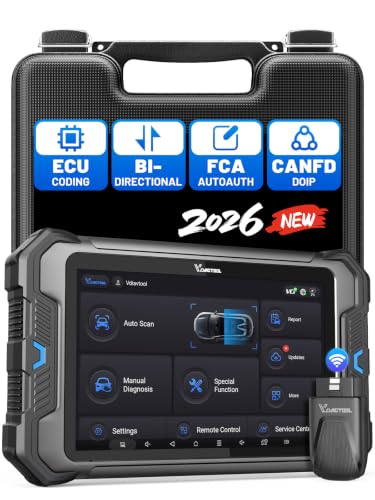
- 【Professional Diagnostics】 The VD80 BT Lite bidirectional obd2 scanner is a professional OBD2 scanner diagnostic tool, delivering vehicle diagnostics right in your own garage. It supports 4,000+ active diagnostic tests, 28+ maintenance service functions, ECU coding, PMI calibration, brake service reset, and OEM-grade full-system vehicle scanning—perfect for DIYers and pros looking for powerful automotive tools. The available function tests vary by model—please to confirm compatibility.
- 【ADVANCED ECU CODE, CUSTOMIZE OE-SETTINGS】As a complete car code reader and reset tool, the VD80 BT Lite bidirectional obd2 scanner supports ECU coding for VW, for Audi, for BMW, for Benz, for Mitsubishi and more. PMI function for Ford/for Lincoln/for Mazda, supports copy data into new module. Step-by-step Guided Diagnostics makes complex jobs easier—making this one of the most reliable code readers & scan tools on the market.
- 【100000+ Vehicles Compatibility – CAN FD/DOIP】 VD80 BT Lite Auto Scanner Compatible with 100,000+ vehicles worldwide, this bidirectiona car scanner works with all OBD2-compliant vehicles manufactured after 1996, covering more than 100 brands worldwide. It also supports CAN FD, DOIP and FCA Secure Gateway protocols, boost 2X faster data transfer, covers 99% of U.S., EU and Asian cars. With 22 languages and 2 years of f*ree updates—future-proofing your car reader diagnostic for all cars.
- 【28+ Maintenance Services & Calibration Functions】VD80 BT Lite scanner for car Supports 28 maintenance services, including resetting oil and service lights after routine maintenance, registering new batteries for proper system operation, and clear clogged filters and restore performance. Additionally, it calibrates TPMS sensors after tire rotations, resets brake systems after pad replacements, relearns steering angle sensors after alignments, and more. These functions help your vehicle quickly and accurately return to peak performance—without the costly dealer visits.
- 【True Bidirectional Control – Diagnose with Confidence】Standing out with full-system coverage and extensive active test capabilities, the VD80 BT Lite bidirectional scan tool retrieves data from electronic control units and performs a wide range of active tests. You can real-time control over modules like fuel pumps, windows, A/C clutches, and relays. Perform 100+ advanced functions including throttle adaptation, injector coding, VIN write, idle relearn, and ABS bleed—helping you fix it right the first time with this all-in-one car diagnostic scanner.
Last update on 2026-06-23 / Affiliate links / Images from Amazon Product Advertising API
This product presentation was made with AAWP plugin.