
NHTSA ID Number: 10124952
Manufacturer Communication Number: A011392 2033807-
TSB/Document Date: 2017-12-05
Summary
MIL on. DTCs are stored in the engine control module (ECM). No relevant component or electrical problems are found when Guided Fault Finding (GFF) is run on the stored fault codes. GFF must be run on any stored fault codes to ensure the cause of the fault is not hardware-related. Software improvement with more robust onboard diagnostics.
If the PDF is very large, it may not load in the preview below.
Some older TSBs had multiple PDFs — visit the NHTSA Website to view all PDFs.
If the TSB PDF does not show, download or view it on the NHTSA Website.
Click on the (+) Plus Sign
Then Click on Associated Document(s)


- Advanced VCI Box, Industry-leading J2534 Pass-Thru...
- High-Speed OEM-Level Diagnostics & Programming: Unlock true...
- Coverage for 17 Car Brands & Ultra Reliability: Works...
- User-Friendly RLink Platform & Expert Support: TOPDON’s...
- 6.6 ft USB-C Cable & Portable Storage Case: The RLink J...
This product presentation was made with AAWP plugin.
Search NHTSA Database for Recalls
Search NHTSA Database for Vehicle Investigations
View Latest Vehicle Investigations
Search NHTSA Database for Vehicle Complaints
View Latest Vehicle Complaints
TSB/Document ID: A011392 2033807-
Replacement Service Bulletin Number:
MFR Communication Date: 2013-05-07
MFR Internal Campaign ID/Software Version:
Communication Type: Service Bulletin/Repair Instructions
NHTSA Components: ELECTRICAL SYSTEM
MFR Component System:
MFR Component Subsystem:
Previous TSB | Next TSB |
Technical Service Bulletin
01 MIL on (DTCs P0299, P0403, P20EE, P229F, P2100, P0045, P2008, P24AF, P026A, and/or P050E)
01 13 92 2033807/1 May 7, 2013.
Model(s)
Year
VIN Range
Vehicle-Specific Equipment
Q7 TDI
2013
All
Not applicable
Condition
MIL on
One or more of the following DTCs is stored in the engine control module (ECM), J623:
DTC P029900 (Turbo/Super Charger Underboost)
DTC P040300 (Exhaust Gas Recirculation Circuit)
DTC P20EE00 (SCR NOx Catalyst Efficiency Below Threshold Bank 1)
DTC P229F00 (NOx Sensor Circuit Range/Performance Bank 1 Sensor 2)
DTC P210000 (Throttle Actuator Control Motor Circuit/Open)
DTC P004500 (Turbocharger/Supercharger Boost Control Solenoid "A" Circuit/Open)
DTC P200800 (Intake Manifold Runner Bank 1 Control Circuit/Open)
DTC P24AF00 (Particulate Matter Sensor Circuit Range/Performance)
DTC P026A00 (Charge Air Cooler Efficiency Below Threshold)
DTC P050E00 (Cold Start Engine Exhaust Temperature Too Low)
No relevant component or electrical problems are found when Guided Fault Finding (GFF) is run on the stored
fault codes.
Tip: GFF must be run on any stored fault codes to ensure the cause of the fault is not hardware-related.
Technical Background
Software improvement with more robust onboard diagnostics
Production Solution
Improved software.
Page 1 of 2 plus attachment
© 2013 Audi of America, Inc.
All rights reserved. Information contained in this document is based on the latest information available at the time of printing and is subject to the copyright and other intellectual property rights of Audi of
America, Inc., its affiliated companies and its licensors. All rights are reserved to make changes at any time without notice. No part of this document may be reproduced, stored in a retrieval system, or
transmitted in any form or by any means, electronic, mechanical, photocopying, recording, or otherwise, nor may these materials be modified or reposted to other sites, without the prior expressed written
permission of the publisher.
Technical Service Bulletin
Service
Do not replace any parts for these fault codes unless directed to do so by GFF. Do not contact Technical
Assistance Center (TAC) unless the problem persists after the software update or if there is a problem with the
SVM process.
1. Follow all instructions in the attached TSB, 2011732 00 Software Version Management (SVM), operating
instructions.
2. Update the engine control module using the SVM action code as listed in the table below if necessary.
Model
Engine and/or
Transmission
Old Software
Part Number
Old Software
Version
New Software
Part Number
New
Software
Version
SVM Action
Code
(or higher)
Q7 TDI
CNRB
4L2910401A
< 0006
4L2910401A
0006
01A125
Warranty
Claim Type:
Use applicable claim type. If vehicle is outside any warranty, this Technical Service
Bulletin is informational only.
Service Number:
2360
Damage Code:
0039
Labor Operations:
Connect battery charger and perform software
update with SVM
2360 2599
50 TU
Diagnostic Time:
GFF
0150 0000
20 TU
Road test prior to service procedure
No allowance
0 TU
Road test after service procedure
0121 0004
10 TU
Technical diagnosis at dealer’s discretion
(Refer to Section 2.2.1.2 and Audi Warranty Online for DADP allowance details)
Claim Comment:
As per TSB #2033807/1
Additional Information
All parts and service references provided in this TSB are subject to change and/or removal. Always check with
your Parts Department and service manuals for the latest information.
Page 2 of 2 plus attachment
© 2013 Audi of America, Inc.
All rights reserved. Information contained in this document is based on the latest information available at the time of printing and is subject to the copyright and other intellectual property rights of Audi of
America, Inc., its affiliated companies and its licensors. All rights are reserved to make changes at any time without notice. No part of this document may be reproduced, stored in a retrieval system, or
transmitted in any form or by any means, electronic, mechanical, photocopying, recording, or otherwise, nor may these materials be modified or reposted to other sites, without the prior expressed written
permission of the publisher.
Technical Service Bulletin
00 Software Version Management (SVM), operating instructions
00 12 32 2011732/9 February 7, 2012. Supersedes Technical Service Bulletin Group 00 number 10 – 02 dated
March 24, 2010 for reasons listed below.
Model(s)
Year
VIN Range
Vehicle-Specific Equipment
All Audi
2002 on
Not Applicable
Not Applicable
Condition
REVISION HISTORY
Revision
Date
Purpose
9
-
Revised header data (Added model years)
Revised Technical Background
Revised Service (Added image)
8
3/24/2010
Revised Technical Background
Revised Service (Added Response Codes section)
7
5/13/2009
Revised Service (Step 6)
6
12/15/2008
Revised Service (Step 3 – added information concerning use of wireless
VAS 5054A transmitter head)
5
11/17/2008
Revised Title to include Repair Group
4
10/21/2008
Revised Service (Step 3 – added information concerning Windows power
savings settings)
This Technical Service Bulletin (TSB) details the general process for carrying out a Software Version Management
(SVM) software update for any TSB or Update.
Troubleshooting information is included in the Additional Information section.
Please refer to the upcoming TSBs covering detailed aspects of SVM. They will be listed under group “99”.
Technical Background
SVM was developed with the main goal of ensuring each Audi vehicle has the correct electronic control units with
the correct software versions installed when it leaves the dealership repair facility.
© 2012 Audi of America, Inc.
Page 1 of 10
All rights reserved. Information contained in this document is based on the latest information available at the time of printing and is subject to the copyright and other intellectual property rights of
Audi of America, Inc., its affiliated companies and its licensors. All rights are reserved to make changes at any time without notice. No part of this document may be reproduced, stored in a retrieval
system, or transmitted in any form or by any means, electronic, mechanical, photocopying, recording, or otherwise, nor may these materials be modified or reposted to other sites, without the prior
expressed written permission of the publisher.
Technical Service Bulletin
SVM is a feature of GFF that has a subset of
functions or components as seen in Figure 1. These
functions are explained below. A VAS 5051B, VAS
5052A, or VAS 6150(A/B/C) diagnostic tool is
required to read out the vehicle control unit data and
send it to the SVM server (also called an “SVM
communication”).
Figure 1. Subset of SVM functions
1. SVM – Specified/actual comparison
Goal: This function is designed to ensure all electronic control units installed in the vehicle have the correct
part numbers, software versions, coding and parameterization. It will not suggest a control unit software
update. During this SVM communication, the part numbers and software versions of the actual control units
installed in the vehicle will be sent to the SVM servers. This “actual” data is then compared to the “specified”
data in the SVM database for a particular vehicle. The specified data stored on the SVM servers is also
referred to as the vehicle “reference”.
What an SVM Spec/Actual can do:
• Document any changes to an electronic control unit’s hardware/software part numbers, hardware/software
versions, and provide feedback to the user if these changes are accepted or rejected.
• When new parts are installed, it will also calculate coding changes or parameterization changes. If a
“hardware replacement suggestion” is given, then a conflict exists with the vehicle reference for that
control unit (i.e. SVM expects a different part number or software version for the control unit in question).
1
• As a rule, SVM will not allow a control unit with the same part number as the original part to be installed if
the new part contains an older software revision. In this situation, SVM will return a hardware change
2
suggestion . In these special cases a new vehicle reference must be manually set by an Audi Product
Support Engineer. Please contact the Technical Assistance Center Helpline if you suspect this is the
case.
2. SVM - Direct Input: SVM code for problem related update
Goal: This function performs any additional functions which cannot be performed with an SVM Spec/Actual.
Those functions include the following.
What an SVM code can do:
• Update the software in a flash-capable control unit if the SVM code is valid for the vehicle.
3
• After the software update is completed, an additional SVM Specified/Actual comparison will be performed
to calculate a new coding and/or parameterization and to document all control unit changes as a new
reference in the SVM database.
• SVM Codes should not be used to update a control unit without knowing the solution(s) the software
update provides. To update control unit software, the technician must first diagnose the condition in the
vehicle and find an applicable TSB that provides a valid SVM Code. Randomly trying out multiple SVM
Codes wastes time and can sometimes cause conflicts in the SVM database.
• SVM codes can also be used to document manual software updates to the vehicle’s systems, as in the
case with MMI Software Package (ZUG) updates. These types of updates are performed manually with a
CD/DVD/SDcard. An SVM code for an MMI update documents the changes in the SVM database and
provides coding and/or parameterization suggestions. It does not perform any software updates.
© 2012 Audi of America, Inc.
Page 2 of 10
All rights reserved. Information contained in this document is based on the latest information available at the time of printing and is subject to the copyright and other intellectual property rights of
Audi of America, Inc., its affiliated companies and its licensors. All rights are reserved to make changes at any time without notice. No part of this document may be reproduced, stored in a retrieval
system, or transmitted in any form or by any means, electronic, mechanical, photocopying, recording, or otherwise, nor may these materials be modified or reposted to other sites, without the prior
expressed written permission of the publisher.
Technical Service Bulletin
SVM codes for MMI Software Package (ZUG) updates will only complete successfully if every control unit is
updated to the correct software level. This is especially important when a control unit fails/dies during the
manual software update process and is then later replaced, but not updated after it is installed. Since the new
replacement control unit was not updated the SVM code will fail. The replaced control unit must be updated
prior to running the SVM code.
• SVM Exchange (XCHG) Codes can also be used to aid in the installation of new service parts when an
SVM spec/actual cannot code or parameterize the replacement control unit, as with all Audi airbag control
units.
It is critical to note SVM XCHG codes must be run immediately after a new control unit is installed in the
vehicle. If an SVM Spec/Actual is performed instead, it will create an invalid vehicle reference in the SVM
database. Once this occurs the SVM XCHG code will not function properly. The only way to resolve this issue
is to contact the Technical Assistance Center Helpline to have the vehicle reference manually set. To find the
SVM XCHG code, follow the parts bulletin listed in ETKA or search for an applicable Technical Service
Bulletin.
3. SVM - Direct Input: SVM code for vehicle conversion
Goal: This function allows for a factory approved retrofit of additional control unit(s) using a valid SVM Code
for Vehicle Conversion.
• This type of SVM code is documented inside the installation instructions for the control unit and is typically
performed as the last installation step. You can identify an SVM code for conversion by the way it is
named. They are typically named “050XXX”.
4. SVM – Activations
Goal: This function is designed to activate additional features or functions within an already installed control
unit using an Activation Code and possibly additional PIN codes or Customer codes.
• This function is designed with a security system similar to installing a new operating system on a personal
computer. Currently, SVM Activation codes are only being used with navigation map data updates for
vehicles with MMI3G/3G+. The customer no longer needs to purchase the Navigation map data. Instead
the customer must purchase an “Activation Packet” to unlock the map update in the MMI system. The
Activation Packet consists of an Activation Code, Activate Number, and Pin Code. Once the Activation
information is used, it becomes permanently tied to the customer’s vehicle in the SVM database and
cannot be reused with another vehicle.
5. SVM – communication, checking
Goal: This function allows the user to check the VAS Tester’s SVM online connection status to ensure the
tester is communicating with the SVM server.
© 2012 Audi of America, Inc.
Page 3 of 10
All rights reserved. Information contained in this document is based on the latest information available at the time of printing and is subject to the copyright and other intellectual property rights of
Audi of America, Inc., its affiliated companies and its licensors. All rights are reserved to make changes at any time without notice. No part of this document may be reproduced, stored in a retrieval
system, or transmitted in any form or by any means, electronic, mechanical, photocopying, recording, or otherwise, nor may these materials be modified or reposted to other sites, without the prior
expressed written permission of the publisher.
Technical Service Bulletin
Tips:
•
Parameterization refers to data written into the control unit by SVM to customize the software functionality
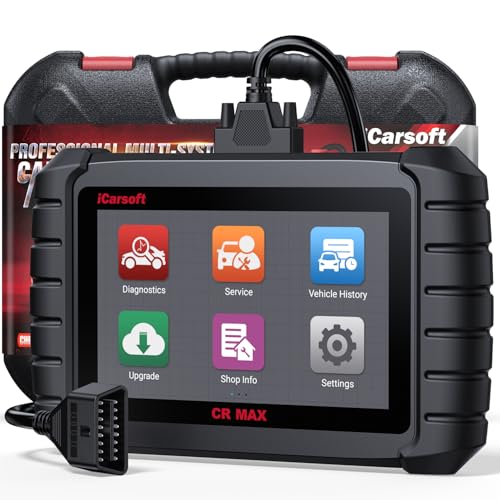
- WHY CHOOSE THE 2025 CR MAX -Upgrade the latest diagnostic capabilities for all vehicles after 1996: upgrade to 49+maintenance services; 46 extra specific functions; real all systems/all control modules diagnose; over 40K+ bidirectional actuation tests for diagnosing all control moduels of cars; Powerful full OBD2 Functions; built-in ECU Coding for BMW
 / Audi/ VW/ RollsRoyce; Fr ee V.A.G Guide Function; Battery retistration for new battery adaptation and more. It covers all vehicle diagnostic services and some special professional vehicle maintenance servces, assists you to do home DIY vehicle maintenance or car repair as a pro technician.
 - NEWEST IN INNOVATION FULL OBD2 SERVICES- iCarsoft auto car diagnostic scanner compatible with CAN-FD, CR MAX can do it all-reads and clears trouble codes, ALL SYSTEM DIAGNOSIS such as engine, transmission, ABS and airbag etc. CR MAX code reader for all cars can perform I/M Readiness, Live Data, Freeze Frame, Vehicle Information, Monitor Test, On-Board Monitor, E vap System Test,O2 Sensor Test,DTC Library Lookup,etc. (Warm Tips: If you car is after 2023,please contact us for compatibility; 3. It comes with 16PIN OBD2 diagnostic adapter, please check your car diagnostic socket if it is 16pin socket, if your car is 14pin diagnostic socket please contact us for the solution.)
- 49 RESET+ 46 SERVICES- Performs: Oil Reset, EPB,SAS,Throttle, D-P - F, Battery, ABS, Injector, TPMS, Suspension, AC, Head Lamp, Body Stablity, Engine, Tramsmission, Airbag, Seat, Door-Win-Roof, Fuel Pump, Door, E-G- R.+21 NEWEST SERVICES( Need update scanner)-AdBlue, Clutch, Crankshaft, High Voltage Battery, Cruise Control, NO xSensor, Rain Sensor, Stop And Start, Turbocharger, Head Up Display, Radar Camera, Vehicle Setup, Cyliner Misfire Check,Speedlimitassist, ControlUnitReset,OxygenSensor, Seatbelt. Extra 46+ extra services based on car brand.(Tips: Quantity of reset/ calibration fucitons are based on car system that your vehicle model has)
- REVOLUTIONARY 40000+BIDIRECTIONAL ACTIVE TESTS: Upgraded CR Max scanner equip with numberous of actuational test items for covering all available vehicle control modules, no longer only do simple light test or window test like other scanners, performs hardware modules test and software control modules test for checking car units or new updated control moduels work well or not after maintenance/ repair/ re-installation/ control system updated (Example for Benz- Roller Sun Blind test; Backup Camera test ;Self-test; EPB test; Transport Mode test;Boost Pressure Positioner test; Fuel Pump test; AND MORE!!).(Warm tip: The available test items are based on control modules your car has)
- ECU CODING+ BATTERY REGISTRATION- Powerful ECU Coding service for BMW/MINI/RollsRoyce / Audi/VW/Seat/Skoda/Bentley/Bugatti/Lamborghini, Improves Engine Power Performance and Optimizes Fuel Efficiency and Match New Hardware Unit to car and Customized a comfortable Driving Modes and Fixes & Updates Original Software Bug. The battery test function for checking car battery health, perform battery reset (BMS ) for replacing a damaged or aging car battery with a new one and register new battery to car ECU

- Scanner POR V2.0 with all obd2 services
- Do the scanning for engine
- Support OBDII/EOBD Ten Modes of Operation

- 【Designed for Most Mercedes-Benz, Sprinter and Smart from 1996-2023】As every car model of Benz has its-owned specific car system and ECUs, not all models are equipped with a complete vehicle ECU, which may cause the scanner to be unable to perform all listed reset services on some models, or even completely incompatible. Like For Sprinter's newer models, it support diagnostic functions only, lacking support for specialized service functions.. So please tell us the car's VIN and required service before purchase for compatibility check. You may also refer to the instructions in the eighth image of the main product photos to perform your inquiry.
- 【Up to 38 Reset Services】MB V3.0 2026 Version diagnostic tool performs Up to 38 maintenance services - Oil Rest , SAS, EPB, ETC, D-P-F, TPMS, ABS, Suspension, Air Conditioner, Head Lamp, Body Stability, Engine Control, Seat, Fuel Pump, Air-Filter, Engine Idle, Door, Im-mo-bilizer, Injector Coding, Transmission Control, Miscellaneous, Adblue, BMS, Cluth, Water Pump, NOxSensor, Rain/Light Sensor, Start/Stop, Radar/Camera, Cylinder Shutoff Test, Speed Limit Assist, Control Unit Reset, Oxygen Sensor, Seat Belt, Cruise Control System, Turbocharger, Crankshaft, Language Setting and etc. (Tips: Please update the software after receiving the product to obtain new service functions)
- 【OE-Level All System OBD2 Scanner】iCarsoft MB V3.0 (2026 Version) diagnostic scanner offers comprehensive OBDII services, allowing you to quickly scan all systems, including the Engine, ABS, SAS, SRS, TPMS, TCM, Fuel Pump System, ESP, EPB, EPS, Suspension, SCM, Adaptive Systems, and more. It supports functions such as reading and erasing codes, checking I/M readiness, viewing freeze frame data, performing O2 sensor tests, conducting on-board monitoring, testing the evap system, auto VIN retrieval, and reading both generic and specific codes, as well as DTCs and battery tests.
- 【Bidirectional Scan Tool】iCarsoft MB V3.0 (2026 Version) Bidirectional scanner supports activate or control a vehicle system or component, allows commanding cars’ modules and receiving info from the ECU to perform active tests on individual components, including EVAP/ABS Motor Pump/Windows/Sunroof and more, to pinpoint fault causes & resolve issues,and allows you to re-learn certain components after making repairs or replacement.
- 【Real Time Record & Graph View】iCarsoft MB V3.0 (2026 Version) can automatically record vehicle text history and identify vehicle information. Preserve real-time data information. View & Graph Live Data. Support Data Review and Print. Multi-language: English, German, Dutch, Spanish, French and so on. We promise to offer Lifetime updates (Lifetime free Update via PC), and confidence in products. We also provide 1 year warranty + extra lifetime hardware free repair if you need it in the future. We prioritize user experience & strive to meet your expectations. Please do feel free to reach out to us if you have any question or problem about the usage, our tech team will service you in time.

This product presentation was made with AAWP plugin.
Last update on 2026-05-13 / Affiliate links / Images from Amazon Product Advertising API