
NHTSA ID Number: 10121254
Manufacturer Communication Number: VSS-15-05
TSB/Document Date: 2017-10-31
Summary
Service Information (Temporary Warranty Process and Parts Return Program): During the Market Introduction of the new Touareg, Volkswagen collected all warranty repair information to ensure prompt analysis and resolution of any emerging concerns.
Service Information
Support
Number: VSS-15-05
Subject: 2015 Volkswagen Touareg – Market Introduction
Date: Mar 20, 2015
Temporary Warranty Process and Parts Return Program
(US Dealers Only)
Supersedes VSS 14 - 12 due to change in repair/reporting date range
Effective:
From repair date December 17, 2014 to March 19, 2015
Model:
Volkswagen Touareg
Model Year:
2015
During the Market Introduction of the new Touareg, Volkswagen will collect all warranty repair
information to ensure prompt analysis and resolution of any emerging concerns.
After performing the preliminary diagnosis, you must create a Volkswagen Technical
Assistance (VTA) ticket and call the Technical Helpline prior to performing any repairs.
o
A separate VTA case number is required for each line item of warranty repair. This excludes
all Required Vehicle Updates (RVU) and Campaign Circulars. (Be sure both RO Number
and RO Date are entered correctly in all VTA cases)
All Volkswagen Technical Assistance cases will need to be "CLOSED" at the completion of the
repair.
Dealers will be notified after Volkswagen Technical Assistance case closure of part return requests.
Only warranty claims with a closed Volkswagen Technical Assistance case number in the
Comments field and verified return parts will be processed for reimbursement.
Program Highlights: Dealership technicians must create a VTA case for every warranty repair using
ElsaWeb and select concern group "2015 Touareg – All concerns”.
Call the Volkswagen Technician Helpline with your Volkswagen Technical Assistance access code:
1-800-678-2389.
Select the option: prompt 1 to enter the access code given from ElsaWeb.
The technician must perform a preliminary diagnosis on each concern reported by the customer and
obtain a Volkswagen Technical Assistance (VTA) access code before contacting the Volkswagen
Technician Helpline.
o Note: Attachments will be mandatory. To be able to generate an access code you
must have an attachment.
Technician must provide complete repair information in the VTA system prior to closing VTA case.
For all Buy-Pack issues: A picture of the unopened Bag and a Picture of the label will be required.
See: 00 14 10 October 1, 2014 2036935
If a part is ordered, the technician must obtain a Parts Sales Document number and enter it into the
space (Sales Doc #) provided in the preparedness questionnaire.
If any part(s) are replaced, please document the Part Numbers in the space (Parts Replaced)
provided in the preparedness questionnaire.
Page 1 of 5
© 201 Volkswagen Group of America, Inc.
All rights reserved. Information contained in this document is based on the latest information available at the time of printing and is subject to the copyright and other intellectual
property rights of Volkswagen Group of America, Inc., its affiliated companies and its licensors. All rights are reserved to make changes at any time without notice. No part of this
document may be reproduced, stored in a retrieval system, or transmitted in any form or by any means, electronic, mechanical, photocopying, recording, or otherwise, nor may these
materials be modified or reposted to other sites, without the prior expressed written permission of the publisher.
Service Information
If a Vehicle leaves the Dealership with the Customer for any reason the VTA ticket should be closed
with the latest information available. If vehicle is leaving due to parts being ordered, a new VTA ticket
will be required when parts are replaced to verify repair path.
See Service Information-Support document: VSS-08-12 “Technician Preparation when Calling the
Volkswagen Dealer Technician Helpline”.
The Volkswagen Technician Helpline consultant will provide a Volkswagen Technical Assistance
case number for each properly documented concern (repair) on the repair order brought up by the
technician.
o Note: This number is different from the access code generated when creating a case in
ElsaWeb. The case code has a 2 digit letter code then a series of numbers. (Example FE1234). This number is only given once the dealer calls the Technical Helpline and the case
is accepted by a Helpline Consultant.
The Volkswagen Technical Assistance case number(s) and closure date for each repair must be
written on the back of the repair order alongside the technician punch time for the applicable repair
(ERO dealers enter the contact number under the description of the repair information), and entered
in the Comments Field of each eligible warranty claim.
Warranty and Parts Return Process:
The Volkswagen Warranty Parts Return Center will notify the dealership of a part return on all closed
Volkswagen Technical Helpline case numbers within one (1) business day.
Warranty Parts Return Center personnel will:
o Create a shipping request in the Warranty Parts Shipping Portal (WPSP).
o Create and email a Warranty Part Shipping Request form for each part request
o Follow up with the dealership if the requested part(s) is not picked up by FedEx in 48hrs.
Dealership personnel should:
o Monitor the Outstanding Warranty Parts Report in WPSP for new requests.
o Print the pre-addressed shipping label from the WPSP
o Return the requested part(s) with repair documentation and a printed copy of the VTA case
to the Warranty Parts Return Center same day.
o Enter the warranty claim into SAGA within 24 hours of repair.
Replaced parts on the warranty claim will be requested through SAGA with the exception of Hazard
Material (HAZMAT) parts.
In the event a HAZMAT part (airbags, seat belts, batteries, etc.) is requested through SAGA contact
the Warranty Helpline: 866-306-8447
HAZMAT parts will be requested on a case-by-case basis during the launch. Your dealership will be
contacted with a request for HAZMAT parts. Parts should be shipped as outlined in the Warranty Parts
Request User’s Guide.
Engines and Transmissions will be requested on a case by case basis. Your dealership will be
contacted with a request for an engine or transmission. Follow the shipping guidelines as outlined in
the Warranty Parts Request User’s Guide.
If requested parts are returned prior to receiving a SAGA part return request, email the Warranty Parts
Return Center (vwoawprc@vw.com) with comments regarding the return and provide the FedEx
tracking number.
If the parts have not been returned at the time of claim submission, the SAGA barcode and required
documentation (i.e. repair order and technician notes) should be sent with the requested parts.
A printed copy of the Volkswagen Technical Helpline case number as well as all applicable required
documentation must be included when sending the requested parts.
Page 2 of 5
© 201 Volkswagen Group of America, Inc.
All rights reserved. Information contained in this document is based on the latest information available at the time of printing and is subject to the copyright and other intellectual
property rights of Volkswagen Group of America, Inc., its affiliated companies and its licensors. All rights are reserved to make changes at any time without notice. No part of this
document may be reproduced, stored in a retrieval system, or transmitted in any form or by any means, electronic, mechanical, photocopying, recording, or otherwise, nor may these
materials be modified or reposted to other sites, without the prior expressed written permission of the publisher.
Service Information
Top Performing Dealers must return all requested launch parts. The requirement for providing a
Helpline Case Number per repair is still in effect when a QTM or resident engineer is directly
involved in a repair procedure.
Why attach Documents to the VTA; user information.
GFF / 00 / Collection Services:
Provides us with:
Part numbers of Control Modules
Hardware/software versions / levels
All faults, even the ones related but occasionally overlooked
Provides specific module coding
Test Plan results or failures
Scan tool Base and Brand version levels
Base line of vehicle configuration
Pictures and Video w/sound:
Provide us with:
Visual documentation of Fit, Finish or Color.
Visual location of condition
o Pictures should include – 3 Views
Overall location on vehicle
Location on panel or body
Complaint of Component
Assists consultants in seeing and hearing what techs are experiencing
Detailed Worksheets:
Provides us with:
Page 3 of 5
© 201 Volkswagen Group of America, Inc.
All rights reserved. Information contained in this document is based on the latest information available at the time of printing and is subject to the copyright and other intellectual
property rights of Volkswagen Group of America, Inc., its affiliated companies and its licensors. All rights are reserved to make changes at any time without notice. No part of this
document may be reproduced, stored in a retrieval system, or transmitted in any form or by any means, electronic, mechanical, photocopying, recording, or otherwise, nor may these
materials be modified or reposted to other sites, without the prior expressed written permission of the publisher.
Service Information
Exact readings and values pertaining to specific problems.
Specific information needed for root cause analysis.
GFF Paperless is not acceptable due to delays in uploads.
What to attach:
Preferred
Check engine light on:
GFF Log
Drivability concern, no Check Engine
light
Collection services / GFF
log
HVAC concern with faults
GFF log
HVAC concern without faults
Collection services / GFF
log
Electrical concerns without faults
Collection services / GFF
log
Electrical concern with faults
GFF log
Noises, rattles. or vibrations
Sound Bite
Paint concerns
Pictures x 3
Fit and Finish concerns
Pictures x 3
Glass deformities
Pictures x 3
Interior trim concerns
Pictures x 3
TPMS light on with faults
GFF log & Printout from
TPMS test tool– BRT –
DBL4
TPMS light on without faults
GFF log & Printout from
TPMS test tool – BRT –
DBL4
Drivetrain function concerns with faults
GFF log
Drivetrain function concerns without
faults
Collection services / GFF
log
Drivetrain Vibration concerns without
Sound Bite
Accepted
GFF log /Collection Serv.
Collection services
Collection services
Collection services & Printout
from TPMS test tool – BRT –DB
Collection services
Page 4 of 5
© 201 Volkswagen Group of America, Inc.
All rights reserved. Information contained in this document is based on the latest information available at the time of printing and is subject to the copyright and other intellectual
property rights of Volkswagen Group of America, Inc., its affiliated companies and its licensors. All rights are reserved to make changes at any time without notice. No part of this
document may be reproduced, stored in a retrieval system, or transmitted in any form or by any means, electronic, mechanical, photocopying, recording, or otherwise, nor may these
materials be modified or reposted to other sites, without the prior expressed written permission of the publisher.
Service Information
faults
Infotainment concerns with faults
(Radio, Navigation, SAT, MDI, Bluetooth,
etc.).
GFF log
Infotainment complaints without faults
(Radio, Navigation, SAT, MDI, Bluetooth,
etc.).
Sound Bite & GFF log
Brake vibrations and noises
Collection services
ABS function concerns with faults
GFF log
ABS function concerns without faults
Collection services / GFF
log
No Communication
DSO Screen shots
GFF log / Collection services if
possible
Parasitic Draw
DSO Long term draw test
GFF log /Collection services
Hybrid Concerns
GFF log
Collection services
Convertible Top Concerns
GFF log & Pictures x 3
Collection services
Immobilizer Concerns with Faults
GFF log
Immobilizer Concerns without faults
GFF log
Collection services
Collection services
Page 5 of 5
© 201 Volkswagen Group of America, Inc.
All rights reserved. Information contained in this document is based on the latest information available at the time of printing and is subject to the copyright and other intellectual
property rights of Volkswagen Group of America, Inc., its affiliated companies and its licensors. All rights are reserved to make changes at any time without notice. No part of this
document may be reproduced, stored in a retrieval system, or transmitted in any form or by any means, electronic, mechanical, photocopying, recording, or otherwise, nor may these
materials be modified or reposted to other sites, without the prior expressed written permission of the publisher.


- [J2534 Pass-Thru Programmer] - TOPDON RLink J2534 is...
- [All-in-One OEM Reprogramming and Diagnostics] - When...
- [Tested, Trusted, and Proven for Accuracy] - TOPDON RLink...
- [One-Click Installation, Continuous Updates] - The exclusive...
- [Works with Windows Compatibility and OEM Software...

If the PDF is very large, it may not load in the preview below.
Some older TSBs had multiple PDFs — visit the NHTSA Website to view all PDFs.
If the TSB PDF does not show, download or view it on the NHTSA Website.
Click on the (+) Plus Sign
Then Click on Associated Document(s)
Search NHTSA Database for Recalls
Search NHTSA Database for Vehicle Investigations
View Latest Vehicle Investigations
Search NHTSA Database for Vehicle Complaints
View Latest Vehicle Complaints
TSB/Document ID: VSS-15-05
Replacement Service Bulletin Number:
MFR Communication Date: 2015-03-20
MFR Internal Campaign ID/Software Version:
Communication Type: Service Bulletin/Repair Instructions
NHTSA Components: EQUIPMENT:OTHER:OWNERS/SERVICE/OTHER MANUAL
MFR Component System:
MFR Component Subsystem:
Previous TSB | Next TSB |

- Stay Updated with Lifetime Access: This obd2 scanner includes lifetime free software updates for all app service functions. With a single payment, enjoy full access to diagnostics, reset tools, and maintenance features — zero subscription fees. A budget-friendly choice for weekend mechanics, home car owners, and DIYers, supporting vehicles from 1996 onward. Come to us with your VIN to check compatibility.
- Full Bidirectional Control/Active Tests & Stable Wireless Connectivity: This car code reader features full bidirectional control, allowing you to send commands to the vehicle's ECU for active tests on components such as fuel pumps, injectors, A/C clutches, windows, sunroofs, and more. This car scanner diagnostic tool helps DIYers quickly diagnose and test vehicle parts, cutting down troubleshooting and repair time. With BT 4.0 wireless connectivity, you can enjoy cable-free diagnostics up to 33 feet. Stand in your garage and test windows, wipers, or even engine components—all without needing to move around your car.
- Portable Car Scanner with 26 Special Functions: Scheduled vehicle maintenance with the A30M car diagnostic scanner can keep your vehicle in peak condition and save you big on dealership trips. The XTOOL A30M obd2 scanner diagnostic tool features essential reset and relearn functions, such as Oil Reset, EPB Reset (Electronic Parking Brake Release), SAS, ABS Brake Bleeding, Throttle Body Relearn, Injector Coding, Crank Sensor Relearn, Headlight Adjustment, and Tire Size Reset. Note: Service functions may vary by vehicle model – check compatibility beforehand!
- Wide Compatibility CAN FD & FCA
 Autoauth: This obd2 scanner diagnostic tool is compatible with over 85+ car brands from the U.S., Europe, and Asia, providing extensive coverage through a BT connection with your smartphone or iPad. Now upgraded to support the latest protocols, it includes FCA AutoAuth access for Chrysler, Jeep, Dodge, and Fiat (2018+), and supports CAN FD for GM (2020+) models, giving you greater access to newer vehicles and systems. Note: The FCA AutoAuth account is not included with the device. Users must register and pay separately through the official FCA AutoAuth website to access diagnostic functions for vehicles that require it.
 - Up to 8 Live Data Streams Graphing – Real-Time Graphing for Deeper Insight: This car scanner supports up to 8 live data streams simultaneously with intuitive, real-time graphing. Gain comprehensive insights into your vehicle’s performance, making it easier to spot issues, detect trends, and make informed diagnostic decisions with confidence.
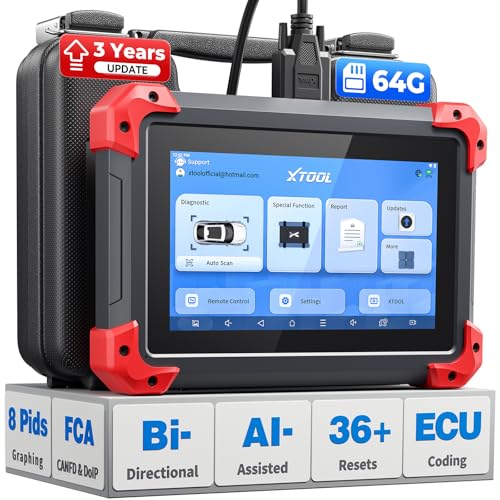
- 2026 Latest Version – Now Upgraded from 32GB to 64GB: XTOOL D7 obd2 scanner diagnostic tool with bidirectional is designed for DIY enthusiasts, professional mechanics. It now offers 64GB storage for smoother operation. Its 5000mAh battery (with 2500mAh 7.3V fast-charging) supports all-day use. With FCA, CAN FD, and DOIP protocol support, it covers more vehicle models and newer systems. A newly added battery voltage reading shows battery status before diagnostics, helping prevent low-voltage tests that could harm the vehicle. The V2.0 Diagnostic Report allows shops to personalize results with logos, customer details, and attachments to build trust and maintain records.
- Save $500+/Year with Pro-Level Diagnostics: Whether you're a DIYer, starting a repair business, or beginning work at an auto shop, XTOOL D7 car scanner offers advanced features typically found only in expensive professional OBD2 scanners - without the high price tag. With 4,000+ Active Tests & Bidirectional Pids, 36+ Special Functions, advanced module resets like SRS Reset, OE-level All-System Scan (one-click), FCA AutoAuth, CAN FD, DoIP, data export, and 8 PIDs graphing, the D7 auto scan tool covers 100,000+ vehicles (excluding Indian models). Includes 3-Year updates and supports the XV200 endoscope to detect em!ssions and intermittent issues.
- Full Bidirectional Advantage Over Other Code Readers & Scan Tools: The XTOOL D7 automotive scanner offers true bidirectional control plus advanced bidirectional PIDs, letting you send commands to components like A/C clutches, fuel injectors, windows, fans and more, while monitoring sensor responses live to catch elusive issues (even those without warning lights). Unlike budget bidirectional obd2 scanners limited to basic active tests,the D7 car fault scanner gives you full bidirectional control to run ABS pump tests, throttle position, turn fan on/off and solenoid tests, etc. No guessing, no extra fees—just smarter diagnostics
- OE-Level Full System Car Diagnostic Scanner with 8 Live Data Graphs: The XTOOL D7 is a pro-grade diagnostic tool that gives you full access to all vehicle systems—just like Snap on scanners & the factory scan tools, it delivers deep, accurate diagnostics you can trust. Easily view live data streams, retrieve freeze frame, and run active tests to pinpoint issues fast. With the ability to graph up to 8 PIDs at once, you can spot performance trends and troubleshoot like a pro. Whether you're a mechanic or car owner, with the D7 auto scanner you can stay ahead of problems and keep your vehicle running at its best
- High-value Automotive Scanner Diagnostic Tool with 36+ Special Function, Module Resets, Relearns, Calibrations, Adaptations & Initializations: XTOOL D7 diagnostic tool packs 36+ common & advanced maintenance, skip the $150 fee for battery registration after replacement, throttle body relearn after cleaning, or TPMS resets post-rotation, Auto bleed after the pad changes, or Electronic Parking Brake. Need to reset the transmission after towing? Crank sensor relearn for GM/for Dodge? Done. D7 also covered advanced functions like Ad~blue Reset, VIN Write, and many more professional OBD2 scanner functions that we can't list here. Text us your VIN + what you need, we’ll check the compatibility
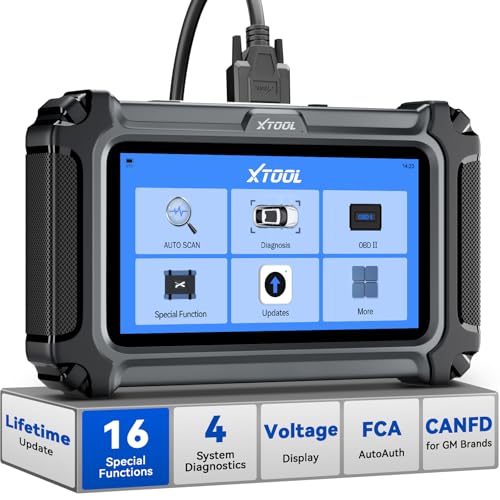
- Comprehensive OBD2 Scanner with 16 Resets: The XTOOL D5S car code reader and vehicle reset tool provides an advanced diagnostic solution with 16 commonly needed reset functions, including Electronic Parking Brake Reset (EPB Reset), SAS, BMS Reset (Battery Test), Throttle Body Relearn, TPMS Reset, ABS Bleeding, Injector Coding, Gearbox Match, Suspension Adjustment, Headlight, Window Initialization, Crank Sensor Relearn and more. Equipped with CAN FD Protocol and FAC AutoAuth, the D5S obd2 scanner diagnostic tool ensures compatibility with a broad range of modern vehicles, allowing users to address common maintenance needs quickly. NOTE: Please Check the Compatibility before ordering.
- 4 Main System Car Scanner & Full OBD2 Diagnostics: The XTOOL D5S car code reader is ideal for home mechanics, DIYers, and professionals, providing access to Transmission/Engine/ABS/SRS systems to read DTCs, Live data can be displayed in text or up to 4 PID data graphs, along with full OBD2 diagnostics to check the engine light on, other obd2 issues and routine maintenance. This car diagnostic scanner ensures you can keep your vehicles in top condition, avoiding costly repairs or unexpected breakdowns. NOTE: Some vehicles display three systems after connection because the transmission and engine of some vehicles are integrated into one.
- Check Engine Code Reader & Real-Time Engine Monitoring: Whether you're a car owner, a DIYer, or run a repair shop, the XTOOL D5S obd2 scanner diagnostic tool makes engine diagnostics fast and frustration-free, reading and explaining trouble codes in seconds—no confusion. Check live data like fuel trim, 02 sensor voltage, RPM, and coolant temp to pinpoint mis~fires, rough idle, or sensor issues. After repairs, simply use the D5S check engine code reader and reset tool to turn off the check engine light and confirm the problem’s fixed—saving time, money, and unnecessary shop visits. - Note: If the check engine light comes back on, it indicates the original problem still exists.
- Portable Car Scanner for ABS and SRS: XTOOL D5S gives you peace of mind when ABS or airbag warning lights come on. It reads and clears ABS codes to help you fix brake sensor, traction control, or wheel speed issues, and supports ABS bleeding after repairs like caliper or master cylinder replacement. For airbag systems, it scans and clears SRS codes related to airbags, seatbelt tensioners, and crash sensors. Whether you're doing repairs at home or running a small shop, the D5S is a cost-effective solution for safety diagnostics. Note: If a fault code returns after clearing, it usually means the issue hasn’t been fully resolved. Please check the compatibility before ordering.
- Transmission Warning Light ON? Here’s the Transmission Diagnostic and Reset Tool You Need: The XTOOL D5S is more than just a basic car scanner—it’s an easy-to-use transmission diagnostic tool. From rough shifts to slipping gears, the D5S lets you read and clear transmission trouble codes, monitor real-time TCM data, and perform transmission resets after fluid changes or repairs. Whether you’re a hands-on car owner or a pro running a busy shop, this OBD2 scanner with transmission functions helps you catch problems early—saving you time, money, and future headaches.. Note: Clearing fault codes is equivalent to a reset on some vehicles, but not all. For help, contact XTOOL Tech Support.
Last update on 2026-06-10 / Affiliate links / Images from Amazon Product Advertising API
This product presentation was made with AAWP plugin.