
NHTSA ID Number: 10120463
Manufacturer Communication Number: 2041919.2
TSB/Document Date: 2017-10-21
Summary
Engine and Gearbox control unit - software update (SC16/02) *Revised: VIN Updates
045005
045009
045012
045020
045030
045034
045036
045039
045045
045048
045053
045056
045057
045067
045071
045082
045088
045089
045093
045094
045099
045101
045107
045108
045115
045116
045121
045123
045126
045132
045141
045142
045145
045155
045158
045177
045180
045198
045201
045209
045220
045221
045226
045233
045236
045254
045257
045262
045270
045276
SCB
SCB
SCB
SCB
SCB
SCB
SCB
SCB
SCB
SCB
SCB
SCB
SCB
SCB
SCB
SCB
SCB
SCB
SCB
SCB
SCB
SCB
SCB
SCB
SCB
SCB
SCB
SCB
SCB
SCB
SCB
SCB
SCB
SCB
SCB
SCB
SCB
SCB
SCB
SCB
SCB
FF6
FJ7
GJ3
FF6
GJ3
FF6
GJ3
FD6
FJ7
FJ7
FF6
FD6
FF6
GJ3
FU7
FJ7
FF6
GJ3
FF6
FJ7
FJ7
GF2
GJ3
FF6
FF6
GF2
FD6
FF6
FJ7
FD6
GU3
FJ7
GF2
FF6
GJ3
FJ7
FJ7
GF2
FJ7
FJ7
GJ3
Documents
Document name
master.xml
3W
ZA
ZA
3W
ZA
3W
ZA
3W
ZA
ZA
3W
ZA
3W
ZA
ZA
ZA
3W
ZA
3W
ZA
ZA
3W
ZA
3W
3W
3W
ZA
3W
ZA
ZA
ZA
ZA
3W
3W
ZA
ZA
ZA
3W
ZA
ZA
ZA
5
0
X
8
4
9
5
2
6
X
9
3
7
2
5
X
2
8
5
4
6
9
4
3
9
8
4
3
5
5
4
1
6
4
5
8
7
X
2
8
0
F
F
F
F
F
F
F
F
F
F
F
F
F
F
F
F
F
F
F
F
F
F
F
F
F
F
F
F
F
F
F
F
F
F
F
F
F
F
F
F
F
C
C
C
C
C
C
C
C
C
C
C
C
C
C
C
C
C
C
C
C
C
C
C
C
C
C
C
C
C
C
C
C
C
C
C
C
C
C
C
C
C
045277
045283
045286
045290
045297
045301
045308
045310
045319
045324
045329
045330
045331
045332
045335
045341
045351
045352
045358
045366
045370
045375
045381
045388
045394
045402
045403
045407
045408
045412
045422
045423
045429
045433
045440
045452
045457
045479
045480
045483
045488
045277
045283
045286
045290
045297
045301
045308
045310
045319
045324
045329
045330
045331
045332
045335
045341
045351
045352
045358
045366
045370
045375
045381
045388
045394
045402
045403
045407
045408
045412
045422
045423
045429
045433
045440
045452
045457
045479
045480
045483
045488
Workshop Campaign EA40
Engine and Gearbox control unit - software update (SC16/02)
Notes
Transaction No.: 2041919/2
Release date: Jun 26, 2017
Repair instructions
Technical background
Revised engine and transmission software.
Remedy
Revised software has been developed. This software is to be loaded into the gearbox and engine control modules using the following process
Customer notification
Customers do not need to be informed directly of this campaign. Please ensure that all affected vehicles are checked and repaired during a service
visit. You should also inform your new and used car sales department so that the vehicles affected can be checked and, if necessary, repaired
immediately (and not just before sale)
NOTE: Ask the customer if the engine control modules have been modified in any way (chip tuning). Explain to the customer that updates to the
engine control modules can render the chip tuning ineffective or damage to the control modules can occur.
Ask the customer to contact the tuning contractor to establish if a software update is possible. Inform the customer that if modifications have been
carried out to the engine control module, Bentley Motors or your own company will not accept liability from damage by updating the software.
Should a customer decline to have the update performed because the vehicle has been chip tuned, please make your Product Support Team aware
by raising a DISS ticket of the chip tune, the VIN and chip tuning information can then be saved for future reference.
Warranty
Normal warranty policies are applicable
Warranty Type
790 or 710
Labour Operation Code
01 29 00 08
Damage Service Number EA40
Damage Code
00 66
Time
80 TU
Criteria ID
01
Parts
.
Parts supply
.
Parts despatch control
N/A
Repair instructions
Notes
Technical background
Revised engine and transmission software.
Check
If the vehicle Is not already listed as repaired in the “Repair history” (ElsaPro), check for the campaign identification mark, blue spot to the boot
mounted fuse box adjacent to the main system battery positive post (see Figure 23), should neither be evident carry out the required work in
accordance with these instructions
Parts
.
Work
1. Ensure a suitable battery charger is correctly connected to the vehicle electrical system for the duration of this procedure
2. Connect the Bentley approved diagnostic tool to the vehicle On Board Diagnostic (OBD) socket. Note: Hardwire connections should be used
between the diagnostic tool and the OBD socket and when connecting broadband to the diagnostic tool.
3. Switch on the ignition using the ignition key
4. From the diagnostic tool main desktop select Off board Diagnostic Information System
5. Select – Start diagnosis
6. Select – Model / Engine
7. Select guided fault finding to check and clear the vehicle of any fault codes. NOTE: At this stage when requested to Make a Target/Actual
comparison do not perform this action select NO
Figure 1
8. Select Special functions (1), Select SVM – Problem related Hardware/Software Update (2), Select Perform test (3) (see Figure 1)
Figure 2
9. At SVM process screen enter (1) the specific SVM code 390XW12UP15RC and then Adopt (2) (see Figure 2)
Figure 3
10. Check you have entered the correct SVM code and select Yes (see Figure 3)
11. If prompted enter your global user ID and password
12. Follow the on screen prompts to continue through the procedure
Figure 4
13. Once software that requires changing is detected,3 units, select Done/Continue (see Figure 4) Note: each of the 3 control units will be offered
for software update individually by the program. Follow prompts the online connection will deliver the required software to the tester
Figure 5
14. At Necessary update programming screen select Yes to update 01 – Engine control unit – J623 control unit (see Figure 5)
Figure 6
15. Select Yes at 2 Update programming 01 to update 01 – Engine control module (see Figure 6)
Figure 7
16. During update a progress bar will be displayed (see Figure 7)
Figure 8
17. Once Done/Continue is selected at the successful programming screen (see Figure 8) then the next module requiring software change will be
presented - Engine control unit 2 – J624
18. At Necessary update programming screen select Yes to update 11 - Engine control unit 2 – J624 (see Figure 5)
19. Select Yes at 2 - Update programming - 11 to update – Engine control module 2 (see Figure 6)
20. During update a progress bar will be displayed (see Figure 7)
21. Once Done/Continue is selected at the successful programming screen (see Figure 8) then the next module requiring software change will be
presented - Automatic gearbox control unit – J217
22. At Necessary update programming screen select Yes to update 02 - Automatic gearbox control unit – J217 (see Figure 5)
23. Select Yes at 2 - Update programming – 02 to update – Automatic gearbox control unit (see Figure 6)
24. During update a progress bar will be displayed (see Figure 7)
Figure 9
25. Once Done/Continue is selected at the final successful programming screen (see Figure 9) then you are prompted to perform an ignition off/on
cycle, to do this: FIRST press Done/Continue then at prompt turn ignition OFF, press Done/Continue then at prompt turn ignition ON
Figure 10
26. At Result screen select Done/Continue and if prompted perform any required calibration (see Figure 10)
Figure 11
27. Once calibration has completed follow the prompts to perform the automatic SVM
28. Select Guided fault finding to check and clear the vehicle of any fault codes generated as a result of performing this campaign. NOTE: When
requested to Make a Target/Actual comparison this action should be performed, select YES. (see Figure 11)
Once the above is performed the following test Adaption of crankshaft sensor tolerance must be performed
Figure 12
1. Within Control units – Select (single touch) 01 Engine Control Module – Reveal drop down menu (extended touch and release), Select Guided
functions (see Figure 12)
Figure 13
2. Within Engine Control Module 1, Select 01-Basic settings and then Execute (see Figure 13)
Figure 14
3. Follow screen prompts to start engine (see Figure 14)
Figure 15
4. Allow engine coolant temperature to rise above 80°C (see Figure 15)
Figure 16
5. Within Basic settings select A Next menu. (see Figure 16)
Figure 17
6. Within Basic settings select 23 Adaption of crankshaft sensor tolerance (see Figure 17)
Figure 18
7. Follow and observe screen prompts and select Continue (see Figure 18)
Figure 19
8. Following the screen prompts press and hold the brake and the accelerator pedal. ( see Figure 19) NOTE: It is expected that the engine speed
will rise rapidly to close on maximum rpm this is normal for this test keep the accelerator and brake pressed for the test to continue. The engine
speed will rise and fall approximately 3 times during the this test
Figure 20
9. With both brake and accelerator pedal held ‘on’ the test will continue as shown on screen basic setting routine running (see Figure 20)
Figure 21
10. When test is complete screen status will show basic setting routine – finished correctly, as instructed release both brake and accelerator pedal
and select Continue (see Figure 21)
Figure 22
11. At Basic setting screen select –C- to Exit
12. On completion apply a blue campaign completion mark (see Figure 23)
Identification
Figure 23
On completion apply a blue campaign completion mark to the boot mounted fuse box adjacent to the main system battery positive post (see Figure
23)
Repair instructions
Notes


- [J2534 Pass-Thru Programmer] - TOPDON RLink J2534 is...
- [All-in-One OEM Reprogramming and Diagnostics] - When...
- [Tested, Trusted, and Proven for Accuracy] - TOPDON RLink...
- [One-Click Installation, Continuous Updates] - The exclusive...
- [Works with Windows Compatibility and OEM Software...
Last update on 2026-06-21 / Affiliate links / Images from Amazon Product Advertising API
If the PDF is very large, it may not load in the preview below.
Some older TSBs had multiple PDFs — visit the NHTSA Website to view all PDFs.
If the TSB PDF does not show, download or view it on the NHTSA Website.
Click on the (+) Plus Sign
Then Click on Associated Document(s)
Search NHTSA Database for Recalls
Search NHTSA Database for Vehicle Investigations
View Latest Vehicle Investigations
Search NHTSA Database for Vehicle Complaints
View Latest Vehicle Complaints
TSB/Document ID: 2041919.2
Replacement Service Bulletin Number:
MFR Communication Date: 2017-06-26
MFR Internal Campaign ID/Software Version:
Communication Type: Service Bulletin/Repair Instructions
NHTSA Components: ELECTRICAL SYSTEM:SOFTWARE
MFR Component System:
MFR Component Subsystem:
Previous TSB | Next TSB |

- 【OE-Level Full System Diagnostics-Lifetime F*REE Software Updates】The VDIAGTOOL D200 OBD2 Scanner for cars is a all system bidirectional scan tool that enjoy lifetime f*ree software updates, delivers complete system coverage. reading/clearing codes across engine, transmission, ABS, SAS, EPB, TPMS plus full access to body, chassis, powertrain and all control modules. This D200 Bidirectional car scanner works with most 1996+ OBD2 gasoline and hybrid
 cars and light trucks. It does NOT support pure electric and heavy-duty trucks. PLEASE CHECK COMPATIBILITY BEFORE ORDERING or Contact us with VIN to confirm compatibility.
 - 【Supports OBD2 Full Functions-ZERO Subscription Fees】D200 Bidirectional OBD2 Scanner is a upgarde of universal car code reader. It supports OBD2 full functions to help you turn off the annoying instrument fault indicator, such as read/clear codes, O2 sensor test, I/M readiness, on-board monitor test, datastream, freeze frame, E-VAP system test, and retrieve vehicle information. This professional obd2 scanner diagnostic tool can full access to diagnostics, reset tools and maintenance features with a single payment. NOTE: The fault code can only be cleared after the vehicle's malfunction has been repaired; please ensure the vehicle issue is fixed before clearing the code.
- 【D200 Hidden 2 Advantages: 1. $169 Expandable 49+ Advanced Resets. 2. $199 Get J2534 P*a*s*s-Thru Programming】Your core car diagnostics and 26 reset remain lifetime f*ree for everyday maintenance. When you need deeper repair capability, upgrade with 3-year access for $169 in Store on VDIAGTOOL App, gaining 49+ advanced resets. D200 configured with J2534 hardware, upgrade only when you need without replacing the entire device. You also can Lifetime Unlock for $199 in Store one-time, perform module programming, software re~flashing and ECU data updates directly. Supports 17+ major brands, including for BMW, for Audi, for GM, for Ford and more. Note:D200 does‘t provide any OE software.
- 【Full Bidirectional Control / Active Tests】The D200 car scanner diagnostic tool is a true bidirectional scan tool that lets you send commands directly to the vehicle’s ECU for active tests. Quickly test fuel pumps, relays, solenoids, injectors, cooling fans, windows, sunroofs and more to verify operation instantly. Get dealership-level diagnostic control at a fraction of the cost (ofter $100-200$ per diagnostic visit), reduce guessworkand confirm repairs faster, avoid unnecessary parts replacement, towing fees and wait times.
- 【26 F*ree Essential Reset & Relearn Functions – Everyday Maintenance Made Easy】Handle common maintenance and repair jobs without visiting the shop. The D200 code readers & scan tools includes 26 f*ree high-demand reset functions, including Oil Reset, EPB Service, SAS Calibration, ABS Brake Bleeding, Throttle Relearn, Injector Coding, Headlight Adjustment, Tire Size Reset and more. Perfect for home car owners, mechanics and DIYers – just plug and diagnose anytime, anywhere! Note: Service functions vary by vehicle model—please confirm compatibility.

- 【A MUST-HAVE TOOL FOR DIYERS】 - VDIAGTOOL VD10 car code reader is an incredibly useful obd scanner for each car owner or hobbyist, even for those with little to no experience when it comes to vehicle mechanics! Similar to a fixd car diagnostic tool, using this car diagnostic scanner is extremely easy. All you have to do is attach it to your car OBDII port and you can diagnose car problems in seconds! Read Codes (DTCs); Clear Codes; Live Data; View Freeze Frame; I/M Readiness; Vehicle Information.
- 【KEEP ENGINE IN GOOD STATUS】 - VDIAGTOOL check engine code reader brings a fast access to scan, read the car fault code, show its definition on the screen instantly, troubleshooting to find the root causes of problems, erase the engine fault code and turn off the MIL (Malfunction Indicator Light). Similar to a fixd car diagnostic tool, this car code reader helps ensure your engine stays in top condition.
- 【READ/CLEAR CODES & DTC LOOKUP】- No search online & saving your time, this vehicle car code reader retrieves generic (P0, P2, P3, and U0), manufacturer specific (P1, P3, and U1) codes, pending codes and displays DTC definitions based on the built-in database(more than 3000 codes) on the TFT screen, find out the root causes and clear the codes after fixed.
- 【LIVE DATA & RETRIEVE FREEZE FRAME】 - This diagnostic scan tool for accurate diagnosis enables you to retrieve data from vehicle sensors, such as Engine RPM, Intake air temperature, Short/Long term fuel, Misfire data and etc. The freeze frame is stored in the PCM together with the diagnostic trouble code (DTC) related to the fault. Comparable to a fixd car diagnostic tool, the VD10 car code reader car scanner can be a valuable & practical diagnostic aid and also greatly help when diagnosing intermittent problems.
- 【I/M READINESS for THE S-nn-0-g CHECK】- OBDII vehicle may not pass the annual inspection unless the required monitors since reset are complete. So you should at least read the readiness monitors and make sure they are ready. This car obd2 scanner diagnostic tool is equipped with I/M readiness function to check the operations of the e-m-issi0n system on OBD2 compliant vehicles, run I/M monitor readiness test, checking if the pass vehicle s-m-0-g inspection.

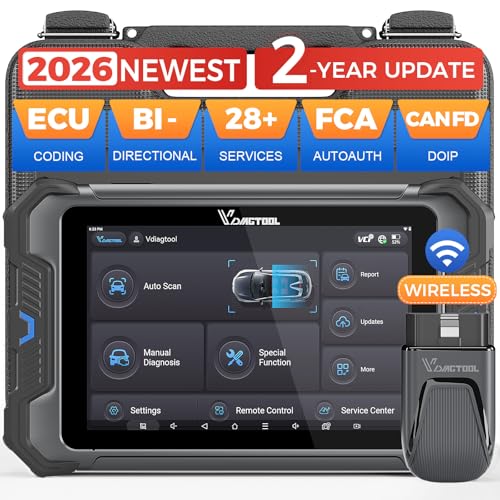
- 【Professional Diagnostics】 The VD80 BT Lite bidirectional obd2 scanner is a professional OBD2 scanner diagnostic tool, delivering vehicle diagnostics right in your own garage. It supports 4,000+ active diagnostic tests, 28+ maintenance service functions, ECU coding, PMI calibration, brake service reset, and OEM-grade full-system vehicle scanning—perfect for DIYers and pros looking for powerful automotive tools. The available function tests vary by model—please to confirm compatibility.
- 【ADVANCED ECU CODE, CUSTOMIZE OE-SETTINGS】As a complete car code reader and reset tool, the VD80 BT Lite bidirectional obd2 scanner supports ECU coding for VW, for Audi, for BMW, for Benz, for Mitsubishi and more. PMI function for Ford/for Lincoln/for Mazda, supports copy data into new module. Step-by-step Guided Diagnostics makes complex jobs easier—making this one of the most reliable code readers & scan tools on the market.
- 【100000+ Vehicles Compatibility – CAN FD/DOIP】 VD80 BT Lite Auto Scanner Compatible with 100,000+ vehicles worldwide, this bidirectiona car scanner works with all OBD2-compliant vehicles manufactured after 1996, covering more than 100 brands worldwide. It also supports CAN FD, DOIP and FCA Secure Gateway protocols, boost 2X faster data transfer, covers 99% of U.S., EU and Asian cars. With 22 languages and 2 years of f*ree updates—future-proofing your car reader diagnostic for all cars.
- 【28+ Maintenance Services & Calibration Functions】VD80 BT Lite scanner for car Supports 28 maintenance services, including resetting oil and service lights after routine maintenance, registering new batteries for proper system operation, and clear clogged filters and restore performance. Additionally, it calibrates TPMS sensors after tire rotations, resets brake systems after pad replacements, relearns steering angle sensors after alignments, and more. These functions help your vehicle quickly and accurately return to peak performance—without the costly dealer visits.
- 【True Bidirectional Control – Diagnose with Confidence】Standing out with full-system coverage and extensive active test capabilities, the VD80 BT Lite bidirectional scan tool retrieves data from electronic control units and performs a wide range of active tests. You can real-time control over modules like fuel pumps, windows, A/C clutches, and relays. Perform 100+ advanced functions including throttle adaptation, injector coding, VIN write, idle relearn, and ABS bleed—helping you fix it right the first time with this all-in-one car diagnostic scanner.
Last update on 2026-06-21 / Affiliate links / Images from Amazon Product Advertising API
This product presentation was made with AAWP plugin.