
NHTSA ID Number: 10118891
Manufacturer Communication Number: 12-06-01-003A
TSB/Document Date: 2017-10-15
Summary
Service bullentin information for repairing engine front cover oil leak, sealing surfaces preparation, applying room temperature vulcanizing (RTV) sealant.
Bulletin No.: 12-06-01-003A
Date: Nov-2013
Subject:
Information for Repairing Engine Front Cover Oil Leak, Sealing Surfaces Preparation, Applying Room
Temperature Vulcanizing (RTV) Sealant
Models:
2006-2014 GM Cars and Trucks (Including Export Vehicles)
Equipped with V6 Engine – RPO LAU, LF1, LFW, LFX, LLT, LP1, LY7 or LF3
This bulletin has been revised to add Model years and an engine RPO. Please discard Corporate Bulletin Number 12-06-01003.
Abrasive Pads - Bristle Discs - Surface Conditioning Discs - Wire Wheels
Notice: DO NOT use bristle discs (1), abrasive pads (2), wire wheels (3) or surface conditioning discs to clean the sealing surfaces of engine
components.
Abrasive pads and bristle discs are embedded with abrasive material. The bristle discs wear down as they clean, continually exposing fresh
abrasive to the surface of the component. These types of devices should not be used because they produce a very fine grit that the oil filter is
unable to remove from the oil. THIS GRIT IS ABRASIVE AND IS KNOWN TO CAUSE INTERNAL ENGINE DAMAGE.
•
Abrasive pads, wire wheels and bristle discs can remove enough metal to affect the engine front cover, cylinder head, engine block , oil pan rail, and intake
manifold runner surface flatness, which can then result in engine coolant leaks, engine oil leaks and air leaks. It takes about 15♦seconds to remove
0.203♦mm (0.008♦in) of metal with an abrasive pad.
•
Abrasive pads, wire wheels and bristle discs used with high speed grinders produce airborne debris that can travel throughout the shop contaminating
other work being performed outside of the immediate work area.
•
When cleaning engine gasket sealing surfaces and/or cleaning parts from an engine that are to be reused, surface conditioning discs, typically
constructed of woven fiber or molded bristles that contain abrasives, such as a high amount of Aluminum Oxide, should also NOT be used. The use of
such surface conditioning discs dislodges Aluminum Oxide from the disk and metal component particles, which can lead to premature engine bearing
failure. The presence of Aluminum Oxide in engine oil has been shown to cause premature engine bearing failure. In some cases, this failure occurs in
as little as 1,600♦km (1,000♦mi) or less after the repair has been made.
•
Surface conditioning discs may grind the component material and embed it into the disc. This can result when more aggressive grinding of the gasket
surface takes place.
Separating Components That Use Room Temperature Vulcanizing (RTV) Sealant
1
•
Use the incorporated pry points to separate the engine front cover from the engine block.
•
The pry points are positioned so other vital engine components are not damaged when the pry points are used.
•
Do not try to separate RTV sealed components by prying against other engine components.
Recommended Cleaning Devices and Method for Removing and Applying RTV Sealant
General Motors strongly recommends using a plastic razor blade, plastic gasket scraper, a wood scraper or a non-metallic scraper to remove all sealer/gasket
material on the surface of engine components that are to be reused. Do not use any other method or technique to remove the sealant or the gasket material
from a part.
•
Do not gouge or scratch any engine sealing surface during the cleaning process.
•
It is not necessary to remove every speck of the old sealer. The appearance of the gasket sealing surface is not critical — the feel is.
•
To remove the old RTV sealant from the sealing surface, spray GM Low VOC Cleaner, P/N♦19287401 (in Canada, P/N 88901247) or an equivalent, on
the mating surfaces and allow it to soak in for 5 minutes to loosen the old gasket material. Use care to avoid getting GM Low VOC Cleaner in any area
other than the mating surface to be cleaned.
2
•
Use a plastic razor blade (1), that mounts in a scraper device or a hand held plastic razor blade (2), to remove old RTV sealant from a sealing surface.
Use a new blade for each corresponding engine component surface. Hold the blade as parallel to the flat surface as possible.
•
Position and work the blade back and forth in the grooved areas of the component to loosen and remove the old RTV.
•
When using a plastic gasket scraper with a straight blade (1) to remove old RTV sealant from a sealing surface, hold the scraper as parallel to the flat
surface as possible.
Use a plastic gasket scraper with an angle blade (2) and work the blade back and forth in the grooved areas of the component to loosen and remove
the old RTV.
•
Clean the engine front cover in solvent.
•
Dry the engine front cover with compressed air.
Notice: After the final cleaning with GM Low VOC Cleaner and before reassembly, DO NOT touch the cleaned surfaces with your hand.
3
Oils from your skin WILL CONTAMINATE the surface and prevent proper bonding of the new RTV sealant.
•
To properly clean the sealing surfaces prior to reassembly, spray GM Low VOC Cleaner, on a folded lint free shop cloth. Wipe the mating surfaces on the
engine and front cover and rotate the shop cloth until there are no more visible signs of contamination on the cloth.
•
After the final cleaning of the parts, allow 5 minutes for the components to dry before applying new RTV sealant.
•
Use a Tube Grip® dispensing device (1) or an equivalent to apply the new RTV sealant for the following reasons:
–
A precise application of the RTV sealant bead to the component, in the specified amount.
–
The dispensing device will squeeze 35 % more material out of the tube, reducing waste.
–
Using the device will eliminate most cleanup.
Engine Front Cover - Removal - Surface Preparation - Removing and Applying RTV Sealant - Installation
1.
Drain the engine coolant. Refer to Cooling System Draining and Filling in SI.
Notice: It is critical that this Step is performed as outlined in order to reduce the possibility of the REMAINING engine coolant entering
the oil pan when the front cover is being removed.
2.
Position a suitable container under the water pump to collect any remaining engine coolant.
Remove the water pump. Refer to Water Pump Removal in SI.
3.
Remove the engine front cover. Refer to Engine Front Cover Replacement in SI.
4.
Insert a piece of cardboard at the front of the oil pan in the area shown to prevent any contaminants and debris from falling into the oil pan.
4
5.
Using the tool or tools as outlined in this bulletin, carefully clean the front cover sealing surfaces on the engine.
6.
Clean out any debris from the bolt holes for the front cover fasteners in the engine.
7.
Clean out any debris from the T-joint (1) where the left side of the cylinder head meets the engine block.
8.
Clean out any debris from the T-joint (2) where the right side of the cylinder head meets the engine block.
5
9.
Clean out any debris from the T-joint (2) where the left side of the oil pan meets the engine block.
10. Clean out any debris from the T-joint (1) where the right side of the oil pan meets the engine block.
11. Spray GM Low VOC Cleaner, P/N♦19287401 (in Canada, P/N 88901247) or an equivalent, on the mating surfaces of the engine side for the front
cover and allow it to soak in for 5 minutes.
12. Wipe the front cover mating surfaces on the engine with a folded lint free shop cloth. Rotate the shop cloth until there are no more visible signs of
contamination on the cloth.
13. Spray GM Low VOC Cleaner, or an equivalent, on the mating surfaces of the front cover and allow it to soak in for 5 minutes.
6
14. Carefully clean the front cover sealing surfaces and grooves.
15. Clean out any debris from the bolt holes for the front cover fasteners.
16. Drain and wipe the remaining oil from the front cover.
17. Dry the front cover with compressed air.
18. Inspect the exterior of the front cover for the following conditions:
•
•
•
Damage to the camshaft position actuator valve oil seal bores (1).
Damage to any bolt holes (2).
Damage and/or corrosion to the engine coolant passage (3).
7
•
•
•
•
Dents or damage to the exterior (4).
Damage to the crankshaft front oil seal bore (5).
Gouges or damage to the water pump sealing surfaces (6).
Damage to the water pump bolt hole threads (7).
⇒
If any of the above conditions are found, repair or replace the front cover as necessary.
19. Inspect the interior of the front cover for the following conditions:
•
•
•
•
•
•
•
Damage to any bolt holes (1).
Gouges or damage to the cover sealing surfaces to the engine block (7), oil pan (5) and camshaft covers (2).
Gouges or damage to the water pump seal area (3).
Loose or damaged deadener plates (4).
Damage and/or corrosion to the engine coolant passage (6).
Damage to the crankshaft front oil seal bore.
Gouges or damage to the O-ring sealing areas.
⇒
If any of the above conditions are found, repair or replace the front cover as necessary.
Notice: Wear Gloves. After the final cleaning with GM Low VOC Cleaner and before reassembly, DO NOT touch the cleaned surfaces with
your bare hand. The oils from your skin WILL CONTAMINATE the surfaces and prevent proper bonding of the new RTV sealant.
20. Clean the sealing surface prior to reassembly by spraying GM Low VOC Cleaner, on a folded lint free shop cloth. Wipe the mating surfaces and rotate
the shop cloth until there are no more visible signs of contamination on the cloth.
8
21. After the final cleaning of the parts, allow 5 minutes for the components to dry before applying new RTV sealant.
22. Remove the cardboard from the front of the oil pan.
Notice: THIS STEP IS CRITICAL.
Oil leaks at the T-joints are one of the most common conditions encountered.
23. Apply a 5 mm bead of RTV sealant to the T-joints on the front cover in order to ensure that there is enough sealant to extend into the joint.
9
24. Apply a 3 mm bead of RTV sealant to the remaining front cover sealing surfaces.
10
25. This is a typical view of the proper application of the RTV sealant to the front cover, with a 5 mm bead of RTV sealant to the T-joints (1, 2, 3, 4) and a
3 mm bead of RTV sealant to the rest of the sealing surfaces.
Notice: The front cover must be installed BEFORE the RTV sealant is allowed to “skin over” or the sealant will not adhere.
26. Install the front cover to the engine. Refer to Engine Front Cover Replacement in SI.
27. Install the water pump. Refer to Water Pump Installation in SI.
28. Complete the repair. Refer to Engine Front Cover Replacement in SI.
Snap-On is a Registered Trademark of Snap-On Incorporated
Tube Grip is a Registered Trademark of Valco Cincinnati Inc.
MaxiFlex is a Trademark of ATG Ceylon (PVT) Limited
GM bulletins are intended for use by professional technicians, NOT a "do-it-yourselfer". They are written to inform these technicians of conditions that may
occur on some vehicles, or to provide information that could assist in the proper service of a vehicle. Properly trained technicians have the equipment, tools,
safety instructions, and know-how to do a job properly and safely. If a condition is described, DO NOT assume that the bulletin applies to your vehicle, or that
your vehicle will have that condition. See your GM dealer for information on whether your vehicle may benefit from the information.
WE SUPPORT VOLUNTARY TECHNICIAN CERTIFICATION
11
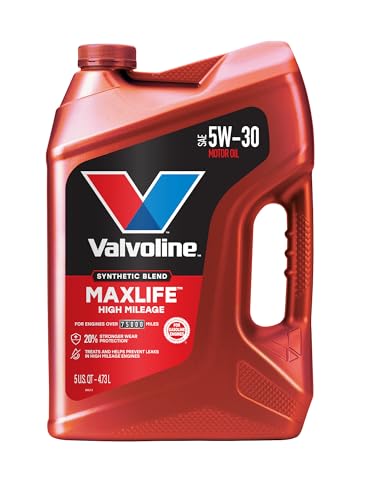
- Formulated for engines with 75,000 miles or more, Valvoline...
- Delivers 20% better wear protection and 15% better sludge...
- Extra detergents safeguard against friction, corrosion and...
- Advanced friction-fighting additives help maximize...
- Provides performance benefits for high mileage, new and...

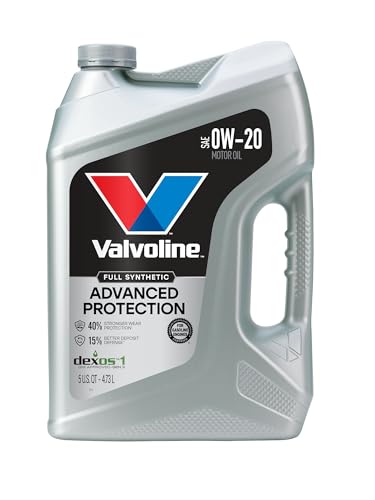
- Advanced protection against the four main causes of engine...
- Delivers 40% stronger wear protection than industry...
- Provides 15% better deposit defense vs. industry standards...
- Up to 2.5X better heat protection vs. industry standards to...
- Engineered for excellent low-temperature flow, reducing...
This product presentation was made with AAWP plugin.
If the PDF is very large, it may not load in the preview below.
Some older TSBs had multiple PDFs — visit the NHTSA Website to view all PDFs.
If the TSB PDF does not show, download or view it on the NHTSA Website.
Click on the (+) Plus Sign
Then Click on Associated Document(s)
Search NHTSA Database for Recalls
Search NHTSA Database for Vehicle Investigations
View Latest Vehicle Investigations
Search NHTSA Database for Vehicle Complaints
View Latest Vehicle Complaints
TSB/Document ID: 12-06-01-003A
Replacement Service Bulletin Number:
MFR Communication Date: 2013-11-27
MFR Internal Campaign ID/Software Version:
Communication Type: Service Bulletin/Repair Instructions
NHTSA Components: EQUIPMENT
MFR Component System:
MFR Component Subsystem:
Previous TSB | Next TSB |

- 【OE-Level Full System Diagnostics-Lifetime F*REE Software Updates】The VDIAGTOOL D200 OBD2 Scanner for cars is a all system bidirectional scan tool that enjoy lifetime f*ree software updates, delivers complete system coverage. reading/clearing codes across engine, transmission, ABS, SAS, EPB, TPMS plus full access to body, chassis, powertrain and all control modules. This D200 Bidirectional car scanner works with most 1996+ OBD2 gasoline and hybrid
 cars and light trucks. It does NOT support pure electric and heavy-duty trucks. PLEASE CHECK COMPATIBILITY BEFORE ORDERING or Contact us with VIN to confirm compatibility.
 - 【Supports OBD2 Full Functions-ZERO Subscription Fees】D200 Bidirectional OBD2 Scanner is a upgarde of universal car code reader. It supports OBD2 full functions to help you turn off the annoying instrument fault indicator, such as read/clear codes, O2 sensor test, I/M readiness, on-board monitor test, datastream, freeze frame, E-VAP system test, and retrieve vehicle information. This professional obd2 scanner diagnostic tool can full access to diagnostics, reset tools and maintenance features with a single payment. NOTE: The fault code can only be cleared after the vehicle's malfunction has been repaired; please ensure the vehicle issue is fixed before clearing the code.
- 【D200 Hidden 2 Advantages: 1. $169 Expandable 49+ Advanced Resets. 2. $199 Get J2534 P*a*s*s-Thru Programming】Your core car diagnostics and 26 reset remain lifetime f*ree for everyday maintenance. When you need deeper repair capability, upgrade with 3-year access for $169 in Store on VDIAGTOOL App, gaining 49+ advanced resets. D200 configured with J2534 hardware, upgrade only when you need without replacing the entire device. You also can Lifetime Unlock for $199 in Store one-time, perform module programming, software re~flashing and ECU data updates directly. Supports 17+ major brands, including for BMW, for Audi, for GM, for Ford and more. Note:D200 does‘t provide any OE software.
- 【Full Bidirectional Control / Active Tests】The D200 car scanner diagnostic tool is a true bidirectional scan tool that lets you send commands directly to the vehicle’s ECU for active tests. Quickly test fuel pumps, relays, solenoids, injectors, cooling fans, windows, sunroofs and more to verify operation instantly. Get dealership-level diagnostic control at a fraction of the cost (ofter $100-200$ per diagnostic visit), reduce guessworkand confirm repairs faster, avoid unnecessary parts replacement, towing fees and wait times.
- 【26 F*ree Essential Reset & Relearn Functions – Everyday Maintenance Made Easy】Handle common maintenance and repair jobs without visiting the shop. The D200 code readers & scan tools includes 26 f*ree high-demand reset functions, including Oil Reset, EPB Service, SAS Calibration, ABS Brake Bleeding, Throttle Relearn, Injector Coding, Headlight Adjustment, Tire Size Reset and more. Perfect for home car owners, mechanics and DIYers – just plug and diagnose anytime, anywhere! Note: Service functions vary by vehicle model—please confirm compatibility.
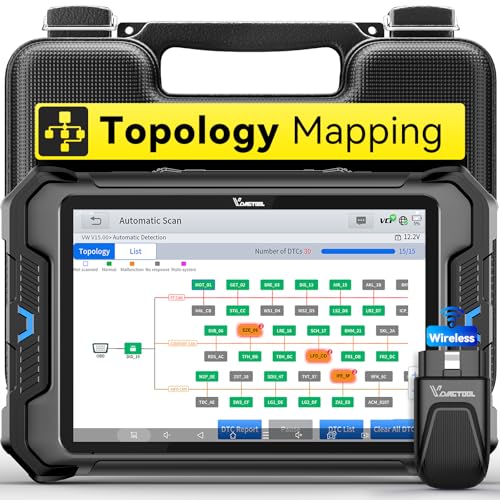
- Smarter Diagnostics, Broader Coverage, Greater Value Than $1,000+ Tools: The game-changing VD80BT OBD2 scanner delivers 4000+ active tests, 42+ hot services, advanced ECU coding, PMI & V.A.G Guided—all in one scanner for car. With OE-level full system scan and intelligent topology mapping that cuts diagnostic time by up to 50%, you'll work smarter and faster. Supporting FCA AutoAuth, CAN FD & DoIP protocols, this car scanner covers over 10,000 vehicle models worldwide. Built for serious pros and DIYers, it features 8" HD screen & 4+64GB storage, 7.3V fast charging with long-lasting battery, and 33–66ft stable wireless connection—making it the most complete diagnostic solution you’ll ever own
- Intuitive Topology Map, Fast Locate Faults: Why waste time clicking module by module? VD80BT car diagnostic scanner takes diagnostics to the next level with its intuitive Topology Map—a premium feature usually found in $1000+ obd scanner. With one tap, it performs all system scan and presents all modules and DTCs in a clear, color-coded layout, boosting diagnostic efficiency by up to 200% and helping you locate issues instantly and reduce repair time and costs. Whether you're a pro boosting efficiency or a beginner learning diagnostics, this obd2 scanner diagnostic tool makes fault-finding faster and smarter for you. Note: varies by vehicle model, please check compatibility before purchase
- Wireless Connectivity Simplifies Bi-Directional Control: With 4000+ active tests, including throttle reset, window calibration and solenoid check, VD80BT bidirectional scan tool lets you diagnose and verify functions faster, smarter, and more efficiently. This scanner for car redefines flexibility in bi-directional control through a fully wireless connection, freeing you from the constraints of wired car diagnostic tool in the workshop. Imagine actively controlling components like the A/C clutch, fuel injector, ABS pump, or radiator fan within a wireless range of 33–66ft around the vehicle—all while enjoying stable, high-speed wireless diagnostic and real-time data monitoring
- 42+ Hot Services, One Powerful Scanner for Car: Why pay a shop $100 just to reset a light? VD80BT car scanner diagnostic tool gives you 42+ hot services from basic resets to advanced maintenance tasks like Crank Sensor Relearn, Injector Coding, ABS Bleeding, Oil Reset, Throttle Relearn, EPB, BMS Reset, Tire Size Reset and more. Plus, it offers 100+ vehicle-specific features including Idle Relearn, VIN Write, Brake Fluid Replacement, Fuel Trim Reset, ABS Initialization and more. Whether you’re resetting TPMS or fixing a stubborn SAS, this car computer diagnostic reader delivers shop-grade precision at a fraction of the cost. Varies by model. Send VIN to verify compatibility before purchase
- OE-Level Full System Diagnostics in Your Hands: Dominate diagnostics like a dealership with VD80BT scan tool for all vehicles, delivering factory-grade scanning for aLL systems—including ABS, SRS, ECM, TCM and more. View up to 8 PID graphs simultaneously to quickly catch intermittent issues and troubleshoot with confidence. Easily read and clear DTCs, retrieve freeze frame data, and run active tests for faster, more accurate repairs. It’s like having a dealership-grade scan tool in your pocket, complete with data playback and CSV export for in-depth analysis. Stop guessing and start fixing with surgical precision—professional diagnostics made simple and portable. Check compatibility Please

- Affordable Solution for Professional-grade Car Diagnostics & Repair: As the budget-friendly OBD2 scanner under $300, the VD70 Lite car diagnostic tool offers 31+ hot resets, full bi-directional controls with 4000+ active tests, all system diagnostics, 8-in-One live data graphing (export as CSV Export/Recording/Playback), CAN FD & DoIP protocols, and long-term free update. Additional features include Auto VIN & Auto Scan, diagnostic report sharing/printing, with coverage for over 10,000 vehicle models worldwide, suitable for DIYers, Car Owners, Technicians, and Mechanics on car repairs and maintenance tasks.
- OBD2 Scanner with Full Bi-directional Control: The Bidirectional scan tool VIDAGTOOL VD70 Lite performs 4000+ active tests that can send execution commands to the ECU module and identify the repair status, covering for windows, doors, ABS, valves, wipers, headlights, rear mirrors, sunroof,and more in-vehicle components. This bidirectional OBD2 scanner is a must-have diagnostic tool for auto technicians and mechanics on a budget! The available function tests vary by model—please check compatibility via vdiagtool2 @ outlook . c o m before purchase.
- OE All Systems Diagnostics & 8-IN-One Data Graphing: VD70 Lite is a dealer-level car scanner diagnostic tool with Auto VIN that can do in-depth diagnostics for 100+ modern car brands, covering all systems including engine, transmission, airbag, ABS, ESP, TPMS, radio, etc, to read/clear code, view live data, freeze frame, and read ECU info. This advanced OBD2 Scanner with 8-in-one data graphing and detailed diagnostic reports makes data viewing more intuitive, ensures quickly accurate repairs by identifying issues, and easily masters the car situation.
- Stay Ahead with 31+ Reset for Faster & Easier Repairs: VDIAGTOOL VD70 Lite scanner for car meets almost all daily maintenance needs for both home mechanics and workshops as a professional automotive scan tool. It can perform Oil Reset, ABS Bleed, Crank Sensor Relearn, Idle Relearn, Injector Coding, Window Initialization, HVAC Calibration, Suspension Calibration, Throttle Matching, etc, ensuring efficient repairs and complete maintenance. Besides, long-term free updates keep its functionality and broad vehicle compatibility up to date. Functions vary by model, please send us the Vehicle Model, Year, VIN for compatibility before purchase.
- 150+ Models, 10000+ Car Coverage & 22 Languages:As a powerful car computer diagnostic tool, VD70 Lite helps you to quickly troubleshoot issues for 95% of US, European, and Asian vehicles. Supporting 22 languages makes it a global car diagnostic scanner for auto mechanics worldwide without language barriers. Note: Simply provide your tool’s S/N and reach out to vdiagtool2 @ outlook . c o m to change the menu language.
This product presentation was made with AAWP plugin.
Last update on 2026-06-08 / Affiliate links / Images from Amazon Product Advertising API