
NHTSA ID Number: 10118799
Manufacturer Communication Number: 08-015-16
TSB/Document Date: 2017-10-13
Summary
Poor GPS Signal Reception This bulletin involves the replacement of the GPS antenna with a roof mount antenna to improve navigation performance. The customer may experience off route conditions due to weak navigation satellite signal.
NUMBER:
GROUP:
DATE:
08-015-16
Electrical
February 09, 2016
This bulletin is supplied as technical information only and is not an authorization for repair. No part of this publication may be reproduced, stored in a retrieval system,
or transmitted, in any form or by any means, electronic, mechanical, photocopying, or otherwise, without written permission of FCA US LLC.
SUBJECT:
Poor GPS Signal Reception
OVERVIEW:
This bulletin involves the replacement of the GPS antenna with a roof mount antenna to
improve navigation performance.
MODELS:
2011 - 2014
(JC)
Dodge Journey (International only)
NOTE: This bulletin applies to vehicles built with one of the following radios:
• Uconnect Touch 8.4N CD/DVD/MP3/NAV (Sales Code RB6)
• Uconnect Touch 8.4N CD/DVD/MP3/NAV (Sales Code RB4)
• Media CTR 641N CD/DVD/MP3/NAV (China) (Sales Code RE9)
• Media CTR 641N CD/DVD/MP3/NAV (Japan) (Sales Code RE4)
SYMPTOM/CONDITION:
The customer may experience off route conditions due to weak navigation satellite signal.
DIAGNOSIS:
If the customer describes the symptom/condition listed above, perform the Repair
Procedure.
PARTS REQUIRED:
Qty.
Part No.
Description
1
05091031AA
Dual-Function Antenna
1
68248758AA
I/P, Overlay Wiring
1
68068349AA
Body, Overlay Wiring
08-015-16
-2-
REPAIR PROCEDURE:
1. Check the radio software version. Put the radio into dealer mode by pressing the
drivers Temp up and down buttons and the front defrost button all at the same time
until the dealer mode screen is displayed. Press the “Navigation” button to read the
Nav software version number and the “Radio Part Info” button to read the Head Unit
software version number.
2. For 2011 Model Year vehicles, is the Head Unit software version the 13/48/18 or
newer and the Nav software version the 3.20 or newer?
a. Yes>>> The Radio is already up to date. Proceed to Step #6.
b. No>>> The Radio software has to be updated. Refer to TSB 08-034-14 to update
the unit. Proceed after the update to Step #6.
3. For 2012 Model Year vehicles, is the Head Unit software version the 13/48/46 or
newer and the Nav software version the 4.14 or newer?
a. Yes>>> The Radio is already up to date. Proceed to Step #6.
b. No>>> The Radio software has to be updated. Refer to TSB 08-034-14 to update
the unit. Proceed after the update to Step #6.
4. For 2013 Model Year vehicles, is the Head Unit software version the 15/26/63 or
newer and the Nav software version the 4.30 or newer?
a. Yes>>> The Radio is already up to date. Proceed to Step #6.
b. No>>> The Radio software has to be updated. Refer to TSBs 08-033-15 REV. B
and 08-032-15 REV. A to update the unit. Proceed after the update to Step #6.
5. For 2014 Model Year vehicles, is the Head Unit software version the 15/09/D1 or
newer and the Nav software version the 6.22 or newer?
a. Yes>>> The Radio is already up to date. Proceed toStep #6.
b. No>>> The Radio software has to be updated. Refer to TSBs 08-033-15 REV B or
CSN-R65 to update the unit. Proceed after the update to Step #6.
NOTE: To complete the repair procedure it is necessary to get the parts shown in
(Fig. 1) ordering the P/Ns 05091031AA, 68068349AA and 68248758AA. (Fig. 1)
shows the routing overview of the body and under-dashboard wiring and the
connector connections.
-3-
Fig. 1 Rework Kit Description
1 - Dual Function Antenna
2 - Body Wiring (from dual function antenna to coupling on A pillar)
3 - Wiring Under the Dashboard (from coupling on A pillar to radio)
Fig. 2 Wiring Routing
08-015-16
08-015-16
-4-
6. Turn the ignition key to the OFF position and disconnect the battery negative terminal.
7. Remove the rear crossmember trim panel by slightly pulling the trim to release the
retaining devices. Using the suitable tool, release the rear roof light and move it to one
side without disconnecting it (Fig. 3).
Fig. 3 Rear Crossmember Trim Panel And Rear Roof Light Location
1 - Crossmember Trim Panel
2 - Roof Light
8. Remove the upper trims of right and left C pillars (Fig. 4).
9. Remove the upper trims of right and left B pillars (Fig. 4).
10. Lower the headliner until the lower part of the antenna can be accessed (Fig. 4).
-5-
Fig. 4 Pillar Trims And Headliner Removal
1 - Trim of Left C pillar
2 - Trim of Right B pillar
3 - Headliner
11. Disconnect the antenna connector (Fig. 5).
Fig. 5 Antenna Connector
1 - Connector
08-015-16
08-015-16
-6-
12. Remove two nuts and lower the Radio Frequency (RF) module downward (Fig. 6).
Fig. 6 RF Module
1 - Module
13. Slightly press on the back of the trim and remove the nut and the retainer from the old
antenna. Working from inside the vehicle, press one of the retaining tabs on the
antenna using a flat-bladed tool. Press one side of the antenna connector through the
roof, then press the other side of the connector and remove the antenna (Fig. 7).
-7-
08-015-16
Fig. 7 Antenna Retainer
1 - Retainer
2 - Nut
3 - Retaining Tab
14. Carefully clean the surface of the roof in the area where the new antenna is to be
placed.
08-015-16
-8-
15. Install the dual function antenna P/N 05091031AA, with two electrical connectors
through the hole on the roof. Press antenna into position until the retainer snaps-fit
(Fig. 8).
Fig. 8 New Dual Function Antenna Location
1 - Antenna
16. Install the antenna retainer and nut. Tighten nut to 90 N·m (66 ft. lbs.).
17. Connect the white connector from the antennae to the white connector from the radio
cable (Fig. 9).
18. Connect the yellow connector from the antenna to the yellow connector from the body
wiring harness from the kit (Fig. 9).
19. Fasten the connectors (white - white) and (yellow - yellow) into the fasteners (Fig. 9)
on the roof crossmember.
-9-
08-015-16
Fig. 9 Dual Function Antenna Location Connectors
20. Install the (RF) module with two nuts.
21. Install the body wiring to the interior side of the roof trim, working from the back side to
the right B pillar and secure it with the adhesive tape (Fig. 10).
Fig. 10 Body Wiring Routing
1 - Tape Application Points
08-015-16
-10-
22. Remove the door weather strip and lay the body wiring along the right B pillar. Secure
by applying tape above and below the seat belt attaching point (Fig. 11). Continue by
routing the body wiring under the B pillar lower trim (Fig. 11).
Fig. 11 Body Wiring Routing B Pillar
1 - B Pillar Lower Trim
23.
24.
25.
26.
Remove the kickplate from the right rear door compartment.
Remove the kickplate from the right front door compartment.
Remove the kickplate coupling for the front door.
Install the body wiring along the right lower side of the vehicle until reaching the
passenger feet area, under the pillar lower trim and secure it to the sill with adhesive
tape (Fig. 12).
Fig. 12 Body Wiring Routing Kickplate
-11-
08-015-16
27. Remove the Radio.
28. Disconnect the GPS connector and wrap with insulating tape. Also wrap harness wires
to lock in place and prevent noise (Fig. 13).
Fig. 13 GPS Connector
29. Open the glove box, release it from the retainers and flip it downward as shown in (Fig.
14).
Fig. 14 Glove Box
08-015-16
-12-
30. Using the under dashboard wiring from the kit, install the yellow/blue connector from
the area behind the glove box, until it protrudes out from the radio housing as shown in
(Fig. 15). Connect the yellow/blue connector to the radio.
Fig. 15 GPS Connector Connection With New IP Wiring
31. Secure the wiring under the dashboard to the dashboard crossmember using cable
ties (Fig. 16).
Fig. 16 IP Wiring Overlay Routing
-13-
08-015-16
32. Route the wiring out from under the dashboard (Fig. 17) on the lower right side of the
dashboard.
33. Connect the yellow connector for the body wiring (coming from the back) to the yellow
connector of the under dashboard wiring, coming from the radio (Fig. 17).
Fig. 17 Connection Between The IP And The Body Wiring
34. Fasten the connector coupling to the A pillar and secure the wiring under the
dashboard and the body wiring with adhesive tape (Fig. 18).
Fig. 18 Connector Coupling Location
08-015-16
-14-
35. Place any remaining wiring under carpet as shown in (Fig. 19).
Fig. 19 IP Wiring Rounting Carpet
36. Install any previously disassembled or removed components (glove box, radio,
kickplates and mouldings, etc.).
37. Move the vehicle outdoors to a place free from high obstacles to check radio
operation. From the home page of the ‘Navigation Menu’, touch the upper left upper
corner signal strength icon (Fig. 20).
Fig. 20 GPS Information Access
-15-
08-015-16
38. Check the number of receiving satellites and the intensity of the signal from each
satellite (indicated through bars) verifying a good GPS signal is shown in (Fig. 21).
Fig. 21 GPS Menu
POLICY:
Reimbursable within the provisions of the warranty.
TIME ALLOWANCE:
Labor Operation
No:
08-20-04-94
Description
Install Dual Function Antenna and
Overlay Harness (2- Skilled)
FAILURE CODE:
ZZ
Service Action
Skill Category
6ELECTRICAL
AND BODY
SYSTEMS
Amount
1.6 Hrs.

- 💯【Conta.ct us for Support Directly】If you met any...
- 🔥🔥🔥【2026 AUTEL FLAGSHIP MK900BT MK900-BT, NEW...
- 🚗【3000+ ACTIVE TESTS (50➡3000+), SAME AS MS...
- 🚗【40+ HOT SERVICES FOR 150 MAKES (28+➡40+)】Full...
- 🚗【OE ALL SYSTEM DIAGNOSE, AUTO SCAN 2.0: SCAN LICENSE...


- 【TURN OFF CEL】 This AL319 car scanner diagnostic tool...
- 【EXTENSIVE APPLICATION】 Autel AL319 Compatible with...
- 【FOR END USER & DIYERS】 This error code reader AL319 is...
- 【USER-FRIENDLY DESIGN】 This OBD2 scanner and check...
- 【HIGH-QUALITY SERVICES】 12 months war.ranty from the...
This product presentation was made with AAWP plugin.
If the PDF is very large, it may not load in the preview below.
Some older TSBs had multiple PDFs — visit the NHTSA Website to view all PDFs.
If the TSB PDF does not show, download or view it on the NHTSA Website.
Click on the (+) Plus Sign
Then Click on Associated Document(s)
Search NHTSA Database for Recalls
Search NHTSA Database for Vehicle Investigations
View Latest Vehicle Investigations
Search NHTSA Database for Vehicle Complaints
View Latest Vehicle Complaints
TSB/Document ID: 08-015-16
Replacement Service Bulletin Number:
MFR Communication Date: 2016-02-09
MFR Internal Campaign ID/Software Version:
Communication Type: Service Bulletin/Repair Instructions
NHTSA Components: EQUIPMENT:ELECTRICAL:NAVIGATIONAL SYSTEM(GLOBAL POSITIONING SYSTEM)
MFR Component System:
MFR Component Subsystem:
Previous TSB | Next TSB |
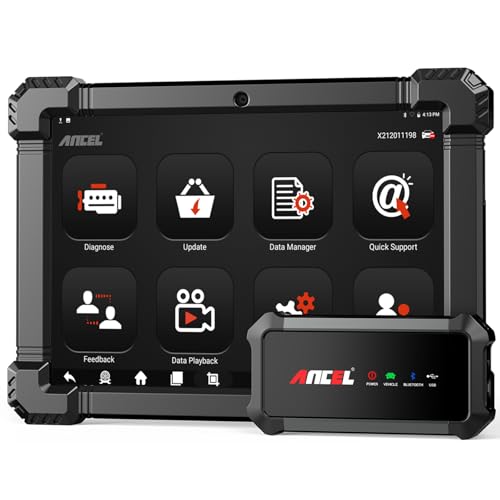
- 🔥🔥🔥2026 New Functions Making X7HD the Top Dog - Big Surprise!!! ANCEL X7HD truck scanner 10 major functional advantages .✅>Full HDOBD/OBD2 Function ✅>ALL System Diagnostic ✅>42+ Reset Function ✅>Active Test / Bi-Directional Control✅>ECU Coding✅>Graphing Live Data✅>Wide Compatibility ✅>2 Yrs Free Update✅>Remote Operation✅>Bluetooth 5.0 & Wifi In addition, 8 major hardware advantages: ✅>6000 mAh✅>10.1 inch Tablet✅>2G RAM
 ✅>32G ROM (Expandable to 128GB)✅>Data Record & Replay & Print✅>Android 10.0✅>Bluetooth 5.0 & Wifi✅>14 Languages
 - 🚛OEM DPF Forced Regen & Cylinder Cutout Test & more - ANCEL X7HD diesel scanner diagnostic tool not only supports DPF regeneration, DPF reset, DPF related information reset, DPR state reset, DPD forced regeneration etc, which helps you better solve the exhaust aftertreatment system problems, but also supports activate motor to do exhaust air in ABS Automatically. Moreover, it features TPMS activation, cylinder cut-off and learning functions
- 🚛Advanced ECU Coding & Programming - ANCEL X7HD 10.1inch truck scanner diagnostic tool is equipped with advanced ECU coding, supports Level calibration, Idle speed learning and Adjustment, Camshaft timing control learning, Control unit adaptations, Injector Codes, Read/Write VIN, Road speed limit optional vehicle speed set, etc... PLEASE NOTE that ECU codes are not compatible with all vehicles, please send us your VIN# to check vehicle compatibility
- 🚛42+ Reset Functions & Bidirectional Control - 2026 newest top heavy duty truck scan tool, comes with 42+ special services (ECU, Speed Limit and Idle Reset, Oil Reset, Injector Coding, EPB, ABS, SRS, Suspension, Throttle, etc. and always keep growing), which meet all your various needs for service and maintenance
- 🚛10 Inch All Systems Diesel Scanner & Full HDOBD/OBD2 Modes - ANCEL X7HD diesel truck scan tool supports all systems scan, such as Engine, Brake, Retarder, TECU Transmission, Tachograph, ABS, SRS, TPMS, EPB, SAS, ESP, and other vehicle systems, comes with 10 obd2 service modes: read/erase error codes, Data Stream, I/M Readiness, Vehicle Information, Actuations, DTC Lookup, EVAP, view freeze frame, etc
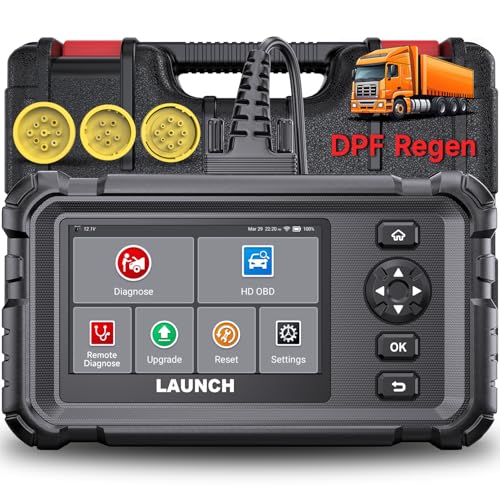
- Dealer-Level Diagnostics, Faster & Easier: The heavy duty truck scanner delivers full-system diagnostics for engine, ABS, transmission, and more, plus 7+ reset functions like DPF Regen and Speed Limit Adjust. Powered by a 1.3G CPU, 2GB RAM, 16GB storage, Android 8.1, and a 3000mAh battery, it runs smoothly for fast scanning, live data, reports, Auto VIN, Wi-Fi updates, and easy handheld use. It captures screenshots, replays live data, and generates reports to support your repair decisions.
- One Tool for 50+ Truck Brands: The diesel scanner supports J1939, J1708, J1587, and OBD2/CAN protocols, delivering broad coverage for major diesel trucks and commercial vehicles including Cummins, Cat, Detroit, Paccar, Volvo, Freightliner, Kenworth, Peterbilt, International, Mack, Isuzu, Hino, Scania, Mercedes-Benz, and more. Also supports Allison, Aisin, Eaton, WABCO, and Bendix, helping you diagnose more vehicles, reduce equipment costs, and handle more jobs with one professional scan tool.
- Diesel Truck DPF Regen & Reset Features: Experiencing loss of power, sluggish acceleration, or poor hill-climbing performance? These symptoms are often caused by a clogged or overloaded DPF. The truck diagnostic scanner offers OEM-level forced DPF regeneration, DPF reset, and DPD/DPR functions. This device extends DPF lifespan and efficiently diagnoses exhaust aftertreatment issues. It can significantly reduce diagnostic time and save you up to $3,000 or more in costly dealership fees.
- 7+ Resets - Perform Essential Procedures: The truck scanner features 7+ essential resets including DPF Regen clears carbon buildup; Oil Reset clears service light; Injector Coding matches new injectors; DEF Test checks urea injection; Speed Limit Adjust saves fuel; Cylinder Cutout pinpoints misfires; Clutch Relearn restores smooth engagement. Reset after maintenance or part replacement for proper truck operation. Vehicle compatibility varies. Email [email protected] to confirm before buying.
- Full System Diagnostic for Truck: The truck scanner diagnostic tool covers all systems like engine, ABS, transmission, SAS, SRS, TPMS and more. It reads fault codes and shows real-time data. Additionally, it includes full HD OBD and OBD2 modes: read/clear codes, live data stream, I/M readiness, freeze frame, DTC lookup, and more. When warning lights appear or performance issues arise, quickly identify which system is affected and gain the real-time data needed for accurate diagnosis.
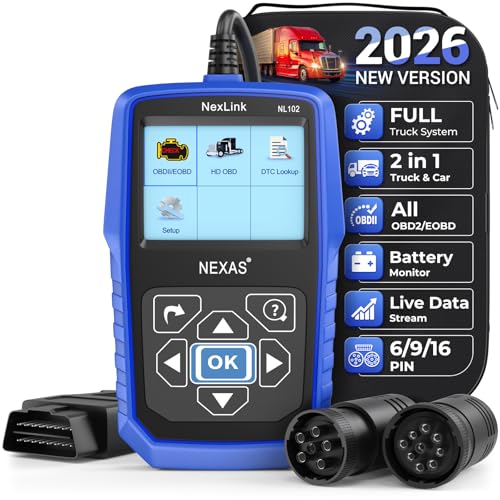
- Diagnose Heavy-Duty Truck Problems Fast — Read and clear fault codes and diagnose warning light issues on many Class 4–8 diesel trucks including Freightliner, Peterbilt, Kenworth, Volvo, Mack and Cummins-powered vehicles
- Help Reduce Downtime & Repair Costs — It offers full system diagnostics for major trucks meeting standard protocols, along with complete OBD2 functionality. Quickly check engine faults, view live truck data and identify issues before expensive repair shop visits or unnecessary repairs
- No complicated setup required — Simple menus and built-in DTC explanations make this truck code reader easy to use for owner-operators, mobile mechanics and small fleet maintenance
- Live Data & Built-in DTC Lookup — View real-time engine data and built-in truck fault code definitions directly on the scanner to help understand vehicle problems faster without searching through manuals
- Free Lifetime Updates & Technical Support — Includes free software updates plus responsive technical support for setup, compatibility and everyday truck diagnostics
This product presentation was made with AAWP plugin.
Last update on 2026-06-05 / Affiliate links / Images from Amazon Product Advertising API