
NHTSA ID Number: 10073833
Manufacturer Communication Number: 2014 R8
TSB/Document Date: 2016-06-22
Summary
SUMMARY TO BE PROVIDED ON A FUTURE DATE.
PDF Not Avaliable. View on NHTSA Website
Some older TSBs had multiple PDFs — visit the NHTSA Website to view all PDFs.
If the TSB PDF does not show, download or view it on the NHTSA Website.
Click on the (+) Plus Sign
Then Click on Associated Document(s)

- 💝【Questions? We’re Here Anytime】MK808S is a...
- 🔥🔥🔥【2026 NEWLY RELEASED BI-DIRECTIONAL...
- 【28+ MOST POPULAR RESET SERVICE FOR 150 MAKES】Autel...
- 【ALL SYSTEM DIAGNOSTICS, FACTORY-LEVEL SCANNER】The...
- 【AUT0 SCAN & AUT0V1N, 10X FASTER】How much have you spent...


- 💯【Conta.ct us for Support Directly】If you met any...
- 🔥🔥🔥【2026 AUTEL FLAGSHIP MK900BT MK900-BT, NEW...
- 🚗【3000+ ACTIVE TESTS (50➡3000+), SAME AS MS...
- 🚗【40+ HOT SERVICES FOR 150 MAKES (28+➡40+)】Full...
- 🚗【OE ALL SYSTEM DIAGNOSE, AUTO SCAN 2.0: SCAN LICENSE...
This product presentation was made with AAWP plugin.
Search NHTSA Database for Recalls
Search NHTSA Database for Vehicle Investigations
View Latest Vehicle Investigations
Search NHTSA Database for Vehicle Complaints
View Latest Vehicle Complaints
TSB/Document ID: 2014 R8
Replacement Service Bulletin Number:
MFR Communication Date: 2013-11-20
MFR Internal Campaign ID/Software Version:
Communication Type: Service Bulletin/Repair Instructions
NHTSA Components: EQUIPMENT:OTHER:OWNERS/SERVICE/OTHER MANUAL
MFR Component System:
MFR Component Subsystem:
Previous TSB | Next TSB |
PERFECT DELIVERY INSPECTION (PDI)
2014
R8 Coupe/R8 Spyder
Client
Audi Delivery Guidelines
Stock No.
Delivery Date
VIN
Pre-Delivery
Ensure Final Vehicle Quality Inspection Is Completed
Inspect exterior for damage, dings, dents and surface scratches
Check interior for cleanliness, grease marks and damage.
Repair all defects prior to customer delivery
Verify vehicle is equipped as specified and all accessories are
installed
Check front/rear floor mats are locked in
Verify all campaigns and updates are closed
Customer Priority Topics
1. ___________________________________________________________________________________________________________________________________________________________
2. ___________________________________________________________________________________________________________________________________________________________
3. ___________________________________________________________________________________________________________________________________________________________
How long would the client like to spend on topics today? ______________________________________
Priority Delivery Topics
Personalize Vehicle Settings
Auto Trans Shifting and
Shift Quality
Bluetooth: Connect customer’s Bluetooth phone and assist in copying and accessing
phonebook entries. Ensure connection will occur automatically upon re-entry if desired.
Refer to www.audi.com/bluetooth for compatible phone list. Click on appropriate country.
Explain Audi advanced microphone
Cruise Control and Operation
Adjust mirrors, seats, and steering column to customer preference
Trunk/Hatch/Tailgate
Assist with radio station presets
Paint Finish and Care
Show how to connect iPod/MP3. Demonstrate AMI, SD cards and Aux-in jack (if equipped)
Bluetooth Capability
Voice Controls
Pair the customer’s phone with the vehicle
Demonstrate the voice command feature (i.e., accessing
“Help,” dialing a phone number, calling a contact, using the
steering wheel voice command button, etc.)
Demonstrate making a call via voice and steering wheel
commands
Demonstrate how to answer, ignore and end calls
Dialing from directories/phonebook/call lists (received,
missed, dialed calls)
Refer to www.audi.com/bluetooth for compatible phone list.
Click on appropriate country
Have the customer complete the speech training to allow the
Voice Recognition System to learn and adapt to the customer’s
voice (Main Menu > Setup MMI > Voice Recognition > Individual
Speech Training)
Radio station and CD/DVD
Demonstrate conference calling (enable in the MMI under
Telephone > Call Options menu
Effective 11-20-2013-US
Version 1.2
1 of 3
PERFECT DELIVERY INSPECTION (PDI)
2014 R8 Coupe/R8 Spyder | Audi Delivery Guidelines
Client
Stock No.
Delivery Date
VIN
Introduce MMI Navigation System
Interior (continued)
Review the MMI controls and basic functionality (buttons:
function, on/off, arrow control, and back)
Demonstrate how to activate folding heated mirrors (if
equipped)
Demo Audio Sources: Show how to connect iPod via AMI, MP3/
SD cards, Bluetooth audio player (enable if needed)
Demonstrate voice commands (if equipped)
Explain CD and DVD loading/unloading
Navigation
Show how to enter a stopover
Demo how to “cancel” route guidance using voice commands
(“Cancel route guidance”) and the MMI (NAV > Destination >
Cancel)
Demonstrate glovebox/valet operation
Show Homelink® location and setup
“Passenger Side Airbag Off” light: Explain that it illuminates if
no occupant in passenger seat or if occupant is “out of
position”
Trip computer/Driver info display: Explain toggle function via
“RESET” on stalk. Reset “Trip Comp 1 and 2” prior to delivery!
Show how to set clock and adjust time zone
Show how to store a destination
Show how to manipulate the map (zoom, scroll map area)
Video Tutorials
Show how to repeat the last navigation announcement using
the iNav steering wheel button
Point out that Video Tutorials can be viewed in the following ways:
Explain Tire Pressure Monitoring System and how to reset in
the MMI
Media Overview
Radio (AM/FM/SAT)
Show how to program preferred radio stations. Up to 6 presets
available on the MMI touch control panel
Explain the scanning/tuning functions
Walk the customer through the steps to program favorite radio
stations (press and hold knob). The customer should do this
with your guidance
Show the customer the manual seek feature. Select the FM
Band > Functions. Turn control knob to Tuning/Channels and
press the knob.
Explain the settings for the Bang & Olufsen® system (if
equipped)
Explain to the customer that they have a 3 month free subscription to Sirius Satellite Radio and demonstrate how to get
to the satellite band. Show them the SiriusXM Satellite Radio
insert from the glove box, point out the station guide list, and
demonstrate presetting a station of their choice for them.
Interior
Demonstrate climate control functions
Demonstrate multifunction steering wheel
Explain wiper/washer system/rain sensor
Demonstrate how to activate heated seats (if equipped)
Effective 11-20-2013-US
Version 1.2
• Via the USB launcher found in the “Quick Questions
& Answers Guide”
• Via www.auditechnology.com
• Via www.audiusa.com/help/video-tutorials
Convertible Top (Spyder only)
Demonstrate how to open/close power top (top can only be
operated up to 30 mph)
Mention power top should be only operated with engine
running to conserve battery power
Demonstrate operation of wind deflector.
Mention more effective with windows in the up position
Demonstrate retractable rear window
Exterior
Demonstrate how to unlock/lock doors/trunk lid and
programming of keys (2 master, 1 emergency, 1 valet)
(If equipped with Keyless entry) Explain to the customer that
the vehicle is set from the factory to unlock only the door that
is approached. Show them in the MMI under vehicle settings,
where they can select their central locking preference and
adjust it to “all doors” if preferred.
Vehicles with matte paint – show the cleaning kit (located in
trunk) to the customer and explain the proper care for matte
paint
Advise the customer to only use oil that meets Audi 502.00
standards for the R8 V8, and 501.01 or 505.00 for V10 and
V10 Plus engines only.
Advise the customer that Audi recommends using Top Tier
Detergent Gasoline with a minimum octane rating of 91AKI
(95 RON)
2 of 3
PERFECT DELIVERY INSPECTION (PDI)
2014 R8 Coupe/R8 Spyder | Audi Delivery Guidelines
Client
Stock No.
Delivery Date
VIN
Owner’s Documents
Orientation Drive
Take the Quick Questions & Answers Guide from the glove box,
open it, and demonstrate how to use it with the customer
Demonstrate Audi parking system advanced (front and rear)
with rear view camera (if equipped)
Explain the USB launcher use
Demonstrate cruise control
ABS should insert their business card in the slots available next
to the USB launcher
Demonstrate how to manually extend/retract the rear spoiler
Explain the “text to phone” features for viewing tutorials on a
smart phone or at the Audi Technology website:
www.auditechnology.com
Owner’s Manual, MMI Manual and other manuals as equipped
Warranty & Maintenance Booklet (stamp to confirm PDI was
completed): Adhere “vehicle identification label” from the
vehicle trunk to the inside cover of the Warranty
& Maintenance Booklet prior to delivery
Review the recommended maintenance schedule. Explain the
importance of getting the Warranty & Maintenance Booklet
stamped for each maintenance performed
Audi magnetic ride: Explain and show where button is located,
including DIS display when activated
Activate and demonstrate navigation system (if equipped)
If equipped with front and rear park sensors, show the customer
how they can customize the volume through the MMI under
“Driver Assist>Parking Aid”.
End the orientation drive in the service write-up area
Service Introduction
Tire Warranty Booklet: Explain coverage from tire manufacturer
Tour service department and introduce to Service Manager and
Service Consultant
License/insurance/registration/title (if applicable)
Set up first service appointment
24-Hour Roadside Assistance information; ask customer to
program number in their phone
Ask customer if you can program service department’s phone #
in their phone
Provide Audi Care Information
Lemon Law Rights Booklet or Lemon Law Notice as required by
law (USA ONLY)
Audi Brand Specialist
I certify that all operations have been completed and this vehicle has been prepared in accordance with Audi Procedures and
Quality Standards.
Audi Brand Specialist Signature
Date
Would you like to schedule a Second Delivery?
No
Yes
Date
Time
By signing, I confirm all items in this checklist have been thoroughly reviewed with me and the statements below are true.
• Vehicle is clean and free of problems
• Received all keys and owner’s documentation
• Satisfied with features and controls explanations
Customer Signature
Effective 11-20-2013-US
Version 1.2
Date
3 of 3

- 🎉[OTOFIX D1 Lite, Perfect Cost-effective Diagnostic Tool]: OTOFIX D1 Lite, a newest bidirectional scan tool from OTOFIX company, is a great choice for DIYers and repair shops. 👉This obd2 scanner diagnostic tool packs all practical functions: OE level all systems diagnoses, Bi-Directional Control, 38+ reset services fixing 99% of common problems, support DoIP & CANDF protocols and FCA
 AutoAuth, high-end hardware configuration. Worldwide vehicles and 🔥2 Years Free Updating🔥 covered.
 - 🎉[Bi-Directional Scan Tool, Active Test]: OTOFIX D1 Lite bluetooth obd2 scanner can also command ECUs and monitor the operation of the actuators to track down the problems of certain parts, like windows, sunroof, wipers, fuel pumps, etc., saving repair time & trouble. This makes OTOFIX D1 Lite the most cost-effective bidirectional scan tool.
- 🎉[2026 Newest, 38+ Hot Reset Functions]: Equipped with 38+ reset functions in one, the OTOFIX D1 lite automotive scanner diagnostic tool allows you to troubleshoot 99% of common vehicle problems. You can use this car diagnostic scanner holding enough functions to easily repair common vehicle models in your repair shops. Including Oil Reset, Injector Coding, Throttle, DPF Reset, SCR Reset, Gear Learning, Clutch Learning, Suspension, etc. Note* Reset functions vary by model.
- 🎉[OE Level Full Systems Diagnostics]: Unlike the 2-system and 4-system diagnostic tools, the OTOFIX auto scan tool can complete comprehensive system diagnostics within 5 minutes. It accesses and scans all available onboard systems like for Engine /AT /ABS /EPB /BMS /TPMS /SRS /SAS /Audio System /BCM /Air Conditioning / etc., to read & clear codes, view live data, and check ECU information. Note: Active test is not involved.
- 🎉[Powerful Hardware Configuration]: Designed with a fashion appearance & a 7” touchscreen and a weight of 463g, this OTOFIX D1 Lite OBD2 diagnostic scanner scan tool is convenient for everywhere and easy to use & store. Android9.0 OS and 2+64GB memory enhance multi-task smoothness and diagnostic operation, no more wasting too much time. 5800mAh battery allows hours-lasting use. WiFi & VCI1 also bring faster communication for your diagnostics.

- 🏆【2026 TOP OBD2 Scanner Diagnostic Tool】OTOFIX D1 Lite wireless obd2 scanner has upgraded hardware configuration and car coverage. The newly upgraded D1 Lite with 🔥OS Android 9.0🔥1.5Ghz 4 core high efficiency processor🔥2GB RAM+64GB ROM large storage🔥5800mAh large battery, more stable and longer lasting diagnostics🔥 38+ Reset🔥action tests🔥full system diagnostic🔥Supports MV105 endoscope🔥21+ Language Supports🔥100000+ vehicle coverage to meet all your daily maintenance needs.
- 👍【Bi-Directional Control / Active Test】D1 Lite obd2 scanner has bidirectional control(worth $300+), which is the most beloved feature among mechanic. If your headlights or car windows are broken, going to a repair shop will cost a lot of money. You can use D1 Lite to send execution commands to the ECU module and identify the repair status. Such as ABS, car windows, doors, valves, wipers, headlights, etc., effectively shorten diagnostic time and reduce diagnostic costs.
- 🔥【All Systems Diagnostics, In-depth Checking】This advanced OBD2 Scanner D1 Lite can perform OE-level diagnosis of all systems including engine, transmission, airbag, ABS, ESP, TPMS, gateway, steering, radio, and air conditioning for more than 100 brands. This diagnostic scanner supports essential functions, such as reading ECU version info, reading and clearing fault codes, and reading data streams.With just a simple click, it provides you with accurate and in-depth diagnostics.
- 🏆【38+ Reset Hot Functions】For repair workshops, holding an OTOFIX D1 Lite Auto scanner is a strong advantage over others. Its 38+ maintenance functions provide various solutions for all module repairs, including Oil Reset, TPMS Reset, Injector Coding, Suspension, Throttle Matching, etc., which will usher your repair business to a new pinnacle. Continuously updating will never make the functionality & compatibility out-of-date.
- 🏆【150+ Models, 10000+ Car Coverage & 16 Languages】D1 Lite is a comprehensive car diagnostic scan tool, help you to troubleshoot car issues fast for 95% US, European, Asian auto makes. ✅ With frequent updates and optimizations allow D1 Lite to cover more vehicles to meet your needs. ✅ Multilingual menu allows auto mechanics around the world to use it without language barriers. 🚩Note: Kindly send us the S/N of the device to authorize new language updates before changing the menu language.
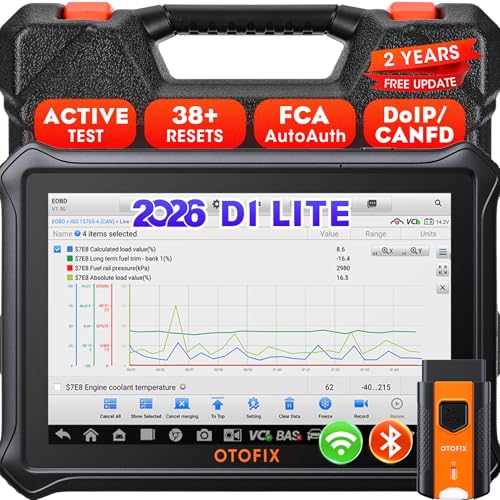
- 【2026 OTOFIX D1 Lite Gives the Best Value for Money】OTOFIX D1 Lite bidirectional scan tool is more FASTER and SMARTER with 2026 Enhanced Hardwares & New Functions! 👍Alternative Bluetooth +USB connect 👍2G+64GB 👍4x ARM Cortex-A35 (1.5GHz) Processor (5X Faster CPU) 👍Android 9.0 OS 👍5G GHz WiFi 👍CANFD&DOIP 👍 FCA AutoAuth 👍38+ Services 👍3K+ Bi-Directional Control 👍Full Systems Diagnose 👍2 Years Update 👍150+ Vehicle Coverage.
- 👍【Active Tests】 OTOFIX D1 Lite is a bi-directional scan tool that can send commands to, and also receive information from vehicle control modules. This way, you can quickly locate and repair faulty auto parts. For Example: send direct commands to ask the vehicle to turn on/off the radiator fan, lights, sound horn, fuel pump, modulate throttle, open/close windows, operate mirrors and more. *Note that only available tests will be displayed in the menu.
- 👍【38+ Service Functions】 OTOFIX D1 Lite scan tool offers 38+ of the hottest service functions that are commonly used for car repairs. That include Oil reset/SAS/EPB/BMS/Throttle/ABS bleeding, and 2065-new SUS/ADBLUE/NOX/Headlamp resets (and more) to help restore your car status after repairs are done. Compared to other diagnostic scanners for cars, the OTOFIX D1 Lite scanner is much more fully-featured. *Note that specific functions available depend on the make/model/year of your car.
- 👍【All System Diagnostics + Cloud Report Management】 This 2026 car scanner OTOFIX D1 Lite provides troubleshooting and data for all ECUs: read/clear DTCs, view graphic live data/VIN, and locate system faults for safe driving. With Cloud Report Management, you can save detailed reports to cloud servers and easily shared them with others via QR codes/emails/text messages. Others can access these reports from any device (smartphones/tablets/PCs …) anytime, and you can better manage repair work.
- 👍【99% Car Coverage】 This one-station car scanner diagnostic for all cars works on 150+ major car brands across the world. 1) It supports CAN-FD/DoIP protocols: compatible with GMCAVALIER/TRAX/Encore/Envision/GL8(LSY)/CT4/CT5 after 2019; Volvo after 2018; Land Rover/Jaguar after 2017; and BM.W F/G all chassis. 2) For models equipped with security modules (such as Renault & 2018+ FCA SGW), its built-in AutoAuth allows you to easily break diagnostic barriers after registration.
This product presentation was made with AAWP plugin.
Last update on 2026-05-12 / Affiliate links / Images from Amazon Product Advertising API