
NHTSA ID Number: 10073450
Manufacturer Communication Number: PI1062
TSB/Document Date: 2016-06-22
Summary
SUMMARY TO BE PROVIDED ON A FUTURE DATE.
If the PDF is very large, it may not load in the preview below.
Some older TSBs had multiple PDFs — visit the NHTSA Website to view all PDFs.
If the TSB PDF does not show, download or view it on the NHTSA Website.
Click on the (+) Plus Sign
Then Click on Associated Document(s)

- 💝【Questions? We’re Here Anytime】MK808S is a...
- 🔥🔥🔥【2026 NEWLY RELEASED BI-DIRECTIONAL...
- 【28+ MOST POPULAR RESET SERVICE FOR 150 MAKES】Autel...
- 【ALL SYSTEM DIAGNOSTICS, FACTORY-LEVEL SCANNER】The...
- 【AUT0 SCAN & AUT0V1N, 10X FASTER】How much have you spent...


- 💯【Conta.ct us for Support Directly】If you met any...
- 🔥🔥🔥【2026 AUTEL FLAGSHIP MK900BT MK900-BT, NEW...
- 🚗【3000+ ACTIVE TESTS (50➡3000+), SAME AS MS...
- 🚗【40+ HOT SERVICES FOR 150 MAKES (28+➡40+)】Full...
- 🚗【OE ALL SYSTEM DIAGNOSE, AUTO SCAN 2.0: SCAN LICENSE...
This product presentation was made with AAWP plugin.
Search NHTSA Database for Recalls
Search NHTSA Database for Vehicle Investigations
View Latest Vehicle Investigations
Search NHTSA Database for Vehicle Complaints
View Latest Vehicle Complaints
TSB/Document ID: PI1062
Replacement Service Bulletin Number:
MFR Communication Date: 2013-10-01
MFR Internal Campaign ID/Software Version:
Communication Type: Service Bulletin/Repair Instructions
NHTSA Components: EQUIPMENT
MFR Component System:
MFR Component Subsystem:
Previous TSB | Next TSB |
File in Section:
Service Bulletin
Bulletin No.:
Date:
PI1062
October, 2013
PRELIMINARY INFORMATION
Subject:
Incorrect Gulf of Mexico Map Location
Models:
2013 Cadillac ATS, SRX, XTS
Equipped with CUE Radio and Navigation System
Built Prior to March 7, 2013
Attention: If Customer Satisfaction Field Action Bulletin #12293 has NOT been completed, use the
blue USB stick (P/N 23189613) instead of the black USB stick (P/N 23124322) from
12293. Do not attempt to order the USB stick from GMCC&A or the GM Nav Disc Center
(refer to the Parts Information section).
Condition/Concern
Some customers may comment that the location of the Gulf of Mexico is in the incorrect location on the navigation
map. This update corrects the Gulf of Mexico map location.
Recommendation/Instructions
An updated radio software calibration has been released to address this condition.
Reprogram the radio following these steps:
Caution: Do NOT program additional modules while programming the CUE system to avoid module damage and/or
other component failure. Do NOT perform any electrical repairs on the vehicle while the CUE system is being
programmed.
Note: If this software is used on vehicles built AFTER March 7, 2013, the maps software will be DOWNGRADED.
Caution: DO NOT start the vehicle during this USB update. Damage may occur to the HMI module.
1. Capture customer preset information from the CUE system. Refer to Cadillac Customer Presets Form at the
back of this bulletin.
2. Verify that there is a battery charge of 12 to 15 volts. The battery must be able to maintain a charge during
programming. Only use a Midtronics® GR8 (Essential Tool EL-50313) set up in Power Supply Mode or an
approved Midtronics® PSC 550 Battery Maintainer (SPS Programming Support Tool EL-49642) or equivalent to
maintain proper battery voltage during programming. Do NOT remove the battery maintainer until both the USB
and TIS2WEB programming events have been completed.
3. Press Engine Start/Stop button for 5 seconds. Do NOT have your foot on the brake while pressing the Engine
Start/Stop button.
3259489
4. Insert the USB stick into the display USB port (1).
5. Close the radio assembly bin door.
3259499
6. Select Update from the display.
3259503
Once Update has been selected from the display, the screen in the picture above will appear. This screen will
show the progress of the update. The navigation software update will take about 2 hours to load. The
non-navigation software will take about 30 minutes to load.
3259505
3626846
Note: Update Complete screen for CUE system equipped with navigation system shown. Update Complete screen
for CUE system without navigation is similar.
Note: If the “Calibrate Device” screen is NOT displayed, the Update Complete screen will appear on the display.
The screen includes the following message: Pass — 23202652.mnf. Programming the Human Machine Interface
Control Module (HMI) using TIS2WEB is NOT required. Perform step 10 and then proceed to step 14.
Note: If the screen remains blank, make sure the radio assembly bin door is closed.
7. Do NOT remove the USB drive until the update has been completed. Once the update has been completed, the
display will go black for a minute and reset itself. Next, the words, "Calibrate Device” centered on the display.
Refer to illustration.
8. Remove the USB stick from the port.
Note: Do not attempt to order the calibration number from GM Customer Care and Aftersales. The calibration
numbers required for this service procedure are programmed into control modules via a Multiple Diagnostic Interface
(MDI) with the calibration update. When using a MDI for reprogramming, ensure that is updated with the latest
software version. Use TIS2WEB on or after 02/22/13 to obtain the calibration. If you cannot access the calibration,
call the Techline Customer Support Center and a VCI number will be provided.
9. Program the Human Machine Interface Control Module (HMI) using TIS2WEB. Refer to SI and Service
Programming System (SPS) documentation for programming instructions.
9.1. Connect the MDI to the vehicle.
9.2. Select J2534 MDI and Reprogram ECU from the Select Diagnostic Tool and Programming Process screen.
9.3. Select K74 Human Machine Interface Control Module -Programming from the Supported Controllers
screen.
9.4. Follow the on-screen instructions.
10. Clear all diagnostic trouble codes (DTCs).
3626846
11. After programming the HMI module, the Update Complete screen will appear on the display. The screen
includes the following message: Pass — 23202652.mnf.
12. Select Dismiss from the Update Complete screen.
3259508
13. The Restart System Screen will appear on the display.
14. Turn the vehicle off, open and close the driver door, and wait at least two minutes before starting the vehicle. All
vehicle doors MUST remain closed during the wait period.
15. Re-enter customer information in the CUE System with the information collected in step 1. Refer to Cadillac
Customer Presets Form .
16. Clear all diagnostic trouble codes (DTCs).
Parts Information
The service procedure contained in this bulletin will require the use of a USB stick. USB sticks will be shipped in a
zip lock bag to Cadillac dealers via FedEx in the DWD box (U.S. dealers) and through regular mail in Canada, or will
be sent by the local GM Aftersales Department as soon as received (Export).
This USB stick will update all involved vehicles. DO NOT GIVE THE USB STICK TO THE CUSTOMER. Do not
order the USB stick from GMCC&A or the GM Nav Disc Center. If you have not received your USB stick, and you
have involved vehicles, the USB sticks can be obtained from the Warranty Parts Center (WPC) using the Parts
Request Form found at the back of this bulletin.
Warranty Information
For vehicles repaired under warranty, use:
Labor Operation
Description
Labor Time
2880118*
CUE System Update With Navigation System
1.1 hrs
Add
Record and Re-enter Customer Presets (not for use on vehicles in
dealer inventory)
0.5 hr
*This is a unique labor operation for bulletin use only. It will not be published in the Labor Time Guide.
Cadillac Customer Preset Form
This form is intended to capture a customer’s information prior to the Software Update or reset. Please take the time prior to performing the upda
Please Note: It is the dealer’s responsibility to notify the consumer that the Software Update will be installed, the reasons for the update (includin
used for purposes of restoring the customer's prior settings. It is the dealer’s responsibility to ensure this form is appropriately secured so that on
with applicable law.
Customer Information
First:
Vehicle Information
Model:
Home Page (Page 1) List of Name(s) of the icons as they appear on the screen prior to update
Home Page (Page 2) List of Name(s) of the icons as they appear on the screen prior to update
App Tray: List Name(s) and location of icons as they appear before the update
After the CUE update, all settings will revert back to the factory setting. All settings underlined are the factory
settings. If the customer’s selection is equal to the factory setting, it is not necessary to reset that setting after the
update.
Settings Selections:
Time & Date (Select One):
Set Time -> Auto Set:
Cell Network or Manually
Clock Display:
On Off
Language (Select One):
English (US) Spanish Fren
Radio:
Manage Favorites:
Description: (Name on Screen)
1.
2.
3.
4.
5.
6.
7.
8.
9.
10.
11.
12.
13.
14.
15.
16.
17.
18.
19.
20.
Number of Favorites Shown:
Auto Record Number ____
Auto Volume (if equipped):
Off Low Med- Low Med M
Bose AudioPilot (if equipped)
On Off
Maximum Start Up Volume:
Record Number _____
Vehicle Settings: (Circle Matching Setting from the Right)
Climate and Air Quality:
Auto Fan Max Speed
Low Med High
Air Quality Sensor (if equipped)
Off Low Sensitivity High S
Auto Defog
On Off
Auto Rear Defog
On Off
Collision/Detection System:
Alert Type
Beeps Safety Alert Seat
Auto Collision Preparation
(if equipped)
Off Alert and Brake Alert
Go Notifier (if equipped)
On Off
Side Blind Zone Alert
On Off
Comfort & Convenience:
Auto Memory Recall
Off On-Driver Door Open O
Easy Exit Options
On Off
Chime Volume
Record Number:_____
Reverse Tilt Mirror
Off On-Driver and Passen
Lighting:
Vehicle Locator Lights
On Off
Exit Lighting
Off 30 Sec 60 Sec 120 Se
Power Door Locks:
Unlocked Door Anti-Lockout
On Off
Auto Door Unlock
Off All Doors Driver Door
Delayed Door Lock
On Off
Remote Lock, Unlock, Start:
Remote Unlock Light Feedback
Off Flash Lights
Remote Lock Feedback
Off Lights & Horn Lights O
Remote Start Auto-Cool Seats
(if equipped)
On Off
Remote Start Auto-Heat Seats
On Off
Passive Door Unlock
All Doors Driver Door
Passive Door Lock
Off On With Horn Chirp On
Remote Left in Vehicle Alert
On Off
Bluetooth
Vehicle Settings should be reset with Customer (redelivery opportunity)
Voice:
Prompt Length
Short Long
Audio Feedback Speed
Slow Medium Fast
Display:
Mode
Auto Day Night
Proximity Sensing
On Off
Rear Camera:
Guidance Lines
On Off
Rear Cross Traffic Alert
(if equipped)
On Off
Rear Park Assist Symbols
On Off
Navigation (Menu):
Navigation Voice Preferences:
Voice Prompts
Voice Volume
Prompts during Calls
Traffic:
Show Flow on Map
Show Icons on Map
Traffic Routing Preferences
Traffic Types:
Check the appropriate lines.
Map View:
Check the appropriate line
Audio Information
Routing Preference:
Route Style
Use Toll Roads
Use Freeways
Use Carpool Lanes
Avoid Slow Traffic
Use Ferries
Use Tunnels
Use Time Restricted Roads
Display “Places of Interest” Icons
If “Places of Interest” are on please check appropriate lines>
Special Note:
This form is not intended to be all encompassing; Dealership personnel will help reset the following items when the
vehicle is re-delivered to the customer:
– Memory Seat Settings
– Individual Remote/Key Fob settings
– Mirror Pre-sets
– Repair Blue-tooth devices (Note: When re-pairing the phone for the customer, the previously paired (“CUE-paired")
device must be removed from the phone)
IMPORTANT NOTE WHEN PRINTING THIS FORM: If the form prints out on two pages, make certain you fax BOTH
pages so that the WPC receives all the needed information. Missing information will delay or prevent the part from
being shipped.
Parts Request Form – Warranty Parts Center
Use this form ONLY for U.S., Canadian and Mexico Dealers. Export markets located outside of North America must
contact their regional Technical Assistance Center for assistance.
To: Warranty Parts Center
e-mail: [email protected]
or WPC Fax: 248-371-0192
Attn: Amina Winfrey
Part Being Requested: WPC706 — USB Kit for Cadillac CUE HMI Update (PI1062)
Dealer BAC (U.S.) /Dealer Code (Canada)/Dealer Number (Mexico):
Dealer Name:
Dealer Address:
Dealer Contact Person:
Dealer Phone Number:
Repair Order Number:
Vehicle VIN:
Important: If you do not receive the part within 2 business days after e-mailing or faxing your part request to the Warranty Parts
Center, please call WPC Customer Assistance at 248-371-9901/9902.

- 🎉[OTOFIX D1 Lite, Perfect Cost-effective Diagnostic Tool]: OTOFIX D1 Lite, a newest bidirectional scan tool from OTOFIX company, is a great choice for DIYers and repair shops. 👉This obd2 scanner diagnostic tool packs all practical functions: OE level all systems diagnoses, Bi-Directional Control, 38+ reset services fixing 99% of common problems, support DoIP & CANDF protocols and FCA
 AutoAuth, high-end hardware configuration. Worldwide vehicles and 🔥2 Years Free Updating🔥 covered.
 - 🎉[Bi-Directional Scan Tool, Active Test]: OTOFIX D1 Lite bluetooth obd2 scanner can also command ECUs and monitor the operation of the actuators to track down the problems of certain parts, like windows, sunroof, wipers, fuel pumps, etc., saving repair time & trouble. This makes OTOFIX D1 Lite the most cost-effective bidirectional scan tool.
- 🎉[2026 Newest, 38+ Hot Reset Functions]: Equipped with 38+ reset functions in one, the OTOFIX D1 lite automotive scanner diagnostic tool allows you to troubleshoot 99% of common vehicle problems. You can use this car diagnostic scanner holding enough functions to easily repair common vehicle models in your repair shops. Including Oil Reset, Injector Coding, Throttle, DPF Reset, SCR Reset, Gear Learning, Clutch Learning, Suspension, etc. Note* Reset functions vary by model.
- 🎉[OE Level Full Systems Diagnostics]: Unlike the 2-system and 4-system diagnostic tools, the OTOFIX auto scan tool can complete comprehensive system diagnostics within 5 minutes. It accesses and scans all available onboard systems like for Engine /AT /ABS /EPB /BMS /TPMS /SRS /SAS /Audio System /BCM /Air Conditioning / etc., to read & clear codes, view live data, and check ECU information. Note: Active test is not involved.
- 🎉[Powerful Hardware Configuration]: Designed with a fashion appearance & a 7” touchscreen and a weight of 463g, this OTOFIX D1 Lite OBD2 diagnostic scanner scan tool is convenient for everywhere and easy to use & store. Android9.0 OS and 2+64GB memory enhance multi-task smoothness and diagnostic operation, no more wasting too much time. 5800mAh battery allows hours-lasting use. WiFi & VCI1 also bring faster communication for your diagnostics.

- 🏆【2026 TOP OBD2 Scanner Diagnostic Tool】OTOFIX D1 Lite wireless obd2 scanner has upgraded hardware configuration and car coverage. The newly upgraded D1 Lite with 🔥OS Android 9.0🔥1.5Ghz 4 core high efficiency processor🔥2GB RAM+64GB ROM large storage🔥5800mAh large battery, more stable and longer lasting diagnostics🔥 38+ Reset🔥action tests🔥full system diagnostic🔥Supports MV105 endoscope🔥21+ Language Supports🔥100000+ vehicle coverage to meet all your daily maintenance needs.
- 👍【Bi-Directional Control / Active Test】D1 Lite obd2 scanner has bidirectional control(worth $300+), which is the most beloved feature among mechanic. If your headlights or car windows are broken, going to a repair shop will cost a lot of money. You can use D1 Lite to send execution commands to the ECU module and identify the repair status. Such as ABS, car windows, doors, valves, wipers, headlights, etc., effectively shorten diagnostic time and reduce diagnostic costs.
- 🔥【All Systems Diagnostics, In-depth Checking】This advanced OBD2 Scanner D1 Lite can perform OE-level diagnosis of all systems including engine, transmission, airbag, ABS, ESP, TPMS, gateway, steering, radio, and air conditioning for more than 100 brands. This diagnostic scanner supports essential functions, such as reading ECU version info, reading and clearing fault codes, and reading data streams.With just a simple click, it provides you with accurate and in-depth diagnostics.
- 🏆【38+ Reset Hot Functions】For repair workshops, holding an OTOFIX D1 Lite Auto scanner is a strong advantage over others. Its 38+ maintenance functions provide various solutions for all module repairs, including Oil Reset, TPMS Reset, Injector Coding, Suspension, Throttle Matching, etc., which will usher your repair business to a new pinnacle. Continuously updating will never make the functionality & compatibility out-of-date.
- 🏆【150+ Models, 10000+ Car Coverage & 16 Languages】D1 Lite is a comprehensive car diagnostic scan tool, help you to troubleshoot car issues fast for 95% US, European, Asian auto makes. ✅ With frequent updates and optimizations allow D1 Lite to cover more vehicles to meet your needs. ✅ Multilingual menu allows auto mechanics around the world to use it without language barriers. 🚩Note: Kindly send us the S/N of the device to authorize new language updates before changing the menu language.
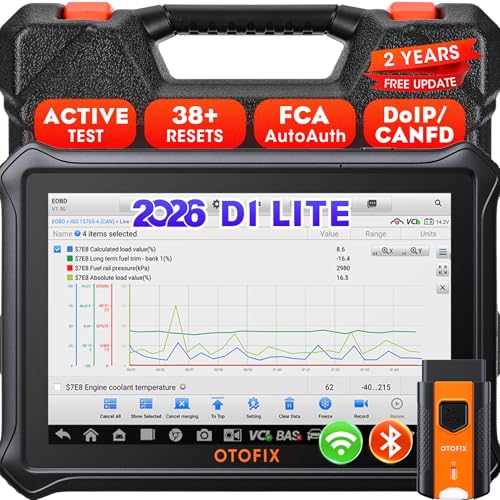
- 【2026 OTOFIX D1 Lite Gives the Best Value for Money】OTOFIX D1 Lite bidirectional scan tool is more FASTER and SMARTER with 2026 Enhanced Hardwares & New Functions! 👍Alternative Bluetooth +USB connect 👍2G+64GB 👍4x ARM Cortex-A35 (1.5GHz) Processor (5X Faster CPU) 👍Android 9.0 OS 👍5G GHz WiFi 👍CANFD&DOIP 👍 FCA AutoAuth 👍38+ Services 👍3K+ Bi-Directional Control 👍Full Systems Diagnose 👍2 Years Update 👍150+ Vehicle Coverage.
- 👍【Active Tests】 OTOFIX D1 Lite is a bi-directional scan tool that can send commands to, and also receive information from vehicle control modules. This way, you can quickly locate and repair faulty auto parts. For Example: send direct commands to ask the vehicle to turn on/off the radiator fan, lights, sound horn, fuel pump, modulate throttle, open/close windows, operate mirrors and more. *Note that only available tests will be displayed in the menu.
- 👍【38+ Service Functions】 OTOFIX D1 Lite scan tool offers 38+ of the hottest service functions that are commonly used for car repairs. That include Oil reset/SAS/EPB/BMS/Throttle/ABS bleeding, and 2065-new SUS/ADBLUE/NOX/Headlamp resets (and more) to help restore your car status after repairs are done. Compared to other diagnostic scanners for cars, the OTOFIX D1 Lite scanner is much more fully-featured. *Note that specific functions available depend on the make/model/year of your car.
- 👍【All System Diagnostics + Cloud Report Management】 This 2026 car scanner OTOFIX D1 Lite provides troubleshooting and data for all ECUs: read/clear DTCs, view graphic live data/VIN, and locate system faults for safe driving. With Cloud Report Management, you can save detailed reports to cloud servers and easily shared them with others via QR codes/emails/text messages. Others can access these reports from any device (smartphones/tablets/PCs …) anytime, and you can better manage repair work.
- 👍【99% Car Coverage】 This one-station car scanner diagnostic for all cars works on 150+ major car brands across the world. 1) It supports CAN-FD/DoIP protocols: compatible with GMCAVALIER/TRAX/Encore/Envision/GL8(LSY)/CT4/CT5 after 2019; Volvo after 2018; Land Rover/Jaguar after 2017; and BM.W F/G all chassis. 2) For models equipped with security modules (such as Renault & 2018+ FCA SGW), its built-in AutoAuth allows you to easily break diagnostic barriers after registration.
This product presentation was made with AAWP plugin.
Last update on 2026-05-12 / Affiliate links / Images from Amazon Product Advertising API